
 One of the things we have been experimenting with here at UMW is creating custom categories for a WordPress installation that will allow us to track students and/or groups quickly and easily in the sidebar. The NIAHD Journals gave me the idea for this hack, and while its not the prettiest hack you’ll ever see, it does help dramatically with the logic of categorizing content and aiding both instructors and visitors in their attempt to navigate the blog effectively. This tutorial is for the K2 theme in particular – although the process should be roughly equivalent for other themes.
“Why don’t I just manage the Categories using the parent-child logic WordPress affords and abandon this madness?” you ask incredulously. Well, hot shot, because while you can have groups and students listed under the Categories header in the sidebar, this option does not necessarily allow you to nest the student links within the group links, nor separate out the two. This hack offers a way to have students and groups as two separate sidebar categories that are quite logically and conveniently nested within the categories menu of the backend in the write tab (a statement that will become clearer I promise). All of which makes it a win win for everybody. So, if you’re done with the interruptions, I’ll proceed.
Additionally, part of this tutorial also allows you to reformat the archive pages that the category links in the sidebar take you to by default. This element of the tutorial may prove useful for anyone wanting the linked archive posts from the sidebar to look consistent with the rest of the blog.
Note: I have not yet explored how this will impact the feed logic by category – particularly since I am effectively creating two distinct category calls in the sidebar that allow me to effectively organize and separate out student content from group, while simultaneously keeping them integrated -how paradoxically cool!!!
Creating separate categories for students and groups in the sidebar of K2 for WordPress.
Let’s open up the sidebar.php file in the Presentation –> Theme Editor tab and get to work.
Copy the following code in the sidebar:
And place it the sidebar.php file anywhere above this code. Once you have done this change the following line to reflect the new category you want displayed on your sidebar. For example, I will change the word ‘Categories’ below to ‘Students’.
change to
Now I will copy this same code as in step 1 in the sidebar once again and title this category ‘Groups’
Having completed this it might be a good idea to create the students and groups through the manage categories tab in the backend of your blog. To make this process a bit simpler and more logical for the users you can have the students names nested within their particular groups (this is irrelevant if you are not using groups). See illustrations below:
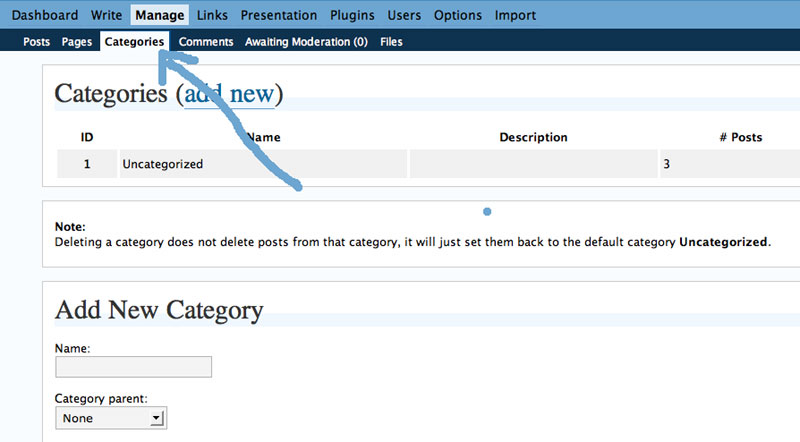
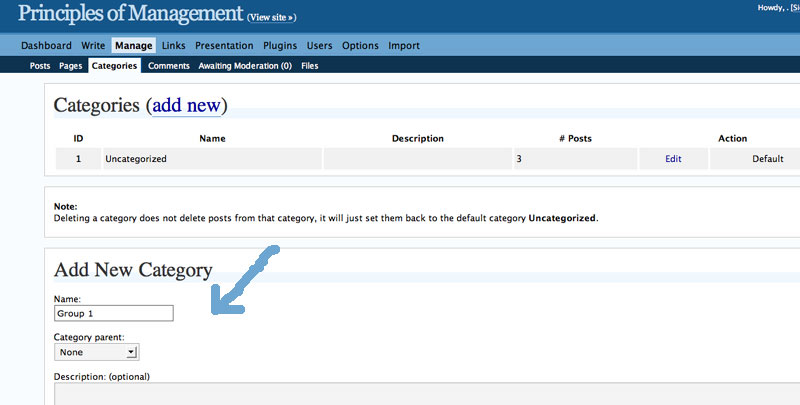
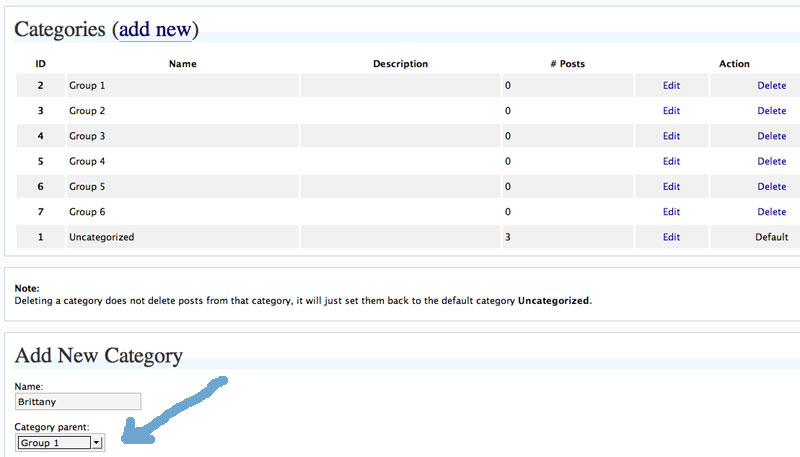
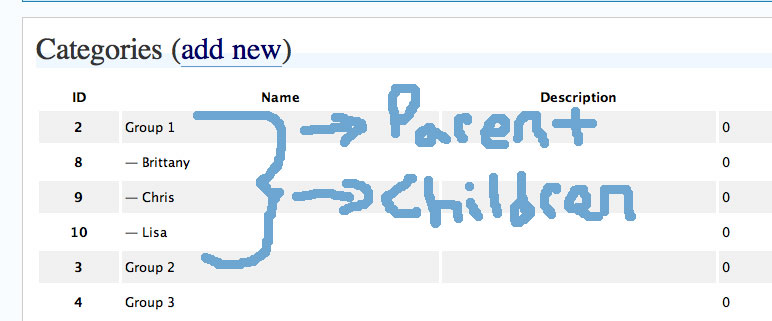
As you can see from the screenshots above, each category has a corresponding ID number associated with it. Record all the unique IDs for the group names as well as all the numbers for each student (separating these numbers will prove useful).
Return to the theme editor subtab (within the Presentation parent tab) and select sidebar.php. Find the two categories (‘Student’ and ‘Groups’) that you included in the sidebar.php in the steps above.
Now, you will want to exclude the appropriate entries from each category. For example, I will exclude the group categories with the unique IDs 2 through 7 from the ‘Student’ category. Alternatively, I will exclude the student categories with the unique IDs 8 through 30 from the groups category. (FYI, I wil be excluding the unique ID 1 from both categories for this is the default category uncategorized -or whatever you change it to). It should look something like the following:
Ok, now you should have the categories in place. Every time a student posts, they should check both their name and the their group in the categories menu when writing a post or page.
If the student author check the appropriate boxes, you should see the categories in the sidebar as shown below.
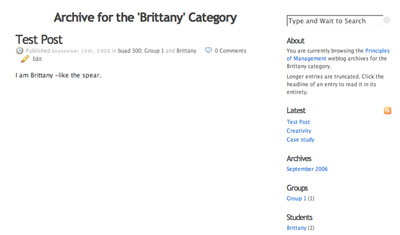
The only thing left to fix is the way the look of the page containing either the group blog posts or the student’s blog posts. Sidebar category links in K2 always revert to an archived page which looks like the following:
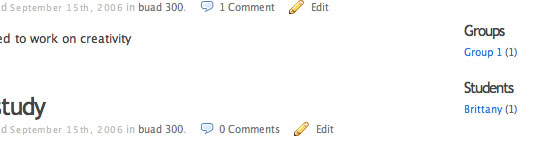
To get rid of the text “Archive Page for …’ and to make the entire post display, rather than an excerpt, we are going to have to edit theloop.php. Ahh, the infernal loop.
To modify the archive page title for categories, find the following code:
printf(__('Archive for the \'%s\' Category','k2_domain'),
and change it to the following
printf(__('%s','k2_domain'),
To make the entire post display edit the following code
} else {
the_content(__(‘Continue reading’,’k2_domain’) . ” ‘” . the_title(”, ”, false) . “‘”);
} ?>
‘.__(‘Pages:’,’k2_domain’).’ ‘, ‘
‘, ‘number’); ?>
and replace it with this:
‘.__(‘Pages:’,’k2_domain’).’ ‘, ‘
‘, ‘number’); ?>
Finally, you can get rid of any extraneous text about the archive in the sidebar.php by searching out the text and commenting it out (/*this is commented out*/).
And, viola, you are ready for a single-class multi bogging solution.

What dawned on me after doing this tutorial is that a hack such as this will allow you to have a series of tabs in the header that act as separate blogs for each group, student, etc. Effecitively using categories to create the organizational illusion of a multi-user blog within one installation. I will create an example and link to it shortly.
I was just this morning bemoaning the relative lack of solid information on the management side of course blogging — mostly because about 20 emails came in on the weekend having to do with small logistical and technical problems for various courses. This particular post does not really address any of those problems (we’re not a WordPress shop, and in most courses the students choose their blog systems), but I’m still really grateful you made the effort.
Oh yes, along those lines those “Hacking an open source VLE” posts were killer.
Recently, I have found myself really excited by the idea of retracing my simple hacks, installations, etc. on the blog. i for one can’t tell you how often i searched out the very details you are complaining of until i gave up and started experimenting -often times i would figure the problem out via trial and error, only to soon forget the steps and be forced to start from scratch only a few weeks later (not very practical). gardner kept pushing us to document our work, and then i saw Darcy’s model and I said, hey, this makes sense to me know and i have been on a tear for the last couple of months. I love it.
This recent crop of tutorials has given gave way to the recently christened bavawiki, thnks for the link! A recently released this is a much more intelligent way to track and update the details of any open source tool installations in the age of perpetual versioning. In fact, part of th idea for bavawiki was sparked by both the lostwikipedia you alluded to recently as wel as all the Web 2.0 devlopers that have been utilizing the wiki as FAQs -a practice I always thought particularly useful. in fact, I was indeed hoping that folks like yourself would find it, as you have, and populate it with your own relevant content (tutorials, presentations, etc.) , or at least a link to your online tutorials. Thanks for the shout out, Brian.
Pingback: Kubrick and K2 WordPress Themes: Collection of Theme Tips « Lorelle on WordPress
Pingback: Kubrick, K2, and Default WordPress Theme
Pingback: Creating Custom Categories for WordPress using K2 at bavatuesdays | Cellulite Creams