
Well, I hate to quote our fearless leader out of turn, but unlike him I really was successful!
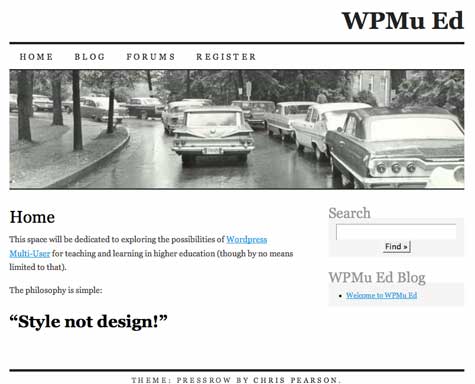
I had blogged earlier this semester about the potential possibilities available to UMW if we were to pursue mapping multiple domains to one WordPress Multi-User installation–one install, one upgrade, one point of failure–the last one is a quote from Jerry :). It is something people had been working out on the WPMu forums and, as usual, Dr. Mike came up with the hack that was ultimately turned into a tutorial here and then, to make things even easier, a plugin here.
So, having all of these unbelievable resources I gave it a whirl. I discovered a few things that may be useful:
- First and foremost, you need a really cool hosting service that is willing to work with you (or you need your own server). Why? Well, CPanel cannot necessary take care of everything you need to do here. You need to park the add-on domain and point it to your existing WPMu installation (easy enough). However, you then have to create another Virtual Host for the new domain that has its own dynamic dns (I’m quickly getting out of my depth so let me use exmple from two people who know what they are talking about.
Luke, from the premium.wpmudev.org forums offered me a nice conceptual overview of how this needs to be accomplished (thanks Luke!).
In Apache’s configuration file, you should either have 2 virtual hosts (one for each domain) that point to the same file path (where mu is installed), or you should have added more domains to the ServerAlias directive in the vhost for the primary domain so that it looked like:
ServerAlias domain1.tld *.domain1.tld www.domain2.tld domain2.tld *.domain2.tld
Also note that you would still need to create the wildcard DNS, which “may” take a day or two to propagate and become available. It shouldn’t take that long, but it might depending on several factors.
As long as the dns points to the server, then apache points it to the right file path, MU will take care of the rest.
And for those of you who understand Apache (which I don’t enirely) here is the code we used for our WPMu installation with multiple domains:
ServerAlias www.umwblogs.org *.umwblogs.org
ServerAdmin [email protected]
DocumentRoot /home/umwblogs/public_html
ServerName umwblogs.org
ServerAlias wpmued.org www.wpmued.org
ServerAlias *.wpmued.org
User umwblogs
Group umwblogs
BytesLog /usr/local/apache/domlogs/umwblogs.org-bytes_log
CustomLog /usr/local/apache/domlogs/umwblogs.org combined
ScriptAlias /cgi-bin/ /home/umwblogs/public_html/cgi-bin/
This worked and was by far the most difficult part of the process because it is not exactly something you can do on your own if you are on a hosted web server, and it really requires an administrator who is willing to work with you, lucky we have the coolest guy in town with Zach Davis of Cast Iron Coding–thanks again Zach!
- The Multi-Site Manager plugin works extremely well, but there is at least one thing you have to do in the database to make it work successfully–see #3. Once you have created a blog with your new domain name (for example the domain wpmued.org would have the correlating blog on the existing WPMu install: wpmued.umwblogs.org) and added the plugin to your mu-plugins folder you will see a “Sites” subtab within the Site Admin tab. When you click on the “Sites” subtab you will see the following fields where you need to enter the appropriate information:
- “Site Name” (what to call your site)
- the “Domain” field will have the URL of the domain you have parked and pointed to the existing WPMu installation
- The “path” field where you need to enter a single forward slash “/” (no quotes)
After this, map your new domain.
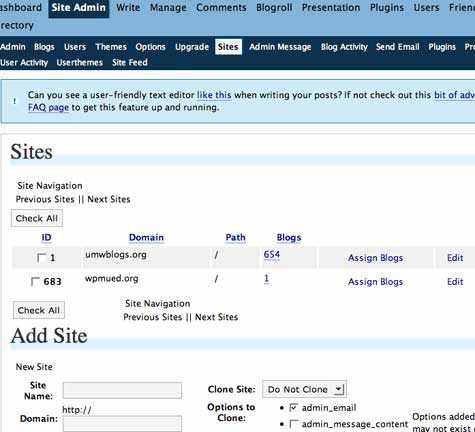
There is also another feature for this plugin that allows you to clone your existing installation–very useful! Keep in mind, however, that the site-admins table does not clone and we are going to have to go in to the database and create this for ourselves. Next stop is the WPMu database, but note the new domain ID number (mine above is 683) before you proceed to the database (it will save you some time and effort).
- Creating the site-admins in the WPMu database is the final step and this is where Richard’s tutorial came in quite useful. You have to have access to a PHPmyadmin to do what he outlines in steps 26 through 30, but if you follow these steps to create the site_admins table you will then be able to see the Site Admin tab and effectively administer your mapped domain. After that, you can change the settings for all the particular options such as illegal domains, allowed file types, etc. from the Site Admin–>Options tab.

Good stuff, Sir James. The Apache stuff makes sense, but it would be rare, very rare, on a hosted domain site hat you could do this without the divine intervention you received.
As I am reading the links provided, it seems all of this is geared to work with new or existing WPMU sites- anything on how you would rope in a corral of say 5 regular WP sites? Can they be imported?
Alan,
Rare, indeed, for a hosted domain, and I think I put some strain on my friendship with Zach while I scavenged around for the code and tried to fully explain myself. He’s a mensch, and was quite tolerance of my ignorance. Fact is, I was obsessed to see how it worked, and I think his interest in WPMu might have been piqued a bit by this feature as well (or at least it would shut me up for a while). Some version of this must be how WordPress.com allows you to map a domain to their server, and it “trickled down” to the Open Source community via the forums thanks to some smart folks.
That said, five different sites might be a bit different and more difficult. I wonder if the export for each site into the WPMu environment would work? You can copy over sites once they have been created making a test run possible before the “scary” process of parking the four other domains. There is a more robust export for WPMu developed here that gets pages and links as well (something the existing neglects last I checked). It may not be the best or cleanest option, but I haven’t read much about combining databases for existing sites. Some folks have posted about it on the forums, and others have steered clear. That said, I believe it could be done, and who better than the Big Dog to do it. Show the wag, and I’ll do the barking 😉
so I just went though the process.. I used the directory method instead of the subdomain… my question is do we lose the ability to track per account stats… meaning through cpanel i can nolonger see webalizer stats for each domain… they’re all together now… not ahuge deal cause i use analytics but would be nice if there was a way to get this working as well.. I do have root access to my vps box… any thoughts?
Pingback: Bava Going Black at bavatuesdays
Pingback: domain parking tip
hi there I’ve lost some major rankings because of lack of www prefix… is there anyway I can implement this while still adding the www prefix? if i use htaccess right now I just get into a infinite loop… pls help thank you
Bart,
I’m not sure how you would do that, wpmued.org reads the http://www.wpmued.org address and forwards it to wpmued.org, which I imagine is accounting for the rankings loss. This is a good question, but I’m not sure I can answer it. I’ll probably have to go to the wpmu forums much like you.
Sorry.
Hi,
Thanks for the great post.
Is it possible to use unique IPs for all domains with this method?
Thanks.
John,
Sorry for the delayed response. I don’t think it’s possible to use unique IPs for each of these domains, but I will double check with someone who actually knows what he is talking about. I am planning on doing some more serious experimentation with this method now that it works and I have a little more time, and will post about it as soon as I have something worthwhile to share.
Jim
Pingback: Porting bavatuesdays to a mapped domain on WPMu at bavatuesdays
Pingback: » Porting bavatuesdays to a mapped domain on WPMu WPMu Ed
Pingback: Importing a single WP blog to a WPMu Installation at bavatuesdays
To answer the IP question: no you can’t use a unique IP for each mapped domain. They all point to the same one.
Hi Jim.
Thanks for this. I am using Hostgator and battling to get this done. Hostgator want to charge me to do it. But I get the feeling they have no idea as well. I have used the tutorial and the plugin. But my new site points to my original site I created with hostgator. I cannot get into the back end of the new MU site.
For the hack of me I can also not find the wp_blogs and wp_signups tables when I use phpmyadmin.
I will rather pay you to help me because then I may know how to do it in the future 😉
Have fun
Hi Jim I am getting closer to getting this done but I think my phpmyadmin is different to the one show on the tutorial and I get stuck at step 22.
Hey Johan,
Sorry for the delay, I have been trying to wrap up projects for this semester, and it got me behind the 8 ball the last few days.
Ok, step 22 is tripping you up. Let’s take a look at that together. In phpMyAdmin you should have two pages of tables when you go into your WPMu database (and far more if you have many. many blogs -how many do you have?). The ‘My Site’ table for me is on the second page of tables, so finding it may be as simple as clicking the double arrow key at the bottom of the phpMyAdmin page. If this doesn’t work, or if you still can’t see it, IM me tonight or tomorrow and we’ll take a look together.
Also, get me a picture of what you do see if you can. I know how frustrating this process can be, and I’ll help in anyway I can.
Jim
This is epic beyond all proportions! I got it working. Thank you kindly sir! I cannot tell you how freakin sweet this is.
!!!!!!!
I am currently trying to solve the www. issue, my clients sites are well ranked and we’ve seen the fugly head of Google rear its face at us when we accidentily installed WordPress without www. in the install process. Our first site lost rank traction for a week. We quickly noticed the problem and fixed it. (Note: This was on a regular WordPress 2.7 install)
eddi,
Glad to be of service, can you give me more detail about your www problem? I never really understood the implications of this. Is it a Google page rank issue? You have somewhere this is discussed in detail?
We’ve seen a dip in rank after we installed WordPress on several of our sites. We have an SEO link campaign set up where all of our requested links start with www. Although its three letters, it puzzled us when our sites dropped in rank. As soon as we added www. back, our rank went up.
Very useful. This is what I am looking for. I will show you my result once I finish it.
Thanks!
Pingback: Wordpress MU Linksammlung | WordPress-News.de
How did the www problem got resolved finally? I’m having similar issue “www.domain1.com” gets redirected to “domain1.com” automatically. Same for other domains mapped.
Bart’s Post Last Year:
hi there I’ve lost some major rankings because of lack of www prefix… is there anyway I can implement this while still adding the www prefix? if i use htaccess right now I just get into a infinite loop… pls help thank you
Hey francis,
I think WPMu Tutorials describes what you are looking for here:
http://wpmututorials.com/hacks/forcing-mu-to-use-www/
Thanks Reverend. I’ll give this a try. I read the tutorial and it mention that it have only been tested with sub directories and not sub domain. But it looks promising anyways. I also wrote to Andrea (owner of that same site) for a solution.
Francis,
Andrea is great, and if the Andrea and Ron team haven’t figured out a solution to this, I’m not sure if there is one 🙂
Pingback: Using a single, central Wordpress-MU installation to power ***all*** your domains « Mark Robert Henderson
RE the WWW issue – just setup an account with google webmaster tools (free) and claim each site and then set the preferred url (with or without www) for the domain. Google will then count the various backlinks all as the same url so you wont get penalized.
I installed wordpress mu on my website and follow the instructions, I also installed plugins, it seems that the created url is broken, no files we’re copied on the directory. Please help me.
Thanks in advance!
http://test.idevelopment-tech.com/wordpressmu/
@Reverend Thanks for the link to Andrea’s write up on how to force www
–On another topic – Multi-Domaining with Multi-Authors!–
In the past couple of months Multi-Domain has been working EXCELLENT! But one issue has arise…
Picture Mothership Mu as the master blog network, MM. Now, MM has 15 authors that actively blog on wp_1_, a few have their own sub domain blogs, some don’t. Several authors actively blog on Sub-Site-Mu’s, SSM’s.
MothershipMu.com has 15 authors, 4 subdomains. SubSiteMu.com has 1 blog, zero subdomains. An issue arises… What if all 15 authors want to blog on SubSiteMu.com? How do you add 15 authors to SubSiteMu.com?
The only solution I’ve figured out is daunting. It involves sql knowledge.
The solution was to create a sql query, give users permissions to that specific blog/site.
Below,
————————————————
INSERT INTO `wp_usermeta` (`umeta_id`, `user_id`, `meta_key`, `meta_value`) VALUES
(708, 4, ‘wp_7_capabilities’, ‘a:1:{s:13:”administrator”;b:1;}’),
(709, 4, ‘wp_7_user_level’, ’10’);
————————————————
Now, 15 authors x2 = 30 = a pain in the butt.
Say if you have SubSiteMu_1.com and SubSiteMu_2.com – 60 lines of code to edit. Painful enough?
Now, what if a few new author steps in? Start digging into the SQL!
We currently have one Mothership and 8 SubSiteMu’s… Luckily only two authors. We have another test site that has 23 authors and only a handful of SubSiteMu’s… Can you picture how complicated / redundant this troublesome issue could get?
Any suggestions?
I’m trying to resolve this very same issue at my wordpress-mu test-bed: greekinlondon.com
I’m doing some research and there seam to be several good plugins that *probably* do the job:
1. WordPress MU Domain Mapping 0.4.3 (seems to work for 2.8.5) by Donncha O Caoimh
2. There are the “Simple Multi-Site plugin” and the “Advanced Domain Mapping plugin” as described in wpmututorials.com
3. The “Multi-Site Manager” at wpmudev.org
Panos,
And your research is right, what really is of issue is what you want to do with the mapped domain:
Donncha’s Domain Mapping will map a domain but not create a series of subdomians on top of that domains as you can with the multi-site manager plugin.
As for the other two at WPMUTutorials, I can’t really say because I haven’t played too much with them.But given Andrea_r and Ron were behind them, I would have to think they do everything these two do and more. They have unbelievable programming chops and have been refining the plugins that are already out there. I’d love to hear about your experience.
Anyone having issues with Multi-Site Plugin + 2.9.1 (or 2.9.1.1) + “Error saving media attachment.”???
All new sites receive the error.
eddihughes,
Can you take a screenshot for me? Where do you see the error?
I got WPMU working for a set of corporate sites/subsites and blogs at Rackspace Cloud Sites
You can read more about it here:
http://bit.ly/9dVjnP
Also please note that I don’t need to host multi-blogs for others so this was just for corporate manually enabled domains/hosts/sites.