I am catching up on my visual assignments, and I don’t think I had done Alan Levine’s (we miss you CogDog!) illustrate 106 assignment yet, so here is one that is quick and easy and almost catches me up.
This was made easier given I had bought those reflective address ds106 stickers in the hardware store with the intention of slapping them on my laptop, but I had forgotten and they were languishing in the manshed. But then Alan Liddell did his visual assignment with a quick and easy posterize effect in GIMP and I said “Bam! I can do this for the Illustrate 106 assignment.” And there you have it. No idea is born alone.
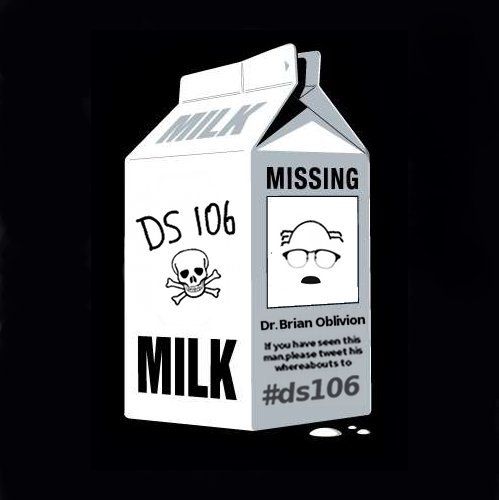
There have been a few milkcontainerexperiments for the “Missing Persons” poster assignment, so I decided to try my hand at in order to help get the word out about the Dr. Oblivion’s disappearance.
One thing that blows my mind about the missing persons milk container campaign of the 1980s—which I am assuming everyone who chose this milk container is alluding to—is how morbid it is. How did milk during the 80s become associated with every parents worst nightmare? I mean how did parents of the 1980s deal with this on a daily basis? To wake up every day to the violent reminder that your own kids could be next—talk about a campaign of fear and alienation. How many kids were actually save as a result of that campaign? I’d really like to know.
Anyway, here is a bit on my process for creating this poster. I found an original milk container t-shirt playing on Lost done by GLENNZ here. I grabbed that and brought it into GIMP and started changing it.
I really only needed the shape of the milk carton to save me some work, and if GLENNZ has an issue with me using the base of his design I’m more than happy to take it down. That said, finding the work of others as a starting point for creating posters, postcards, album covers, or any of the other visual/design assignments is often very useful —just be sure to give those you are “borrowing” from credit—imitation is the greatest form of flattery.
First I edited the carton image to remove any previous text and images using the Select Tool and Bucket Tool.
I then grabbed the icons from the Dr. Oblivion of Swaffham post here to reproduce an iconic vision of the real Dr. Oblivion. I cropped the hair and the glasses and pasted them in the now empty missing box. I had to make the entire missing box white so that it would match the background of the icons. I used the magic wand selection tool to do this because the box was on an angle and this let me airbrush the background of that box white precisely.
I also grabbed the ds106 logo and pasted that on the front of the Milk container.
I then used the Text Tool to create the text. Which I had to transform a bit to sit on and angle to match the image.
An then, finally, I flattened Layers, Scale Image and Saved As … and voila.
If you want to experiment with GIMP, the best way at it is to figure out how layers work first and foremost. There are a ton of tutorials out there, and remember that the Mac and PC GIMPs are rather different looking and operating. And if you already have Photoshop, well I doubt you’ll be using GIMP. For my next assignment I am gonna use Aviary to see how that works and hopefully provide a more thorough tutorial. God save Oblivion!
This is yesterday’s dailyshoot, and like Aimee I am not always thrilled with the prompts. Add to that this is my fourth time doing this process, and I am starting to see the repeats (like today’s prompt). That said, I still savor the opportunity to push myself to look around at everything for an intense period of two weeks when we do this for ds106, and I basically interpret the prompt to fit the shot I liked the most that day.
So, when thinking about perspective not necessarily of a thing, but of my life right now and all those who are dear to me. I realize how quickly I can lose all perspective given my tendency to get obsessed with all things ds106. So let this be a reminder and provide some perspective.
It is the ds106 community that makes the awesomeness that has become the Summer of Oblivion possible, and I can’t thank you all enough! But I’ll do my best to try and show my gratitude over the next five weeks, thanks ds106.
In a strange twist, T.A. Jim Groom is left stranded by Dr. Oblivion and left to do all the work of ds106 in his absence. The doctor’s daughter, Bianca O’Blivion gives us all the details. Meanwhile a discussion on visual design and specific assignments for the course is facilitated with Martha Burtis (@mburtis) and Tim Owens (@timmmmyboy) and later Michael Branson Smith comes on to talk about game theory and ds106.
Given the unexpected turn of ds106 today, the first visual/design assignment is going to be to make a “Missing Persons” poster for Dr. O’Blivion. You can see the assignment here. Be sure to tag it properly, the most highly rated 3 posters will be printed out and posted around the world in physical space.
In an attempt to assist you with your poster design, Tim Owens has provided a series of resources (see links section of the following link) for various fonts, image editors, and the like, see it here.
Additionally, Michael Branson Smith came on to talk about ds106 as a Role Playing Game (RPG) and has at least two excellent posts on this topic so far: part 1 and part 2.
Finally we ended with Alan Liddell’s “News on the March” which summarizes yesterday’s happening, but could never have predicted today’s events.
You can find Dr. Oblivion’s Discussion Notes (with all relevant links) here. Also, here is a copy of the Livechat Transcript from today’s live broadcast. Additionally , Dr. Oblivion asked me to thank Abbie Boaduwa Yirrah for calling into the live broadcast via Skype. It was a first for the Dr. Oblivion Show, and she was quite the guest.
Something Dr. Oblivion and I talked about after today’s session was the idea that ds106 folks who can’t make it to the regular, live broadcasts at 11:30 AM (EDT) might want to make quick video recordings of questions, issues, and general ideas they might have about any topic related to ds106 (and beyond). These can be as short as you like, just make sure you tweet the link and hashtag them on Twitter both #ds106 and #droblivion. Once you do they will be broadcast live so that Dr. Oblivion can respond to them on air. Keep that in mind and also keep the video responses coming as well as a quick reminder that you are expected to comment on the posts of others in the class.
Tomorrow at 11:30 AM (EDT) we will be introducing the visual and design portion of the course, and the assignment below will be what is expected of you over the next 4 days (in addition to the daily shoot).
Visual Assignment
Over the next four days (.i.e. Thursday, Friday, Saturday and Sunday) each of you will be expected to review the visual assignments for ds106 and choose one to do each day. Blog your project each day and be sure to tag your post with the proper design assignment tag. What’s more, if there is nothing that interests you from the list, submit your own visual assignment here and then do it.
Also, be sure to rate which assignments are the best using the ratings poll at the bottom of each assignment. Keep in mind you will find each individual assignment’s tags (there are two) beneath the ratings poll and you must tag your post with both to get credit for your work. If you are not sure how to add tags to a post see this video tutorial.
Dr. Oblivion responds to a few blog posts and comments in the live chat and Twitter feed and takes the time to talk about WordPress and getting started with themes and plugins.
See the assignment for experimenting with plugins and themes in your blog at the end of this post here.
Notes from the discussion
The Import of twitter ? why it is crucial to be following along with twitter for #ds106
A couple of points about the DailyShoot
Make images public and creative commons on flickr.
You should be tweeting the image with the syntax I sent to you in an email.
Dissonance
From Tim Owens in yesterday’s live chat session:
Is there some dissonance between telling everyone to get their own webhost and in the same breath telling them to put their images of Flickr and get a twitter account?
Physical versus Virtual: the world we find ourselves in
The privileging of the physical classroom for far too long, the necessary move to the virtual because that is the space in which the world’s agenda is formed and executed. It is in the ether that power is being defined and wars are fought. It is a question of the battle for information, who controls, who shapes it, and who can decipher its various meanings. A majority of the world’s classes should be virtual because a vast majority of the world’s information has already been vrtualized. We limp twoards the 21st scentury like wounded animls, nay screaming children afriadof the undeniable present that is has continued to be cast as our future.
What’s becoming unique about DS106 is that every day it becomes less of a course and more of a community. And this community behaves in a way that I want to liken to a role playing game (RPG).
The connections are ethereal, as the architecture of the spiders is sound in connection and node, the connection between our lives will deepen and strengthen over the days and nights to come and we will build a small village of ties, bound with rope together we will wander in the star streaked night and visit strange lands. In these strange lands, filled as they may be with buttons and clicks and terms unknown, we will know frustration and anger. Together, tied as we are, we will ride into the night screaming.
______
Tomorrow you shall receive the second warning. The second message. The second revelation. And you shall be closer to the purpose. Closer to the light. Closer to Oblivion.
After reviewing the video introducing my ds106 course I have come to the realization that most of the technologies that are covered in ds106 are essentially media based. However there is nothing leading edge about having a facebook, twitter, flickr, or youtube account. It almost seems as though this should be more of a literature class instead of a cs106 course like at UMW. I don’t believe that it takes a CS major to figure out how to create a web domain or create accounts with these services.
Alan Liddell point out in this post that “technology is driving human evolution” http://www.liddellsystems.com/blog/?p=32 Assignment: Experimenting with your blog’s plugins and themes
Note: If you are not hosting your own domain/blog for this course don’t sweat this part of the assignment and just skip down to part b of assignment 2 below.
First, I would like each of you to start experimenting with your blog space. Look for information and tutorials online about how to embed videos, include images, audio files, etc. (All things you will need to know shortly.) What’s more, do some research on the features of WordPress, there are literally thousands of free themes (template designs) and plugins (third party extension to give you more capabilities) that you can experiment with. Below I will list a few plugins I strongly encourage you to in install.
Subscribe to Comments: Allows commentators to subscribe to a comment thread, this is crucial for this class, and easy as pie to install. Just go to Plugins–>Add and search for Subscribe to Comments. Once you have uploaded it, activate it and you are ready to go.
Twitter Tools: I would like you all to play with Twitter Tools. Ever since Twitter move to a new OAuth this plugin has become a pain to install, but give it a shot, and their is extensive documentation in the plugin panel itself, be sure to read it.
Akismet (already installed): this will prevent your blog from being over run by evil spammers. NB: you will need an Akismet API key—would love if someone posted the play-by-play for others, or even found one.
Google Analytics: Experiment with some Google Analytics plugins for WordPress—go to add plugin and search for “google analytics”—you should find a bunch. I’ll be expecting that you sign-up for a Google account and get Analytics running on your blog. Google Anlyticator is one of many.
Install a Flickr plugin that will display your dailyshoot Flickr images on a post or page of your blog.
Other: look for other stuff you might be interested in. It could be anything from plugins for Facebook, Flickr, YouTube, plugins, etc. Contact form plugins, etc. Get creative.
When you are done, report back on your process, what you’ve discovered, what you installed, and any issues you may be having. Remember, if you have issues—use your blog or Twitter to communicate you process and your problems—it is expected.
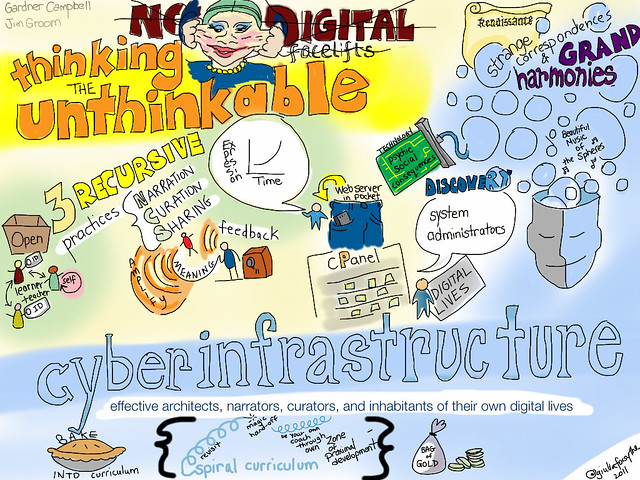
Stellameme has figured out the real purpose of animated GIFs, use them to interpret a reading or video you watched for #ds106. These are brilliant response to Gardner Campbell‘s “No More Digital Facelifts” presentation. Brava, this is genius—and builds geniusly on Giulia Forsythe’s remarkable ability to visualize the essence of a presentation on her iPad.
Email sent to all registered ds106 participants 3:11 PM June 20th, 2010.
________________________________________________________
All,
I just spoke with Dr. Oblivion, and given the daily Live TV (who does live TV anymore?) is going to be his primary means of communicating, he has a couple of ideas for opening those sessions up for some more virtual discussion.
1) Skype video calls into the chat. We are working on broadcasting in Skype calls during the chat, so when watching tomorrow at 11:30 AM (EDT), have Skype open and friend jimgroom on Skype who will be manning the phones (in a different room from Dr. Oblivion of course).
2) Create a YouTube video response to Dr. Oblivion’s introduction. It is easy, and it can be as long or short as you like. Here is how:
http://www.google.com/support/youtube/bin/answer.py?answer=57931 Creating YouTube video responses is a viable alternative to a written blog post on any topic Dr. Oblivion discusses, just be sure to embed it on your blog (as easy as copy and pasting a link into your text editor in WordPress).
3) During the Live TV session you can also ask questions of Dr. Oblivion via Twitter, and he will respond in kind. For longer, more in-depth questions use option 1 or 2.
Ok, that’s it for now. I know Dr. Oblivion is throwing a lot at you, but underneath that phlegmatic personality there is a real fire for experimenting though and in the medium.
As some of you may have already witnessed, Dr. Oblivion offered the introduction to ds106 via a live video (http://ds106.tv/live). If you didn’t get a chance to watch it yet, it is now available on YouTube or at the main site of http://ds106.tv. Please watch it.
Below is a Summary of the assignments laid by Dr. Oblivion in his introduction to ds106.
The following reading and videos are key to thinking through the conceptual and theoretical underpinnings for a course like ds106. Read the essay and watch the videos and blog your responses to both thinkers ideas by midnight of Tuesday, 6/21. Tag this post: pcimedia
The Daily Shoot
By the end of this week we will be diving into the visual and design portion of this course. You will all be expected to start the Daily Shoot assignments immediately, and please keep this going through July 4th. Here are the details for this assignment.
This assignment will last for two weeks from Monday, June 20th until Monday July 4th.
For this assignment you will need to follow the daily assignments on the Daily Shoot site. What this site does—on a daily basis—is provide you a frame for taking a picture on any given day. Like, for example, the following:
2010/09/13 • #ds302 (115 photos)
Make a photograph of a path, sidewalk, trail, or road today and post it. Lead our eye through the scene.
Based on the prompt for that day, you are to take a picture.
Next step is to upload each day’s image to Flickr on a daily basis with the following two tags:
The course hashtag ds106
The daily shoot tag (it changes daily) ds456, ds457, etc.
Also, you may want to set your account up to blog to twitter from Flickr- makes shorter URLs http://bit.ly/ifdCWf (thanks to @cogdog for this useful tip).
To complete the daily shoot on any given day, you will need to tweet the image to @dailyshoot with a link to the image on Flickr as well as the proper hashtag for that day’s daily shoot (i.e., #ds456 or #ds457 etc.—note ds in the hashtag is for DailyShoot not Digital Storytelling). Also, the order is important It should look something like this:
@DailyShoot – #ds581 – Lists guide an eye in a linear way: menus, recipes, etc. Find a list and make a photo. http://flic.kr/p/9UQDoe
is an ongoing conversation about media of all kinds ...
Testimonials:
Generations from now, they won't call it the Internet anymore. They'll just say, "I logged on to the Jim Groom this morning.
-Joe McMahon
Everything Jim Groom touches is gold. He's like King Midas, but with the Internet.
-Serena Epstein
My understanding is that an essential requirement of the internet is to do whatever Jim Groom asks of you while you're online.
-James D. Calder
@jimgroom is the Billy Martin of edtech.
-Luke Waltzer
My 3yr old son is VERY intrigued by @jimgroom's avatar. "Is he a superhero?" "Well, yes, son, to many he is."
-Clint Lalonde
Jim Groom is a fiery man.
-Antonella Dalla Torre
“Reverend” Jim “The Bava” Groom, alias “Snake Pliskin” is a charlatan and a fraud, a self-confessed “used car salesman” clawing his way into the glamour of the education technology keynote circuit via the efforts of his oppressed minions at the University of Mary Washington’s DTLT and beyond. The monster behind educational time-sink ds106 and still recovering from his bid for hipster stardom with “Edupunk”, Jim spends his days using his dwindling credibility to sell cheap webhosting to gullible undergraduates and getting banned from YouTube for gross piracy.






 I just spoke with Dr. Oblivion, and given the daily Live TV (who does live TV anymore?) is going to be his primary means of communicating, he has a couple of ideas for opening those sessions up for some more virtual discussion.
