
Yesterday, while showing a professor Google Docs, I discovered a feature I hadn’t seen before: the “publish to blog” option (not unlike the same feature in Flickr and del.icio.us and, from what I now understand, was also available with Writely). I wanted to test it out, so this morning I tried pulling in the outline of a presentation I will be doing with Jerry and Andy at ACCS this Friday in order to see how clean it is — let me tell you something, it is very clean!
Here’s a quick run down of this feature:
Once you have a document you want to post to your blog, click on the Publish tab in the far right-hand side of the Google doc, and you will see the option to Publish to Blog.
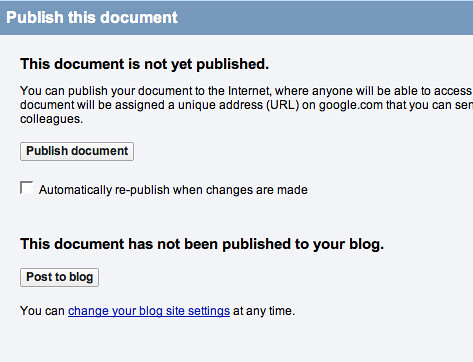
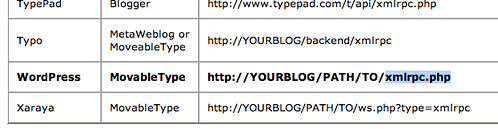
You will first need to setup the details of your blog so that it can be published seamlessly. You will need to specify if you have a service hosted blog (like wordpress.com, blogger, etc.) or whether you host it yourself. After that, just put in your login and password info and specify your blogs API, which for WordPress is your blog domain followed by xmlrpc.php, so bavatuesdays would be http://bavatuesdays.com/xmlrpc.php (keep in mind that they refer to this as the movable type api for some reason).
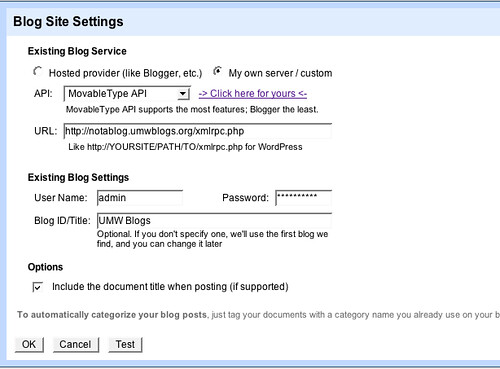
After that, you will have a very clean document published right into a blog post, like this one here. Amazing, and for all those interested this was tested on a WPMu blog installation and it works beautifully. I can’t think of an easier way to publish those college essays you are writing for class to avoid all those pesky printer problems 😉

You can still use this feature by selecting the old version of Google Docs. From the main Google Docs page go to Settings -> Documents settings, click Editing, then uncheck “Create new text documents using the latest version of the document editor.”
New documents will now be created using the old version of Google Docs, which includes the post to blog feature.
It’s a real shame, but it appears that this feature has been disabled now. I found this dead useful for collaborative publishing too. Any ideas why?
Hey Mike Chelen, thanks for the tip – I tried it but it didn’t work either, perhaps they’ve got rid of it?
This web page is known as a walk-via for the entire data you needed about this and didn’t know who to ask. Glimpse right here, and also you’ll positively uncover it.
It seem that they cancel this feature and the workaround that Mike suggested 🙁
I would love to use it.
You can still use the publish to web and use the HTML code in your post.
Pingback: Using google Docs with WordPress « The Journeyler
Pingback: Posting from Google Docs | nWizard
Can’t find any publish tab.