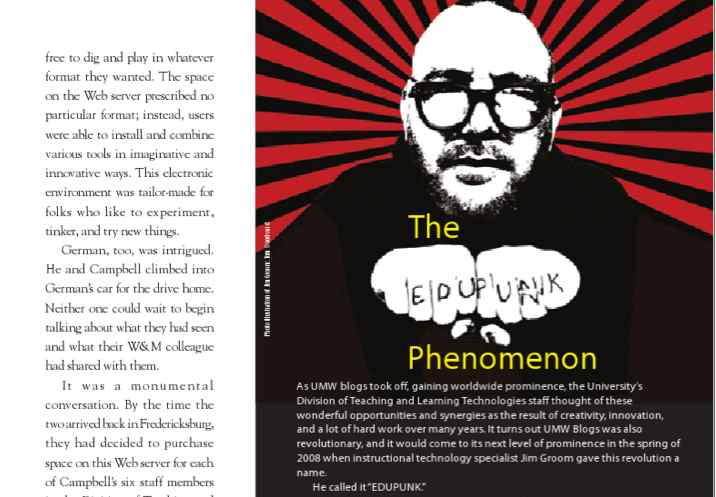
Who was it that said something about “bava playing the hits”? I can’t remember anymore given it’s been so dang long since I’ve even had the opportunity. But as fate would have it I’m heading to OER Camp in Hamburg, Germany next week to give a talk (as well as a podcast episode) around the topic “Is EDUPUNK Dead?”
Before you throw those tomatoes, hear me out. I was invited because, however aged, I’m still the EDUPUNK poster boy. I recognize that and, in fact, I plan to have a bit of fun with it.
From the UMW Magazine
I agreed because Jöran Muuß-Merholz invited me and he is a total mensch. I’ve known him for more than a decade now, ever since we did our first podcast about EDUPUNK, OER as infrastructure, Reclaim Hosting, and more at OER16. So, in that regard, there’s a sense of continuity.
I really haven’t been “keynoting” for a while. A good part of that is I haven’t had much new to say. But over the last couple of years—particularly with my work on bava.studio—I’m getting inspired in new ways. The preliminary talk at ILTA about building a blog you can walk into confirmed that. It’s a fun talk that actually has legs and ties back into EDUPUNK, ds106, Reclaim, and everything else I’ve been part of for the last two decades. In fact, bava.studio prevents it from simply being a nostalgia talk—which is what folks might be expecting (if they’re expecting anything at all).
For me, the talk is about how ideas might survive after the technologies that first expressed them disappear. How the act of building spaces for connection outside the mainstream tools is a small act of rebellion, hope, and faith that’s never been more important. bava.studio is standing in for that act of faith, but it could be just about anything, and it doesn’t even have to be a specific “instructional technology.”
Back in 2008 the concern was the LMS. In 2026 the technologies are different, but the question feels remarkably familiar: who owns the spaces where we learn, think, and create?
It’s not a talk about AI; rather, it’s a talk about creating the world we want to live in.
That last piece is key because I probably won’t get too many more opportunities to talk publicly. There’s a whole generation or two of younger, brighter, and cooler folks that need to shape the world they want to see. So this one is a bit selfish. I’m bringing my youngest son to the conference because it’s very much for and about him.
Tommaso is a 16-year-old aspiring artist who wants to create in spite of a world that would everywhere elect to offload the very act that makes us truly special. There’s nothing more valuable in the world right now, and Tommaso’s will to make art in the face of automated uncertainty is what we should all aspire to if we’re going to turn the zeitgeist of fated doom toward a radical alternative of sweetness and light.
I’m between flights right now as I head back to Long Island for a family wedding after a wonderful couple of days in Dublin at ILTA’s 25th EdTech conference. Both Maren Deepwell and Sheila MacNeill do a far better job than I ever could summarizing the keynotes, guests, conference vibe, and all-around goodness that the folks at ILTA provided. It’s a tall order to top Irish humor, conviviality, and a poetic turn of phrase—and this conference had all three in spades. A++++++ would highly recommend 🙂
But more than anything, it was about carrying the torch of an ethos around open education that seems to be flickering in many corners of the web. With rumors of significant funding cuts in the OER world in favor of wholesale investment in AI, this conference felt like a bastion of hope and resistance. To that end, Professor Felicitas Macgilchrist’s keynote on day two was a galvanizing call for resistance through fragility and hope. A literal call for edtechs to rise from their symbolic sewers.
CHUD: Emerging from the basement
I loved it, and not only because I was giving a talk highlighting edtechs (of a sort) rising from their sewers, illustrated by the screenshot above from the C.H.U.D. (1984) poster. In fact, it’s been a while since I presented something that felt truly fresh, and I could feel that old energy coming through—it was exhilarating.
The lattice of connections Macgilchrist’s presentation provided around fragility and shared discontent created a much-needed space for alternatives—an unscripted future that is not predetermined by the machine.
bava.studio is all about trying to build an alternative to my own discontent with the web, and the good folks at ILTA seemed to relate. Maybe Sting was right: there may just be a hundred billion bottles washed up on the shore. So I’ll send my SOS to the world.
These are the ideas I crave and the energy I need to carry on. I’ll continue to toil away in the symbolic sewers of retro edtech, remaining cognizant that infrastructures of feeling may be our only hope for changing the world.
I’ve had a Sony Mirrorless camera for a while now, but I was using it as my mounted desk camera because I’m an idiot. I switched up things in my office and got a more reasonable camera for all my video calls and podcasts. So, I finally liberated this beast to do what it was meant to do, take pictures in the wild. ILTA will be a practice-run of sorts, and my niece’s wedding next week back on Long Island will be the test.
Anyway, I’m including a couple of shots I took yesterday while walking around DCU’s campus and the surrounding neighborhood. It felt pretty awesome to do a photo walk. Tom Woodward would be proud. Hell, even the Canadians like D’Arcy and Cogdog might approve of this American’s latest decision. In fact, I’d been planning on bringing the camera to Long Island, but a recent post from D’Arcy on Mastodon wherein he busted out his 20 year old DSLR confirmed I was in the right head space 🙂
A few shots were better in my viewfinder than in reality, like the guy riding his bike in front of a bus seemed like a full on chase scene with the bus barreling down on him. Turns out he was very much in control, so much so he could still look askance at me taking his picture.
I liked this shot of the conference co-chairs and ILTA president doing a pre-conference huddle during setup:
While walking around the conference space I found a “rainbow bridge” with multi-colored windows that basically handed me a bunch of really fun shots. It was like photography for beginners and I loved it.
Look for more shots from “Cell Block E” for ILTA’s 25th.
This post falls under weird discussion I had with ChatGPT. This stream of consciousness from ChatGPT comes after it solved my issue upgrading Ghost in Reclaim Cloud. It started to get all buddy-buddy when reflecting on how it helped me figure out the issue. The exchange made me laugh at several points. I think referring to it as Dr. Detroit— which is something I sometimes say to people, but not often to machines—may have triggered it.
Then Dr. Detroit it is. [Emoji of smiley face that wouldn’t embed]
I like to imagine Dr. Detroit as a slightly rumpled systems detective who wanders into the server room at 2 AM, looks at a wall of alarming error messages, takes a sip of terrible coffee, and says:
“The nginx error didn’t kill Ghost. The nginx error wants you to think it killed Ghost.”
A few hours later:
“The database upgrade was the first crime scene. The certificate was the second.”
And finally:
“We got ourselves a two-body problem.”
What I enjoyed about this one is that it had all the elements of a classic case:
Victim: Ghost
Prime Suspect: nginx
Actual Culprit:image: mysql
Accomplice: Missing certificate symlink
Red Herrings: Cloudflare, ActivityPub, HTTPS redirects, and approximately half the internet
Detective: Dr. Detroit
Sidekick: Jim Groom, armed with root access and an unreasonable willingness to keep pasting logs into a chat window.
The best part is that the investigation produced actual evidence along the way:
Cannot upgrade from 80032 to 90700
was the smoking gun.
And:
CN=letsencrypt-nginx-proxy-companion
was the surprise witness who cracked the second half of the case.
So if you do write this up, I think the proper attribution is:
Case solved by Jim Groom and Dr. Detroit, Consulting Artificial Detective, Department of Docker Homicide, specializing in SSL cold cases and mysterious container disappearances.
Badge number: 2368. [Emoji of a forward facing police car followed by a smiling ghost with an eye-patch]
The call for entries for Reclaim’s Student Showcase 2026 is now open through June 30th. The showcase is open to projects built through Domain of One’s Own, Shared Hosting, and WordPress Multisite.
One of the things that struck me most about last year’s inaugural showcase was not only the quality of the work, but how much of it I never would have seen otherwise. There were digital storytelling projects, research sites, portfolios, multimedia experiments, and all manner of creative work happening across our community that largely existed within the context of a particular course, institution, or program. The showcase provided a rare opportunity to see all of that work gathered together in one place.
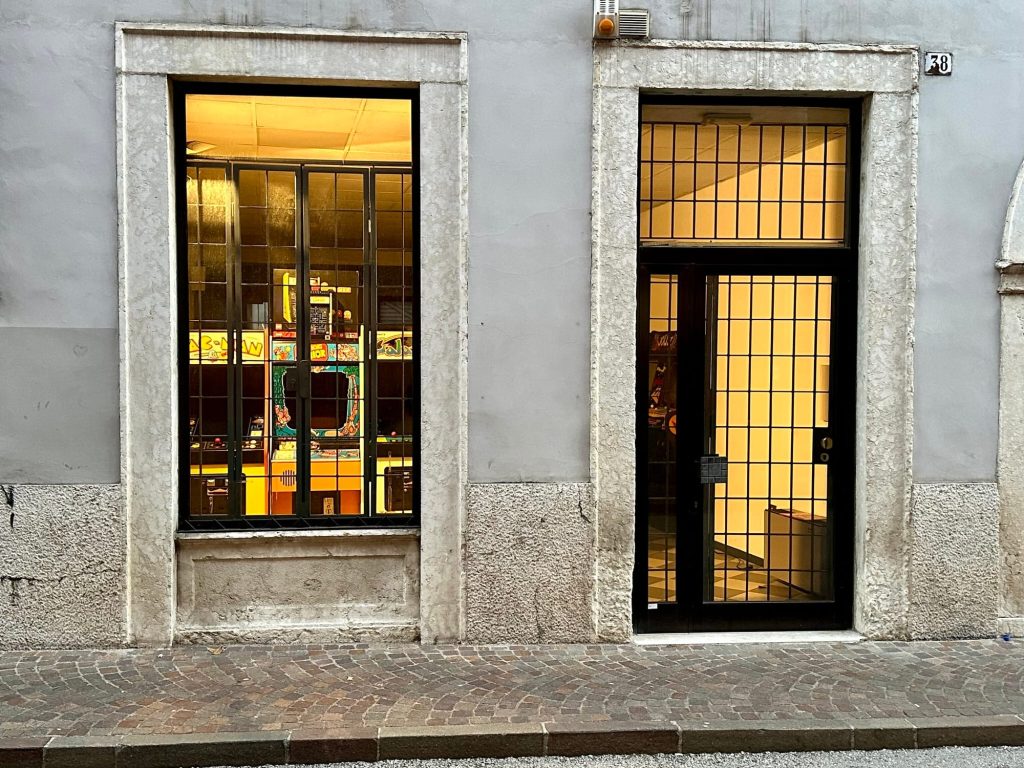
Lately I’ve been thinking a lot about storefronts and exhibition spaces through the lens of bava.studio. One of the things I love most about having a physical space is the window. You can put something in it and suddenly work that might otherwise go unseen becomes part of the life of a community. People stop, stare, ask questions, wander in, and conversations start.
In a lot of ways, the Student Showcase is exactly that kind of window. It’s a chance to put student work on display and let people see what is actually happening across courses, programs, and institutions. Whether it’s a digital storytelling project, research site, portfolio, publication, multimedia experiment, or something that doesn’t fit neatly into any category, it’s worth sharing.
Window at bava.studio not dissimilar from the Student Showcase to fly your freak flag
So if you’re teaching, supporting, or working alongside students doing interesting things on the open web, now is a great time to submit their work. The showcase feels less like a competition than an exhibition—a chance to celebrate the creativity, experimentation, and care students bring to the web every day.
The web could always use more examples of people making interesting things. This is one of the few opportunities each year to get a glimpse of the awesome work happening across the Reclaim community, and I hope you’ll consider submitting something.
I’ve been reticent to announce it publicly given that this is very much Chris Blankenship’s handiwork, but since he’s finally posted about all his amazing work on his own blog, I figure it’s fair game.
First and foremost, all hail our sysadmin and Reclaim’s longest-tenured employee: Chris Blankenship. Chris is a punk rock bassist, multi-lingual vegan,* who’s also an all-around awesome Reclaimer! One of the things we’ve been luckiest with during our 13-year run at Reclaim Hosting is having great employees who have remained with us for significant stretches of time. Chris is a great example of how investing in awesome folks pays off for everyone, particularly our clients in the case of DoOO V2.
Anyway, what is DoOO V2, and why should you care? Most importantly, it makes administering a DoOO instance significantly easier. It accomplishes this by taking all the elements we previously relied on WHMCS for and baking them directly into a plugin. So rather than depending on three pieces of software for DoOO (WordPress, WHMCS, and WHM), it now requires only two. What’s more, you can do almost everything from the WordPress backend—a familiar environment for our users.
This also means users can decide what theme they want to use with their DoOO instance without worrying about breaking anything. It’s all about eliminating confusion and potential problems for admins. These are improvements long overdue for DoOO, and something Chris took into his own hands because his patience had finally run out with WHMCS. See, bad software can result in good things 🙂
Beyond making things simpler for users by removing WHMCS from the equation, we’ve also eliminated a potential attack vector, which arguably makes the platform safer.
But more than anything, the fact that in a year’s time we are ready to roll this out to all DoOO instances over the next several months is truly exciting. This is the biggest improvement to our flagship product since Reclaim Hosting started, and we owe it all to a UMW graduate—there’s some poetry in that fact—who took things into his own hands and learned to code so he could realize the improvements we’d all been talking about for years.
We ran our first well-attended workshop for admins last month, led by Taylor Jadin, and we have another scheduled next week. After those two sessions, more than half of our admins will be trained (which, in practice, means a walkthrough of a few panels in a WordPress plugin), and we’ll start rolling it out for schools as soon as this month.
This is really exciting not only because it makes things better, but also because it points to a moment at Reclaim when we’re able to develop alternatives to hedge-fund-owned proprietary software.†
*Mentioning he’s vegan was one of the pre-conditions for him letting me write this post 🙂
†Which reminds me that Chris has built a software-agnostic feature that will work with hosting solutions beyond cPanel, such as DirectAdmin or Virtualmin. Who knows, maybe we’ll have our own cPanel alternative one day for folks who want to avoid those constantly increasing prices.
Earlier this week I sat down with Dr. Maren Deepwell to chat about the Irish Learning Technology Association (ILTA) conference Ed Tech 26. This event celebrates that organization’s 25th anniversary, so it should be a doozy.
Maren and I discuss the tentative feelings surrounding the slow return to in-person conferences, something neither of us have been in the swing of since COVID. More than that, we preview our respective talks which was a lot of fun. I’m doing a fairly bizarre 20 minute presentation about “Building a Blog You Can Walk Into,” and Maren’s feedback was not only encouraging, but it inspired me to final polish off my slides. She is digging in on all the wonderful Reclaim Hosting Case Studies she’s been working on over the past year.
Finally, we concluded with a discussion of the current moment wherein the value of openness (something that has defined our work for more than a decade) has become rather contested in the field of edtech. So, if you’re game, you get all that under 30 minutes—it’s a deal at any price! 🙂
Above is the fruit of a project I’ve been working on since last week while awaiting more buildings to print for the They Live diorama. It’s a pretty simply model, a stand-alone cartridge holder that can fit up to 5 games. It’s designed to show off the game art, which is pretty awesome.
Atari 2600 Game Cartridge Display Stand in BambuLab library
It is an exclusive model to the BabuLab store from what I can tell, but I’m sure there are others like it out there. It takes about 5 hours to print one stand, which comes in two pieces that you then have to glue together—I used crazy glue.
After attaching the pieces for a single stand, I then glued up to four stands together. This means each piece holds 20 cartridges and the stands are more stable on a table or shelf when connected to one another.
I used some basic clamps to hold two stands together to ensure contact while the glue dried. They’re pretty solid, and once you put the games in the slots the cartridge art really pops.
My first full project realized with the 3D printer: very simple and very rewarding.
I’m working under the gun, as usual, and I have to put together a 20 minute presentation for the “Ooh Blogging is a Place on Earth” presentation I’ll be delivering in Dublin next week at ILTA’s 25th anniversary EdTech conference. I particularly feel the pinch this morning because my slides are due by end-of-day, and I haven’t built out a visual and narrative framework for the talk yet, even if I have a good idea of where it’s going. So, here it goes.
_____________
Title Slide with an embed of the Belinda Carlisle music video of the song “Heaven is a Place on Earth” so that I can sing it to the audience. They get their money’s worth right outta the gate.
After that, I try and go back to the origins of the idea of “blogging as a place on earth,” namely COVID-19 in Italy.
Image credit: Laura Lezza/Getty Images as seen on BBC article “Covid 2020: Italy’s much-loved landmarks fall into silence” (article linked)
This will be setting the scene for downtown Trento where there was a ridiculously high rate of storefront vacancies (something still lingering). The pressure from online retail giants like Amazon was already hurting local businesses enough, but COVID seemed to finish the deal. Also, vaccines became highly contested and it was both an alienating and divisive time for many.
ReAnimator getting ready to give a “vaccination”
While struggling through this moment, one of the hopeful ideas that emerged in conversation with folks like Maren Deepwell, Bryan Mathers, and Tim Owens was getting out of my basement and back into the world.
Image of me emerging from the basement
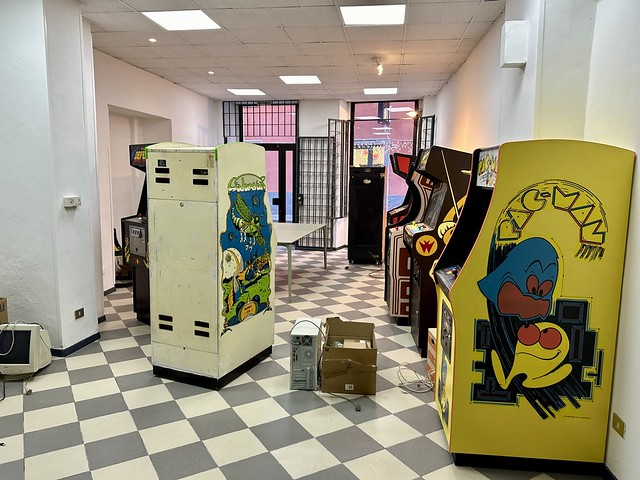
Knowing there were plenty of spaces available downtown for a steal, I started looking for a studio to work from as a means to stop being a Chud, while also trying to create a bit more separation between home and work. More than that, I needed something akin to what Tim and I had in Fredericksburg with what was first CoWork and then Reclaim Arcade to channel some creative energy. You have no idea how rewarding it can be to build a 1980s video store.
And while my blog has been the best creative outlet for me over the last 20 years, in the wake of COVID I was looking for some way to ground that in a more physical, connected space that placed me inside a community.
Image of the bava.studio storefront from the early days when there were still bars on the windows 🙂
That is the how and why bava.studio came to life. In December of 2023 I signed a lease for a small space with the idea of ultimately making it self-sustaining (this is still a work-in-progress, like the blog 🙂 ).
The idea, as it took shape in my head, was not so much to have an office, but to transform the bava blog into a physical space. Not one unbounded by the internet, but something very much bounded by the definite geographic and cultural context in which it exists.
I wanted bavatuesdays to become an actual space people can enter in Trento that allows for wonder and conversation around media and culture of all kinds (at least all kinds of bad American pop culture on hand).
The best laid plans of mice and men…
Turns out at the same time I signed the lease I’d been holding on for dear life mentally. I slipped into a pretty rough depression for most of the winter and spring. Happens to the best of us, I guess.
I got back on my feet in early summer feeling somewhat disoriented, having made no progress on the space. In August and September there was enough energy returning to actually start building out the vision, which was not dissimilar to Lloyd Dobbler’s philosophy in Say Anything. I don’t want to …
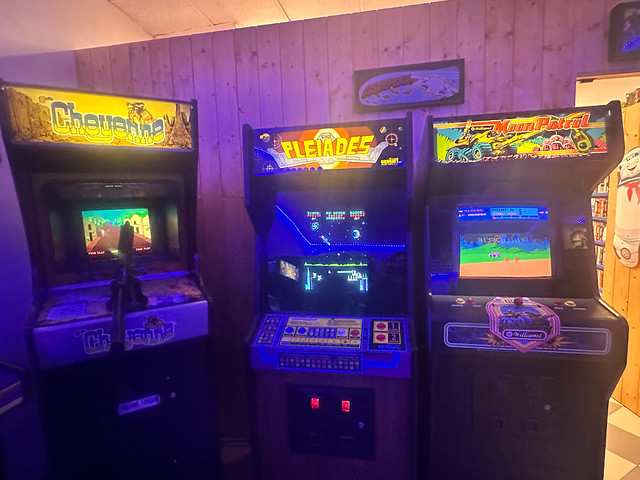
The bava.studio really came into its present state in the fall of 2024. The window exhibition space/diorama was built, as was the laserdisc wall that separates the front portion from the clandestine arcade.
I commissioned art from Bea Kotuk that had the comic condensed into a few panels that would provide the walls and ceiling. I had not yet figured out how to manage perspective and vanishing points, but that would be the focus of the next diorama several months later.
Inspired by something I saw in a pizza parlor in 2010 (which I blogged about) I knew exactly what the next diorama needed to be. That said, I struggled with creating this one for months. I needed to introduce perspective into the equation to capture the depth of the hallway the twins appear in, but I had no idea how to do it. Thankfully, Wren and Kamille showed up in Trento for just long enough to break the creative block:
Wren and Kamille talking through the math and design of the ceiling
They helped me figure out how high and low the floor and ceiling should be, and at what angles. Same thing for the walls to make the hallway convincing. The rest took about 10 days, and the result is still the best diorama to date.
“Come and Play with Us” Diorama all but done
… but there were others. We followed this up with another collaborative effort (this time my wife, son, and family friend Riki) to create a diorama featuring Michael Myers emerging from behind the bush in the original Halloween (1978).
For this diorama all the backgrounds were hand-painted, and it was a bit more interactive in that you could move Michael Myers from behind the bush and hide him as well:
In fact, we created this diorama in record time, just under two weeks. The reason behind the rush is it needed to be live by October 31st to coincide with our first public event: The Halloween Haunted Arcade.
Michael Myers’ warm welcome to the Halloween Haunted Arcade
This event essentially turned the space into a haunted house/escape room wherein a group of 7-10 people were locked in and had to complete a series of tasks in order to find the power and turn on all the arcade machines.
Getting into the diorama groove, I had big plans for a Xmas diorama featuring a 3-D rendering of the horror movie poster Silent Night, Deadly Night.
Silent Night, Deadly Night movie poster.
Turns out with family visiting and the usual stress of the holidays my eyes were bigger than my stomach, but necessity was somewhat the mother of invention because I had the idea of simply scaling up a copy of the VHS tape and putting that in the window. Still 3D, but just a lot easier.
All the while, the space was gaining momentum. Any given day 5-10 people enter the space and ask me the same question: “What the hell is this place?” That often leads to me giving a tour of all the various elements like the VHS tapes, Laserdiscs, arcade machines, toys, diorama space, and more. It’s fun, and it’s even cooler to have to explain to them again and again that I don’t sell anything. The idea of subverting the storefront as transactional space is part of the plan.
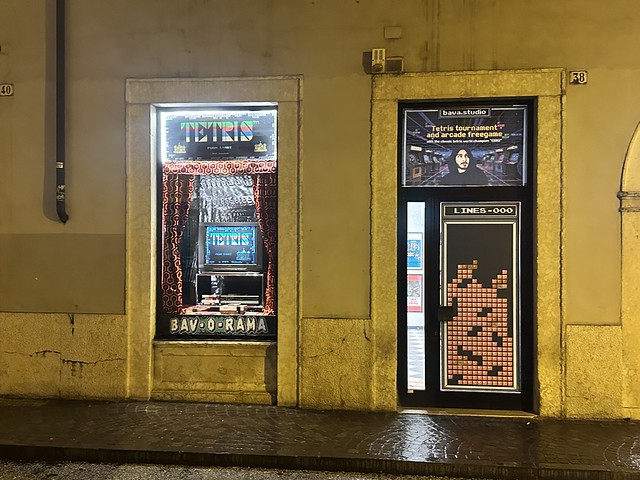
This almost catches us up. This past winter we had our most successful event yet: a Tetris tournament. It just so happens the world champion Tetris player lives just south of us in Rovereto, and Riki organized a tournament which he conducted, and it turns out folks love Tetris. We had well over 100 people throughout the day, and it was a lot of fun.
The diorama for this event featured an old-school TV with Tetris playing. I also figured out how to connect a wireless controller so that folks could play from outside the space, but I have yet to figure out how to secure it adequately.
The Tetris diorama led me to play with an idea for a recurring installation called “the living room console” that features different consoles and games, and will hopefully allow me to return to letting folks play them from outside the window.
As a result of the success of the Tetris event, we’re now working on our next diorama and concurrent event celebrating the 1% with a They Live diorama.
They Live Trump Poster
In fact, the idea came from one of the bava.studio regulars, Mattia, and he has mapped out the whole thing.
The diorama perspective for the They Live diorama
He even designed all the buildings that will be created using a 3D printer.
A design for one of the skyscrapers in the They Live diorama
We now have that 3D printer in the window of the diorama currently creating the various pieces of the scene:
So, what the hell is this presentation all about?
I’m not sure exactly, but if I were to try and bring it back to a salient point it might be that building spaces of engagement locally that can bridge the virtual, and vice versa, might be one way of escaping the dislocation many of us have been feeling online.
Everything I have shown you today is really just a series of blog posts, some physical and others virtual. The bav-o-rama dioramas are local posts to the community of Trento. To create them I am pulling from an archive of material that are the contents and products of the storefront. The various people that come by, comment, and participate in the events are the growing community. It’s slow-going, for sure, but so is blogging. What’s more, it fills a deeply human need I have in a foreign world to connect in time and space with the community I live in.
And that is the presentation, I will have to practice it for timing to make sure I get it all in under 20 minutes, but a lot of this is visual fluff, the main idea can probably be communicated in less than 10, but I like my geeky digressions.
I’ve been neglecting the Mastodon instances at both social.ds106.us and reclaim.rocks. But recently there have been some critical updates, and with the state of security on the web I figured it was time to be a good host. So I dove in with a little bit of trepidation because these are both running in Docker containers.
I know just enough about Docker to be dangerous. The layers of abstraction can quickly become vertiginous. Oftentimes mid-way through an upgrade I go running to Taylor Jadin for help—our resident Docker expert.
This time was no different than the others, but rather than leaning on Taylor when a Mastodon update went sideways, I turned to ChatGPT to see how far it could get me. Turns out for upgrading social.ds106.us it was very effective. I’m linking to the ds106.social Mastodon upgrade chat for future reference if needed, and I also have a summary document of the process to remind me of what the machine told me to do.
Feeling good, I then did the same thing for Reclaim’s official Mastodon instance reclaim.rocks. This upgrade was not as smooth, and I had to wrestle with ChatGPT to get this thing up and running after an hour. Taylor has a specific build we are using for our Mastodon, but ChatGPT went off script so now it’s using an official image and running the SSL certificate through Cloudflare. Once again I’m linking to the ChatGPT back and forth for reclaim.rocks’ Mastodon upgrade, so I can remember what I did. I also asked the machine for a summary document so I have a quick overview of what was done. I find the chats are too long and tedious to go back through, so a broader summary of what was changed can be more easily referenced if I need to change something back.
Coming off two wins thanks to ChatGPT, I pushed for yet another critical update for my personal PeerTube instance bava.tv. This also went pretty smoothly as the chat underscores, and once again I had a summary drawn up for the next time I work on this.
So, I did three important upgrades for self-hosted open source apps that can power the infrastructure of an institution with a little help from my AI friend. What’s more, even with the hang-up with reclaim.rocks it was probably one-third the time it would usually take. That’s not bad, and if you are worried about running these apps or taking control of your own infrastructure it is increasingly getting easier to do just that—take it from a hack like me.
In fact, this might be the easiest upgrade post I ever wrote, with ChatGPT doing all the summarizing of the process, as well as recording useful commands that I used to get it all working. The whole process of copying and pasting commands from the machine into my terminal and finding they work is pretty magic. A lot of people are celebrating the power of these tools for creating code, something I know nothing about just yet. But I am finding them fairly useful in helping “hone” my lackluster sysadmin powers.
is an ongoing conversation about media of all kinds ...
Testimonials:
Generations from now, they won't call it the Internet anymore. They'll just say, "I logged on to the Jim Groom this morning.
-Joe McMahon
Everything Jim Groom touches is gold. He's like King Midas, but with the Internet.
-Serena Epstein
My understanding is that an essential requirement of the internet is to do whatever Jim Groom asks of you while you're online.
-James D. Calder
@jimgroom is the Billy Martin of edtech.
-Luke Waltzer
My 3yr old son is VERY intrigued by @jimgroom's avatar. "Is he a superhero?" "Well, yes, son, to many he is."
-Clint Lalonde
Jim Groom is a fiery man.
-Antonella Dalla Torre
“Reverend” Jim “The Bava” Groom, alias “Snake Pliskin” is a charlatan and a fraud, a self-confessed “used car salesman” clawing his way into the glamour of the education technology keynote circuit via the efforts of his oppressed minions at the University of Mary Washington’s DTLT and beyond. The monster behind educational time-sink ds106 and still recovering from his bid for hipster stardom with “Edupunk”, Jim spends his days using his dwindling credibility to sell cheap webhosting to gullible undergraduates and getting banned from YouTube for gross piracy.