
WP-O-Matic 1.0 has been released today and what a fine day it is for the aggregated auto-blogging world! You can download it here. Guilliermo Rauch, the 16 year-old wunderkind from Argentina, has delivered an unbelievable tool for WordPress and (YES it works!) WPMu.
In short, what is WP-o-Matic? It is a plugin that allows you to publish a variety of content from other blogs into one blog. This is a tool often used to aggregate content into one blog space, some folks have a problem with it because it can be used to “steal” other people’s content and pass it off as your own, on the other hand when you are creating a distributed online learning environment like we are at UMW, it comes in extremely handy for aggregating all the different student blog feeds for a class, project, seminar, etc. into one space. Couple that with WPMu and you have a combination of tools wherein you can quickly and easily create multiple blog spaces and feed content in and out ’til your heart’s content. Groovy!
You can get all the wonderful details from Guillermo’s site, but there are a couple of things I want to highlight about this plugin that make it yet another important piece of the puzzle for UMW Blogs. First and foremost, WordPress-O-Matic is more akin to a fully-featured extension of WordPress rather than “just a plugin”. This is not like WP-Autoblog, which is just a simple space for copying and pasting feeds. (Although, it should be noted that WP-Autoblog can pull in the original post categories, something that WP-O-Matic does not do–a significant difference to note given that WP-Autoblog category feature makes sitewide tags for WPMu possible.) Additionally, it uses the SimplePie feed parser which is downright awesome -making all sorts of feeds from all sorts of places ripe for the picking.
The new version is organized around the logic of campaigns. What’s a campaign? A campaign is, quite simply, a specific group of feeds. For our purposes a campaign could be just as easily thought of as a class. What is slick about this is that you can bundle a group of feeds for a class into a campaign then manage and customize that group of feeds accordingly. Also, they are all located in their distinct spaces making organization a cinch–something BDP RSS doesn’t do so well (then again there are a number of things BDP RSS does that WP-O-Matic doesn’t). The customizations options for each campaign are very, very sick! Here’s a few:
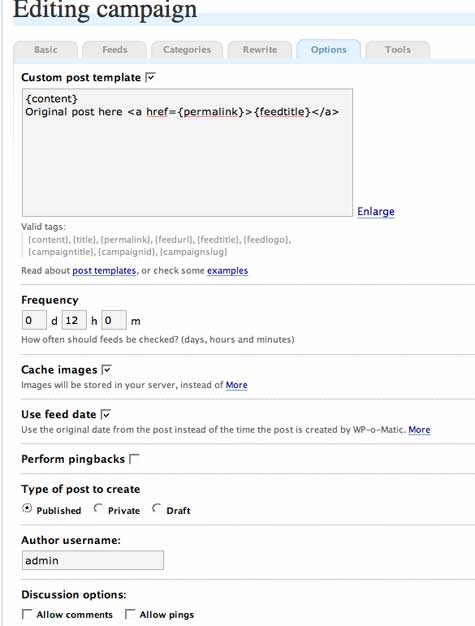
The Custom Post Template deserves a little attention. This is a wild feature that allows you to decide where to put the content of the post you’re pulling in, including the original post title, a link to the original post, a feedurl for the site your quoting, etc. What you have here is a way to customize the posts for any specific campaign (course). And customizing the links back to the original is extremely important so that an Autoblog can make sense to the potentially confused reader. This feature is really impressive, the only thing it is missing is a tag for the original author’s name -you find a way to add that and you are set (let me know if you make any headway 🙂 ).
The Use feed date option allows you to specify the time and date the original post was published rather than the time it was published via WP-O-Matic. Nice detail.
The Perform pingbacks feature gives you a check box for allowing or disallowing a pingback–another fine detail. This could prevent you from sending all sorts of needless pingbacks to a site, and issue that came up for me this Summer with WP-Autoblog when one student noted that the pingbacks were distracting because while they thought they had a comment it was just the Autoblog trackback notification. Now it’s easy to prevent this on a case-by-case basis.
This next feature rules: Type of post to create: Published, Private, or Draft. Self-explanatory, but a really big improvement. You can now still keep posts private, or even control when they are published through an auto-blogging feature. Wow!
With Author username you can specify an author, however that author has to also be recognized as a user on your blog. So, if you want to just put in a random name, this won’t work, the username must be registered on the blog you are running WP-O-Matic from.
Again, the fine tuning features really make this plugin remarkable, for Discussion options you can decide on a campaign-by-campaign (class-by-class?) basis whether to allow comments or pingbacks.
Just a really impressive array of customizing features in the Campaign Options tab, but wait there are a few more tabs that also allow you to fine tune the parameters of any one campaign.
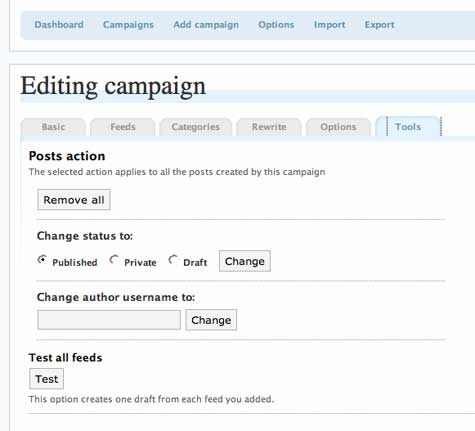
There is the campaign tools which enables you to remove all the posts brought in through this specific campaign (a labor saver, indeed). You can also use the tools feature to change the author username for all posts or change the publishing status of all the posts in a campaign.
Finally, there are even some basic options that are worth mentioning:
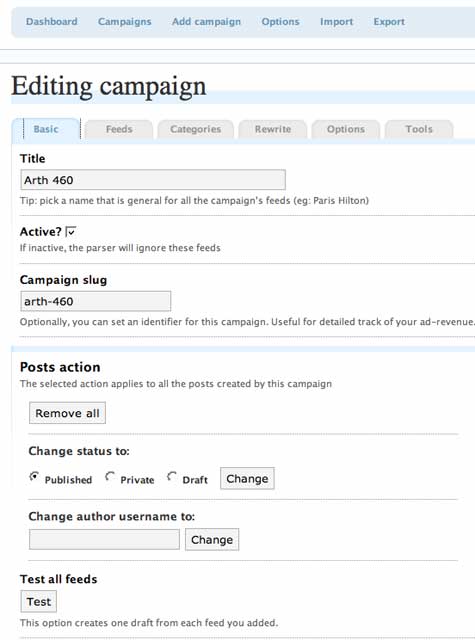
Many of which reproduce the functionality of the tools tab for a campaign, but one in particular I would like to point out: the Active? check box allows you to turn off a group of feeds without deleting them or changing their settings. A way of preserving the campaign without getting rid of it. Additionally, each campaign can have it’s own slug which you can then use the Custom Post Template to incorporate in the posts.
So why go through all this in such rapid-fire succession, well primarily so I can start making sense of all the features, but also because what we have here is a tool for granularly customizing a group of feeds from student blogs into one blog space on UMW Blogs. More than that, because it is SimplePie, their personal blog can be anywhere pretty much -on Blogger, Moveable Type, WordPress.com, etc. More than that, unlike BDP RSS, WP-O-Matic handles category feeds from UMW Blogs without a problem. Which is a huge deal for me as I push faculty and students to categorize their work for different classes, so that we can pull the feeds from each individual category -whew, I’m glad Guillermo is on the job!
You can see Wp-O-Matic in action on UMW Blogs (this is just a test) here.

Thanks for the thoroughness when describing my plugin! It’s really appreciated.
I have to mention, though, this is a release candidate and some bugs can still be expected. Known deficiencies include poor IE support (some small css/js issues) and incomplete help files.
The stable version, however, is on its way.
Guillermo,
Thank you! this plugin is a veritable gem! Your hard work is greatly appreciated and if UMW can’t reward you for it for whatever reason, I’ll be sure to.
Best,
Jim
I would like to use this plugin but the categories does not work.
Any body can help me in this regards.
WOW!!! what a great tool!!
I LOVE this plugin…thank you for posting this!
well! say if i want to display only 4-5 line of fetched post followed by a URIGINAL POST HERE… what kind of custom template i need to use..?
Great Plugin!
When fetch from a blog this plugin left amy comment to thier blog.How can i turn off this function.