
Here’s a simple hack to make your WordPress Multi-User Dashboard display news and recent posts from within your specific WPMu community. For example, I am going to briefly illustrate how to display the “Latest News” for our community (traditionally where the WordPress development news appears) as well as the 20 most recent posts from around UMW Blogs (traditionally where posts from Planet WordPress are displayed).
Below is a screen shot of what it looks like (click on the image to see a larger version to get a fuller sense of how this looks).
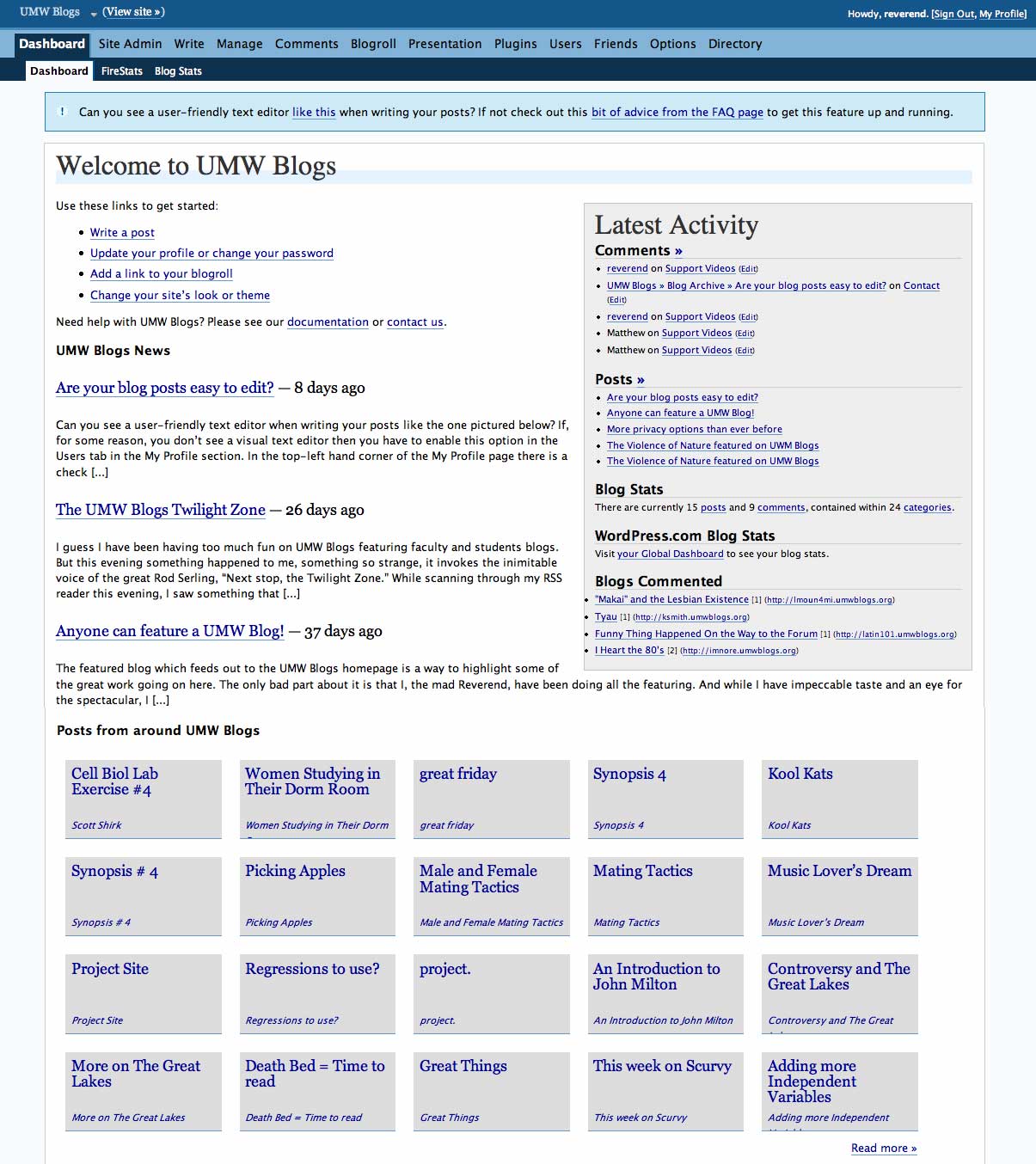
The idea was sparked by Gardner Campbell during the UMW Blogs forum we had a couple of weeks ago, and I think it is an awesome way to connect each individual with the larger UMW Blogs community right where they live—their blog dashboard.
It is a really simple hack that only requires changing a few lines of code in both the index.php and index-extra.php files within the wp-admin folder.
Here’s how:
First the index.php file found in the wp-admin folder:
Find the following line in this file:
And change it to the title of your WPMu community. Ours looks like this:
Next, find the following line of code:

And link it to your own documentation if you have some handy. Ours looks like this:

That’s it for the index.php file in wp-admin. Now, we need to modify a few lines on the index-extra.php file in the same directory and that’s all there is to it!
Find the following lines of code:
case 'devnews' :

$rss = @fetch_rss(apply_filters( 'dashboard_primary_feed', 'http://wordpress.org/development/feed/' ));

if ( isset($rss->items) && 0 != count($rss->items) ) {

?>
And change the ‘devnews’ primary feed to a feed URL that will deliver news specific to your community. Then change the title from ‘WordPress Development Blog’ to something more appropriate. Ours looks like this:
case 'devnews' :

$rss = @fetch_rss(apply_filters( 'dashboard_primary_feed', 'http://umwblogs.org/feed/' ));

if ( isset($rss->items) && 0 != count($rss->items) ) {

?>
Next, do the same exact thing for the Planet News feed, just use the Sitewide Feed for WPMu or some other feed you might have that will feature a range of content from a number of blogs in the community.
case 'planetnews' :

$rss = @fetch_rss(apply_filters( 'dashboard_secondary_feed', 'http://planet.wordpress.org/feed/' ));

if ( isset($rss->items) && 0 != count($rss->items) ) {

?>
Ours looks like this:
case 'planetnews' :

$rss = @fetch_rss(apply_filters( 'dashboard_secondary_feed', 'http://umwblogs.org/wpmu-feed/' ));

if ( isset($rss->items) && 0 != count($rss->items) ) {

?>
Finally, find the following line of code (which is the “More” link after 20 most recent posts in the blog community):

And change the URL to something that will bring the readers to more recent post. In our case we have a page that list excerpts from the fifty most recent posts, and that would be where we would want to send folks who want to see more. Below is the UMW Blogs code:

That’s it, now each and every user in your community has immediate access to a range of information and other people’s posts from right within their dashboard. Bring the content to them, don’t make them search too hard for it!

After finishing this tutorial I was sure there is a plugin I am overlooking. So I searched, and to my amazement there isn’t. I have never even looked at how one would make a plugin, but I am pretty certain this would be a cinch. perhaps I’ll try and finally give something tangible back to the WPMu community 🙂
Jim;
Thanks a lot for this useful hack. I would be implementing it in RUM Edublogs.
You know all too well by now that it’s my pleasure Mario 🙂
Pingback: » Started customizing the dashboard within … devlog