
A strange thing happened on the way to trying to open a Haunted Arcade at bavastudio, someone gave me an original Commodore 64C.* I’ve never seen the re-design of the classic breadbox version of the C64, so it was definitely a novelty.

The Commodore 64C revision of the breadbox made it look more “computery”
I was essentially tasked with seeing if this old machine still works, and for that I needed a few things: a disk drive, power source with a 7-DIN connector, 8-DIN video convertor, monitor, and joystick. I was pretty sure I had accumulated most of those components over the years, so I took the machine home to test it.

RF, Video, and Serial ports on the back of the Commodore 64C

Side ports include two joystick ports, the on/off switch and the 7-DIN power output
Turns out I had everything but the power supply. A 7-DIN power supply is not something I used with my C128 machine, that has the more traditional three-pronged grounded power cable. So I bought a C64 reproduction power supply from Keelog in Poland and they were awesome. The product came within a few days, and I love the way the C64 marquee lights up. These retro computing outfits are the best, the lion’s share of which are small businesses run by aficionados—what’s not to love!

A reproduction power supply unit for the Commodore 64

The 7-DIN power cable output for the C64 power supply
The other piece that also came from a retro computing outfit that I picked up back in 2016 is the uEIC/SD disk drive. This thing was a revelation for me when I started playing with it, and I now have it in my box of retro computing wonders. It was essential for this project, and as usual it took me some time to remember how to use it, but luckily I document everything on this blog.

The uIEC/SD disk drive
The uIEC/SD drive plugs into the cassette port (for power) and uses the serial port for transferring files on the C64c given it’s much faster.

Cassette port on the Commodore 64C powers the uIEC/SD drive
The other piece that I had bought years ago when figuring out how to stream the C128 was an 8-DIN video convertor to RCA component and S-Video. This is a handy little convertor that works really well to bring the computer into the 19″ Sony CRT I have in my office.

Video convertor from an 8-DIN output cable to S-video and RCA component

The 8-DIN video/monitor output cable (there is also an RF, but I have no time foe that!)
Once I had everything hooked up I was able to confirm this C64 was working perfectly. These 40+ year-old machines are total beasts. The few I’ve dealt with seem to last forever, and the simplicity of the C64s design is something to marvel at in retrospect. Strip a computer down to its very basic keyboard/CPU and let everything else be a peripheral, including the home TV as monitor. People have told me the Commodore monitors compatible with the C64, namely the 1702, are some of the best mass-produced monitors of the era. I never had one and they don’t come cheap, but I can believe it given the quality of everything else Commodore made around this time.
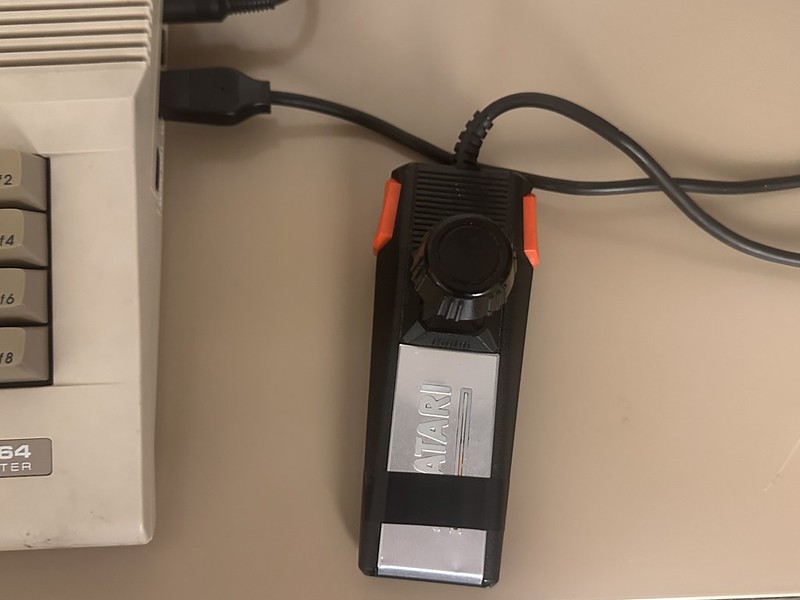
Atari 7800 joystick works well with the Commodore 64C
The final piece for the setup is getting a joystick so I can play the games. Turns out the Atari 7800 joystick works well with the Commodore 64C. And with that, I am ready to start loading and running games:

The blue screen of life from the C64
And for the cherry on top, loading a little Ghosts ‘n Goblins on the C64 would be nice, no?
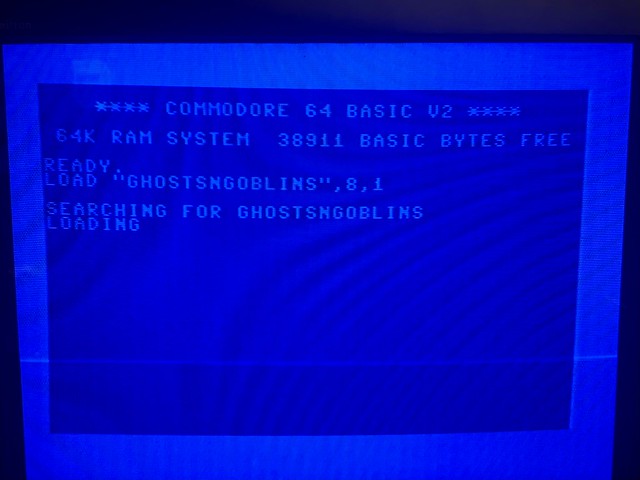
Loading Ghosts n Goblins–hardest part about re-visiting the C64 is re-learning the commands
It’s worth noting here, if for no one but myself, a few of the commands used to get things running.
First, to assign the uIEC/SD drive the traditional number of 8 (it’s 10 by default) you need to run these two commands (thanks to the Good Old Days blog for documenting it):
OPEN 15,10,15,"U0>"+CHR$(8):CLOSE15

OPEN 15,8,15,"XW":CLOSE15
After that all commands can run with the uIEC/SD card as drive 8. I might need to change this back to 10 for the C128 given that has a disk drive built in that is already claiming the ID 8.
Also, when trying to switch to a .d64 disk image (which is essentially a floppy disk) you need to do the following:
OPEN 1,8,15,"CD:RANDOMNAME.d64":CLOSE1
After that, to see what is on the disk type the following command:
LOAD"$",8
Then
LIST
That will list the program files on the d64 disk that you can then load and run, such as the following:
LOAD"GHOSTSNGOBLINS",8,1
Once it is ready the type
RUN
While diving into the Lemon64 forums (which are invaluable) I found a tip about using FB1K V1.1 as a file manager for the SD drive, so I’m excited to play with that.
Anyway, that is my quick start tutorial to remind me how to negotiate the .d64 images that I always mistake as files and try and load. Future Jim, remember to first open the .d64 directory then load and run files.
__________________________________________
*Long story short, I am try to build a mini-haunted house at the arcade that folks can enjoy then play the games for a bit. In this effort I am reaching out to other folks who have cultural associations here in Italy and this guy Max came on my radar. He runs a space called Babarum which is an amazing, multi-level walled Italian garden that he opens up to the community once a week. It has live music, theatre, DJs, and is pretty much the sickest home bar I’ve ever seen. It’s more like a home club. He’s been both kind and generous with his time and knowledge for which I’m most grateful. Beyond that he had a Commodore 64 hanging around and gave it to me to see if it works.

C64 was my platform in the 80s .. loved that thing. Years of playing Elite https://elite.bbcelite.com/c64
It is a pretty awesome machine, and the fact you have to restart the whole thing every time you wanted to play a new game is crazy to me. Did you ever figure out how the soft reset works? I have never gotten that to work consistently, but folks have create separate on/off button to soft reset and spare the main power switch with the new SD drives that suck power. I am tempted to try this https://www.youtube.com/watch?v=ZaNK42-DmpY&t=73s
No – never did try that – that looks like a novel solution. Also had a VIC20! Used to pirate games in Jr.high using my double deck cassette player!
I do want to get a working cassette player and see how slow that was for playing games 🙂