
OK, I’m officially in full blown UMW Blogs blogging mode, I will most likely prove insufferable for the next month or so, and that’s just the way it is, suckas!

Steve Harris Stalinism Blog (Oh what a header)
Today I actually gave my first advanced training session on WordPress to a group of five faculty. And I have to say it was a ball. Professors Steve Harris (History), Michael Killian (Biology), Betsy Lewis (Spanish), Andrew Dolby (Biology), and Zach Whalen (English/New Media Studies) were nice enough to remain polite through a kind of abstract session on UMW Blogs as syndicated publishing platform. Because all of these faculty were to some degree familiar with UMW Blogs, and could navigate the application rather well, we went through a few quick questions about uploading and the new interface and then proceeded to focus on how the syndicated logic of a course blog works. Exactly how does WPMu re-publish students work form their own space into a course blog? What kind of setup allows the student to compose and publish their work on their own blog/academic portfolio space yet feed it out easily?.
These are the questions we wrestled with, and I figured I’d blog the details of this setup for other mavericks WordPress users like Professors Sue Fernsebner and Jeff McClurken who will likely be adopting a similar method. So what follows is a tutorial for creating a syndication rich course blog using sitewide tags and FeedWordPress.
Here it is (is that The Roots I hear on the headphones or is it Yo La Tengo?):
For a while now we have been using BDP RSS at UMW Blogs for aggregated course blogs, but with that plugin out of development for a while now, it is time to explore some other aggregating options. The heirs to the spam aggregating plugin WP-Autoblog (long defunct) are WP-O-Matic and FeedWordPress. Given the elegance and simplicity of FeedWordPress it is the republishing aggregator of choice at UMW Blogs these days. What does it do? Well, quite simply it republishes a post (or several posts) from one blog into another, and provides a series of option to customize the republishing of a feed.
So, take this plugin (which I will go into more detail on below) and marry it with Donncha’s new Sitewide Tags Page plugin, which generates feeds for sitweide tags from a WPMu install. In other words, every time a person uses a shared tag on a post in their own blog, it automatically becomes part of a larger feed for that tag. So, if students for History 101 tag all their posts for this class hist101 in their own blogs, a sitewide feed on that tag will be generated, and it will look like this:
http://tags.umwblogs.org/tag/hist101/feed
So, that url above contain the posts from every student blog tagged with hist101, groovy, right?
OK, so the tag needs to be unique and students need to remember to use, but if those things happen, then this is one single feed for an entire distributed class that could consist of as many as 30 blogs. And this is where the details of FeedWordPress come in handy. So, we have the feed for all the student blog posts relevant to History 101, all we need to do now is activate the plugin FeedWordPress and do the following:
- Go to the Syndication tab in your WordPress stall that is created once you activate the plugin and add your sitewide tag feed, and click syndicate.
- If the feeds work swell, no errors, then click the syndication button.
- After that, go to the Syndication–>Options Subtab and customize the options for your feed (make sure it updates automatically and you consider if you want the permalink to take people back to the student blog, etc.
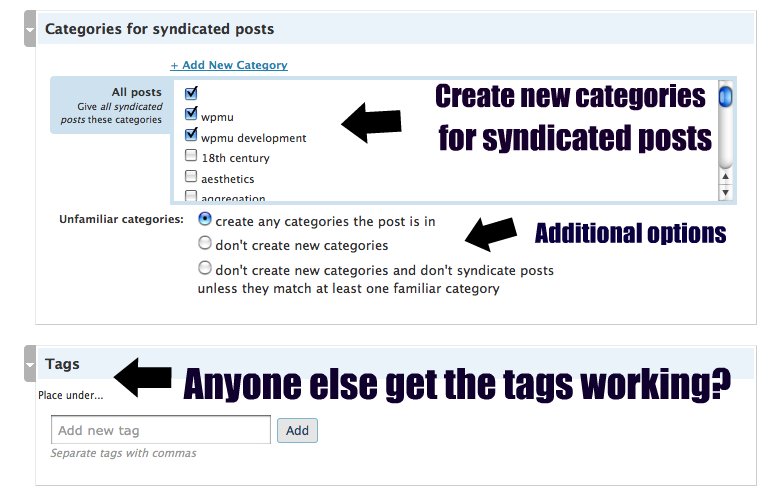
- Categories for syndicated posts do work (attention WPMu über admins: I learned this thanks to the ever wise D’Arcy Norman, you just have to do the Magpie RSS Upgrade included with the plugin). You can have the feed you are syndicated come into its own category or even include the categories the students use in their posts. I still can’t get this plugin to include tags fro the original post, however.
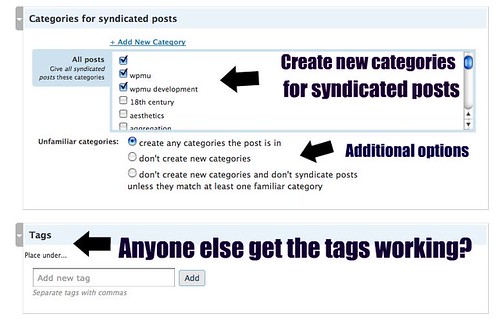
- Click on image for larger view
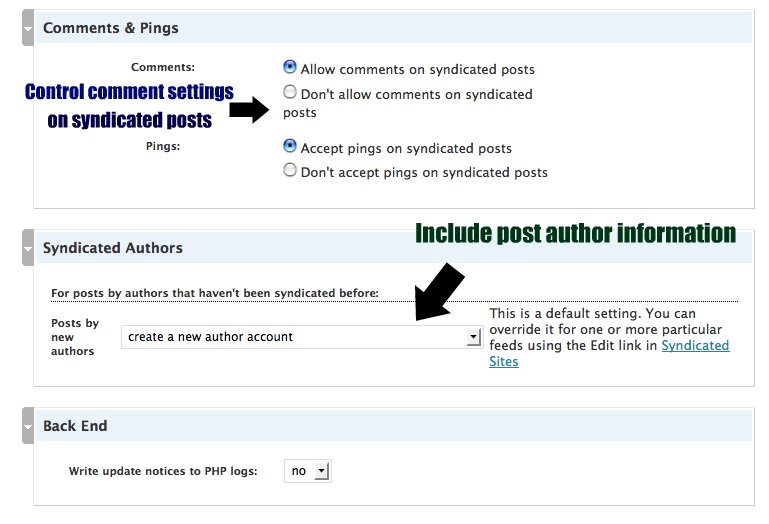
- Comments and ping can be enabled or disabled (you may want to disable them if you want people to comment on the student’s own blog (this is where changing the permalink option to original post might be useful). You all can choose the author settings here.
- After it is customized to your liking, you can then return to the main syndication tab, and check the radio box aligned with this link and click the “Upgrade checked links” button. And the posts will start a feeding 😉
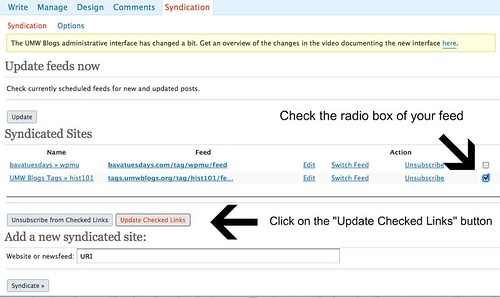
Click on image for larger view

Click on image for larger view

Click on image for larger view

Click on image for larger view

If you would like to get a sense of what a course blog like this might look like, take a look at the master course blog wrangler Gardner Campbell’s phenomenal Milton Seminar taught this summer. I love his design, and he has the permalink going back to the student’s blog, while aggregating all the distributed comments for all the students blogs in the sidebar (using the BDP RSS aggregator) . Gardner used FeedWordPress to great effect, and while this blog isn’t feeding off of one sitewide tag feed (there were few enough students so that Gardner could add the students’ feeds manually) it does demonstrate the wonderful power and elegance of the FeedWordPress plugin.
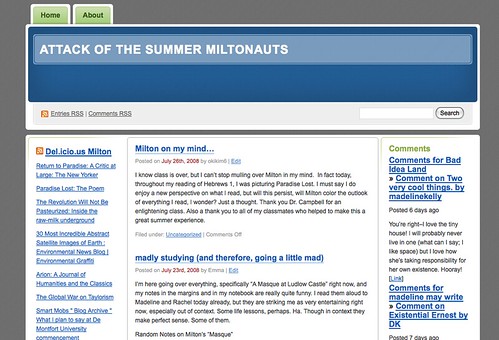
Gardner Campbell's Attack of the Summer Miltonauts course blog
Now, imagine the sitewide tag feed for Gardner’s blog as just one less step to do, and one giant step towards complete automation. We are getting there people!!! Die BlackBoard die 🙂

This is so PACKED with information. Thanks for sharing the post, and I’m going to recommend it to a few people who are also helping people understand WordPress.
Great stuff! Found you via Twitter.
Man, Jim, this stuff is intense. Just wanted to ask: what was that The Roots/Yo La Tengo reference? Or is it a reference at all? I like it either way! Also: good use of the word “suckas”!
Hey Brad,
Are you back now? Looking forward to reading the king of all Judges as he rips it up all year long! The musical references are just an idiosyncratic non sequiturs, because whenever I get deep into blogging WordPress and UMW Blogs (which I am at the moment) I have either The Roots’ “Things Fall Apart” or You La Tengo’s “I Can Hear the Heart Beat as One” blasting on the headphones —my inspiration.
Thanks for noticing my precise placement of suckas in this post, I think its power is lost on far too many readers 🙂
Jim;
FeedWordPress is a powerful plugin and it has been growing with WP through the years. I do not see the possibility in this version of publishing excerpts and not the whole post. Where I can control that?
Jim;
This plugin may do the trick: http://guff.szub.net/2005/02/26/the_excerpt-reloaded/ . However a code should be added to the theme.
Hey mario,
I haven;t seen an excerpts option for FeedWordPress, and if I were to be honest, a much as I like FeedWordpress, WP-Autoblog was extremely simple and effective. I liked the minimalism of choices, and the fact it gave you two basic options: show original post author or not and include full feed or not…those were the days 🙂
The plugin you show is interesting, but the theme hacking makes it tough to build out more globally. I’ll be testing it, and thanks for the tip.
Jim,
This is great for the film class, but 2 questions.
1) How do I aggregate the comments from all the student blogs in a sidebar?
2) Can I use FeedWordPress to feed those student blogs into a page on the blog, and not to the main blog page itself?
Hey Jeff,
You always ask the good questions 🙂
1) Aggregating comments is still extremely difficult with a large group. Reason being it is yet another feed for each blog, and it will bring the comments for every post on a student’s blog. No post specific comment feed. So, for example, Gardner’s seminar was using BDP RSS and placing the aggregator widget that comes with this plugin in the sidebar.
2) FeedWordPress brings the blog posts right into the blog, so no really separate page action unless you want to make the homepage of the blog more static, and feature announcements you make as an RSS feed in the sidebar (you could do this my grabbing the feed for an announcements category for example). But, you are right to point out that the main blog now becomes everyone’s. So, f this doesn’t work, BDP RSS is still an option, and will bring those posts into a separate page in the “ghost” like manner (they are there but not really). The FeedWordPress plugin leaves a more material trace, with one, solid RSS feed for all the class’ work -that being the real difference.
This reminds me… What’s up with your feed? I have http://bavatuesdays.com/feed/, but have just noticed that nothing’s been coming through for months.
Hey Jon,
This is most disturbing! How have you been surviving without the bava? 🙂 I checked Google Reader and Bloglines and it seems to work, are you using a different reader?
Best,
Jim
Hi Jim;
Just for fun, I use FeedWordPress to develop a little planet about WPMU: http://blogs.uprm.edu/wpmu . I used the excerpt related and the auto-delelete post plugin to fine tune it. As you can see you are everywhere in this planet.
Mario,
What is amazing to me, is that you just solved my issue with Jeff above. I was going to go back to BDP RSS, but this fine tune solves it. You rule, thanks for this beautiful combo.
Pingback: Syndicating and republishing decentralized content with WordPress | D'Arcy Norman dot net
How do I get the feed Jon’s got? Things would be so much more peaceful with a nulled Bava feed…
Ho ho D’Arcy… Jim, I’m on NetNewsWire. Is there another feed address I should/could use?
@Darcy,
You an;t pick on the bava, on the bava. Thi is home turf man, what’s going on? oving your FeedWordPress work by the way, and heading to the norman now.
@Jon:
Don’t listen to D’Arcy, try this one: http://bavatuesdays.com/wp-rss2.php
Not sure why this is happening, but bava is a mapped domain on another WordPress Multi-User site, so that may bork some RSS readers, and that makes sense if it has been months. Hmmmm.
I have been searching all over the net for an answer to this: You know how you can set options to make “permalinks point to” either original website or to this website. But this is a site wide setting, I am wondering is there a way to make some feed’s permalink point to original website while other feed’s permalink point to my website?
Please email me @ [email protected] if any1 knows the answer or can share some insight on this. Thanks
hello,
I have used Feedwordpress on Jobsite in which I have used monster, indeed.com site Feeds to pull jobs on my wordpress site for the users to see the jobs and apply for the jobs.
As Jobs are getting pulled on the the site no problem for that, But I just want to know, when user apply for the jobs, where the user job application goes, its not shown in the admin panel.
please help here…
thanks
hello,
I am working on the wordpress site using job roller theme when I search for in the search bar for any key words i get huge results for the keywords, i have set the page showing 15 post to display per page but the pagination in the bottom is not showing in the bottom. I dont know how its coming, I am using wp pagenavi plugin.
when I click on the other category having many posts it shows pagination in the bottom, only pagination for the search page is not showing.
can you please tell me how to fix this….
waiting….for reply.
thanks
mylife,
Sorry, I have no idea.