
Well, I have written a bunch about domain mapping on WPMu over the last year or so. Up and until tonight I have been using Richard Bui’s tutorial here along with David Dean’s Multi-Site Manager Plugin. The combination of the two have worked great for me thus far, and I liked that with this combination each mapped domain could act like its own, stand-alone WPMu install—with each domain have the possibility of unlimited dynamic subdomains—a feature I’m not so sure is available with this plugin. That said, you did have to be brave enough to muck around in the database.
Well, that was then, this is now. Donncha just released a plugin that brings domain mapping for WPMu to the masses in the form of a simple, easy-to-use plugin. Is Donncha on a roll or what? Last month it was the Sitwewide Tags Plugin (though it’s much more than the name suggests) which kicks major ass. This week it is the Domain Mapping Plugin, which is for many the Holy Grail for WPMu admins.
So, I just got around to testing it out on a WPMu install that uses [[CPanel], and it is actually pretty painless, though not entirely automated. Keep in mind this will only work for installation that have sub-domains setup, no love for sub-directories just yet.
Here is how I got it to work with CPanel:
After you install the plugin you will find the Domain Mapping subtab under the Manage tab. Once you go there you will see the following:
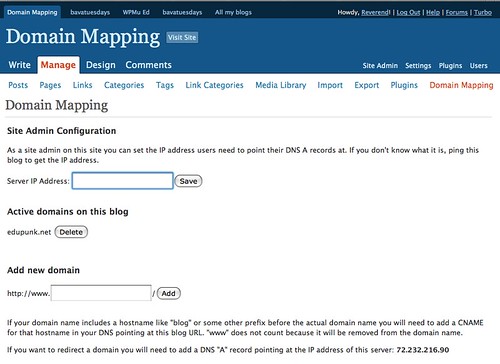
Domain Mapping Subtab
The logic here is simple, each WPMu blog will have access to this subtab once the plugin is installed. If someone has a blog on your system and they have a domain they want to map, they would need to do two things:
1) From where ever they purchased their domain, they would need to point their domain to the nameservers of the WPMu install. For example, if your WPMu install was hosted on Bluehost, they would need to point them to NS1.BLUEHOST.COM AND NS2.BLUEHOST.COM.
2) After that, they will need to go tot the Manage–>Domain Mapping tab and specify the IP address of the WPMu site and have them put in their domain. (You can decide how you want to share the IP address with them.)
That’s it on their end, pretty simple. But on the admin end there is one more step if you are using CPanel.
You need to create an addon domain for the mapped domain and point it to the directory with the WPMu installation. For me it looked like this:
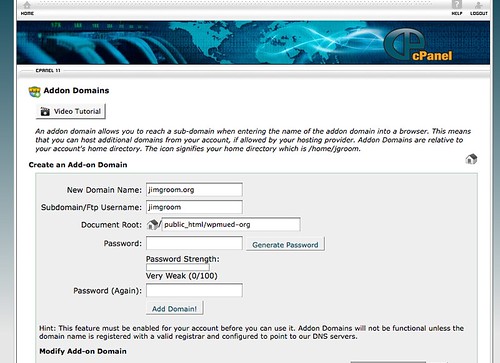
Add Domain Trick in Cpanel
You can see that the domain is added normally, but the document root is changed to point to the actual directory with the WPMu installation. After that, it works like a charm. Now, this was simple and awesome, and for folks who aren’t using CPanel it will probably work automatically once someone points their domain to the correct IP address. But with CPanel there is one extra step, and while a relatively easy one, it does rule out strict automation of the mapped domains. But, th upside is that at the end of the day even I can map domains with out hacking Apache settings or putting our WPMu install in imminent danger. Disco!
So, can UMW Blogs map domains now? Well, I gues we can now, can’t we 🙂

Donncha is amazing! The new WPMU Domain Mapping Plugin is awesome, but one thing to note is that with mapped domains via the plugin, you can no longer create subdomains off those. Check it out here with Donncha’s response.
Richard,
To be honest with you, while I love Donncha’s plugin and can see how invaluable it is for the community in terms of ease and accessibility, I also loved the idea that with your hack that you could create WPMu sites within sites. That was a huge bonus and something I have taken advantage of on several occasions. So thank you for all your awesome work. I don’t see one as ruing out the other, I will still be using both. Moreover, I didn’t see the loss of remote publishing as a deal breaker with your hack, it has worked beautifully for me.
Reverend,
Yea it’s definitely a cool feature, running multiple MU installs with a single MU. I personally kinda like having remote publishing so I can write drafts using the native WordPress app for the iPhone.
Very. Very. Very. Cool. I can almost hear the sucking sound of the entire internet re-mapping itself to umwblogs. Who needs Skynet when you have umwblogs?
Great work Jim on the post write-up and for keeping umwblogs on the cutting edge. Let’s just hope it doesn’t become self-aware.
Hi Jim
Great post.
I think you are on a roll with all these posts and ideas.
Thanks.
I could create an addon domain for the mapped domain but I could not point it to the directory with the WPMu installation. I then asked Hostgator to help me and they changed my Cpanel. And it now looks like yours.
In no time was I able to map a domain.
Have fun
Johan
Just wanted to say thanks, your post helped me get setup with domain mapping on my shared host. Well done & thanks again.
Paul
This works well – what tripped me is that I got lost in WPMU’s switching between admin panels of the various blogs.
You have to create the mapped domain from within the sub-blog you want to map, or it’ll screw you up. Pretty obvious – but it stunned me for an hour or two!
Thank you thank you thank you!
Great solution to a problem that was plaguing me 🙂
Cheers
Sam
Sam,
My pleasure, glad it worked for you.
Hey there!
I’m using Bluehost to do this stuff, and having no end to the troubles. A couple of questions:
Do we want to have a wildcard domain set up on Bluehost?
What is the IP address of my bluehost server?
Where do I change the CNAME, on bluehost or the registrar site (register.com)?
Thanks in advance! This is great stuff!
Rob
Hey Rob,
Last time I asked BH doesn;t allow wildcard DNS stuff, so you can only do subdirectories, but that policy may have changed. Not sure what the IP address of your server is on BH, you need to ask them.
TO change the CNAME through Bluehost, you need to call them and askl them to do it, if you registered your domain name on register.com, youshould have some sort of control panel in your personal account where you can change the DNS stuff.
Hello! Excellent step-by-step … That this goes for today August 2013? Or have had some changes to use subdomains for WPMU? Can I install WPMU in subdirectory or must be installed in the root?