More Notes on ds106 Clean-Up

I think the worst of the ds106 hack is behind us, and thanks to Wordfence managing most of the heavy lifting it was not all that bad in the end. Now I’m just going through and pretty ruthlessly removing plugins and themes that are outdated, removing users, and seeing where old PHP code that never made the jump from 7.X. to 8.X can be cleaned up or removed. I enlisted Tom Woodward for the PHP clean-up in a few themes and plugins, and I also paid for an updated version of the Toolset Types plugin, which drives the Assignment Bank -it was the easiest short term solution until we can figure out a way to replicate that functionality without a premium plugin. As mentioned in my last post on the hack, I also bit the bullet and purchased the latest version of the premium theme Salutation so that it was also PHP 8 compliant.

At this point I think we’re in a pretty good shape. The only issue after the clean-up has been a result of my zeal to remove plugins and themes. I deleted the 960bc theme Tom had already cleaned up (oops!) as well as the Daily Blank theme that’s driving the Daily Create. I restored a version of that theme that still had some left over cruft, so finally did what I should have done in the first place: download a clean copy of the Daily Blank from Github.

My idea is to try using the MU Migration plugin I’ve heard great things about from Charles Fulton to pull the Daily Create out of the ds106.us multisite into its own instance. That’s currently the most active of the sites, and exploding some of these sites from the multisite at this point will make it easier for me to work through a full blown flat-file archive/migration of the main ds106 syndication site that has almost 100,000 posts. So, the upside of all this is it provides a great excuse for a bit of experimentation with a new migration tool as well as some more archiving in the vein of UMW Blogs.

Speaking of experimentation, the whole reason I was playing with ds106.us that ultimately led to the discovery of the hack was to test out the WP Offload Media plugin I am running on this blog. It’s up and running on ds106.us as well, and serving media for the main ds106.us site as well as the assignment bank without any issues. The other test was to see if it works cleanly with a mapped domain, and this led to getting the Camp Magic MacGuffin domain re-mapped. Mapping a domain on a WordPress Multisite that’s running in Reclaim Cloud (where ds106 lives) is pretty easy, we even have documentation for it. The one thing I had to do was add the following line to the wp-config file given I was having cookie issues when logging into the admin of https://magicmacguffin.info/ :

define('COOKIE_DOMAIN', false);

Adding the above line in wp-config.php solved the login issues, and Camp Magic MacGuffin is once again mapped, so I can now further test how media that is offloaded to S3 works on a mapped domain.

While all the media in the media library has been offloaded to S3, I have not removed the local media given I’m not a very trusting person when it comes to losing files. That said, I did notice that existing files are still loading over the subdomain macguffin.ds106.us rather than being pushed to the domain alias on S3: files.ds106.us. I could do a rewrite in the database to ensure they load over files.ds106.us, but it’s odd given the assignments.ds106.us subdomain does push all images to files.ds106.us automatically. This is something I’m going to have to test more, but good to know that all the media files are in S3, and I can find and replace if I have to. But I do want to understand why they don’t automatically switch on this mapped domain site.

So, I guess we are far enough through the hack that I can get back to some experimentation, that eventually, will lead to another hack 🙂


Posted in AWS, digital storytelling, s3, WordPress, wordpress multi-user | Tagged , , , | Leave a comment

ds106 Hacked and WordFence to the Rescue

If you have used WordPress for any length of time, chances are you’ve gotten hacked at least once or twice. That certainly has been my experience, and it never helps when you let old plugins and themes sit around for a while and stink up the fridge. In fact, before I went on vacation over two weeks ago I realized ds106.us was down, and that was the clue that the site had been hacked. We have rapid response scripts to lock sites down when this happens and change passwords and cordon off everything so that we can work through cleaning up any remnants. There were malicious scripts left-over in several of the theme and plugin files that I manually cleaned up, but after doing some work on ds106.us with the WP offload Media plugin, I discovered that the hack had left scripts in almost all of the nearly 100,000 posts in ds106.us archive.

Not fun, and the worst part was I discovered this while on vacation and the Reclaim Hosting crew had their hands full with a more pressing issue. When Chris suggested Wordfence as a way to get me out of Slack, I knew he was right and decided to reach out to see if they would/could clean it up given the scope. I’m glad I did because not only did I get a sense of what Wordfence can and cannot do as part of the Wordfence Care offering, but also because Gert—who works with Wordfence and was my point of contact— was amazing. Like pretty much everyone, I love good customer service. In fact, Reclaim Hosting was built on a foundation of responsive support, so it was really nice to work with a company that also values a great support experience. I mean Wordfence have become synonymous with WordPress security for years now, they’ve built an amazing niche for themselves. Even more remarkable, is despite their growth and obvious success they’ve maintained such a high-level of support for the one-off user like myself. Major kudos to those running that ship given I have some idea how hard that balance can be.

So, a couple of things I knew would be issues that Wordfence confirmed, and one I didn’t:

  • Site running PHP 7.3 is a no-go
  • Can’t have old WordPress core files anywhere on server
  • A WordPress Multisites with more than 5 sites cannot be part of the Wordfence Care product I signed-up for

Points one and two were not a surprise, and I bit the bullet and bought the recent version of the Salutations’s Paralellus theme from ThemeForest so that I could get the site running cleanly on PHP 8. Removing the tmp folder with old core files was not an issue given it was only there when we were replacing core files after the original hack. The third point was not one I expected, but given the implications of cleaning a huge WordPress Multisite, it should not be all that surprising.

Luckily, ds106 only has about 9 sub-sites, so I temporarily “archived” (archive is the term WordPress uses for making them inaccessible to the web) a few that were tests or not in regular use. There are two sites I archived—namely the original Daily Create and the Re-Mixer—that I want to bring back online here shortly, but first I need to figure out what other sites might be a good candidate for flat-file archiving. After taking four sites offline I asked Gert if that would allow us to continue on the Wordfence Care package for the next year, and luckily it did! After that, they went ahead with the scan and clean-up of any and all offending malicious scripts. Whew!

The clean-up took several hours given the size of the database, and I’m still waiting on the post-mortem given this was all done over the weekend on Saturday and Sunday!—did I mention I love Wordfence? As of now all the offending scripts have been removed and I’ve been going through and removing out-dated plugins and themes in an attempt to avoid any re-occurrence. That said, I’m happy to remain on the Wordfence Care plan for another year to ensure all is good. Part of this is because I have an idea for a new ds106 course and you can’t start something new until the existing infrastructure is solid. Not to mention it just makes good sense to continue the clean-up and archiving of large parts of this site to future-proof its survival. I think that was the big take-away from the UMW Blogs archival project, and it’s work we should continue to push on.

It might be worth noting the thing that tipped me off there were still hacked files was browsing ds106.us on the phone, something I normally would never do. But given I was on a vacation from my problems (well, not really in the end!),  I had been testing the WP Offload Media plugin for ds106.us using the phone. When clicking a link on the site via mobile a new tab gets created that opens a crypto spam site, but this happens only on mobile devices. So it was hard to find, and probably impacted next to no one given the site is fairly dormant, that said this aggression will not stand, and hence Wordfence did the sweep and things are cleaner than a fresh “Hello World!” site.

There’s still a PHP conflict on assignments.ds106.us that needs to be resolved, and not able to get the wp-cli to play nicely to find and replace some strings to ensure all older embedded Youtube videos play, but if those are the worst of my problems right now then we’re on easy street!

Something else that might be worth noting is that ds106.us is hosted on Reclaim Cloud, which made giving Wordfence access to a single container in a clean way separate from my other environments pretty easy. We can use the collaborator tool for this, and I have to say it made giving server-level access to a container that much cleaner. That said, Wordfeence also needed a user with SSH access beyond the built-in web interface SSH client, which is possible if they share a public key. The one issue we hit is when someone shares a public key and we try and use the SSH Gate created by Reclaim Cloud there can be issues when connecting server-to-server. Taylor suggested adding the public key directly to the server environment (so not through the SSH key interface in Reclaim Cloud) and then using ssh user@ipaddress to access once the public key was added, which worked perfectly. Gert was patient with me while we worked through this, and this is very good to know for any future issues we may have. because, let’s face it, when using WordPress you’re a big target on the web in this day and age. And while preventative security is crucial, hacks will happen and response-time and effective clean-up services are increasingly becoming necessities when you host your site using WordPress.

Posted in digital storytelling | Tagged , , , , , | 4 Comments

Notes on WP Offload Media

At Reclaim Hosting we’ve been exploring plugins for offloading media from larger WordPress instances to object storage such as AWS’s S3 or Digital Ocean’s Spaces. There are a lot of good reasons to do this:

  • First and foremost, we want to save space on Reclaim Cloud servers given a big WordPress Multisite can eat up a ton of space on uploads alone, and that’s less than optimal given those servers are dedicated with fixed storage for optimal performance.
  • If we have to migrate a larger WordPress site, having the files in cloud-based object storage makes that process quicker and easier given no media files need to be moved
  • Offloading WordPress media helps ensure there are no issues serving media for a multi-region setup that is distributing traffic across several servers
  • And, ideally, it is faster given you should be able to server the media through a content. delivery network (CDN) like Cloudflare that stores/caches media across its vast network making assets quicker to load

So, with the why out of the way, the next question is the what? As usual, I am using this, the  bav.blog, as the initial test run for a single WordPress instance. I’ll be offloading the 10GB of media in the uploads folder on this blog to AWS’s S3. Simulataneously, I’m using ds106 as a test for a small-to-decent sized WordPress Multisite instance to offload media as well, so this is a two-pronged test.

Now to the most interesting question, how? I did some ‘research,’ and WP Offload Media plugin seems to be the most fully-featured option available. For our purposes we are using the Pro version given we need many of the advanced features and plan on rolling this out more broadly for some of our bigger WordPress sites.

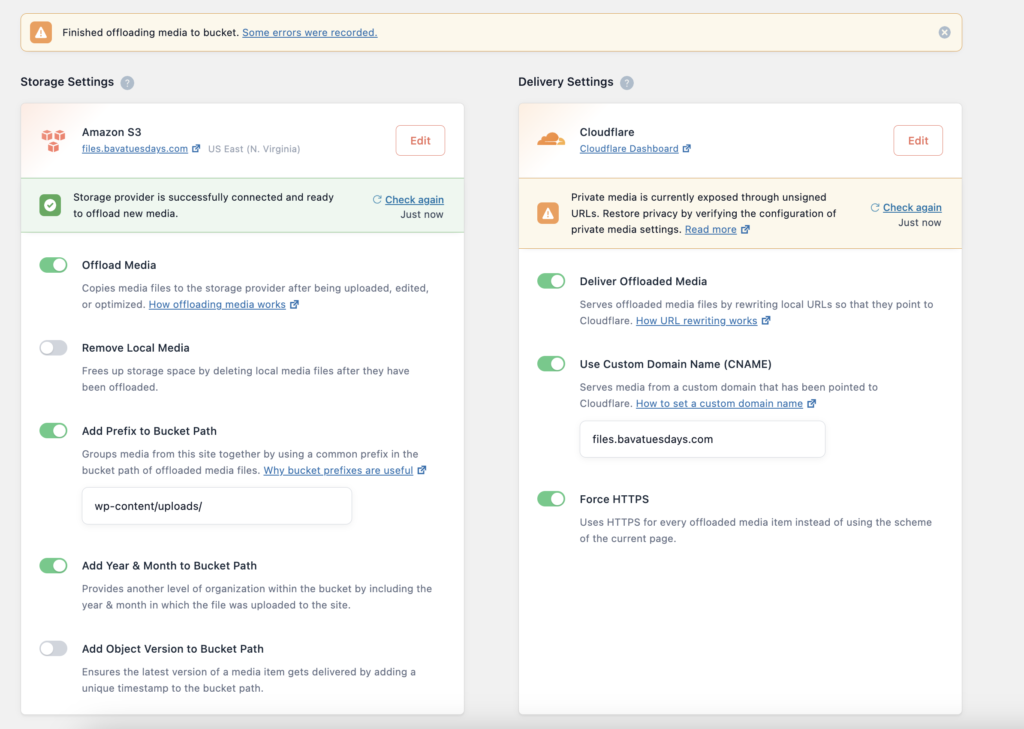
Screenshot of the WP Offload Media Interface

WP Offload Media Plugin Interface

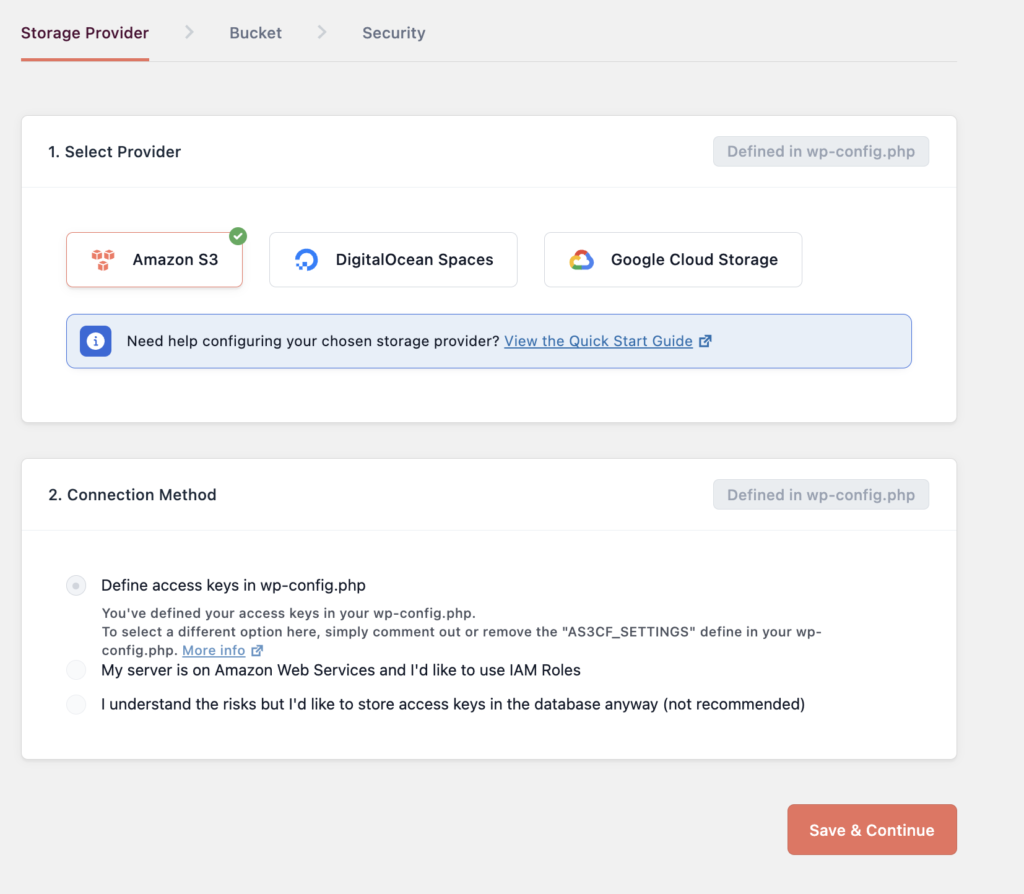
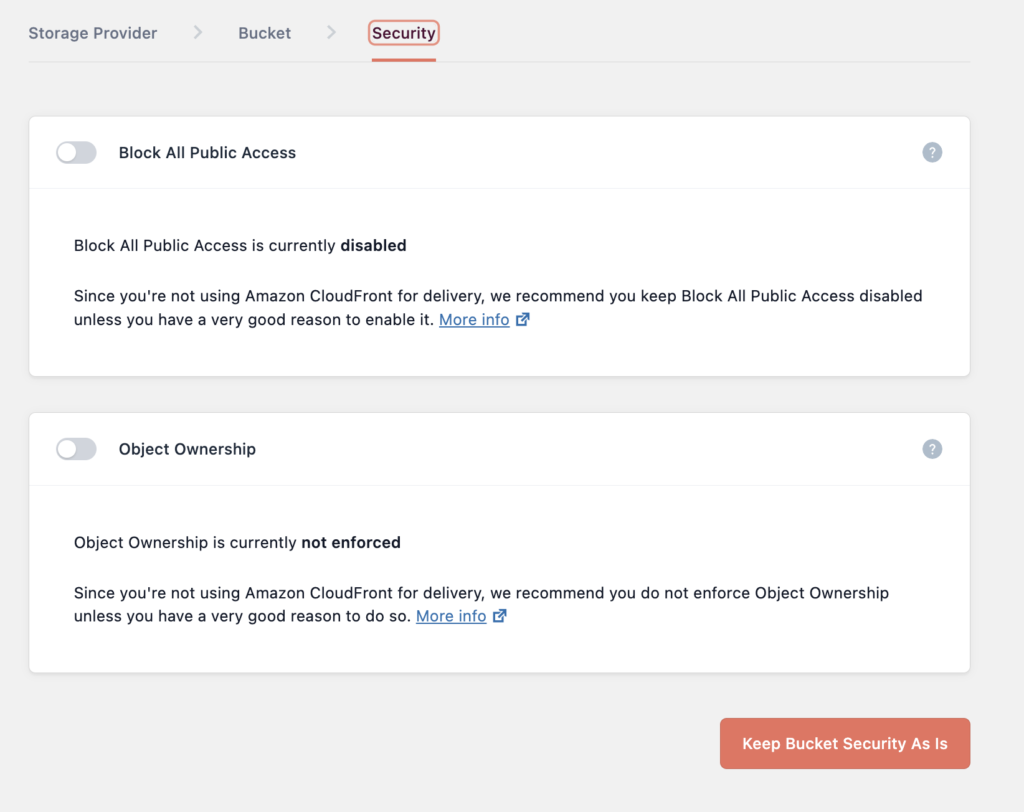
It has integrated tools to help you setup your storage across several S3 service provides, including AWS, Digital Ocean and Google. This is where you instructed how to add your S3 keys, define the bucket, and control the security settings for the bucket.

Screenshot of Storage Provider interface for WP OPffload Media

Storage Provider interface for WP OPffload Media

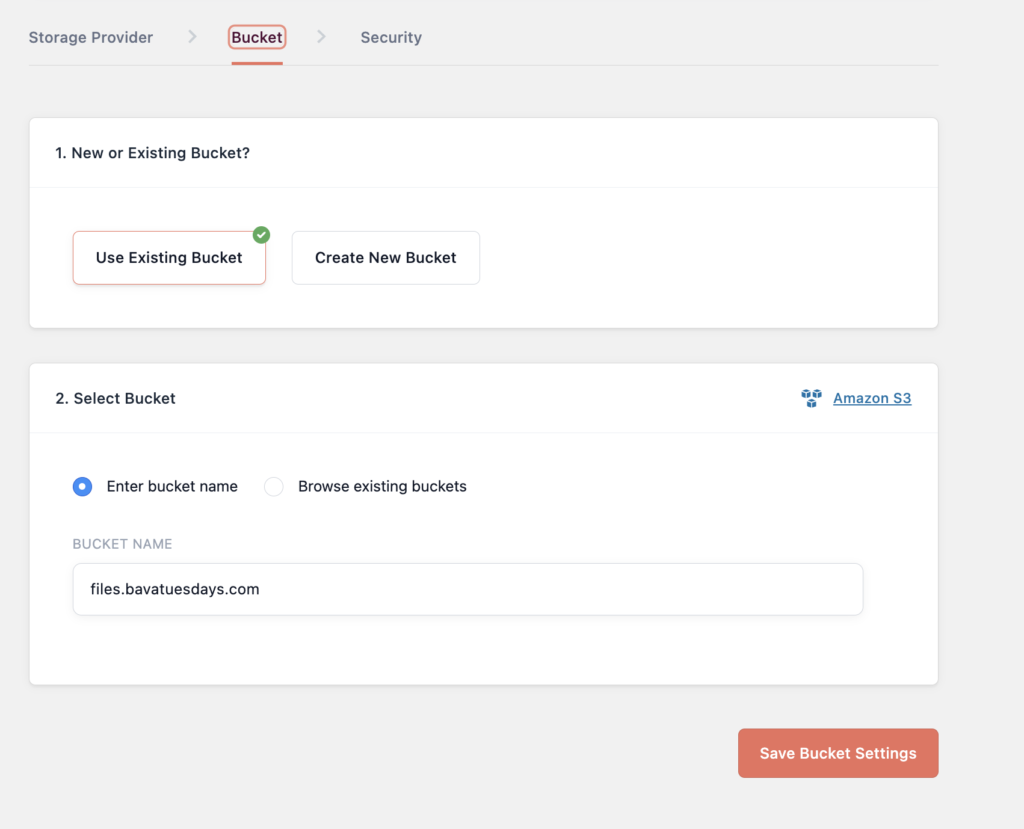
One important thing you need to do if you want the S3 files served over a domain alias is to make sure to name the bucket the same as the alias domain you want to serve files over. For example, for bavatuesdays the files will be served over files.bavatuesdays.com so that is also the name of the S3 bucket files.bavatuesdays.com:

Screenshot of WP Offload Media Bucket Interface

WP Offload Media Bucket Interface

Screenshot of WP Offload Media Security Interface

WP Offload Media Security Interface

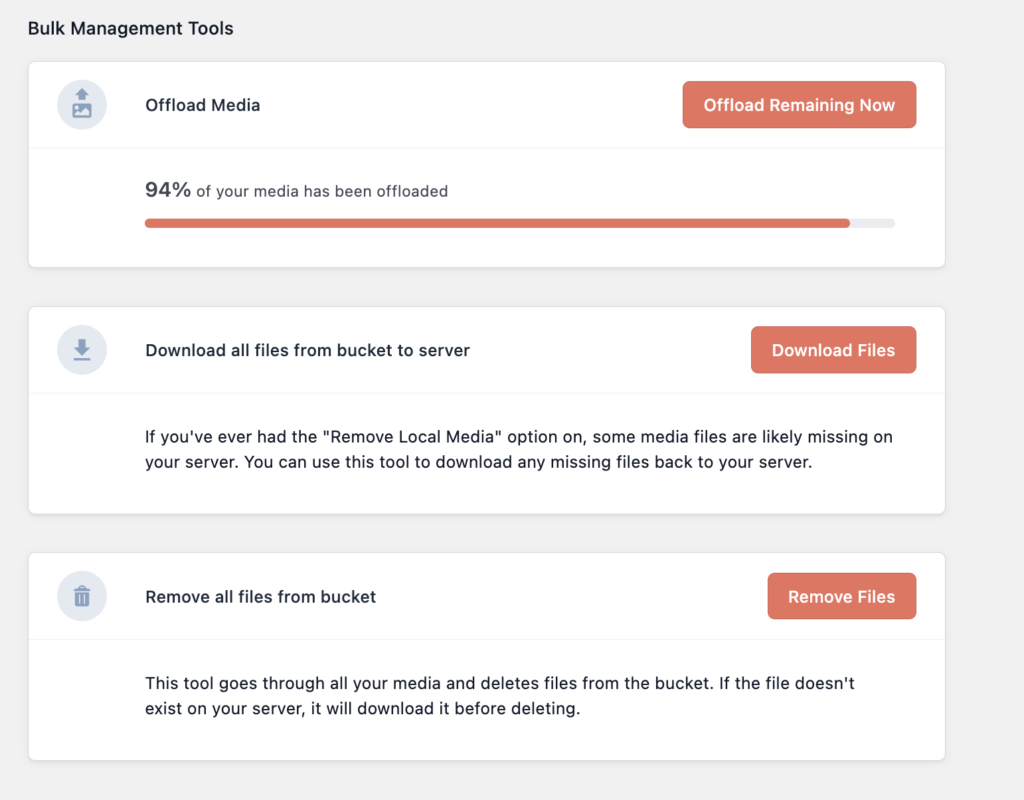
Once your bucket is connected, you can then use the tools available to offload your media to the new storage provider. I found this step took quite a while for bavatuesdays. I had 6,000 files to copy over, and that took several days to complete. It worked, although about 6% of the files had issues that were linked to being in new locations.

I was wondering if I could use the s3cmd tool to sync all the pre-existing files over to the S3 bucket, and then serve the media from there using this plugin without having to go through the offload media tool for previously uploaded media given how long it took on bavatuesdays. I used S3cmd to sync the media files for the ds106 multisite before offloading, and while all the media moved over cleanly, I still needed to run the offload tool through the WP offload Media plugin. While took forever on bavatuesdays, as noted already, it did all 11,000 files for ds106 in about 15-20 minutes, so I am wondering if syncing all files to the S3 bucket beforehand made offloading faster or if the fact bavatuesdays is a the multi-region site caused issues that slowed it down on that site. I’m not sure, but I will definitely have to figure that piece out.

Also worth noting is that the WP Offload Media plugin worked cleanly for the ds106 multisite with various subdomains and at least one mapped domain, which is very good news.

One issue I ran into on bavatuesdays was linked to the fact that I had used the WP Offload Media Lite plugin a few years back as a test. It ran for about a year or so and then I turned it off, but when I re-activated the pro version using a new bucket, namely files.bavatuesdays.com, the database had already stored details about the old bucket  bavamediauploads I’d setup previously, so there were some issues. I had to manually remove media from the old bucket through the Media Library and then offload it again to the new bucket. The plugin adds tool to the Media Library for removing and adding media to the S3 bucket, which is nice, and it is possible to bulk select the removal and offload options, so it was not too painful, but this is something to lookout for if you have previously used the plugin.

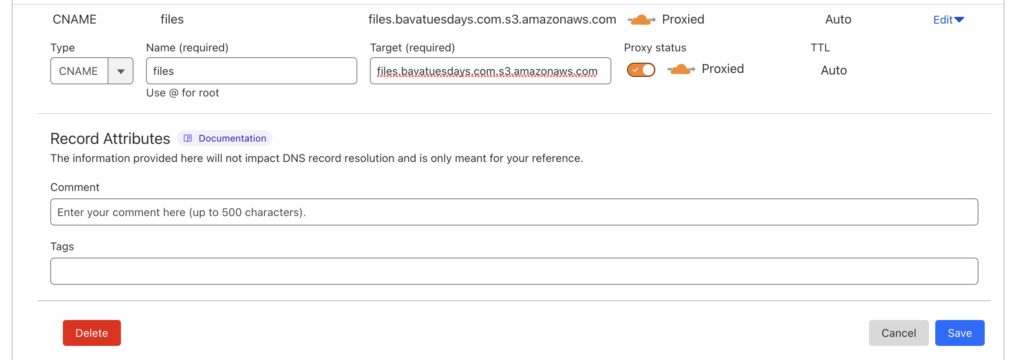
Once I had all the media offloaded cleanly, it was time to test running the delivery through Cloudflare. First thing to do is create a CNAME domain alias to map to the bucket in order to deliver media over the subdomain files.bavatuesdays.com. To do this you create a CNAME in Cloudflare and the value you add is files.bavatuesdays.com.s3.amazonaws.com with the first part of the target before the S3 reflecting the domain alias.

Screenshot of Adding CNMAE for domain alias in Cloudflare

Adding CNAME for domain alias in Cloudflare

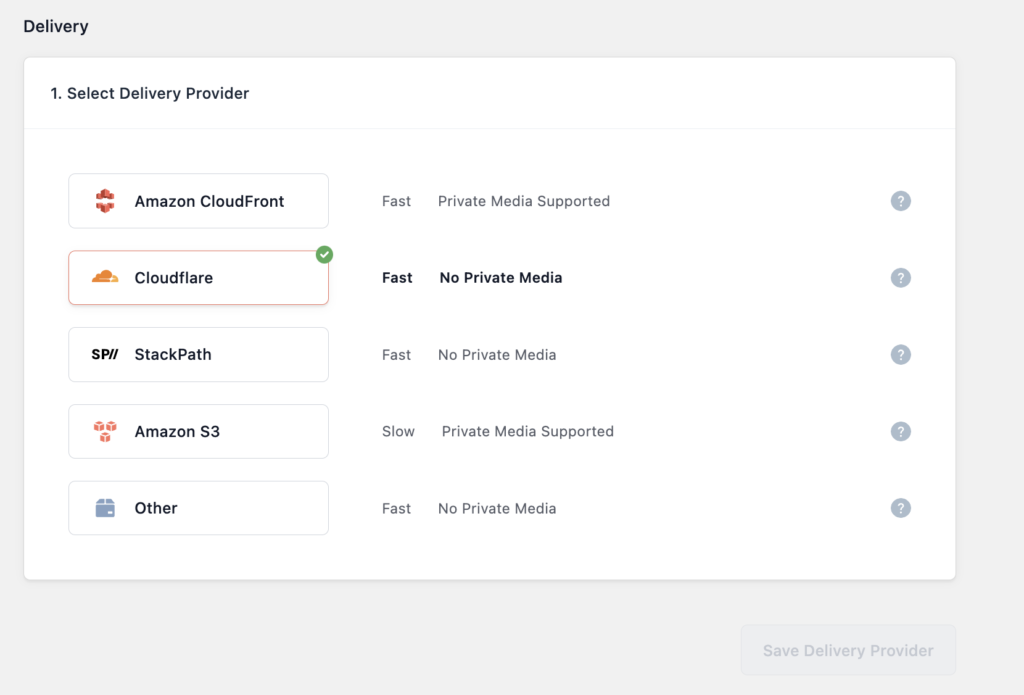
Once that is added go to the delivery section of the plugin and select what provider you will be using, as you might have guessed this blog is using Cloudflare to harness their CDN for faster media delivery.

Screenshot WP Offload Media selec t Delivery provider Dialogue Box

WP Offload Media selec t Delivery provider Dialogue Box

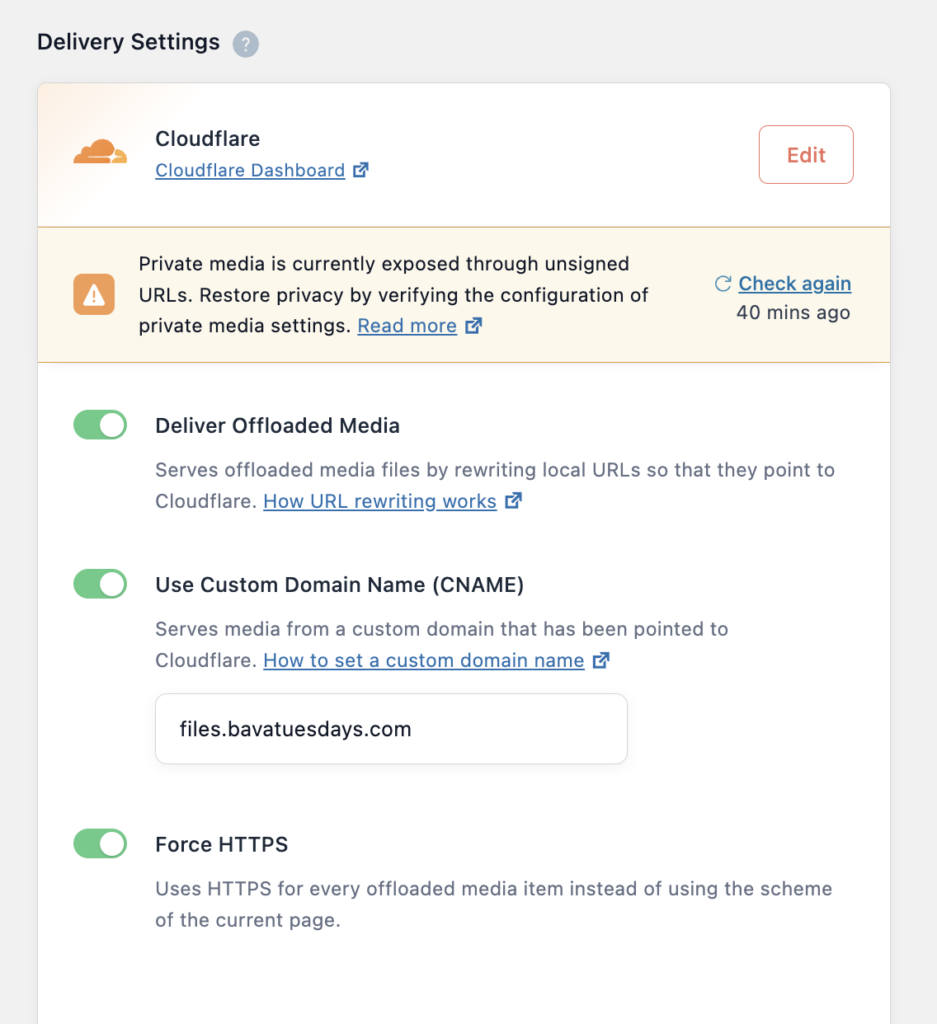
After that, toggle the “Deliver Offloaded Media”  button to start delivering media from the S3 bucket, and also toggle Use Custom Domain Name option to enables the alias files.bavatuesdays.com:

Screenshot of WP Offload Media Delivery Options

WP Offload Media Delivery Options

I also selected Force HTTPS, but not sure that is making a difference given that is already happening on Cloudflare. Also, there’s a private media settings error that I think is mainly linked to AWS’s Cloudfront option, so not sure if it is relevant for this setup through Cloudflare, but will need to verify as much.

I’m also using a similar domain alias on ds106.us as well (files.ds106.us), and it worked identically for the WordPress Multisite setup and is functioning without issues as far as I know. I still have to test some more sophisticated permissions setups for serving media, but all-in-all, I think this plugin really moves us towards being able to offload a significant amount of stored media on our dedicated servers to S3 buckets which should free up terabytes of data on our Cloud infrastrucuture, which would be a gigantic win!

Posted in AWS, plugins, reclaim, Reclaim Cloud, s3, WordPress | Tagged , , , , , | 8 Comments

10 Years a Reclaimer

I have a longer post I want to write about Reclaim Hosting at what seems an inflection point for the company. I’ll use that to get a bit more indulgent about the where we’ve been, where we are, and where we are heading. But for this post I just want to take a moment to acknowledge that as of today Reclaim Hosting is the only place I have ever worked for ten years, just barely beating out UMW a couple of months back.

In many ways I consider myself first and foremost an employee of Reclaim: I still answer tickets; I still make sales; I still do edtech work; I still do talks on occasion; and most importantly I still enjoy all of it. But I don’t know exactly why? I have seen much better people than me burn out, but maybe it’s because I’m equal parts stupid and stubborn: I love a simple routine, and Reclaim has provided a stable, drama-free work life that has afforded me just that—with the added bonus of living in a foreign land. Plus, given I never truly stop working, running my own company makes good sense and it removed the pointless railing against a boss which may have even made me somehow more productive.

10 Years at Reclaim is, indeed, a lot of good work, and I am proud of pretty much all of it. It’s a landmark for the company on many levels, but today I’m just one of the employees that make it work. And, I must say, it has been very, very good to me. I truly love Reclaim Hosting for not only providing a human alternative to the faceless tech conglomerates, but also because it has been a great place to work amongst amazing people for the last decade, thanks Reclaim!

Posted in reclaim | Tagged | 3 Comments

Reclaim Today explores Docsify This

In our most recent episode of Reclaim Today, Taylor Jadin and I talked with Paul Hibbitts about his work to create Docsify This. This tool is in many ways part of a longer trajectory of Hibbitts’s work, which I first learned of through the creative ways he was using the open source flat-file content management system Grav to build out open course templates. His work with open source, markdown-based templates broadened to include Docsify, a lightweight tool for publishing documentation. More recently, he created his own tool, Docsify This, that enables folks to take markdown from any document and convert that into a web-based HTML page without the need for a server—making the entire process as simply as copying and pasting a link. It’s not only a cool, useful tool, but the discussion frames the trajectory of Paul’s work from Grav through Docsify in terms of a journey to make the online publishing process as easy and lightweight as possible. If you’re interested in open source publishing tools that might prove useful and make someone’s life easier, this session just might be for you.

Posted in reclaim, Reclaim Today | Tagged , , , , , , , | Leave a comment

Pledge Against Surveillance

Don’t worry if you missed today’s Reclaim Open session featuring Ian Linkletter speaking out against surveillance in education technology because we have all 24 minutes of this call to action recorded so you can share it far and wide:

As Ian recounts, it has been almost 3 years since his battle with Proctorio begun, and he is not backing down. He is truly a model for leading with principles and standing up to online bullies. What’s more, he is also acknowledging that there’s power in numbers and that resistance is not futile. He is asking folks to take a pledge against surveillance, and I think the occasion to remember what is happening to Ian, is an important lesson we should ever forget: it could happen to any of us!

Watch the session, sign the pledge, and remember “you gotta suss, suss, suss, suss, suss, suss/ Suss, suspect device.” 

Posted in Reclaim Open | Tagged , , | 2 Comments

Reclaim Cloud in Europe!

Image of the European Union flag

EU Region in Reclaim Cloud

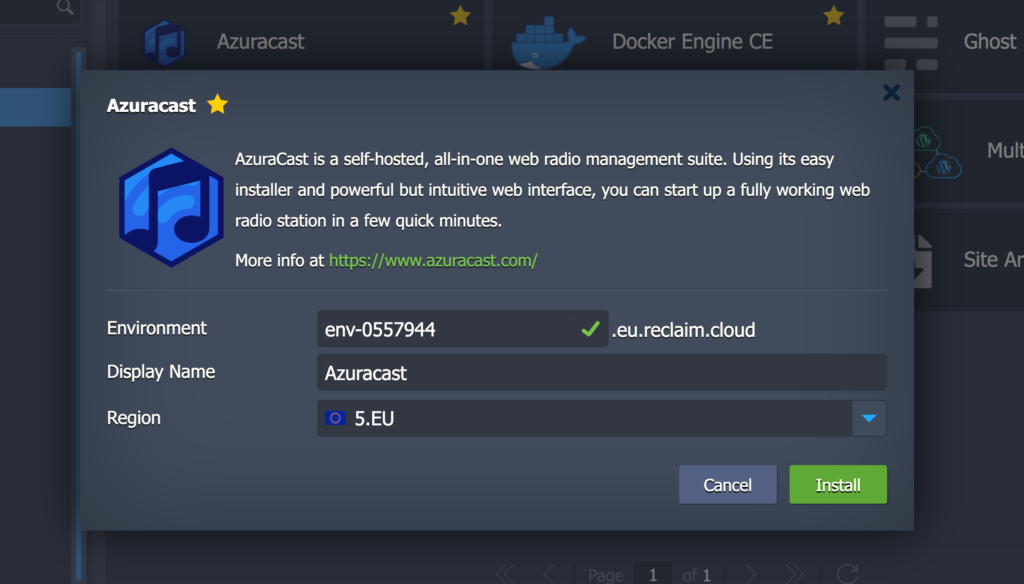
It’s official, as of today we now have an active European Union (EU) region in Reclaim Cloud, located in the partynacht central of Berlin Frankfurt, Germany. This has been a long-time coming and we’re thrilled to expand the geographical scope and reach of Reclaim Cloud to the European Union. Not only will this provide additional server nodes in our broader cloud cluster, but it will also help make it easier for existing clients to remain compliant with GDPR regulations.

Screenshot of a dialogue box for installing Azuracast in a EU region on Reclaim Cloud

Azuracast in the EU Region!

With each region added comes a significant investment of time and resources, so it’s very rewarding to see Reclaim Cloud grow from the initial two (US East and West) to now five regions in just under three years. It’s been a big year for Reclaim’s infrastructure to not only expand the cloud, but also shore up security while preparing for an underlying kernel migration. No rest for the weary!

Image of D.R.I.'s album "But Wait, there's more"

DRI’s “But wait…there’s more!”

“But wait….there’s more!” Over the coming weeks and months we’ll be unveiling an entirely new service for high-traffic, high-availability WordPress sites in the Cloud: Reclaim.Press. Stay tuned for more!

Posted in reclaim, Reclaim Cloud, ReclaimPress | Tagged , , | 4 Comments

UMW Blogs: a Diamond in the Rough

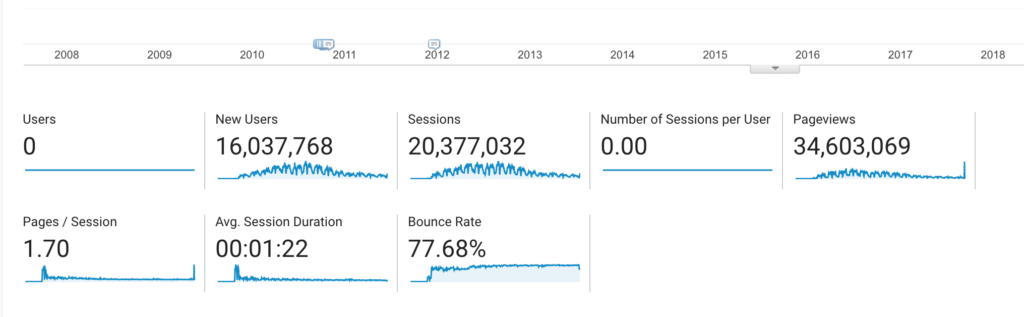
I don’t really know how to write this post. Saying goodbye is never easy, and sunsetting a duct-taped platform that gave life to thousands of voices for over 16 years is not trivial. Out of curiosity I peeked at the aggregate numbers for UMW Blogs when we first started tracking hits in 2010 (3 years after its launch in 2007) and it’s kind of mind-boggling:

UMW Blogs traffic since 2010

That’s well over 16 million users that started 20 million sessions and viewed 34 million pages that have been recorded. Not bad for a humble publishing platform for the UMW community that was born on a shared hosting account for $75 annually—let’s round-up to $90 with domain registration.  In many ways UMW Blogs embodied the anarchic spirit of fast, cheap, and out-of-control technology that flew in the face of over-engineered, locked-down, and expensive systems that were increasingly third-party solutions. Not only did the existing systems provide little to no agency for the broader community, but there was seemingly less than zero interest in serving the context of an educational institution—teaching and learning was an after-thought of these systems, if at all.

This is the primordial ooze from which UMW Blogs emerged in the Summer of 2007, almost exactly 16 years ago this week. It was not the product of any one person, but rather an amalgam of actors and factors conspiring to cultivate, capture, and broadcast the “life of the mind” at a small, public liberal arts college. The willingness to provide this online space to actively promote thoughtful, compelling, and authentic reflections from across the UMW community was a radical act of faith in the open web. And, I would argue, it did just that!

I’m not pretending UMW Blogs saved lives or changed the world, it didn’t. But I would argue that this modest experiment underscored that education is at its root a set of social relations that the web, at its best, amplifies and augments in ways existing systems at the time failed to imagine. While WordPress was the technology that made these connections accessible, it was the human will to learn through connections that underlines the true value of this platform.

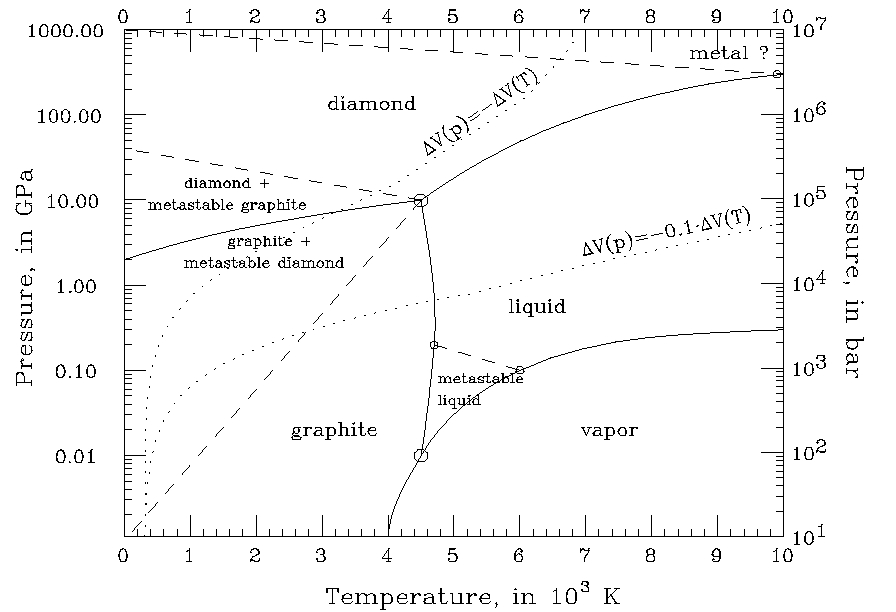
There are literally thousands of examples of these connections, which will live on indefinitely given it’s been meticulously archived thanks to Shannon Hauser, Lauren Hanks, and Taylor Jadin.* But one example that struck me was a random blog called pchem that had only 3 posts in the Fall of 2011, one of which was the ubiquitous “Hello World!” The second was a post describing a diagram that illustrates the intermediate phases that occur in between graphite and diamond.

I have no idea what any of this means, but the student who wrote this post was digging in quite thoughtfully, and then one day several years later—October 26, 2014, to be precise—24,000 other people found this post for some reason. It was the single biggest day of traffic ever, and it was a post written by a student to help explain a complex chart about conditions under which diamonds are forged from graphite at a given combination of temperature and pressure. The chemical process by which something so beautiful and priceless is formed from the salt of the earth is worth reflecting on as UMW Blogs is gracefully retired. A diamond in the rough, for sure.

___________________________________________

*Their amazing work to flatten thousands of sites and tens of thousands of posts to a HTML archive will provide an invaluable glimpse into higher-ed at the cross roads of the social web.

Posted in umw, UMW Blogs | Tagged , , , | 4 Comments

Seeing 30 Years of WWW

On Monday we premiered Olia Lialina‘s keynote as part of Reclaim Open’s virtual event, which has been—and will continue to be—happening throughout July. Lialina’s talk is very much a highlight given her ongoing work to preserve and curate the work of the early web with online exhibits such as One Terrabyte of Kilobyte Age, featuring homepages from the free web hosting service Geocities that might have been otherwise lost in the Yahoo! purge circa 2009. This keynote beautifully balances scholarly critique with a playful joy while exploring the aesthetic that defined the early web, while questioning the teleologic assumptions that is was merely amateur or a necessarily early and rudimentary stage of evolution of an online aesthetic. 

In this talk Lialina works from a series of links that highlight various trajectories of the world wide web at various inflection points, namely 1993, 2003, 2013, and 2023. It refuses the idea of a clear past, present, and future of the web, resisting the tendency to simplify the web into epochs like Web 1.0, 2.0, or even the more recent neologism Web3— highlighting the ways in which these categories obfuscate and market through an attempt to simplify complexity and make the enclosure of the web more palatable, through increasingly removing agency from the user experience.

It is a real joy to watch Lialina revel in early, vernacular web design. At various points throughout this talk we are taken on a tour of the GeoCities Institute’s Archives, filled with midi soundtracks, blinking tags, and glorious GIFs that define a sense of home for the respective users. All of this feeds into the broader trajectories that Lialina traces—including the shift “From My to Me” on the web—underscoring the various ways in which the changing nature of the web is not a foregone conclusion, but rather an intentional move towards closing things down to further profit off those that would build there home in cyberspace. The move away from access and agency on the web is not inevitable, but rather part of the broader movement presently afoot to lock down the web as we know/knew it.

If you missed the talk during its premier, I whole-heartedly recommend you take an hour to watch and listen to what Lialina has to show us about WWW across time and trajectories that resist netstalgia, and firmly embrace an inhabitable web that can be reclaimed one website at a time.

Posted in reclaim, Reclaim Open, reclaimopen | Tagged , | 1 Comment

Yie-Ar Kung-Fu Art!

One of the things I love about the bava blog is that it contains multitudes, I’m realizing I’ve posted well over 40 times about the bavacade in the last two years, and that’s a beautiful thing! So, let’s put another brick in that wall, this time with a little Visual Thinkery graffiti! Talking about the great Bryan Mathers’ art in the same breath as the bavacade is a bit like crossing the professional and hobby streams, and I love that.

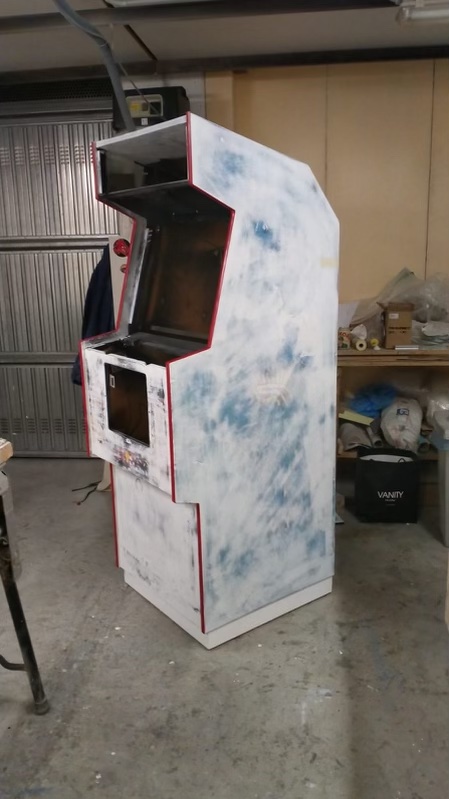
Image of a defender cabinet primed
Defender Cabinet primed and ready for custom art

Anyway, last month I posted about working with Bryan to create custom art for my Yie-Ar Kung-Fu cabinet that is housed in a re-purposed Defender cabinet. And right before I started my travels last week Bryan got me his mad creations, and to no one’s surprise who knows his work, the art is absolutely gorgeous. It really brings the various opponents you fight in this 1985 kung-fu video game to life. The magic of this game is in the cast of characters you fight, as well as the two different backdrops in which you battle each of them. The first stage features a waterfall and the second a Japanese-inspired palace/temple. When we were thinking through how to use the space, I had referenced the way Sidam’s Explorer uses panels to cut the space up, and we wondered what this might look like for Yie-Ar Kung-Fu, and that’s the basis for the left and right side-art, which are showcasing the opponents you fight. Below is the left-side art featuring Star, Sword, Pole, Fan, and Nuncha.

Image of Left-side Art for the custom Yie-Ar Kung-Fu cabinet

Left-side Art for the custom Yie-Ar Kung-Fu cabinet

We’ll be using a black base to break up the panels, each of which will be printed out separately on vinyl and are custom fit to work with the Defender cabinet, pretty awesome right? The other side has five more characters, namely Feedle, Club, Buchu, Blues, and Tonfun.

Right-side art for Yie-Ar Kung-Fu customcabinet

Right-side art for Yie-Ar Kung-Fu custom cabinet

Freaking magic, amirite? The colors, the highlighting of each opponent, the sheer glory of the Yie-ar cast of characters decorating this soon-to-be-real custom cabinet, be still my bava heart! Now, at this point the discerning video game fan will note that there are actually 11 opponents, not the more easily divisible 10 we have above.  You would be correct! Chain is missing from the side art, and Bryan’s ingenious solution to this dilemma was putting both Chain and the protagonist Oolong on the marquee fighting one another.

Image of Yie-Ar Kung custom marquee featuring Oolong fighting Chain

Yie-Ar Kung-Fu custom marquee featuring Oolong fighting Chain

So good! I don’t know what to say, I love it soooooo much! Now as good as the above is, when Bryan was talking through his art for the project, he noted that two of his favorite figures, in particular Sword and Fan, might make real compelling figures for the side art if I was looking for a less comprehensive approach:

Image of Fan character with red dress and blue and white fan

Image of Sword character crouching with sword against grey and blue background

I’m telling you, it was a hard one, cause I can immediately see the power of a single, almost 3 or 4 foot tall character on the cabinet’s side art cutting an imposing silhouette. In fact, Bryan’s suggestion might have been the preferable path given his better sense of design, but I tried to compromise a bit and decided to make the above two images flank the coin door because I want to use all of it! I hate empty space, and the bava is not a minimalist!

Yie-Ar Kung-Fu Bezel with a cast of characters

The above bezel design, which is the art surrounding the monitor, was one of the innumerable inspirations Bryan brought based on various versions of this game ported to home consoles. This one comes from an almost Mortal Kombat 2-like interface where you pick your opponent, allowing us to reinforce the idea of a “Cast of Characters” featuring all of them yet again. This time in the order you face them, and the left and right sides of the bezel highlight stages one and two respectively.

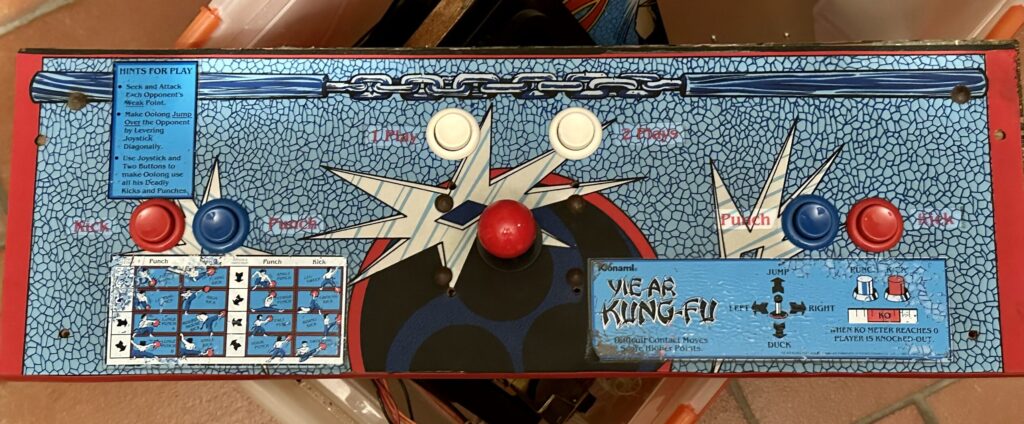
Image of Original Yie-Ar Kung-Fu control panel overlay

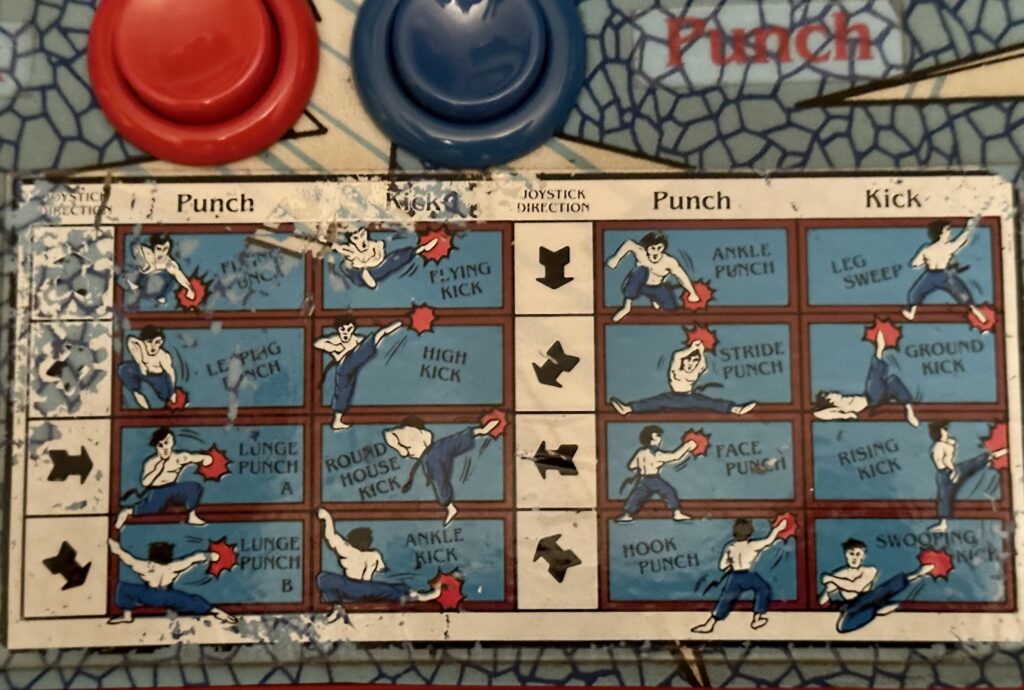
Moving down, the next challenge was the control panel overlay, and I think we decided to keep it simple, but with a really brilliant twist that Bryan came up with that I absolutely love for what will soon be obvious reasons. There is some text to play the game as well as some illustrations for how to perform various moves, which are blown up a bit in the following image:

Close-up image of the illustrations on the control panel overlay

Illustrations of how to jump, punch, and kick, highlighting the various moves

We decided to get rid of the explanatory text and keep the overall design simple:

Simplified Control panel Overlay with a special set of illustrations

But, in that tried and true tradition of patron and artist, Bryan found it within his expansive heart to draw me into the control panel overlay, so move over Oolong, here comes the bava kicking ass and taking names!

Move over Oolong, here comes the bava to kick ass and chew bubble gum, and you better believe he is all out of bubble gum!s

It really doesn’t get much funner than this! And while I understand the ego involved in putting yourself on the control panel of a custom video game arcade cabinet, let’s be honest here that the simple fact I’m funding custom art for an almost 40 year old video game cabinet few people have ever heard of is already far enough down the rabbit hole that I figured the bava illustrations would be the least of my offenses against propriety—not to mention that I LOVE IT!

Sometimes life is good. And the final piece, given I already mentioned the coin door decorations, is the space directly beneath the coin door, which will feature the Japanese palace/temple that is the backdrop for all the fights in stage two. It’s really a striking background, and we wanted to find a way to feature it, so in my quest to eradicate all empty space, we’re filling up the front part of the cabinet beneath the coin door with it.

Image of an illustrated interpretation of the background art for Yie-Ar Kung-Fu from Stage 2 of that game

So, the art is in, and per usual Bryan came through in technicolor! Now I have to paint the cabinet black while I shop around for a printer who will create high resolution versions of of the side art, coin door art, and lower front panel art. I imagine these will all be some version of vinyl, but I’ll see what my options are. Also, for the marquee and bezel I want to see if I can get those printed on top of some heavy duty glass, rather than plastic, but I guess we will see what’s possible. Nonetheless, we’re getting pretty close to reality for a project that seemed a mere dream a couple of months ago, how sick is that?! So, so sick, so sick!

Posted in bavacade, bavarcade | Tagged , , , | 2 Comments