

Image care of Michael Heilemann’s flickr account, one of the great minds behind K2
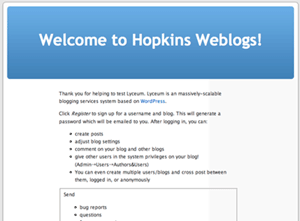 I had known this for a few days now, but I wasn’t certain if it was a test run or the real deal, but it seems official given the recent post to the ibiblio lyceum blog- Johns Hopkins University is using Lyceum as a multi-user blog solution. See site here. Asheesh Aroia was instrumental in seeing this project through and he explains his process in some detail here. Great stuff, Asheesh.
It is pretty exciting when a research 1 university with the renown of Johns Hopkins adopts an open source blogging project like Lyceum – congratulations to the WordPress folks and, more specifically in this case, John, Fred, and company – this is major!!!
What is even more exciting about this development is that a smaller university with fewer resources, like Mary Washington, can just as easily join the party thanks to all the hardworking, inspired folks involved. Thanks to all y’all …
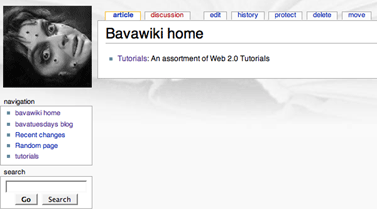
By the way, Asheesh has also set up a JHU wiki using MediaWiki. Very cool, and wait I just got a wonderful, awful idea:).
Jerry and I have been discussing how useful a centralized wiki would be for collaboratively tracking and editing documentation for web 2.0 applications we have been using frequently over the last couple of weeks. To that end I am introducing bavawiki as a repository for tutorials I have been working on as of late, I’ll start this wiki off with tutorials for WordPress, WordPress.com, and Mediawiki. I’ll soon after follow these up with the tutorials I already posted on this blog such as “Using Cpanel to install a MySQL Database,” “A Lyceum How to,” and “Hacking a Virtual Learning System using WordPress parts I&II.” We envision this mediawiki install as a space to host such documentation that can be easily edited by others and/or quickly and easily harvested for various uses by various users.
While doing research for resources on Slave housing in the South, I serendipitously came across an interesting project at the National Institute of American History and Democracy. NIAHD is a joint venture between the College of William and Mary and the Colonial Williamsburg Foundation. this program is focused on the examination of American’s past, with a particular concentration on material culture and museums. I mention this program because while doing my search I came across a journal post titled “Honor or Slavery?” by Martha Crockett (a student in the pre-collegiate program offered by NIAHD) that offers an interesting discussion of what she terms “Southern Honor and Slave Housing” using Chippokes Mansion and Bacon’s Castle as examples.
Not only was the journal entry very thoughtful and intelligent, but the frame for technology that the pre-collegiate Summer seminar at NIADH is using piqued my interest. When I initially found Martha’s journal entry I was a bit disorientated as to its relationship to a larger course – but I was soon able to find my way based on a couple of details I will illustrate below.
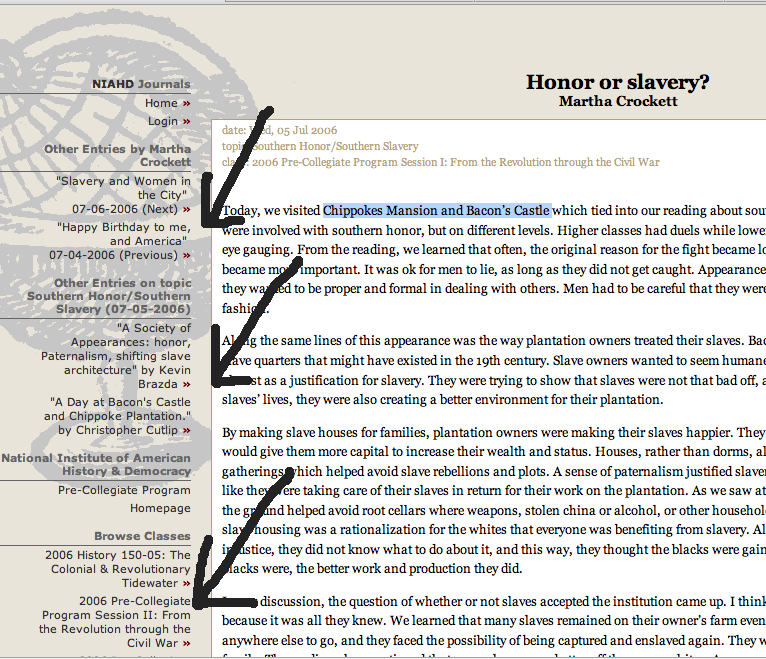
Figure 1: this is a single journal entry, notice the links on the left-hand sidebar
If you follow the link to the journal entry, you will notice that on the left-hand sidebar there are a series of categories that I point to in the illustration above. They are “Other entries by Martha Crockett,” “Other entries on topic,” and “Browse classes.” These three links on the sidebar offered me, as a user, an immediate way to place this journal entry within a larger context of a specific course. This design offers a relatively intuitive framework to help users navigate the online course work quite easily.
Below are images of the site which, when clicked on, will take you to the actual pages within the NIAHD Journals so that you can get a sense of the look and feel:
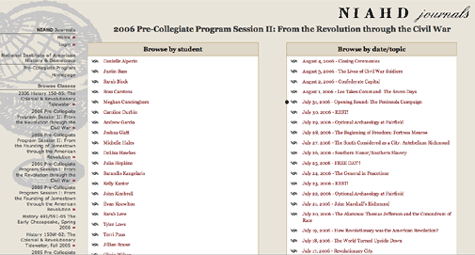
Figure 2: the default class homepage that allows you to browse by student and topic
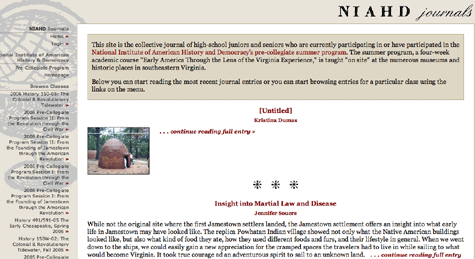
Figure 3: the Journal homepage that features the latest posts
One concern I had with this site was that there was no place for me to leave a comment on Martha’s journal to tell her what an excellent job she was doing, or even to ask her about some particular points she made about Southern honor and slave housing. The interactive element of comments seems like it would offer something important, if not essential, to such a format. Additionally, the students could include images on the right-hand sidebar of their journals, which is a bonus, but I did not see any images included in the space of the journal entries.
I am not sure what program NIAHD used to develop this site, but I am going to have to call them and find out. Looks to me like it is a homegrown php design – many elements of which might be really exciting if we could build them into a wordpress installation that would allow us to track posts easily by student, topic, and course. Very cool.
… because I am so damn good. Feel free to edit it! Link.
Context: This post started out as a comment in response to Raph Koster’s insightful and thought-provoking comment on Brian Lamb’s discussion of the recent article in Harper’s Weekly “Grand Theft Education.” After I finished the first two paragraphs I promoted it to post! 🙂
As I understand it, the term interiority in relationship to narrative refers to a moment wherein a conceptual space, often through figurative language or visual juxtaposition, opens up a world, individual, or idea through a more profound and protracted lens. Such a moment in narative makes me think imeediately of a writer like Kafka -for he is an author that has managed to capturing the feeling of interacting within a dream. Kafka’s art in extended narratives such as The Trial, The Castle and Amerika lies in his power to immerse the reader within a liminal world that traces the manic frailty of subjectivity in relationship to the often absurd and arbitrary nature of power.
Kafka’s ability to allow the reader to interiorize his world is dependent upon many factors. One may argue that his use of metaphor and allegory within an absurdist framework stems from larger intellectual traditions, such as existentialism (read Kierkegaard and Nietzche here) or the psychoanalytical worldview proffered by Freud (who also has a game theory about children which is quite interesting) that serves to inform and unifiy the recurring themes during the narrative trajectory, which for Kafka was almost always incomplete and fragmented.
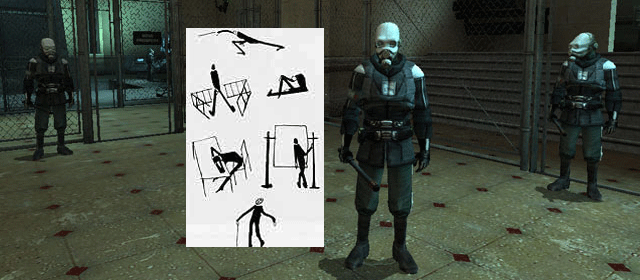
Another example of interiorizing-one that I was blown away by- is the moment in the very beginning of Half-Life 2 (as the game was teaching me how to play it) when I came across a Combine soldier who repeatedly hit me with his night stick until I was forced to pick up a piece of trash and throw it away: “Pick it up!” – he threatened me. Only when I did his bidding could I move on, and as I passed by the Combine soldier he laughed at me with an imperious manner that both shocked me into subjection and filled me with wonderous contempt all at the same time. All I can think about (after reading Koster’s comment) is how I have, at some level, been brilliantly positioned by the game designers to interiorize the logic of this narrative through the interactive game play.
What is this logic? As I played Half-Life 2 for the first time, Zach, a friend of mine, termed this particular moment of the game as a fine example of the arbitrary abuse of power rampant throughout the narrative. A powerful theme in any narrative, but a unique experience for me in this particular form -for here the narrative themes were not external to the interactive game play, rather they were being nuanced, particularized, and further developed withi the break. This all may be my own conflation of gameplay and narrative, but I have to say that Half-Life 2 has suggested to me that the distinctions drawn between narrative and interactive game play may be prove fleeting. Suggesting that the question is not so much whether one’s interactive game play within a narrative frame provides interiority, but rather how it does?
 Well, it is not like I didn’t know this fact already, but I have been so spoiled in my enjoyment of a bug free web experience over the past year that sometimes I simply forget. Recently, however, I have been rudely reminded of just how incompatible most browsers are with open source programs like WordPress. So this post is a way of slumming, a kind of How the Other Half Lives of web browsers like IE Explorer (whose multitude of sins makes it synonymous with eternal damnation) , Safari, and Netscape users. Here is what I learned when when canvassing WordPress by way of the dilapidated tenements of non-compliant web browsers and their greedy slumlords:
That’s all I have for now, but just enough to make me pull my last hair out!
Did I ever tell you I love Firefox?
 Upon completing part 1 of this serialized tutorial you should have the shell of your virtual learning space framed out. Now we want to start adding other open source tools that may be helpful. After WordPress, the next install for me is MediaWiki. I experimented with putting my syllabus and class notes up on a MediaWiki (premised on a similar virtual learning space to the one I am mapping here) this Summer in an effort to closely track the trajectory of a five week summer course I taught. During the summer I found the wiki installation for this intensive course useful because I was teaching this class for the first time and the wiki provided a space to constantly re-examine my approach to the material as well as a persistent resource that I can return to again and again for new ideas – like the one I am trying to frame while I write this. And unlike static content repositories like BlackBoard, you can easily trace your own process of shaping and directing the logic of a course during a semester -not to mention the possibilities for designing written assignments that can quickly become digitally dynamic narratives that are able to trace the process of writing and revising in new and exciting ways – wow – did I say revising and exciting in the same sentence? So, as you may have guessed, I am excited about the idea of playing with the possibilities of MediaWiki over the next 15 weeks (much more sustainable than five) of the Fall semester. Keeping in mind, however, that these “lab experiments” are simply scratching the surface of potential uses for these new tools in an educational setting. The tremendous excitement and energy that surrounds tools such as the wiki or the blog or the podcast or the vodcast or the CMS is fueled by the fact that they are still in the nascent stage of discovery within the world of higher education.
Step 2: Linking your MediaWiki installation through the WordPress Header
I. Downloading, creating a database and installing MediaWiki
i. Download Mediawiki
Well, first you have to download Mediawiki here. Please note that I will be using version 1.6.8 for demonstration purposes here because the latest version 1.7.1 requires PHP 5 which I have not yet got around to upgrading to – my bad!
ii. Where should I install it?
This is entirely up to you, but here is a dose of my logic. I installed my MediaWiki in a folder titled wiki within the WordPress directory. i.e., http://courses.jimgroom.net/engl101_f06/wiki
The directions on the MediaWiki site are pretty thorough – in fact, an excellent use of the wiki! -but you will need to setup a database for MediaWiki because there is no Fantastico script installation for this program – so check out this tutorial on creating MySQL databases using CPanel (it assumes you are setting up a Lyceum multi-user blog – but the meat and potatoes of the tutorial for creating a MySQl database using CPanel are easily ported to MediaWiki).
iv. Installing Mediawiki
Once you download the source files you will need to follow the directions for installation on the Mediawiki Installation Page. They assume you can upload the sources files to your web server and make the modifications from there using a line command shell (if you are old gold) or a FTP client that has text editing capabilities if you are faint hearted like myself (Transmit for the MAC does this wonderfully for me). Tip: remember your WikiSysop login and password, this will come in useful when customizing the wiki in the examples below.
OK, so I am going to make a huge assumption here, and say you followed my paltry directives above and the MediWiki installation went like a charm. You are extremely impressed with my ability to be both succinct and comprehensive simultaneously – “What prowess!” you remark, incredulously. Well, not really, but I am not sure I can re-frame the instructions for installing MediaWiki any better than their current incarnation – so wrestle with them.
Continue reading
 So you wanna make an online course site that is open, conversational, multimedia ready, and more conducive to an engaging and dynamic online learning environment? Well, you came to the right blog at the right time because as the monolithic administrative Course Management Systems tighten their imperial grip on anything “resembling a web interface to a database” (thanks for the line, Gardo), the open source rebellion is poised to slip through their stubby fingers. Are you ready to promote the virtues of openness, discovery, and sharing within the process of teaching and learning? Are you yearning for a way to accomplish academic goal outside the institutional logic of products like BlackBoard or WEBCT? If so, the following series of posts will be quilting together a number of open source software such as blogs, wikis, image repositories, and content management systems – in order to lay the groundwork for a customizable online learning environment that actually promotes a worthy ideal: an open university. So without any further preaching, let’s make ourselves the bitchinest online learning environment this side of Wallwalla.
Part 1: Setting up WordPress as a course specific CMS
First things first, we are going to start with a single, relatively insular installation for a course site that will be using the well-known blogging software WordPress as both a Content Management System and a malleable blogging component. Keep in mind, however, programs like Drupal (see Darcy Norman’s trail blazing work with this CMS) or multi-user blogging software like Lyceum or WPMU will allow us to eventually think through scaling this concept to a much larger degree (but more on this in another chapter of our exploratory revolution).
I will be assuming a couple of this during this walk through:
a) That you are working in a LAMP server environment
b) That you have access to CPanel on this server that is equipped with Fantastico
If these two things are the case for you then we are ready to rumble. If not, you can still install WordPress quite easily without Fantastico by following these instructions, but you will need a LAMP environment -so go find a good web hosting service (I will be demonstrating here with Bluehost).
I. Installing WordPress with Fantasitco
This will be quick and easy with Fantastico, keep in mind, however, that this script installer will not always be available for all programs and is not recommended for CMSs like Drupal and Typo3. Nonetheless, it does the trick for our purposes with WordPress:
I guess it has been a long time coming and a long time here, but I just had to blog about it once I finally got it up and running. Thanks for the plugin Albert Banks.

Find out more about me here.
