 I recently returned to an online exhibit I had worked on last Spring with John Pearce’s Museum lab class. Link. The site was running on Typo3 version 3.8, and I spent some time a few weeks ago updating it to the latest version (4.0.2). (By the way, I tried the fantastico upgrade shortcut which is a huge “no-no” for this CMS.) After reworking all the elements and reinvigorating my interest in bringing the site up to speed, I created a development site for typo3 on my web hosting account and started playing with Typo3’s DAM (or its digital asset management system). The DAM is a series of extensions (plugins) which allow for the organization and delivery of media objects like images, videos, flash, etc. Typo3’s DAM is still in development and they have a little ways to go to make it fully integrated for searching and downloading media from the frontend. Nonetheless, this system has come a long way in the last six months in terms of organizing, indexing, categorizing, defining metadata, and presenting media.
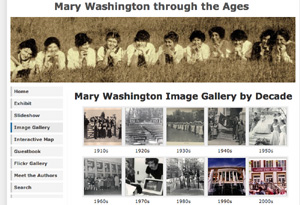
In the case of the museum site -the entire project is built around over 300 archival images the students have scanned, optimized and uploaded into a Coppermine gallery. Coppermine is an open source media repository that allows users to create their own account and upload images, movies, documents, etc. to their respective albums. The problem I had with this application when I returned to the exhibit is that their is no quick and easy way for me to reorganize the images in the student albums after the fact. So, for example, if I wanted to create albums by decade, I would have to re-upload the images into new albums rather than moving them around in the backend -a bit cumbersome to say the least. This predicament inspired me to revisit the Typo3 DAM project which allows me to upload all my images from the Coppermine gallery, index them, reorganize them, add metadata, and integrate them into any one of several front end galleries for Typo3. Take a look at the developmental site for the image gallery here (click on the image gallery tab, and keep in mind not all of the decades in the gallery have been finished, for this is still very much a work in progress).
The gallery I chose for displaying the images through the Typo3 DAM (which is called “Dam Show Image”) is an extension designed by Heiner Lamprecht. A quick recounting of my dealings with Heiner might illustrate everything I believe to be valuable and good (for lack of a more generally favorable term) about the open source movement. I tried out the “DAM Show Image” extension and it fit my needs nicely, allowing me to create a series of thumbnails that link to normalized (meaning an image with a predetermined width and height for display) images based on the categories setup in the DAM. The only feature I was missing from Coppermine was the ability to link from the normalized image to a larger, higher-resolution downloadable image. Well, what can you do, right? The system’s got its heel on your neck … but wait, NO! Heiner is a guy who I can e-mail and request this as a modification for the next version and, hey, he has an Amazon wishlist, I might even buy him a book for his troubles.
Well, I sent the e-mail making the request and less then three days later the functionality was added to the extension, incidentally Heiner got a new book. Now, I can’t say this will always be the case, for many of the people who develop these extensions for various systems also have full-time jobs or school or families – but damn, it is really something to be able to see how collaboration, communication and mutual respect can make everybody’s investment in any open source community that much more rewarding. Shortly after our exchange, the extension’s latest modification was uploaded to the public Typo3 extension repository for anyone to use. Is their a name for how cool this all is?


 For many the