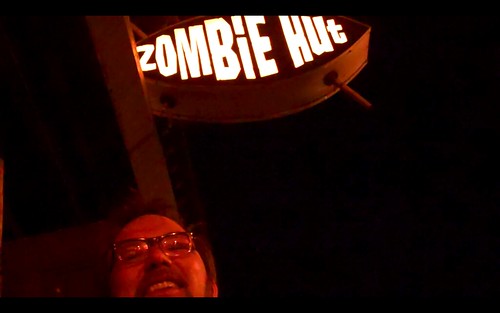
David Noel just added a new assignment in the Webstories section (the first one!) and it is a blast. The general idea is make a quick story in Google’s My Maps using the directions line and some pop-up text bubbles, and the one he did appeals to me deeply because it is, you guessed it, a ds106 insanity tale. And, it is absolutely compelling. His story is about a student that gets kidnapped which in turn reveals the ugly underbelly at the heart of ds106.
I started a page on the ds106 wiki that takes you throw the possibilities for getting the Video Essay done. It takes you through ripping DVDs (for Mac and PC), some quick trimming and compression tools, and how to do a voice over narration in iMovie and Movie Maker.
Would love if anyone who has something to clean up or add would do as much. You have to login to edit to prevent crazy spam, just use your ds106 username and password if you have one, if you don’t you can easily get one here. If the logging in and editing is a drag, just let me know anything you want to share in the comments.
Emily Roberts, a ds106 alum from Spring 2010, tweeted an awesome animated GIF she did today that draws its inspiration from Terry Gilliam’s Monty Python animations.
For this assignment you need to select several scenes from your favorite film (or one of your favorites), and edit them together and comment on some of the filmic elements of the scenes? Why do you like these scenes? What strikes you about them? What makes them good cinema? Is there a subtext at work in this film? In short, construct an essayistic commentary on the scenes as a narrator explaining to your audience what you find important about the scene, and why. What’s more, what do the details you have pinpointed say about the film more generally.
If you want more specific example of what I’m talking about, here is a commentary of the 1978 zombie film Dawn of the Dead that I did done a couple of years ago (you can also check out the The Shining commentary I did last semester for ds106 embedded below).
Please tag this assignment “videoessay”
Due date for f2f (section 3 course): Thursday, 3/31
Due date for Online (section 4 course): Saturday, 4/2
Due date for Open Online Course: whenever
And now, how do you do this? Take the jump for some recommendations.
First and foremost, remember to consult the unbelievably useful resource for all things video provided us by the great Andy Rush: http://video.umwblogs.org
Getting the digital video
Now, chances are you’ll probably be able to find a good number of the scenes you need one video sharing sites like YouTube, etc. This would probably be the easiest solution, and the following tools should be a great help in downloading them: Fastest YouTube Downloader (PC/Mac) – Seriously, it’s fast! Video Download Helper – Download YouTube videos in the browser 1-click YouTube Video Downloader
Alternatively, Andy Rush also blogged about using VLC to record segmets of a DVD straight to your hard drive on a Mac or PC. This could be an easy and useful alternative for those of you who still own DVDs, like me
And finally, if you already have your film in some digital video format on your computer (mp4, avi, divx, etc.), then jump to the next part.
Getting the specific clips you need
Onc you have gotten digital video of the film you will be commenting on, you will need to get the specific clips you want to talk about. This is where I would recommend a tool like MPEG Streamclip (PC/Mac), though there are others. Important: When using a Mac and working with video editing/conversion tools like MPEG Streamclip (or even Quicktime, Evom (Mac), and Handbrake (PC/Mac)) I highly recommend that you make sure to install Perian, which is a free utility that adds a series of codecs recognition tools across various video compression tools on your computer.
What MPEG Streamclip will allow you to do is select and trim exactly the clips you want to discuss from the longer scenes. Doing this in MPEG Streamclip will save you time and energy before importing it into a video editor like Moviemaker or iMovie, both of which bloat video unnecessarily and take a lot more time. Not that you may have to cut a longer scene up into various clips, that you will then edit together in your final version. Also, when converting the clips, make sure they are the same aspect ratio, and that you are saving them in the proper codec for your video editing software.
Editing your video, and adding the audio
Most of you will have on of two basic video editing tools: Moviemaker and iMovie. I will expect you have some basic competence in either of these. If not, there is this thing called Google…. What you will need to do here is import your clips, organize them accordingly to the logic of your commentary, and then record your commentary on top of the clips (which can be done in either of these applications).
Also, if you don;t have either of these tools and are lookingfor an online editor, check out Jaycut, it is free but there are alos some real limitations. Also, Videospin might be a good alternatives for you PC users.
Upload it to you Video Hosting Service of choice
Finally, upload your finished video to you video service of choice. Here are some recommendations if you don’t have one already:
* YouTube – http://www.youtube.com/
* Blip.tv – http://blip.tv/
* Vimeo (HD) – http://www.vimeo.com/
This post is a continuation of part 1, and it will aim to take a closer look at some of the details driving the syndication and general re-publishing logic that is happening on the Virtual Language Studies site. As I noted in the previous post, we are using the plugins FeedWordPress and Sitewide Tag Pages Plugin to create the syndication oriented architecture. It is rather simple, but it could use a bit more development to make it even more seamless, and I’ll talk about this later on and make some recommendations for future development at the end of this post.
How does the syndication work?
First and foremost, we had to come up with an agreed upon set of tags for the various courses, featured, content, and particular topic we want students and faculty to tag their work. You can see our agreed upon tags in the tag glossary here. What happens after that is we actually can aggregate all content from the individual student blogs into a uber course blog titled “Chinese Notebooks” that actually can filter course posts based on the tags being aggregated. For example, all the Chinese 002 posts can be filtered from the rest etc. So, for example, here is a look at the FeedWordPress interface in which the various tags for the Chinese course are being fed into the Chinese Notebooks blog:
These various feeds are all pulling off the main tags blog which is created by the Sitewide Tag Pages Plugin. You can see that blog here. What is happening in this blog is every post from around the environment is being aggregated to one “central” blog that then allows us to grab the tagged feed for each individual course and aggregate it into the Chinese Notebooks site, for example. Here is an example of a specific tag from the tags blog that is syndicating into the Chinese Notebooks site: http://virtuallanguagestudies.net/tags/tag/chinese-002/. And here is the feed for that tag http://virtuallanguagestudies.net/tags/tag/chinese-002/feed/. And you can see those same posts on the Chinese Notebooks blog here: http://virtuallanguagestudies.net/chinesenotebooks/category/chinese-002/. You’ll notice that on the Chinese Notebooks site that the tag “Chinese 002″ tag has been converted to a category, this is intentional and very important. Why do we do this? Well, because if we pull it in as a tag it will through this blog into an eternal loop, and it will constantly be finding new posts tagged “Chinese 002″ resulting in thousands and thousands of posts, so what needs to be done (and this happens by default in FeedWordPress) is that tags must be converted to categories in the syndication settings. You can find those settings under Syndication–>Category & Tag Settings. What’s more, you can specify a specific tag or category you want all posts syndication from a particular feed to be associated with.
So, on the Chinese Notebooks we have all the different course posts separated by categories which allows you to quickly filter what is happening in each class within on site. What’s more the permalinks and comments all link back to the original student or faculty posts in their own space. And you control these options under Syndication–>Posts & Links Settings.
Now, this is the same logic we are using to target content on the homepage from various sites. You’ll notice there are Chinese and Russian faculty posts as well as Chinese and Russian students posts.
This is handled with the same logic. Now there is some custom PHP calls in the custom home page template, but they are simply calling in particular categories of posts that we are in turn syndicating in from the various faculty blogs as well as the Russian and Chinese Notebooks sites. here is what the FeedWordPress interface looks like for the main VLS site.
And for each of those feeds we are mapped them on to specific categories that we can then syndicate in the various customized content areas on the homepage to feature as much work from around the community as possible. What’s more, you will notice to tabs on the front page titled Russian Notebooks and Chinese Notebooks that actually link to the versions of the Notebooks sites that are syndicated from those sites (which are actually separate sites) in order to maintain some visual consistency for visitors on the front page (you can see the actual Russian and Chinese Notebook sites here and here).
Finally, what is even more pwoerful about this syndication bus model is that the posts need not originate on the vls,net system, we can syndicate posts from any site that has a working RSS feed, like we are doing with Orland Klem’s Chinese Field Work Posterous blog. The possibilities in this regard are powerful, and VLS has only just begun to imagine them.
__________________
Future development to streamline the Syndication Bus
This process needs to be streamlined a bit further to keep inline with the reason i choose to work with WordPress in the first place, namely that anyone can and should manage this space, it should not take a programmer or a “specialized” admin—that is where Drupal goes off the tracks in my opinion. So, what would be needed to make this syndication bus model that much easier is basically a streamlining of the of the FeedWordPress syndication settings/options as well as the ability for those various feeds to be automatically discoverable within the system. As of now the vast majority of the sites share a stable base URL from which we are pulling the content, so it should be fairly straightforward to create a simple element in the dashboard or where ever wherein professors can simply add the tag of a specific course into a field and have all the posts with that course tag instantly aggregate into this blog. Kind of a mother blog on the fly. All you need to do is enter a tag, all the settings are there and ready to go (just simplify them). FeedWordpress is almost there, but the difference between adding “chinese 002″ an entire feed from the tags blog, like http://virtuallanguagestudies.net/tags/t… trivial, but it is extremely significant. And the ability for this feature to ask, is this a VLS feed or an external feed would be that much cooler. In short, it would be excellent if we put a couple of people on the task of thinking about how to make the syndication bus that much simpler for anyone to use, and use well.
I have been working for the last nine months or so on a project that is attempting to re-think language studies using a fully online model. It is know as the Virtual Language Studies project being run out of Drake University. I was called in, along with Barbara Sawhill and Ryan Brazell, to come up with an infrastructure that might be used for such an online course. We immediately experimented with WordPress Multi-Site, BuddyPress, and some other plugin and configurations, it was our idea to have everything running in WP/BuddyPress, but Moodle was part of the grant already, so we needed to integrate WP/BuddyPress and Moodle, which we did with some success.
Below is a breakdown of the technical framwork we created and some of the details surrounding this experiment.
Loosely Integrating WP and Moodle
The open and syndication driven publishing platform model that many have experimented with using WordPress Multi-Site was the basis of our setup. The ideas we finally settled on this past Summer was that WordPress would be the forward-facing site where students and faculty would blog their process out in the open. And our Moodle install would be the space folks went to for more secure, management-based resources like grades, quizzes, and other “sensitive” materials. I didn’t manage the Moodle installation given it is not really my strength—I know next to nothing about Moodle–but we did manage to get Cast Iron Coding to develop a plugin for this VLS grant that enables single sign-on between Moodle and WordPress Multi-Site. It works pretty well, the only issue is that it depends upon Moodle for the login and registration info and passes it from Moodle to WP, so you would have to populate Moodle with all that data and then anyone with a Moodle account can login or start a blog on the WordPress install.
You can find the plugin for integrating Moodle and WP Multi-Site (title “Moodle Network Authentication”) here.
Designing the Syndication Bus
After WP and Moodle were loosely integrated the next step was to make sure we had the syndication working for this space. In short, we had about five or six different courses each with about ten students. Everyone, including faculty, would have their own blogs, and we would syndicate the various posts onto the front page to highlight faculty posts as well as student posts. What’s more, each semester we had at least three Russian language classes and three Chinese language classes, so we also wanted to post all the applicable Russian language course posts in one blog and all the Chinese language course posts in another, which would give us a way of visualizing the work across classes in one space. We termed the spaces Chinese Notebooks and Russian Notebooks (mainly because the push was to refer to the blog as a “notebook” rather than a blog, which is probably not the best idea, and one I recommended against).
So, we could aggregate all the student work from either the Russian or Chinese courses into one blog, and then filter it all by the use of tags. In fact, we used tags for this syndication rather extensively, and you can see the glossary of course tags here.
The syndication onto the front page as well as into the Chinese and Russian Notebooks was accomplished using two plugins: FeedWordPress and Sitewide Tag Pages Plugin.
In combination, these two plugins work together to create a pretty slick syndication framework that allows for us to pull posts into any blog or onto the homepage according to a specific tag. This is what is populating both the Chinese and Russian Notebooks, as well as various, targeted content on the homepage.
Social Networking and BuddyPress
The design is a loosely distributed publishing model that enables student and faculty work to be re-published easily around the environment. What’s more, with the integration of BuddyPress we can easily create directories of all users, sites, as well as highlight the recent activity around the site. Additionally, each user has an extensible profile with information about all the work they have done for a specific class, including their comments (something that was previously more difficult to keep track of on a user-by-user basis. BuddyPress can also showcase users that are online at a specific moment, or even enable such social networking features as groups, friend networks, and promotional tools for various content. We have used this on the Virtual Language Studies site for the member and site directories, as well as sitewide activity. The potential for these tools in creating an open and social space for online learning is an extremely powerful, and as of yet under utilized. That said, you can see a few excellent examples at Baruch College, the University of British Columbia, and the CUNY Academic Commons.
When I jumped on #d106radio Friday night Timmmmyboy had started doing some Friday Night Karaoke on the mighty #ds106radio and I couldn’t resist—and I wasn’t alone. And while my karaoke songs were god awful, this may be the hardest I have laughed in years, the magic that is ds106radio cannot be denied, no matter how bad it sounds.
What’s remarkable is that karaoke is simple with Mikhail’s setup here, and I can’t communicate to you just how insanely fun it is to do, not necessarily to listen to.
The Velocioraptor Variety Show group asked me to do a quick impromptu spiel on surviving the zombie apocalypse for their half hour radio show—which you can listen to in its entirety here—and what resulted was a bit of extemporaneous zombie storytelling that was pretty fun. I basically added another element to the zombie apocalypse that I’m not sure many have played on yet, namely eating them once you’ve killed them. Anyway, I had to post it on the bava because it is part and parcel of the ongoing narrative of this blog—and it pushes me to keep posting about ds106. Another thing, I’ll be posting about all the radio shows and the last weekend’s ds106radio marathon very soon (there were three zombie shows in all, and I never seem to tire of that theme!). On that note, if you haven’t heard the zombie radio show by the WSOZ Zombie Radio group, it comes highly recommended—it uses the radio medium brilliantly, and is quite a compelling narrative: WSOZ Zombie Radio.
And finally, here is a link to my portion of the Zombie Apocalypse as seen from the manshed: Zombies in the Manhsed
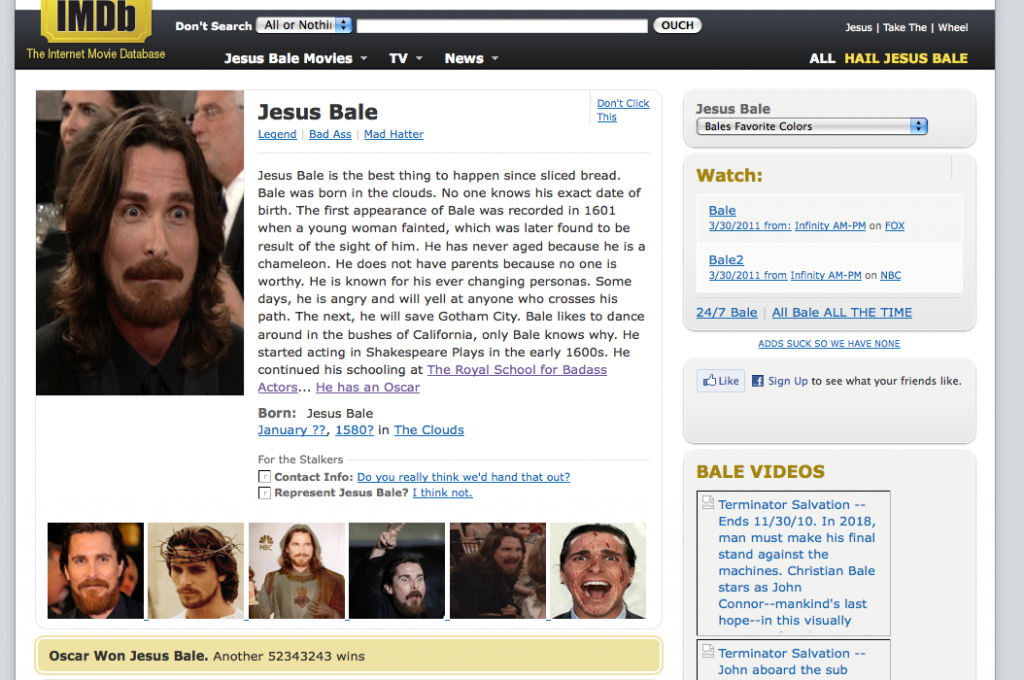
Martha and I got started on the webstories assignment this week in ds106 in it is immediately paying some serious dividends. The assignment is Martha’s brainchild, and it is really pretty awesome. Take a site, and intervene in the CSS and HTML with Firebug to tell a story. And looks like the bar is already insanely high as we have some early projects already being posted. Take a look at the Intervention on IMDB with Jesus Bale, which is brilliantly executed and really has fun with the insane figure Christian Bale has become. What’s more, Stacy breaks down her process brilliantly in this post on her blog.
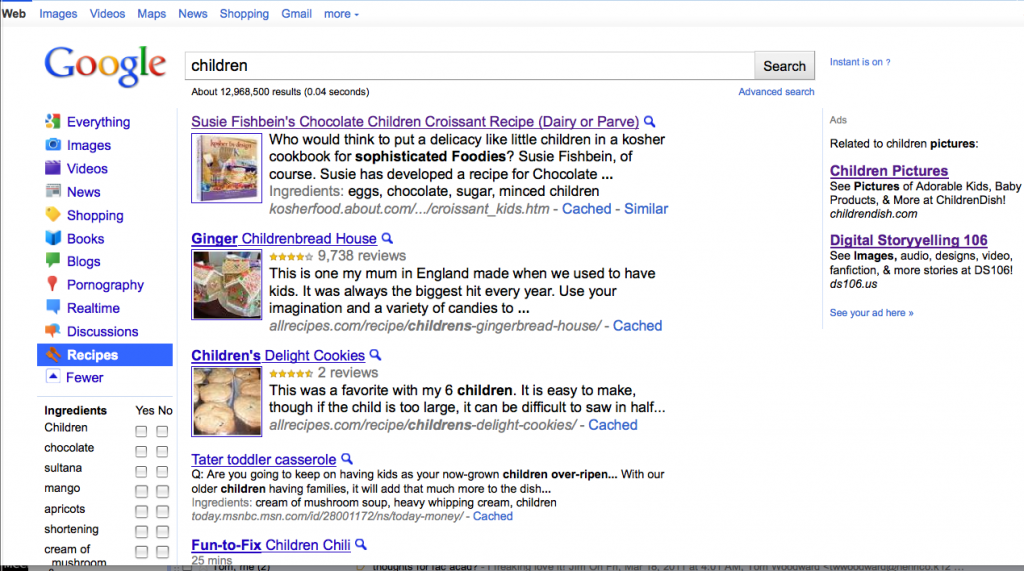
And if that’s not enough in terms of bringing the heat early and often, Andrew Allingham had some fun with the Google Recipes feature. Read closely, it’s deliciously brilliant an disturbing all at once.
This is brilliant, and folks all around ds106 have been bringing their A-game consistently, and it really blows my mind. What’s more, I haven’t really mentioned this here on the bava yet but this is Martha’s first time teaching. Not just a college class, or ds106, but any class. Period. Could you imagine this experience being your first? It’s blowing my mind and I have been doing it for more than 12 years and it’s been insane for me, I can’t imagine how it must be for her? That said, she is bringing her A-game hard as well, and the webstories assignment (as well as the Radio Show assignment) is a sign of just how amazing she is. It’s been a real honor and pleasure to teach ds106 collaboratively with her, and has pushed my own teaching and approaches in some really important ways (I’ll talk more about this when I blog the assessment radio session). Now I have to get on my webstory assignment and bring my A-game to this assignment—cause I will continue to eat my own dogfood—cause everyone else is bringing theirs, especially Martha. And this is no longer a class, it is a creative movement!
Yesterday was yet another special day on the mighty ds106radio, and it was in honor of the great Alan Levine who announced that he is leaving his job (apropos of Tuesday’s work theme on ds106radio 🙂 ) and hitting the open road. It is a bold move, but very much in line with the sense of wonder and exploration that cogdog represents for me with everything he does in his work and life—and those boundaries are very much blurred when it comes to the good dog. He’s a remarkable guy who has the rare ability to live his life authentically, what’s more he tolerates no bullshit, and for me truly embodies the reality that these web-based connections are anything but fragile.
After noting the title of his post “Into the Great Wide Open” was alluding to Tom Petty’s song (and album) of the same name, I got the idea that a ds106radio #roadtunes show in honor of Alan’s announcement might be fun. What better way to let him know how much we care than a radio tribute to a dear friend. What’s even cooler is that the show was almost entirely made up of requests by various folks (not entirely cause I started us off with Tom Petty’s “Into the Great Wide Open”) who drove the request show via twitter.
The way these requests shows have emerged (it was my third or fourth one so far) is remarkable in and of itself. A theme of the day emerges for ds106radio (such as #work, #songs2growby, #roadtunes, etc.) and I take over the ds106radio stream, get on twitter and start asking folks to send me their requests, that they usually (but not always) reply to @jimgroom and hashtag their requests #ds106radio and the theme of the day, in this case #roadtunes. From there I get the song into my iTunes and start a queue based on what they requested, quite simple really. What’s more, I came into found money recently in the form of a $300 Amazon gift card (which was unbelievably generous—thank you—but undeserved) so I figured I would put it to good use and build up my song library based on the recommendations of others. What’s cool about Amazon downloads is they’re almost instantaneous, so as soon as someone requests a song I can download it and queue it up all in a few seconds. It makes for a pretty quick and easy work flow, and I have to admit I absolutely love doing this—it’s a blast to play music for others, and even cooler to play them music they want to hear, and even cooler than that to play the music they want to hear based on a theme that is tribute to a friend making a major life change.
ds106radio continually blows my mind on an almost daily basis, and it’s at the core of what I think we should be doing on the web not only as educators, but as human beings–creating deep and meaningful relationship based around a sense of sharing our culture all the while exposing ourselves to the culture and tastes of others in a real, authentic, and untethered environment. The basis of real, lived culture as the touchstone for meaning and relevant education is paramount for me, and while ds106radio is not perfect, it is the closest thing to perfect I’ve seen in the edtech space—and it goes well beyond the technology, it is the sense of presence, immediacy, intimacy, and more than anything fun. Sharing an intimate piece of yourself—and our particular experience of culture is just that—is where it’s at!
To reinforce this point, after the request show—which ran over 2 hours—Grant Potter lined up an all Trans-Canadian Indie Rock road show (near and dear to his heart, and he seemingly has an encyclopedic knowledge of that domain), which was punctuated beautifully by Noise Professor‘s field reports from the road as he was traveling from Northern California to Los Angeles. His reports about California Teacher’s Unions, the dust bowl, missionaries, the grapevine, and California politics in general was a magic touch, and the whole thing made for some of the greatest radio I’ve ever been exposed to (though I make no claims to being a radio connoisseur), no less an integral part of it. It gives me goosebumps just thinking about it.
But enough of this gushing, let me link you to the show in its entirety and a list of the songs and those awesome folks from around the world who made it possible!
The City of New Orleans, Arlo Guthrie (Keri Morgret)
______________
The following tunes were requested but I didn’t have the time to play during the show (sorry), but I imagine they made their way up to the dropbox somehow:
is an ongoing conversation about media of all kinds ...
Testimonials:
Generations from now, they won't call it the Internet anymore. They'll just say, "I logged on to the Jim Groom this morning.
-Joe McMahon
Everything Jim Groom touches is gold. He's like King Midas, but with the Internet.
-Serena Epstein
My understanding is that an essential requirement of the internet is to do whatever Jim Groom asks of you while you're online.
-James D. Calder
@jimgroom is the Billy Martin of edtech.
-Luke Waltzer
My 3yr old son is VERY intrigued by @jimgroom's avatar. "Is he a superhero?" "Well, yes, son, to many he is."
-Clint Lalonde
Jim Groom is a fiery man.
-Antonella Dalla Torre
“Reverend” Jim “The Bava” Groom, alias “Snake Pliskin” is a charlatan and a fraud, a self-confessed “used car salesman” clawing his way into the glamour of the education technology keynote circuit via the efforts of his oppressed minions at the University of Mary Washington’s DTLT and beyond. The monster behind educational time-sink ds106 and still recovering from his bid for hipster stardom with “Edupunk”, Jim spends his days using his dwindling credibility to sell cheap webhosting to gullible undergraduates and getting banned from YouTube for gross piracy.