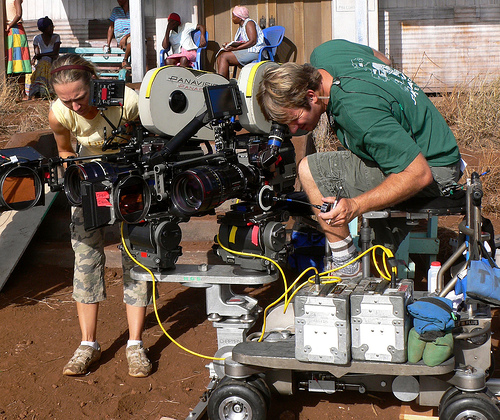
Thanks to Michael Branson Smith below are three ideas for experimenting with video. They’re all pretty straight forward, and they give you a specific focus and set of limitations to work through—which can be helpful. If you are looking to experiment with video try one of these. And if you want to submit a video to the ds106 assignment bank, and I don’t thing any of these are submitted, consider it a freebie—and define the difficult level based on your experience creating it.
Make it Backwards
In this assignment, plan and execute a scene where in you play it backwards for the desire effect. In the above scene from Orpheus, the character rises from the dead in a fairly haunting and surreal way, an effect that Jean Cocteau creates by playing the scene backwards. Can you create a similar effect by planning a scene that will add dramatic effect by playing it backwards?
Reproduce They Live
Play with point of view and effects to give your viewer a sense of meaning beyond the reality of the image. In John Carpenter’s 1988 cult class They Live, he uses a pair of sunglasses and black and white film to give the viewer a sense of seeing the alien-driven consumer reality that controls us all. Experiment with point-of-view and alternating color/black and white to create your own short scen from They Live.
The Old Gloves Through the Window Trick
What Jean Cocteau understood as well as anyone in cinema was that the form was one big illusion. The above scene, once again from Orpheus, reinforces that. How might you create a sene of the other worldly on video using some tricks that Cocteau demonstrates in this scene? Perspective, camera angles, and props go a long way towards momentarily convincing the viewer they’re in another world.
Below is the video featuring Michael Branson Smith, Mike Bosland, and mI talking about two of the three approaches above, we cut cut off before we could discuss the third thanks to my deep issues with technology 🙂
Today I recorded an hour long ds106.tv broadcast framing and introducing week 4 of the ds106zone. This week is dedicated to reading an episode of Twilight Zone closely and working through 15 stars of video assignments. You can see the post outlining this week’s assignments here (much of which is lifte directly from Alan Levine’s assignments last semester). This video features me explaining the assignments, ranting about learning to read the grammar of film, and looking at some assignment completed already by early bird ds106ers at UMW, namely Kris and Kelli. I am planning on doing another episode of ds106tv tomorrow, tentatively at 3 PM EDT with Michael Branson Smith. What’s more, I’m also hoping to get Mike Bosland locked to talk about his effect work in video. We’ll see, but until then, make some art, dagnabit!
Special thanks to Alan Levine for doing all the heavy lifting for this week’s assignments, much of this is based on the work he did last semester.
First half of Week 4 (Summary due Thurs 6/13 at 11:59 PM)
This week we enter what most students find the most challenging and/or rewarding portion of ds106: video. Working with video presents challenges with file formats, creating more complex narratives, and dealing with more complex software. But it’s also one of the most engaging forms of media — hence the current statistic that in the span of one minute of time, more than 72 hours of video are uploaded to YouTube.
Before we jump into video editing, we want you to spend a little time first looking critically at the video form itself. Read the first half of this post for details about your work for the first half of this week as we try to “read” movies. We are not trying to turn you into movie critics, the goal is just to practice noticing the details and techniques used in movies, TV, and web video.
For the work in the next 2 weeks, you will need to be using software that allows you to combine, edit, augment, re-sequence video, as well as being able to add or even replace the soundtrack within a video.
Reference the Tools for the Trade for links to software you might want to use as well as our new Video Guide for video resources and tutorials.
We most strongly recommend for the future assignment that you use the applications that come with most computers- either Windows Movie Maker or Apple’s iMovie, these are generally the easiest to get started with and should be available on your computer. Note that students often face challenges in Movie Maker and importing MP4 type videos (the most common format you will download videos in), you may have to install extra video codec software or find converters that will translate MP4 videos into AVI or WMV formats (try http://www.online-convert.com/ or http://zamzar.com).
For making small clips from downloaded videos, get a copy of the free MPEG StreamClip, an application for Mac OSX and Windows that makes it easy to mark and export the exact portion of a video – see our tutorial that shows you how this is done.
Reading Twilight Zone
You have likely watched plenty of movies, TV, and web-based videos, but when we say “reading,” we mean looking at them with a keener eye for the cinematic elements that make them successful (or not). This is not about reviews of “good” or “bad” movies or videos, but rather how well they convey the story to all our senses, how well they suspend our disbelief to make the plot real, to draw us in– how well they tell a story.
For your work in this week, you are expected to look for details in movies, many of which are found in Roger Ebert’s “How to Read a Movie”
In simplistic terms: Right is more positive, left more negative. Movement to the right seems more favorable; to the left, less so. The future seems to live on the right, the past on the left. The top is dominant over the bottom. The foreground is stronger than the background. Symmetrical compositions seem at rest. Diagonals in a composition seem to “move” in the direction of the sharpest angle they form, even though of course they may not move at all. Therefore, a composition could lead us into a background that becomes dominant over a foreground. Tilt shots of course put everything on a diagonal, implying the world is out of balance. I have the impression that more tilts are down to the right than to the left, perhaps suggesting the characters are sliding perilously into their futures. Left tilts to me suggest helplessness, sadness, resignation. Few tilts feel positive. Movement is dominant over things that are still. A POV above a character’s eyeline reduces him; below the eyeline, enhances him. Extreme high angle shots make characters into pawns; low angles make them into gods. Brighter areas tend to be dominant over darker areas, but far from always: Within the context, you can seek the “dominant contrast,” which is the area we are drawn toward. Sometimes it will be darker, further back, lower, and so on. It can be as effective to go against intrinsic weightings as to follow them.
Note that the left/right positioning of characters is best applied in scenes where the camera is facing them- e.g., when the possibility of their position is equally probable, left or right. Many scenes are shot in dialogue, when characters are facing each other, and here the placement must also honor a very important film rule, the 180 degree rule:
To get an appreciation for some of the power of cinematic techniques, watch at least 3 of the following videos about filmmaking.
Other elements to consider keeping in mind include:
Lighting
Film “tone” (bright, monochrome, washed out, high contrast, low contrast)
Set design, wardrobe and location
Sound- music, sound effects (remember Foley?)
Action, stunts, special effects
Look, Listen, Analyze
Now we want to apply some of criteria to the Twilight Zone episodes you have been asked to watch so far. You will be asked to analyze a scene from any of the episodes by watching it three times in different ways.
Analyze the camera work. Before watching the first time, slide the volume on the clip (or on your computer) all the way down. Take notes on the visual aspects of the clip. Look for camera angles, cuts, how many times the camera switches view, the quality of light. Look for the ways the camera tells, guides the story.
Analyze the audio track. Now turn the volume up, but play it without looking at the screen; just tune into the audio. Take notes on the pacing of the dialogue, the spaces in the the audio, the use of music or sound effects (think back to our work earlier on listening to audio).
Put it all together. Finally, watch the scene as normal. Pay attention to something you may have missed the first time or how the elements you saw in the first two steps work together.
Write up a blog post that includes an embedded clip of the scene, and the notes you made in the three views of the scene. Did you notice thing new by minimizing one of your senses?
Next use what you have read in Ebert’s column or anything else you observed in the cinematic technique videos to identify key elements of this scene. Include specific reference to Ebert’s ideas of left/right character placement, what the camera angle suggests, how the way the scene is shot builds the story element. We are looking for the video aspects that makes this work well (or not) – not just “this is a great scene” or “this is my favorite movie”.
Exploring the Episodes Even More
Seek more background information on this episode from its entry in WikiPedia or the Internet Movie Database (if that fails, use the web more generally). Find at least 3 interesting bits of information about the making of the episode – summarize them and link to your sources.
Next, try to identify the film genre and justify your choice with supporting evidence from the film using one of the references below:
Following this, find at least two other YouTube clips from this same episde; download all the clips as .mp4 files to your computer (here is a tutorial on downloading YouTube videos).
To get practice in basic video sequencing, locate at least two smaller portions within these clips that demonstrate the points you made in your analysis above. We want you to put these scenes together in a short montage, sequencing them together so that you get some basic experience with video editing. The goal is to pull sections out of the scenes with MPEG Streamclip and combine them into a newly edited video. This is possible to do just with the MPEG Streamclip see our tutorial on combining clips with MPEG Streamclip. You can of course use any other software, but you should try to use Streamclip’s trim tools to make the shorter clips
Upload your montage to YouTube, and include it as part of a post on Exploring a Great Episode Scene summary.
What Are the Genres of YouTube?
You’ve read a little bit of genres in movies and film, but given the volume of video content on YouTube, and its meme generating nature, might there be genres specific to this type of video?
Write a blog post describing your thoughts on the genres listed and the justification for the example you chose or genre created. And of cours, embed the video in your post!
A Little bit of Pre-Production First
Before you move on to the Video Assignments, many of which require use video editing tools and techniques, we would like to focus on pre-production steps that will help you complete the assignments.
What we want you to do is identify two more complex video assignments that appear interesting to you, and just do the set up work that will enable you to complete the assignments. DO not start editing, just identify and assemble the media you think you will need (e.g. find the source clips you might use in YouTube, list or find the types of images or audio files you might need) and what you think it will take to create your own video. These should be more difficult assignments, and you can finish them as part of your stars for the second half of week 4.
We offer a few recommended assignments listed below, chosen because they have plenty of examples done by previous ds106 students and several also have tutorials that others have written for the assignment
Return to the Silent Era: Select a trailer or movie segment you can use for this assignment. Outline the things you can add to make it more like silent movie style, or write the text you will use on the screens that display dialogue.
Vintage Educational Video Assignment: Identify an educational video you could use to create your own; create a script and set of media needs to complete the assignment.
Play by Play: Write a script and record audio you can use for this assignment.
Plinkett Review: Write a script and record audio you can use for this assignment.
Redub a Movie: Write a script and record audio for this assignment.
Or choose any other video assignment, and document all you would need to do before going into editing
Again the point here is to just do everything you would need to do for these assignments up until you do video editing. This will help reinforce video production and editing done well can often take planning and time. Write a blog post outlining what you’ve completed for pre-production for these assignments. Include in your writeup a short review of two previously done examples you looked at for each assignment.
Daily Creates
To keep your creative juices running, do at least four daily creates this week. Doing a video one would be good practice or maybe including some aspect of your movie reading experience into your work.
For Your Summary of the First half of Week 4 (Summary due Thurs 6/13 at 11:59 PM)
Be sure to include these items in your weekly summary as well as your reflections about what you learned from trying to both read and create videos.
A post after your “3 time” review of a selected movie scene. Be sure to include aspects you learned from Ebert’s “Reading Movies” essay as well as other things you observed about the use of sound, camera techniques, lighting, set design. Be sure to link to any of the resources you used as a reference. Your post should also include the embedded YouTube video of the scene.
A second post with what you learned about the making of the movie, any production information you find interesting, and its genre. Try to identify another movie from the same genre. Embed the clip you created by combing clips from two different scenes together, this should be uploaded to YouTube as well and describe the details you “read” in these scenes.
A third post describing the YouTub genre example you added to the shared document and /or the new genre you added. Are these meaningful or just playful? Is YouTube really just video as we know it on the web or something different?
A fourth post describing two of the ds106 video assignments you might consider finishing next week. This should include a reason why the assignment appeals to you, as well as a description of the types of media or techniques you think it might need based on the description of the assignment and the examples done by others.
A summary of the two Daily Creates you have done this week, including any connection they might have to this week’s topic of reading movies.
After that, we need to dive head first into doing video assignments.
Second Half of Week 4 (Summary due Sun 6/16 at 11:59 PM)
Now that you’ve “read” movies and done your pre-work. It’s time to make movies! Video is perhaps the most rich of storytelling forms, and this week (and next) you will focus heavily on video storytelling. The only assignments on your plate for the second half of week four are 15 stars of video assignments, all of which are due this Sunday at 11:59 PM.
But here is the warning, danger danger Will Robinson– DO NOT LEAVE THIS ALL FOR THE WEEKEND (hence the breaking this week up into two parts). You should have a good start for the two assignments you did the pre-work for at the beginning of the week. You will get more feedback if you prepare your work for video ahead of time.
You will want to be using the video editor that allows you to cut and re-arrange clips on a timeline, and to add, and layer audio tracks. Most typically this is the software that came with your operating system- iMovie on Macs and MovieMaker on Windows PCs (but feel free to look at some of the other options in the ds106 Handbook). Many of the assignments will require downloading of clips form YouTube (we have a tutorial if you need it). PC users may have challenges in importing the downloaded mp4 video files- you will either have to install codecs to read mp4 videos, or use a converter to change mp4 into AVI or WMV file formats.
It is also inportant focus on the storytelling aspect of your video making–do not focus on just the technical points or making the video just for the points.. Be very sure that your video tells a story somehow and that when you write up your blog post you are providing full details and context for your videos. Think about the shape of stories we studied in week 4.
Here is what you should be including in all of your video assignments for the next two weeks (we will have ten more stars of video in Week 5 in addition to the mashup assignments):
An opening title sequence and closing credits – make sure your video gives credit to media sources.
Makes good use of audio- keep in mind the lessons from audio storytelling- use of background music, sound effects, and/or foley.
Your blog writeup includes the key elements— narrative describing the ides/inspiration behind the video you created and also details on how it was made (including credits/links to media sources and at least one screen shot of your video editing screen).
Video Editing Resources
Check the ds106 Handbook Tools section for options on video editing tools and links to tutorials for iMovie and Movie Maker. Other resources that may help include:
UMW Digital Video developed by Andy Rush in DTLT, a local video guru
Due midnight, Sunday, June 16th
Your week summary should not take much to do. Besides linking to the work you did for the 15 stars, make room to write some reflection on what you learned about creating stories in video — and not just the technical aspects, but what did you find were the compelling elements of story in the work you did in these two weeks. In addition to that, include your comments on the work of others and your four Daily Creates.
Given the state of exhaustion Scottlo has found himself suffering under, Rochelle and I have done the heavy lifting these past two days. My show clocked in at a cool 32 minutes (sorry Andrew Thomas Experience) and it may be the best Lodown yet, if I do say so myself. I think it captures the true spirit of the class, i.e. smack talking. I start out gently by featuring some work that was compelling, but slowly move into a relentless, “fun loving” discussion of the 911 audio assignments that a number of UMW students did. If you did a 911 Audio assignment and are a student at UMW, you may not want to listen to this Lodown. In fact, I recommend you don’t, you might not like what you hear 😉 A-GAME!!!! [I hope the ds106zonies at UMW have a sense of humor!]
modified from cc licensed ( BY NC ND ) flickr photo by Ayton: http://flickr.com/photos/ayton/136629036/
Hey all you ds106zonies! It’s time to get serious in the 5th dimension of teaching and learning online. I have already laid the groundwork for week 3 in the pre-assignment post that sets up the radio groups, structure, and a rough timeline for what’s to happen this week for UMW students enrolled for credit. Open, online students are encouraged to create their own radio groups and make some art, but I am going to let that be self organizing. If you are looking for people to work with, try the #ds106zone hashtag on twitter.
As for this week, I want to add a few more details so it is clear for everyone what is expected:
Listen and reflect on the ds106zone Lodown podcasts all week (a round-up post on the week’s episodes is fine as well)
Tune into ds106radio for at least an hour a day (this can be done while you are doing other things) and get a sense of the vibe and the community. Let us know when you are tuned in on Twitter by using the #ds106radio hashtag. You can tune in here: http://ds106rad.io/listen
10 stars worth of audio assignments. Feel free to re-work existing audio assignments that need more music, sound effects, etc. The idea here is to get you doing some more sophisticated editing, what’s more it might be a good time to start adding your own assignments and tutorials, you have to complete at least two of each by semester’s end.
A half-hour, collaborative radio show (if you can meet face-to-face and need a place to record let me know, we have space)
That’s that, the Twilight Zone episodes I am expecting you to watch and integrate into your audio assignments (at least 6 stars worth) were already listed in the pre-assignment post for week 3. I know this looks fairly simple by comparison to previous weeks, but don’t let that fool you, the radio show is a herculean task and you’ll have needed to begun yesterday to have a fighting chance. To that end, I strongly recommend you listen to some previous radio shows by #ds106 students at UMW to see what’s possible. You’re all limited to a Twilight Zone inspired narrative, but I want to hold up the radio show “Zombie Radio” from Spring 2011 (Martha Burtis‘s section) as a particularly compelling example. You can find them all here, and Alan Levine—who has taught the class for much of the last year—might have some more recent examples you can build off of.
As usual, office hours and possibilities for help and consultation are available 24/7 on twitter using the #ds106zone or by emailing me directly. Good luck, and be careful out there!
Inspired by Claire Patrick’s Art Invitation for “The Midnight Sun” Twilight Zone episode, I decided to take Robert Frost’s poem “Fire and Ice” and place it on top of Norma’s painting from that episode. I love that the poem maps beautifully onto the episode’s themes and plot line. I also appreciate the added bonus of the sun in Norma’s painting as the backdrop balanced by Frost’s last name as the representative chill you get at the end of the episode 🙂
The image was pretty easy to make, I grabbed a screenshot from the episode on Hulu, and then brought it into GIMP and used the ellipse tool to highlight the sun and airbrush it orange (leaving it a bit textured). Then I simply added the text on top using the Ringbearer font and aligning the text accordingly. Simple.
Now, I have yet to start my audio assignment, so I thought reading this poem set to some eery music might be cool. So I read the pome into audacity and then found the Twilight Zone theme music on YouTube, and downloaded it using pwnyoutube.com. I brought it in as a new track to audacity under Project–>Import Audio and then cut of a 15 second piece and slowed it down so it would expand to the 25 second reading. I then clipped a bit here and there and the effect is pretty cool. There is no real assignment for Twilight Zone poetry images and audio, but I will change that soon. In the mean time, I have officially started my audio assignments, and finished my design assignments:
An added bonus while searching around for Frost’s “Fire and Ice” poem is that a fan of this episode wrote a sequel for “The Midnight Sun” titled “Fire and Ice,” you can read it here. All of which reminds me how awesome yesterday’s Daily Create was, namely “Write the sequel for ‘Time Enough at Last’.” Love it!
This past Thursday I delivered the above presentation to the kind and awesome folks at the University System of New Hampshire’s 3rd Annual Academic Technology Institute (a.k.a #usnhati on Twitter). The event is an intensive, 4-day intensive event that brings together select faculty and technologists from the four public campuses in New Hampshire’s Higher Ed system (namely the University of New Hampshire, Keene State University, Plymouth State University, and Granite State University) to learn about a wide range of concepts, practices, applications, and tools in relationship to teaching and learning with technology. What’s more, they bring in people in the field like myself to frame larger issues, ideas, and hopefully provide some inspiration. I was the last of the three invited presenters, and I had to follow in the all-too-capable footsteps of Jessamyn West (whose talk I sadly missed on Tuesday) and Bryan Alexander (whose talk I did catch Wednesday morning).
For a little context, I gave a talk at this event last year. What’s more, I had the added bonus of hanging out with Mike Caulfield for a few days, and sadly that was not possible this year given he’s a left coaster now—a lot can change in the short span of a year! I’ve never been asked to speak at the same event/conference twice in a row, and I take this as the highest of compliments in regards to speaking engagements. An added bonus is that it puts more pressure on me because many of the attendees (particularly the technologists) heard me talk about UMW Blogs and ds106 last year. Given this, I loosely framed out an idea for a talk about the “Coherence of the Web” I’ve been thinking a lot about lately. But that ideas evaporated after embedding myself in the faculty’s discussions for a full day. I decided to do something different all together. Rather than a packaged presentation based on my own thoughts about what they might be interested in, I went home Wednesday night and created a presentation based on the immediate concerns I heard them speak about that day. Most of the concerns they had were related to the difficulties of creating real and sustained engagement in online and/or hybrid courses. And given I knew that Jessamyn had covered the issue of open content and Bryan had framed out the various possible futures for higher ed, I figured I would speak specifically to the real and practical pedagogical challenges I’ve faced and adjusted to while teaching ds106 on both face-to-face and online environments. I didn’t want any one platform or course design, such as #ds106, to represent some monolithic solution to online learning, but rather it was a shared object of attention for looking at the particular challenges and concerns we all face when teaching online.
So, given I’m currently flush with the experience of the recent iteration of ds106—the ds106zone [cue Serling’s voice]—I figured I would introduce some of the concepts that drive the class architecture of participation and community and then focus more specifically on how an open, online class like ds106 fosters a sense of community over time through approaching online courses as part and parel of the web more generally. What was really cool was that I made a point of featuring the creations of open online participants as well as credit-seeking UMW students so that this talk could act as both part of the ds106zone as well as a presentation to the folks at #usnhati. I love that sense of blurring purposes! And thanks to the great David Kernohan willingness to cross-cast the session from Adobe Connect onto ds106 radio (I love that guy!), we have a clean audio recording. What’s more, you can get a stream the Adobe Connect version of the talk here.
I have to say that I ‘ve never gotten such positive feedback from any talk I’ve given to date. Now that might be attributed to the fact that the USNATI folks are so warm and have a naturally kind disposition coupled with the inspired work of the ds106 community. The latter certainly gets me excited. But I think having the time and willingness to embed myself in the event and listen for a day or two made all the difference. I’ve been guilty of parachuting in and out of conferences (though I try hard not to make a habit of it), but there is no question that treating your work as an invited guest as an honor that should be requited by spending the time and energy to hang out, talk, listen and engage the people you are enabling you to be there always make it better for everyone involved. I had a blast, and a special thanks to Scott Robinson and Jenny Darrow for all there work putting it all together, major kudos!
This email precedes the Monday announcement of Week 3’s assignments a bit because it’s will prove such an intensive week. You all will need to get a head start to get your groups working together and to devise a topic for your half hour radio show that is due Sunday, June 9th. The information below can apply to both UMW and open online participants, but I will only be organizing groups for UMW students. Open online participants are encouraged to form their own groups, but I don’t want to assume anything given the significant time commitment involved. If you are interested, however, the Twitter hashtag #ds106 (or #ds106zone) is a great mechanism for connecting with others to form groups.
Required Watching and Listening
The original 1938 broadcast of “War of the Worlds” can be heard here in its entirety here: [youtube]http://www.youtube.com/watch?v=W6YNHq1qc44[/youtube]
You all are required to listen to this episode of Radiolab (thanks Brian Bennett) wherein they discuss the classic scifi radio show “War of the Wolrds” cultural influences which might provide some additional inspiration.
Three Twilight Zone episodes to watch in preparation for week 3:
Group 2
x Ashley B.
@ Amy C.
# Wesley R.
* Andrew T.
Group 3
* Charles C.
# Kristopher C.
@ Claire P.
x Kara S.
Group 4
* Katy C.
x Jessica L.
@ Sean P.
# Arlana M.
Preliminary Planning and Scheduling
First things first, you need to come up with a topic for your radio show. Keep in mind we are providing the limitation that your show has to be inspired by and based loosely upon a Twilight Zone like narrative (we talk about this in more detail in the hangout recording below).In other words, the requirement is that it needs to be a narrative of some kind, inspired by Twilight Zone, as well as it needs to include at least three commercials and three ds106 bumpers. These commercials and bumpers can count as assignments towards the ten stars due by each of you during week 3 in addition to the radio show assigned.
Here is what is required of you right away:
The group member with the * next to their name needs to contact everyone, and create a Google Doc and share it with everyone in their group so you all can start collaboratively working on the premise and script. Also, you need to make Scottlo ([email protected]) and myself ([email protected]) as editors on the Google doc so we can keep an eye on your work and give you feedback.
Here is a timeline and assignments you will be asked to follow:
The group member with the x next to their name is in charge of organizing Monday and Tuesday’s work and making sure you are on schedule.
Monday or Tuesday: Have a premise, story script, and specific effect ideas framed out by.
The group member with the # next to their name is in charge of organizing Wednesday and Thursday’s work and making sure you are on schedule.
Wednesday-Thursday: Start the recording and production .
The group member with the @ next to their name is in charge of organizing Wednesday and Thursday’s work and making sure you are on schedule.
Friday-Saturday: Post-production
The group member with the * is responsible for making sure the radio show is posted and finished, as well as informing me if there has been issues with anyone along the way.
Sunday: Last minute editing and cleanup
I expect that the group immediately contact me if anyone member is not pulling his or her weight. This needs to be a collaborative effort, and everyone needs to contribute regularly. If you don’t contribute regularly and publicly you will receive no credit for week 3. I expect all of you to blog and share the process of putting this radio show together. I want you to post story ideas, brainstorming, posting audio clips, production, and post-production. This is not about creating a flawless radio show, but about sharing the process of working together to create something.
Ongoing Support and Help
The Scottlo cast will be crucial all week because we will be featuring recommendations, tips, and our own work on a show that might help you ground what you are doing. What’s more, if you are having issues ask immediately, waiting this week to seek help this week will ultimately compromise the quality of your work. You need to be on top of your work all week long for this project to have the chance to succeed—this is your collective responsibility.
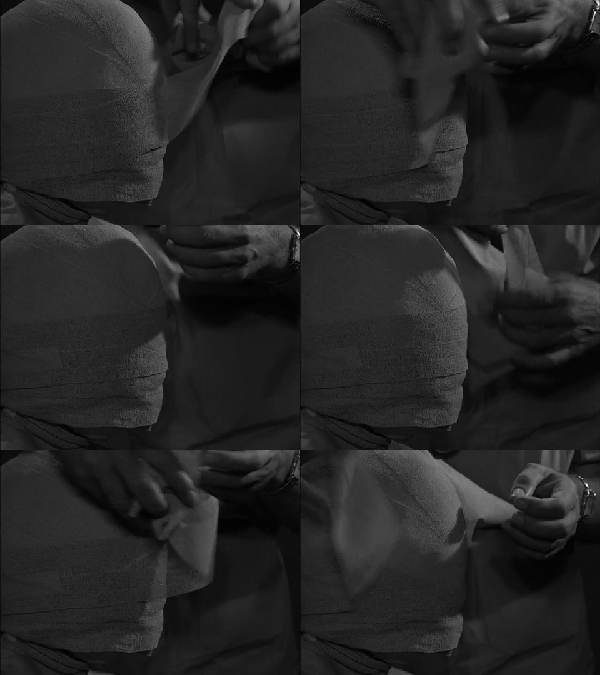
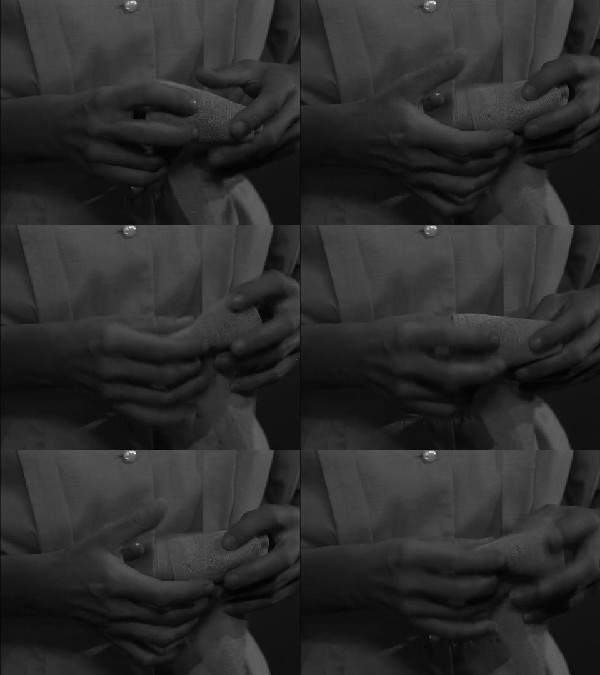
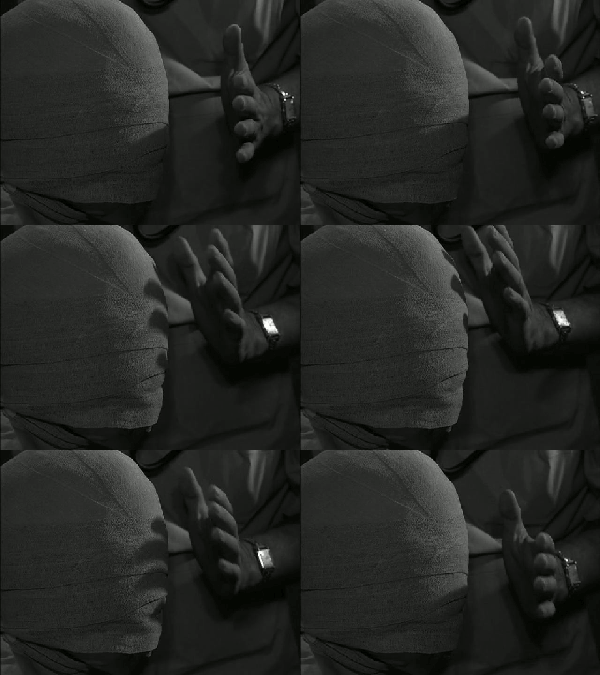
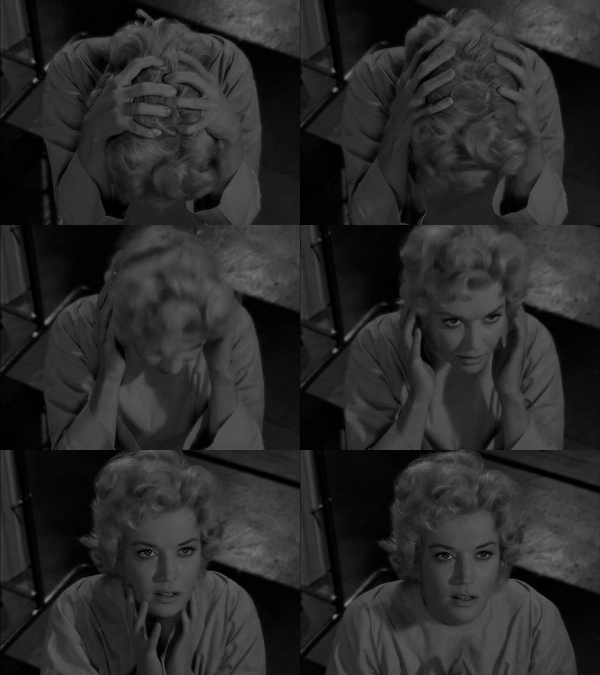
One of the things I really love about the classic “The Eye of the Beholder” Twilight Zone episode is the tension built up during the scene wherein the doctors and nurses unwrap the gauze. Everything was working towards this moment, and cinematically it is deliberate and compelling at once: “Do you see any light now, Ms. Tyler?” There is a reason why this is the most memorable episode, it’s the ongoing critique of conformity, a monolithic idea of societal purpose, and the disturbing historical reverberations of a state that “exterminates undesirables.” Masterfully written (by Serling himself), scored (by the great Bernard Herrmann), and directed by Douglas Heyes—all three come together in this episode to create a holy trinity of awesome that might make it single greatest episode of any show in U.S. TV history. So, to try and capture some of the magic, I created a Multi-Frame GIF Storyboard of sorts to try and capture some of the magic of the scene when the bandages are being removed. My thinking is that an assignment like this is one of the best ways for unpacking a scene in film or TV to see what shots actually constitute the illusion of continuity in cinematic storytelling .
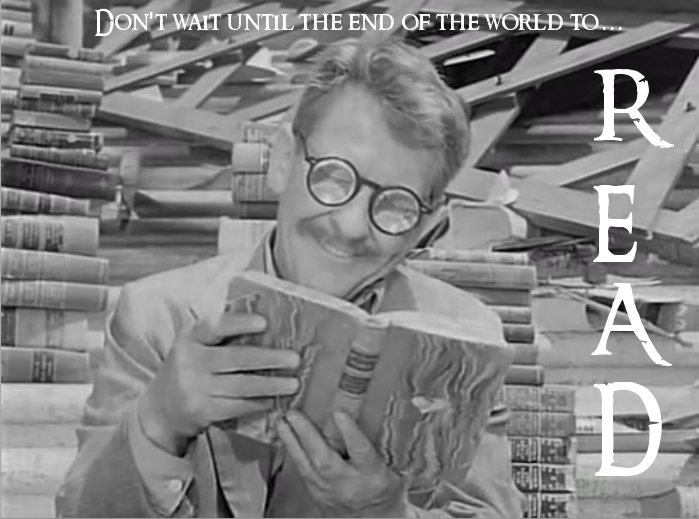
I created yet another design assignment for ds106 because I’m just that good. This one is based on the Read poster campaign that started in 1985. Here is the description:
Since 1985, the American Library Association (ALA) has tried to sell reading books as cool by showing celebrities reading their favorite books. You can read about the history of this promotional campaign here. Experiment with this tradition, introduce a celebrity with a book who hasn’t been recognized yet, but should be. Or use the poster you create to poke fun at a public figure, or do something else all together. have fun.
Doing this in photo shop was pretty simple, I got the screenshot from the Twilight Zone episode “World Enough and Time” and added the caption on the top and the READ text on the side using the text tool and trying out the the Ringbearer font, which is very Twilight Zoney. I made it three stars because the real gold would be photoshopping books in famous figures hands, like Bill Clinton with Lolita, etc. Also, I always thought the following image of Snoop Doggy Dogg would make a great read poster, so I did 🙂
is an ongoing conversation about media of all kinds ...
Testimonials:
Generations from now, they won't call it the Internet anymore. They'll just say, "I logged on to the Jim Groom this morning.
-Joe McMahon
Everything Jim Groom touches is gold. He's like King Midas, but with the Internet.
-Serena Epstein
My understanding is that an essential requirement of the internet is to do whatever Jim Groom asks of you while you're online.
-James D. Calder
@jimgroom is the Billy Martin of edtech.
-Luke Waltzer
My 3yr old son is VERY intrigued by @jimgroom's avatar. "Is he a superhero?" "Well, yes, son, to many he is."
-Clint Lalonde
Jim Groom is a fiery man.
-Antonella Dalla Torre
“Reverend” Jim “The Bava” Groom, alias “Snake Pliskin” is a charlatan and a fraud, a self-confessed “used car salesman” clawing his way into the glamour of the education technology keynote circuit via the efforts of his oppressed minions at the University of Mary Washington’s DTLT and beyond. The monster behind educational time-sink ds106 and still recovering from his bid for hipster stardom with “Edupunk”, Jim spends his days using his dwindling credibility to sell cheap webhosting to gullible undergraduates and getting banned from YouTube for gross piracy.