There’s a ds106 Social Going On in Mastodon!

Rhyming post titles will cost you extra! 🙂

I got sucked down an elephant-sized rabbit hole the last couple of days taking the bait to see if I could get a Mastodon server up and running for ds106. Guess what….NOBODY!

As usual, it’s never a solo effort. My first go-around Tuesday morning was plagued with errors and issues when trying to install from Docker, so I switched quickly to using an Ubuntu 20.x VPS in Reclaim Cloud, and while I got further than with the docker image following this guide for installing Mastodon on a VPS, I still got jettisoned on the nginx setup (although there could have been much more wrong for sure).

Two-hour stream of Taylor and I figuring out how to install mastodon on Reclaim Cloud

But hope springs eternal, so later on Tuesday Taylor Jadin and I jumped on a stream in Reclaim Edtech’s Discord and walked through setting up Mastodon in a Debian 11.5 VPS, and this time it worked thanks to Taylor’s sysadmin kung-fu. Taylor’s mastodon notes can work in tandem with this official installation guide from Mastodon, and it just might get you where you want to go. Taylor’s notes outline the following:

If you get an error while running this command, you can ignore it:

cd ~/.rbenv && src/configure && make -C src

And when you exit back to root user in the guide be sure to start both postgresql and redis using the following two commands:

systemctl start postgresql
systemctl start redis

Also, when you get to the Mastodon setup command that prompts you for the domain, postgresql settings, redis settings, etc., you’re going to want to have a domain where your Mastodon lives (changing that post facto might be hairy), SMTP credentials for an email through something like Mailgun, and finally a S3 bucket setup on a service like AWS’s S3, Minio, or some other S3 compatible tool.* You can just use default values and ignore passwords for the postgre and redis prompts of the setup, but you will need values for the domain, e-mail, and S3 media offload values.

Here are the details you will need for email, using Mailgun in this example:

SMTP_SERVER=smtp.mailgun.org
SMTP_PORT=587
[email protected]
SMTP_PASSWORD=yourSMTPpasswordhere
SMTP_AUTH_METHOD=plain
SMTP_OPENSSL_VERIFY_MODE=none
SMTP_FROM_ADDRESS=’Mastodon <[email protected]>’

Keep in mind the login and password settings will be unique to your setup, but the rest should work unless you are using an EU server for Mailgun, if so the SMTP_SERVER may be different.

Where I ran into the most difficulty is piecing together offloading media to the cloud, and I would recommend doing that beforehand. If you want your server to scale, off-loading media will be important. This excellent guide on setting up AWS for Mastodon got me most of the way there, but my media was ultimately resolving to wonky URLs, and the following setup is what worked for me, again you will need your own bucket name, your specific S3 region, your own AWS key, and AWS secret.

S3_ENABLED=true
S3_BUCKET=reclaimsocialdev
AWS_ACCESS_KEY_ID=yourAWSkeyhere
AWS_SECRET_ACCESS_KEY=yourAWSsecretaccesskeyhere
S3_REGION=us-east-1
S3_PROTOCOL=https
S3_HOSTNAME=s3.amazonaws.com

The issue I ran into was the the different methods (and URL structures) for accessing media through AWS’s S3. This is a bit of a breakdown from their documentation, but long story short I wanted virtual-hosted style buckets rather than  paths-style buckets. Seems the latter are being deprecated by AWS, and for some reason beyond my understanding the URLs in Mastodon were using the path-style structure. I may have messed this up in the setup given I off-loaded media to the cloud after the instance was successfully setup—be better than me. When you are prompted to choose S3 bucket style, chose virtual buckets, or something equivalent. Even better, setup a CNAME alias that re-writes reclaimsocialdev.s3.amazonaws.com to something like files.ds106.us. I might still do this, but for now it’s working, and that’s not nothing given the hours sunk into this issue.

Once you get through the setup, there is going to be one last trick when you get the nginx part of the install guide from Mastodon. This was a bear for me given my limited understanding of nginx, but when working through it with Taylor we figured something out. Namely that when starting nginx (systemctl start nginx) you need to uncomment these two lines in the /etc/nginx/sites-available/mastodon file.

#listen 443 ssl http2;
# listen [::]:443 ssl http2;

And below them add these two lines:

listen 443;
listen [::]:443;

I can’t tell you why nginx starts cleanly after that, but it does. Once it is started and you setup your Let’s Encrypt certificate you can remove the two listen lines I told you to add, and uncomment the two above those. Also, certfbot will add lines to the server block that are duplicates, you will need to comment some of these out. I’m including my nginx config below for the server block in question found at /etc/nginx/sites-available/mastodon. It looks like this:

server {
server_name social.ds106.us;
root /home/mastodon/live/public;
location /.well-known/acme-challenge/ { allow all; }
location / { return 301 https://$host$request_uri; }

# listen [::]:443 ssl ipv6only=on; # managed by Certbot
# listen 443 ssl; # managed by Certbot
# ssl_certificate /etc/letsencrypt/live/social.ds106.us/fullchain.pem; # managed by Certbot
# ssl_certificate_key /etc/letsencrypt/live/social.ds106.us/privkey.pem; # managed by Certbot
# include /etc/letsencrypt/options-ssl-nginx.conf; # managed by Certbot
# ssl_dhparam /etc/letsencrypt/ssl-dhparams.pem; # managed by Certbot

}

Be careful given this may not copy lines in cleanly, but shout out to Tim Owens for noting you just need to comment out the lines where there is a “managed by certbot” line in the first server block, which made it easier to delineate. The last bit I struggled with is that if you have both a default and mastodon file in /etc/nginx/sites-available/ you may have to remove the default and rename the mastodon file default, at least that’s what I did. I also then went back in /etc/nginx/nginx.conf and specified the server to look for only the default file in /etc/nginx/sites-available/ rather than /etc/nginx/sites-available/* (which means it will find all files in that folder, I believe). I do realize I am jotting down some half-baked notes, so feel free to reach out with questions given I do know it will not be a straightforward install, no how much advice I provide here. It’s a very complicated install, Maude. You know, a lotta ins, lotta outs, lotta what-have-you’s.

jimgroom account on social.ds106.us mastodon server

Anyway, I think that is a decent breakdown of how I got to the point from which I write this, dear reader, and I also have a ds106 Mastodon server up and running on Reclaim Cloud for my labors. It can scale up to 8 GB right now, but it’s only using between 1-2 GB so far. I estimate it will cost about $24 a month. Add to that another $3 for the IP, and you are up to about $27 a month with no real activity to speak of. I will also be tracking the AWS costs for this media bucket to see what that runs, but I’m guessing maybe $5-$7 a month? So, if you can set one up and are comfortable with a bit of uncertainty around maintaining it, a solid server with offloaded media to S3 will run about $35 a month to start. We’ll see if that proves a solid figure over time, but luckily we control the vertical and the horizontal, so we can scale it baby! This is ds106 after all.
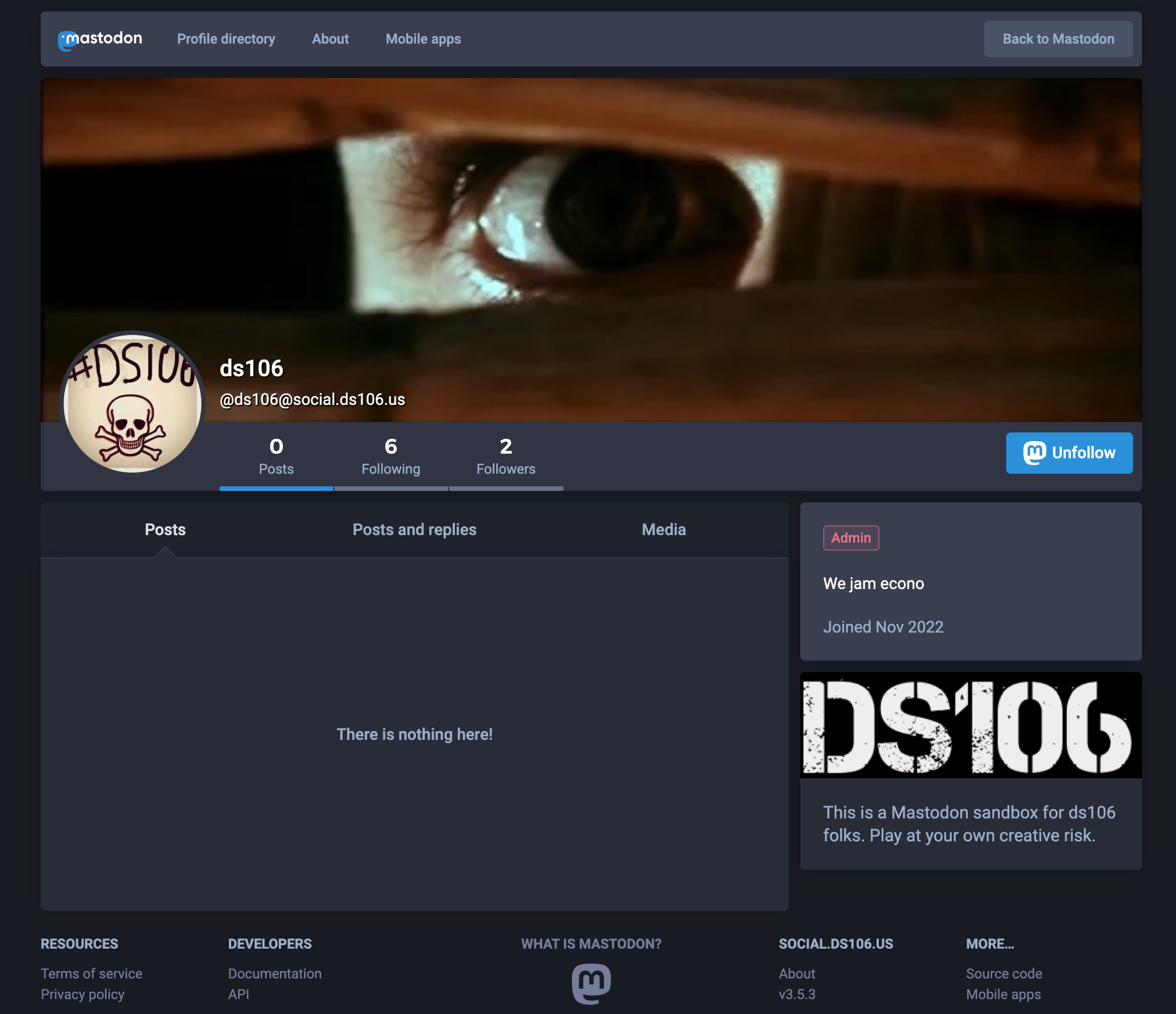
Screenshot of ds106 user on mastodon

ds106 is #4life

___________________________________________

*I had no luck with Digital Ocean’s Spaces or Cloudflare’s R2, so I had to revert to AWS’s S3.

Posted in reclaim, Reclaim Cloud | Tagged , , | 4 Comments

Talking WordPress Multiregion Hosting on Reclaim Today

Last week Lauren Hanks, Chris Blankenship, and I recorded a session for Reclaim Today, “Oh What Brave New Worlds of WordPress Multiregion Hosting!” wherein we discuss the process of getting Reclaim Hosting’s main site running in in a WordPress mutliregion setup leveraging Cloudflare for load balancing, CDN, DDoS protection, and more. The multiregion through Reclaim Cloud provides replicated server setups and Cloudflare ensures the site is always online health checks of each server and distributing traffic accordingly. A lot of this is premised on running our DNS for www.reclaimhosting.com through Cloudflare, and in this session we talk at length about that process.

One of the reasons we started Reclaim Today was to capture our thinking about particular projects we are doing at any given time. It’s an intentional archive in many ways given we have found it quite useful to take the time to reflect on our approach through conversation. What’s more, this is a special one given it’s work that represents the beginning of a whole new world of hosting at Reclaim. So consider this yet another mile marker on the long road that is Reclaim Hosting’s journey.

Posted in reclaim, Reclaim Cloud, Reclaim Today, WordPress | Tagged , , , , , , | Leave a comment

November’s Ghost

Image from Poltergeist of the young girl touching the hand of a Ghost coming out of the tv

Communicate with Ghost and broadcast to the paranormal world!

This month at Reclaim Edtech Pilot, Taylor and I will be running a flex course focused on getting up and running with the open source publishing tool Ghost. It will take place every Wednesday over the next three weeks at 11 AM Eastern (that’s November 2nd (today!), 9th, and finally the 16th). You can tune in to all the action for free here: https://watch.reclaimed.tech/ghost.

Image of hands coming out of hatch in floor to grab someone;s feet

Click on the GIF to join us in Discord

As an added bonus join Reclaim Hosting’s Discord server to chat live during the sessions, ask questions, or get more targeted help.

Here is look at what we’ll be covering in each of the upcoming three sessions:Image Image of TV with Reclaim EdTech on screen

  • Session 1: What is Ghost? (and getting it installed)
  • Session 2: Using Ghost & Writing Your Newsletter
  • Session 3: Mailgun and Email Setup

Additionally, we’ll be hosting two Q&A sessions in Discord on Friday, November 11th and the 18th, also at 11am, which can be a time to ask more questions, pontificate on Ghost vs WordPress, or work through issues you might have had while setting up your instance of Ghost.

Posted in Ghost, reclaim, Reclaim Cloud, Reclaim Edtech, ReclaimTV | Tagged , , , | Leave a comment

Flattening the DNS Curve with Cloudflare

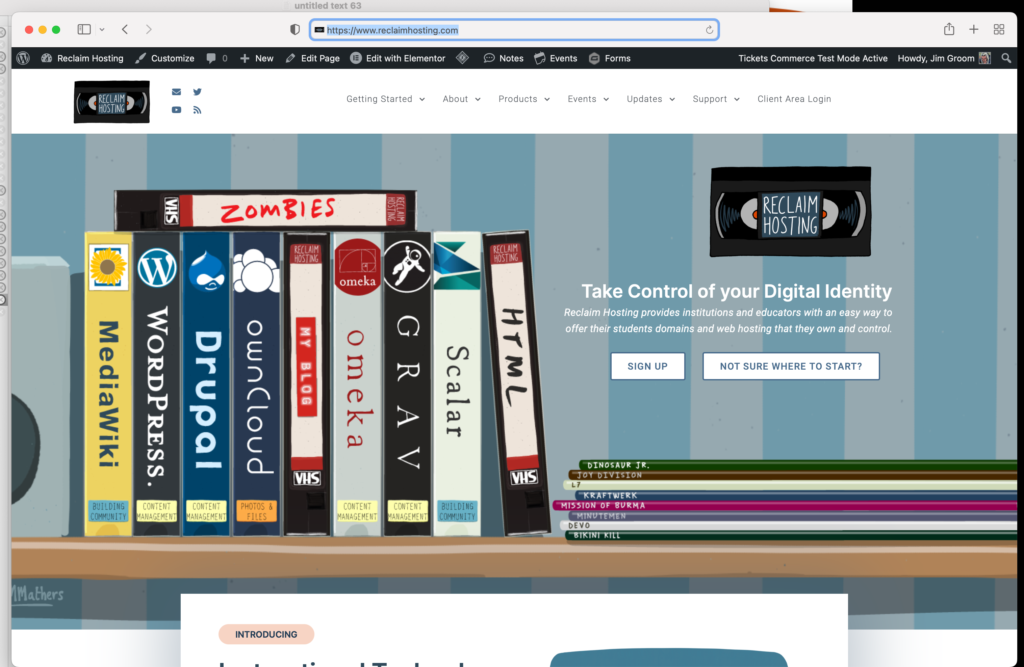
Image of Reclaim Hosting's main website

Notice the wwww.reclaimhosting.com

I feel like I could write a book about just last week at Reclaim Hosting, so many awesome things happening and the work we’re doing to build a sense of team internally and community more generally is really starting to gel. I’ll save that post for another day, but right now I just want to capture some of the work we have done over the last couple of weeks to move our main website to Reclaim Cloud using a multiregion setup. What multi-region denotes is that there are two (or more) servers in two (or more) regions that are serving the content. For this to work the files and databases need to be syncing instantly across the two regions, and thanks to Virtuozzo’s WordPress Multiregion setup we can do that. I already have the bava.blog setup with mutliregion, so it was time to do the same with the main Reclaim Hosting website. We started with spinning up a dev instance to export everything from the Digital Ocean droplet hosting our site over to Reclaim Cloud. I setup the multiregion instance and did the migration (mostly) while Chris Blankenship led the way with the Cloudflare setup. This dev space allowed Lauren to troubleshoot a couple of pesky plugins, make sure everything was syncing cleanly between the regions, and ensure there were no major flags with this setup for the main site.

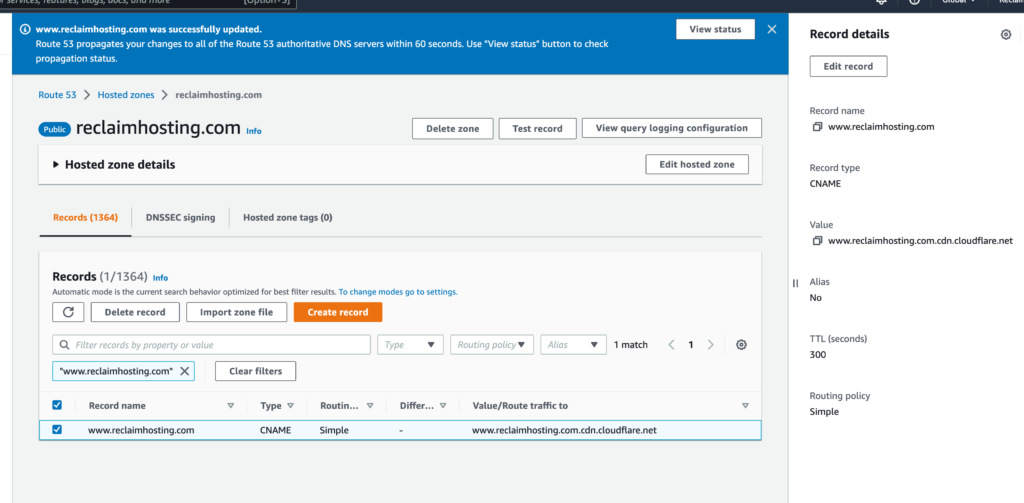
In AWS the CNAME record is pointed to a Cloudflare address in order to flatten that record

All was good, so we created another multiregion for the production instance using two regions and rsynced files and imported the database from the dev site. After that, we had to point our www CNAME record from AWS to Cloudflare, and this is worth talking about for a moment. Given AWS’s DNS service Route 53 does not allow us to flatten the top-level domain of reclaimhosting.com* we had to point just part of our DNS to Cloudflare, a.k.a. a partial DNS setup.  We pointed www.reclaimhosting.com, which allowed us to then create two A records for www in Cloudflare’s DNS management panel. And that’s when it occurred to me, this is what we need to do for all of our infrastructure going forward. We need an enterprise license through Cloudflare that allows us to point records for our own infrastructure (and for that of schools that want to point part of their DNS at us, such as subdomains like domains.stateu.edu) so that we can manage the records that point to a server’s IP behind the scenes. This is useful because in the event a server needs to be migrated (which often means an IP address change) there is never an interruption of service. The client never needs to worry about that, and while it took me 8 years to grok it, I now understand how Cloudflare’s introduction of CNAME flattening in 2014 changes the game in so many ways for us. In fact, it was during yesterday’s move of the Reclaim’s main site that it hit me like a diamond through the forehead.

Image of AWS CNAEM record pointed to Cloudflare to flatten that subdomain

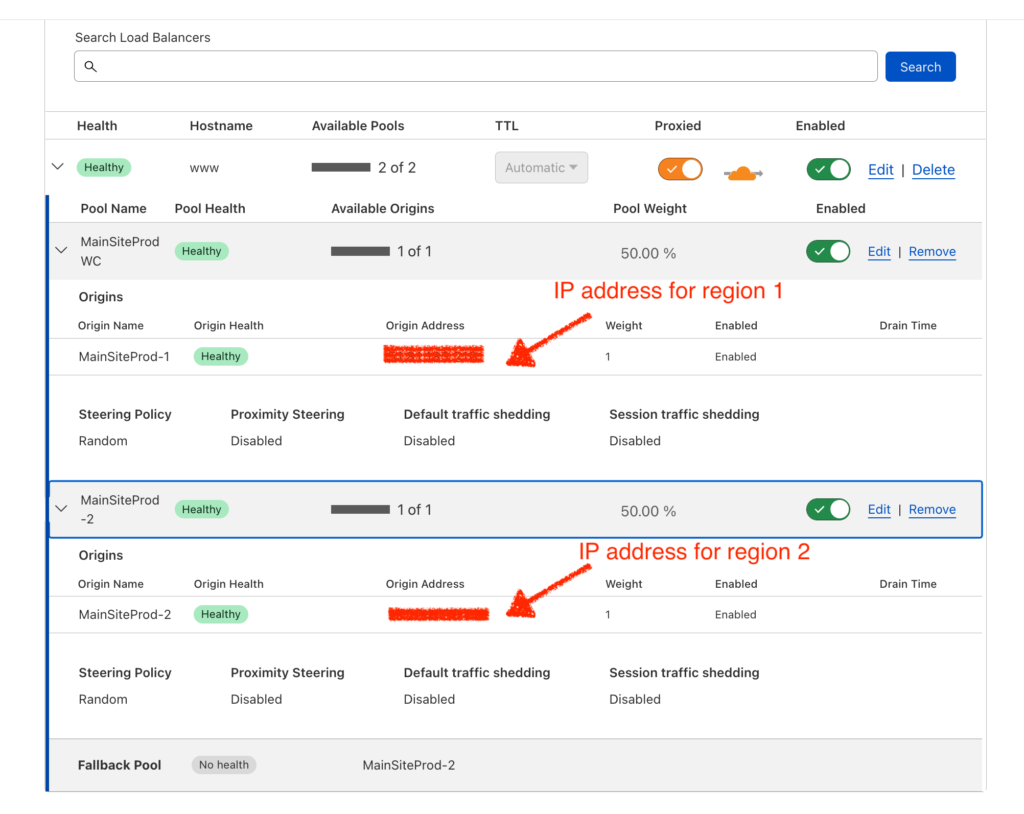
WWW A records for two servers

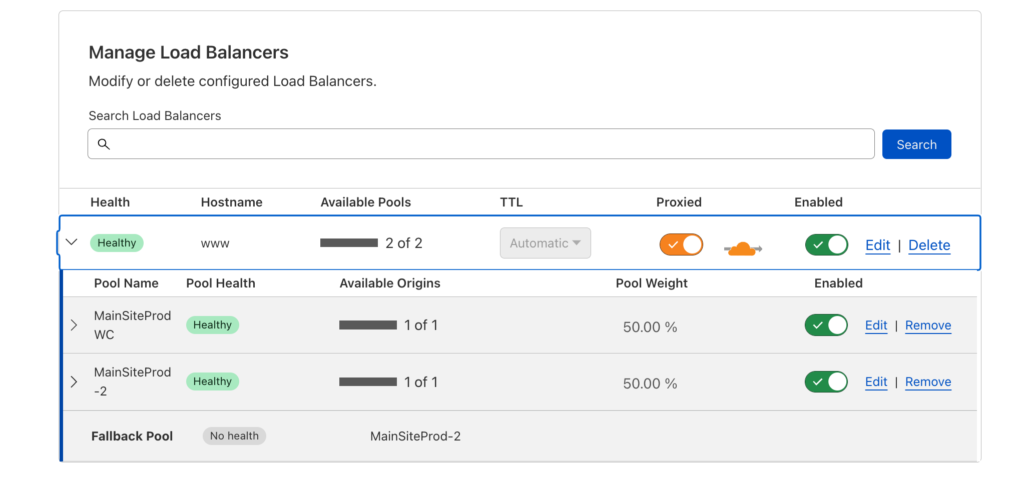
By flattening the CNAME record for www from the original DNS provider (in our case AWS’s Route 53) we are able to proxy that record in Cloudflare so that it can have multiple A records pointing to the server IP addresses for our multiregion setup. Then, and this is the second piece that fell into place for me conceptually, we can run the load balancer for that server not in the container on Reclaim Cloud, but abstracted out to Cloudflare’s load balancing service. So the management of DNS is fully isolated from a physical machine allowing for immediate failover and traffic re-direction in the event of an emergency.

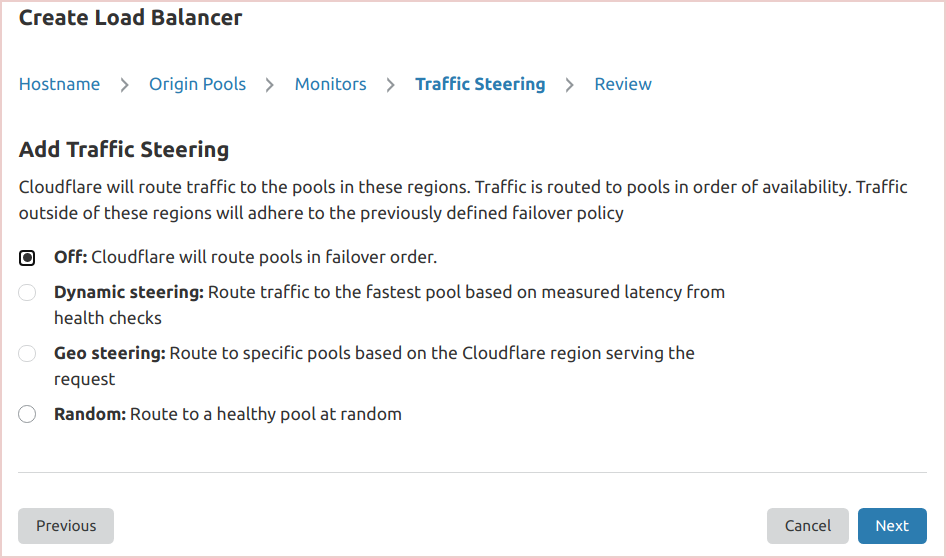
Image of Load Balancer through Cloudflare

Load Balancer through Cloudflare

What’s more, there is monitoring built-into the load balancing so should there be an issue with any of the regions you will be immediately notified. In fact, you can control how traffic is steered to these regional pools, whether based on proximity (closest server) by geo-locating IPs, or randomly using speed and latency checks. What’s more, at the point any of the servers is having issues the load balancer knows to re-direct all traffic to the healthy origin. It is pretty awesome, and Reclaim Hosting is leveraging the power of not only multiregion and load balancing, but also all the other benefits of Cloudflare like DDoS protection, a huge CDN, the potential for zero trust networks, and much more.

Details of CLoudflare load balancer using two different pools

Details of Cloudflare load balancer using two different pools

In fact, as I was testing out www.reclaimhosting.com yesterday before we redirected all traffic from reclaimhosting.com –> www.reclaimhosting.com we realized that all images were not synced to the region two server. So while Taylor Jadin stepped in and saved my butt by rsyncing all media files to the production server from dev server we were able to steer all traffic to the fully functioning server in region 1 with the click of a button. Literally micro-seconds for the change to propagate. It was eye-opening as to the power of such immediate shifts that ensure your site is enterprise-ready. Cloudflare is no joke, and I am a big fan!

______________________________________________

*We would need to point that main record (reclaimhosting.com) to Cloudflare without interrupting thousands of records for the various servers and services we run off that namespace. So this was not nothing….

Posted in reclaim, Reclaim Cloud | Tagged , , , , | 2 Comments

Ambient Participation, Reclaim Radio, and Breaking on Through #4life

It’s been more than a decade since Grant Potter introduced me to the wonderful world of self-hosted web radio, yet another lasting legacy of that heady ds106 trip. During the pandemic the radio presented an occasion to return to micro-communities. For me, the uncertainty and dread of the early days of the pandemic will always be balanced by the joyful comradery of the ds106radio community. The sharing and laughing were a much needed salvo, and a good reminder how beautiful small can be.

2011/365/135 Accordion Man

Photo credit: Alan Levine’s 2011/365/135 Accordion Man

While that sense of urgency around connection at the height of the pandemic has retreated a bit, the radio still abides because it is, and always will be, awesome—with or without a virus. In fact, in the long wake of the virus many of our assumptions about how and where we work have shifted. Since the beginning of the pandemic Reclaim Hosting has hired five people that have no idea what a Reclaim Hosting office culture would even look like. Most (all?) of them seem to really enjoy working from home. As Martin Weller reflected on today, there’s been a real sense of excitement around building out the home office setup…in fact, Meredith’s Megadesk is quickly becoming Reclaim lore, and I love it.

I’ve been building my home office setup since about 2018, and it’s getting pretty insane. I’ll leave out the details of 30 golden age arcade cabinets on the other side of the image below and just give you a look into the current iteration of the work space in the bavacrypt.

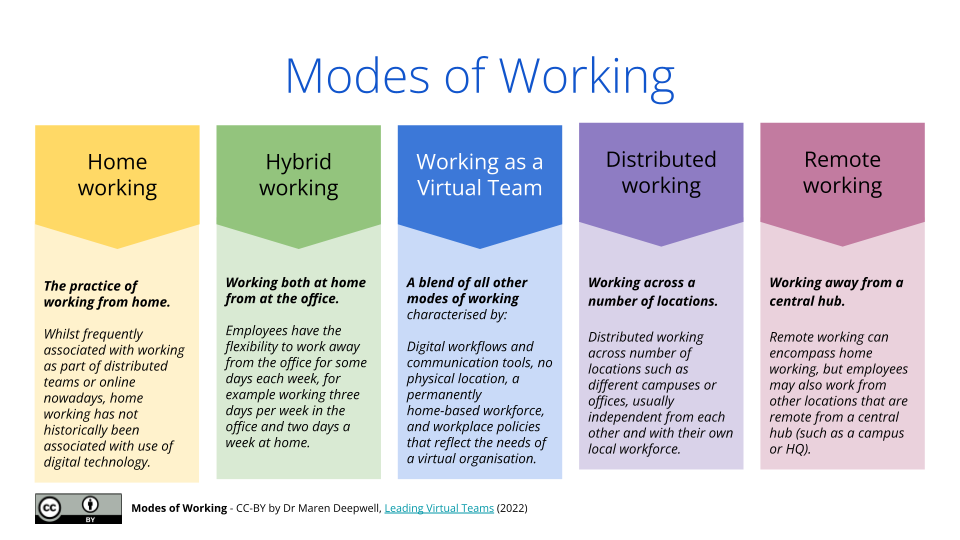
I think of my home office setup as kind of Winchester House without all the mystery and guilt. A complete blast!  And now that Reclaim Hosting has gone fully remote as of March we’ve been working pretty hard on trying to create a joyful work environment where you can laugh and share virtually. It pushes you to think about how our physical space interfaces with the online in potentially interesting ways when so much of our interaction is not just text, but more and more video and audio. In fact, Maren Deepwell and Lauren Hanks are doing a timely Reclaim Edtech flex course, Hacks for Hybrid Working, wherein they explore the impact of the contemporary realities around free-range working—although I flatten all the possible variations of remote working with my inexact language. But thanks to the following useful breakdown Maren Deepwell shared in week 1 of Hacks for Hybrid Working, you can be better than me:

Maren Deepwell’s “Modes of Working” breakdown

The idea of ‘ambient participation’ came up in Monday’s session, and it suggests how people’s backgrounds and working spaces become an integral part of their daily interactions online. In fact, they backgrounds become part of their online persona. That is quite true for me given my office is also a co-working/living space not only for arcade cabinet work, but also my son’s gaming rig or the dog’s waiting room until the next walk. It’s all part of the ambient reality that seeps into the online work we do.

Reclaim Radio 2.0

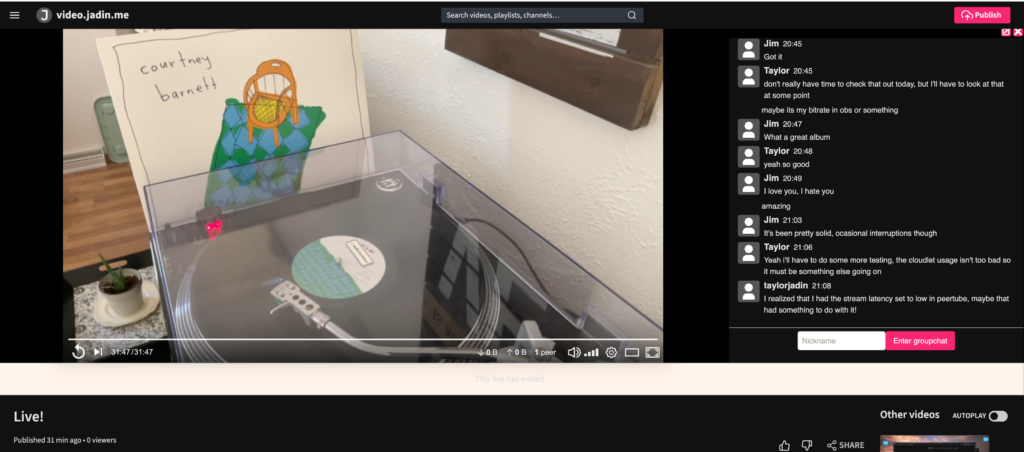
One of the things that has started to take stronger hold at Reclaim Hosting has been broadcasting to Reclaim Radio. I just finished watching/listening to a vinylcast of Courtney Barnett thanks to our Community Instructional Technologist Taylor Jadin.

Image of a recordplayer in the youtube clone Peertube

Taylor Jadin doing a vinylcast cast video on Peertube!

Both Meredith Fierro and Lauren Hanks were working on setting up Audio Hijack (one of many applications used for radio broadcasting) to go live on the radio earlier this week, and Chris Blankenship has an Azuracast—the open source software that powers ds106radio and Reclaim Radio—instance running on a Raspberry Pi hooked up to his record player. He even blogged his setup as well as some of the crazy music he listens to, which I love. So far he has played Agent Orange‘s Living in Darkness (a personal fav), the Germs, D.R.I., Midnight Oil, as well as his own bands music, such as  Toxitolerant and Skumboyz—both of which rule. But apart from the music (which I dig), it’s the act of sharing across the team and feeling there are fun, creative outlets to bridge the virtual space, which I think makes all the difference. And the fact you are doing it rom your home offices means it would be more like inviting someone into your living room rather than meeting in some sterile work environment. We are continuing to push on more regular streams (whether audio, video, or both), and the idea is share if you want and listen/watch if you can.

Like everything, it takes a bit to catch-on, but if you keep the door open and genuinely practice what you preach eventually the band will start playing together to become something greater than the individual musicians. That is why bands are special, and that is why when you go about building a team the idea of working together, riffing off each other, and creating something that transcends any one individual—yet reflects everyone’s collective work—you have begun to break on through. And that is what the team at Reclaim Hosting is doing currently…we are trying to break on through the boring models of work and make our day job not only pleasurable, but deeply gratifying and rewarding on a personal level. That’s the dream, and we can’t stop, won’t stop!

Posted in reclaim, Reclaim Edtech, Reclaim Radio | Tagged , , | 2 Comments

Vinylcast #55: After Dark 3

This was a two-part #vinylcast on ds106radio x-cast to Reclaim Radio, while streaming to bava.tv. The vertical and the horizontal. The vinyl was a compilation of artists on the Italians Do It Better record label called After Dark 3, and it’s a treat. If you are into the synth/vaporwave movement that returns to the neon sounds of the 80s, this is right up your alley.

Image of label for side two of the 3 vinyl compilation album After Dark 3 from IDIB

You can can see a full track listing on Discogs, but the songs feature gems from GlĂĽme, Desire, Chromatics, Joon, Johnny Jewel, and many more. The stream gets off to a slow start in part 1, you might want to push to 9 minutes if you actually want to listen to the music rather than my futzing.

After Dark 3, Part 1 plays the first 3 sides of this three-disc vinyl

It took a few weeks, but did get around to finishing the second part of this #vinylcast and playing the last 3 sides of the remaining vinyl. I think one of the things to mention about this vinyl beyond the awesome 80s inspired new wave sounds is the aesthetic of the record sleeves. They are so beautiful!

Vinyl sleeve: Is anybody out there?
Vinyl sleeve: Music is medicine!

As always with these vinylcasts, they’re music to work-by for me, and in general a lot of fun to talk to the airwaves of 2 or 3 people in the breaks. In fact, during the second stream there was a fun chat with a strange, anonymous figure who was under the impression colored vinyl cannot be played on a US turntable, and that the album was far too big for a small figure like me to move ? You can’t make this stuff up, the web is still weird on #ds106radio.

After Dark 3, Part 2 plays the last 3 sides of this three-disc vinyl

And if you are not into the whole video thing, here are the two separate audio files for each show:

vinylcast of After Dark 3 Part 1 broadcast 10/4/2022
Vinylcast of After Dark 3, Part 2 broadcast on 10/24/2022
Posted in compilation, ds106radio, on air, vaporwave, vinylcast | Tagged , , | Leave a comment

bavacade Repair Log 10-24-2022

This was another couple of weeks of fits and starts when it came to arcade repairs given day-job demands. That said, I actually made some significant progress on Moon Patrol. Like, it works now progress! 🙂

Long-short story on Moon Patrol is that I was trying to knock-out a couple of the smaller to-do items on the “bavacade To-Do List, Part 2,”  namely adding the Moon Patrol high score save kit to the new board Tim sent. Ya see, I was getting ready to send the original Moon Patrol boards in for repair given I was convinced the reason that game was not working was board related. Spoiler: I was wrong. So, as I was adding the high score save kit, I realized the extra board only included two of the necessary three boards, namely the video scrolling and CPU board.*

Moon Patrol PCB

Moon Patrol Board(s)

This was initially a bummer, but it pushed me to consider the issues with Moon Patrol anew and given all the problems I was having with the Williams power supplies it struck me that I was using the Moon Patrol’s power transformer in Joust temporarily and the voltage readings were crazy. So bad that I needed to use the switching power supply with a Williams adapter. Which then made me think the graphic issue Moon Patrol was having could be due to bad voltages rather than anything to do with the board. So, I spent all last Sunday putting Moon Patrol back together and using the switching power supply I had in Venture to test my theory. Lo and behold, that was it. Like web issues are always DNS, arcade issues are always power!

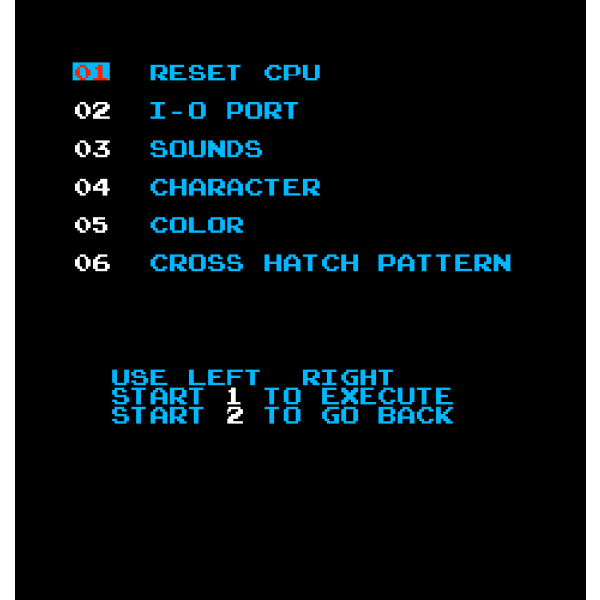
Image of Moon patrol menu options

Moon Patrol menu 

After getting it working I was stumped for a bit given I could not get the game out of test mode with or without the high score save kit installed. Turns out there is a dip switch that causes this. Specifically, switch 8 on dip switch #2 was set to “On” forcing the game to load only to the menu. Once I figured that out, the game played beautifully, how crazy is that!

This win encouraged me to do some more clean-up on the Moon Patrol cabinet, which I’d been preparing to send to Alberto for refurbishing. After this, however, I’m gonna de-prioritize that and send Venture out in its place. I can do some surface clean-up on Moon Patrol and save it for the full refurbishing after Venture is done. It also means I can play it sooner than later, which always matters.

I took a wire brush to the coin box door and then re-painted the heads of the new bolts black. I also got rid of as much rust on the metal reinforcements as I could and them repainted them silver. They aren’t perfect, but they look pretty good.

Moon Pattol Cash box box and accessories

The final piece will be taking some black paint to the front of the game and touching up some of those spots and hiding the peeling plywood at the bottom for the time being, we’ll see what I can figure out. It also means I need to disassemble Venture this week to get that shipped out, which will help me prioritize re-building the power supply for that game, cause again I know it’s the power 🙂

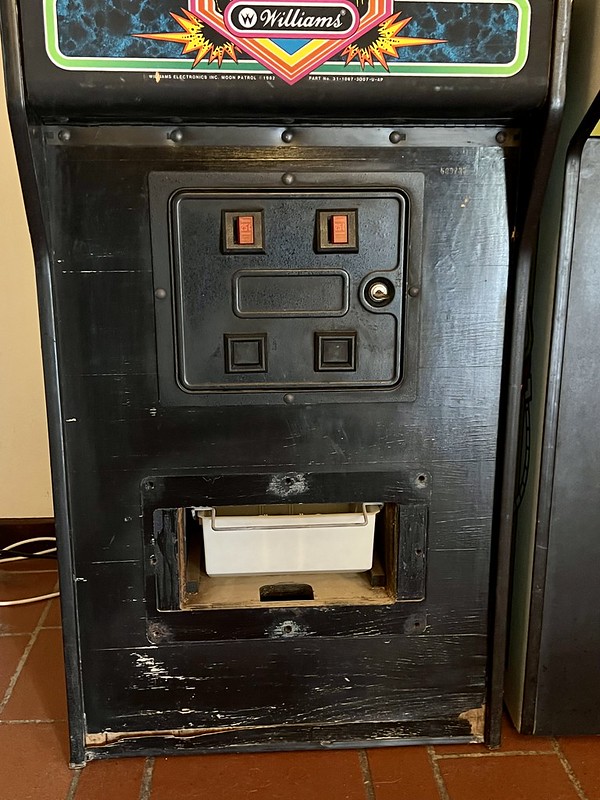
Moon Patrol coin door area of cabinet

Moon Patrol coin door area of cabinet needs a clean-up

The other project I looked at yesterday afternoon was the issue with getting access to the menu for changing game settings for Robotron. This issue was not a deal-breaker given the game played fine, but I like to have 5 guys in that game rather than the default 3, so I wanted to adjust settings.

Coin Door Switches

Games Switches for menu settings in Defender identical to those in Robotron

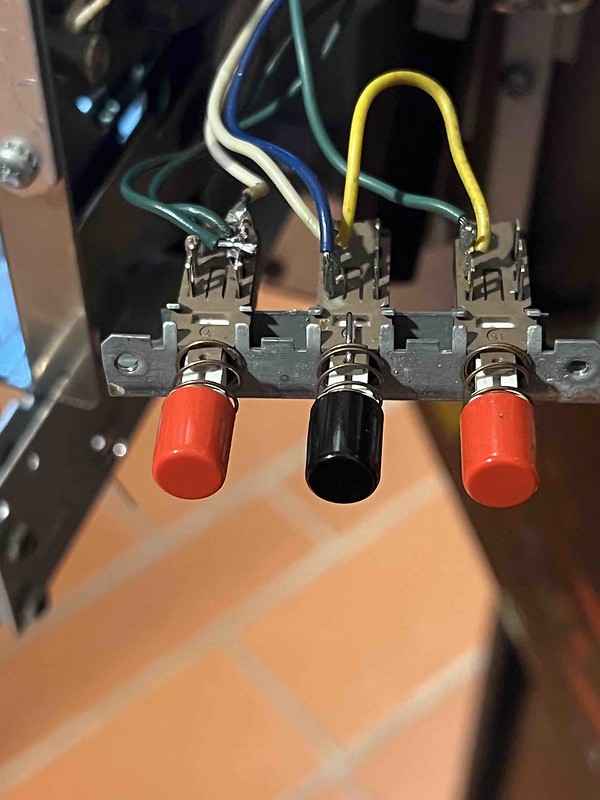
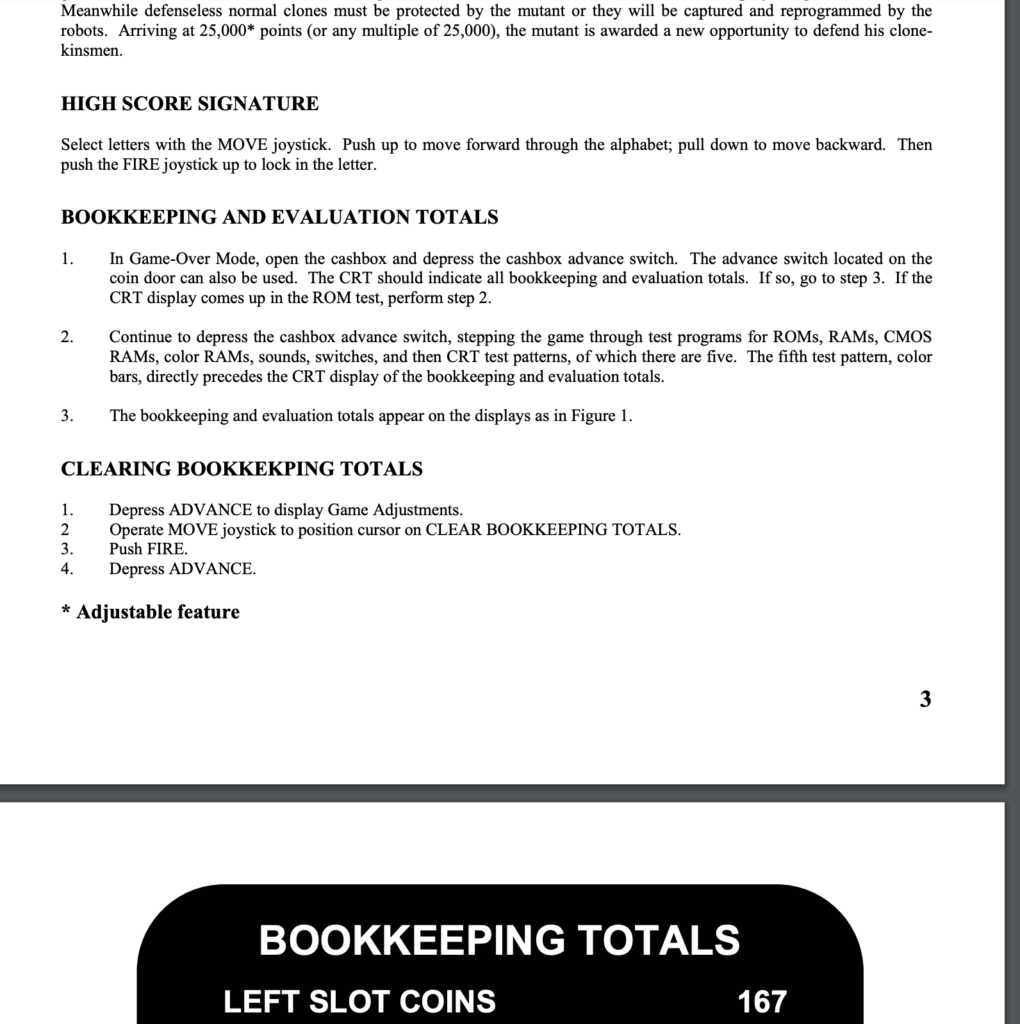
This was similar to the issue I had with Defender discussed here, but as with most of the Williams games, it was just different enough to result in my wasting a couple of hours trying to track the issue down. While Robotron has the same game setting switches as Defender, turns out there is another Advance switch for the menu that is accessible via the coin box ceiling.

Sometimes you should really just read the manual to save you time 🙂

The advance switch in the coin door did not work, and at first I could not find this other advance switch that was supposed to be in the cash box area. But after closer inspection of the coin box it looks like that switch was screwed to the top of the box with the switch forced open, which explains why I couldn’t find it, as well as why the switch tester was showing the service switch as open.

Robotron Advance Switch on Cashbox

Advance switch screwed onto cash box for Robotron, but not aligned properly with hole

Once I unscrewed that advance switch and re-aligned it over the cash box hole for the switch I could then get in and access book keeping totals as well as change settings like number of guys from 3 to 5…YEAH! Too much time spent on a simple problem, but it’s now solved. I also re-visited the original Robotron boards while I was troubleshooting to see if they would work without the FPGA board, but that was a no-go. Something is weird given they’re not showing any errors, just seem to be getting no power, but when I turn the game off the error LED indicator flashes 0 once very quickly.For my sanity, however, I’m not going down this rabbit hole right now, but it’s one to note for later. The other thing is the player 1 and player 2 start buttons are switched, so I need to re-wire those, but after that that’s it. Robotron is done and done.

The other thing I did to get Moon Patrol working is take the transformer from Stargate temporarily, which puts the repairing of the Joust transformer I blew at the top of the repair list now. I’m getting there, only two games down now, and at least one of them, Cheyenne, should be a simple fix….SHOULD is the operative word there 🙂 The other thing worth considering is how much time I have spent the last month managing Williams’ menus, Jesus.

________________________________________________

*The character board was missing, so I’m gonna need to find one.

Posted in bavacade, bavarcade | Tagged , , , , , , , | 1 Comment

Fall with my Besties

Fall with my besties

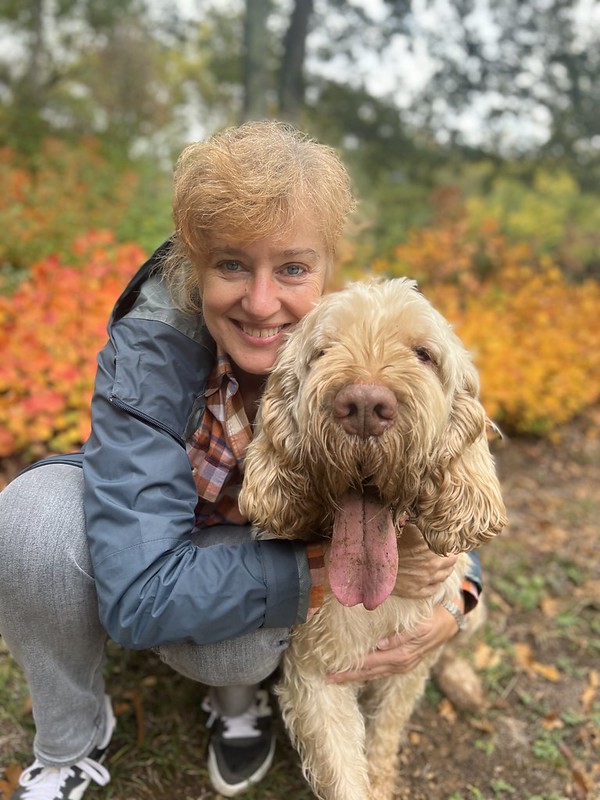
It’s been a quite busy fall at Reclaim Hosting, kinda crazy to think October is almost over. I really haven’t looked up from my desk for the last month, so it was nice to get out yesterday with Anto and Duca for a walk. We went to the Bosca della CittĂ , which is a gorgeous, 500 meter high “Doss,” a geological remnant of the ice age which left large, round rock formations in the middle of the valley. This is one of several within the city limits, and we were able to capture it as it caught fire with the colors of fall.

Fall Sparks

Before we moved into the “big city” we spent a lot of time with Duca in this park. In fact, probably the greatest thing about Trento is the parks in the city that make you feel like you are within the deepest woods. It was a glorious return, and nice to take a break from all the multiregion networking shenanigans 🙂

Posted in family, fun | Tagged , , , | Leave a comment

Multiregion: a Year-Long Odyssey

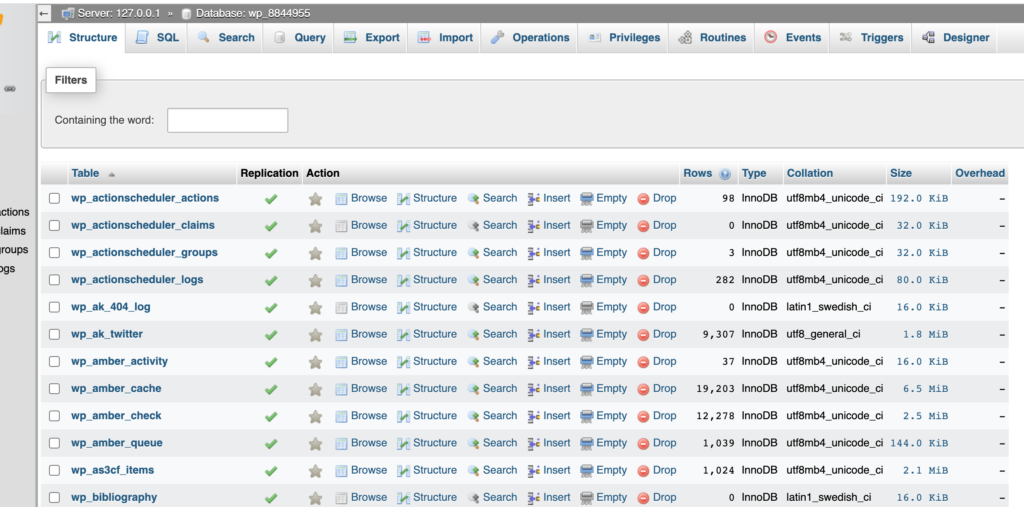
Since our all-team meeting in November of last year I have been chasing the White Whale of WordPress multiregion hosting on Reclaim Cloud. I’ve been experimenting with it on and off since January. You can find the tale of the tape on the bava using the WordPress Multiregion tagged (wpmr) post. This is yet another multiregion post, but this time with a successful implementation of bavatuesdays running across our US West and UK data centers, and it’s replicating perfectly.  The proof is in the database!

Image of a MySQL database tables

The Replication column is the key!

I am managing the DNS of each of the unique servers through Cloudflare, which allows me to setup DNS-based load balancing that steers traffic towards either the closest server, the fastest server, or at random depending on the settings chosen.

Image of Cloudflare load balancing options

Traffic options in Cloudflare’s load balancer

What’s more, the moment one of the two servers goes down all traffic is redirected to the healthy pool, or the server that is not down in this case. That’s the failover, and I tested it for both servers and I immediately was notified via email, which is slick.

Image of email alters notifiying me server is down

Cloudlfare alert to notify me one of two servers hosting bavatuesdays is struggle-bussing

So, that is multiregion failover in a nutshell, and we have it working for WordPress instances in Reclaim Cloud. So, the next step was to get Reclaim Hosting’s main WordPress site running on this setup, and this is where things get interesting. In a recent post on how we work at Reclaim I mentioned how Cloudflare would become a larger part of our workflow and infrastructure, and that’s already the case. And I am starting to fully realize the immense power of this resource, and part of it harkens back to the O.G. web, namely www. The tradition of using the subdomain www. before the top-level domain start has a marker to distinguish these resources from FTP or Gopher sites, a kind of resource branding. With the web being the de facto destination for almost all traffic for well mover 25 years, the subdomain might be seen as redundant. But, when it comes to a web where more and more security, traffic shaping, and resource distribution are controlled via DNS with services like Cloudflare, being able to isolate the traffic for your main site to a www subdomain where all top-level traffic is re-directed becomes an increasingly important practice.

So, in the case of Reclaim Hosting’s mainsite our DNS is managed by a different provider than Cloudflare. Often times when you run your domain through Cloudflare you point your nameservers to their’s and then they effectively manage all your records by “flattening” your top-level domain. But changing DNS for all records running through reclaimhosting.com at this point is a non-starter, so how can we still leverage all the benefits of Cloudflare, such as their CDN, DDoS protection, DNS-based load balancing (to name a few) for our main site if we can’t point our main domain’s nameservers?

Image of a ball rolloing to flatten a fictional character

Flattening CNAME with Cloudflare is something like this….

Well, turns out Cloudflare allows you to setup a Partial (CNAME) setup that allows you to point a specific CNAME, in this case www, to their service so that you can flatten a specific CNAME like www.reclaimhosting.com in order to leverage everything we need. The amazing Chris Blankenship got that all setup yesterday in our development environment, so I think we will be able to pull the trigger on having our main site running WordPress multiregion using Cloudflare for load balancing, DDoS protection, as well as their CDN. Getting multiregion on Reclaim Hosting’s main site has been a bit of an odyssey, but like anything, keeping the faith and continually returning to the issue with a fresh perspective makes all the difference. YEAH!

Posted in reclaim, Reclaim Cloud, WordPress | Tagged , , , , | 3 Comments

WordPress Multisite Migrations and the Meaning of Web Life

This post is heavily influenced by the goings-on at Reclaim Edtech this October, namely a month-long dive into all things WordPress Multisite for admins with Tom Woodward. It’s similar to the Domain of One’s Own workshop we have run for years, and it feels good to finally offer something for our myriad WordPress Multisite folks. Also worth noting October 24th kicks off Hacks for Hybrid Working with Maren Deepwell and Lauren Hanks—a free, month-long event that is open to anyone, you should really attend!

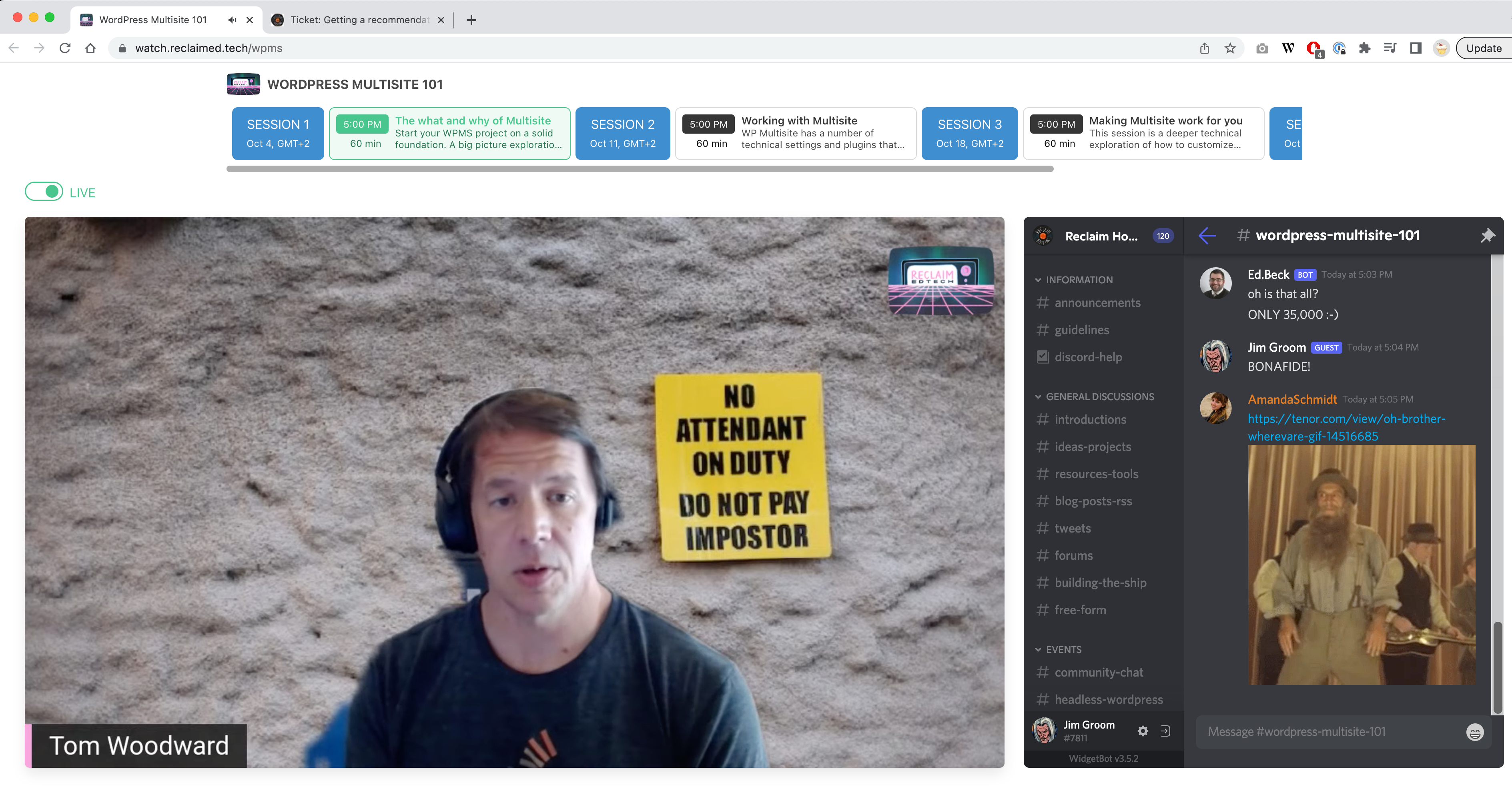
Image of Tom Woodward during Week 1 of WPMS 101

Tom Woodward during Week 1 of WPMS 101

But back to WordPress Multisite, I believe it’s the first event that Amanda Schmidt has run since joining Reclaim Hosting in late June, and I’m really loving the vibe. She has a wicked GIF game, as you might be able to glean from the screenshot above, and she has made impressive headway on our WordPress Multisite documentation which is a natural adjunct to this workshop. Hell, it’s even inspired me to take on a “Single Sign-on (SSO) for WordPress Multisite” article, which is a much needed push to centralize some resources and track down all the different SSO methods we currently support, including the UMW Blogs outliers. But I should return to the vibe of the edtech sessions already mentioned before I get lost in WordPress Multisite migration land. It’s fun to see Amanda, Taylor Jadin, and Pilot Irwin co-hosting with Tom. It has resulted in some great conversation and a sense of generations of edtech in dialogue with each other in an organic and generative way—and that was all Amanda’s doing. I’m really digging that, not to mention I never tire of the way our pre-recorded videos work in concert with Discord’s live chat—the delivery and episodic calendar along the top are quite elegant.

But all of that is just a way to get to this (you can see how these posts can get unnecessarily long, right?), I have been working on a migration that pulls a single site out of a WordPress Multisite, which can be a tricky process. That said, it was cool to see Tim’s document on “Migrating a WPMS Subsite to a Standalone WordPress Install” holding up brilliantly, so I won’t re-hash the process. Rather, I’ll note some things that were particular for me that might be worth remembering.

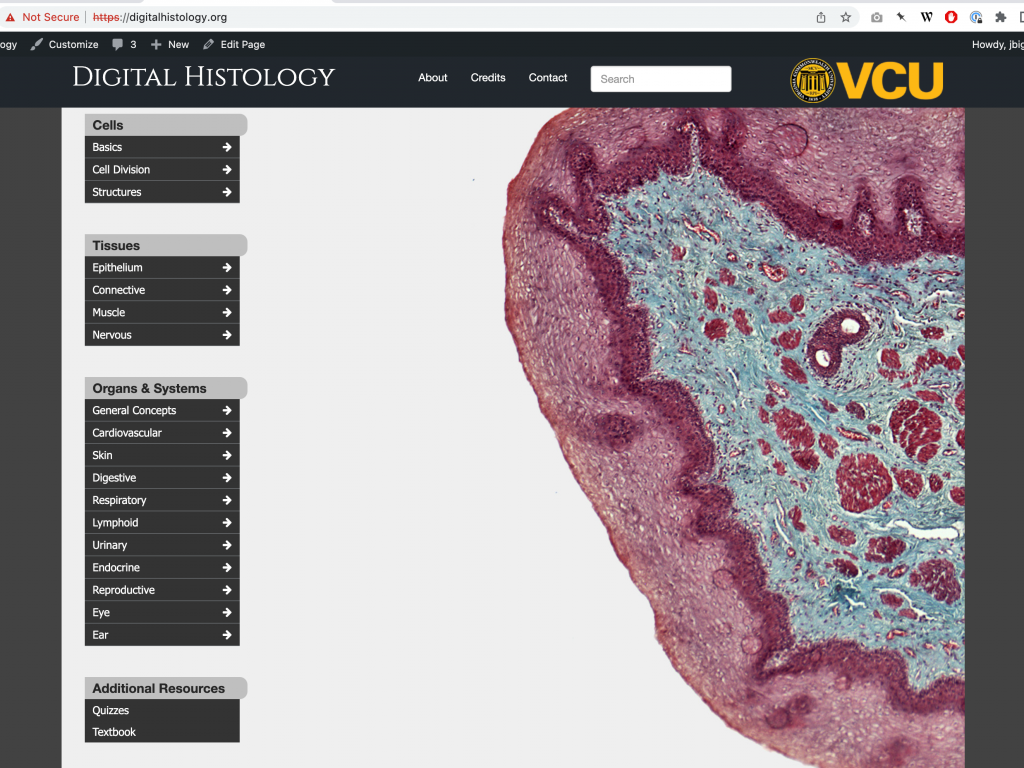
To start, the site is a mapped domain on the mighty Rampages.us, namely digitalhistology.org, and the export I got was probably using a plugin like Updraft Plus, which did not have images even though there were 5+ GB worth. So, if you are trying to pull a sub-site out of a multisite be sure to check media is in the uploads directory if you get an export. I also realized that only some of the plugins were included in the zipped export, and I imagine this is due to the ways WPMS deals with network active, must-use and forced plugins. The same can be said for themes when the theme might be a child-theme (this one was based off WP Bootstrap), which means it will depend on another theme being installed and accessible for it to run properly. It can be tricky, but making sure you know what plugins are actually used is important, and doing a visual check of a site through the dashboard helps avoid many of the pitfalls an export plugin like Updraft Plus promises for WPMS, but remains uneven at best in my experience.

So doing the preliminary work around installed themes, plugins, and making sure media is present is essential, after that you have to manage the user scenario given the user data will not come in with an export of the site tables which are managed centrally, rather than  site-by-site. This can mean downloading thousands of users to just get to one, not an ideal scenario. For this migration I realized the author info is in many ways secondary given this site is driven by page-based resources not necessarily associated with a specific author.  So I just matched the username and email with the the username and email of the new site admin, and updated the wp_user and wp_usermeta tables to make sure they match, I also had to ensure the wp_users_capibility entry was present in wp_usermeta—I have a history with losing admin access with this table when migrating out of WPMS.

At this point user has access, plugins, themes, and uploads are there, now I just drop all tables in the new site database except for wp_users and wp_usermeta and import existing tables from the export SQL file you got from the WPMS. Before importing be sure to do a find and replace of all instances of the multisite ID written into tables, for example wp_1234_options versus wp_options.To do this in your text editor of choice just find and replace all with the find being wp_1234 and replace being wp). The 1234 here would be the site ID, and with a stand-alone WordPress instance that ID is no longer needed and can often break things.

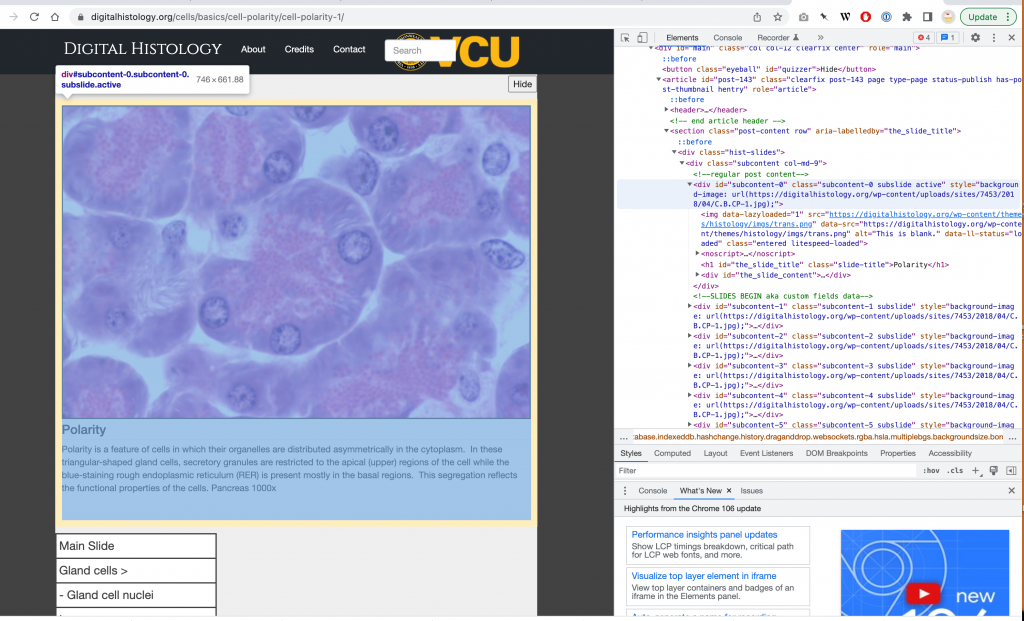
After you import everything successfully, it’s time to look it over, which took some time for me cause I was working through a resource Tom Woodward built for a faculty member over many years and reproducing the process was pretty wild. I actually had a ton of fun trying to figure a few pieces out, but all-in-all it was pretty seamless. I gauge my success—and Tom’s—on not having to reach out to him during the migration. The site has over 1500 pages,  each of which uses specific data from Advanced Custom Fields to drive the experience. The site is organized around targeted topics, such as this tiny “module” on Cell Polarity:

Cell Polarity Mini-Module

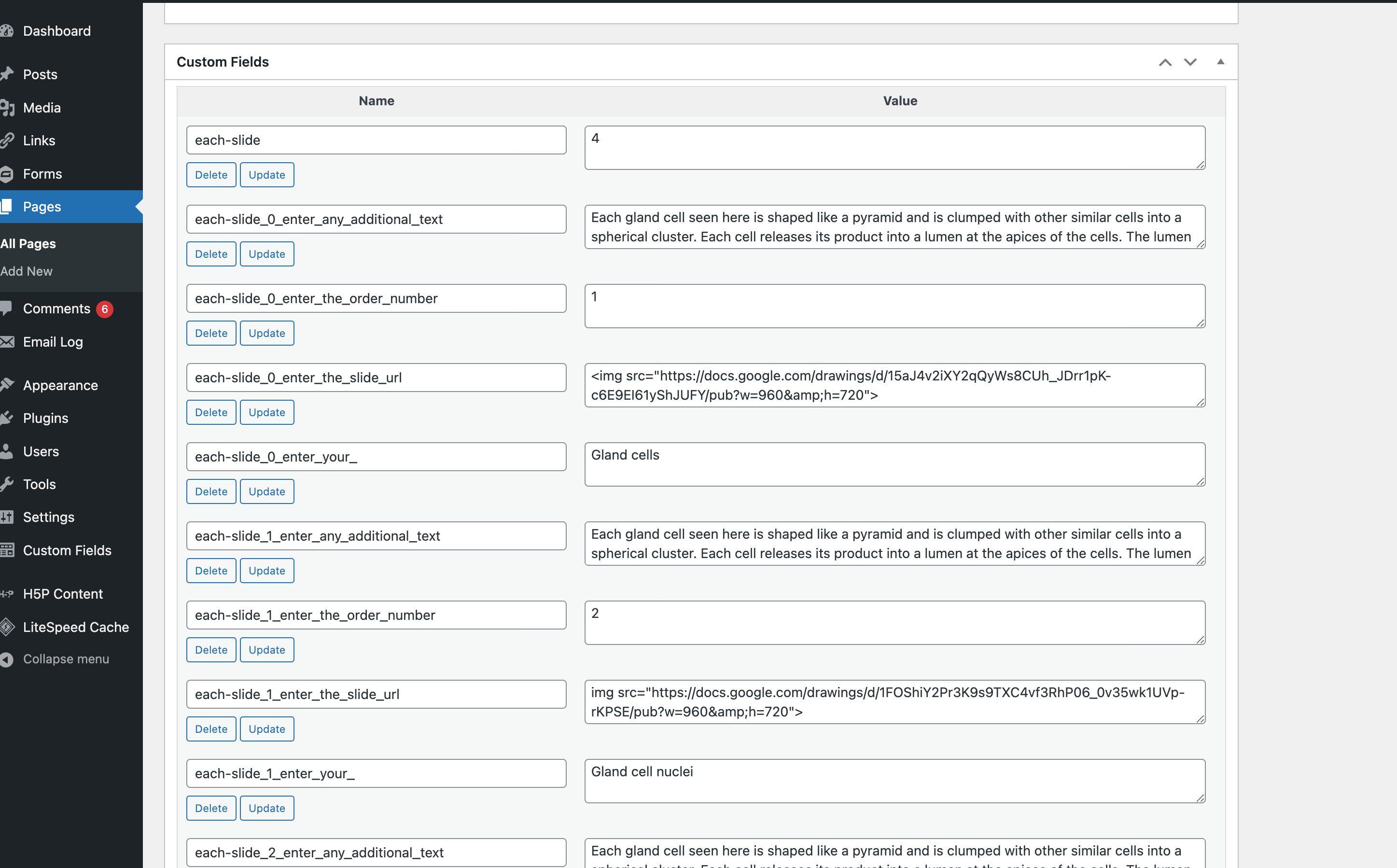
It was fun seeing all the content written into custom fields, and I started to understand how this site was built using custom fields that created basic page navigation as if a slide deck. Here is a look at some of the innards:

My knowledge of Advanced Custom Fields is limited at best, so I was glad it all just worked. The only snag I ran into was the need for quotes around a url constant in a theme PHP template:

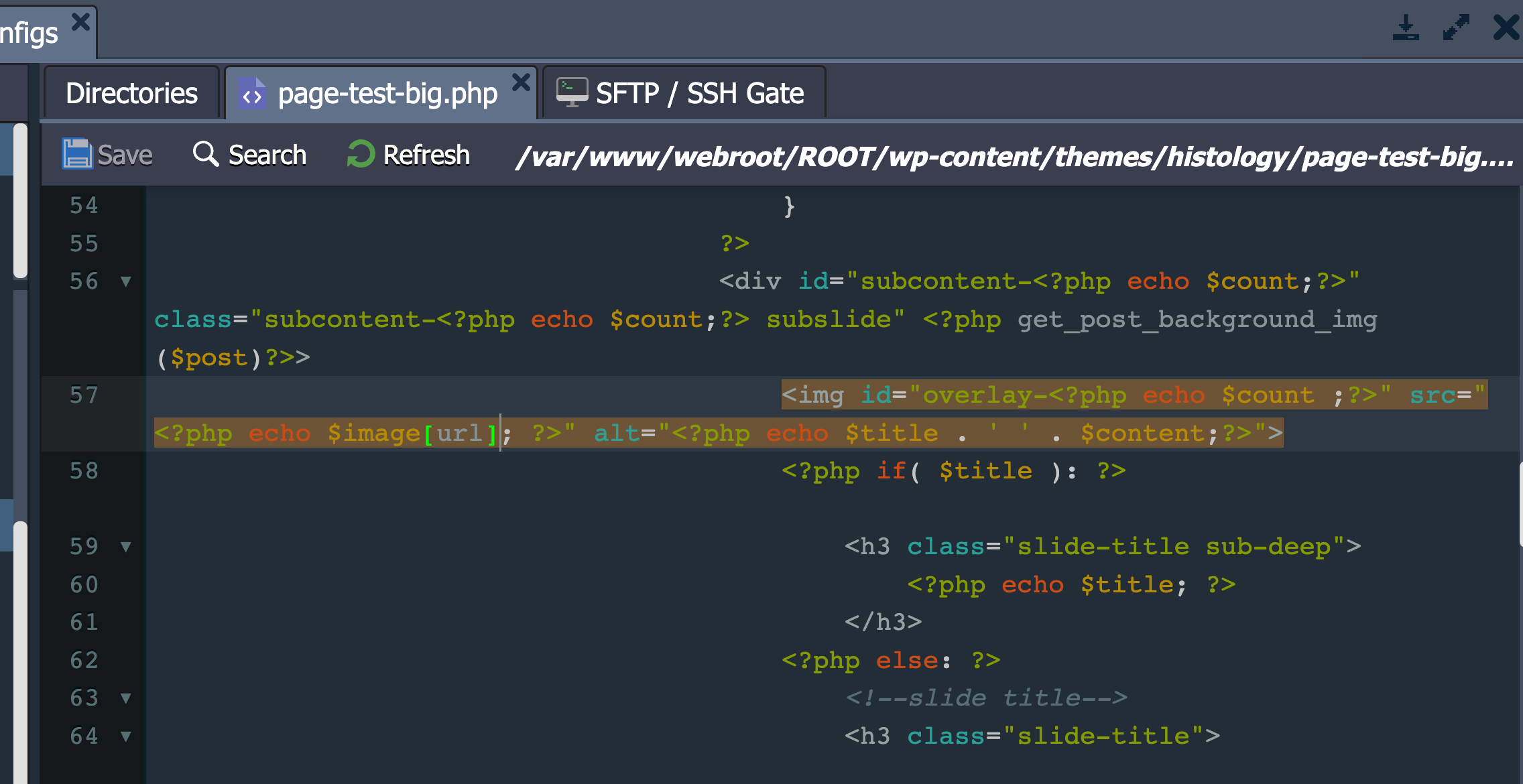
Snag on the Migration path

I went to the template in question, page-test-big.php, and added single quotes around the url constant and it worked, which is next level for this proud citizen of non-programmistan:

Wrap that url constant in single quotes, Cowboy!

There is always something rewarding about a good migration, Tim would often describe them as therapeutic. I agree, and for me it is that much sweeter when we are migrating and preserving work from these truly remarkable WordPress Multisite systems that made publishing at scale trivial, but also enabled edtechs like Tom to grow as developers. There is so much history in these files and directories, so much magic in collaborating with faculty, students, and staff to realize a vision, and it’s why the archivist in me relishes the ability to keep the dream alive. I’m lucky in that we also host Rampages, so I have privileged access to some of these things to make this transition easier. There are some complexities involved that other hosting companies may balk at, but that for me is the gold of Reclaim Hosting. We’re not other hosting companies, we are hosting for educators! This is our bread and butter, this is where we come from and this is what we believe in.

The work happening in WPMS for over 15 years across the higher ed web is an important archive, and all too much of it at the whim of the latest slash and burn campaign of the the newest leadership. This stuff is an important look at the impact of the digital shift on higher ed more broadly, and we can save it one site at a time (or even more if we have access 🙂 ). Thankfully the good folks at UMW have been hosting UMW Blogs with us forever, and I believe that archival project happening over the next 6 months will highlight a way that a school can both preserve what was and move forward at the same time.

Posted in reclaim, Reclaim Edtech, WordPress, wordpress multi-user, wpmu | Tagged , , , | 2 Comments