Elevator Action Multikit Installation

Yesterday was a good day for the bavacade, I got the Elevator Action Multi-Kit from High Score Saves up and running. This kit not only saves up to 10 high scores, and enables free play that allows attract sounds, but also throws in 6 more games to boot, namely Jungle Hunt, Jungle King, Pirate Pete*, Time Tunnel, Space Seeker, and Seafighter Poseidon—the last four of which are new to me. I was excited to get this installed on one of two Elevator Action boards I have.

These Taito boards can be a bit confusing. To make matters worse, my boards were not identical to those in the installation guide. So, below are some images of the board set I was working with in the event it helps anyone else, and oddly my other board is identical, so I don’t think it is a one-off fluke. Anyway, to the boards….

The ROM daughter board is mounted on the game board.
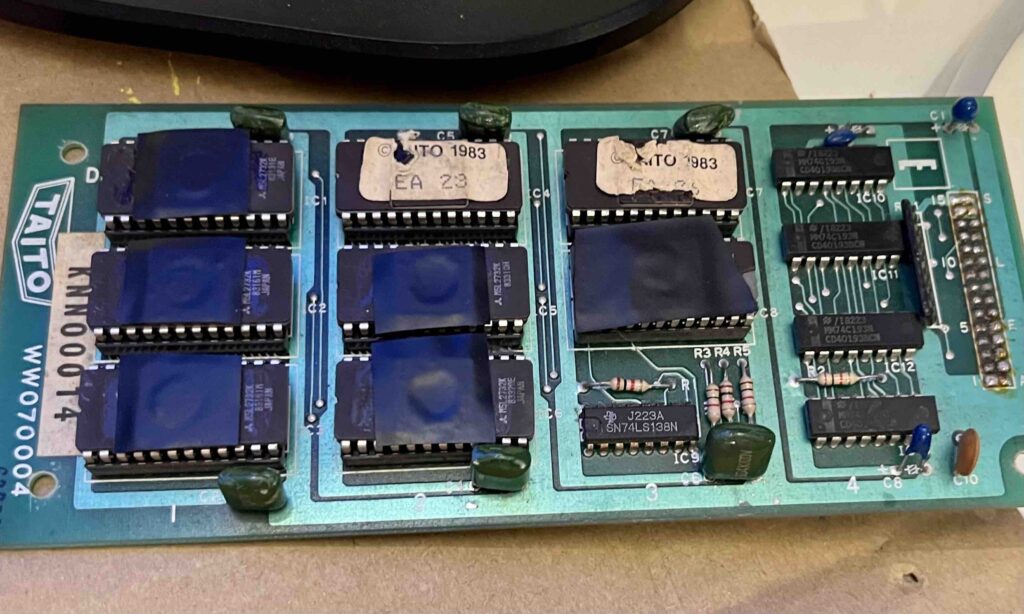
Image of the Taito daughter ROM board for Elevator Action

Taito daughter ROM board for Elevator Action

Then there’s the game board which is where the above ROM board is mounted:
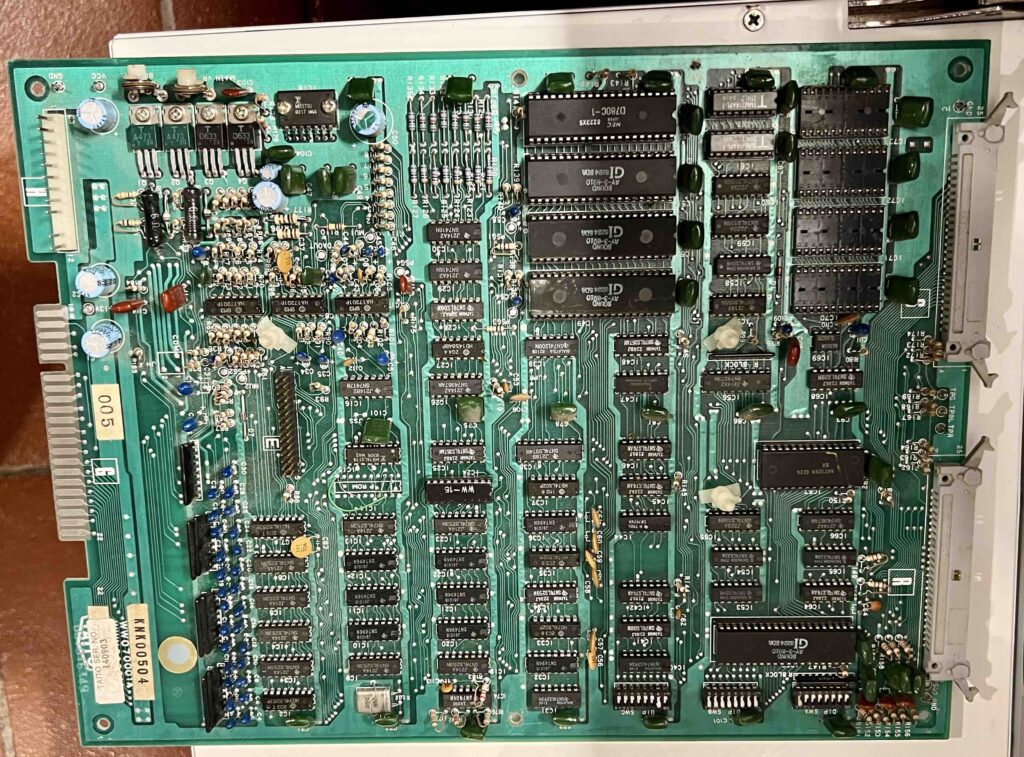
Image of the Taito game board for Elevator Action that has the Sound Z80 that needs to be replaced

Taito game board for Elevator Action that has the Sound z80 chip where the sound mod goes

The video board is mounted beneath the game board in the opposite direction, and you should not have to touch this board:
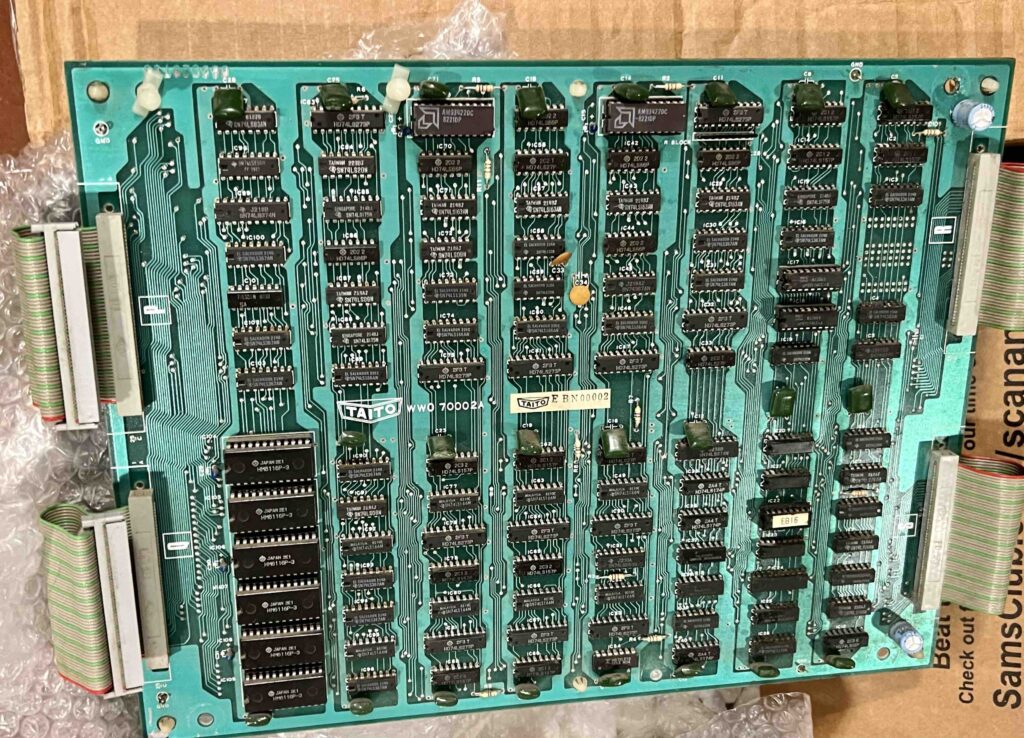
Image of Taito video board for Elevator Action

Taito video board for Elevator Action, you need to make no changes to this one

Then the CPU board, which is face-to-face with the video board, but separate by 1″ spacers:
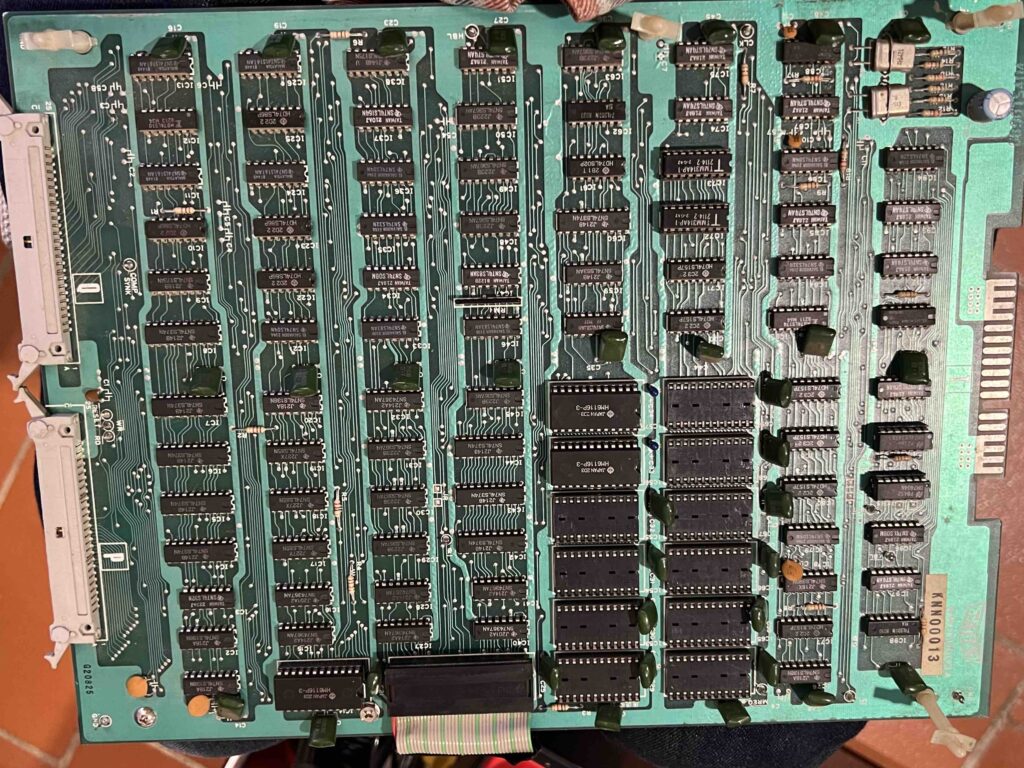
Image of Taito main CPU board for Elevator Action

Image of Taito main CPU board for Elevator Action

Finally a ribbon-cable attached CPU board that connects to the main CPU board. The ribbon cable attaches where the z80 chip would normally be, and this would be where the main multikit daughter board would go if you had a normal board set, unlike me.
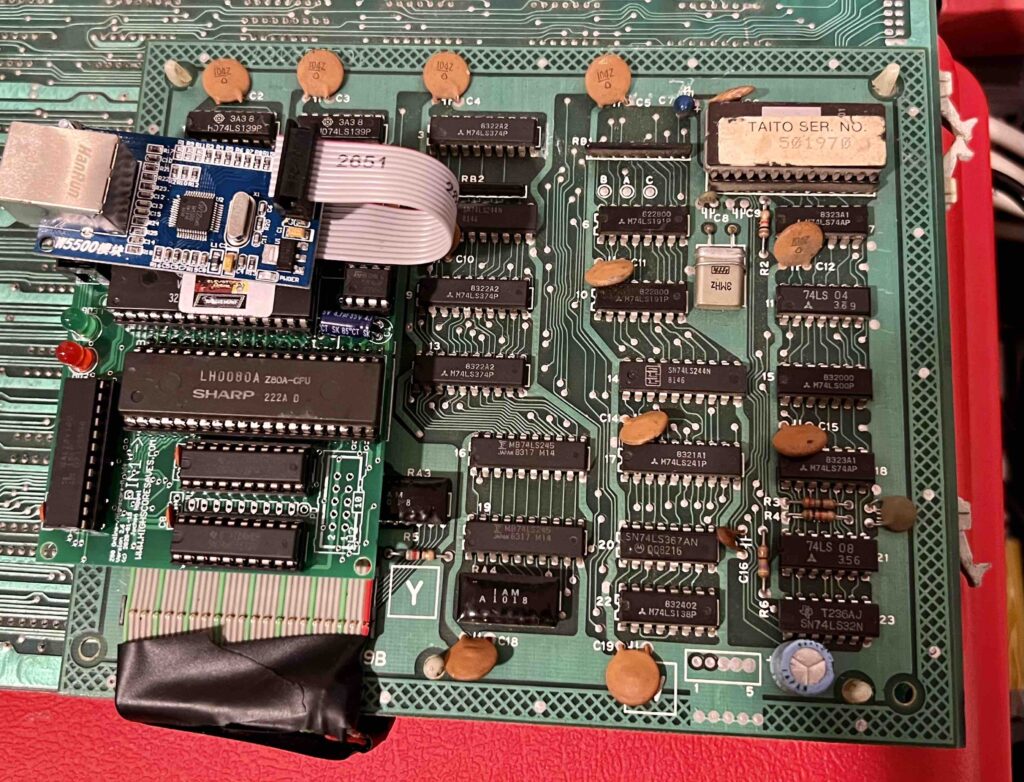
Image of Taito attachment CPU board for Elevator Action

Image of Taito attachment CPU board for Elevator Action, notice the main multi-game daughter board is attached

The CPU attachment board has a socketed z80 chip where the main multi-game daughter board goes. Also, the chip in the upper-left hand corner with the “TAITO SER. NO.” label is the MCU chip, and you do not need to remove that.

I took my boards apart, and followed the installation instructions available through the website. But once I realized my chip numbers and the chip locations were not always identical, I reached out to the proprietor at High Score Saves and he gave me all the advice I needed, so big shout out to their wonderful service!

Image of the Taito daughter ROM board for Elevator Action

Once the daughter ROM board is removed, no need to re-install

In short, the first board, the ROM daughter board, does not need to be replaced after the multikit is installed. Once you take it off, it can stay off. On the game board, you need to remove the z80 chip the instructions point to, as well as (in my case) two additional ROM chips, namely EA 9 and EA 10.† The guide notes there are three to remove, but my boards only had two.
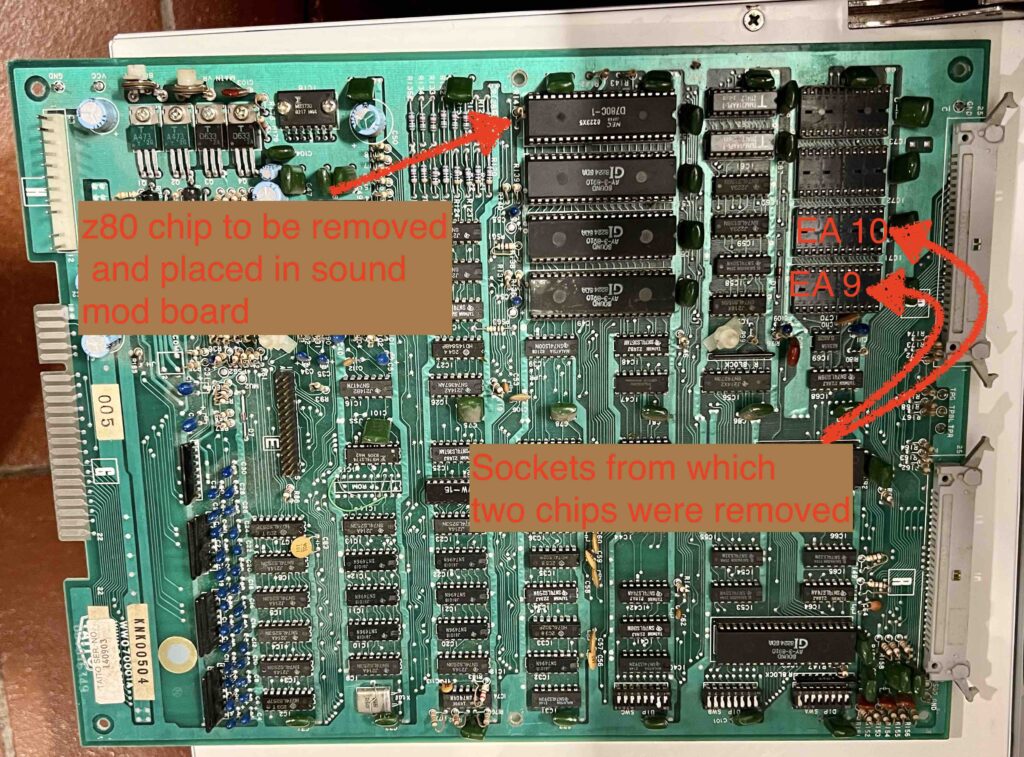
Image of game board with isntructions for removong z80 chip and two rom chips

Modifications needed for game board

Once you remove the z80 chip from the game board you can place the sound multikit daughter board in this z80 chip being sure to match pin 1 when inserting. Here is a picture of the sound multikit chip installed, notice the z80 chip, once removed, is then placed in the available socket in the daughter board:
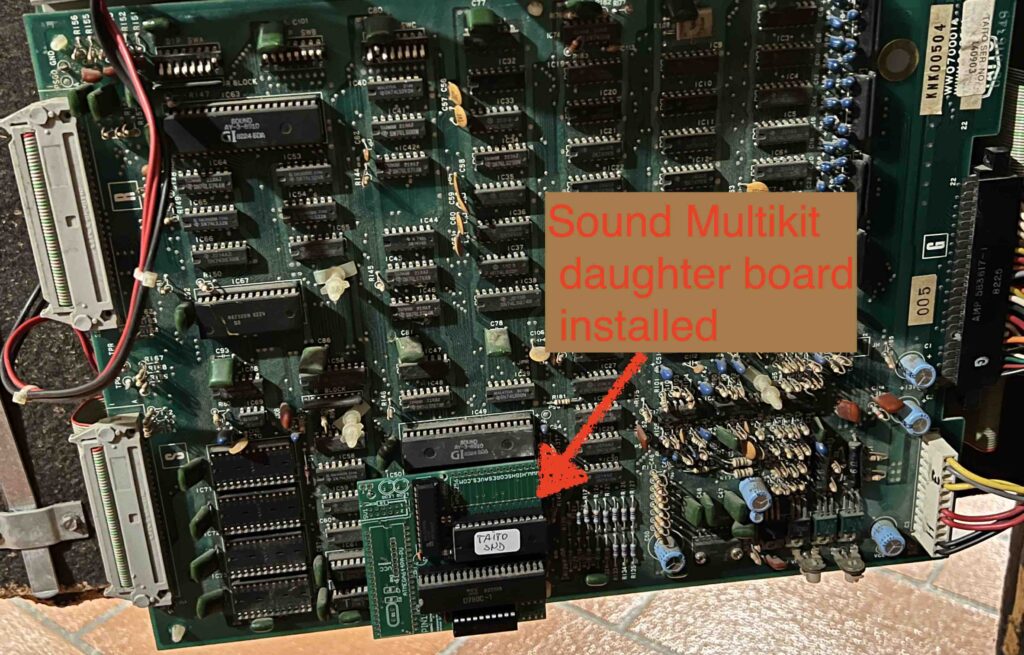
image of game board with sound card for multikit installed

Game board with sound card for multikit installed

On the main CPU board you need to remove all ROM chips save the two pictured below in the upper left-hand corner of the two rows of ROMs.‡
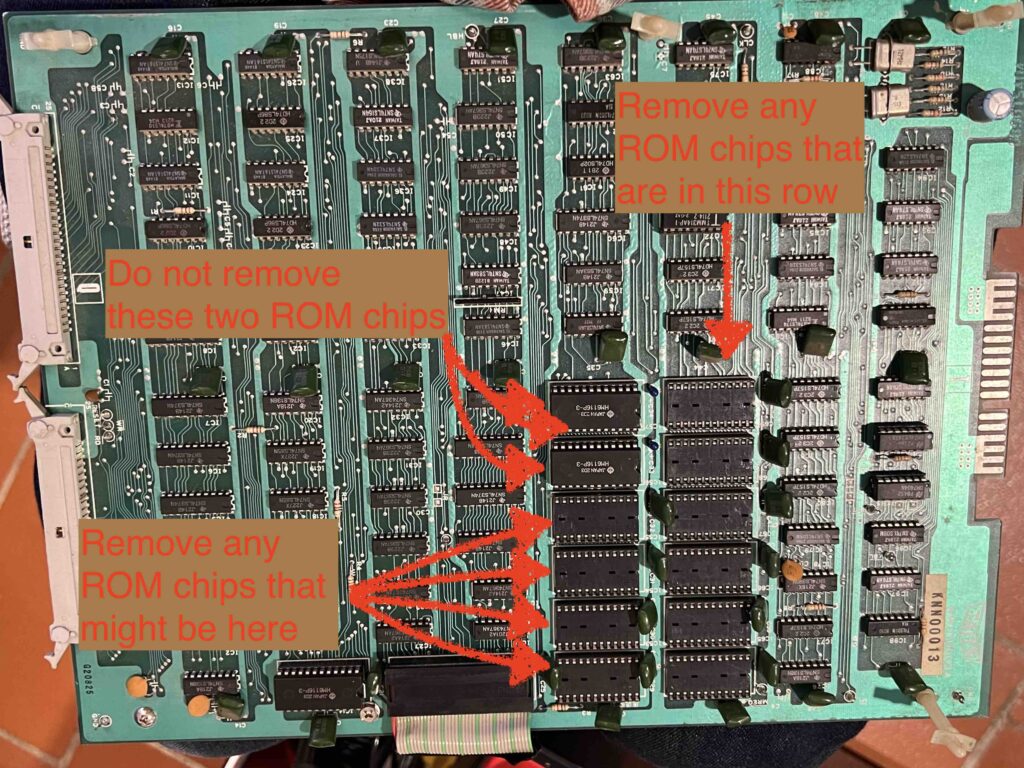
Elevator Action CPU Main board with instructions on which ROMs to remove

Removed 8 ROM chips from the main ROM board (instructions say to remove 9, but I only had 8)

Once you have the ROMs removed you need to remove the z80 chip on the CPU attachment board and install the main mulitkit daughter board. The MCU chip—located in the upper right-hand corner in image below—will not need to be removed as noted earlier:

CPU attachment board with z80 chip that needs to be placed in daughter board

CPU attachment board with z80 chip that needs to be removed from socket and placed in daughter board (matching pin 1)

After that re-assemble the board and everything should work. I got extra lucky because the board was not working after I first tried and failed to install the kit it the first time. I realized too late I only had one of two multikit boards needed—the main multikit board—having left the sound board back in Virginia. So I stopped the work and ordered a new sound board, but when I returned to install the kit for this board a second time it was not working. I decided to go ahead with the multikit anyway as a hail mary to see if it would save the extra board, and to my surprise and immense relief it worked. I now have two functioning boards, one with the original Elevator Action chips and the other modded to have 6 additional games and all the other bells and whistles. It was a big win for the bavacade. What’s more, I hope one or two people out there that have a weird set of Taito boards, like I did, find this post useful.

___________________________________

*Another re-release of Jungle Hunt with pirate theme swinging between ship masts and fighting sharks instead of alligators in the water.
†Below is an image of the game board that still has ROM chips EA 9 and EA 10 installed for reference:
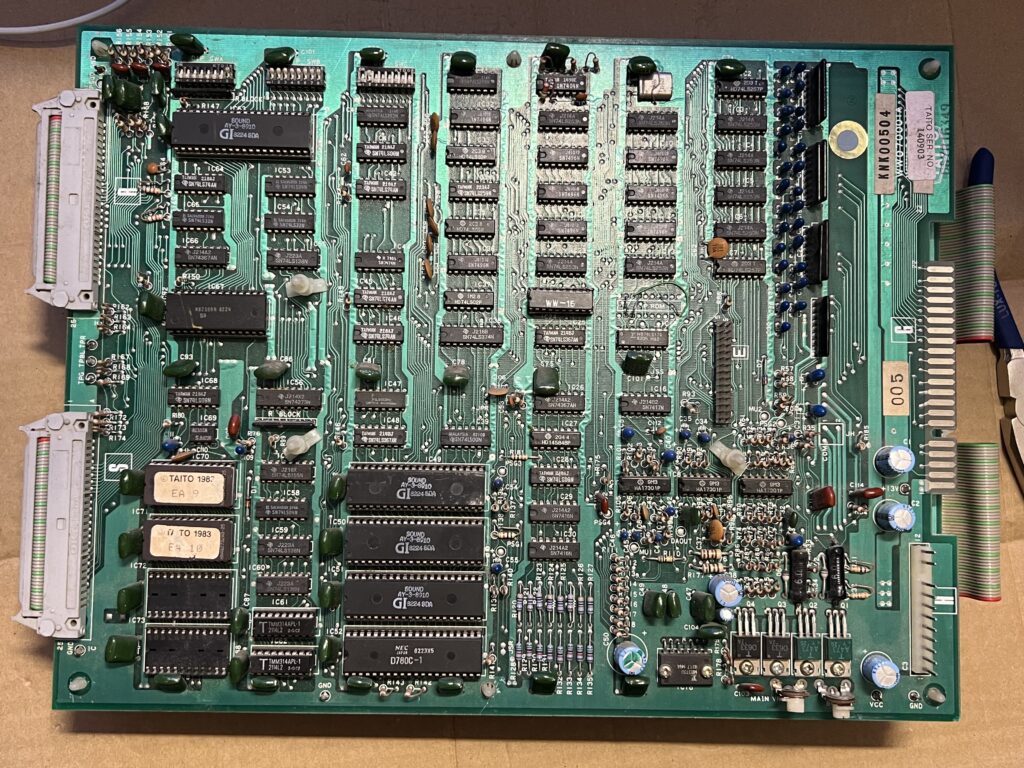
Image of game board with two ROM chips installed that were then removed

Image of game board with two ROM chips installed that were then removed

‡ Below is a picture of the chips removed  (save the two in the upper-right row) from the main  CPU board for future reference:
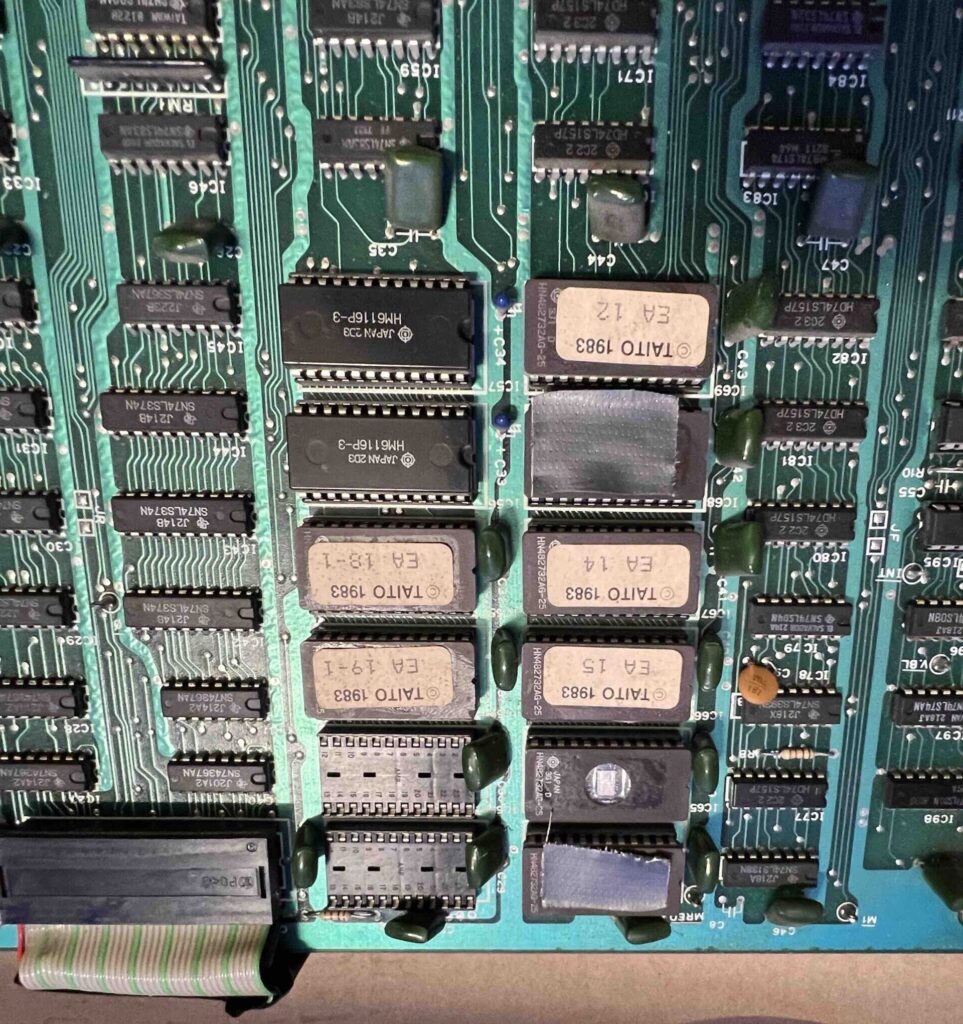
Image of CPU main board as reference for chip placement

Reference for the chips I removed
Posted in bavacade, bavarcade, video games | Tagged , , , , , , , , , , , | 1 Comment

November’s Ghost Redux

Welcome to Running a Newsletter with Ghost!

As we hit the last day of November I wanted to quickly compile the Reclaim Edtech sessions we did this month focused on getting up and running with Ghost, an open source platform focused on simple, elegant publishing with newsletters support built-in. Below are links to posts about each of the three sessions we ran, with relevant resources and along with links to the relevant videos. Thanks to the power of asynchronous learning it is never to late to see a ghost!

Session 1: What is Ghost?

Session 2: Using Ghost & Writing Your Newsletter

Session 3: Mailgun and Email Setup!

Posted in Ghost, reclaim, Reclaim Edtech | Tagged , , | Leave a comment

Reclaim.Rocks Mastodon

It was only a matter of time at the pace I’ve been going with setting up Mastodon instances that Reclaim Hosting would get its own snazzy server, and that day was Wednesday. I streamed the setup so that I would have an on-the-fly guide for getting everything setup from the VPS in Reclaim Cloud to DNS in Cloudflare to email in Mailgun to storage in Digital Ocean’s Spaces. The last bit was exciting for me because I realized in version 4.0.2 of Mastodon they’re building DO’s Spaces into the server setup, which is a million times easier to create than AWS’s S3.*

I had everything done in less than an hour, but then got hung-up on a confounding nginx config error that I fumbled around with for way too long between the 1 hour mark and 1:18:00. So if you just want to get to the punchline, go to 1:18 for the proper setup of nginx. Other than that, the process went pretty smoothly, and I do like that Digital Ocean’s Spaces is a viable option for folks now.

_____________________________________________

*What’s more, if you are using Digital Ocean’s one-click instance of Mastodon I imagine this is pretty convenient.

Posted in Mastodon, reclaim, Reclaim Edtech | Tagged , , , , | 1 Comment

Some Initial Mastodon Instance Tweaking

Now that I have a few instances of Mastodon running in Reclaim Cloud, I figured it was time to start optimizing them for resource usage, storage, and security. This post is an attempt to capture what I’ve done thus far—which is not much—in order to keep track of changes I am making. Also, I’ve only been tweaking social.ds106.us given the other two servers (reclaim.rocks and bava.social) are still getting their legs. I’ll probably collect some of these resources and tweaks into a more comprehensive guide, but for now this will be fairly random and incomplete.

Chris Blankenship pointed me to a recent post from the Mastodon admin Tek of the freeradical.zone Mastodon server. I dig that they run a blog to capture and share the work they’re doing, and I think the breakdown of the different pieces that make Mastodon run in the “Surviving and thriving through the 2022-11-05 meltdown” post is quite good:

Let’s take a moment to talk about how Free Radical was set up. A Mastodon server has a few components:

  • A PostgreSQL database server.
  • A Redis caching server that holds a lot of working information in fast RAM.
  • A “streaming” service (running in Node.js) that serves long-running HTTP and WebSocket connections to clients.
  • The Mastodon website, a Ruby on Rails app, for people using the service in their web browser.
  • “Sidekiq”, another Ruby on Rails service that processes the background housekeeping tasks we talked about earlier [namely posting, following other users, notifications, etc.] .
  • Amazon’s S3 storage service that handles images, videos, and all those other shiny things.

This nicely highlights all the different pieces that go into running a Mastodon instance, underscoring that there’s some complexity. One of the issues that Tek was running into with the influx of new users was Sidekiq was overloaded with new and various tasks, so they were not showing up in real time—essentially being queued as a result of the bottleneck. What he did was separate out the PostgreSQL database (already done back in 2017), move Sidekiq to its own machine (a lonely Raspberry Pi 4 he found around his house), and eventually moved the Redis caching service to the server hosting Postgresql to ensure it was not competing with Sidekiq for RAM. The only services left on the original 4GB cloud server were the node.js streaming service, the Mastodon website Ruby on Rails app, and the original Sidekiq service (he added more works to the Sidekiq running on Raspberry pi to go from 25 to 160 works to deal with queueing tasks).  It never ceases to amaze me how resourceful and creative sysadmins can be to solve high-pressure issues like servers not working right for a community of 700 folks that are managing their social streams—it ain’t a job for the faint of heart.

What I gleaned from Tek’s experience is that breaking out the various services is essential as you scale, and it seems like the first to move was the database—which is good to know. Luckily we are only just now approaching 40 users on ds06’s instance, and we will most likely scale slowly and intentionally, so we may not have any of these issues just yet—but a behind-the-scenes peek at how freeradical scaled is really helpful if Reclaim does want to take on other instances that want to scale fast.

So, that was some good background ready and context for the tweaks I starting implementing on social.ds106.us. First things fist, I reading the scaling Mastodon doc and starting adding environment variables to the .env.production file to increase concurrent web processes (WEB_CONCURRENCY) as well as the number of threads for each process (MAX_THREADS). I read that Tek had these at 25 for concurrency, so I changed the default values of  2 and 5 respectively to 25. So far there have been no issues, but any one reading this who sees an issue let me know. Also, I real the DB_POOL would need to be at least as many as the number of MAX_THREADS, so I set that to 30.

WEB_CONCURRENCY=25
MAX_THREADS=25
DB_POOL=30

So far, so good. I then dug-in on the Scaling Down Mastodon guide by Nolan Lawson (h/t Doug Holton) which was quite helpful. In particular, I changed max database connections to 200 in the postgresql.conf file found, at least for me, at /etc/postgresql/15/main/

max_connections = 200 # (change requires restart)

I then tried using PGTune to fine-tune the database, but that brought everything down for a bit, so I quickly reverted and will need to re-visit that in a dev environment. Another thing I will be experimenting is PgBouncer in the event we start running out of available database connections. I upped the default from 100 to 200, so I am imagining this is not an immediate concern given our size, but at the same time this is also about figuring out how to optimize a server for scaling, so worth playing with in the future.

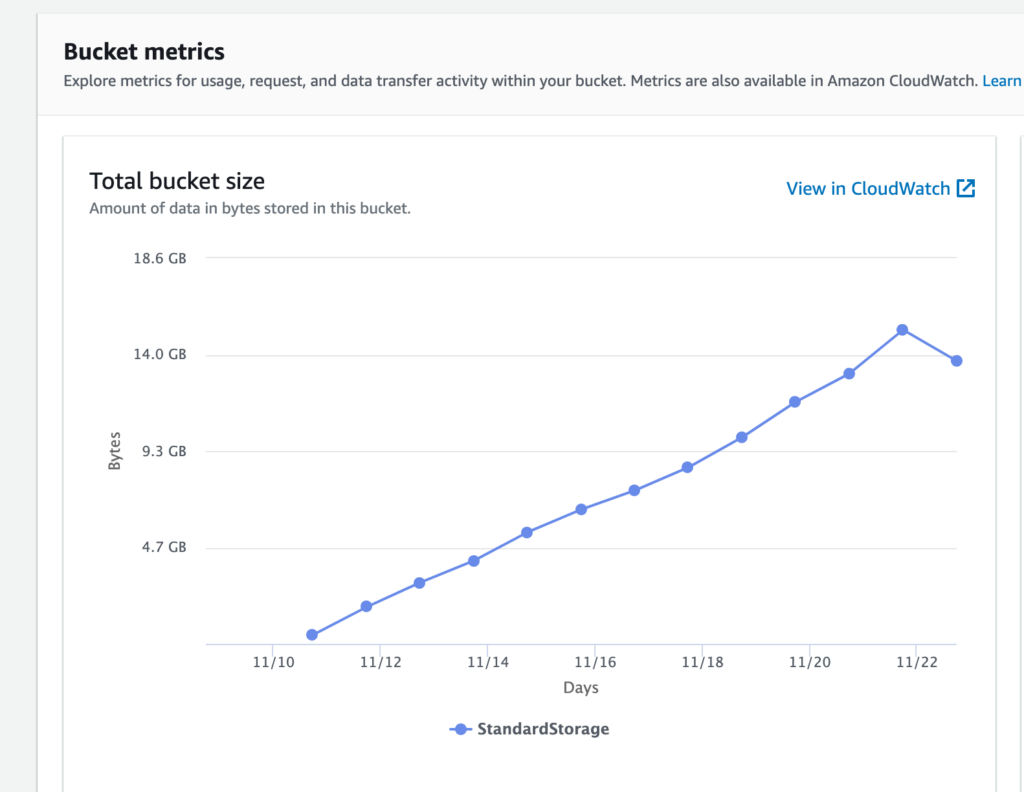
Another big piece of scaling down was figuring out how to control the explosion of files being stored in AWS’s S3. The scaling down guide pointed me to this bit in the Mastodon docs that shows you how to create a cron job to remove cached media files on a weekly basis. I ran the cron and it immediately cleaned out 2 GB of cached files. This of a possible 15 GB, bring the total closer to 13 GB.

Image of chart illustrating the growth of media files in Amazon's S3 for social.ds106.us that progressively grows to 15GB and then drops off 2GB to 13GB

Graph illustrating the growth of media files in Amazon’s S3 for social.ds106.us

That said, the instance is still taking on about a GB of files each day, so file bloat is something to continue to watch and fine tune. I have to believe there’s more we can do given it seems unlikely 30 users are uploading that much media daily, but I could be wrong. This also underscores the point that offloading media to cloud storage should not be optional for instances interested in scaling.

And the final tweak I made was last night when John Johnston discovered that nginx buffers needed to be upped to allow the service brid.gy to use OAuth to link his blog with his Mastodon instance. He did all the heavy lifting of searching for the fix, and I added the following following 3 lines to the http block in /etc/nginx/nginx.conf and it worked.

proxy_buffers 4 16k;
proxy_buffer_size 16k;
proxy_busy_buffers_size 32k;

After saving the file and restarting nginx without errors I got the confirmation from John it worked, which was pretty awesome given how quick and easy it proved to be. I’m not used to that.

So that’s it for the server tweaking thus far, I did upgrade the ds106 instance from version 3.4.2 to 4.0.2, and that went off cleanly. Only issue was me not following the post-migration database instructions, so that was on me. I followed these instructions for my non-docker environment.

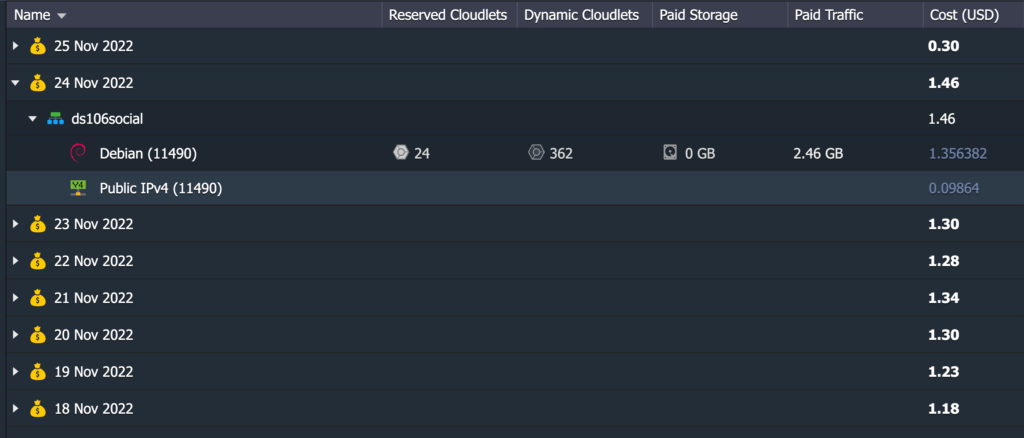
The last thing worth sharing is costs in Reclaim Cloud given this has been a question we have gotten from folks, so I am trying to keep an eye on that. I have an 8-day breakdown of costs for my instance that can scale up to 8 GB.

Reclaim Cloud 8-day breakdown of costs for hosting social.ds106.us

Reclaim Cloud 8-day breakdown of costs for hosting social.ds106.us

So, as you can see from the image above the cost has been increasing daily by a few cents. The cost of the IP address is fixed at .09 cents a day, or $3 a month, the cloudlets (or CPU running the instance) vary daily, and the average has been about 14 per day, which works out to $40 per month in Reclaim Cloud.

Image of Reclaim Cloud panel for the social.ds106.us instance

Reclaim Cloud environment running the social.ds106.us instance

I’ve read about memory leaks in Sidekiq and wonder if restarting that service every few hours would help. It will be interesting to see how things shake out if ds106 scales. In particular, I am curious if the resources continue to mount for the environment, or if they proportionally taper off despite increased numbers of users. My logical assumption is it’s 1:1, more users more resources, but it seems like a base Mastodon instance without more than one or two users sits around 8 cloudlets, or 1 GB, whereas ds106 has still yet to hit 2 GB for 40 users. Would 100+ users be fine with 4 GB? Not sure, but I’m interested in finding out, so get a Mastodon account on ds106 Social you hippie!

Posted in digital storytelling, ds106social, Mastodon, sysadmin | Tagged , , , | 3 Comments

Archiving Twitter

Thanks to this post on the OL Daily, and this subsequent toot from Grant Potter reminding me to do it, I spent time converting my recently acquired Twitter archive into markdown. “Why?” you ask. Well, Mattias Ott covers that beautifully:

Once your archive is on your machine, you will have a browsable HTML archive of your tweets, direct messages, and moments including media like images, videos, and GIFs. This is nice, but it also has a few flaws. For one, you can’t easily copy your Tweets somewhere else, for example, into your website because they are stored in a complex JSON structure. But even more dangerous: your links are all still t.co links. This hides the original URL you shared and redirects all traffic over Twitter’s servers. But this is not only inconvenient, it is also dangerous. Just imagine what happens when t.co ever goes down: all URLs you ever shared are now unretrievable.

I like the idea of media links being relative to where ever I host my archive, if you’re gonna get a personal archive, might as well have one that doesn’t point media back to the original media source. The Tweet permalinks still link back to the originals, and I’m going to leave my Twitter account up and keep the archive in the unlikely event it goes away any time soon. Just feels more complete to have an accessible archive collecting dust on my hard drive.

python3 parser.py

So, if you have a more recent version of Python3 installed on your computer this process is just a small script away thanks to Tim Hutton’s Twitter Archive Parser. Just run the above command from the unzipped Twitter archive directory on your machine, and let it ride!

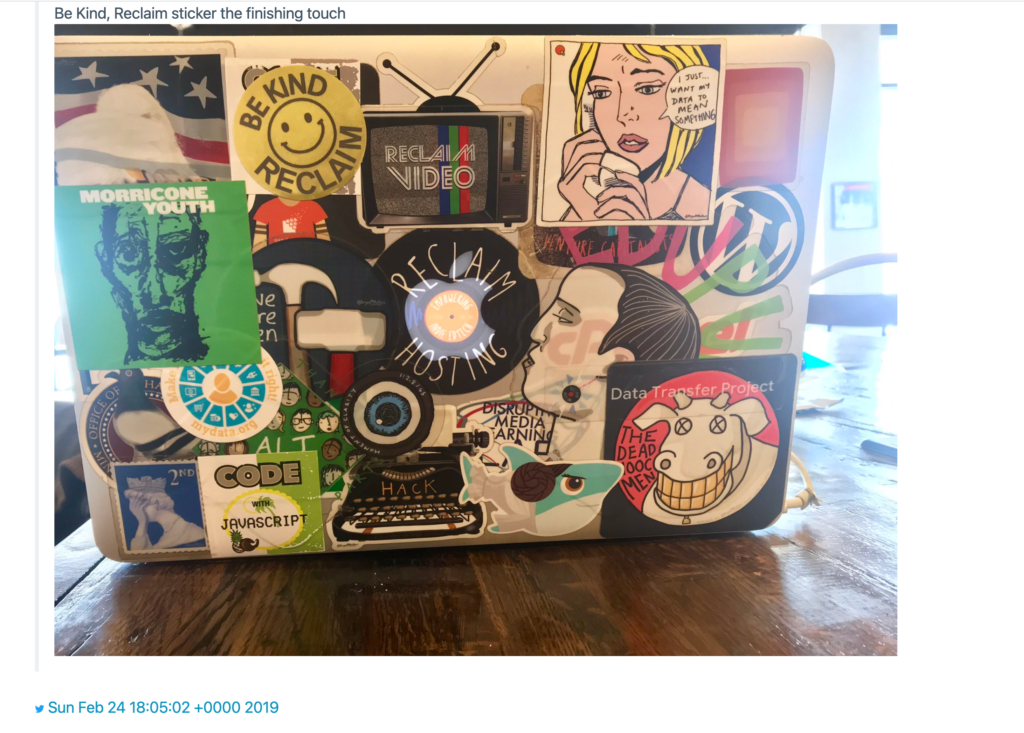
It takes images like the one above and rewrites the URL to point locally rather than back to Twitter’s t.co links. You can access this archive pointing to local images using the TweetArchive.html file that is now in your directory, along with a media directory (which, that’s right, holds all your images, videos, etc.) and markdown files of your tweets and DMs.

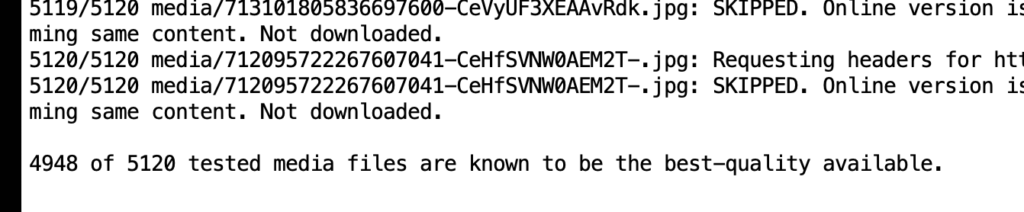
Image of Twitter Archive Parser script working through my archive to download best possible available versions of the media

Image of Twitter Archive Parser script working through my archive to download best possible available versions of the media

I had 5120 media files and this script was able to get the best available versions online for all but 12 of them. That’s right, I’m only missing 12 media files of a possible 5120 (or so I believe). It kept trying and re-trying to find best available images for a bit, and in the end there were a grand total of 12 that came back as inaccessible, I may be mis-reading something here—but if this is true it is reassuring to think I have all these images I may never reference again 🙂

I also realized that all direct message conversations were there, the person’s handle is not immediately identifiable in the original HTML version. That said, the conversation is definitely accessible and the parser breaks the DMs down by folks you chatted with. Given DMs were meant to be private, you will want to take them out of your archive if it is to be publicly accessible. Also, it points to an interesting discussion around DMs in Mastodon, which are not encrypted and the instance administrator can find and read them. There might be a push to encrypt those messages, which is definitely something server admins will have to think through given this is a space where potentially sensitive data can be laid bare to others. Also, it might be a good reminder not to put sensitive data in DMs, which is my take away seeing all this data bundled up in a neat little zip ball 🙂

Posted in Archiving, twitter | Tagged , , | 1 Comment

Some Notes on Mastodon after Two Weeks

I’ve been pretty obsessed with figuring out how to run a Mastodon server on Reclaim Cloud the last couple of weeks, and it’s been a lot of fun. I do dig challenges like this, and I moved almost immediately from getting multiregion WordPress working on Reclaim Cloud into Mastodon, so it’s been a pretty intense month or two. But this is also the stuff I love about the field of edtech, seemingly overnight (albeit 6-7 years in the making) a technology arrives that drops the scales from your eyes. I had stayed on Twitter since 2016 by and large for #ds106radio as well as some film accounts and a few friends who stuck it out, but it has long been a space emptied of the manic joy of the early days of Twitter that peaked for me in 2011 when ds106 exploded there. To paraphrase a prophetic presentation by Gardner Campbell at Faculty Academy in 2007—or was it 2008?—we were all “mutants creating together.”

But that has not been the case (at least for me) for a long time for many reasons. Don’t get me wrong, I still love Twitter—it visualized the network like no other tool has to this day, and coalesced #ds106 in ways that continue to reverberate strongly. That said, it’s a long way from the “open” ecosystem where creative things happened on the regular. The API closed down and the politicians and celebrities moved in and the platform where you shared what you had for lunch became a tool for gaslighting a nation. It was an increasingly harder pill to swallow so breathlessly, but it was also a place where l had front row sets to witness the emergence of new forms of communication. I still marvel at the way people like Tressie Macmillan Cottom seemed to change the very nature of academic discourse and what it means to be a public intellectual in 140 characters, it was a kind of poetic art form that was interdisciplinary in ways that are hard to fully understand—it’s the whole person. There is no place for the absence of the writer’s biography within a work of Twitter art, it was like you were present for the artist’s emergence in ways heretofore impossible—and no paparazzi were necessary. At the same time the public became increasingly polarized and reading Twitter was often more of a chore than a desire.

All in all, Twitter was ridiculously fun for me, but after 15 years it’s probably healthy to turn the page. I had been struggling with finalizing the split for years, and before I started setting up Mastodon servers I was certain I had no interest in any other Twitter-like relationships: “Been there, done that!” was my thinking. But then, two weeks ago, I created a Mastodon profile after setting up the ds106 server and began peeking around and following a few folks. Almost immediately I remembered that lost excitement of a social space without all the overhead. I missed being able to communicate with people I had come up with professionally. And then D’Arcy Norman showed up on the ds106 server and I knew I was sold. You see, D’Arcy in many ways showed me how to blog, he also helped me understand the magic of Twitter with an early tweet about a Moose in his backyard, and seeing him on Mastodon made me realize he was one of the many people I was missing connecting with. I want my media to be social, I want to hang out and have fun, I want be able to spend time with other mutants creating something. Scale and followers can be anathema to that joyful impulse because things start to get “serious” and one’s voice and platform becomes the brand, and that is not an easy bit to disentangle. I have no doubt the fall of Twitter will have significant collateral damage, and that sucks.

But the thing beyond the sense of joy and excitement that connecting with folks on Mastodon offered was a return to a decentralized network driven by open source software premised on open protocols. A re-decentralization of the web where we live online. Seems like humanity oscillates between the consolidation and the diffusion of control for numerous reasons at various times in history, and I have to say decamping from the last big, centralized social media platform I spent any real time in was liberating. This blog has been my home base for 17 years (long before Twitter), so I don’t feel adrift in the least. I’ve requested a full archive of my 60K+ tweets, and I’m ready to clean them up and post them for posterity on my site with the intention of moving on. And I am ready to finally move because I have seen a viable alternative, and frankly it has been eye-opening how quickly I forgot all about Twitter. Increasingly I’m driven by the idea of  helping other folks run Mastodon servers to further re-distribute resources and empower communities to take ownership of their social presence. I mean that has pretty much been my career vector since 2005 and it’s something I still believe in very strongly. My discovery of WordPress coincided with the start of my career as an edtech, and from day 1 I was blown away by the ability of open source tools to empower folks to build their own systems outside those they are no longer interested in supporting (in that case Blackboard). Mastodon is an example of just that, and now that people are joining in droves the network effects are hitting, it is coalescing for me. I particularly like how one can manage the social space in scales that are intentionally local at the server level and global at the federation level.  That design makes things less monolithic and, hopefully, less driven by the attention economy that is fueled by likes and follows.

I think the final point worth making in these already too long and loosely coupled notes is that the fediverse enables a sense of migration that seems novel. Not only is it possible to move your presence from server to server, but it might be possible to go from platform to platform if these tools are operating on shared protocols like activitypub. This idea of portability and integration between communities made up of different technologies without a sense of lock-in was the hope of RSS, which was systematically erased in favor of platforms starting to militarize their perimeter in order to prevent migration between service borders. Maybe open isn’t dead yet, maybe, just maybe, we can reclaim open!

Posted in Mastodon, twitter | Tagged , | 7 Comments

Installing Mastodon on Reclaim Cloud

The following video guide shows you how to install Mastodon on a Reclaim Cloud virtual private server (VPS). This guide assumes you have your VPS spun up in Reclaim Cloud, a domain for your server chosen, a transactional email account setup with Mailgun, as well as cloud storage using Amazon S3. If none of this is true (or makes no sense), I recommend starting with the “Preparing to Install Mastodon on Reclaim Cloud” guide.

Heads up: As you get to the final minute of the tutorial you need to uncomment two additional lines in the nginx default file, be sure to see notes below 

The above video takes you through installing Mastodon from source on a Debian 11.5 VPS, which is well-documented in their own guides. I recommend using that guide as you follow along with the video. That said, there are several moments wherein you will need to deviate from that guide to get Mastodon v4.0.2 running in Reclaim Cloud. Those divergences from their guide will be documented below with time stamps and a brief description:

7:45-8:30 Don’t install Ruby 3.0.3, rather install Ruby 3.0.4. So, replace the commands they suggest with the following two commands:
RUBY_CONFIGURE_OPTS=--with-jemalloc rbenv install 3.0.4
rbenv global 3.0.4
8:55-9:30 Run the following two commands to start postgreSQL and Redis:
systemctl start postgresql
systemctl start redis
14:25-21:00 This is the six minutes of the video when I run through the interactive installer to input environment variables, including domain name, AWS’s S3 settings, Mailgun settings, and more. It might be useful to reference this.

23:00-26:40 Editing /etc/nginx/sites-available/mastodon file to update domain from example.com to your domain, in my example ds106.social. There will be four instances you need to replace. After that, which is documented, you need to copy lines 26 and 27 and paste them below, and then  comment out the original lines 26 and 27. or the new lines you copied in, you want to edit them to look like the following:

listen 443;
listen [::]:443;

After you have saved this file, you can go back and delete the default file at /etc/nginx/sites-available/default and rename the mastodon file we just edited to default. Finally, you will need to edit /etc/nginx/nginx.conf at line 60 and change it from:

include /etc/nginx/sites-available/*
to
include /etc/nginx/sites-available/default

After that, save the file and run the fulling command to restart nginx:

systemctl start nginx

26:50-27:50 Turn off the firewall for the Reclaim Cloud VPS temporarily and add inbound ports 80 and 443. Be sure to turn the firewall back on after running the cerbot commands to get an SSL certificate.

29:00-30:00 Uncomment the two listen 443 lines we commented out earlier at 26 and 27 (they will now be at lines 32 and 33) and remove the lines we added that were directly beneath them, namely

listen 443;
listen [::]:443;

After that you want to comment out the entire listen block from lines 16-29, the block should look like this:

#server {
# server_name ds106.social;
# root /home/mastodon/live/public;
# location /.well-known/acme-challenge/ { allow all; }
# location / { return 301 https://$host$request_uri; }

# listen [::]:443 ssl ipv6only=on; # managed by Certbot
# listen 443 ssl; # managed by Certbot
# ssl_certificate /etc/letsencrypt/live/social.ds106.us/fullchain.pem; # managed by Certbot
# ssl_certificate_key /etc/letsencrypt/live/social.ds106.us/privkey.pem; # managed by Certbot
# include /etc/letsencrypt/options-ssl-nginx.conf; # managed by Certbot
# ssl_dhparam /etc/letsencrypt/ssl-dhparams.pem; # managed by Certbot

#}

Finally, there are two final lines you need to uncomment, lines 43 and 44. I am now realizing I fail to mention these in the video, but I will rectify that now:

ssl_certificate /etc/letsencrypt/live/ds106.social/fullchain.pem;
ssl_certificate_key /etc/letsencrypt/live/ds106.social/privkey.pem;

After you make these changes to /etc/nginx/sites-available/default save the file and restart nginx:

systemctl restart nginx

At this point I recommend turning the firewall in the Reclaim Cloud VPS back on, and going to your domain and hopefully revel in Mastodon loading. If that is not the case, no worries, mate, just let me know the issues you run into in the comments below and I’ll try and help.

Posted in Mastodon, reclaim, Reclaim Cloud | Tagged , , | 1 Comment

Preparing to Install Mastodon on Reclaim Cloud

The following video tutorial takes you through the process of preparing to install Mastodon on a virtual private server (VPS) in Reclaim Cloud. I’ve installed a few servers now, and based on that experience it makes sense to break things up into two distinct processes. The first is preparing to install mastodon, which includes figuring out your domain name, setting up transactional email, as well as cloud storage. Having those all setup ahead of time will make the second process, namely installing Mastodon, that much simpler.

So, what is covered in the above video are the following pieces:

  • 1:40 –>4:15 -Spinning up a Debian 11.5 VPS on Reclaim Cloud with public IPv4 address and at least 4 GB of CPU*
  • 4:15–>6:50 -Managing DNS for Domain in Cloudflare
  • 6:50–>17:00  -Creating a transactional email account on Mailgun and adding DNS records to Cloudflare
  • 17:00–>27:30 -Setting up an AWS S3 bucket for cloud storage of media files.†
  • 27:30–>29:30 -Pointing server IPv4 in Reclaim Cloud to domain in Cloudflare.

I’ll be working on screenshots and a more definitive guide for Reclaim Hosting’s support documentation, but in the interest of time and sanity I am setting this one free for now so I can get part 2 out directly, which covers actually installing Mastodon on the server you spun up and prepared for.

___________________________________________________

*I would not run it on less, even if a personal instance, and for a community instance that is a good starting point, but you’ll probably need more.

†As of Mastodon 4.0.3 you can use Digital Ocean’s object storage Spaces as opposed to Amazon’s S3, and given how much simpler Spaces is than S3 I highly recommend it. I will be working on a guide for that sometime soon.

Posted in Mastodon, reclaim, Reclaim Cloud | Tagged , , | Leave a comment

Hacks for Hybrid Working Flexing on Reclaim Edtech

Hacks for Hybrid Learning logoI just posted about the Ghost Flex Course currently running at Reclaim Edtech this month, and it occurred to me that is just one of two! Lauren Hanks and Maren Deepwell are deep into week three of their four-week session Hacks for Hybrid Working that’s been running since mid-October (watch previous sessions here).

It’s been a fun series of discussions around reclaiming your work environs, managing space and time with useful hacks, as well as just connecting around the new work realities many of us share. I’ve gotten a lot out of the sessions thus far, and later today at 11 AM Eastern they’ll be jumping on the mighty ds106radio to talk hybrid working with yours truly, and I’m fired up about that. So, if you have some time to tune in for a non-video mode of considering hybrid work, then this session may be right up your alley.

Posted in ds106radio, reclaim, Reclaim Edtech, Reclaim Radio | Tagged , , , | Leave a comment

Haunting the Ghost Flex Course

This week saw the release of the second installment of the Ghost Flex Course we’re running at Reclaim Edtech. This session featured Pilot Irwin taking us through their process of putting together Reclaim Hosting’s monthly newsletter Reclaim Roundup. There is a lot of solid advice around using Ghost, and I’m a sucker for listening in on people’s process and creative workflows. Pilot has really run with the Roundup, so listening to them share their work was a real delight. What’s more, Taylor and Pilot make for really awesome co-hosts, and I do like how we’re changing-up who leads a session as well as who becomes the conversant co-pilot, if you will 🙂

Pilot and I have already recorded the third session that will premiere next Wednesday at 11 AM Eastern. That session focuses around getting your email setup for the newsletter feature in Ghost, which is a big draw for many.

The Reclaim Edtech sessions march on, and I am really loving how much good stuff is coming out of our work there, which reminds me of the next post I need to write about the Hacks for Hybrid Working course running alongside this one …. so like and subscribe!

Posted in Ghost, reclaim, Reclaim Edtech | Tagged , , | Leave a comment