Azuracast: One-click Web Radio in the Reclaim Cloud

Screenshot of a Tweet from September 4th, 2020 saying "There's been some interest in Azuracast (the open source web radio software) from a couple of folks this week, so I leaned on @timmmmyboy to help me create a one-click installer for Reclaim Cloud. And because he's a genius, it's now a thing! "

Image of a Tweet from September 4th, 2020 https://twitter.com/jimgroom/status/1301961536899108864

Yesterday was a win because I finally focused for long enough to work through creating a one-click installer for the open source web radio application Azuracast. I’ve had a couple of conversations with folks around web radio this week, and I have to say it was cool to hear them suggest web radio is one area they want to explore. I love the whole idea, and I figured Reclaim Hosting could do its small part to make installing and hosting Azuracast that much easier. I have played with the software a bit in Reclaim Cloud to create Reclaim Radio, stand-up Strawboss Radio for the inimitable @scottlo, and finally to migrate #ds106radio to Azuracast. So I had installed the software using their Docker container a few times now.

The trick was to take the installation commands and create a one-click installer for Reclaim Cloud. Tim has already created quite a few, and he wrote-up a bit about the approach for creating packages on the Reclaim Community forums that was a very useful starting point:

Jelastic has documentation at https://docs.cloudscripting.com/ on how to develop these packages which take the form of a yaml or json file. You can also browse all of the packages currently available via Jelastic’s Github organization at Jelastic JPS Collection as well as recent additions I’ve built and added to the Marketplace at Reclaim Hosting’s Github. The repos contain a manifest.yaml file which has all of the necessary code. In more complex scripts that file may call other scripts within the repo to do various things.

One method I’ve had a lot of success with is creating a generic Docker container and then running a build script to automate pulling down and running the particular software project.

Tim points to the example of the manifest file for RStudio he created as a model, which is where I started. I created my first Github repo in the Reclaim Hosting account (which is a proud moment for me 🙂 ) and I got started. And, in fact, it was pretty simple, I had to update the application name and other details, but the only real significant change to the RStudio manifest he shared was to the actions section:

actions:
  setup:
    cmd[cp]: |-
      mkdir -p /var/azuracast
      cd /var/azuracast
      curl -fsSL https://raw.githubusercontent.com/AzuraCast/AzuraCast/master/docker.sh > docker.sh
      chmod a+x docker.sh
      yes no |./docker.sh install
      #Checking of container is up and running
      until [ "`/usr/bin/docker inspect -f {{.State.Running}} azuracast_web`"=="true" ]; do
        sleep 1
        print '.'
      done;
      echo OK
ssl: true
skipNodeEmails: true
success: |
  **Azuracast URL**: [https://${env.domain}/](https://${env.domain}/)

This is the finished product, but to be clear it took some finessing of my attempt by Tim to get it to work. The big thing was that the Docker container asks questions about the custom domain and SSL certification to creating and environment file, so that had to be forced in the script with the line yes no |./docker.sh install. The other thing is the test to make sure the container is running until [ "`/usr/bin/docker inspect -f {{.State.Running}} azuracast_web`"=="true" ]; do needs the name of the application for that Docker instance, which is azuracast_web, so that was another thing Tim helped me figure out.

That said, I can see how creating these one-click installer can be pretty do-able with the right container, which is pretty awesome. Even better, it is not necessarily limited to us creating these manifests, as Tony Hirst demonstrated with his Jupyter Notebook work, anyone can do it and share appropriating for others to use, where or not it is in our marketplace. So, all that said, I finally have my first attempt at an installer for Reclaim Cloud under my belt.

Posted in reclaim, Reclaim Cloud | Tagged , , , , , | 7 Comments

Live from Jacksonville

For the 19th episode of Reclaim Today Tim and I sat down with old colleague and good friend Andy Rush, who in what seems like another lifetime was part of the UMW DTLT “dream team.” Fortunately we’ve been able to keep in touch on and off these last five years, where he has been keeping himself busy at the University of North Florida in Jacksonville, Florida working as a Course Media Developer doing what he does best: all things video. As you may have noticed, Tim and I have been playing quite a bit with streaming video for things like KaraOERoke, ds106.tv, and the like. We are interested in doing even more, and given we have a ton of office space given the construction work for Reclaim Arcade was scaled back significantly. So, what do you do? Take the empty conference room and build a ReclaimTV station.  And who do you call? Your friendly neighborhood New Media Speicalist: Andy “feel the” Rush! 

So, this discussion is basically broken up into two parts:

1) us reviewing the limits and possibilities of the high-end TV studio Andy helped design at UMW for the Convergence Center. It is without a doubt an impressive space, but one of the things the discussion comes around to is that video game streaming has highlighted the array of open source tools for streaming and fairly cheap hardware that allows you to build a quite impressive “TV” studio on the cheap.

2) at around the 30 minute mark Andy discusses how he created a flexible, cheaper studio with a few basic features like a good mic, lighting, and the Black Magic ATEM Mini switcher (or Mini Pro or Mini ISO) to name a few you would be well on your way to a pretty impressive setup. Hopefully Andy will blog a more detailed list of all the things he was playing with in this video, but if you go to around 45 minutes Andy begins his tour and takes you through and names each piece of equipment.

You pricing and mileage may vary, but if you already have a decent camera and a fairly robust laptop, you can probably build a solid studio for $1000-$1500, which would be a big jump for someone doing it on their own, but for an edtech group or wanna-bes like ReclaimTV, that is a very manageable range. So, I am sure Tim is already ordering equipment for our nascent studio, and we promised Andy we would have another chat when we were further along and he can update us on the next phase of his work this semester: building a kit that faculty and students can easily use that is not necessarily just one big button 🙂

Posted in ds106tv, reclaim, Reclaim Today, video | Tagged , , , , | 5 Comments

A Follow-up on Costs in the Cloud

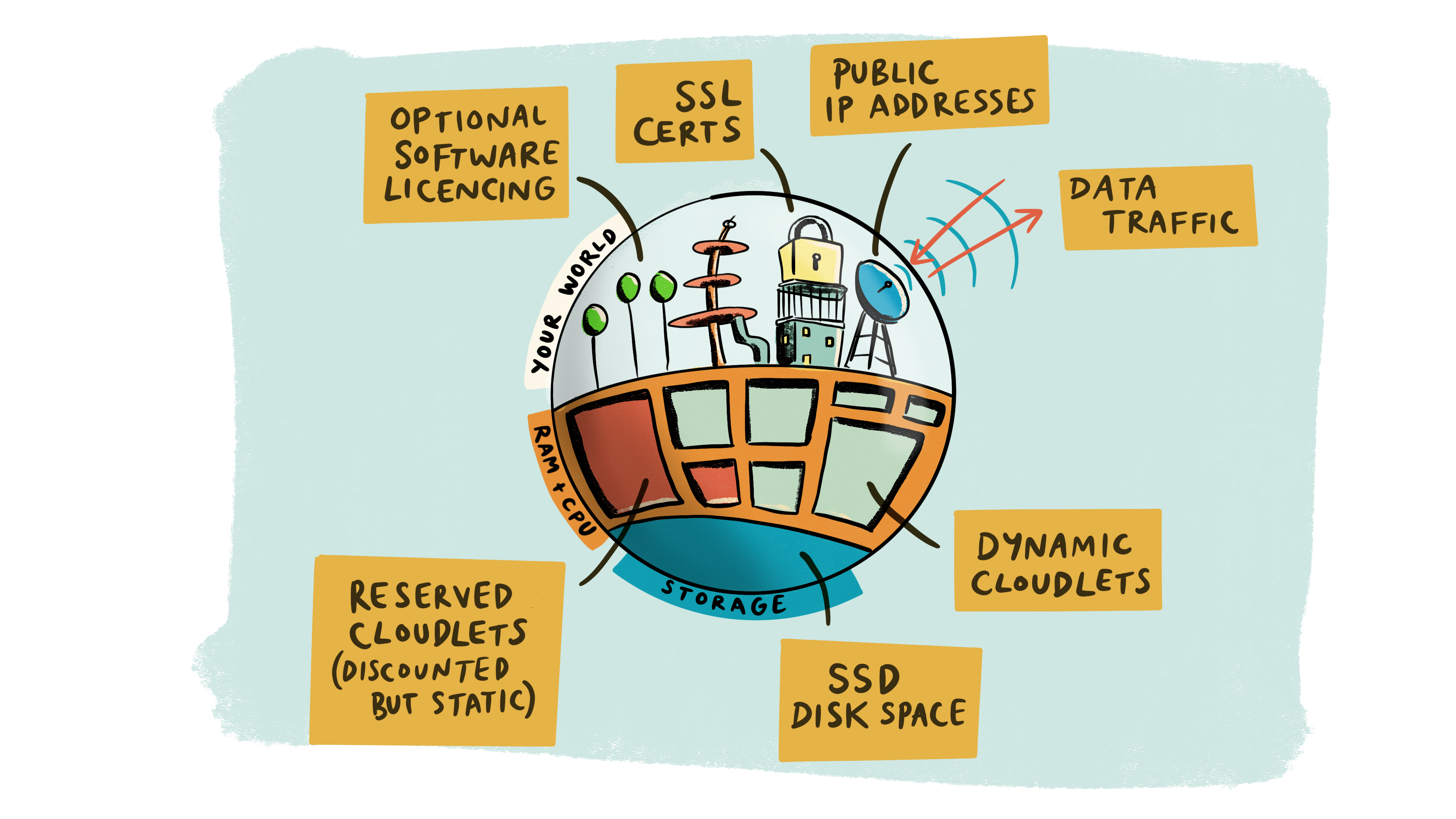
Some new Reclaim Cloud art from Bryan Mathers, isn’t it beautiful?

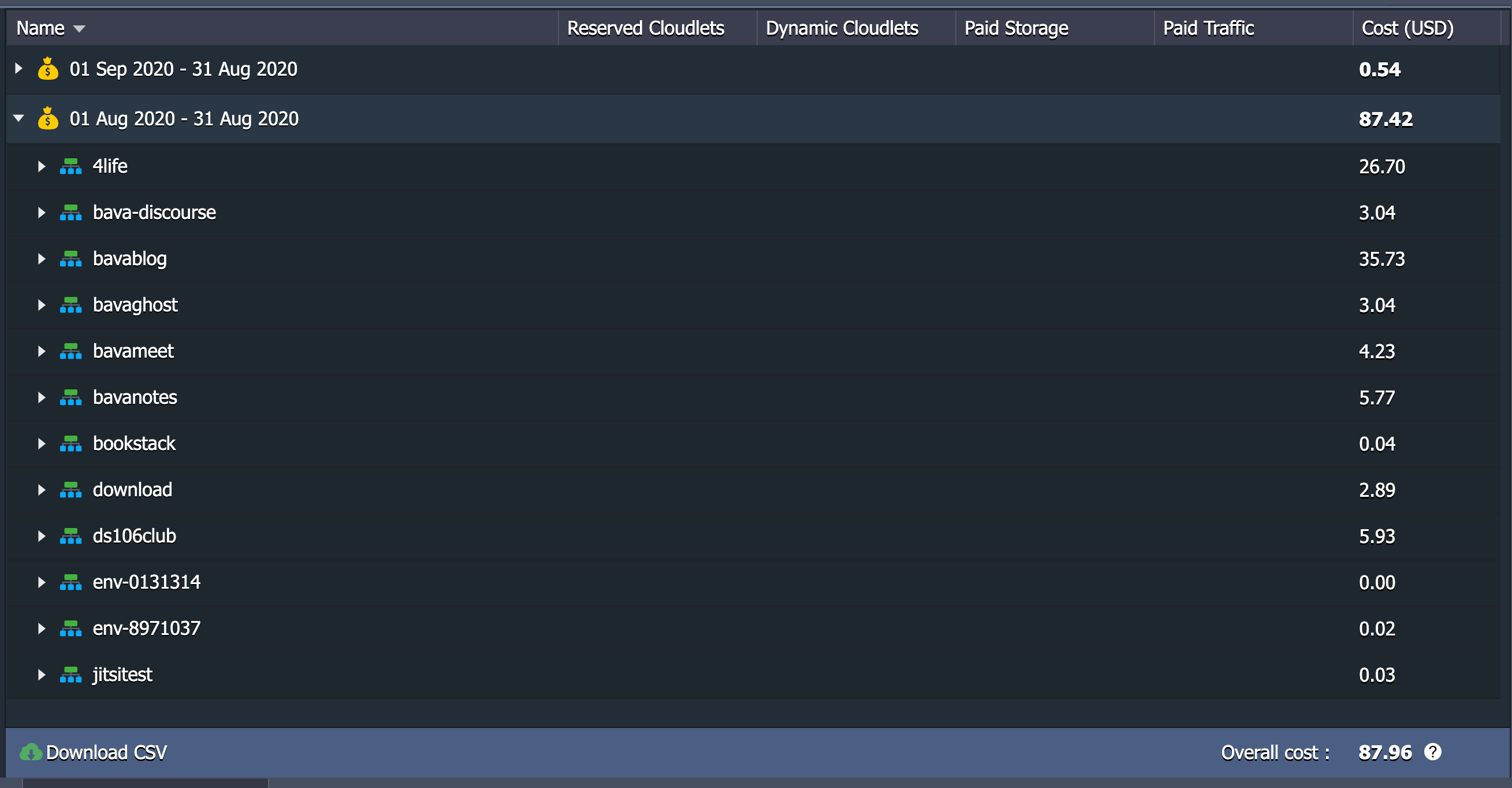
Yesterday marks the first full month of my being a paying customer in Reclaim Cloud. I wanted to take the occasion to follow-up on my post in July where I started projecting what the costs of hosting on Reclaim Cloud might look like given you only pay for what you use, and that will be variable over time. The uncertainty of variable pricing can be scary, but at the same time once you have a sense of what to expect it starts making a lot more sense. So, below is a look at my total monthly cost for August hosting this blog, ds106.us, my own Jitsi instance (which I turn on and off as needed), Etherpad, a YouTube Downloader app, as well as a number of parked applications I’m experimenting with.

And the verdict is in, I spent $87.42 in August, and that breaks down as follows:

  • bavatuesdays (WordPress): $35.73
  • ds106.us (WordPress): $26.70
  • ds106club (Ubuntu VPS): $5.93
  • bavanotes (Etherpad): $5.77
  • bavameet (Jitsi): $4.23
  • Youtube Downloader: $2.89

These are the apps I regularly used, and that works out to $81.25, the other $6.17 was spent on the Ghost ($3.04) and Discourse instance ($3.04) the former of which I eventually shutdown and archived to a static site. The remaining .09 cents I spent on testing various environments with a few different apps.

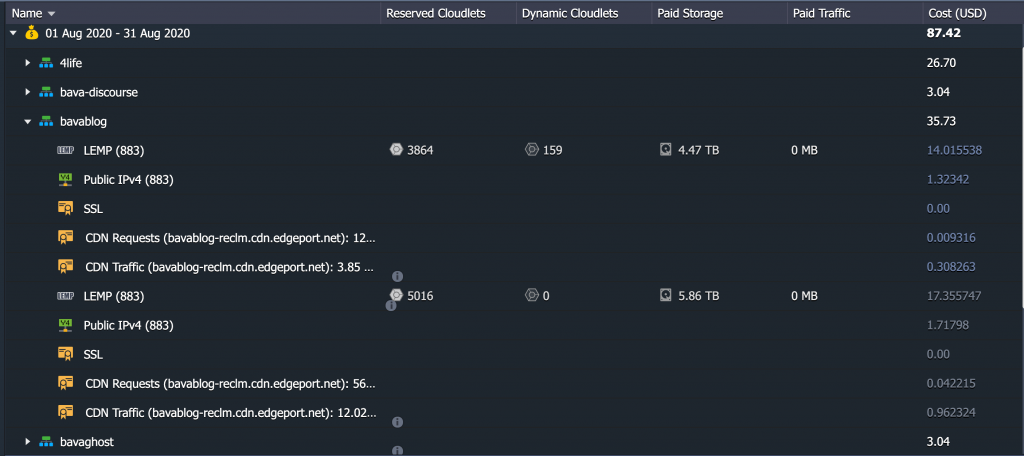
The nice thing about the Cloud billing is it gives you insight into exactly how many resources you used and what they cost at the container level and beyond. Above I exploded the view for this blog and you can see the costs are split up given I moved the environment mid-month. The costs are predominantly for the LEMP application server ($31.37) and the rest is for the dedicated IP address ($3) and the CDN I installed ($1.36) brings the total to $35.73. This is about half what I would be paying with Kinsta, which is nice to know, and about $5 more than Digital Ocean, although that did not include a CDN.

The big win for me once Tim added the Edgeport CDN service that Reclaim Cloud is utilizing is that I really had no more reason to pay Cloudflare for their CDN and caching service, effectively saving me $20 per month (actually $40 if you include I also had a pro plan for ds106). So, I am effectively $90 monthly for my web services through Reclaim Cloud, with a fair bit of room to experiment. I could probably shave off $8 or $9 if I started and stopped Etherpad and the Youtube Downloader application. I think this kind of monitoring of usage makes me consider not only what I am spending, but what resources I am using. And this is a bit different then just minding money—I could probably skip the bill and no one would say anything 🙂 —it’s the fact it makes me more mindful of what I can shutdown to save resources—such as Discourse and Ghost—it goes back to the idea of turning off the lights when you are not in the room. Same thing here, and it is what is unique about the Cloud, in shared hosting I spend far less, but at the same time I hog resources with the 15-20 applications I have installed (maybe two of which I am actively using) and never think twice about it.* I’m not sure sustainability is the right word given its environmental connotations, although it might be, but it does make sense in terms of ensuring our shared hosting infrastructure is not overburdened with accounts that demand more resources, such as mine.

Anyway, I guess I am still blogging about this because I’m so used to paying $30-$100 a year to host any and everything I want on a shared hosting server and I am trying to come to terms with a digital life outside the “free” third party trap services is something I have to start accounting for, and as a result budgeting accordingly.

___________________________________

*At least until Tim gently reminds me other folks are paying for those resources you are burning.

Posted in reclaim, Reclaim Cloud | Tagged , , , , | 1 Comment

TommasoTV: Pong Hits

Tommy and I re-united for our second episode of TommasoTV. I’m always looking for an excuse to stream these days, and Tommy is always ready to share what he’s been developing, so we make a good pair. This episode covers Tommy’s back to the basics strategy of game development. As mentioned in our last episode, he was working on a more complex, 3D shark game that he had to abandon given some AI difficulties, and he decided to go back to the beginning of it all: Pong. As I noted in the video, this warms my old school gamer heart 🙂

He takes us through the process as well as providing some details around how he figured out various functions in C Sharp to get the ball to accelerate with every paddle hit, as well as how to get the speed to reset once it is out of the playing field. What’s more, he even got a power-up feature to work on the fly. Tommy rules, and I love that fact he is working through narrating his learning.

As for the video, we had some intermittent internet issues on our end given a storm that rolled through, so I edited those extended freezes out of this video, but if we refer to poor internet at various points that’s why. Also, this stream was done using the web-based application Streamyard that we had occasion to play with this week and we’re really digging it and seeing it as a perfect tool for Reclaim Today. Tim got an account and has already played a bunch, and I just got around to it this weekend and I am loving it.* It’s a really quick, streamlined version of OBS with a variety of templated shots, screen sharing, and browser-based audio sharing. What’s more, inviting people is as easy as sending someone a link to the streaming event, it’s quite slick.

So, Tommy got to share his work on Pong and I got to test out Streamyard, win-win!

______________________________________

*Shout out to Paul Bond who introduced me to the app years ago, but I had forgotten about it until it came back on our radar for an event we participated in this week.

Posted in ds106tv, video | Tagged , , , , , | 1 Comment

KaraOERoke ALT Summer Summit Post-Mortem

As part of the ALT Summer Summit event Chahira, Tim, and I reprised the KaraOERoke event that debuted during OER20.  As expected it was fun, and special thanks to Maren, Martin and Emma Jane for inviting us back. If there were more issues this time around than last, that can be blamed squarely on me for not opening the song sign-up doc I shared with potential participants [face palm]. That said, there was no shortage of willing singers, especially amongst the hosts 🙂

The setup we went with was Zoom, and having folks share their screen (along with their audio) proved to be a pretty solid solution. I kept everything on one monitor and used OBS to stream it out to ds106.tv. Fairly straightforward, there were some issues with sign alongs though, we tried it a few times but audio was competing and cutting out, so that would be something to solve in future iterations. After all the singing there was some time for a chat between Chahira, Martin, and I about the possibilities for streamed events like this, and the work Martin has already been doing for ALT events for years in this regard. We got to talk about my most recent pet project is to try and help build an internet TV station a la EXPTV or Cloudflare.tv. It was cool, if not a bit surprising, to learn Liz Hudson not only stayed around, but even appreciated our discussion at the very end of the evening around the idea of an ALT TV, or some kind of larger idea of edtech TV.

I decided to spare you the other two hours of bad singing throughout the evening and share the 20 minute chat at the end wherein we tease out a few of the ideas around live streaming, karaoke, and internet TV made for and by the people!

Posted in ds106tv, video | Tagged , , | 1 Comment

Drolomite!

A couple of years back I had the idea of getting a drone to take along with me on some of the hikes I’ve done in the Italian Alps. Almost exactly a year ago I did an epic hike through the Dolomiti mountains that having a drone along with me would have been amazing. In fact, the whole idea of my original idea for getting a drone was when Kin Lane stopped over in Trento  in 2018 and got Tommy and I hooked on the idea. But time and momentum is a strange thing, and while I got some more affordable Parrot drones to play around with, I never committed to something a bit more pricey. The other day, on an impulse R&D buy, Tommy and I decided on the DJI Mavica Mini which cost us about 350 euros.* It was a good call, Tommy already was pretty solid at flying a drone given he was the one that really took to the $30 Parrot drones I bought, and he took to the Mavica like a fish to water.

H Marks the Spot

So, yesterday we had our first real test of the drone. We hiked up to 2000 meters (or roughly 6000 ft.) in nearby Val di Mocheni and gave the Mavica a test drive, and I was blown away not only by the footage Tommy was able to get, but how thoroughly he understood just about every feature of the drone in less than 48 hours. He is his mother’s son 🙂

Above is footage from the first flight, wherein Tommaso flew the drone up some 400 meters (1200 feet) to a 2300+ meter peak to capture the cross-shaped lightening rod. The cinematic circling technique is something Tommaso had read about for this drone and used it on a few occasions to great effect.

We then hiked up another 100 meters to the rifugio Sette Selle and flew the drone off a helicopter site that was pretty stupendous. The two videos above are the footage of Tommy flying up to the peak and the second is him circling it through the clouds. It is pretty epic stuff. And to give you a sense of how far the drone travels, below are videos of me recording Tommaso taking off with the drone and another of recording of his getting ready to circle the peak (which you can see the actual footage in the video above):

And the video from the return gives you a sense of how high the drone flies:

Something we noticed that we probably wouldn’t have without the drone worth was that a huge swathe of trees just beyond the perimeter of the forest we were stationed at were all fallen. Turns out they were casualties of the storm known as Vaya that hit Trentino hard two years ago. The unrelenting rain storm led to massive mudslides that wiped out forests all over the region, and this is a pretty good look at the devastation. The craziest part is we were literally 15-20 feet away from it and would have not have noticed given the storm spared just a few trees along the edge of the forest.

Needless to say, Tommaso, Antonella, and I are hooked. We are planning another outing next weekend to try out the drone on some Dolomiti mountains in Alto Adige. It promises to be even wilder, and I am going to collect some of those videos and stories over at drolomite.com (nothing there just yet), although everything there will syndicate here cause that is how I roll.

__________________________

*Which is over $400 given the shitty exchange rate right now as a result of the global communities lack of faith in the US, another reason to hate Trump and the sniveling, sociopathic Republicans that make his reign of terror possible.

Posted in Drolomite, video | Tagged , , , , | 2 Comments

Excuse Me, but your Webcam is Effecting the Tracking on my VCR

Well, I’ll be spending much of this weekend and the coming week trying to keep up with the blog. I’ve found myself back in a pretty fun groove with ds106radio and ds106tv, and I think I finally dialed in my streaming setup for both platforms to a place I’m pretty comfortable with. I’ll be writing more about this throughout the week, but I ran into an interesting issue last night that was probably niche enough to be completely irrelevant to most anyone reading this, but all the more reason to blog it 🙂

So, I have been wanting to get my hands on a webcam for a while now, I ordered a higher-end Logitech webcam during the height of the COVID-19 lockdown here in Italy, but it never arrived given Logictech’s inventory issues here in Europe. I decided to do some shopping yesterday in an actual store and it was Slim Pickens.

So, in the end, I opted to invest in a play drone for some more Reclaim R&D instead, and picked up the C615 Portable HD Webcam from Logictech. At $100 bucks here in Italy,I would classify it within the decent range at best. The autofocus is not all that great, but it does the job for conference calls and my very low quality barrier for live streaming. That said, if the drivers for the Canon DSLR I have are ever available for Catalina on the Mac, I may be better off going that route.

Anyway, I needed the webcam because the new Macbook Pro I got a couple of months back gets really loud when connected to my external monitors. And if I’m doing anything at all with the laptop lid open and built-in camera on (say a video call), it’s like a factory in my office. So, the webcam was a “quick fix” to an issue 2 months in the making. I felt the added pressure these days because Wednesday we have the karaOERoke for ALT’s Summer Summit, and I did not want anything competing with my singing voice 🙂 Now I can keep the lid shut when doing video, which has led to a huge improvement in fan noise (along with turning off the MBP’s Turbo Boost using this app). So, with the noise under control I decided to do another stream last night discussing my method of archiving VHS tapes using Elgato Video Capture. I archived The Matrix the evening prior with no issues,  but last night when archiving True Romance I ran into some serious tracking issues.* In fact, it was bordering on unwatchable, and about an hour and 15 minutes into the film the tape stopped. It was frustrating the hell out of me, and I could not figure out why the VCR was now on the fritz. I cleaned the heads multiple times, tried various tapes,  and even pulled out my backup VCR (which just happens to be the same make and model) and it had the very same issues. The following video traces these issues in excruciating, head cleaner detail

I was about to give up, but then had an idea—like a diamond through my forehead: the only thing I changed about my setup from last night was I added the new USB webcam I purchased early that day. The Elgato video capture device also runs via USB though a USB-C dongle I purchased to re-introduce 3 USB ports. Based on a hunch, I decided to plug the Elgato video convertor directly into a free USB-C port using the appropriate USB convertor, and the tracking issues disappeared. Can you believe it? The webcam was interfering with my VHS tape tracking on the USB hub dongle? How crazy is that? Probably not to crazy for folks who understand this better for me, but eye-opening for this hack. Anyway, below is the video where I finally figure this out at 4 AM in the morning 🙂

_________________________________________

*These tapes are part of a collection the great Laura Ritchie brought to me in a large, orange suitcase during OER19 that I have been methodically archiving since.

Posted in ds106tv | Tagged | 1 Comment

#ds106radio: tweetbots, listeners, and playlists

Grant Potter’s new Reclaim Hosting design, soon to be a shirt 🙂
The last two weeks has been dedicated to getting ds106radio moved over to Reclaim Cloud. I wrote about the migration in some detail already, so this post will be updating some other work as well as a list of things still to do.

First things first, Timmmmyboy already wrote about getting the ds106radio Twitterbot back up and running. It turns out not only to be a pretty cool to think 7 years later the bot is alive again, but more than that within the resurrection there is an interesting tale about digital identity as it relates to domain, emails, and social media. It comes highly recommended.

Beyond that there has been some interest in getting some more metadata on the listen page, such as number of listeners and a playlist history. I found this page about Azuracast’s potential API integrations for the “Now Playing” info thanks to Anne-Marie Scott, and asked Tom Woodward if he might have any ideas. It took him minutes, and he sent over a codepen with song title, playlist, and active listeners, he rules I drools.

So, I set that up after realizing I need to call the jQuery library via Google in the meta area of the HTML page, and the final bit will be cleaning up the historical playlist data (dropdown menu perhaps) getting rid of the redundant song info that is already in the player metadata. I’ll get to it sooner or later, by CSS is not my strong point so always happy to have volunteers who might have more inspired ideas.

On that front, I also need to add a link to the ds106.us/ds106-radio about page which Nigel helped me clean up, and should reflect the new station details fairly accurately. I am working on downloading an archived version of the old site Grant created (as well as full back-up of the Linode server before retiring it), given I have an idea of archiving/emulating it using the EaaSi setup Tim has been playing with to great effect (more on that soon).

Beyond that, I know folks have been concerned about some station drift and other stream wonkiness, but remember the old adage of ds106radio, “Ask not what your station manager can do for you, but what you can do for your station manager” 🙂 ds106radio never has been and never will be anything resembling professional, moving it to the cloud has been an attempt to keep the infrastructure update as well as to distribute some of the labor away from Grant who has been such a mensch over the last decade. But as we all know a community can only survive and thrive if there is a sense of share interest and labor, so if you don’t see needed documentation or not sure how something works or if there is a problem consider writing that documentation, researching that issue, and contributing in some way other than a “support request” to others in the community. If it is going to continue to be enjoyable we must all play a part.

Posted in ds106radio, Uncategorized | Tagged | 3 Comments

Migrating ds106radio

First and foremost, Grant Potter rules! He spent almost a decade keeping ds106radio online without interruption, and in many ways we are simply trying to return the station to its former innovative harmony that Grant managed so graciously for years. So, Potter will always be the station manager as far as I’m concerned, but it also seemed like a good time to distribute the load a bit.

I have been getting requests about various features, which wasn’t necessarily a reason to move ds106radio to a new server. In fact, it’s been rock solid for a decade, which is something I can’t say about too many other technical systems I’ve been part of over the last decade. The real push for me were the “insecure site” errors on the /listen page people were reporting that will ultimately scare anyone new to the radio away. But the bigger reason was that the IceCast2 streaming server we were running was using the Airtime software for managing the internet radio side of things. As already mentioned, it has been remarkably reliable for years, but the open source version of this software has been abandoned for quite a few years now and it’s just a matter of time before the Ubuntu server we are running needs to be upgrade and this software will most likely prove incompatible going forward. So, we moved the management layer of the station to a more vibrant open source alternative called Azuracast that Taylor Jadin sold me on.

And like most open source software these days, Azuracast has a Docker container available that means it’s a perfect candidate to be moved to Reclaim Cloud. That’s two birds with one stone: another server off Linode (down to our last few now) and a fine excuse to push Reclaim Cloud 🙂 So, this was the week I decided to get ds106radio migrated, and I’m happy to report it went fairly smoothly. There was one annoying bit I will document for future reference, but in general I was pleasantly surprised. But before it all becomes ancient history and I forget what I did by Monday, I figured I would try and document the thinking and the process.

So, there was really only two pretty simple goals for the migration:

1) Make it seamless for folks trying to connect to the server to live broadcast their shows throughout the week. This means connecting to the server with the usual credentials the community currently shares
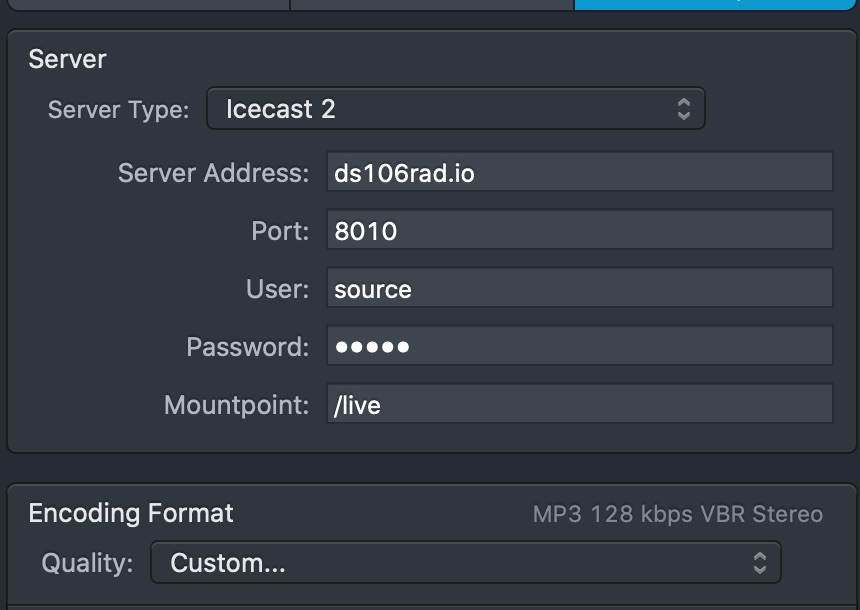
So, the default port for Azuracast needed to be 8010, the Mountpoint /live, and the username source.

2) The second thing was I needed to get the default stream for the station to pick-up WFMU when live DJs go offline.

That was it, if I could get those two things to work no one using the radio presently should be negatively effected by the move. And then we could work on rolling out some documentation to harness some of the features available through Azuracast.

So, to this end, I spun up an Azuracast environment on the cloud using this guide a very attractive gentleman labored endlessly over. This was the third time I’ve spun up Azuracast using Docker (previously reclaimrad.io and listen.strawboss.net), and it’s pretty easy. I do need to push myself and create a one-click installer for Reclaim Cloud, that is next week’s project. But now to the settings I changed to address the connection piece of the migration puzzle.

The AutoDJ for Azuracast is using LiquidSoap which allows me to customize the streamer port to 8010 and where I can customize broadcasting mountpoint to /live. This is accessed Edit Profile –> AutoDJ and you can change the settings.
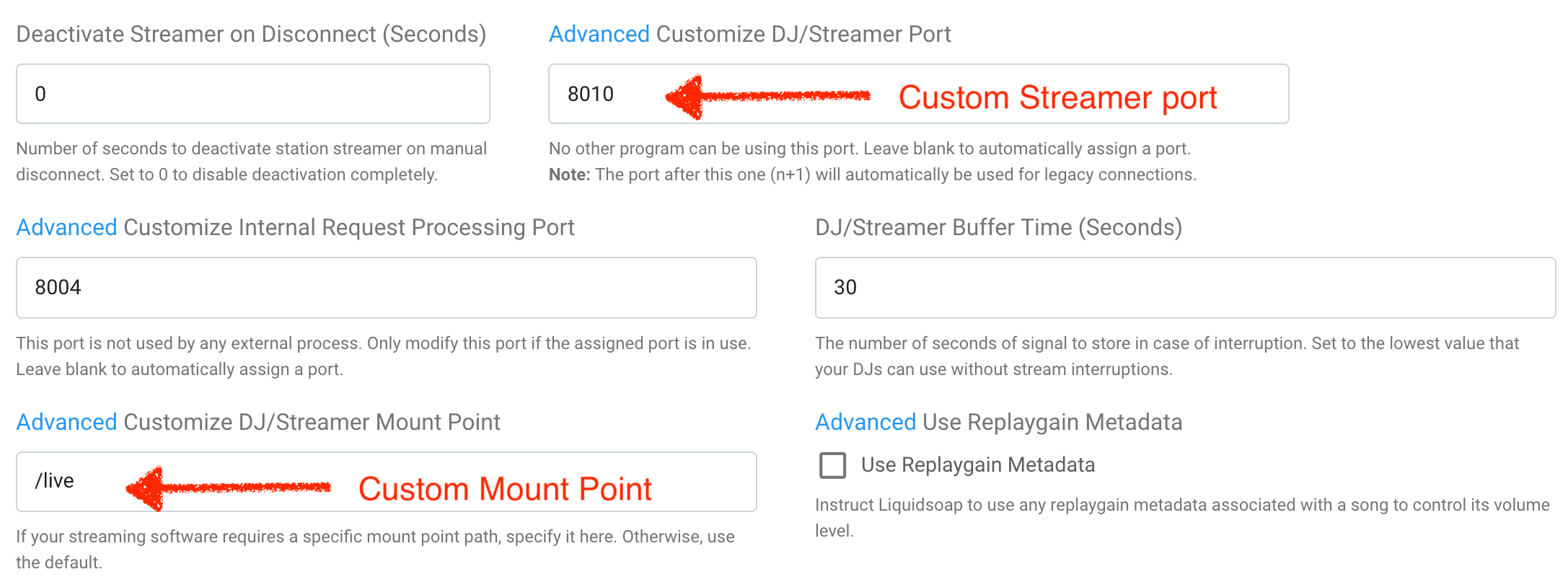
What’s more, there is a field for buffer time of the stream which could prevent stream drift. I set the stream buffer to 30 seconds, and we’ll see how that holds up.

So, at this point I have the custom mount point and port, now I need the change the default username to source and the password to the one currently shared. Under Streamer/DJ Accounts section of Azuracast you can add user accounts or update the default. To keep the username and password the same as it was I simply updated the default broadcasting credentials:
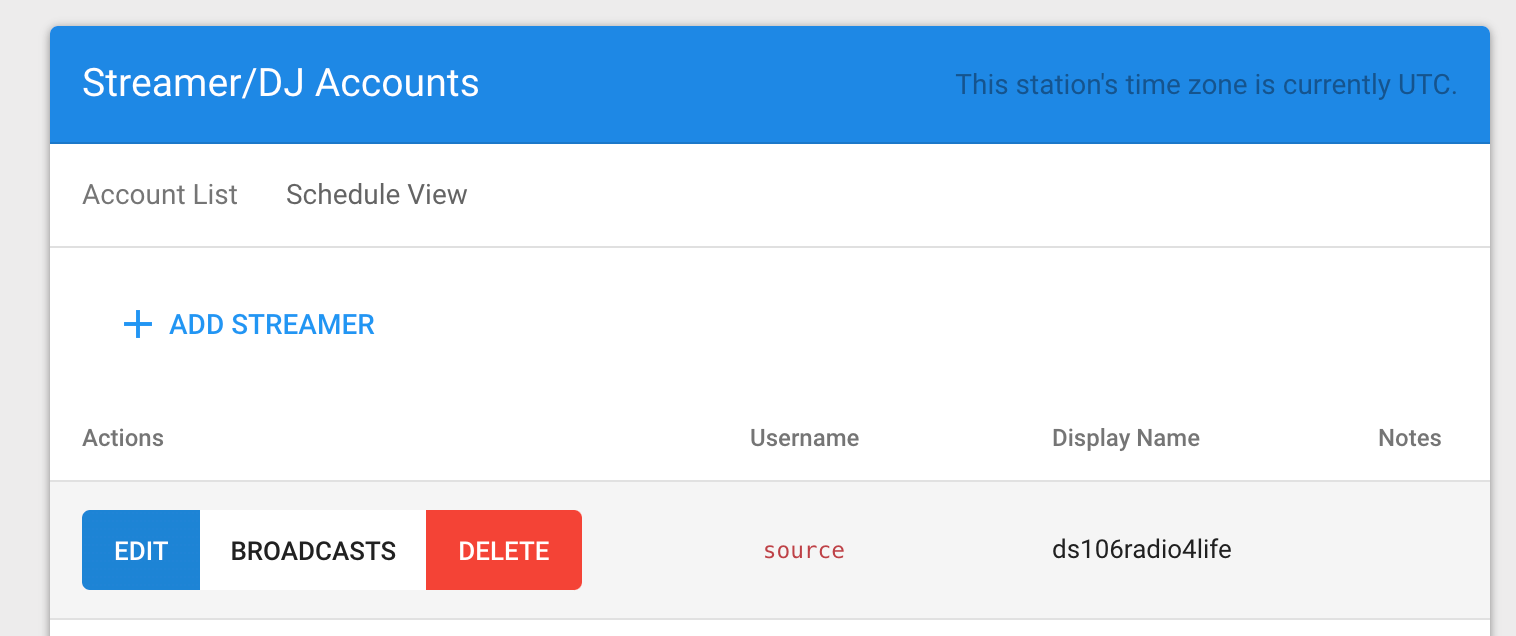
Click edit and add the username and password combo you want, and you can even define the display name of the streamer:
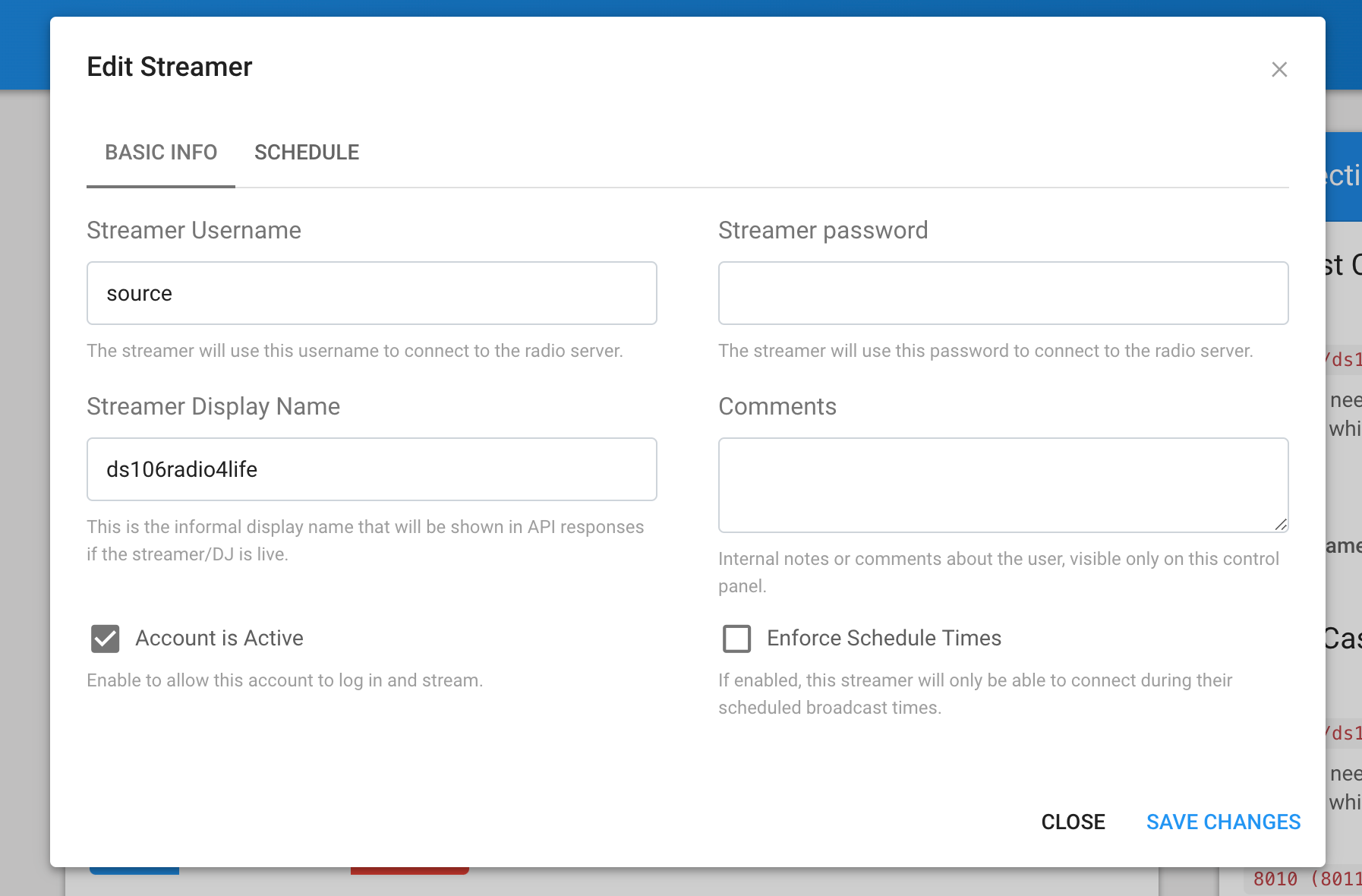
As you might have deduced, rather than everyone sharing the same credentials, which can be simple, this feature now allows us to provide individualized accounts for any and all ds106radio streamers.

When I originally set up this Azuracast instance it was using the IP address of the server given I did not want to point the Ip address until I was sure I had the basics working. But once I did point an A record for the URL ds106rad.io to the new server IP the domain ds106rad.io could be used as the hostname for connecting. So, that means all the credentials used to connect to the old server now work on the new one. Disco!

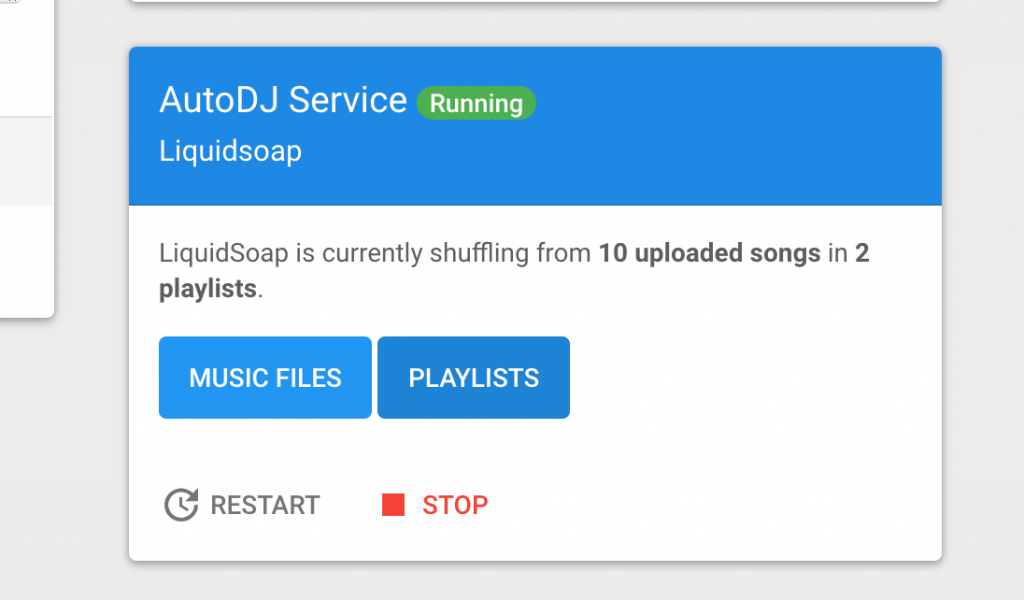
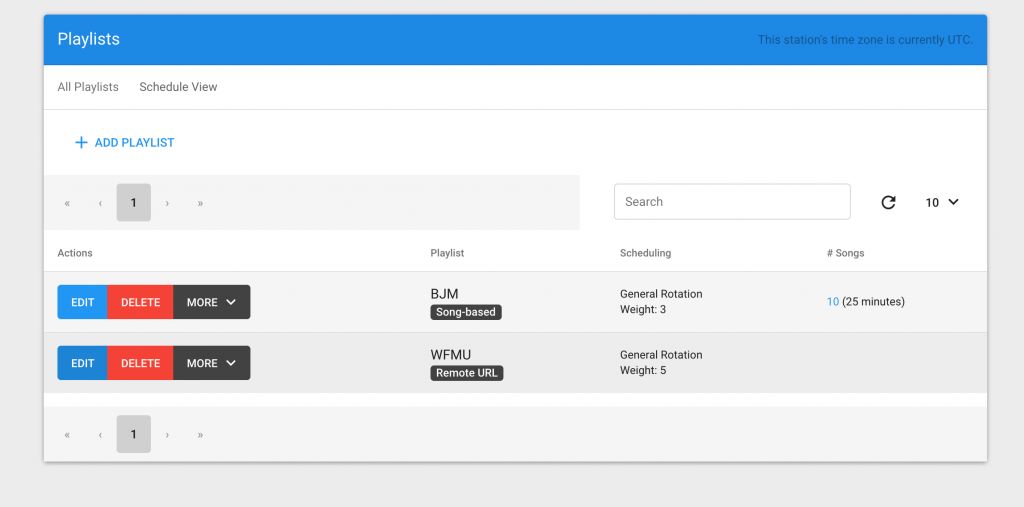
Cross-casting the live stream from WFMU was the next task, and for some reason I made this more difficult than it should have been. It is pretty easy, if you go into the AutoDJ area and click on the Playlists button:
From there you can create a new Playlist, I called mine WFMU.
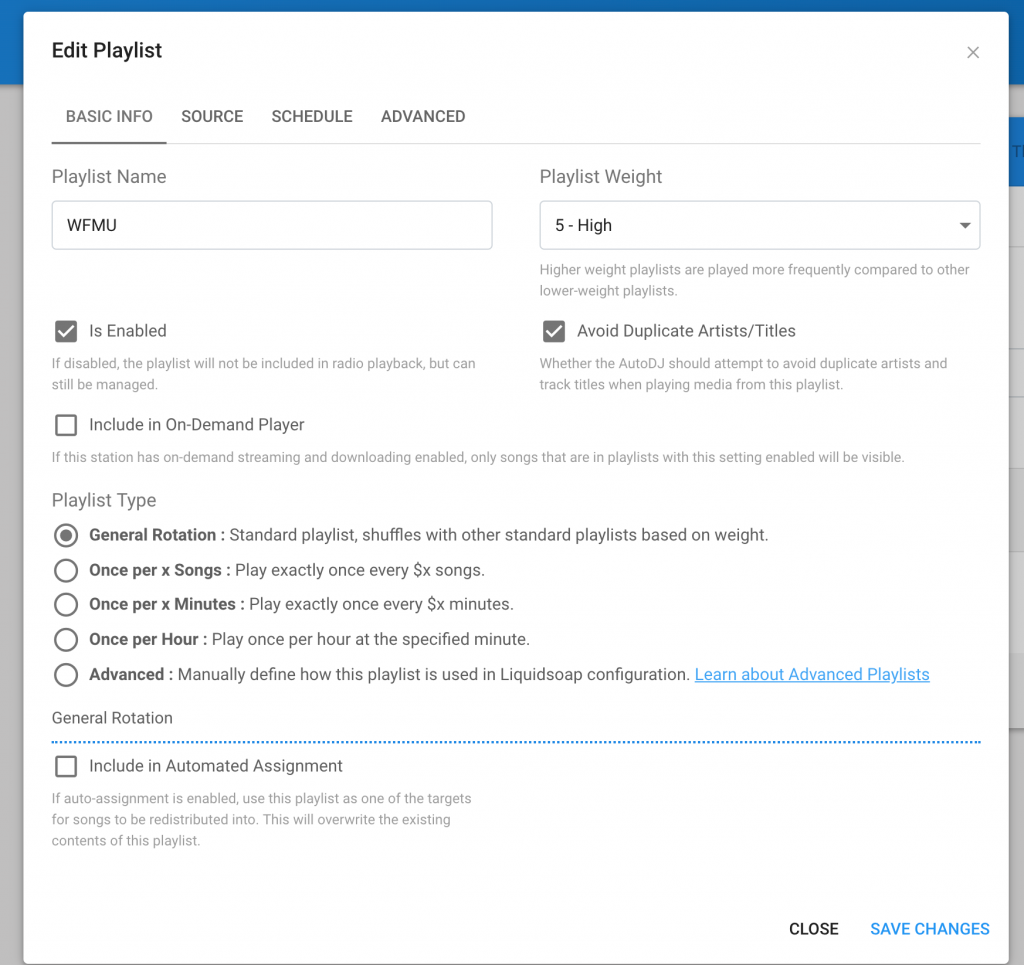
Once I create the playlist I can name it, and now much else to do, I have General Rotation selected, but not sure if it matters.
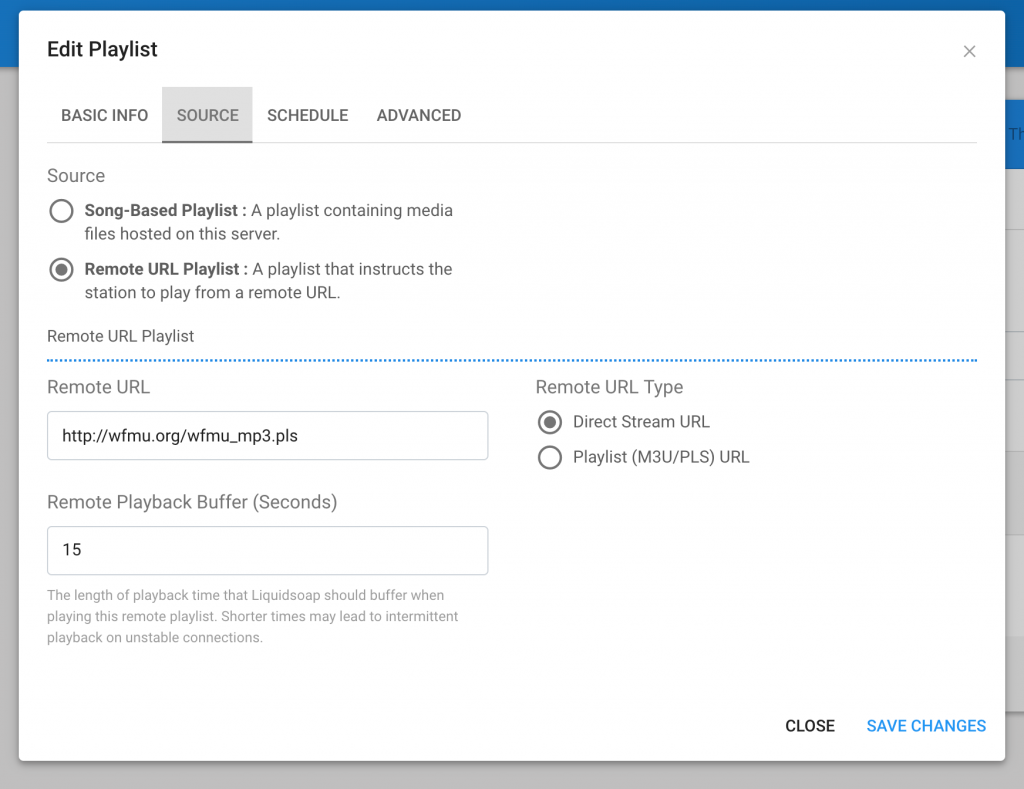
After saving changes, go to the Source tab and select Remote URL Playlist radio button and add the direct stream URL, for WFMU it is http://wfmu.org/wfmu_mp3.pls. I set the buffer to 15 seconds, though not necessarily for any reason.
Finally, in the Advanced tab I have nothing selected.
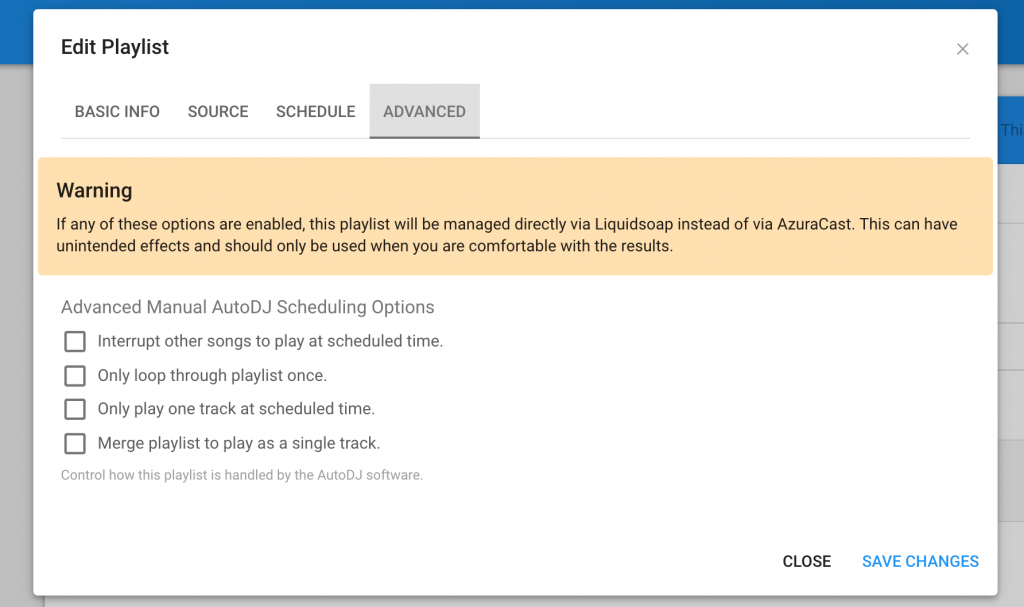
This will work as the default playlist when no one is live, but after I had everything setup I did run into issues with the streaming fading in and out. Turns out if you are broadcasting another stream I highly recommend turning off the Disable Crossfading in the station’s AutoDJ settings:
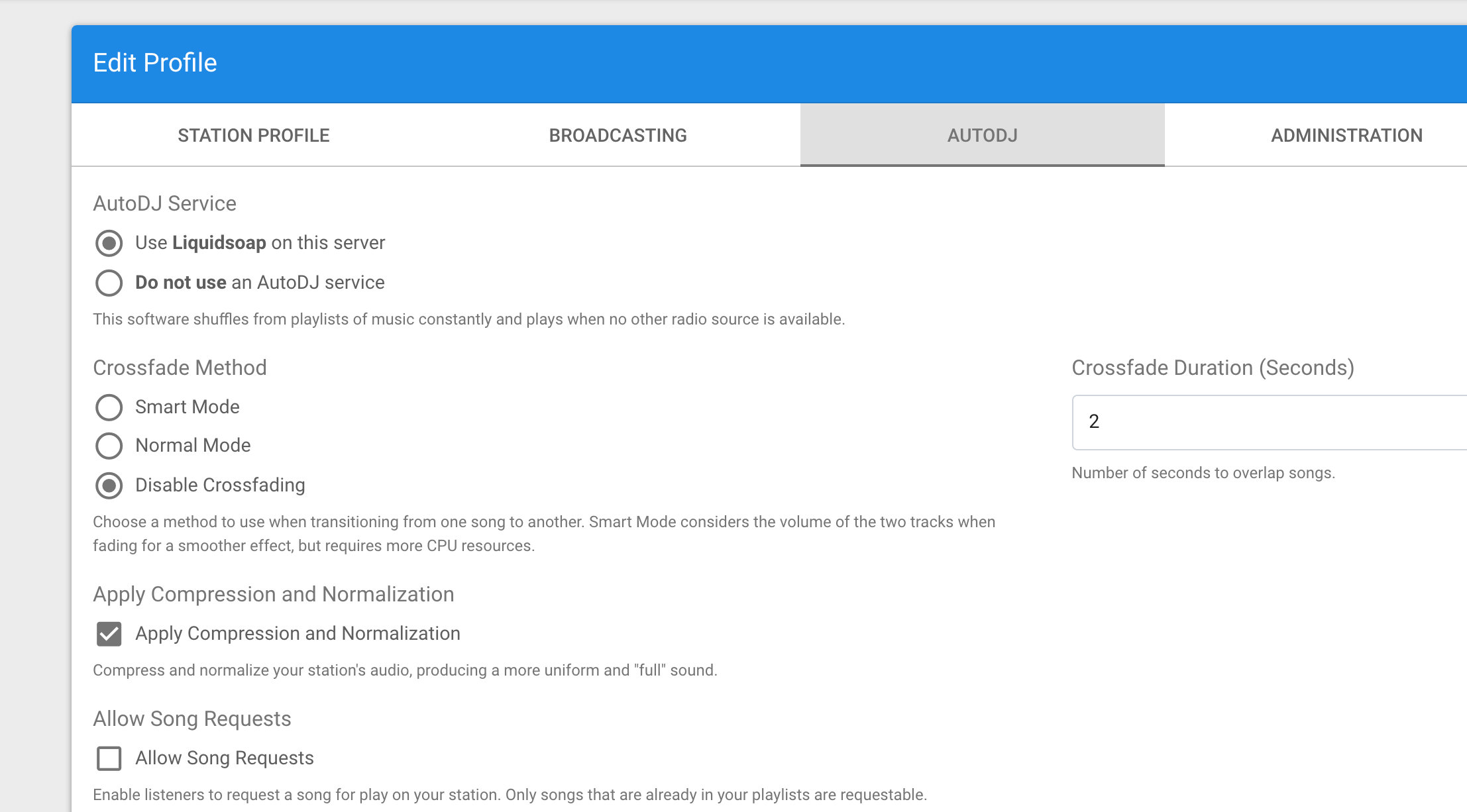
Turns out this feature, when pulling from a remote playlist, will cause the stream to fade in and out intermittently, almost like a pulsating, that was driving me crazy, and took me a few hours to hunt down.

After that, my two primary goals were accomplished, as a special treat I want to get the ds106radio intro bumper back up and running, and with Tim’s help I was able to get it working when stream starts using this guide https://www.azuracast.com/help/docker/#using-a-custom-default-track My recommendation to you, if you try this make sure the mp3 bitrate matches that of the station, for example the file we are using was 196 kbps, and it needed to be 128 kbps. The difference prevented it from playing, and not until we saved it as 128 kbps would this feature work. The following code with whaht I added to a docker-compose.override.yml file in order to update the container with the new link to the file.

version: '2.2'
services:
stations:
volumes:
- /var/azuracast/ds106minibumper.mp3:/usr/local/share/icecast/web/intro.mp3

The other piece is adding <intro>/intro.mp3</intro> to the ds106radio Mountpoint:
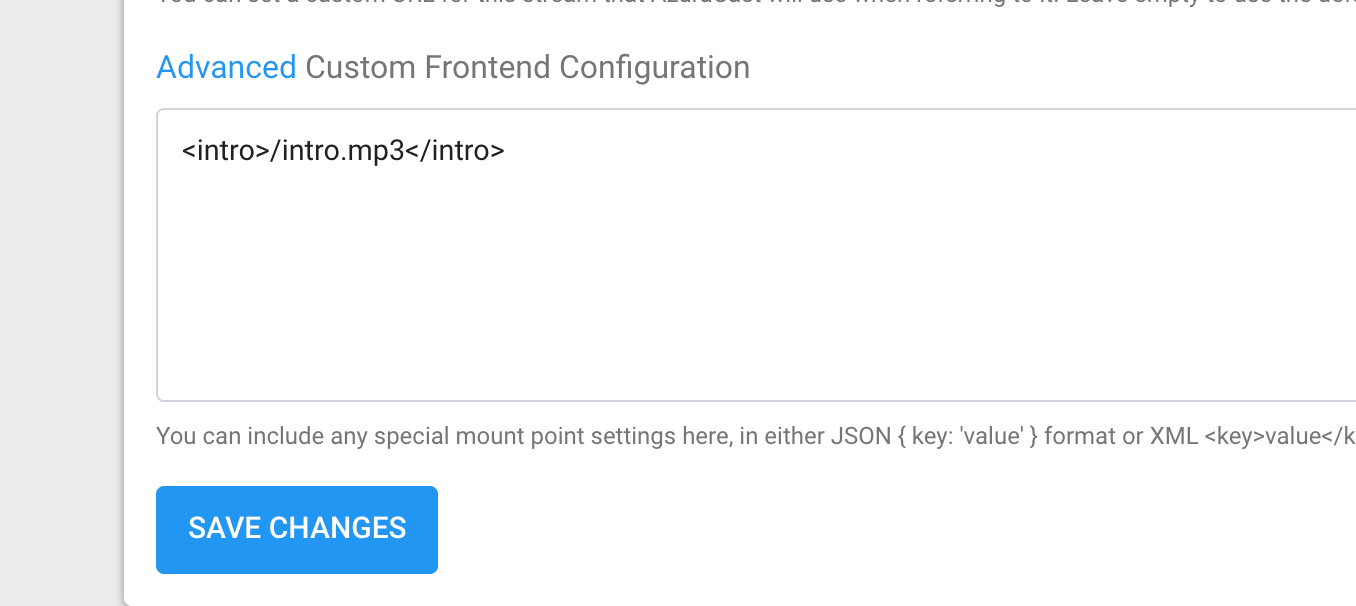
That worked!

Finally, folks were going to http://ds106rad.io/listen to find the player, given the way Azuracast works that was not going to be possible, so I setup a webpage with an embedded player and redirect the  URL http://ds106rad.io/listen to https://listen.ds106rad.io. Like with adding the intro.mp3 file, I updated the Nginx file to redirect both ds106rad.io/listen and ds106rad.io/listen/ using this handy guide, which also had me overriding the docker compose file to add new lines of code to the nginx config file. The following two lines are what were added:

location ^~ /listen/ {
rewrite ^/listen/(.*) http://listen.ds106rad.io/$1 permanent;
}

location ^~ /listen {
rewrite ^/listen(.*) http://listen.ds106rad.io/$1 permanent;
}

With that ds106rad.io was ready to be pointed to the new server, and apart from the cross-fading issue, everything went as expected. Tim then dug right into getting some of the webhooks working so we could start sharing metadata on the new player and also update when DJs go live through Twitter. Fun stuff, and now that I got this documented I can figure out how Tim got the Twitter piece working and move on to documenting some useful features to help all those old and new radio friends to go live.

Posted in ds106radio, Reclaim Cloud | Tagged , , | 3 Comments

Personal Archiving is an Ongoing Battle Against Web Kipple

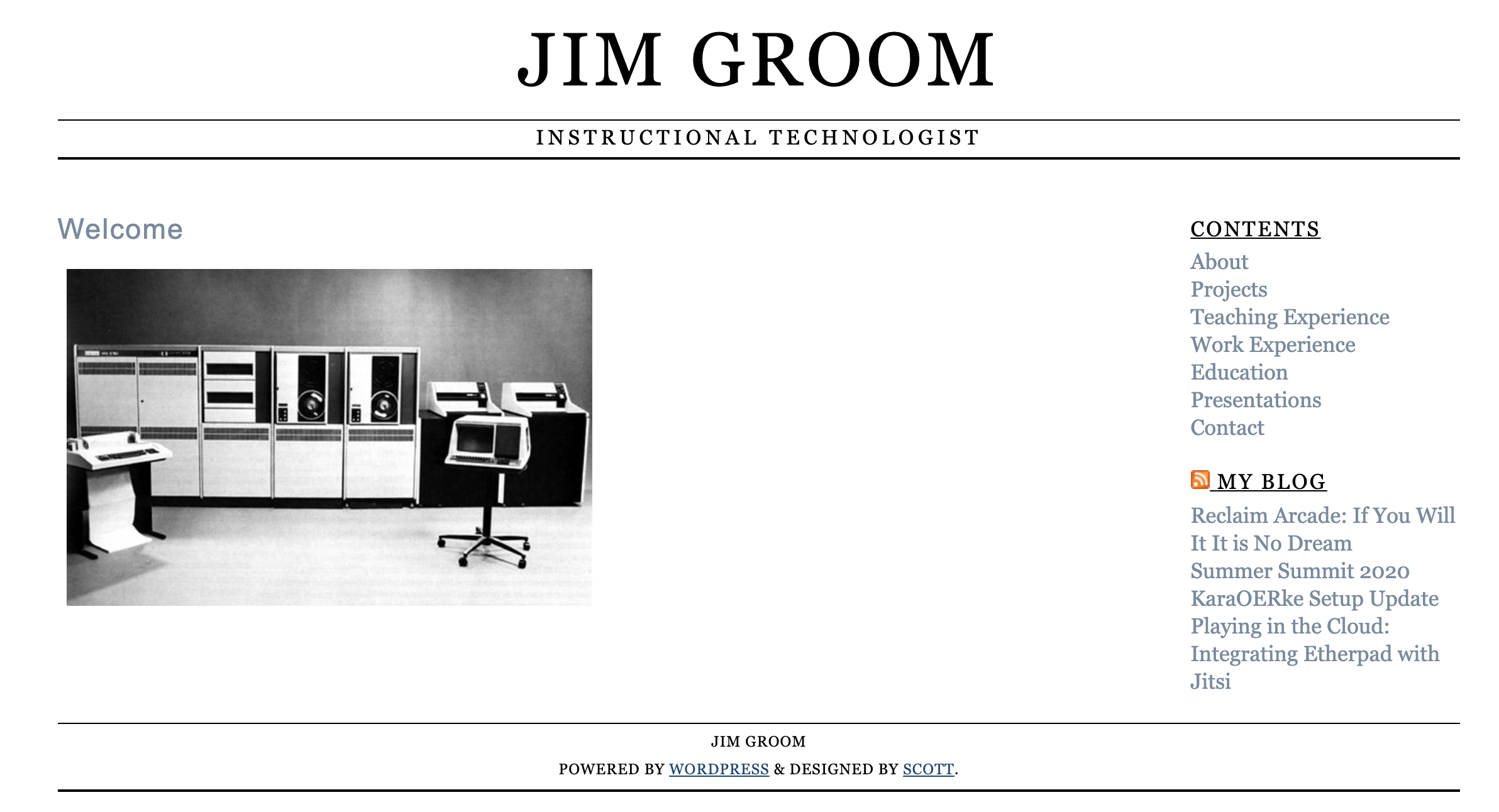
While cheering on Tim as he migrated UMW Blogs on Saturday, I discovered that my personal website jimgroom.net was returning a 404. It’s something of an online resume with an RSS feed of recent blog posts I setup using WordPress back in 2006 or 2007. I don’t update it that much anymore, but for a while I was using it to document presentations, articles, projects, etc. While I have always considered bavatuesdays my homepage on the web, this site was a fun kind of splash page for my online presence that has served me well for near on 14 years. I never tired of the minimalist aesthetic, but the WordPress theme has begun to feel its age. I eventually got it back online and then immediately grabbed an HTML copy of the site using Sitesucker. I archived the WordPress files and database, and have swapped out the WordPress site with an HTML archived copy.

This episode has pushed me to finally redesign that site. And after troubleshooting John Unsworth’s OG HTML personal homepage I have been inspired to try and rebuild the site entirely in HTML and CSS, with some possible javascript if I am feeling crazy. It’s a good project for me right now given I have been wanting to play with HTML includes, and I will only learn stuff like that if I have a project, not to mention Tommaso has been pushing me to learn Javascript.

But as is often the case, once I got the site back online I realized a couple of Mediawiki instances I was running for courses from 2013 (Hardboiled) and 2014 (True Crime) had also been broken. Upgrading MediaWiki can be a bear, but I was able to get those sites back online (one with a 3 GB database which means the spam cometh) I decided to Sitesuck them as well and archive the MediaWiki instances.

But a couple of hours later I was feeling the weight of managing legacy sites. I have been fairly good about this process, but it takes time. I am currently consolidating two different cPanel accounts I have had with the idea of moving everything into Reclaim Cloud, and the work of remembering what’s where after so many different moves can be trying. Philip K. Dick talks about kipple as a kind of accumulation of broken, useless crap, and this is exactly what database-driven sites can be like. You turn around after any amount of time and a version needs updating, PHP needs upgrading, themes and/or plugins broke the site, etc. It is a constant game of cleaning up after the fact. If left unattended your whole online life can quickly become a pile of kipple. I imagine it’s inevitable in the long run, but pound-for-pound HTML is a lot less overhead once the dynamic, database drive site has been retired.

But I must admit, the talk about using containers to manage this kind of archiving so you can have the environment as it was X amount of years ago is exciting. Those kind of next generation web archiving possibilities are thrilling for me. And the stuff Jason Scott has done with arcade console emulation on the Internet Archive suggests just how cool it could be. But in the interim I’m still managing many of these sites in a cPanel environment, and it turns out many of the popular PHP and MySQL apps from the oughts can be unforgiving 10 years later.

Posted in Archiving, design, digital identity | Tagged , | 3 Comments