A New Low for Reclaim

Support for January 2016

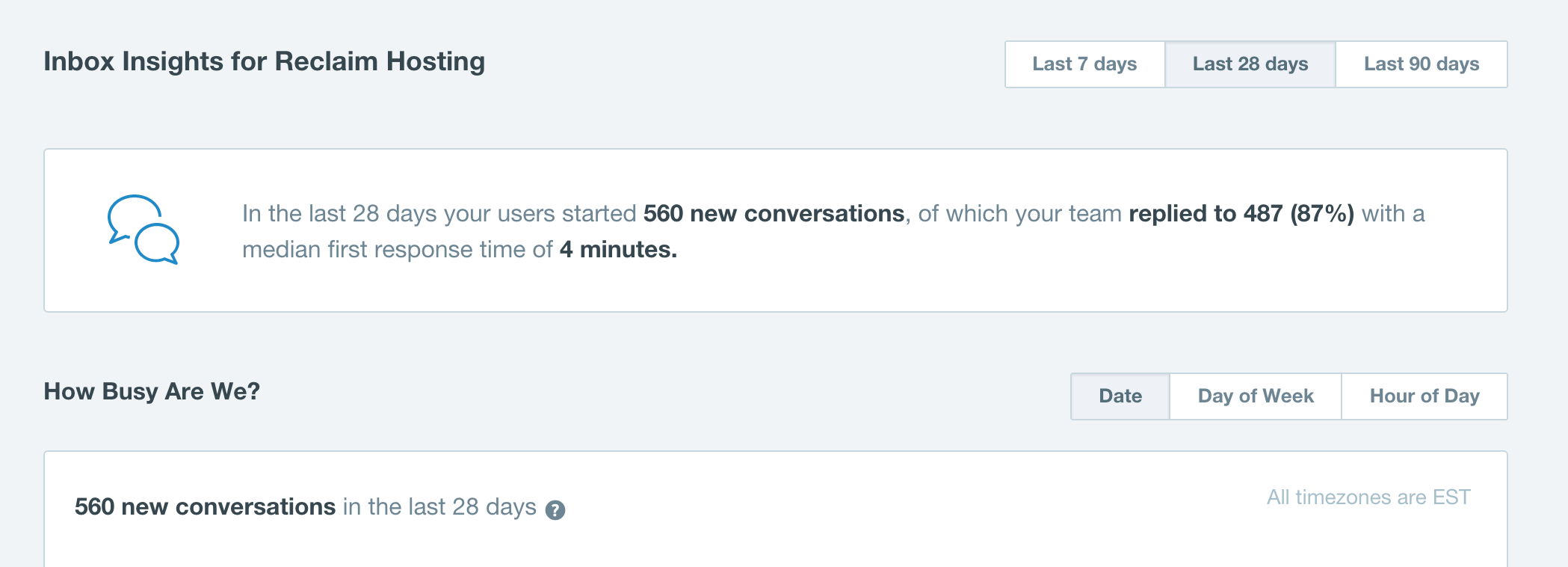
In the last 4 weeks we managed to reduce our first response time for new tickets yet another minute. It’s only gonna get harder to do from here on out. I’ve been writing about our support a bit because I have the numbers, and I’m particularly proud of the average time for the last 4 weeks because the beginning of the spring semester is one of our busiest times of the years. We’ve been on our A-game. As I joked on Twitter earlier, I’m taking all complaints about our support on Twitter…

And the same goes for the comments of this blog. #NOBODY!

Posted in reclaim | Tagged , | 2 Comments

Migrating Known

I have a migrated a couple of Known installations at Reclaim Hosting over the last week or so. While doing them I ran into some issues and want there to be some documentation for us at Reclaim—and beyond—in the event other folks have similar problems. Anyway, the hosted versions of Known provide tools for exporting and importing your application to an XML file similar to the WordPress exporter. That said, it wasn’t working for me. I was trying to use the WP importer Known provides to import the export from Known to no avail.

Screenshot 2016-02-07 10.32.36

Known’s built-in WordPress Importer

Luckily, Ben Werdmüller got me a database and backup of the uploads file lickety split. And my tutorial picks up from there….

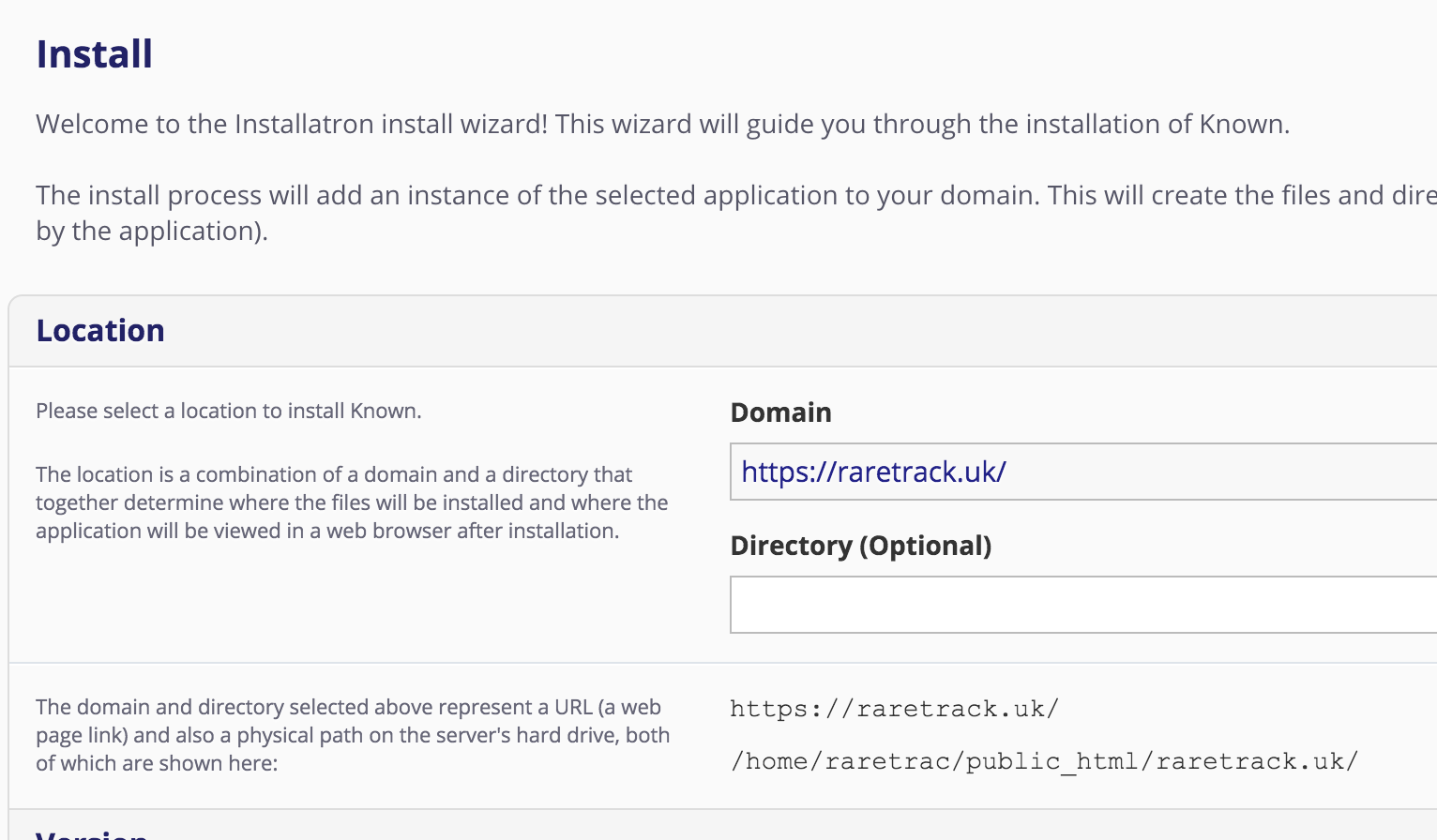
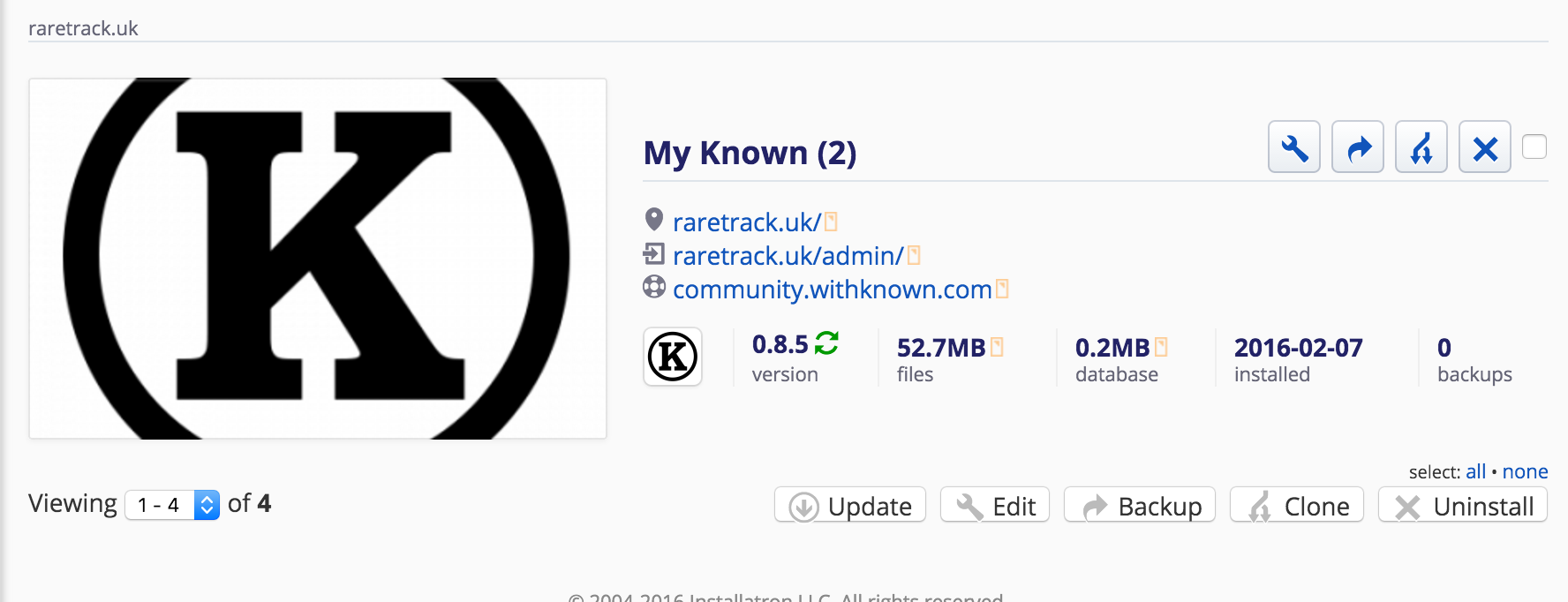
To begin with I installed Known in the directory where I wanted it to live with our Installatron application installer.

Screenshot 2016-02-07 10.10.59
Screenshot 2016-02-07 10.12.00

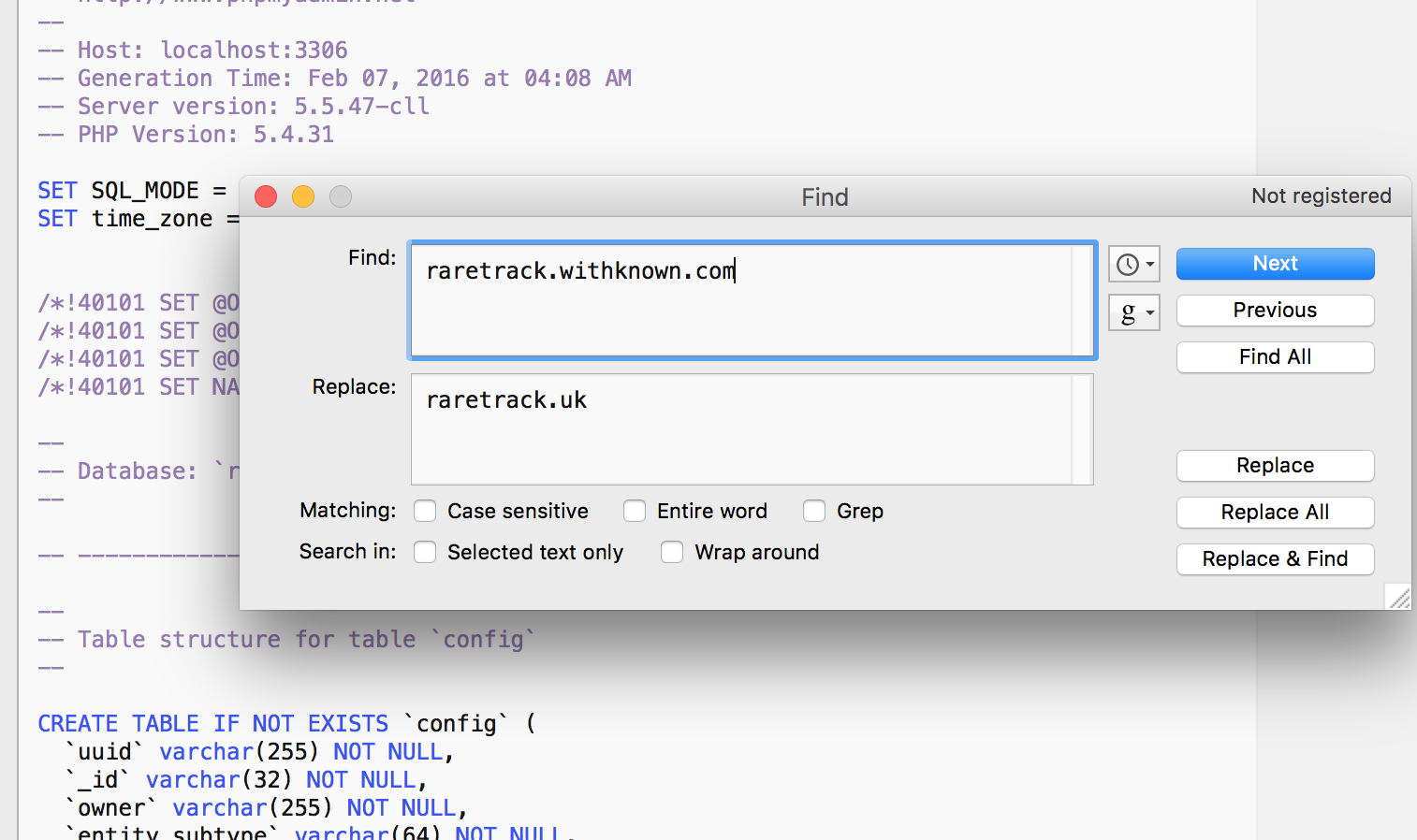
I didn’t do any of the setup for Known though. Rather, using my favorite text editor I made sure to do a find and replace in the SQL export file Ben sent me, replacing all the instances of the old URL with the new one.Screenshot 2016-02-07 10.45.30

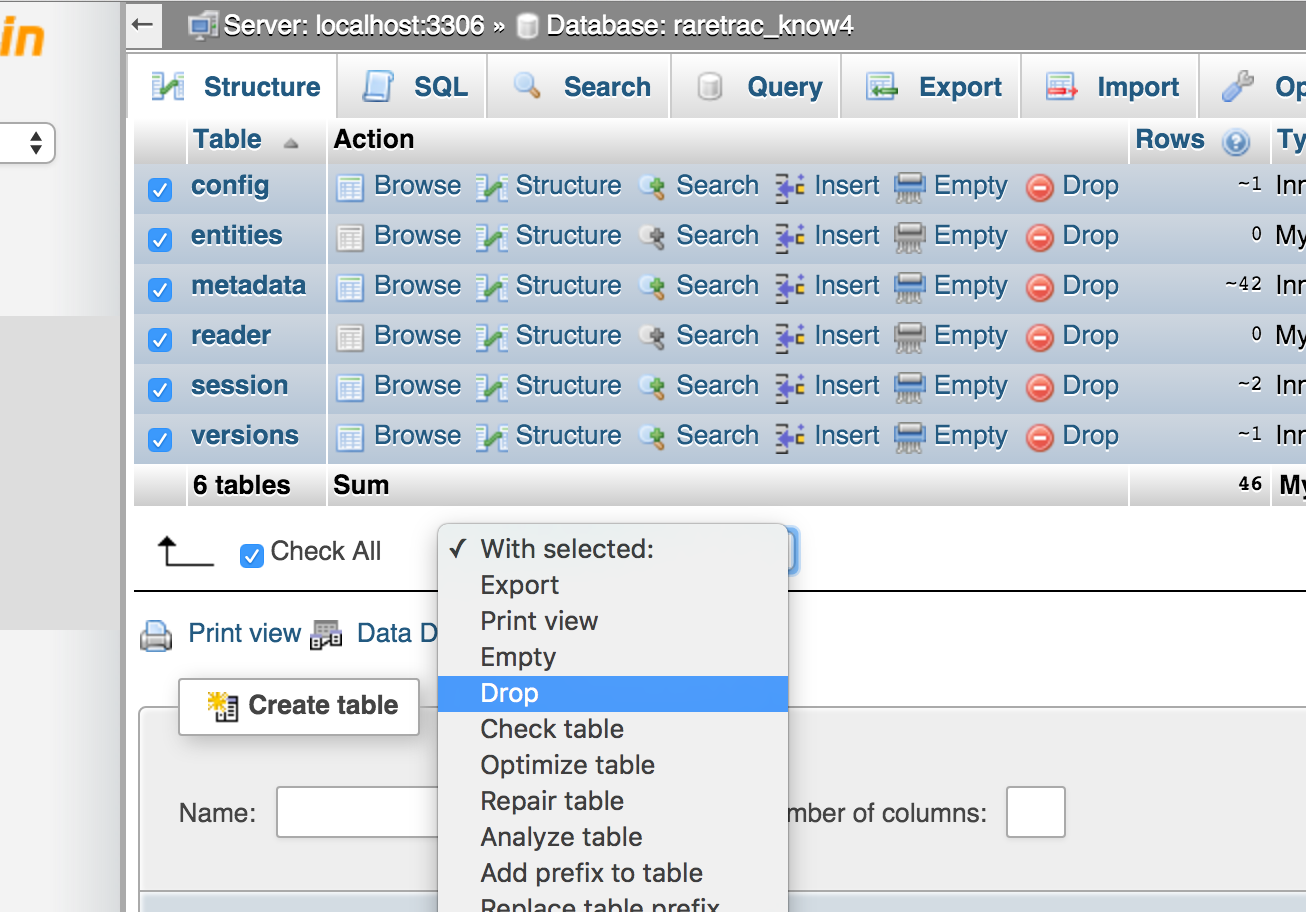
After that I saved the export file. From there I went to phpMyAdmin and drop all the tables of the Known instance I just installed.

Screenshot 2016-02-07 10.13.12

Dropping all tables of installed Known in phpMYAdmin

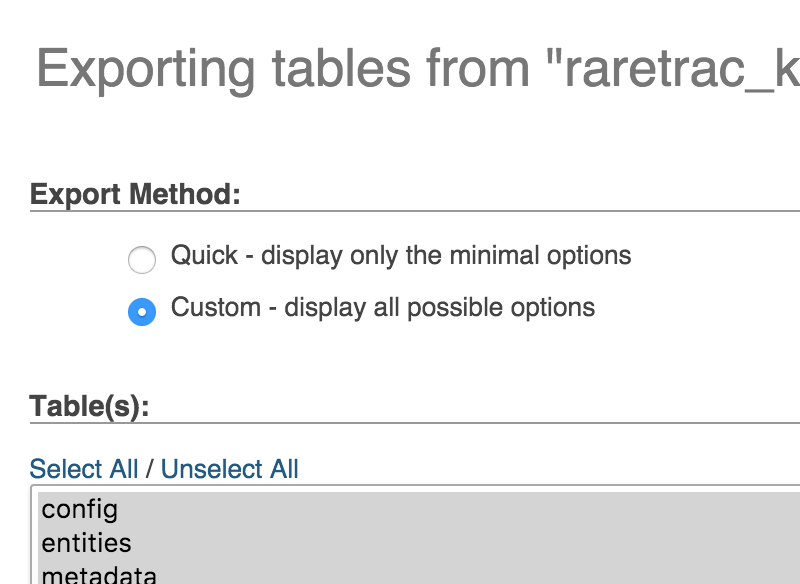
After that, I imported the SQL file that I had just done the find and replace on. One of the issues I ran into immediately after this was that the SQL database Ben send actually had blobs (this is a technical database term!) with all the content, but they were unreadable by the application in the form they had been exported. In this event, I had to do a custom export of the database I just imported:

Screenshot 2016-02-07 10.08.26

Custom export option

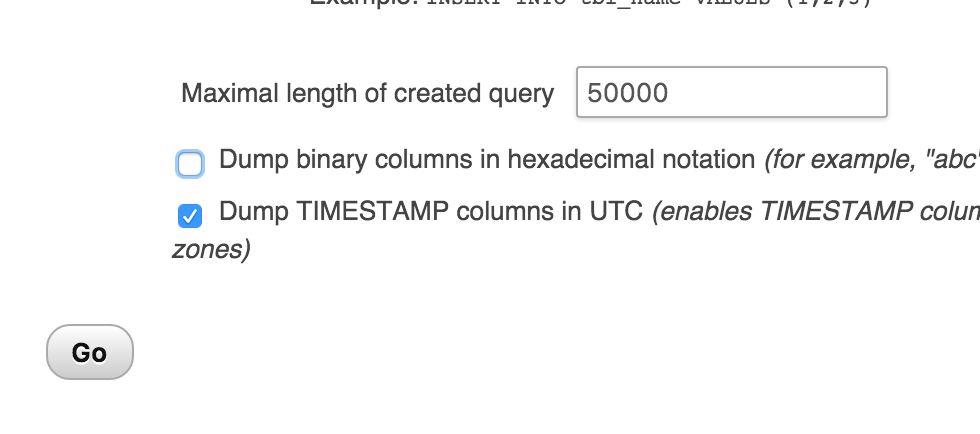
For this custom export you need to make sure the “Dump binary columns in hexadecimal notation” is unchecked. This was the issue I ran into.

Screenshot 2016-02-07 10.08.06

Make sure the “Dump binary columns in hexadecimal notation” is unchecked

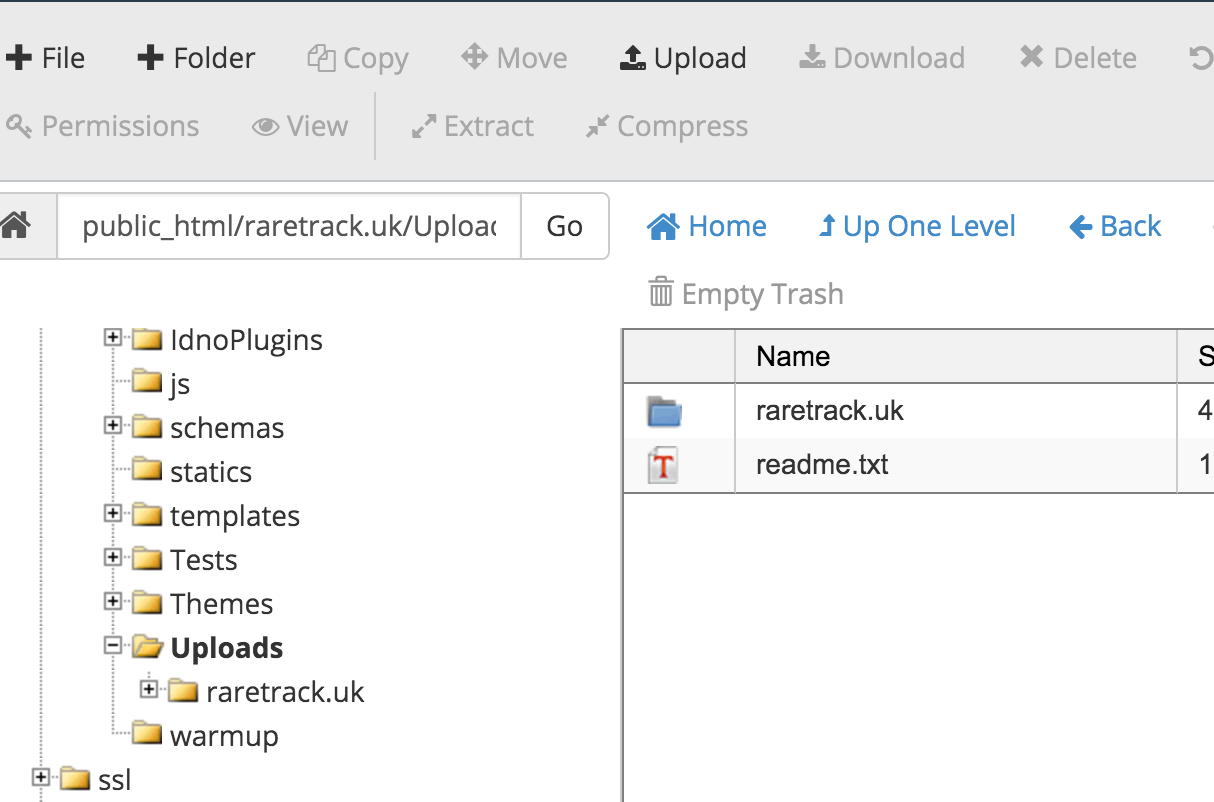
After this you would drop the database tables again and reimport the SQL file and all should be good. The final step for me was uploading the zipped uploads folder to the Uploads directory and extracting it in File Manager. Also, be sure to rename the directory you uploaded from the previous directory to the new directory. For example, raretrack.withknown.com becomes raretrack.uk.

Screenshot 2016-02-07 10.16.43

Rename URL of uploaded files in Uploads directory

After that, your site should be working seamlessly.

Screenshot 2016-02-07 10.59.35

Posted in Known, reclaim | Tagged , | Leave a comment

Reclaim Your Hypothesis

FcJI9k3

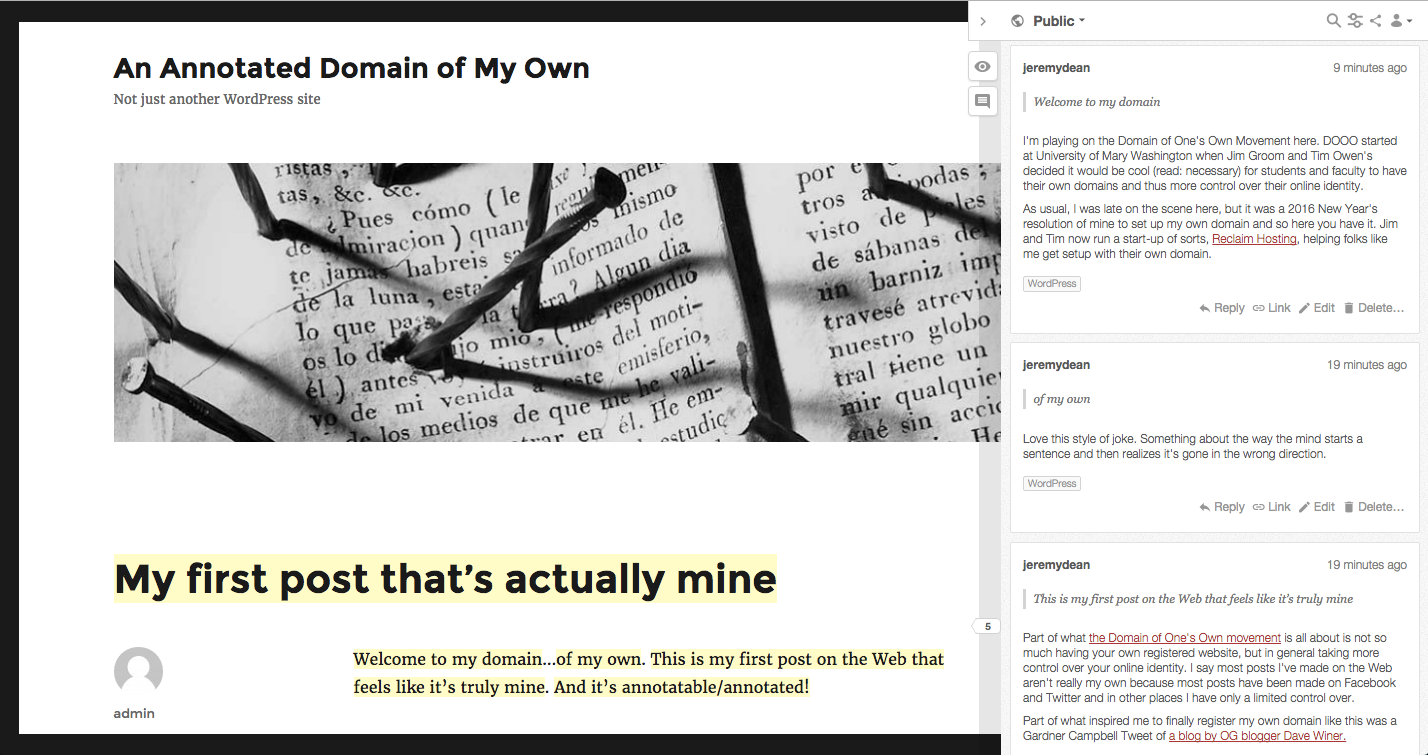
I wanted to point folks to Jeremy Dean’s excellent post “An Annotated Domain of One’s Own” that details getting up and  running with the web annotation tool Hypothesis on a  self-hosted WordPress site. Now I’ll admit it, it didn’t hurt that Jeremy highlighted the awesomeness of Reclaim Hosting in his post, but regardless of that he provides an excellent conceptual framing of why managing your own domain is important as well as hands-on, practical how-to for getting up and running with Hypothesis using WordPress.

Additionally, I have to hand it to the folks at Hypothesis. I’ve been really impressed with the folks that work(ed) there. Last March at the IndieWebCamp in Cambridge I met Benjamin Young, who was in a prolonged conversation with Sir Tim Berners-Lee about some spec I have no idea about. Super smart person, and when we had dinner later that night totally down-to-earth and awesome. Looks like he since moved on to work for W3C, REST Fest, and the Apache Software Foundation, good for him—that some open web stuff right there! Jeremy Dean’s bio frames a long history in higher ed, and I love that he’s out and about blogging his process, tweeting support, and generally getting folks excited about Hypothesis. What’s more, when you’re showcasing projects by faculty like Robin DeRosa and Larry Hanley, it’s a good sign you are building your community from the ground up.

And then they went and hired one of my very favorite people who invented the internet: Jon Udell. It’s no secret Udell’s thinking has provided inspiration for so much of the work we did at UMW over the last decade, and it continues here at Reclaim Hosting. Bringing Udell on as Product Manager certainly reflects brilliantly on Hypothesis. What’s more, I was really excited to see on Twitter the other day that Udell was speaking at BYU. Sending Udell on the road to talk about the open web, decentralization, and higher ed is boon for all of us!

So, if you judge an organization by it’s people, then Hypothesis has been on a bit of a tear as of late.

Posted in reclaim | Tagged , , | 1 Comment

Nothing is real without a Domain

I’ve been on a bit of a Sandstorm kick for the last few days, and this is a follow-up to my previous two posts about this impressive server environment for open source apps. The title of this post comes from a brief exchange with Tom Woodward when talking about mapping domains in Sandstorm. I’m only half joking when I said it. Domains provide, as Martha Burtis so eloquently put it, the metaphysical act of naming a thing which in many ways brings it to life intellectually. There is real power in the framing of a site on the web around a unique namespace you define.

So, as I have been playing with a number of applications in Sandstorm, I have been happy to see that a few of them have the ability to map a domain on top of the default URL, which is usually something unwieldy like https://altlab.sandcats.io/grain/sEJR8J3iEKiiMJYX9C6fCs. The only sites I’ve seen that provide domain mapping in Sandstorm currently are WordPress, Ghost, and HackerCMS, though there may be more I didn’t see. In fact, it would make sense these apps have domain mapping because they are all designed for building and running blogs/sites.  Some of the other apps I would have liked a domain mapping feature on are Hacker Slides, Etherpad, and DocuWiki, though i can understand why folks might not see the need given these are more collaborative/presentation tools. But like I said, it’s not real for me without a domain!

Screenshot 2016-02-03 10.52.13

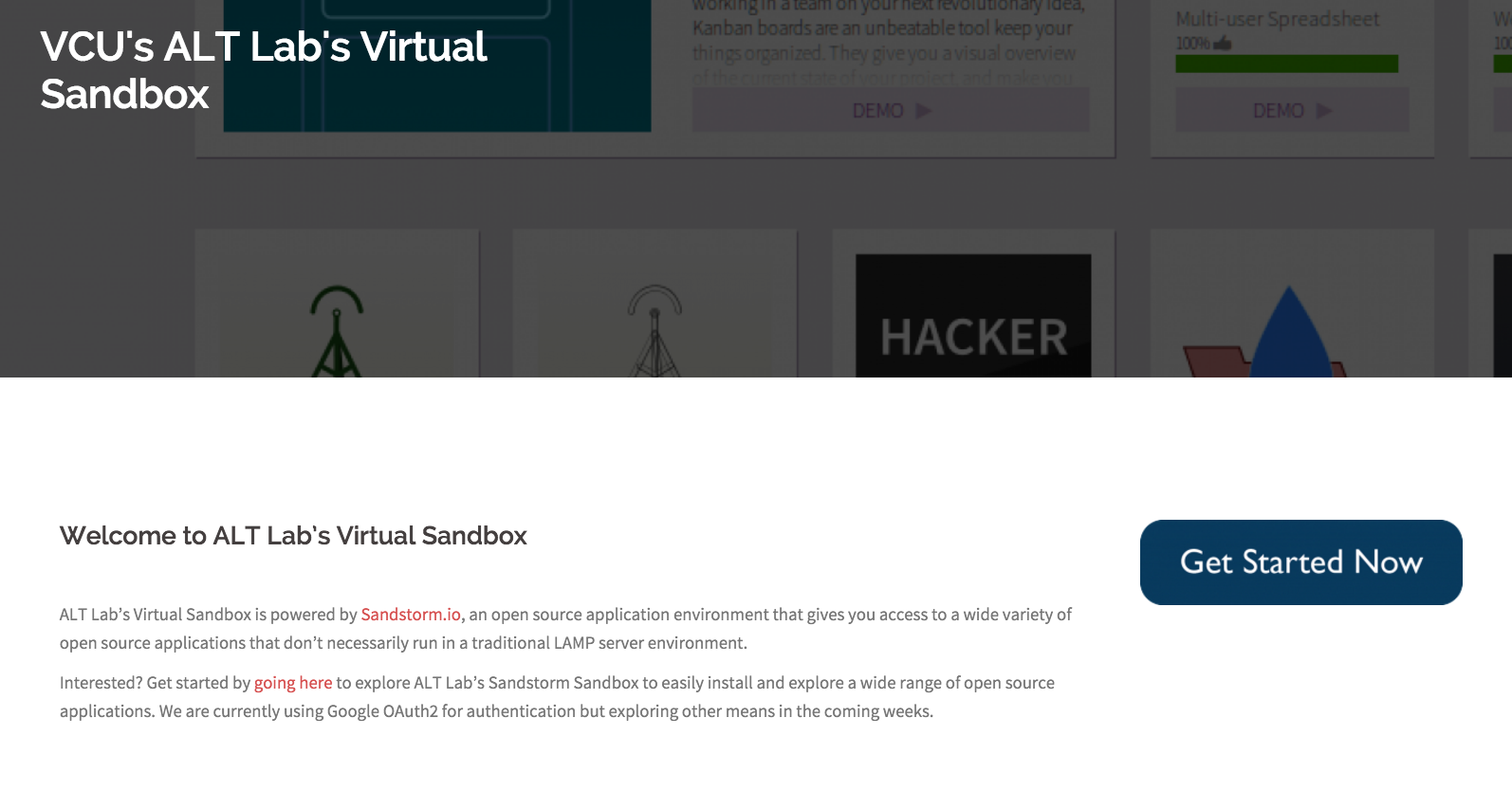
Anyway, I spent a few moments building a really simple splash page for  VCU ALT Lab’s Sandstorm sandbox using a WordPress grain on their Sandstorm server and then pointing it to http://sandbox.augmenting.me. (See what I mean about domains : ) While a WordPress instance was a bit of overkill for this splash page, it’s the devil I know. What’s more, my attempt to customize the Oasis splash page with Hacker CMS didn’t get very far, you can see it here. I was trying to pull the Sandstorm login for VCU’s Sandbox, which you can see here, into the splash page via an iframe, but my CSS chops broke down quick. They have some pointers for this in their FAQ, but I could see many a wasted hour in pursuit of something I could do with WordPress in minutes.

Screenshot 2016-02-03 11.21.34

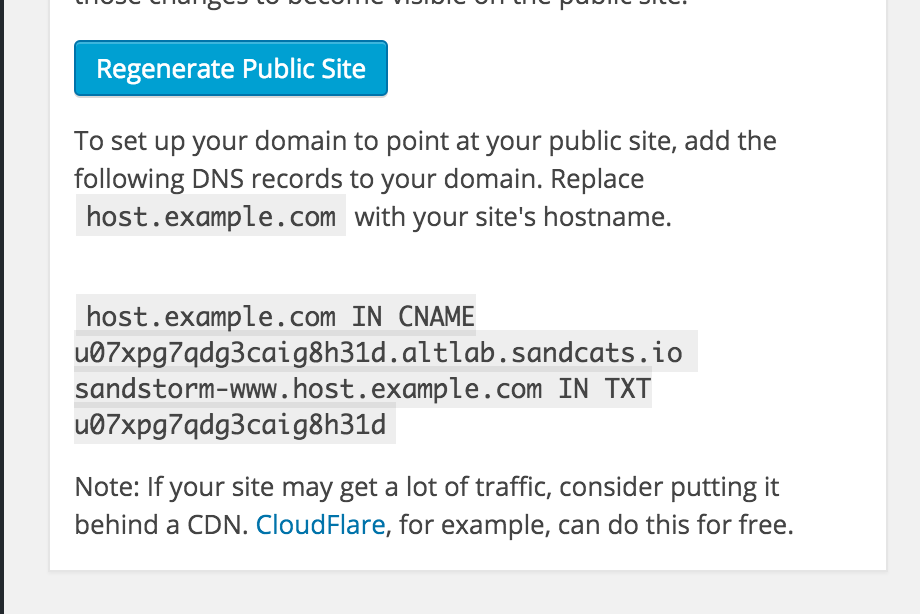
Anyway, once the splash page was done, I asked Tom Woodward to map sandbox.augmenting.me by giving the following screenshots with the credentials. I find the text in the WordPress Dashboard explaining this nicely placed, but a bit hard to read cleanly. If you are not familiar with DNS zone stuff it would all flow together and confuse an impressionable technologists like myself. So, below are screenshots spelling it out, which might be useful for folks who are trying to map  a domain in Sandstorm but are getting confused.

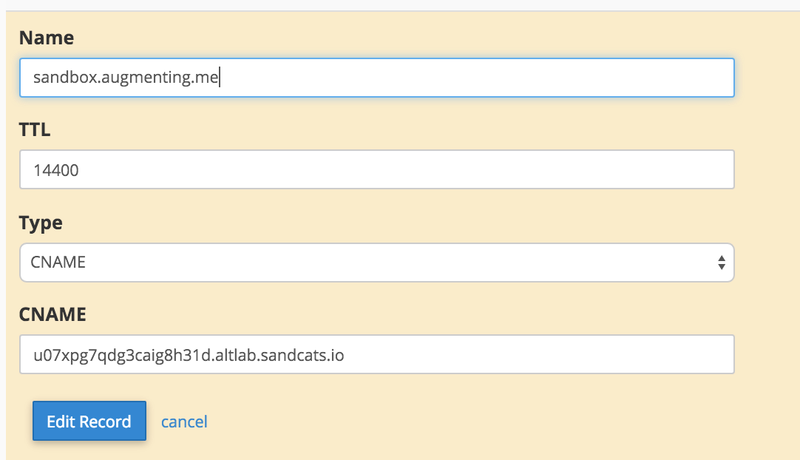
In the Advanced DNS Sone settings provided by your domain registrar or host you need to configure a CNAME record, which should look something like this:

sandstormdomainmapping2

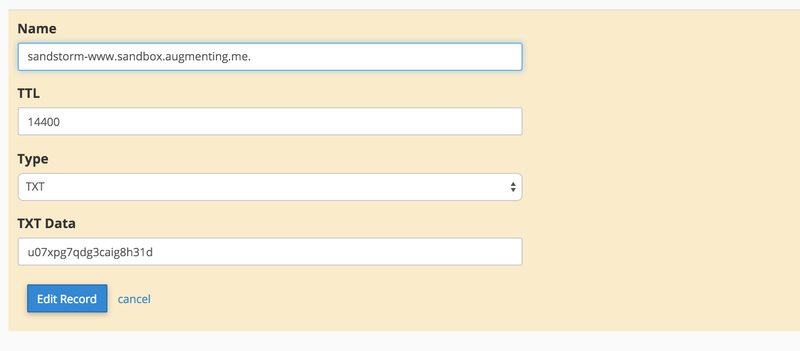
And a TXT record which should look something like this.

sandstormdomainmapping1

After that, you have a seamlessly mapped WordPress site, and I tried it with Ghost as well, and it works a treat. Have I ever mentioned on this blog that I never get tired of domain mapping?


Posted in reclaim | Tagged , , | 4 Comments

Anatomy of an Application in Sandstorm

Yesterday I wrote about getting your own Sandstorm server up and running, and today I wanted to follow-up with some specifics about applications in Sandstorm. This should be a fairly short post because it’s really easy, but I’m really not into the whole brevity thing. As I mentioned yesterday, Sandstorm’s Application Market is really impressive and they have done an amazing job of integrating it into the server to make exploring and installing apps painless.

Screenshot 2016-02-02 11.18.32

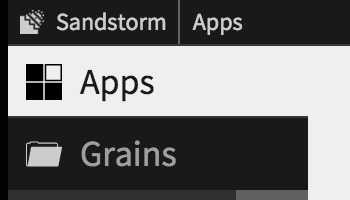
When you are in the Sandstorm dashboard you will see two areas: Apps and Grains.

Screenshot 2016-02-02 11.22.36

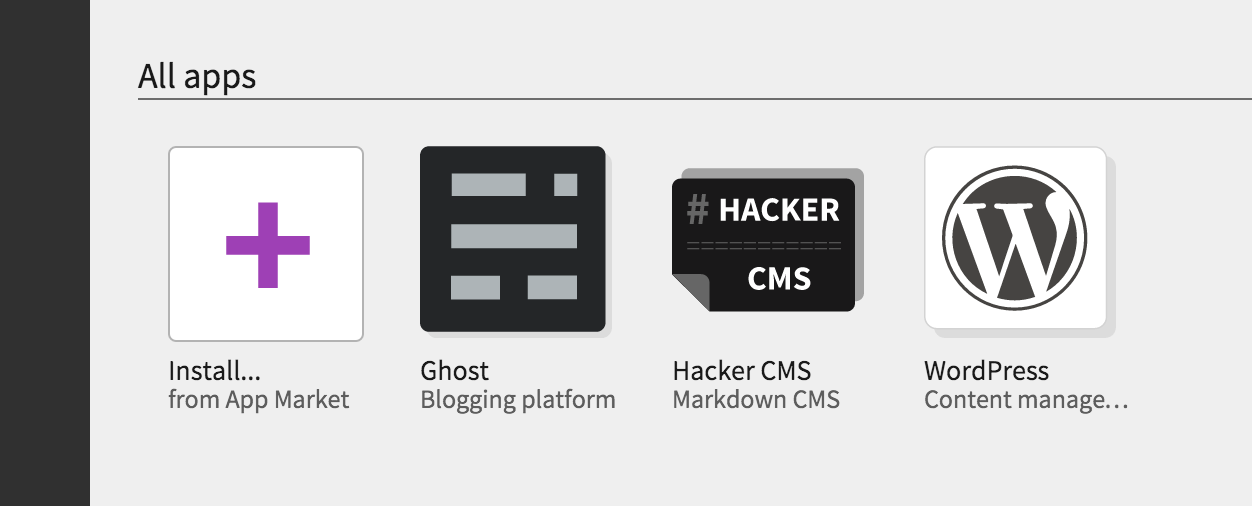
Apps are just that, applications you can or have used. SO, for example, this is what the apps area looks like in my Sandbox dashboard.

Screenshot 2016-02-02 11.23.50

A link to the App Market to install applications as well as those I have used, in this case Ghost, Hacker CMS, and WordPress. The other area of the dashboard is the section called Grains.

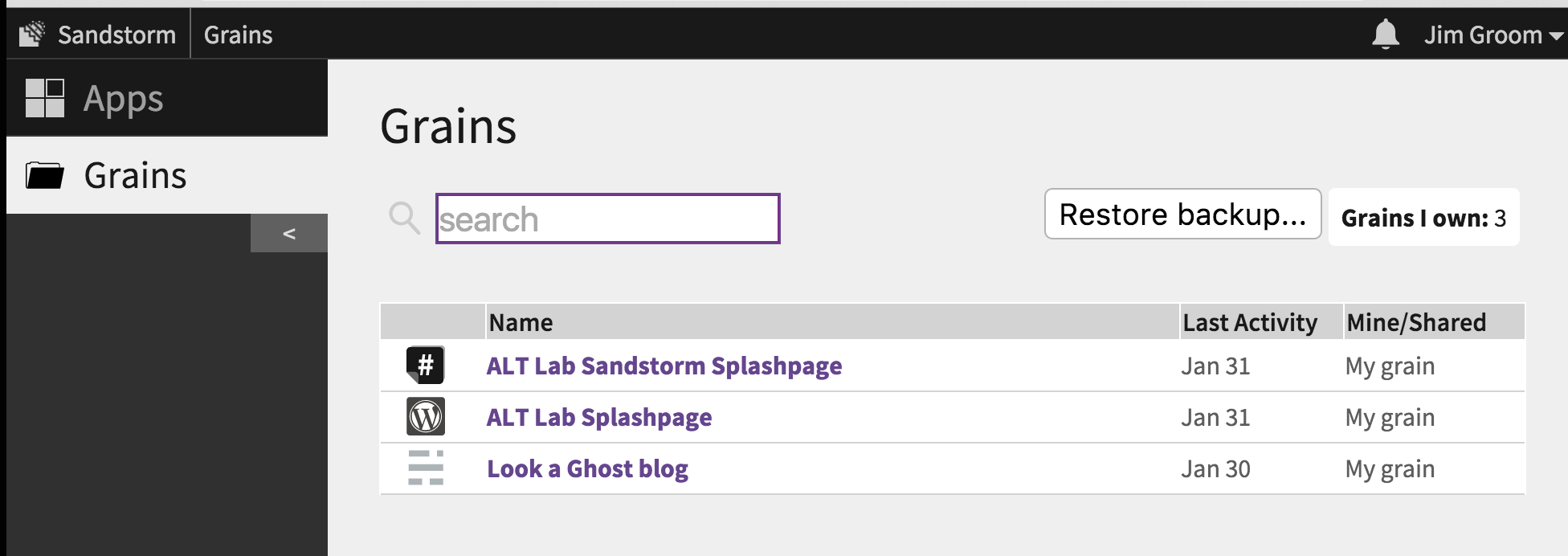
Screenshot 2016-02-02 11.27.27

The Grain terminology is a bit confusing for me, I am not sure exactly what they mean by it. But I tend to think of these as instances of applications you have installed on your server. Clicking on anyone of those instances will bing you to the application. For example, if I click on the Look a Ghost blog link (which features an instance of the Ghost blog engine) I can edit and publish to that instance from within Sandstorm. The editor is effectively embedded in Sandstorm

Screenshot 2016-02-02 11.30.12

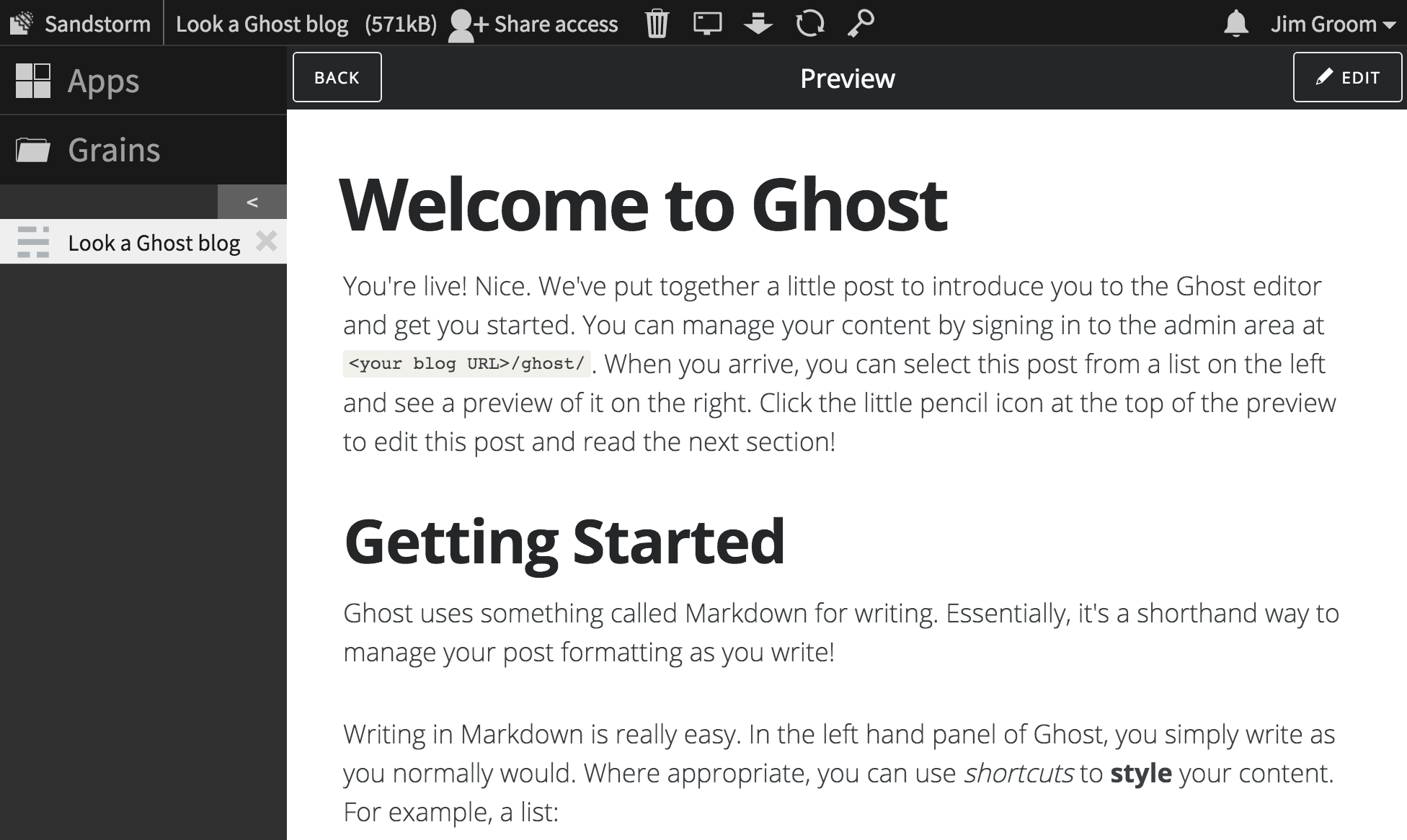
Clean as a whistle. You’ll notice above the application  you have some additional icons and menu items now.

Screenshot 2016-02-02 11.44.50

On the uppermost admin bar you have the Look a Ghost blog  text to the left which provides a space to change the title of this site. The (517KB) is the size of the application. The Share access link allows you to invite other users to access this application. In terms of the icons: the trash can deletes the application; the computer screen provides a debug log; the arrow enables you to download a backup; the recycle sign enables you to restart the application, and the key provides webkeys that enable you to connect an external app.

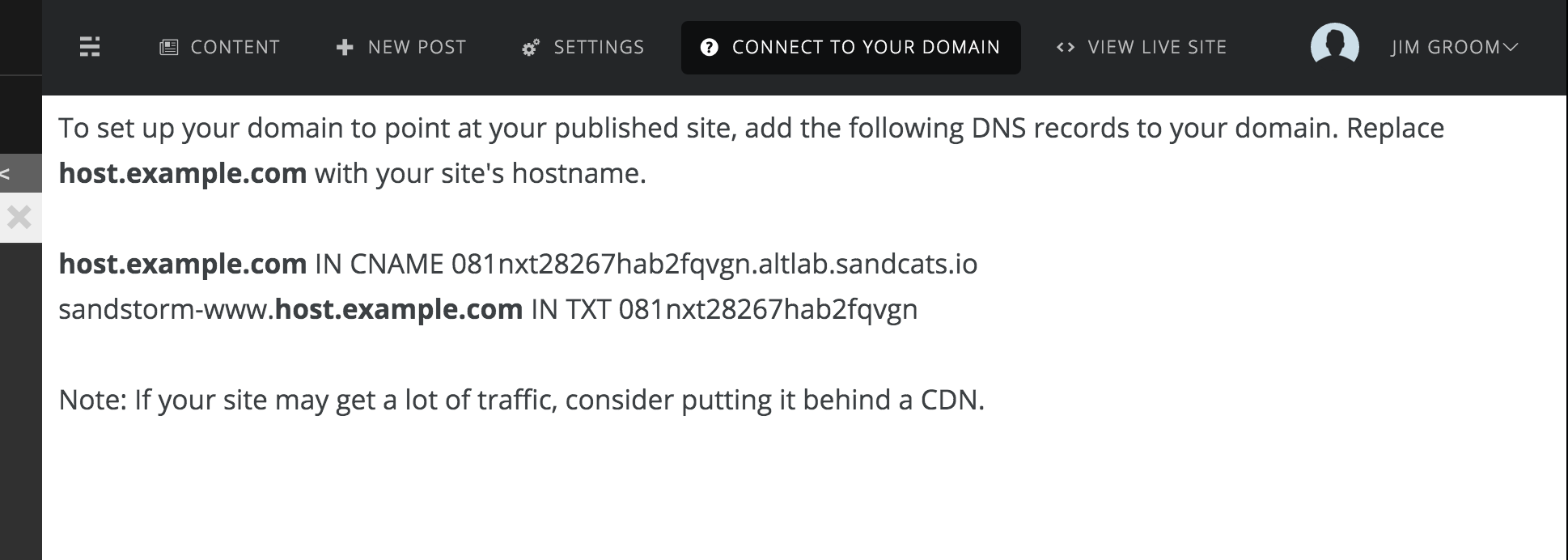
The admin bar below this provides access to creating new posts in the blogging software Ghost, as well as enables you to change the settings for Ghost. It also gives you the ability to connect your domain (more on this below), and the ability to view the site live. One of the things that is different about running apps in Sandstorm versus something like CPanel is the DNS. The URL for my Ghost site is the following dynamically created subdomain link: https://081nxt28267hab2fqvgn.altlab.sandcats.io/ Sandstorm is running DNS off of the URL Sandcats.io and provides folks who setup a server their own subdomain at something like altlab.sandcats.io.  After that, applications are given dynamic URLs as a subdomain of the subdomain the gave you. Not the prettiest URL for public facing sites, but you have the option to map a domain as you can see in the Connect Your Domain tab:

Screenshot 2016-02-02 12.01.05

So, if you have a domain like lovecats.io, you can map a series of applications on subdomains like ghost.lovecats.io, wordpress.lovecats.io, etc. And, to be painfully pedantic, the subdomain can be named whatever you like. So, you could have a number of these applications running off a subdomain of a domain of your choice through Sandstorm. Kinda cool. And the thing about Sandstorm that I like a lot is it’s just you and the applications. CPanel has a ton of overhead and clutter by comparison. Sandstorm’s interface is dead simple, and you know what they say about simple, right? It WINS!

Another interesting element of Sandstorm is how they abstract out certain elements of an application. Take, for example, WordPress on Sandstorm. Given they way things run on in terms of security and enabling applications to work within their system (I’m not totally 100% clear on the specifics as to why) you can’t automatically activate and run themes and plugins, you have to download them to your desktop and upload them manually. Similarly, you can’t add users through the application, rather this can only happen through Sandstorm. That said,this provides an interesting feature: the ability for any one to contribute to a WordPress site with just a shared link, not unlike Google Docs.

I’ve spent a little time creating and domain mapping a WordPress instance in Sandstorm for VCU’s ALT lab, so I’ll document that shortly as well.

Posted in reclaim | Tagged , , | 1 Comment

Caught in the Sandstorm

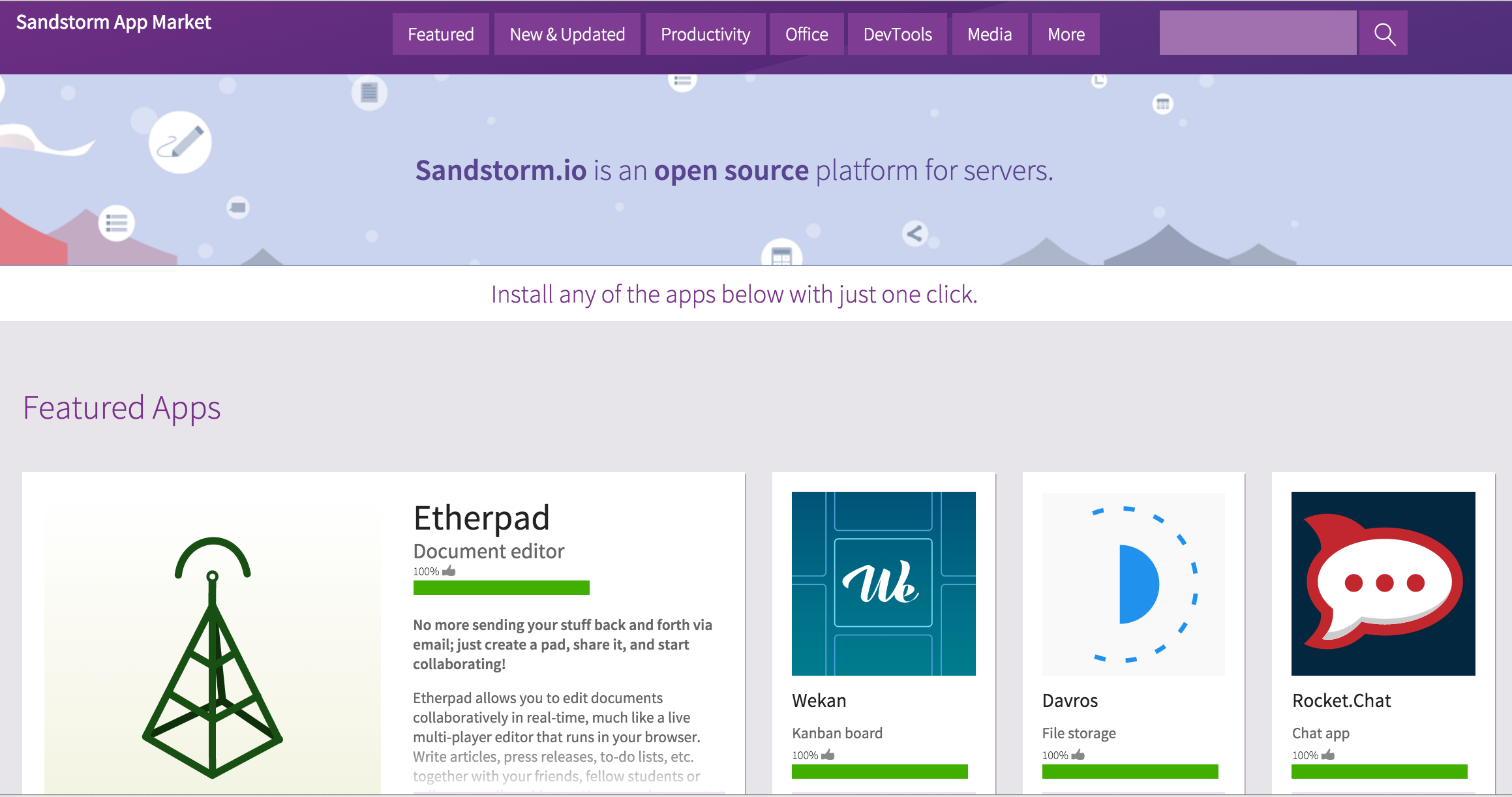
I have been looking on with wonder at the work Grant Potter and Brian Lamb have done with BC’s Open Ed Tech. In particular, their initiative designed to provide British Columbia’s post-secondary institutions the means to easily install and explore a range of open source applications using Sandstorm.io. What’s nice about Sandstorm is it provides access to a number of open source applications that don’t run on a commodity hosting LAMP stack, such as the blogging software Ghost, the collaborative text editor Etherpad, computational environments like the iPython Notebook, and Git Hosting with GitLab. And that’s just a few of the over 50 applications Sandstorm supports out of the box, and if you you have an application you want to add that’s also possible.
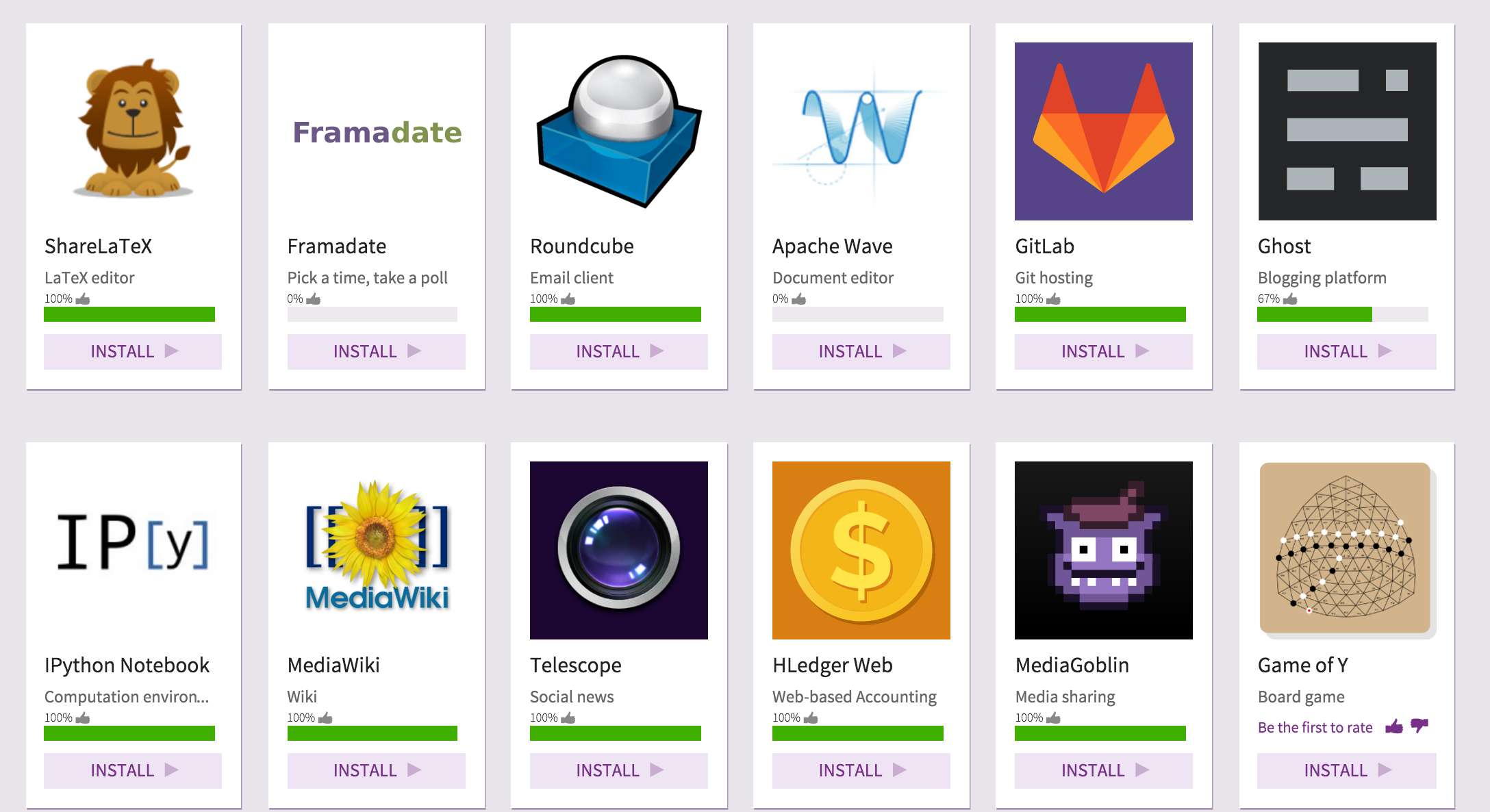
Sandtorm.io's App Market

Sandtorm.io’s App Market

What struck me on this run through Sandstorm (Tim turned me onto it over a year ago) was the application market. It contains a number of applications folks have asked us about hosting through Reclaim. Georgetown University was interested in the possibility of hosting iPython Notebooks on their dedicated Reclaim server, and the great Tony Hirst as been exploring how to host them for a while now. More recently, Shawn Graham at Carleton University was asking me about the possibility of hosting GitLab, which was new to me, and lo and behold that is a featured app on Sandstorm.

So, when the outlaw Tommy Woodward asked if Reclaim Hosting could spin-up a Sandstorm server for VCU’s ALT Lab, I jumped at the chance. I have to hand it to the folks at Sandstorm, they made the process of setting up your own server dead simple. I’ll document my process below, but their documentation is pretty awesome.

Setting up your server Sandstorm Server

So I wanted to experiment with the self-hosted version of Sandstorm.io, but they do provide managed hosting as well if you don’t want to run your own server. In their Easy install instructions they give you details about what kind of server you should provision.

…you need a 64-bit Linux server connected to the Internet. (Requirements: Linux 3.13 or newer running on x86-64. 1GB+ of RAM; 2GB+ recommended.)

Knowing the details I headed over to Linode, one of our favorite cloud providers at Reclaim, and spun up an Ubuntu 14.04 64-bit virtual machine as per their recommendation. I’m telling you, spinning up servers in this brave new world of virtual hosting environments is freaking awesome. I added the smallest machine they have to start with, which is $10 a month, which just happens to meet the bare minimums for Sandstorm. Once I get a better sense of what VCU needs I can easily scale the server up.

Screenshot 2016-02-01 11.47.13

If you are using Linode, once you login and create an account you will see a link in your dashboard to Add a Linode. Once you click that it will give you the option to choose how big a server you want (I started with the $10/month option). Once Linode creates the server, you will need to click on the Deploy an Image link:

Screenshot 2016-02-01 12.03.21

From there you chose the Ubuntu 14.04 LTS image, leave the deployment Disk space as is, and allocate 512 Mb for swap disk space. After that, create a secure root password for the server and hit the Deploy button.
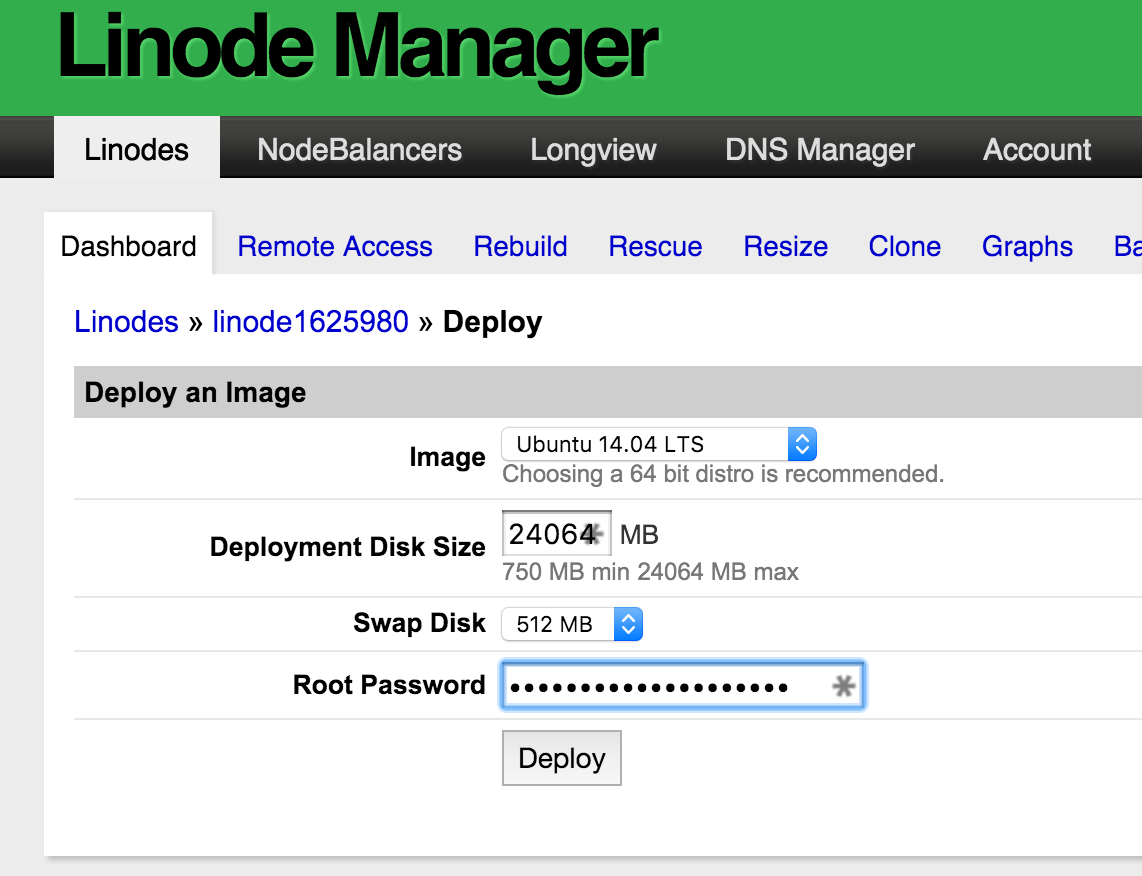
Screenshot 2016-02-01 11.58.36

Once that is deployed return to the main dashboard of the Linode server you have created and hit the Boot button to start running the server.
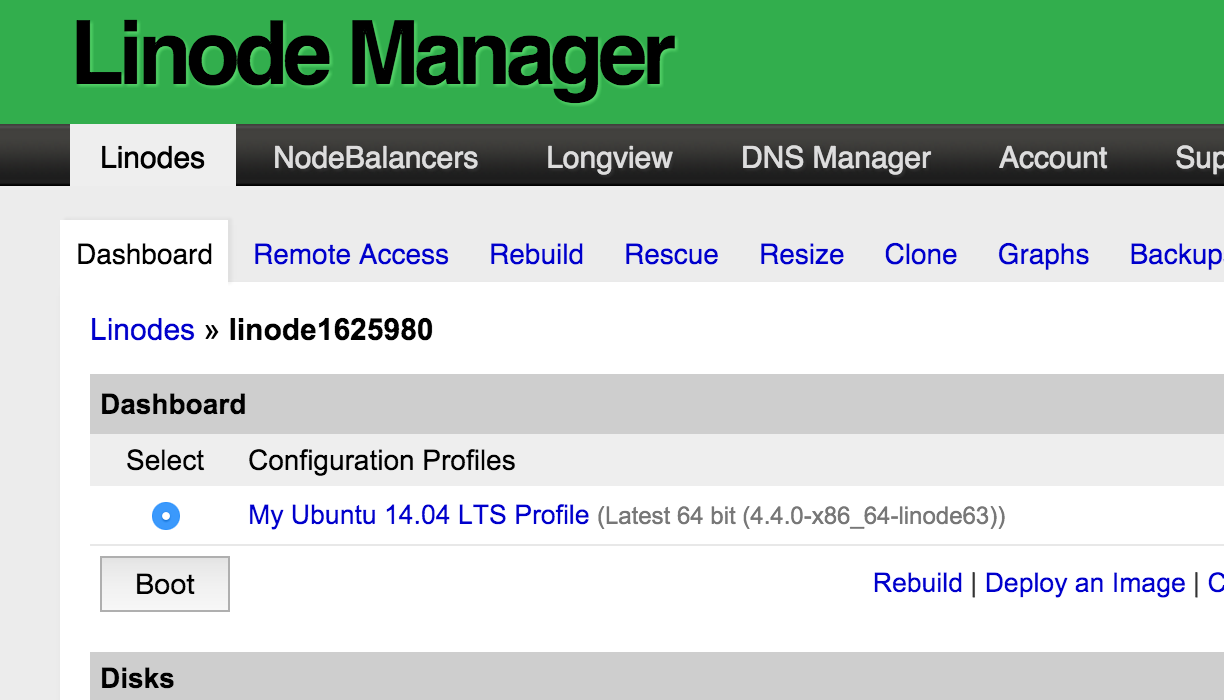
Screenshot 2016-02-01 12.03.12
You should now have your own $10 a month Linode server with an Ubunto Ubuntu 14.04 64-bit virtual machine up and running. Crazy, right?
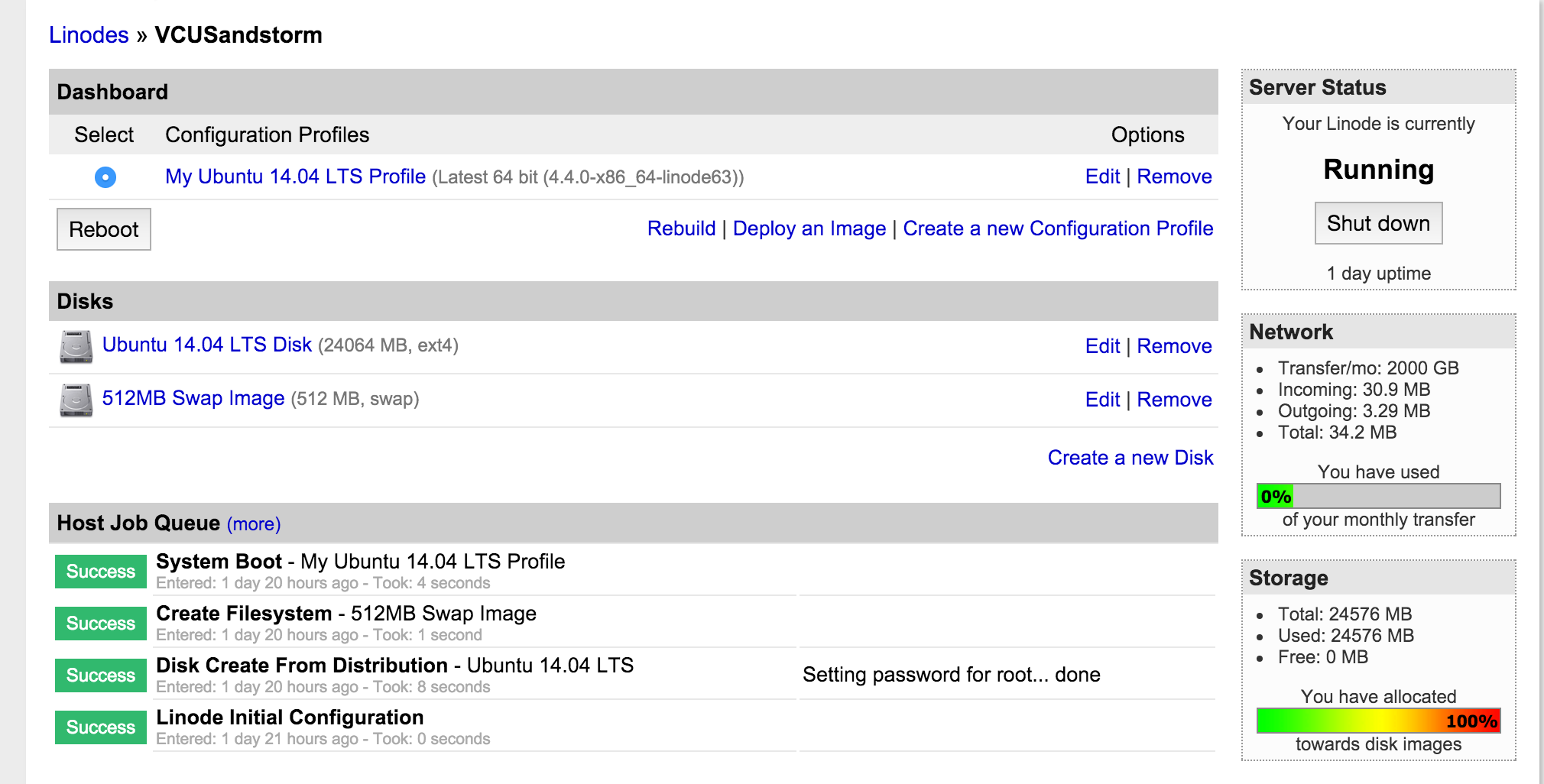
Screenshot 2016-02-01 11.43.53

Finally, you are gonna need to find the IP address and root password (which you just created) under Remote Access so that you can log into the server via terminal and install Sandstorm. Note the tabs Resize and Clone in your server dashboard which allow you to quickly resize the server as well as clone it. I love all the cloud babies.
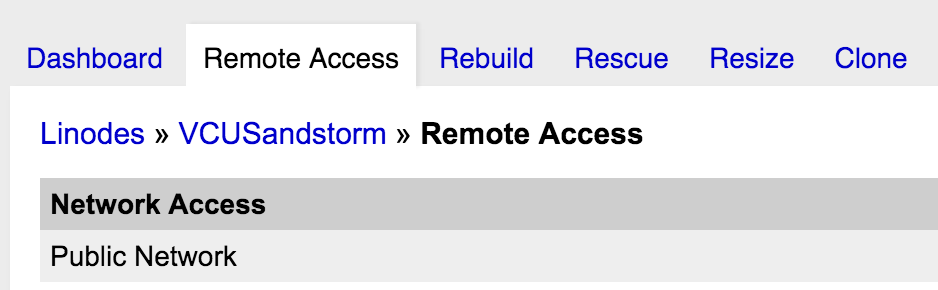
Screenshot 2016-02-01 11.52.02

Installing Sandstorm.io on Your Server

Now that you have your server up and running it is time to install Sandstorm. They have made this really easy, and I will use a series of screenshots to take you through the process step-by-step.

Once you login through terminal using ssh root@youripaddress and authenticate with the proper password you will then need to add the following command to start installing Sandstorm:

curl https://install.sandstorm.io | bash

Screenshot 2016-02-01 12.04.31

Once you do this, you will be prompted which version of Sandstorm you want to install. Choose 1, full server with automatic setup.
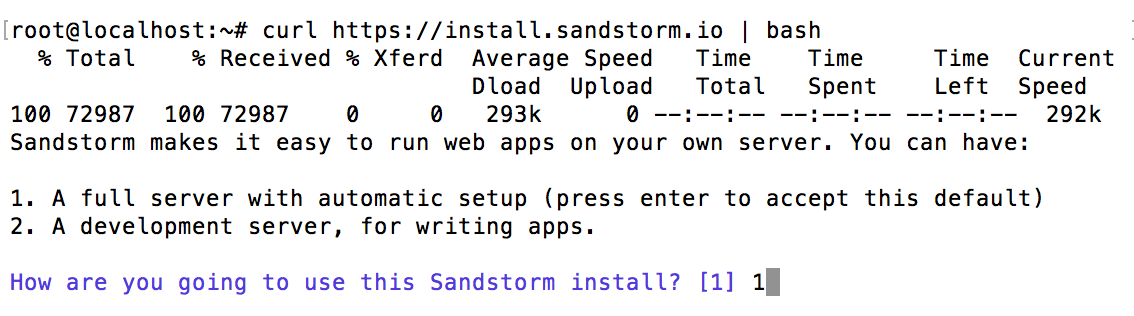
Screenshot 2016-02-01 12.04.51

Then you are prompted with the details of what they are about to do, assuring you of good server administration along the way 🙂
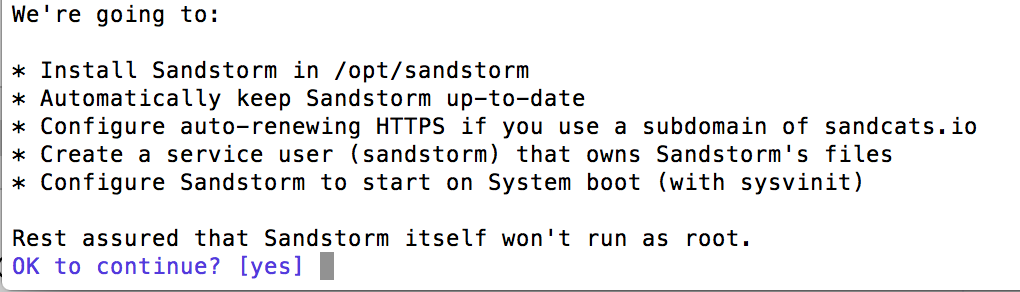
Screenshot 2016-02-01 12.05.09

Then you choose the subdomain of sandcats.io you want to run your instance on. For example, I setup VCU’s instance subdomain as altlab.sandcats.io. For the test instance I created for this documentation I used reclaim.
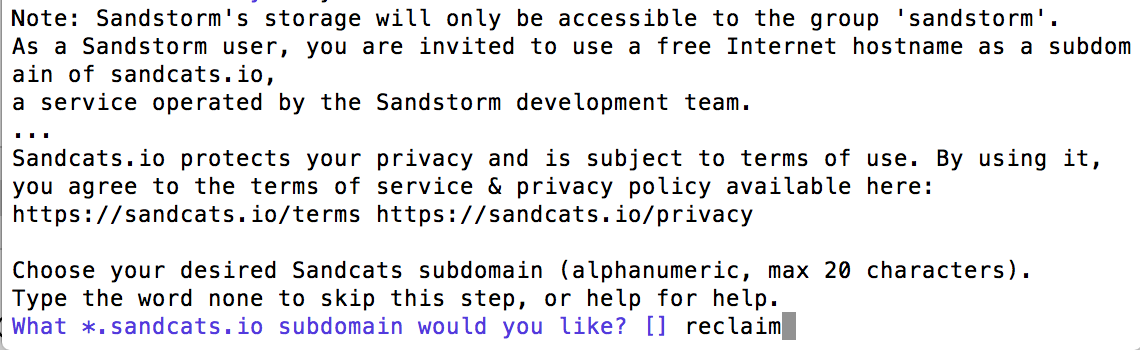
Screenshot 2016-02-01 12.05.54

After that, provide an email for disaster recovery purposes.

Screenshot 2016-02-01 12.06.34

Finally, you will be provided with a link (highlighted in blue below) that you will need to copy and paste to start setting up Sandstorm.
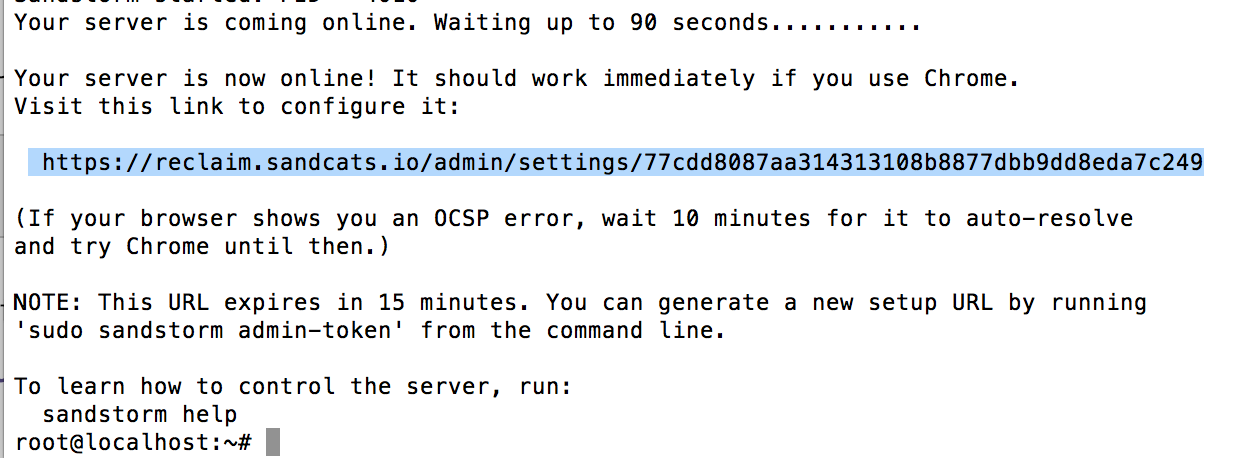
Screenshot 2016-02-01 12.07.45 That’s it, pretty easy. They certainly walk you through it quite cleanly, even if it is command line.


Setting up Sandstorm

Now it is time to setup Sandstorm, once you copy and paste the link they give you at the end of the installation process into a browser, you should see something like this:
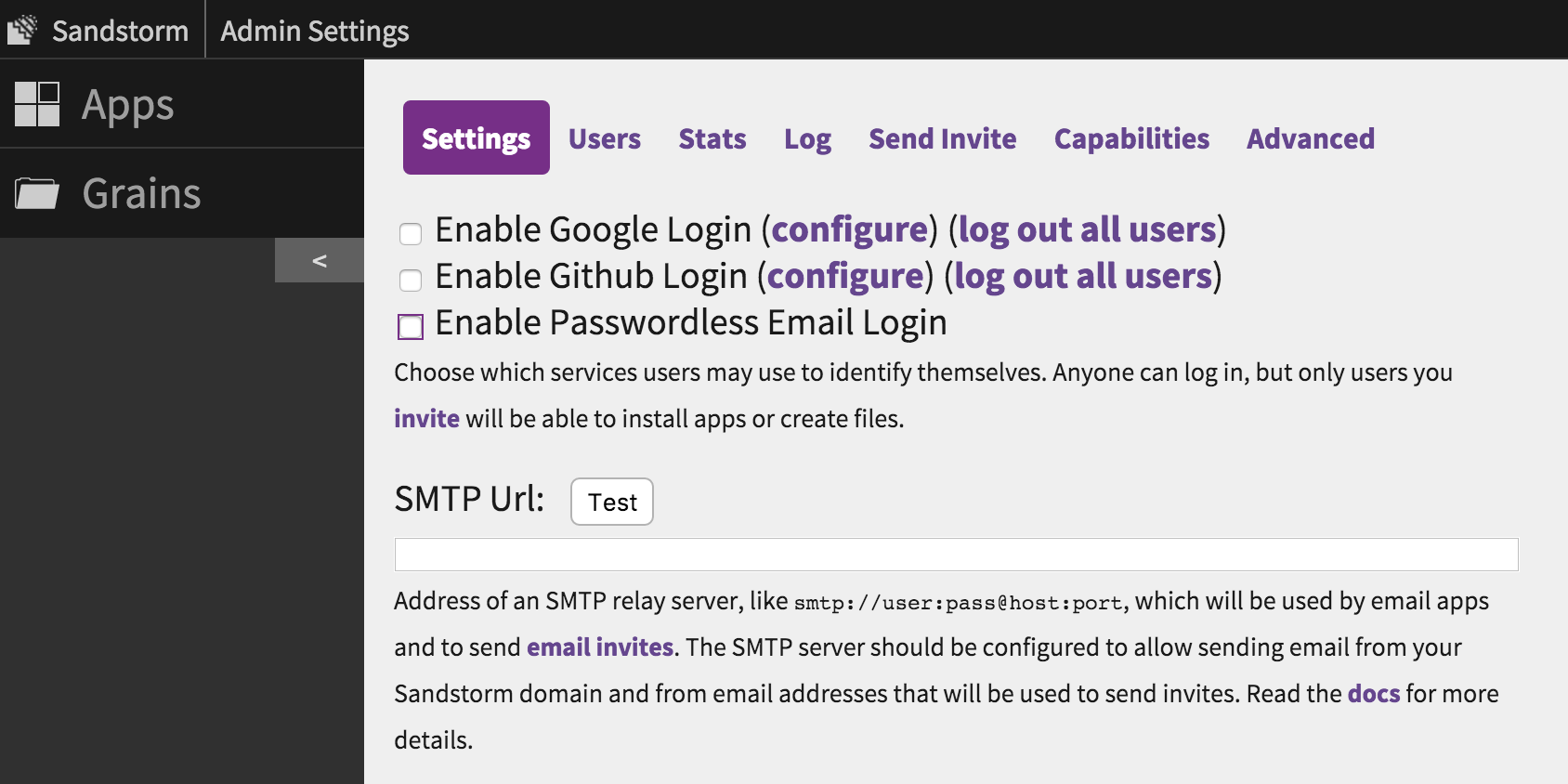
Screenshot 2016-02-01 13.02.06

There are two main pieces to configure, the Login methods and SMTP to send folks their invites. I enabled all three login methods, i.e. Google, Github, and email. With email there isn’t much to configure, just click the box and you are set. For Google and Github there are a few more steps, but Sandstorm walks you through them seamlessly. You are basically enabling OAuth through these apps, which assumes your users have accounts on them already. If not, then the email route is the way to go. Here is a screenshot of the configuration details for Google that Sandstorm supplies, pretty straightforward:
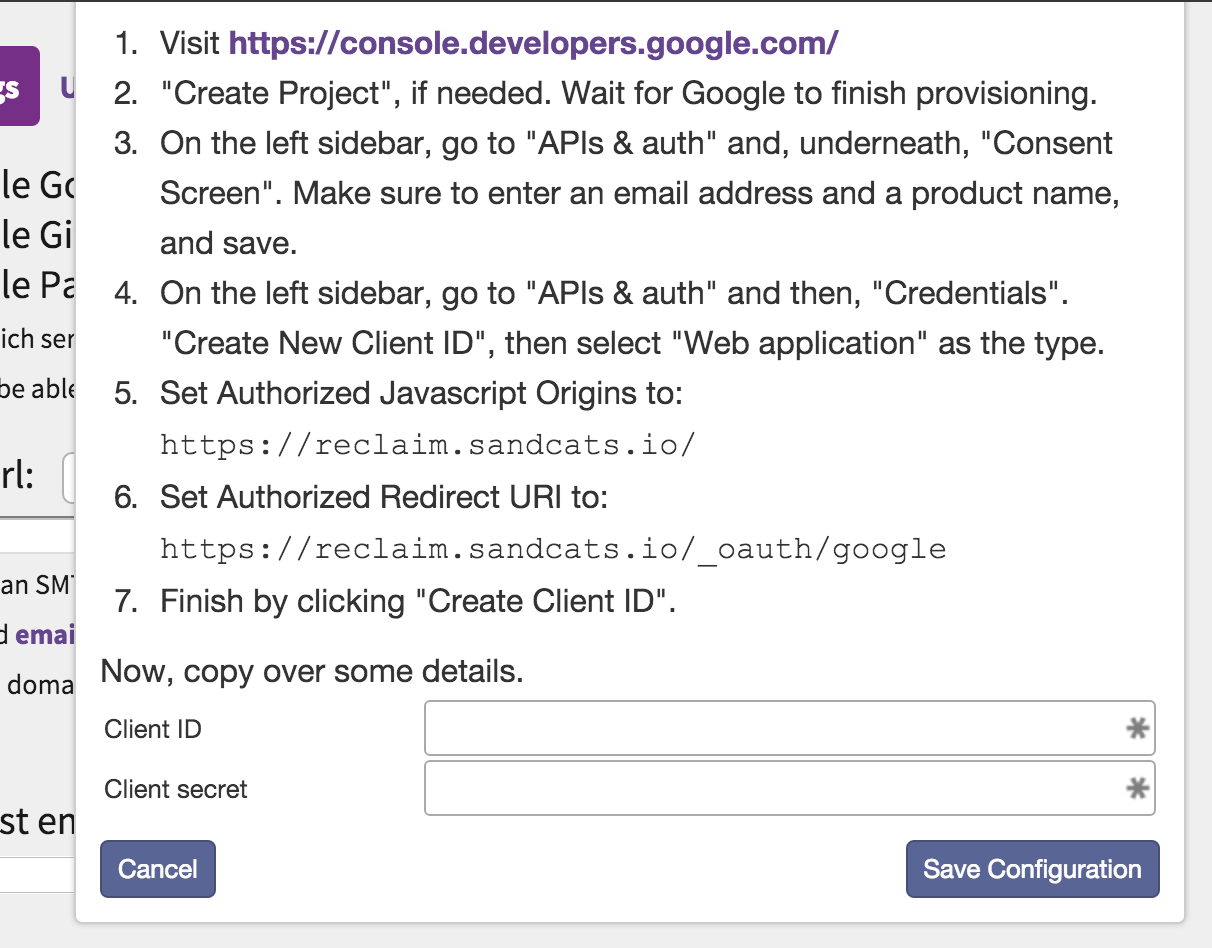
Screenshot 2016-02-01 13.09.13

It’s roughly the same for Github, just a tab bit easier.

Now, in order for any of that to work, you have to configure a SMTP relay server. This might seem alien, but it’s not that bad. We use Mandrill at Reclaim, and I just logged in and created an API key for the Sandstorm instance and used our SMTP settings. It looks something like this:

smtp://user:pass@host:port

And if your username has an @ in it you need to convert it to %40.

After that, you should send yourself an invite, and once you accept and login using that invite you will automatically become the admin. First person registered is Admin by default.

And that’s it, with these steps you’ll have your Sandstorm instance up and running. I’ll follow-up on this post with some details about running applications, enabling application email, mapping domains, etc. But for now this post is long enough, and this covers the three steps to actually getting your Sandstorm server running.

Update: I followed up on this post with “Anatomy of an Application in Sandstorm.”

Posted in reclaim | Tagged , , | 2 Comments

Reclaim Growth with Support by the Numbers

It’s been over a year since Tim Owens left Mary Washington for Reclaim Hosting. He officially went full -time in January, although he has always been the caretaker at Reclaim. Needless to say he hasn’t looked back since, and when we were talking about his bold departure he pointed out that in his post announcing the move he has an image of the support ticket stats from the Fall 2014 semester.

Fall 2014 Support Stats

Fall 2014 Support Stats

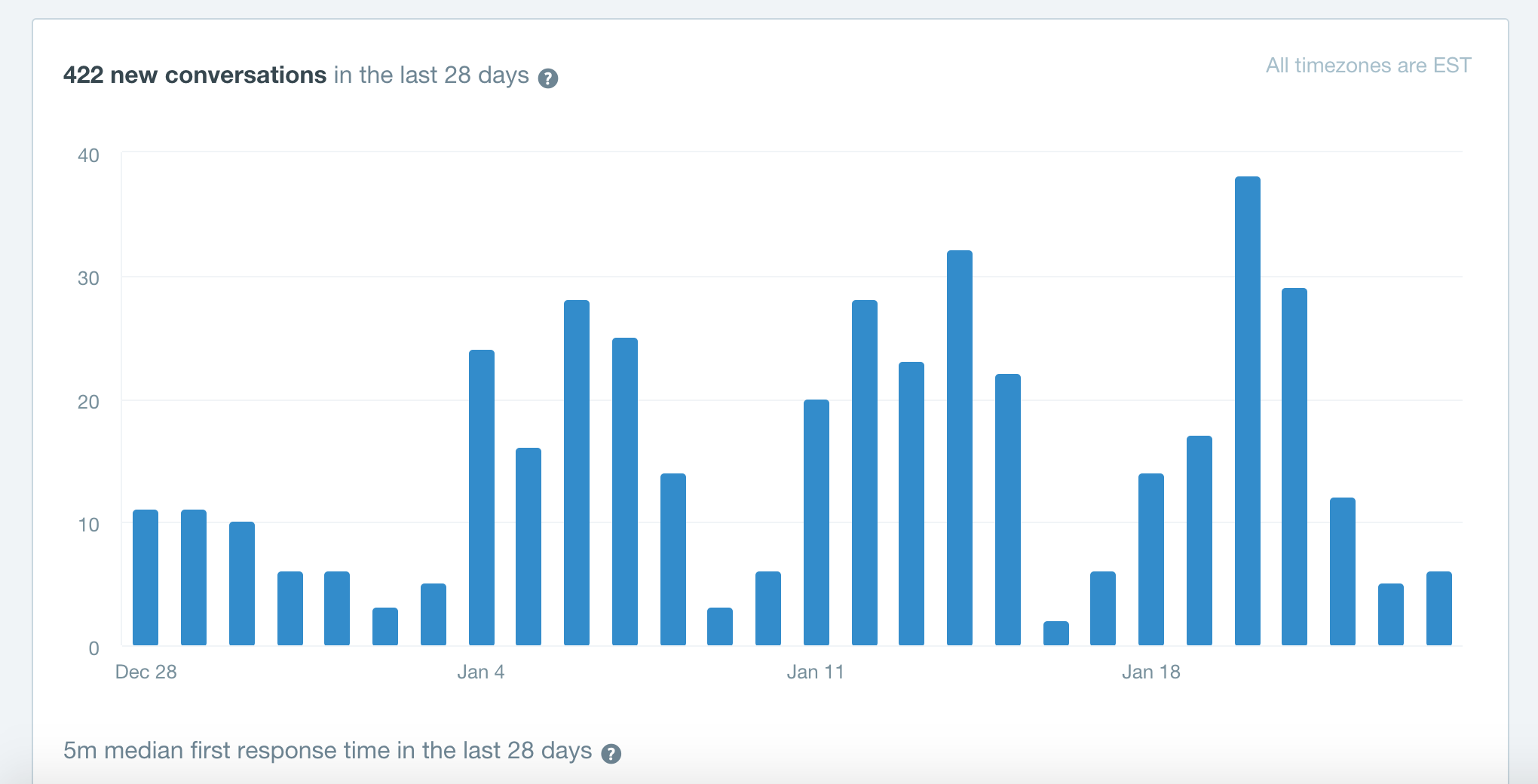
From late September through late November 2014 (roughly 60 days) we had 238 tickets at Reclaim Hosting. Our average first reply time was just under an hour. Not bad. But take a look at the support ticket numbers for Reclaim over the last 28 days :

Snapshot of last 28 Days in Intercom

422 support tickets with a median response time of 5 minutes. That is almost twice the number of tickets in half the amount of time with a response time that is 10x faster than it was over a year ago.

Number of Conversations of past 28 days

Number of Conversations of past 28 days

What’s crazy about the longer view of our support over the last 15 months is that while we have grown significantly, we have focused on scaling our support accordingly. In fact, not only has our median response time dropped dramatically from the 50 minutes we clocked last Fall. We’ve continued to decrease the response time from 8 minutes this September to 5 minutes this month. Talk about squeezing blood from a sugar cube. It’s an insane standard, but it’s also why we rule!

Graph of response times

And if you look at the median response times there were only two days over the last 4 weeks where tickets sat for any significant length of time: New Year’s Eve and New Year’s day—and even then it was just over an hour. Do the math and start reclaiming #4life!

Posted in reclaim | Tagged , | 2 Comments

The Duke’s Song of the Selfie

Today’s Daily Create asks you to “Do a Duke Selfie” referring to the most iconic figure of U.S. Westerns: John Wayne. Love him or hate, he has been part of so many of the greatest films of this genre that it’s hard to ignore him once you start digging into Westerns. Let’s just name a few spanning four decades: Stagecoach (1939), Red River (1948), The Searchers (1956), Rio Bravo (1959),The Man Who Shot Liberty Valence (1962), and The Shootist (1976). The Duke, indeed! Such an act is hard to follow, so I just had fun with today’s DailyCreate and mashed up the Duke with The Man with the Yellow Hat and Billy Idol.

IMG_2422

But more than my half-ass selfie, today’s Daily Create provides me an opportunity to explore an element of the film Stagecoach that really struck me when I watched it recently. Stagecoach was the film that made John Wayne career. In fact, John Ford’s film would also jumpstart the Western genre that hasn’t really looked back since. Ford said about Wayne in this role: “He will be the biggest star ever because he is the perfect ‘everyman.'”  Not a shabby prediction. But what struck me while watching Stagecoach is how much Wayne, thanks to Ford, eats up the camera. Check out the following shot when we are first introduced to Wayne’s character Ringo Kid.

stagecoach2-11616

GIF source: Nerdist

The camera zooms in on the Duke and goes from soft focus to a sharp, surprised look that captures a moment of surprise and vulnerability that immediately draws you into his character. What’s more, watching that moment made me realize Wayne had the same kind of screen magnetism that only a few other celluloid godheads did, namely James Dean, Marlon Brando, Marilyn Monroe, and Elizabeth Taylor. He was a rarefied star representative of the perfect everyman—a paradox not lost on me. But I’ll take the Duke as everyman over Jimmy Stewart any day of the week 🙂

tumblr_nfcssiinbc1s5bh5uo1_500

GIF credit: Rotten Tomatoes

What I also realized while watching Stagecoach is that while John Wayne was certainly young, he was also timeless. His figure in the GIF above reminds me of the classic, defiant, expressive image of Walt Whitman that served as the frontispiece of Leaves of Grass—and made him in many ways as iconic an image of his own era (although the great poetry didn’t hurt his cause).

LOG1856

The idea of the celebrated self as an integral part of the expansive American identity. The song of my selfie! It’s all connected in #ds106, and nothing like bringing together America’s Bard with the closest thing we have to royalty from the 20th century: THE DUKE. And then there is this conspiracy theory from Repo Man (1984) that may suggest yet another link between the two:

https://www.youtube.com/watch?v=vCb9H46tzmc

Posted in digital storytelling, Digital Whitman, Western 106 | Tagged , , , , , , , , | 2 Comments

What Was Wound

unwound02-e1359529260320

“Everything is a commercial, we advertise our memories
We leave our shit on silver platters and then we buy whatever’s left

“Off this Century,” Unwound

Reclaim Hosting has added another server this week. Building on our tradition of naming all of the machines after indy/punk bands, this one was dedicated to one of the very  best post-post punk bands of the 1990s: Unwound. This trio hails from the Olympia music scene, and they were the first band signed to the Kill Rock Stars record label, which also released indie groups such as Bikini KillBratmobile, The Melvins, and singer-songwriter Elliott Smith. In fact, Unwound may be amongst the lesser-known of those Kill Rock Stars acts, but over the course of the 90s they steadily produced brilliant albums, toured tirelessly, and forged a sound that is still getting broader recognition 15 years later. This fairly recent review in Pitchfork of the Numero Groups four-part reissue of Unwound’s decade-long oeuvre is a testament to that, and the following pull quote from the “No Energy” reissue on Numero Groups site provides a nice profile:

As a robust rock underground got swallowed alive by the Major Label Industrial Complex, the very autonomous Unwound—Olympia, Washington’s Great Noise Hope—toed the troublesome line between pay check and Check Engine light. Captured in the gaps of a ruthless touring schedule.

Underground, autonomous, and awesome!  In many ways they defied strict categorization given how disparate their sounds could be from album to album, and that might be one of the reasons they got out of the 90s alive! The Numero Groups reissue was also mentioned earlier this month in this LA Times post as an essential. How’s that for history smiling kindly on this relatively obscure trio. What was craziest to me, as a fan, was that they were showing no signs of rust all they way up until the very end when they decided to call it quits in 2002. In fact, it could be easily argued that their final, double-album Leaves Turn Inside You (2001) was their most ambitious, and in many ways most impressive both conceptually and musically, to date.

But that was Unwound, consistently changing, exploring, and creating outside of the distracting grunge musical explosion of the moment. They never flew a flag, staked out an agenda, or preached about this or that; they just came out and rocked. What’s more, they remained fiercely independent throughout their entire career. They were with Kill Rock Stars until the end, and they played local gigs at record stores, all ages shows, and modestly toured the country delivering some of the best sounds of the decade for $5 or $6 a show for their entire career. A model for the indie edtech we continually aspire to at Reclaim.

The above video clip has them playing Hexenzsene at Off the Record in San Diego in 1997, interspersed with clips of Justin Trosper  (guitarist) and Sara Lund (drummer) awkwardly explaining themselves. It’s awesome, they talk about the emptiness of punk as a term, the importance of staying young, and the fact their shows are cheap enough that no one should get too pissed if it sucks. Here’s to Unwound, I’m glad to be the first web hosting company to name a shared web hosting server in their honor. Some great reward for all their hard work!

Posted in reclaim | Tagged , | Leave a comment

LIRR from Jamaica to Penn Station

2016-01-19 14.27.01I grew up in Baldwin, Long Island which is a 30-minute train ride to Manhattan. I’ve ridden the LIRR to and from NYC’s Penn Stations innumerable times. And still to this day I remain mesmerized by the trip more than 40 years after my first time. I just stare out the window on the stretch between Jamaica and Penn Station and take in the dynamic scenery outside my window. It’s my personal, real-life cinema of attractions. I did the ride earlier this week and it was interesting to compare it with my recent trips on the train in the Italian Alps. I can see why the Europeans are so taken with NYC, it must be at once a familiar and foreign space: compressed, colorful, and connected. Italian Futurist Fortunato Depero—who hails from Trentino—saw NYC as the living and breathing symbol of the future. And I find that so many of the Italians I’ve met from Trento are very fond of New York City. The iconic skyline of New York can be found all over Trento, and it has some real parallels with the skyline of Trento that is everywhere dominated by the Dolemites. The following videos—although not of magnificent skylines per se—trace the 10 and a half minutes of my ride train ride to Manhattan starting after we left the Jamaica, Queens station. The first is 2:30 minutes and the second is 8 minutes. These videos are why I lvoe my iPhone. Also, thanks for the YouTube channel Reclaim. What kind of trouble could I possibly get in 🙂

Posted in video, YouTube | Tagged , , , | Leave a comment