Reclaiming Marx’s Capital

On Friday an old friend and collaborator  from the CUNY Graduate Center, Chris Caruso, reached out to me about hosting David Harvey’s website. There is the awesome factor that Harvey is one of the foremost Marxist theorists in the world, and has been pretty smart about letting connected folks at the Grad Center help him get his ideas out to a broader audience via social media. He has 59K followers on Twitter, and his site is an ongoing stream of  his talks delivered regularly around the world. Additionally, the site houses two complete courses of Harvey teaching Marx’s opus Capital, Volumes 1 & 2 back in 2008 and 2011.

img_2460-1

imgres-1

Reading Capital Hub Site

My relationship to this course starts back in 2008 when Chris reached out to me about the possibilities of building a blog aggregator/wiki/forum hub around the videos for the lectures on Volume 1. I blogged at length about the process of setting this all up back in 2008, and it was not all that successful. I got about 50 folks creating blogs, jumping in forums, etc., but it was not all that consistent and the hub I created died a slow death, but the same wasn’t true for Harvey’s site. Chris Caruso, the man behind the curtain of Reading Capital, has done a remarkable job with aggregating Harvey’s work over the last seven years. He ran the project that got both of the Reading Capital courses online and available for free (in a multitude of formats no less). You could argue Caruso’s work to produce Harvey’s course was a prototype of what the xMOOCs would pickup and run with four years later. The difference here was they produced and maintained the content on his own domain, it was done for a fraction of the cost, and they invited a hack like me to try and frame an aggregated blog community. Two out of three successes ain’t bad.

In many ways bringing David Harvey’s site into the Reclaim Hosting fold feels like the convergence of work I’ve been part of since the beginning. It’s a very cool feeling to still feel connected to awesome people and projects like this that truly forward the value of sharing the best of academic thinking without all the corporate/business model nonsense that is increasingly being grafted on top of the idea of the course. The maintenance of Harvey’s site has been fueled by donations over the last seven years, and folks continue to be generous to a fine, independent cause. Reclaim wants to do its small part, and we’ll ensure Harvey’s site and work have a home for as long as Reclaim Hosting is around. And that’s just the beginning, we would love to help out other independent, socially relevant projects that need hosting support if we can. Let us know.

While making certain the site moved over to Reclaim’s Huskerdu server cleanly (Huskerdu meets Marx–groovy) I used lecture 8 from the first course on Volume 1 of Capital to ensure the media moved over cleanly. As the site was coming over I randomly watched this video through. I was really struck by Harvey’s framing Capital as Marx’s theory upon how societies change. He dedicates a significant part of this class session to a footnote in which Marx calls for a “critical history of technology” up against Darwin’s Critical History of Nature, to understand how societies, rather than species, change. As soon as I heard this bit it struck me as one of the undergirding impulses for much of my favorite intellectual work in edtech, honed to an art by folks like Audrey Watters in masterpieces like this on The Learning Channel.

Thanks Chris, we really appreciate you keeping the porch light on for awesome resources like this! You’re making the web a richer library with every downloaded video!
 

Posted in Reading Capital, reclaim | Tagged , , , , , , , | Leave a comment

#nobody

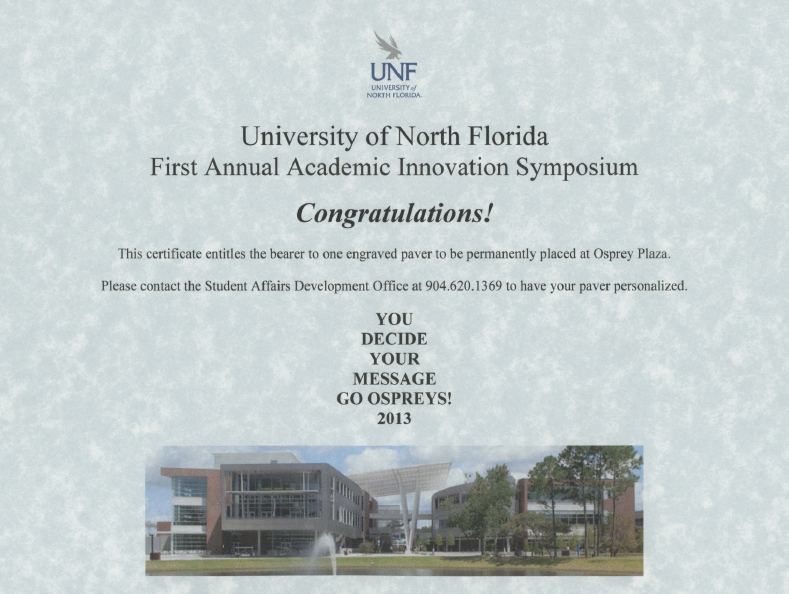
Back in the fall of 2013 I had the distinct pleasure of presenting at the University of North Florida about the work we’ve been doing at UMW. I had a blast, and I wrote about the experience in detail soon after the trip. One of the bizarre/cool things they did was provide me a certificate granting me the paver of my choice.
Screen-Shot-2013-10-12-at-4.22.22-PM

Soon after my return,  I roped DTLT into a conversation about what might be fun to put on the paver. Ryan Brazell suggested #nobody. This is an oblique reference to some of my more bombastic tweets:

I think my use of the #nobody hashtag was at its height in 2013/2014, but I still occasionally pull it out when in a creative jam. Anyway, I loved it and had #NOBODY put on my honorary paver. Last week I got the following image from a yet to be announced source who has confirmed that the paver actually exists. It’s fun to think that someone might be pausing for a millisecond at UNF right now being like “WTF!” #NOBODY!

IMG_0785

A paver at the University of North Florida


Posted in fun | Tagged , , | 3 Comments

Hi Score

hi_score

This is a screenshot of my recent hi score on Asteroids for Atari 2600. It’s really a pretty simple game, so this score is really not an accomplishment. Now if I actually finish Raiders of the Lost Ark for Atari 2600, that will be something. One of the many things I love about the Atari 2600 games are the screensavers. I love the way they cycle through the colors of the 8-bit spectrum, and I was trying to capture that in this GIF, but not so sure I did such a good, I guess you’ll just  have to see in in the #umwconsole, it’s pretty groovy.

Posted in Console Living Room | Tagged , , , , | 2 Comments

Discourse(s) on Docker

One of the things Tim built a while ago is a server running multiple instances of the forum software Discourse using Docker. He did this because we’re getting more and more interest at Reclaim Hosting for this forum software. As usual, Tim came up with a pretty slick setup that enables us to provide this fairly easily and cheaply. To be clear, I have not yet gone through the process of setting up the server environment that runs multiple Docker instances of Discourse, and I want to go through that process next. But in the interim, this post will simply go through setting up a new instance of Discourse using Docker in an attempt to beef up our internal documentation.

If you are interested in getting up and running with Discourse in a Docker container, check out Sam Saffron’s excellent overview of Docker, the various issues installing it, and a write-up of his process, I used that posts on several occasions to be refreshed on the commands I needed to bootstrap and start the docker container.

So, after logging into your server via command line (are you still with me?), you would change directories to where the containers setup files for each server are kept:

cd /var/discourse/containers


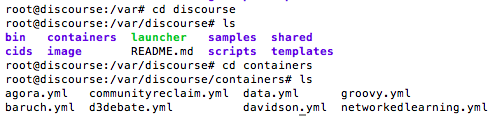
Discourse 1

You can see in the image above I was searching a bit. In the containers directory you have several .yml files for each of the Discourse installs. YAML files are basically a serialized set of instructions for Docker on how to setup the environment. You have to create a new YAML file for each new install, and then copy another install’s config and change a few details.  So, edit another YAML file by typing something like this:

nano nameofanothercontainer.yml

You will then be shown the config file for that container. Copy it and then create a new YAML file like so:

nano bava.yml

Copy the contents from the other container in this new file, and change the following details.

In this bit you include the email, or emails, of the admins:

## TODO: List of comma delimited emails that will be made admin and developer
## on initial signup example '[email protected],[email protected]'
DISCOURSE_DEVELOPER_EMAILS: '[email protected],[email protected]'

In the following area you change the hostname to the domain (or subdomain) you will be installing Discourse. Chances are you will be mapping an A-Record here (more on that later):

## TODO: The domain name this Discourse instance will respond to
DISCOURSE_HOSTNAME: 'discourse.'

In this area you need to setup your mail server info so Discourse can send emails to new users, etc. We use Mandrill for this at Reclaim Hosting, and it seems to work well. This is a big difference from applications in a LAMP environment which have all this setup for you. With the new fangled Rudy and Node.js apps you’ll find you need a transactional mail service like Mandrill, Mailgun, etc. —which are basically API driven mail services for developers, or so I’ve heard.

## TODO: The mailserver this Discourse instance will use
DISCOURSE_SMTP_ADDRESS: smtp.mandrillapp.com # (mandatory)
DISCOURSE_SMTP_PORT: 587
DISCOURSE_SMTP_USER_NAME:  username
DISCOURSE_SMTP_PASSWORD: yourpasswordhere
#DISCOURSE_SMTP_ENABLE_START_TLS: true # (optional, default true)

Finally, you need to change a few paths to point to your Discourse file. So anywhere you see bava was previously the name of the container’s YAML file I copy and pasted from. For example, if I copy and pasted from the reclaim.yml file, everywhere you see bava below would have originally been reclaim

## These containers are stateless, all data is stored in /shared
volumes:
- volume:
    host: /var/discourse/shared/bava
    guest: /shared
- volume:
    host: /var/discourse/shared/bava/log/var-log
    guest: /var/log

Now save the bava.yml file.

After that, we need to edit the discourse settings for Nginx. Notice that Discourse is a Ruby application running on Nginx—two big reasons this application doesn’t run in a LAMP environment. Nginx is a web server, like Apache, but with different requirements than what’s bundled with a LAMP stack. Very few Ruby applications run in a LAMP environment, which means a whole generation of Ruby and Node.js web apps depend on a sysadmin to get running. One of the many reasons to be excited about Docker is that it can potentially make hosting these applications a lot easier. Anyway, we still have to edit Nginx.

Discourse 5

Go to:

cd /etc/nginx/sites-available

From there you need to edit the discourse file:

nano discourse

There will be a series of server settings for each of the discourse containers running. Copy one, and paste it at the end of the file and edit it to work for your container. For example, I replaced the URL I am running my container at (discourse.) as well as putting bava in the proxy_pass file path:

server {

        listen 80;

        # change this

        server_name discourse.;

        client_max_body_size 100M;

        location / {

        proxy_pass http://unix:/var/discourse/shared/bava/nginx.http.sock:;

                proxy_set_header Host $http_host;

                proxy_http_version 1.1;

                proxy_set_header X-Forwarded-For $proxy_add_x_forwarded_for;

        }

}

Now you need to go to the /var/discourse directory and bootstrap the container and then run it. Below are the commands. When you bootstrap it will take a little while, because that is where an image of your discourse application is being created in the container.

sudo ./launcher bootstrap bava

Discourse 8

If it bootstraps successfully it will tell you as much, and then you can start the application:

sudo ./launcher start bava

If that works, you need to remember to restart Nginx using the command below:

Discourse 11

service nginx restart

We talked about mapping an A-record above, well if you haven’t done that your Discourse application won’t be visible anywhere. So, this might be a good time to go to the DNS Zone editor for the domain you want this to point to and add the IP address of the server to an A-record. It should look something like this:

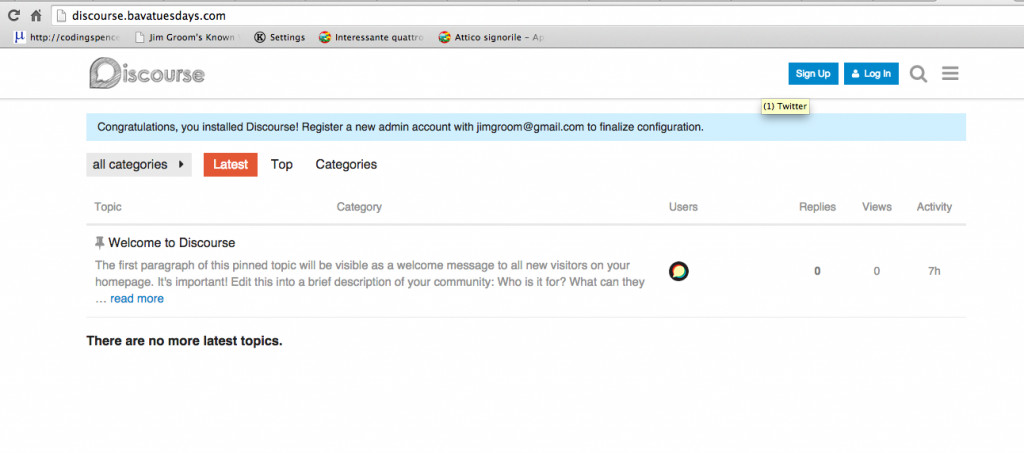
Discourse 6After that, you should have a brand spanking new discourse application up and running. I still have yet to play with discourse., so that should be a future post.

Discourse 10

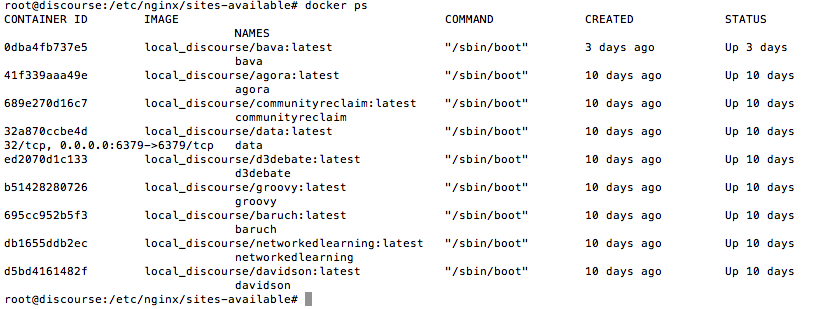
What’s cool is that if I run the docker ps command in terminal, I can see all the containers running discourse.

Screen Shot 2015-08-01 at 10.19.15 PM

If we could automate this process, which I imagine is possible, we could have a server that provides discourse instances for anyone that wants one. Making hosting an application like this relatively easy. And, unlike shared hosting or a multi-site application, the fact that it’s in a container means it would not effect any of the others. Trippy and cool.

Update 8/22/2017: I returned to this tutorial a couple weeks ago and realized I left one thing out. You need to change the email address at the bottom of the .yml file:

  ## If you want to set the 'From' email address for your first registration, uncomment and change:
  - exec: rails r "SiteSetting.notification_email='noreply@'"
  ## After getting the first signup email, re-comment the line. It only needs to run once.

I missed this and the user I created was not getting the confirmation email when trying to create the admin account. Surprise, surprise 🙂

Posted in reclaim, Uncategorized | Tagged , , , | 2 Comments

Lunch with the Torrances

During a discussion I had with a group of faculty this evening about managing their own domains, one professor asked how he might approach blogging in his film class. Because I can’t help myself, I immediately mentioned to GIFs as a way to capture and analyze specfic moments in a film. A way to pepper a textual analysis with the visual manna. I quickly introduced the Video to Gif tool on Imgur to demonstrate how simple this could be for him and his students. While screen sharing to a room full of faculty I was able to create and embed an animated GIF in less than 3 minutes. THAT is technological progress!

mmqlKJw

This simple GIF of Danny and Wendy enjoying a wholesome PB&J before all hell breaks loose was created from this Shining trailer on YouTube in seconds. More than anything, this example underscores a domain isn’t necessarily a neat, packaged solution to digital pedagogy, but rather the place you chronicle and archive frequent, free-wheeling jaunts all over the web. And the more GIFs the better.

Posted in digital storytelling, reclaim | Tagged , , , | 3 Comments

Two Years of Reclaim Hosting

Two years ago my partner Tim Owens and I rushed down to the Fredericksburg county clerk and gave birth to the two-headed monstrosity that is Reclaim Hosting. I didn’t realize at the time how momentous that would prove 24 short months later. Tim has been full-time for over six months. We hired our first employee, Lauren Brumfield, last month. And I’m going full-time myself, which will allow my family and I to setup shop in Italy for at least a year. All of this made possible by the awesome folks around higher ed and beyond that continue to support the work we are doing. I couldn’t be more excited about where we are right now.

King-Kong-of-Open-Hosting-Slideguy

All Hail the great Michael Branson Smith!

Last year at this time we had two institutions locked into a Domain of One’s Own project, and two others considering it. This year? We setup up four institutions just this week! And we will have at least 20 schools running a Domain of One’s Own initiative come fall. I’ve been in a bit of a zone the last month or so trying to wrap my head around the Reclaim Hosting infrastructure. I went through the entire process of getting an institution up and running on their own server with only minimal help. Tim has not only carried the load, but he has also architected a pretty amazing experience for schools. Feels good to finally be able to help him out some so he can get back to R&D.

One of the things we’re offering that has me really excited is sane and accessible server/sysadmin support—something that proved invaluable for me when starting at UMW. While I was still getting my head around domains, web hosting, WordPress, etc., I leaned heavily on my friend Zach Davis. I went to that font of knowledge countless times while setting up UMW Blogs. Zach understands servers, web hosting, programming, open source applications, and more. He got me into all this, and he was always very liberal and gracious with his time getting me out of trouble. But, astonishingly enough, ostensibly few ed-tech and digital humanities outfits in higher ed have this kind of support. And none of them have Tim Owens! Reclaim Hosting is all about providing infrastructure and support for those schools that can’t get it locally. And we are doing it at insanely affordable rates. That’s something we pride ourselves on—we want our work to be as accessible to as many people as possible.

1279099504_spinning-fan

Thanks D’Arcy Norman!

The other thing I am excited about is re-thinking hosting in terms of a personalized dashboard for managing one’s digital life bits across time and space. We want to try and re-architect hosting to be both abstracted and deeply personal at once. We’re continuing to chase the vision that has fueled UMW Blogs, ds106, and Domain of One’s Own for years—but we might actually have the people and resources to truly start to build the digital future we want to live in! Happy birthday, Reclaim Hosting. I am a very big Finn fan!

YHf6s

Posted in reclaim | Tagged , , | 1 Comment

I’m One of the Greatest Animated Comic Book Artists! Well, actually…

Paul Bond tweeted out a link to this post featuring 25 of the greatest animated comic book covers of all time—which means the last three or four years when they became a thing.

I cannot resist any reference to animated comic book covers, so I had to follow this luscious link bait. I wasn’t surprised to see so many of Kerry Callen’s animated comic book covers represented so heavily. His work is amazing, and basically started the “craze.” When I first saw his Spider-man, Iron-Man and Justice League animated comic book covers back in 2011, I immediately knew this had to be a ds106 assignment.

IM128A

So, while browsing the list I was pretty floored to see an animated comic book cover I created back in 2012 was included in the list. The Incredible Hulk GIF for the comic “Free At last” was wedged between the work of real artists who actually know what they’re doing.

hulk-animated-bavatuesdays

While I was pleasantly surprised to see the GIF get some love, I have to come clean and recognize that I couldn’t have made this one on my own. To realize this awesome vision of this pulpy-green schizoid psyche I employed the help of Alan Levine and Tim Owens, who did most of the heavy lifting! The finished product is still pretty rough, and the line where the two halves meet suggests this is a b-GIF all the way, but that may be part of the allure. Or so I tell myself.

I’m kinda lucky the folks over at Comics Alliance aren’t hip to Michael Branson Smith’s work, because I can’t think of any animated comic book  cover GIF that competes with this masterpiece.

Nonetheless, the web continues to rule, even if I don’t. I want to thank the academy….

Posted in digital storytelling, fun | Tagged , , | 1 Comment

XML-RPC Blocking using htaccess

Blog posts about WordPress on the bava in conversation with the great D’Arcy Norman? Party like it’s 2008!

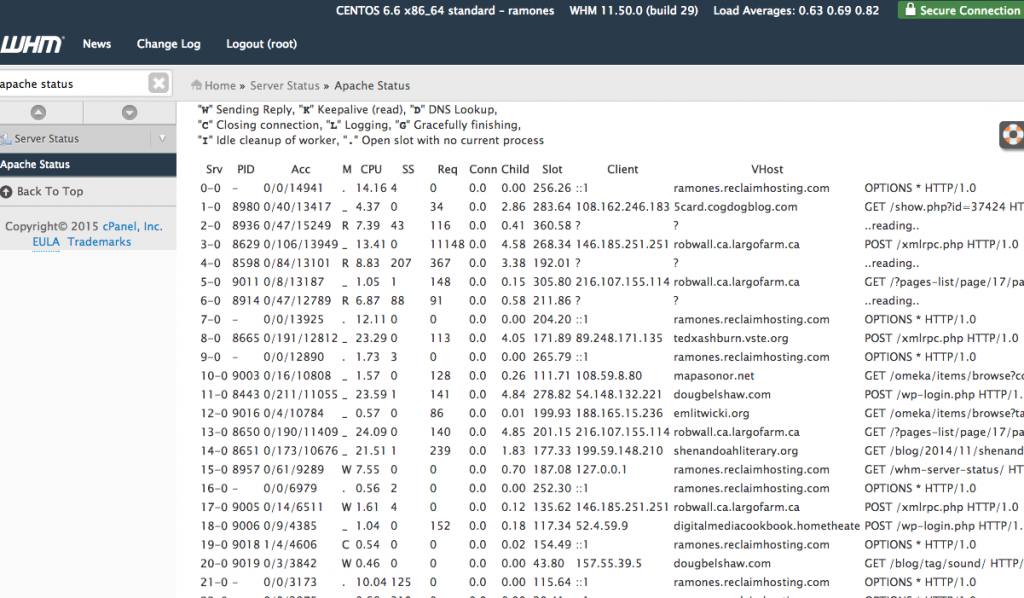
Reclaim Hosting‘s Ramones server was experiencing some extremely high loads this afternoon, and D’Arcy gave Tim and I a heads-up on Twitter to let us know as much. The A-Team was on the job, and more than up to the task! a-team1 The first thing we check when we’re getting unusually high loads is the Apache Status  in WHM (the GUI interface for managing a CPanel server). We look to see if there is one particular site getting hammered with requests—which is often, though not always, the case with random load spikes. Screen Shot 2015-07-30 at 9.38.37 PM In the instance earlier today, one WordPress blog was getting hit very hard with login attempts, often referred to as brute force login attempts. But rathe than the wp-login.php file, it was the xmlrpc.php file which has been a vulnerability for years because it provides, in the words of my server sensei Tim Owens, “a huge target for brute force login attempts because it bypasses the traditional wp-login.php and goes right for logging in via API.” This was precisely the case with the intense load on Ramones this afternoon.

Tim has started collecting snippets of code in our internal documentation, like the one below, that we can just add to the .htaccess file in the affected WordPress install to block all calls to xmlrpc.php. Below is the code snippet we copied into .htaccess this afternoon that brought the load back down almost immediately. Hope you find it helpful.

<IfModule mod_setenvif.c>
  <Files xmlrpc.php>
    BrowserMatch "Poster" allowed
    BrowserMatch "WordPress" allowed
    BrowserMatch "Windows Live Writer" allowed
    BrowserMatch "wp-iphone" allowed
    BrowserMatch "wp-android" allowed
    BrowserMatch "wp-windowsphone" allowed

    Order Deny,Allow
    Deny from All
    Allow from env=allowed
  </Files>
</IfModule>

ErrorDocument 403 "Access Denied"
Posted in sysadmin, WordPress | Tagged , , , , , | 2 Comments

#umwconsole Now with 2 Channels!

I spent most of the spring writing about UMW’s Living Room Console exhibit, a re-creation of a 1985 living room in a tucked away corner of the brand spanking new Information and Technology Convergence Center at UMW.  I spent the latter part of this afternoon listening to Blondie‘s Parallel Lines on vinyl while playing Video Pinball on the 2600. Living the dream.

One of the things we’ve been working on is programming and broadcasting TV from 1985 literally over the airwaves for umwconsole. Michael Branson Smith showed us the way when he came to campus as a visiting artist in April, and Zach Whalen has been building on his work since. As I wrote about briefly already, Zach has been working on a TV scheduling program for the Raspberry Pi that automatically synchs the time of day when turned on, and starts playing the appropriate shows and pulling from a pool of commercials for a specific channel at a given time. It’s pretty awesome. The Raspberry Pi contains at least 24 hours of shows and commercials for a specific channel, say channel 7, that is then broadcast through an analog transmitter that the TV(s) in the living room can pickup via antenna.

Zach recently received the TV transmitter he ordered 2 months ago from Hilly, which means he could finally test out if two different TV channels could be broadcast at once without too much interference.

As you can see from the Vine above  video above, it worked. We have channels 7 and 9 running of two completely independent Raspberry Pi setups that are being picked up off two different analog broadcasters on two channels. The discerning amongst you might have recognized The Prisoner marathon on channel 7 in honor of Prisoner106 🙂 What’s cool is that we could potentially have even more channels broadcasting to the TV, which could means ABC, CBS, NBC, a local independent channel, and PBS. Five channels broadcasting at once in the 80s living room? Now that would be sick.

Posted in Console Living Room, Uncategorized | Tagged , , | 2 Comments

ds106 is not a cult, it’s a ~club

Screen Shot 2015-07-22 at 3.53.10 PM

Image Credit: John Johnston

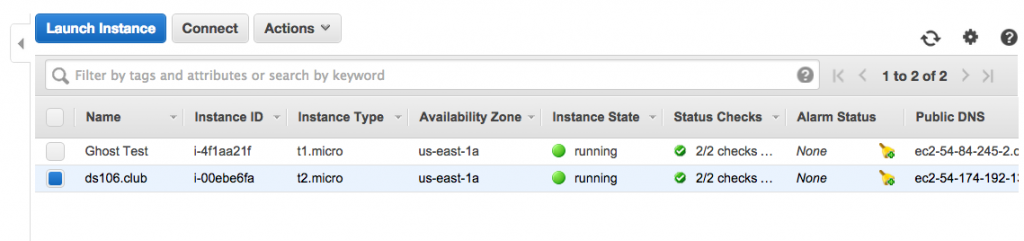
Back in March Tim and I went to the IndieWebCamp at MIT.  Part of the two-day event consists of proposing something to build and hoping others are interested in participating. During lunch on the first day Tim threw out the idea of building a Tilde Club based on the work Paul Ford did last year. I loved the idea, and a few other folks were mildly interested for the nostalgia of it all. Tim spent about an hour showing us how to spin up a server on Amazon Web Services (AWS) to get a tilde club going. There’s an excellent tutorial for doing just this on the Tilde Club Github account. It’s a fairly low-bar project for experimenting with spinning up a server on AWS if you’re interested.

AWS Instance of ds106.club

AWS Instance of ds106.club

Once Tim took us through the process, I spent most of the rest of that afternoon creating ds106.club on my AWS account. I used the extension .club because I couldn’t get the top-level extension .cult 🙂 Once I setup the server and actually figured out how to create users and give them permissions, I made a call out on Twitter offering anyone interested an invite. And, as is often the case with ds106 folks, more than a few were keenly interested in experimenting. Tim got his web ring up and running quickly. Dr. Oblivion was game for the new flesh. Bertha Curtis came to terms with the fact she is living in Oblivion. Tom Woodward shared that odd sensation. Grant Potter offered some ASCI art to the cause. And what do you know, A is for Audrey and Anarchist. But that’s just a sampling, find more here.

Screen Shot 2015-07-22 at 5.59.06 PM

It was meant as something both fun and experimental in a retro sort of way. We had no real plan, and it was a fun project to try and wrap my had around some basic linux commands and dusting off my command line. Additionally, it was a trip back to some of the early processes that helped me wrap my head around the web: creating and editing HTML files, FTPing files and images, and navigating server directories and file structures.

Soon after I got ds106.club up and running John Johnston was all over it, adding some impressive elements. He built a site filled with resources, shared a video he created on tilde basics, collected all the GIFs, laid out all the thumbs, and listed all the sites. Unlike me, John actually knows what he’s doing. I have to say he’s really embodied the spirit of creative hacking for me over these last few years. His amazing supercuts for wire106, his brilliant GIF Fight entries, his dazzling ds106GIFtv, and the sheer volume and brilliance of his Prisoner106 work—and that’s just a sampling. Out of curiosity I just wanted to see how much John has contributed to this community. A quick search showed 248 syndicated posts on ds106.us dating back to June 5th, 2011. Thanks pretty freaking amazing! You call it a cult, I call it downright inspiring!

the-general-poster-econo2

And seems to me John might be up to something with the Village Web Club. Seems there has been some recent Prisoner106 sightings on the server.

Screen Shot 2015-07-22 at 6.21.35 PM

I just love his idea of introducing this space as one folks who are creating on the web and pushing to teach themselves new things within a focused community might explore together. It’s fun, it’s personable, it’s focused, and it’s educational! If that’s a cult, I don’t want to be a rugged web individualist! I am a number. Number #1064life.

Posted in digital storytelling | Tagged , | 2 Comments