
Watch the bava blog trailer!
about
is an ongoing conversation about media of all kinds ...
Testimonials:
Generations from now, they won't call it the Internet anymore. They'll just say, "I logged on to the Jim Groom this morning.
-Joe McMahon
Everything Jim Groom touches is gold. He's like King Midas, but with the Internet.
-Serena Epstein
My understanding is that an essential requirement of the internet is to do whatever Jim Groom asks of you while you're online.
-James D. Calder
@jimgroom is the Billy Martin of edtech.
-Luke Waltzer
My 3yr old son is VERY intrigued by @jimgroom's avatar. "Is he a superhero?" "Well, yes, son, to many he is."
-Clint Lalonde
Jim Groom is a fiery man.
-Antonella Dalla Torre
“Reverend” Jim “The Bava” Groom, alias “Snake Pliskin” is a charlatan and a fraud, a self-confessed “used car salesman” clawing his way into the glamour of the education technology keynote circuit via the efforts of his oppressed minions at the University of Mary Washington’s DTLT and beyond. The monster behind educational time-sink ds106 and still recovering from his bid for hipster stardom with “Edupunk”, Jim spends his days using his dwindling credibility to sell cheap webhosting to gullible undergraduates and getting banned from YouTube for gross piracy.
I am Jim Groom

Find out more about me here.
Recent comments
- Reverend on Punk’s Not Dead
- Reverend on Punk’s Not Dead
- Martin Weller on Punk’s Not Dead
- Maren Deepwell on Punk’s Not Dead
- Jim Groom on Punk’s Not Dead
- Jim Groom on Punk’s Not Dead
- Scott Leslie on Punk’s Not Dead
- Alan Levine on Punk’s Not Dead
- Jim Groom on You’re definitely Dr Detroit …
- Jim Groom on Atari 2600 Game Cartridge Display Stand
- Jim Groom on Conference, Camera, ILTA!
- Jim Groom on Conference, Camera, ILTA!
- Tom on Conference, Camera, ILTA!
- Zach Davis on Atari 2600 Game Cartridge Display Stand
- GNA Garcia on You’re definitely Dr Detroit …
-
Recent Posts
- Punk’s Not Dead
- Unscripted Futures
- Conference, Camera, ILTA!
- You’re definitely Dr Detroit …
- The Reclaim Student Showcase Returns for 2026
- Domain of One’s Own Version 2
- Heigh Ho, Heigh Ho, It’s Off to ILTA’s EdTech 26 We Go
- Atari 2600 Game Cartridge Display Stand
- Building a Blog You Can Walk Into
- Deferred Maintenance: Upgrading Mastodon and PeerTube
browse the bavarchive
Contributors
some favorites
- Alan Levine
- Andy Rush
- Audrey Watters
- bava.social
- Bonnie Stewart
- Brian Lamb
- Bryan Alexander
- Chris Lott
- Clint LaLonde
- Cole Camplese
- Darcy Norman
- David Kernohan
- David Wiley
- Gardner Campbell
- GNA Garcia
- Grant Potter
- Jeffrey Keefer
- Jon Beasley-Murray
- Jon Udell
- Kate Bowles
- Kin Lane
- Laura Blankenship
- Leslie Madsen-Brooks
- Lisa M Lane
- Martha Burtis
- Martin Hawksey
- Martin Weller
- Mike Caulfield
- Mikhail Gershovich
- Mountebank
- Paul Bond
- Scott Leslie
- Serena Epstein
- Shannon Hauser
- Stephen Downes
- The OLDaily
- Tim Owens
- Tom Woodward
- Tony Hirst
Who says there is no good content on Youtube?
Pasting a Word Document into WordPress
Over the past two semesters I have gotten a bunch of complaints about the crazy formatting that results when pasting a MS Word document into the WordPress visual rich text editor. Well, those days are over thanks to Peter Baumgartner’s WordPress Plain Text Paste Plugin.
Now, some folks may argue that creating this option (given the horror of MS Word’s code formatting) just encourages people to use a non-compliant editor. Fair enough. However, the fact remains that more people regularly use MS Word than not (especially here at UMW), and we have got to be ready to offer them a quick and easy solution. Thanks to Peter’s hard work, we now have that solution.
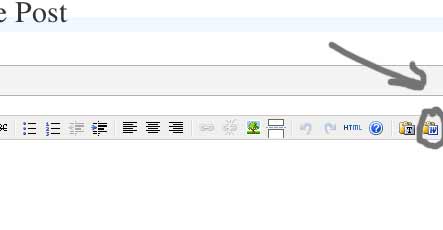
The plugin places a paste button with the MS Word Icon on the Visual Text editor. When you click this button a separate window pops up asking you to paste the text into it. After that, the plugin strips out all the ugly MS Word code and you’re on your way. You may have to reformat certain parts of your document, but you do not have to go through the additional step of copying and pasting the Word document into yet another editor and then re-save it as a text file. Very cool.
Update: If you want additional editing options for your WordPress posts and pages, you can download the Advanced Editing plugin for WordPress 2.0 so that you can reformat all those hard to get styles that have been stripped from your MS Word document. The fun never stops!
Nicolas Roeg’s Walkabout – a quick review

This week has been a long one, the semester starts Monday and I have much to say about my recent experiments with Drupal, MediaWiki, bbpress, Open Journal Systems, and WordPress. But until I muster up the time and energy to discuss this work in more detail, I wanted to share my two cents on a wild movie I saw recently. After asking my wife to tell me what was playing at the Film Forum in New York City (oh, I miss that rotten apple!), I stumbled across a movie that blew my mind: Walkabout (1971).
The New Yorker recently had a brief review of Nicolas Roeg’s Walkabout in which they noted that this film was a generational landmark of the late 60s, early 70s on par with Dennis Hopper’s Easy Rider. After reading this comparison I wondered why I hadn’t seen, no less heard of, this film before. So, I got on Netflix and rented it, and I was not disappointed. The cinemotagraphy is unbelievably beautiful and the story is sparse and powerful. It follows two young children (a brother and sister) abandoned in the Australian outback by there father. Being left for dead in the desert they are unexpectedly rescued by an Aborigine boy who is on his “walkabout” -a ritualistic banishment from his tribe that forces him to survive on his own in the desert wilderness. It seems that much of Terrence Malick’s filmic style -his protracted shots of nature in juxtapostion with humanities estranged space within its majestic order- seems to directly quote much of Roeg’s style in this film. You can fit the amount of dialogue in the script on a napkin. The consistently intelligent and profound shots communicate the author’s argument as effectively as the most finely crafted dialogue ever could. A radically different film that offers a glimpse into the amazing possibilities of transformative visuals during a moment of the late 60s and early 70s. If you like photography, funky desert movies, or just damn good cinema -I highly recommend this gem!
A Few Customizing Tips for K2
The semester is coming, so here’s a little something to keep you going…
Including a Custom Header Image in K2:
To include a custom header in K2 you have two options. You can use the custom header tool in the tabs Presentation –> Custom Header or you can modify the Cascading Style Sheets (CSS). Modifying the custom header via the Presentation tab is relatively self explanatory, but it does not give you as many options for presenting your header. In particular, it is difficult to move the text in the header up or down to complement the header image. For this reason we will look at adding an image in the header using the CSS. First things first, select an image for your header that is 780px wide by 200px high. Make sure this image is optimized for the web and is no bigger than 25k. Upload this file to the wp-content/uploads folder (or some other folder designated for uploads). After this, go into the Presentation –> Theme Editor tab and make sure you are editing the “style.css” file. The following code should be replace the current styles for the header. Keep in mind two things: 1) I extended the height of the header to 225px so that the page tabs would not overlap the image -there will be a 25px space for the page tabs (in this case black because that is the color I set for the header background); 2) the URL is specific to one particular site -if you want to use the code on another site you are going to have update the address accordingly.
#header {

      padding: 0;

      margin: 0;

      position: relative;

      height: 225px;

       background: black url(../wp-content/uploads/fairbanks.jpg) top center no-repeat;

}
Moving the Text in the Header:
Depending on the image in your header you may want the freedom to move your header text around. This is easily accomplished by modifying the CSS code for K2. For this code I added a text-align: right; and changed the padding to 50px (from the top) and 20px (from the right). The padding code works as follows: padding: top right bottom left; (substituting a pixel value for the appropriate positions as you see in the code below). If the font is too big you can change the size using the font size value, etc.
h1 { /* H1 is the title in the header */

	font-size: 3em;

	font-weight: bold;

	letter-spacing: -1px;

        padding: 50px 20px 0px 0px;

        text-align: right;

	}
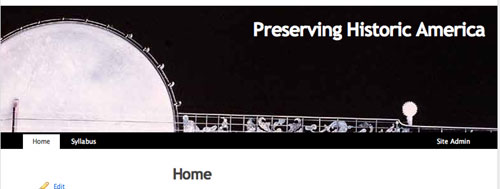
After you changed and updated both these areas of the CSS file you should get something like the image below.
Changing the Size of the Content Area:
Finally, if you want to remove the sidebar and have a larger content area there are two steps:
- Go into Presentation –> theme editor and edit the “Page Template” file. Remove the get sidebar call that looks like this
. - Next, edit the primary class of the CSS and change the width value from 500px to 780px as illustrated below. Additionally, you may want to edit the right and left margins to center your work a bit more. I changed the right and left margins below from 10px and 30px –> 50px and 30px in order to center the body of the text a bit more.
#primary {

	width: 780px;

	float: left;

	padding: 20px 0 20px;

	margin: 0 50px 0 30px;

	display: inline;

	}
That’s it, hope this helps.
For a far more thorough and thoughtful tutorial on doing things with the K2 theme for WordPress, check out Paul Stamatiou’s tutorial here. His instructions for placing a rotating images in your K2 header are quite good, and it proves to be a very easy hack!
Posted in WordPress
Tagged blogging, Hacking a Virtual Learning Space, instructional technology, open source, tutorial
10 Comments
The WordPress Plugins in My Life
Seems like the Cog Dog and teachinghacks.com having been doing a little sharing about their WordPress plugins, which I find extremely useful -so thanks. I have been talking a bit lately about some of the plugins I have recently discovered here, here, and here -but the following list is a quick and dirty look at what’s beneath the hood of bavatuesdays:
- 404 Notifier 1.0: This plugin will log 404 hits on your site and can notify you via e-mail or you can subscribe to the generated RSS feed of 404 events. Adjust your settings here. By Alex King.
- Aggregate 1.0: Allows you to place the contents of an RSS feed into your posts. By Rob Miller.
- Articles 1.1: Display posts in an ‘Articles’ list. To include a post in the list, add a custom field to the post: ‘article’ = ‘1′. By Alex King.
- BDP RSS Aggregator 0.4.10 (test): RSS Aggregator – collate RSS feeds and summarise to a page – updates regularly without the need for cron. By Bryan Palmer.
- Code Markup 1.1.1:: A filter that displays code blocks nicely while still allowing formatting. By Bennett McElwee.
- Exec-PHP 3.0:: Allows php code tags inside the content or excerpt of your posts and pages to be executed just as in usual PHP files. By Sören Weber.
- Kimili Flash Embed 1.1: Provides a wordpress interface for Geoff Stearns’ excellent standards compliant Flash detection and embedding JavaScript. By Michael Bester.
- Netflix 2.1 :Displays info from your Netflix account. This includes text and images via RSS feed. By Albert Banks.
- Optimal Plugin (formerly, OPML Renderer) : Renders valid OPML from any source as an expandable/collapsible list. By Dan MacTough.
- podPress: The podPress plugin gives you everything you need in one easy plugin to use WordPress for Podcasting. Set it up in ‘podPress’->Feed/iTunes Settings. By Dan Kuykendall (Seek3r).
- Share This: Let your visitors share a post/page with others. Supports e-mail and posting to social bookmarking sites. Thanks to Thomas McMahon for footwork on the URLs. By Alex King.
- Spam Karma 2: Reloaded: The only spam filter for WordPress. Period.
- Viper’s Video Quicktags:: Creates quicktags for embedding various video types, including those hosted at YouTube and Google Video, into WordPress. Uses the ButtonSnap class by Owen Winkler. By Viper007Bond.
- Wikipedia Link 0.1: With this plugin, you can link to Wikipedia entries just like within Wikipedia by simply enclosing the word you want to link with in double brackets. By Andreas Krennmair.
- WordPress Database Backup:: On-demand backup of your WordPress database. By Scott Merrill.
- WordPress Mobile Edition 2.0: Show a mobile view of the post/page if the visitor is on a known mobile device. By Alex King.
- WP-FLV 0.2: This plugin eases insertion of Jeroen Wijerings FLV Video Player By Roel Meurders. (PodPress does play FLVs, but this is still the slickest and most solid FLV player for WordPress)
- Brian’s Latest Comments 1.5.10: This shows an overview of the recently active articles and the last people to comment on them. By Brian Meidell.
How about you? -what plugins do you keep in your backend?
Alex King’s Articles Plugin for WordPress
If you haven’t already, go check out Alex King’s post about the plugins he is employing for the redevelopment of his WordPress site. He has produced some unbelievably cool functionality for WordPress, and the community owes him much.
I took four plugins from the post referenced above:
- the 404 Notifier (a feed for page errors on your blog)
- the WordPress Mobile Edition (a theme for PDAs)
- Share This (an ajax enabled link for sharing posts through web 2.0 services or e-mail)
- The Articles plugin allows you to define certain blog posts that you want to re-index on a static page.
You can download any of these plugins and more here. All of the plugins are worth exploring, but I was particuarly struck by the last one I mentioned. The Articles plugin allows you to define certain blog posts that you want to re-index on a static page that cross-references these posts using the category tags you assign to each. I tried a little experiment by selecting four posts I had published over the last few months that were a bit more involved and defined them as articles. I then took the code provided by the Articles plugin and slapped it in a static page (using the Exec-PHP plugin that makes it easy) and, lo and behold, the bavarticles page has one column (you can also have two columns if you choose) of category tags beneath which are lists of titled links to the “articles.” You can also put the code that calls articles in your blog’s sidebar(s). Not only is this an intuitive way to index posts across several category tags outside of the blog’s inverted chronology, but it also allows you to cull certain posts from the blog to use as articles by defining a taxonomy accordingly. I use the term taxonomy here with Drupal in mind, for the Articles plugin for WordPress begins to build in some of the functionality of taxonomies and vocabularies (on a more limited scale) that makes Drupal such a powerful CMS for organizing conent along several different axes.
Posted in drupal, WordPress
Tagged blogging, Hacking a Virtual Learning Space, open source, PHP
1 Comment
Colonizing Social Sites: It’s Fun & It’s FREE!
 Jim Spadacinni at Ideum recently posted on the potential of institutions -in this case museums- to colonize web 2.0 spaces (article link). He brings up a lot of excellent examples in his post. See his discussion of the Los Angeles Museum of Contemporary Art’s My Space profile and Ideum’s work-in-progress with the Maxwell Museum of Anthropology that will be…
…using a Flickr mashup to create a gallery and online activity. The site focuses on the 20th Century American photographer, John Collier Jr. The Maxwell will be posting around 500 high-resolution images to Flickr. At the moment, you can visit a John Collier Jr.’s Flickr site and see a test-bed which includes around 40 images.
These are just two examples of ways that museums are tapping into the immense social networks that have already been established by applications like MySpace and Flickr. I posted a little while back about Brooklyn College’s Library presence on MySpace; I was thinking aloud about the presence of other universities and colleges on MySpace. Yesterday, Melissa (sorry I don’t have a link or more info about this great resource) replied in the comments of that post directing me to the Universities and Colleges page on Myspace. From my initial explorations there are 23 colleges and universities on MySpace and there profiles vary widely in approach and accessibility. Not all of them are public and many of them have issues with the formatting of their profile, check out Yale and Brown’s profiles for cleaner, more attractive interfaces. Many of the profiles have done a good job of befriending their students: Wake Forest has 893 friends and Brown has 375 friends.
Interestingly enough, many of the “friends” of these universities are alumni, suggesting these profiles as possible spaces that universities and colleges can colonize to “stay in touch” with graduates. More than that, it is a way to find out how many students are on MySpace; how people are using this online application; and what such a social networking tool might bring to the realm of teaching and learning technologies. I don’t thin k I need to make the case so vehemently for Flickr as MySpace, for given the fear and terror associated with MySpace predators -it is often framed as anathema to all things “educational.” But as these social networking spaces with critical mass continue to foster active communities populated by large numbers of people such an argument may not hold water for much longer. I hate the advertising presence on MySpace as well as the look and feel of the site just as much as the next discerning web junkie, but thinking of this space as one of many portals into more particularized university and college resources (say like scholarship viz-a-viz podcasts, videos, online learning experiemnts, etc.) may not be as crazy as I once thought -or is it?
Optimizing with Optimal -A Plugin for WordPress
I have been playing pretty intently with WordPress these days in an attempt to develop out a UMW Division of Teaching & Learning Technologies site that features our projects, aggregates our blog posts & del.iciou.us feeds, while also acting as a resource for faculty, students, and the whole world wide web. It has been a really enjoyable project because I am finally creating the time to sit down and push WordPress as far as my paltry imagination will let me. I have already blogged the BDP RSS plugin -which provides the basis for some inspired WordPress eduglu. Another plugin I came across recently for WordPress is Optimal. The description on the Yabfog blog of this dynamic plugin is as follows:
Optimal renders valid OPML from any source in a tree-like view ideal for browsing. Links to external OPML files as well as RSS, RDF, and Atom feeds are expanded in place.
For those of you who may be unfamiliar with an OPML file, it is a file written in Extensible Mark-up Language (xml) that aggregates disparate feeds from various sources (in this case RSS feeds from blogs) into one file. Optimal allows you to link externally to this file and display the links to various sources (in my case blogs -but it can also be podcasts, mediawiki articles, forum threads, or anything else with an RSS feed). None of these features makes the Optimal plugin particularly special, what does, however, is that this plugin allows you to browse the most recent content from these various feeds right in the page where you have added the simple script.
An example might make this a bit clearer. A while back Darcy Norman “published” an OPML file of all the eduTech blogs he reads for anyone else out there to take advantage of (he’s a giver!). Using the Optimal plugin, all I need to do is get the address of the OPML file and plugin it into a little code that comes with the plugin and BOOM! -I have my own eduTech bloglines right within bavatuesdays that everyone else also has access to. Take a look at bavafeeds to see this plugin hard at work.
Posted in WordPress
Tagged blogging, Hacking a Virtual Learning Space, instructional technology, mediawiki, open source, PHP, rss, web 2.0
8 Comments
YOUTUBERS: the video!
I was just reading Andy Rush’s blog, spending some quality time admiring his new “My YouTube Favorites” sidebar widget -very nice!, when I came cross a veritable gem! He is always good for an entertaining video, but the one I clicked on today was a lot more than that. YOUTUBERS, despite the melodramatic music, is a nine minute montage that suggests something compelling about the complex intersections of technology and identity -on Youtube specifically but also much more generally.
[youtube]VXwarrIYLJ4″[/youtube]
A Social Revolution: The Web 2.0 Poster
Ross Mayfield’s “revolucion” poster puts a very specific context of the social back into Social Networking!

Ross Mayfield – WEb 2.0 Conference.
via Christian Contini
Tagged Flickr, general, web 2.0
2 Comments