
Via the great Luke Waltzer…
[kml_flashembed movie=”http://youtube.com/v/LbvP7dT3Dx0″ width=”425″ height=”350″ wmode=”transparent” /]
Via the great Luke Waltzer…
[kml_flashembed movie=”http://youtube.com/v/LbvP7dT3Dx0″ width=”425″ height=”350″ wmode=”transparent” /]
As promised, I am going to go through the steps I followed bringing this blog from a single WordPress installation into a WPMu environment. For some background on all of this check out these posts here and here.
So, I mentioned previously here just how unhappy I have been with the WordPress import and export functions. Not only is the importer inconsistent, but it also creates quirky XML that isn’t as clean as it should be and imports only some of your precious data, while leaving out the blogroll, plugin tables, and a variety of other necessities germane to an export/import tool. These issues led me to experiment with importing the actual database tables of an existing single-installation of WordPress into a WPMu database. It wasn’t all that hard, but there might be a few things to keep in mind as you give it a shot.
But before we get started there is one disclaimer: If you don’t back up all your databases and core files for both your single WP and WPMu installs before trying anything like this, then you’re a crack baby!
Let us go, now…
Step 1: Export Your Single WP Installation Database
First thing you need to do is go into your CPanel and look for the phpMyAdmin interface on your server (this is my GUI of choice because I am line-command impaired) and export a copy of your WP single installation database. This is pretty straight-forward, just find the database for your blog, if you have several WP blogs set up and don’t know which is which, then browse the wp-options table and you should see the blog title listed in this table (see example here).
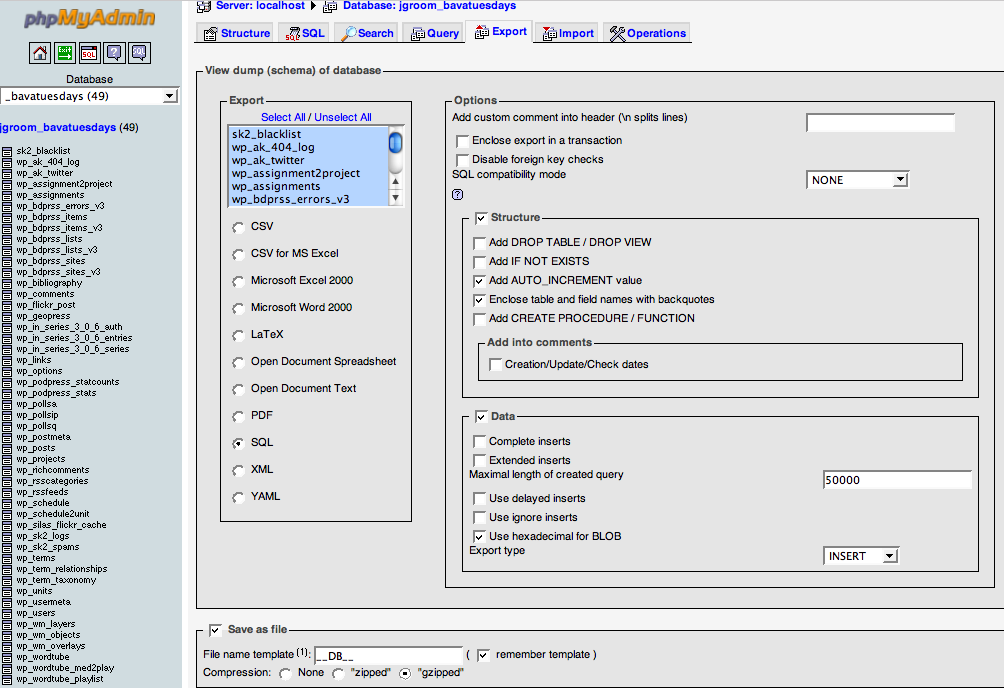 Click on image for larger version.
Also, be sure to save the file you your disk so we can open it up and start changing a few things.
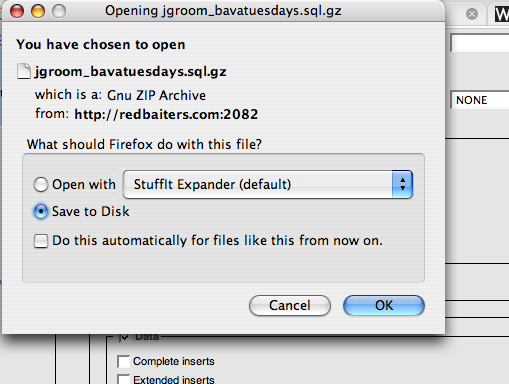
Step 2: Open Up the Exported SQL file in a Text Editor
Open up the SQL file you downloaded in a text editor of some kind. Keep in mind that if you choose the .gz format (a compression algorithm which is quite useful for large SQL files) you will have to double-click on the file to de-compress it before you start editing. If you use a Mac I recommend TextMate ($) or Text Wrangler (Free), and while the editing we will be doing to the .SQL file is very basic, the searching, finding, replacing of text and general formatting options will be easier with a good editor. As for PC based text editors, I’m not so sure, some good recommendations anyone?
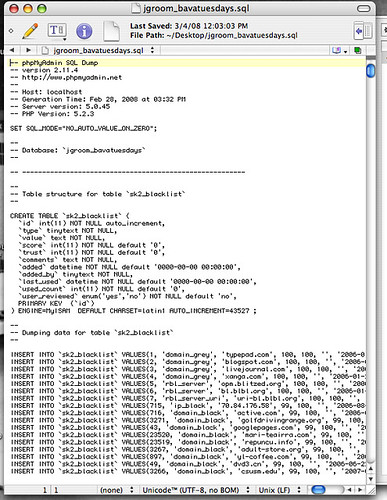
Click on image above for larger version.
Step 3: Explanation of WPMu database table structure
The WPMu Tutorials site has two posts about the basic structure of the WPMu database. It is a useful overview that explains how the deafult blog in a WPMu database has the table prefix wp_1_ as logic would have it the next blog you create on a WPMu installation will be wp_2_ etc. This is a different from a single WP installation in that the single installation only has the wp_ prefix without the numbers (which connote a blog id in WPMu). For example, whne importing my single installation in WPMu, I already had several blogs within that environment, so when I mapped the new domain for bavatuesdays, the database table structure was already up to 30:
wp_options is the table name on WPMu vs. the wp_options that is in my single installation. So, in short, just about every database table you have in a single WordPress installation (which will not include plugin databases only you have already set them up on the new WPMu blog you are importing to) will have a corresponding table in WPMu with an appropriately number table prefix, in my case wp_
Step 4: Editing the SQL database file
Before we go in and change the table names, one thing you might consider is cleaning out some on the kipple in your database. For me, this amounts to getting rid of all the spam caught by Spam Karma 2, and deleting the <code>sk_2_blacklist</code>, <code>wp_sk2_logs</code>, and anything else that takes up a lot of unnecessarily table space. For example, the 404 error log I run on my site (which is a plugin as is SpamKarma 2 and if they are not installed on your site they will not see these tables, and chances are your database will be far cleaner and lighter than mine is).
As for deleting database tables from an SQL text file, it is pretty simple because SQL files a very specific format that you can easily follow in a text document, here is an example:
-- --------------------------------------------------------
—
— Table structure for table `wp_wm_layers`
—
CREATE TABLE `wp_wm_layers` (
`id` mediumint(9) NOT NULL auto_increment,
`layer_title` tinytext NOT NULL,
`layer_name` tinytext NOT NULL,
`layer_type` tinytext NOT NULL,
`layer_url` mediumtext NOT NULL,
`layer_params` mediumtext NOT NULL,
`layer_bounds` mediumtext NOT NULL,
`layer_options` mediumtext NOT NULL,
`layer_size` mediumtext NOT NULL,
`layer_unavailable` tinyint(1) NOT NULL default ‘1’,
`layer_hide` tinyint(1) NOT NULL default ‘1’,
`rss_cachetime` mediumint(9) NOT NULL default ‘0’,
`layer_author` bigint(20) NOT NULL default ‘0’,
UNIQUE KEY `id` (`id`)
) ENGINE=MyISAM DEFAULT CHARSET=latin1 AUTO_INCREMENT=1 ;
—
— Dumping data for table `wp_wm_layers`
—
— ——————————————————–
—
— Table structure for table `wp_wm_objects`
—
CREATE TABLE `wp_wm_objects` (
`id` mediumint(9) NOT NULL auto_increment,
`object_name` tinytext NOT NULL,
`layer_name` tinytext NOT NULL,
`object_type` tinytext NOT NULL,
`object_bounds` tinytext NOT NULL,
`object_color` tinytext NOT NULL,
`object_width` tinytext NOT NULL,
`object_hide` tinyint(1) NOT NULL default ‘1’,
`object_author` bigint(20) NOT NULL default ‘0’,
UNIQUE KEY `id` (`id`)
) ENGINE=MyISAM DEFAULT CHARSET=latin1 AUTO_INCREMENT=1 ;
—
— Dumping data for table `wp_wm_objects`
—
— ——————————————————–
As you can see from the two example of seaparate database tables above, SQL has a very regular logic to how it separates tables with hasmarks, and creates new tables, and populates the relevant information. So, having no knowledge of SQL, which is my current state, i just got rid of the tables that were extraneous (like Spam Karma and the 404 Error log) and renamed all of the wp_ prefixes to wp_ etc. for examples, the two tables above would no longer be `wp_wm_layers` and `wp_wm_objects`, but rather `wp_wm_layers` and `wp_wm_objects`. I didn;t have to edit any of the actual SQL code, but just rename the tables that are being created to match the blog id on WPMu. Does this make any sense?
Step 5: A quick find and replace all for table names
So, the quick and easy way to do this replacement is to use the text editor to find `wp_ and replace all instances with `wp_
This should do the trick, but this is also why it is very important to do a database backup of both installations just in case something goes wrong. Also, if anyone out there who knows more about SQL than me, and there are millions of you, pleeeeeeease peer review this post 🙂
Save the SQL file and now we move to deleting the existing tables for this blog in WPMu and importing the ones from the modified SQL file we have been working on.
Step 6: Deleting existing tables
The sixth step may seem counter-intuitive (and there may be a better way), but in my limited experience I found I had to go into the WPMu database and delete all the tables for the blog I created and want to import the single-install database to. For example, the new blog on WPMu for bavatuesdays has the database prefix wp_30 (your may very well be different depending on how many blogs you have created and what the corresponding number is). So, I go into my WPMu database, find all the tables that have the prefix wp_30 and drop them (scary I know, but trust me, I’m an amateur).
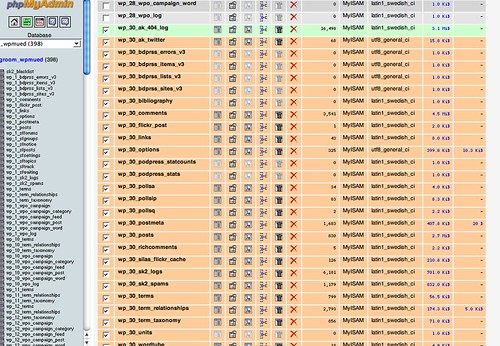
Please note: You will need to dump all of the tables associated with the blog you want to import. Try not to be confused by my example here because I have already done this and some tables are related to plugins. for a list of the tables you should be deleting with only the wp_# prefix, for example:
wp_#_categories
wp_#_comments
wp_#_link2cat
wp_#_links
wp_#_options
wp_#_post2cat
wp_#_postmeta
wp_#_posts
wp_#_terms
wp_#_term_relationships
wp_#_term_taxonomy
Where the # is the number of the blog you have created to which you will be importing the SQL file. Am I being clear here?
As another note, wp_#_terms, wp_#_term_relationships, wp_#_term_taxonomy are all specific to WP version 2.3, so be sure your blog is updated to the lastest version before you try this!
Step 7: Importing the new SQL blog database
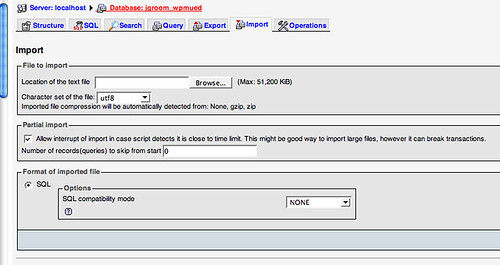
Once you have dropped all the relevant tables, you will then go to the import tab in phpMyAdmin and upload the modified SQL file we have been working through. This should be relatively painless, return to the root of the wpmu database, make sure you are not within a specific table, and then click on the import button, find the saved SQL file we have been modifying and import it.
And that should be it, but let me say two things before I end this post:
a) I’m a hack and this worked for me, but may prove unsuccessful for you, so if you try it please backup your stuff
b) I hope far smarter than me who have done this before and know the intricacies better will chime in and correct any flagrant errors or misleading passages that could mislead or somehow screw someone’s attempts up.
With that said, go to it and let me knwo if you have an issues that I can try and help out with.
Luke Waltzer over at the Bernard L. Schwartz Communication Institute, Baruch College, CUNY just turned me on to an awesome use of a WordPress blog in a course. Professor Zoë Sheehan Saldaña of the Fine and Performing Arts Department has her students sharing the resources they find online by way of a class blog. More than that, each student designed an animated, flash-based header for the blog as an assignment, so the actual class blog is now also a dynamic portfolio of the work the students are doing. What an awesome intersection of uses of this online space: sharing resources, publishing platform, collaborating on projects, and a class art gallery.
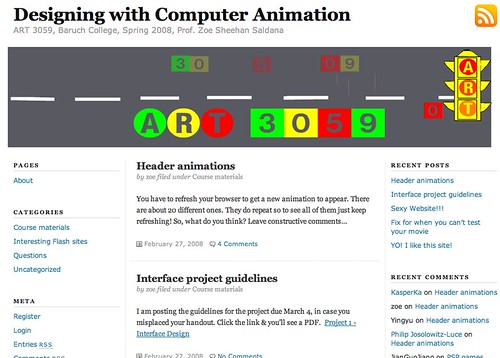
Click on the image above to be taken to the class blog, and click the refresh button to view the 20 flash-based headers designed by the students in the class.
I have spent the last few days porting a stand alone WordPress blog with over 800 blog posts, 75 videos, countless images, and PHP executed in several posts (not to mention the over 35 plugins) to a mapped domain on a WPMu installation. This is something I have been dying to do, and I have finally made the plunge. I followed the steps outlined here to map the domain on WPMu and create the site. The actual porting of data from an existing site to WPMu is something I hadn’t done before, and now that I am beginning to emerge from it I have learned a bunch of things along the way. So here they are in no particular order.
https://bavatuesdays.com/wp-content/uploads/2008/02 (for files uploaded in February, 208)
Whereas WPMu has numerous blogs all of which have their own uploading space, so each has it’s own unique directory path for uploads like the following:
https://bavatuesdays.com/wp-content/uploads/uploads/2008/02 (which is really a re-write of this absolute path .../wp-content/uploads/2008/02)
So, every link to an image, video, mp3 file, etc. in the single WP that was located in the /wp-content/uploads/… directory path had to be found and replaced with /files/uploads/ which was pretty easy to do with the SQL data file thanks to the sage advice of the CogDog Blog (does he have an appreciation society yet? I think we need to get on that!)
There is probably more I can say, put I think that’s all I have in me for now. And despite some setbacks, I am happy to report that as of yesterday bavatuesdays is now part of a larger WPMu installation that will be hosting at least eight different mapped domains. And this is really the future of my thinking about WordPress. Mapped domains and a more dynamic CMS style of WordPress across several sites excites me to no end, this is a tool wherein a more sophisticated, user-friendly social site can be created across several domains affording both community and unique identities. But, more on that soon….
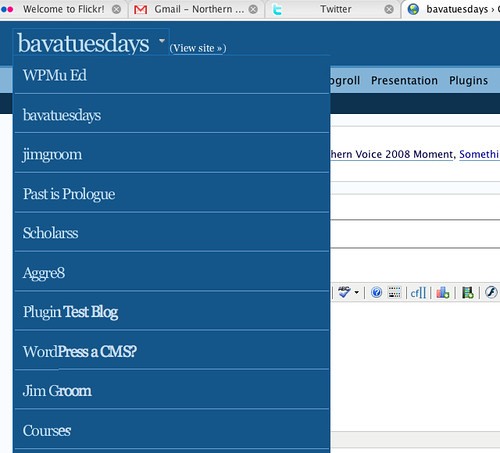
After far too long, I finally ported bavatuesdays over to my WPMu installation using the mapped domains hack. It wasn’t as painless as I would have liked because I have no understanding of MySQL, but despite my dearth of knowledge it worked pretty well –though I have some major clean-up to do.
The upside is I am now confident that I can map every domain I “own” (with their associated blogs) on to one WordPress installation, so I can continue to push WPMu into the logic of a more dynamic CMS. When I have time (which should be this evening) I will write the whole process up step-by-step. I’m pretty excited about the idea of managing one upgrade and using all these different spaces to create a more dynamic environment (not to mention one group of plugins for everything, a myriad of themes, and a sitewide tag cloud!). I liek the idea of having all the different work I do (both personal and professional) in one space, and I think my online life just got a little more interesting 🙂

I am trying to move the bava to a wpmu installation so I have something to blog about. I expect that the site may be down over the next 12-24 hours during the move. I know this is very horrifying for many of you, so I just wanted to encourage you to be strong and persevere.

Over at the Not For Nothing blog by Kaitlin Butler, a UMW Art major, there is a wild post about The Spore Collective Manifesto that her sculpture class has framed as a way for experimenting more radically with their artwork. Here is how she describes this manifesto:
The Spore Collective Manifesto, now featured as one of my pages, is going to make such a huge impact on myself and the class as a whole. As I discussed with the class during debates about the Manifesto, I am hesitant to take risks in art classes. This resistance is from my head constantly asking “What will your classmates think of this? What will your grade be? What will your professor criticize?” So in this case, instead of taking risks and being as creative as possible, I tend to ask around for suggestions and get the general consensus about where to go from here.
You can see the manifesto in its entirety here.
So, what’s happening here? Are student collectively deciding that in order to experiment and and take risks they have to come together and acknowledge it and make a larger statement about it? Well, yeah, and they are even as going as far as to publish their ideas as a manifesto. I love it!
So, given that I still keep abreast of the UMW Blogs, I have found that the Manifesto is having a rather powerful impact on several students. For example, Roblog notes in this post that “the Spore Collective Manifesto gives me the freedom to concentrate on art instead of ‘art class.’ For me, the manifesto changes my perspective on my work.”
How cool is this? I have goosebumps just writing about it. It’s not only that these students are aggressively framing and reclaiming their education, but they are pronouncing it far and wide. An act which in many ways makes them that much more visible and powerful. I think I see a movement fomenting in the UMW art department (and UMW more widely, just look at UMW Blogs!), and that is more than exciting, it is what education should be!
Say it loud — I’m Spore and I’m proud!

The original title for this post was: “Just one more NV post, memory bartender”
The Northern Voice 2008 posts have been streaming in regularly, and I can’t add much to their overall reflections because they capture the power of this conference beautifully. That said, I have one more reflection to serve up before I check myself into a thinking detox.
At Friday’s Moose Camp I was able to catch up with a couple of UBC students who work with Brian. They are building an “educational publishing platform” using WPMu, and we got to chat about the ins and out of this system, RSS, aggregation, and the possibilities for a more powerful way of building campus community through such a tool, and needless to say these cats get it (the two I sat down with were Vince Ng and Andre Malan, and let me tell you that these two are the future of edugluuuuuuuuuuu!) It kinda I felt like being a guest speaker in one of Brian’s learning party classes, though as usual with me I came away with more than I gave back. In short, they blew me away. They understood that BDP RSS is by far the better feed parser, yet cannot create individual posts in blogs as re-blogging spam engines, like WP-o-Matic. So, Andre and Vince said, well why not automate the sign-up for BDP RSS publicly in the front end, and then take the aggregated feeds from the respected output formats and automatically feed them into WP-o-Matic as needed. Now I know this makes no sense to most, and I will expect that Andre (or Vince) write it up given he is blogging his work now.Hallelujah!
Now that technical conversation wasn’t the real charge I got out of this discussion, it was the glean of eduglu that I saw in Andre and Vince’s eyes. They had been under the informal tutelage of the abject teacher, and they groked the issues and have the programming prowess to make a difference with these tools for teaching and learning. There is no limit to what Andre, Vince, and the other students on the team can not only give back to the educational community, but also blaze the path through which students take control of the destiny of how they frame their learning environment online. I eagerly await any and all future developments, but a post like this one from Andre gives me an almost unfathomable sense of excited impatience for things to come:
I realized that I have been neglecting my duty to the community by not outlining our solutions to the problems of implementing a university-wide blogging platform.
So here it is, my plan for using WordPress as a University wide blogging platform:
To start off, I’ve been mentally breaking the problem down into two parts. We are in a sense providing two completely different services. One part is that we are providing a platform and community for student bloggers. The other part is that we are providing a course management system for professors. Although both services are interlinked, they each have their own fundamental challenges.
Not tell me this cat isn’t a natural edublogger? Looks like the edublogosphere just got that much richer with this unique and necessary voice. Can you imagine someone blogging about WPMu as publishing platforms in education who actually knows something about code? Perhaps with Brian’s dream team we can start giving those Drupal code freaks a run for their eduglu money 🙂
There’s colors on the street
Red, white and blue
People shufflin’ their feet
People sleepin’ in their shoes
But there’s a warnin’ sign on the road ahead
There’s a lot of people sayin’ we’d be better off dead
Don’t feel like Satan, but I am to them
So I try to forget it, any way I can.
–Quoted from some Canadian
I have been deeply immersed in an active and intellectually distributed community devoted to re-imagining the role of technology in education for over two years now, but the intensity that the Northern Voice conference demands is something else altogether. To start, I get to hang out with the very people who continually inspire me to think critically about the field we inhabit, to contextualize the ideas beyond a trendy bubble, and imagine our commitment and relationships as a real way to transform ourselves — if not the culture we live in. That is not usually what your average conference promises, but there is something different at work here. And while the crowd was groovy, the vibe was mellow, and the ed tech presentations I attended were all extremely impressive (as were so many others), I’m not certain that is what makes this conference so transformative — although it certainly has something to do with it.
I think what I come away with, as I did last year, was the sense that this conference provides us the opportunity to really examine what it is we are working towards. For me, the mythical eduglu is far more powerful as a metaphorical space for re-thinking the social, political, and economic forces that frame the current state of education that extends far beyond any particular technology. Which is why this conference proves so demanding on my psyche, for it re-establishes the push to renew a ridiculously high-level commitment of time, energy, and emotion to continually think about these ideas together.
Where are we going with educational technology? What do we believe? And why do we care so much? It is the intensely personal sinews of these online communities that demand one to think about where they are and why, and I certainly understand that the community you build defines your perspective. Given that, I cannot even begin to articulate just how fortunate I feel to draw such immense inspiration from so many brilliant people. So, when I read the following quote pulled from this post by Barbara Ganley’s announcing the new directions that lie ahead of her, I am extremely grateful to have access to someone who can begin to explain these feelings to others with such a determined sense of wonder, fear, and excitement.
“Never doubt that a small group of thoughtful, concerned citizens can change the world. Indeed, it is the only thing that ever has.” Margaret Mead
Long live the spirit of Northern Voice, or at the very least until the next one!
The Moosecamp is here, and things are getting exciting quick. The sessions are up on the wiki, and as soon as the first session started Jen Jones (Injenuity) started Ustreaming it. Genius, what a cool way to get the message out immediately through Twitter with an invaluable resource on the other side.
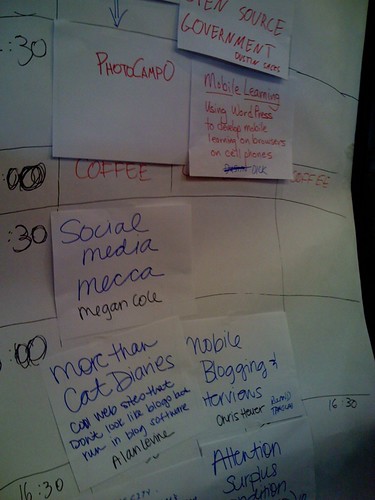
Very cool!

Find out more about me here.