Rock My Religion

Another gem from the Ubuweb RSS feed.

Image from the Rock My Religion documentary/thesis

Dan Graham’s Rock My Religion (1982-84)
1982-84, 55:27 min, b&w and color, sound

Rock My Religion is a provocative thesis on the relation between religion and rock music in contemporary culture. Graham formulates a history that begins with the Shakers, an early religious community who practiced self-denial and ecstatic trance dances. With the “reeling and rocking” of religious revivals as his point of departure, Graham analyzes the emergence of rock music as religion with the teenage consumer in the isolated suburban milieu of the 1950s, locating rock’s sexual and ideological context in post-World War II America. The music and philosophies of Patti Smith, who made explicit the trope that rock is religion, are his focus. This complex collage of text, film footage and performance forms a compelling theoretical essay on the ideological codes and historical contexts that inform the cultural phenomenon of rock `n’ roll music.

See preview velow and find the full video on Ubuweb here.

Some fascinating fodder for the historical theory that all great American social movements (think the two awakenings, the Civil Rights movement , etc.) are at their root religious. Some amazing early Sonic Youth forms the soundtrack of this video, not to mention some great footage of Patti Smith, Black Flag, and others. Additionally, there is some great mash-up action between 1950s religious revivials and the punk scene.

Posted in art, civil rights, video | Tagged , , , , , , , , , , , | 3 Comments

Gladly Eating Some Drupal Crow

Bill Fitzgerald has posted about a most impressive aggregator he put together with Drupal in about six hours. He documents the modules he used, and his creation slices and dices the content from various feeds in some really impressive ways.

This may very well be the beginnings of a more sophisticated tag cloud, directory, searchable archive, and filtering system. Bill and I have been jawing back and forth about Drupal and WPMu for a while now, and he’s an absolute pleasure to heckle. More than that, he has been doing some amazing work with DrupalEd and this here aggregator site he put together fully defines the meaning of wrapping Drupal around a WPMu install (or any other series of feeds for that matter) that I could never quite get my head around last year.

Next step is tweaking this experiment to create OPML and a more sophisticated directory. I am really starting to believe that Drupal may be just the tool we are looking for to display the activity at UMW Blogs. Wait, did I just say that I think I just said?!

More to come on this very exciting development. There is no question I have a lot of crow eating to do when it comes to both Bill and Drupal, and given the season I think I am ready to eat another bird or two some time very soon.

Image of a cool cat eating crowImage courtesy of tanakawho.

Posted in drupal, wordpress multi-user, wpmu | Tagged , , , , , , | 14 Comments

UMW Blogs & Middlesell Sittin’ In a Tree…

…R-S-S-I-N-G.

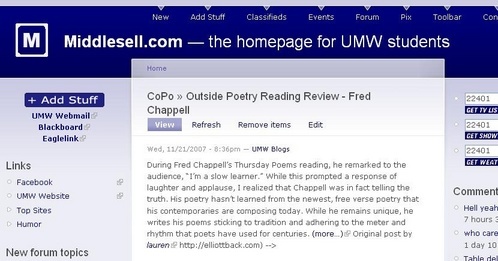
Image of UMw Blogs post on Middlesell.com

I happened upon Middlesell early this morning (this site is an independent homepage for UMW students established by the inimitable Bobby Durette) only to discover that posts from around UMW Blogs are being fed into this space. How fascinating!

Now it really shouldn’t come as a surprise to me, for Bobby is a remarkable guy who I have had the pleasure of listening to and talking with on several occasions. Here’s a brief tech bio of one of UMW’s finest: he started Middlesell as a hand-coded PHP project in his Freshman year; during his Sophomore year–after a recommendation from Martha Burtis and Cathy Derecki– he decided to use Drupal as the site’s CMS; and now he is currently a Junior and has effectively developed a community site that is a regular online destination for a large part of the UMW campus. Most impressive, Jedi! What I particularly like about Bobby is that he is wise beyond his years and a consummate gentleman, and I say all this in spite of his using Drupal as his CMS of choice mind you 😉

So, when I saw that he was pulling posts from the UMW Blogs sitewide feed into Middlesell I really shouldn’t have been all that surprised. He’s a smart guy and recognizes the value of solid content that is directly targeted to his audience, not to mention that he is intimately familiar with with the wondrous power of RSS aggregation. All of which makes me think about a thread on a post D’Arcy Norman wrote recently about creating a blog directory for WordPress Multi-User wherein Bill Fitzgerald suggested how Drupal could be easily configured with views to offer this functionality, but Drupal disciples always mention the Views Module when they want to discount WordPress (and they usually mention the CCK module soon after this) so I wasn’t taking the bait.

What was most interesting to me, however, was something Mr. Fitzgerald (I’ll appeal to his sense of formality) describes in his second comment on this thread that amounts to a more sophisticated interaction between these two applications that would utilize WPMu as the publishing platform and would run its sitewide feed through Drupal to harness functionality such as searchable aggregation, mapped external tags, and OPML generation. Mr. Fitzgerald says the following in his comment on D’Arcy’s blog:

The more I think about it, though, the more I like the idea of an OPML feed coming out of a blog directory[in this case WPMu], and being fed into a searchable aggregator. Keep in mind that the feedapi allows for mapping of external tags into Drupal’s core taxonomy, and that you can then slice those imported feeds up into new sections via views, and then expose that via an rss feed…

Yup. I taste some Drupal-Wordpress kool-aid, consumed straight out of the grail

So, if I understand this correctly, and please correct me if I don’t, WPMu remains the individualized publishing platform and Drupal handles the aggregation, searching , and display. Drupal wrapped around WPMu in other words (something the good folks running Arizona State University’s blogs mentioned to me at ELI last year, but I couldn’t fully grasp it).

So, Mr. Fitzgerald, do we have a shared project/vision finally?

And, Mr. Durette, might you be interested in experimenting with such a feeding and parsing of content from UMW Blogs into Middlesell? You are one of our local Drupal aces, and your feeding posts from UMW Blogs into Middlesell (I’m assuming this was you, by the way) really brought all these loose connections home to me.

If neither of you are interested, I’ll just have to take this silence as a tacit understanding that Drupal sounds great in blog comments and can feed posts into a site like any old aggregator, but just doesn’t have what it takes to push this baby to the next level. No sweat, I just won’t let you forget it for a while is all.

Posted in UMW Blogs, wordpress multi-user, wpmu | Tagged , , , , , , | 4 Comments

This Thanksgiving…

…I’m celebrating the culinary contributions of the eyetalians…

Image of a DiFara slice of Pizza, yum!

Image courtesy of PetroleumJelliffe

…and the Jews…

Image of Bales in a bag

Image courtesy of Harris Graber

…in New York. Who has room for the dirty Puritans when in Rome?

Posted in fun | Tagged , , , | 3 Comments

Growing up, my neighbor had a three-legged dog…

Image of a Tripod Dog

…and his name was Tripod.

Image thanks to mre770.

Posted in fun | Tagged , , | 6 Comments

The Reverend Preaches Patience?

I’m not known for my patience, in fact we have been arguing all morning here at DTLT about this very topic. But a video I found on YouTube just might help be re-think my rash and untempered approach to life, and instructional technology more specifically. Riffing on this quote from the the Book of James, “Therefore be patient, brethren, until the coming of the Lord,” Shawn Boonstra offers a much needed antidote to the hustle and bustle of modern day life.

Here’s a quote culled from this three minute video:

We used to think that dial-up internet at whopping 56k was a technological marvel, and now we get frustrated when our high-speed internet gets hung up on a video once in a while…You see, some things are simply worth waiting for, and the Second Coming is one of those things.

All I have to say to Shawn is thanks for putting the Second Coming in technical perspective for us all.

Posted in fun, video, YouTube | Tagged , , , | 1 Comment

I Have Learned My YouTube Lesson

Image of YouTube Logo from 2007Last week Sarah Allen inquired about a James Farmer video (knowing we have a rich collection of media of this Civil Rights leader) for her Culture, Context, and Composition class. The particular video she requested was Farmer’s debate with Malcolm X, and I had not come across it in my sojourns to the archives, so I recommended she ask Carolyn Parsons (the campus archivist) if she might know of anything and left it at that.

Yesterday, I met with Sarah for a different matter all together. She’s currently a Teaching and Learning Technology Fellow (for more on this read Gardner’s post here) and we scheduled a meeting to pimp out her WordPress blog (something I enjoy tremendously). We installed the OneClick Installer plugin on her personal WordPress blog so that she can harness the unbelievable power of this amazing publishing platform with one click (Fanboy to the bone 🙂 ). We used it to install Spam Karma, Subscribe to Comments, and then I recommended Viper’s Video Quicktags for easily including videos on her blog.

After that we tested the plugins, and when we came to Viper’s Quicktags we went over to YouTube and I recommended she search for a video related to something she was teaching. She searched for “James Farmer and Malcolm X” and lo and behold what shows up? That’s right, three videos featuring the debate between these two historical figures. How could I have been so stupid? Why didn’t I recommend YouTube to Sarah a week earlier when she was searching for this resource? I spend most of my days there, it is the most amazing resource for everything (including teaching and learning) and I guess it’s a lesson even I have to learn again and again.

What was particularly cool this time around though, was that I think Sarah might have learned this lesson right along with me. For while she couldn’t show the debate in class yesterday because our discovery came two hours too late, it is now neatly embedded in her class blog for everyone to watch and comment on. Moreover, she seems to be experimenting with YouTube on her own blog with some other fascinating intellectual content.

It has been said before, and I’ll say it again here: YouTube is the most powerful example of how these small pieces can be so easily and effectively joined for a teaching and learning context. And what publishing platform loves YouTube more than WordPress?

Posted in plugins, video, WordPress, YouTube | Tagged , , , , | 7 Comments

Simple Forums Plugin for WPMu

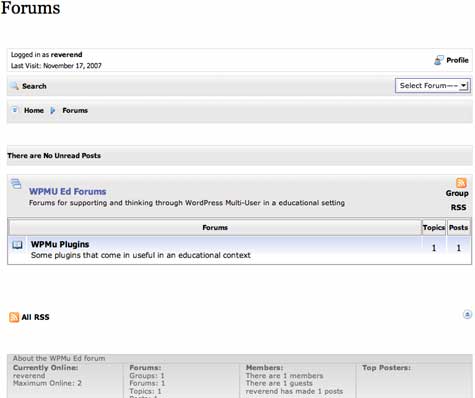
Once again, I must thank Dr. Mike for pointing me to the Simple Forums plugin at Yellow Swordfish. This is an amazing plugin that basically allows you to include a pretty powerful forum right into a blog on WPMu. You can see it in action on the Yellow Swordfish site here, or take a look at a version I am playing with at WPMuEd.org (more on this site to come shortly).

Image of WPuEd Forums


There are a host of features, a couple I particularly like are the following:

  • It integrates seamlessly with a WordPress theme as a separate page, so if you have a class blog and want a powerful forum here is an excellent option
  • It has advanced permissions to control who can post and/or see the forum
  • It can integrate with the blog it is installed on so if you want to have more in-depth conversations about a blog post it can carry over to a forum –very cool!
  • It automatically integrates users from the blog, allowing all registered users to post without an additional sign-up
  • It has a simple spam blocking feature built in
  • It has RSS and e-mail subscriptions for individual topics as well as the entire forum -wow!
  • It allows for avatars, and can grab gravatars as well
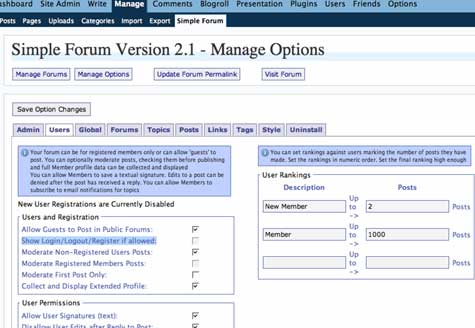
  • An admin interface in the WP backend that is simple and intuitive
  • The forum itself is highly customizable with a series of skins to boot
  • Best of all, the developer Andy Staines is tirelessly supporting users and working on integrating their feedback into the future builds–he is pretty remarkable

Image of Simple Forums backend

And did I mention that this is a plugin!!! A fact that truly amazes me given all the functionality and seamless integration at work here.

That said, there is one simple hack you need to do to get it to work with WPMu, and here it is:

You need to edit the following lines on sf-includes.php file in the plugin so that WPMu can recognize the users:

Change:
define(’SFUSERS’, $wpdb->prefix.’users’);
define(’SFUSERMETA’, $wpdb->prefix.’usermeta’);

To this:
define(’SFUSERS’, ‘wp_users’);
define(’SFUSERMETA’, ‘wp_usermeta’);

This is not be offered as a sitewide feature for all sites on UMW Blogs, but rather as an option for users on a site-by-site basis as a plugin they can activate.

There is one issue of WPMu that makes this plugin a bit difficult that I haven’t entirely gotten my head around yet, and maybe someone out there has figured it out. In the Simple Foums Options (under the Manage tab in the WP backend) their is the ability to “Show Login/Logout/Register if allowed:” I couldn’t check this option, and I realized it is because you can’t allow users who have not signed-up for a blog or username in a WPMu environment to to register for specific blogs independently. They must first have a username at the minimum. Not too big an issue, but since I am running multiple domains I need to find a way to allow any user to sign-up for an account yet keep it distinct from UMW Blogs, hmmm…I have to think on this more though–any ideas or experience with this out there?

Posted in plugins, UMW Blogs, wordpress multi-user, wpmu | Tagged , , , , , , , , , | 2 Comments

Multiple Domains on WPMu: Mission Accomplished!

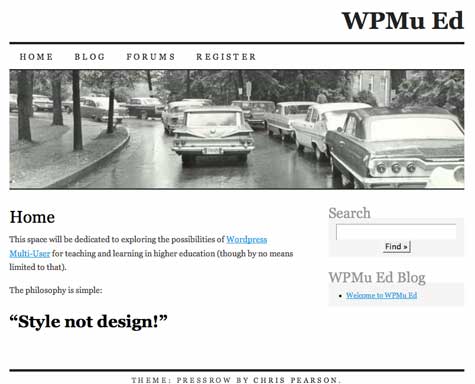
Well, I hate to quote our fearless leader out of turn, but unlike him I really was successful!

Image of WPMuEd Site

I had blogged earlier this semester about the potential possibilities available to UMW if we were to pursue mapping multiple domains to one WordPress Multi-User installation–one install, one upgrade, one point of failure–the last one is a quote from Jerry :). It is something people had been working out on the WPMu forums and, as usual, Dr. Mike came up with the hack that was ultimately turned into a tutorial here and then, to make things even easier, a plugin here.

So, having all of these unbelievable resources I gave it a whirl. I discovered a few things that may be useful:

  1. First and foremost, you need a really cool hosting service that is willing to work with you (or you need your own server). Why? Well, CPanel cannot necessary take care of everything you need to do here. You need to park the add-on domain and point it to your existing WPMu installation (easy enough). However, you then have to create another Virtual Host for the new domain that has its own dynamic dns (I’m quickly getting out of my depth so let me use exmple from two people who know what they are talking about.

    Luke, from the premium.wpmudev.org forums offered me a nice conceptual overview of how this needs to be accomplished (thanks Luke!).

    In Apache’s configuration file, you should either have 2 virtual hosts (one for each domain) that point to the same file path (where mu is installed), or you should have added more domains to the ServerAlias directive in the vhost for the primary domain so that it looked like:

    ServerAlias domain1.tld *.domain1.tld www.domain2.tld domain2.tld *.domain2.tld

    Also note that you would still need to create the wildcard DNS, which “may” take a day or two to propagate and become available. It shouldn’t take that long, but it might depending on several factors.

    As long as the dns points to the server, then apache points it to the right file path, MU will take care of the rest.

    And for those of you who understand Apache (which I don’t enirely) here is the code we used for our WPMu installation with multiple domains:


    ServerAlias www.umwblogs.org *.umwblogs.org
    ServerAdmin [email protected]
    DocumentRoot /home/umwblogs/public_html
    ServerName umwblogs.org
    ServerAlias wpmued.org www.wpmued.org
    ServerAlias *.wpmued.org
    User umwblogs
    Group umwblogs
    BytesLog /usr/local/apache/domlogs/umwblogs.org-bytes_log
    CustomLog /usr/local/apache/domlogs/umwblogs.org combined
    ScriptAlias /cgi-bin/ /home/umwblogs/public_html/cgi-bin/

    This worked and was by far the most difficult part of the process because it is not exactly something you can do on your own if you are on a hosted web server, and it really requires an administrator who is willing to work with you, lucky we have the coolest guy in town with Zach Davis of Cast Iron Coding–thanks again Zach!

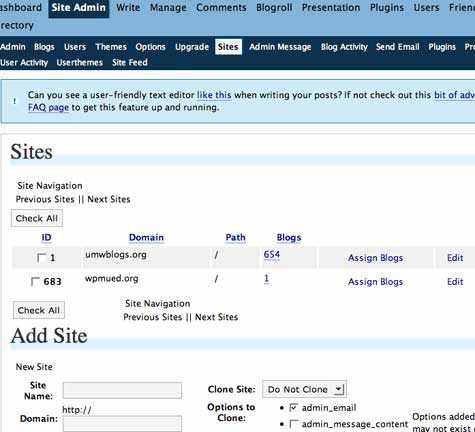
  2. The Multi-Site Manager plugin works extremely well, but there is at least one thing you have to do in the database to make it work successfully–see #3. Once you have created a blog with your new domain name (for example the domain wpmued.org would have the correlating blog on the existing WPMu install: wpmued.umwblogs.org) and added the plugin to your mu-plugins folder you will see a “Sites” subtab within the Site Admin tab. When you click on the “Sites” subtab you will see the following fields where you need to enter the appropriate information:
    1. “Site Name” (what to call your site)
    2. the “Domain” field will have the URL of the domain you have parked and pointed to the existing WPMu installation
    3. The “path” field where you need to enter a single forward slash “/” (no quotes)

    After this, map your new domain.

    Image of Sites tab in Wp-Admin

    There is also another feature for this plugin that allows you to clone your existing installation–very useful! Keep in mind, however, that the site-admins table does not clone and we are going to have to go in to the database and create this for ourselves. Next stop is the WPMu database, but note the new domain ID number (mine above is 683) before you proceed to the database (it will save you some time and effort).

  3. Creating the site-admins in the WPMu database is the final step and this is where Richard’s tutorial came in quite useful. You have to have access to a PHPmyadmin to do what he outlines in steps 26 through 30, but if you follow these steps to create the site_admins table you will then be able to see the Site Admin tab and effectively administer your mapped domain. After that, you can change the settings for all the particular options such as illegal domains, allowed file types, etc. from the Site Admin–>Options tab.
Posted in plugins, WordPress, wordpress multi-user, wpmu | Tagged , , , , , , , | 35 Comments

The “Read” Poster Re-defined

Image of JayZ

Now this is a “Read” poster I can get behind! See another one featuring Tupac here. Both thanks to the creative genius of Tom Woodward at the Bionic Teaching blog.

Anyone know the lyrics that come immediately before this line?

Posted in art | Tagged , , , , | 3 Comments