8-Minute Abs

One of the few things I have been unable to share on my blog is my daily work-out regiment. Not so much because I am shy or embarrassed about it, rather until now I haven’t had an effective way to explain its cinematic complexities and nuances -and some may even argue its transnational poetry. So in the spirit of sharing everything, I had my last session recorded and mixed so that you all can see what I’m up to before work on a daily basis. Enjoy!


In all seriousness though, I found this awesome video through Luke Waltzer’s precision post on Syncretism and Web 2.0 -it’s a keeper! The work of art above is from the Dvinsk Clan-Le Parkour. What’s Le Parkour and why am I interested in this as part of Web 2.0? -well Luke says it much better than I ever could:

This video features the Dvinks Clan, a parkour/free running group based, I think, in Latvia. Parkour was invented in the French suburbs, and inspired by the moves in 1970s Kung Fu flicks. This video echoes French New Wave cinema, draws upon the California skater videos of the late 1980s and early 1990s, and uses French hip-hop as its soundtrack.

Yeah, baby -mashing it up has as much to do with physical movement, cinematic styles, transatlantic hip-hop and decayed urban spaces (as Brian Lamb alluded to yesterday in his masterful Mashup talk) as it does with virtual technologies. Marrying the two makes them both that much more conceptually powerful and accessible.

Posted in video, YouTube | Tagged | 7 Comments

A Bliki -what’s a Bliki?

get_elements_by_tagname(‘div’);
foreach ($divs as $div) {
if ($div->get_attribute(‘id’) == ‘column-content’) { //grab only the body of the mw page
$contentDiv = $div;
}
if ($div->get_attribute(‘id’) == ‘jump-to-nav’) { //kill navigation div
$parent = $div->parent_node();
$parent->remove_child($div);
}
$div->remove_attribute(‘class’); //clear off classes to avoid style collisions. might need to do the same if style attributes are present
}

$h3s = $contentDiv->get_elements_by_tagname(‘h3’);

foreach ($h3s as $h3) {
if ($h3->get_attribute(‘id’) == ‘siteSub’) { //kill the reference to original mw page
$parent = $h3->parent_node();
$parent->remove_child($h3);
}
}

echo $wppageDOM->dump_node($contentDiv); //spit it out!

?>

Posted in WordPress | Tagged , , , | 11 Comments

Thinking History Digitally

Tomorrow a few of DTLT’s finest are going to meet with some folks from the History and Historical Preservation departments to talk about the technological possibilities for the emerging Center for Digital History at UMW (nothing official yet!). This is very exciting because we all know the faculty in these programs quite well, and I think that they are genuinely interested in what we have to bring to the table in terms of imagining and planning for such an academic resource center. I guess the benefits of working at a small liberal arts college manifest themselves in moments like these.

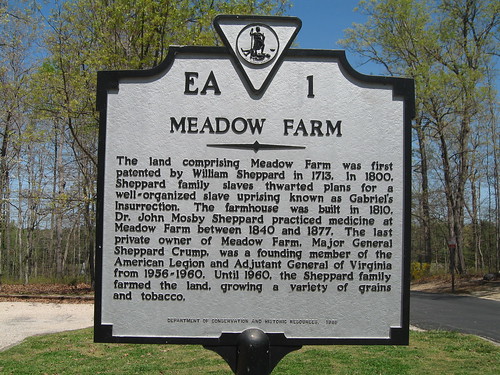
So, by way of a bad transition, my family and I spent the day at a “retired” plantation just North of Richmond in Henrico County called Meadow Farm. This site was the Sheppard family’s tobacco plantation for almost 250 years. The actual museum on the site was underwhelming, and I often find myself intellectually disgruntled by such historical landmarks -especially since the possibilities for learning about the history of such a place is often limited to a few generic placards. I’m not one of those hippies that believes that just because you are on the ground where history took place that by some kind of mystical osmosis you will begun to understand the events -I actually need something to read, conceptualize and interact with (I’m that kind of learner:)).

Anyway, the grounds were beautiful and the day was spectacular (blue skies and 85 degrees), but I left wanting a bit more from my experience. I mean Gabriel’s Rebellion, one of the most significant failed slave revolts of the early republic was foiled at this farm by two of the Sheppard’s house slaves -whom soon after were given their freedom. There was very little in the way of dealing with this history -whether by contextualizing it, exploring it, or further examining the history of slavery in the US. In fact, the only place I saw any mention of the slave revolt was in the historical marker at the entrance to the plantation.

Meadow Farm Plantation

This day trip to Meadow Farm rekindled an idea I had been bouncing around in my Museum lab class this semester given the ever increasing ease of creating mashups. The idea was quite simple, have a group of students take images of historical markers in Virginia from around the state -just like the one pictured above- and put them into flickr, geo-tag them and create a resource of historical sites that might be used in several different ways. In order to create a more comprehensive resource for the over 1500 historical markers from around Virginia we could open up the project to all UMW students, allowing for a distributed means of collecting the markers quickly and easily. The logic being that we have students from just about every nook and cranny of the state, get them excited about adding to this project by creating a flickr group that would make it easy for them to make their contribution. In fact, this is by no means novel, something like this has already been done in print and online -although the online version is a apparently a one-man 1.0 project. The idea in an educational context would be to open the images up for more conversation around the political, social and cultural events in Virginia’s history, as well as a way to graphically track and interact with more recent and local history.

Then, serendipitously, Alan Levine linked to Will Richardson’s post on Google’s My Maps, and I started to see just how much easier and contextualized this process might be. The final push came from Jeff McClurken’s (one of UMW’s finest digital historians) post about a Surreal Mashup Moment which brilliantly illustrates the possibilities for Google’s My Maps to think history digitally in some powerfully interactive ways. So why not create that flickr group of Virginia historical markers and build them into a Google My Maps account (both of which are registered and administered through UMW’s new Center for Digital History). Let the students explore with these tools, let them mash it up, and while they’re at it let them create a dynamic evolving teaching and learning resource that can be used, re-used and abused?

Tagged , | Leave a comment

Open, Connected, and Social

Pulling teeth

D’Arcy Norman has already announced the (MAC) Learning Environments presentation that will take place this Wednesday, April 25, 1:00pm EST (10:00am Pacific, 11:00am Mountain, etc…). D’Arcy, Brian Lamb, and Alan Levine will be re-visiting some of the generative ideas from their 2004 presentation “Small Pieces Loosely Joined” (you can see the archived wiki here) that was premised on framing a learning environment using decentralized, web-based tools -even before K2 was widetized for WordPress! If you want some additional information about the presentation, or are already sold and just want to sign up for this completely free and open presentation, go here.

Now, to set the record straight (I do this a lot), these three guys owed me on account of a little wager I placed for them on the Chicago WhiteSox back in 1919. So now, as a result of their rigged misfortune, they have to slum a bit. Their lack of options aside, I am extremely excited to take my five or ten minute portion of the jam to act as a stand-in for the hard working folks at Mary Washington’s DTLT (and UMW more generally) whom, through the leadership over the past year-and-half of Martha Burtis and Gardner Campbell, have taken the small tools loosely joined philosophy and ran full speed ahead with it. So, to quote Lee Harvey, “I’m just a patsy!”

In hopes that the MAC folks -those geniuses!- would want to see the possibilities of online learning environments, I took some familiar tools (and a snazzy new rug that really ties the room together! -thanks Andy Rush) to frame out a space where intensely open, connected and social learning could happen. Moreover, all of this within the framework of open source applications like WordPress, WPMU, and MediaWiki, applications that play nice with Web 2.0 services such as flickr, del.icio.us, twitter, etc. That’s right, start with a little open source then pull in some open content, and we got ourselves the beginnings of a learning environment that is closely modeled upon the small tools loosely joined philosophy.

The site for the presentation can be found here, and I invite any and every one to join in on the fun. The idea is that this is going to be a classroom/learning environment, and let’s pretend the course is on “Web 2.0.” Now all you have to do is get in there and offer up some content. It’s easy. Here’s how:

  • Create a blog here
  • Play around a bit with over 25 attractive themes in the presentation tab
  • Add in some videos or music from your favorite online services (like YouTube, Revver, etc.) by testing out the Anarchy Media Playerlook. Simply look for the yellow A on the text editor toolbar and copy in the relevant url.
  • If you’re still bored, you can always add a flickr stream, del.icio.us bookmarks, recent tweets, etc. using your sidebar widgets. And presto, your hard work over the past months is already there waiting for everyone during the presentation.
  • Not impressed? Well, the wiki is also wide open, so feel free to frame out my portion of the discussion for me while you’re too busy being underwhelmed :)

I can’t offer you much in the way of fame and fortune for testing it out. But maybe I can convince you all by stressing the fact that any and all examples of a dynamic, open source learning environment that plays well with the Web 2.0 services we have all come to know and love is well worth collaboratively testing out and highlighting for corporate entities that are used to hand delivering the “next, best thing!” The work we are doing is not about companies, it is about people and the importance of keeping the highly socialized connections amongst us open and free. So take a few minutes and give it a test drive, it won’t be used as some lame advertisement, and it shouldn’t be any worse than having a tooth pulled -I promise!

Posted in WordPress, wordpress multi-user | Tagged , , , , , , , , , , , , | 1 Comment

Just in case you were wondering…

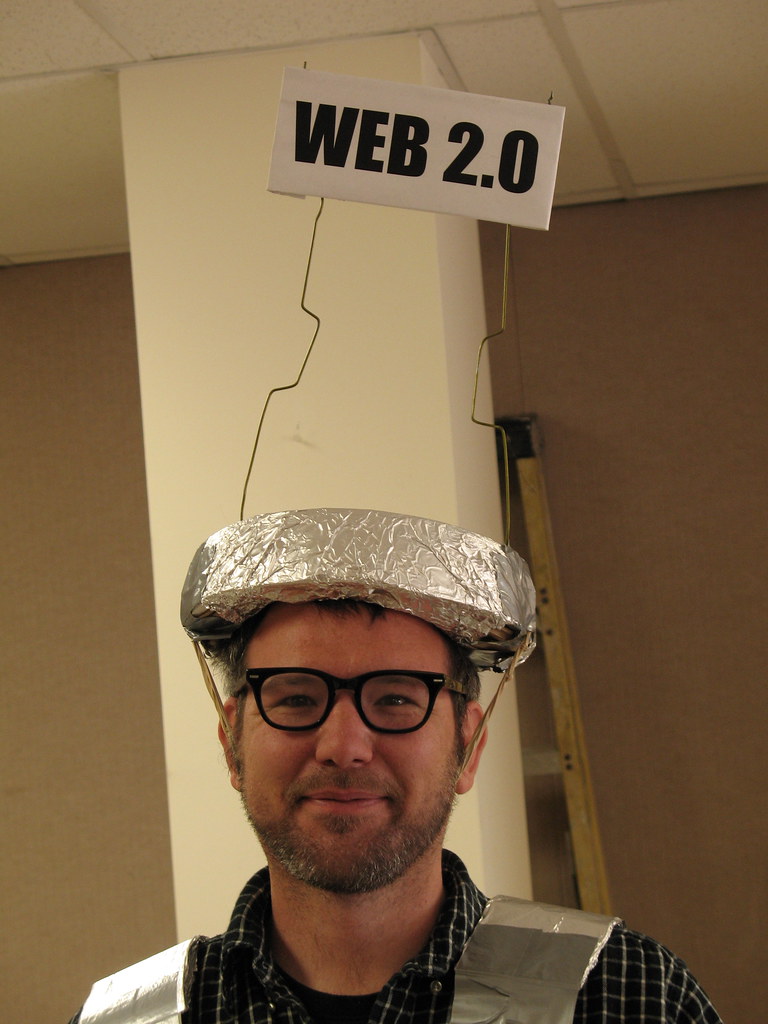
…this is Web 2.0!

This is what Web 2.0 looks like!

Tagged | 13 Comments

Exploring a few WPMU plugins

I recently got inspired, so I returned to the ELS blogs site to see what was going on in the world of WordPress Multi-User plugins (as well as to test Simple Pie on WPMU -which works beautifully!). I’m glad I did!

I found a few cool new plugins for WPMU, and I will order them in the order of overall coolness (the coolest comes first). All of these plugins can be downloaded on the WPMU development site here.

  • The Anarchy Media Player Plugin (love the name!): WPMU now has an all-in-one multi-media player thanks to the Anarchy Media Plugin. Stop and think about this for a moment, WP has another plugin as versatile and well designed as PodPress. That’s two bad ass multi-media plugins while Drupal is still trying to put one half-way decent module together -what’s wrong here?
    Here are the file formats and online services this plugin supports:

    Simple href links: Upload your mp3, flv, mov, mp4, m4v, m4a, m4b, 3gp, wmv, avi or asf file via the WordPress editor’s upload browser then “send to editor” – or make a hypertext link to any external file on the web – and you’re done!

    Rich text editor: Flash swf (including Google Video, YouTube etc., players via the “A” for anarchy button) or Director dcr use the respective rich editor buttons. To embed the various media players supported by AMP enter the full HTTP address (url) to your YouTube, Google Video, iFilm, Revver, Metacafe, MySpace or GoEar web page. For DailyMotion video and Apple iTunes iMixes just copy and paste the code from their embeddable players.

    A very cool development to say the least!

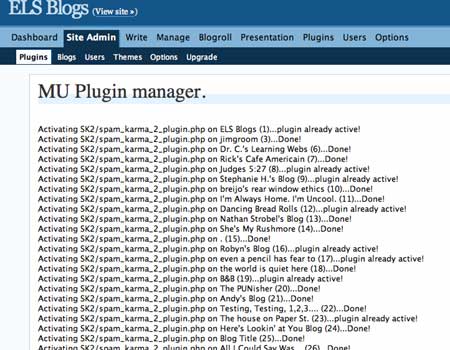
  • The WPMU Plugin Manager: A close number two if you have anything at all to do with administering a WPMU install. This plugin rocks! Here’s the official copy: “Manage global plugin policies or just turn on and off plugins for individual blogs – without enabing like the plugin backend menu.” I can’t begin to stress how amazing this is for customizing users on a case-by-case, or class-by-class, basis. I just installed it and updated all the blogs on the site with Spam Karma 2 -won’t they love me without ever knowing why! Here’s a looksie:MU Plugin Manager
  • WPMU Recent Posts: “Adds a sidebar widget to let you display recent posts from updated blogs in WordPressMU. The posts from blogs marked as spam, mature, or deleted will not be listed. Download from the topmost link .” Relatively straightforward -but always useful to catch a quick glimpse of what’s most recent on the home page. It supposedly creates a sidebar widget, but I couldn’t get that to work too well, I had to copy and paste a php snippet in the sidebar widgets. So, not too well coded, but easy enough to work around with a slick K2 sidbar modules them:)
  • Mass Mailer: A straightforward plugin (works better than the previous plugin out of the box, but since it has to do with e-mail I had to rank it down a peg) that allows the administrator to e-mail everyone who has a blog on the site. This will be useful, for example, if I want to send a link to a post about exporting their content as they are getting ready to graduate, or details about new plugins, etc. I imagine I won’t use it much, but a nice fiver in my pocket regardless.
  • WPMU Latex Math & Random Blog: These two plugins tie for last because neither worked correctly for me. The Random blog plugin is a nice idea (have a link on the portal that features a random blog in the network) but it was terribly coded and continually chokes on the headers. I’m gonna have to re-visit this one. WPMU Latex is a bummer because I know it works (I saw it on uniblogs.org), so I am going to have to revisit it sometime soon as well. I just love the idea of folks putting complex mathematical equations into a blog or wiki (MediaWiki is Latex ready but I have seldom seen it used) -so I will have to do more research on this one.
  • I do love playing with WordPress Multi-User -I guess I am a WordPress fan boy:)

Posted in WordPress, wordpress multi-user | Tagged , , , , , | 4 Comments

bavarcade

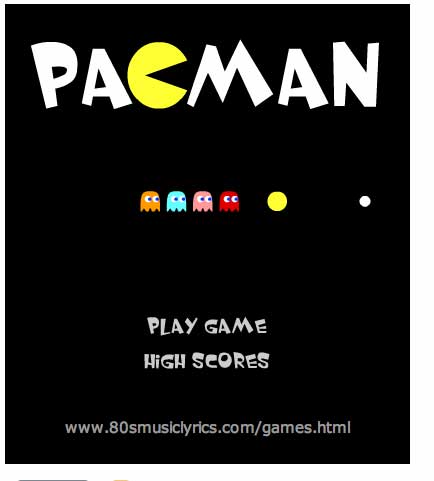
Pacman

This is my house! Just wait ’til I have my high-score -no one will beat -I said NO ONE!!!

It just doesn’t get any better than this, thanks Jerry -for lightening the load!

Posted in video games | Tagged | 3 Comments

Playing with SimplePie for WordPress

I’m gonna stick to playing with SimplePie and WordPress and let Andy Rush (the new MediaWiki celebrity) and Patrick Gosetti Murray-John (the old-gold Drupal fan-boy) do their thing. I can officially announce that the SimplePie RSS parser runs fine on Bluehost. Take a look at the demo installation on my bluehost account here. Additionally, I have been using a plugin called BDPRSS (my write-up here) which, in fact, does much the same things as SimplePie. Yet, both have their specific benefits and drawbacks. A huge benefit of SimplePie is the way it formats the feeds it pulls in. BDPRSS choked on displaying flickr photos or formatting the feeds from YouTube, whereas SimplePie feeds both of these services quite nicely into WordPress. See the examples of these below.

A potential drawback of the stock SimplePie plugin is that it doesn’t have a user interface in the backend, so you will have to copy and paste simple php code into the sidebar and/or template. You can also post it into a page or post in WordPress if you are using the EXEC-PHP plugin.

One thing I haven’t figured out about SimplePie is whether or not you can combine multiple feeds into one -this was the major selling point for me when using BDPRSS, and a feature which subsequently fueled the experiment with pulling class feeds into a static page with WPMU (write-up here). So, I still have some more research to do with this tool, but I am more than excited about the possibilities.

SimplePie Test with YouTube

SimplePie Test with flickr

BDPRSS Test with flickr

Posted in plugins, WordPress, YouTube | Tagged , , , , | 4 Comments

WP-o-Matic

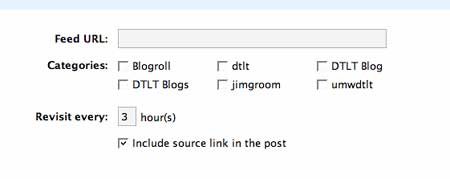
WP-O-Matic is a nice little third-party plugin for WordPress that uses the SimplePie php class (thanks to Patrick and Andy for the link to this amazing set of aggregation resources for both WP and MediaWiki) to grab an RSS feed and automatically use it to create posts in your blog. The interface is “dead simple” (to quote John Maxwell, one of the many highlights of NV 2007). All you do is copy and paste the RSS feed and then select the category it should be posted within. That’s it!

Here’s a look at the interface:

wp-o-matic

So, why might this be useful? Well, I started thinking about it some, and I there are a couple of possibilities.

  • Cross-posting blog articles that you may want to preserve on your own blog but also would like to share on other blogs you may be associated with. For example, UMW’s Division of Teaching & Learning Technologies has been framing out a series of WordPress and MediaWiki spaces on a separate Bluehost account where we can begin to centralize some of our content, ideas, tutorials, and other resources that are specific to our collaborative work. WP-o-Matic is perfect for this. Just install it on the blog you want to post on in addition to your own. Then tag one of the categories on your personal blog as, for example “dtltblog” -keep in mind that WordPress will create a unique rss feed for each of the categories you create. After that, grab the category feed (in this example “http://yourdoamin.com/category/dtltblog/feed”) from your personal blog and feed it into the WP-o-Matic plugin. Now every time you post to this specific category on your own blog it will also be posted on the additional blogs you added this feed to.
  • Now extend this example to a series of student blogs who are using their own blog to post for several different classes. With this plugin they can login to a class site, copy their category feed in, then every time they post to that category they have updated their own portfolio as well as the relevant class site! Simple as pie!

What I really like about this is that you’re able to keep a majority of the posts you publish on the web within your own blog, while at the same time using categories and their feeds to quickly publish the relevant posts to the other distributed blogs you may be contributing to. This solves some of the questions surrounding the work/personal line of a blog that some of us, at times, wonder about. Not necessarily a remarkable idea conceptually these days, but definitely a lean, quick and easy tool to accomplish sharing posts amongst several blogs.

In fact, this post is a real-life example. I have installed WP-o_Matic on umwdtlt.org (a site under development) and used the “dtltblog” tag to send this post over there. Here it is in action!

A couple of additional notes: this plugin is currently in an early beta and does not yet deal with flickr feeds well and chokes in WPMU for the moment. Also, the next version promises a link in the distributed post to the original site it was published on.

Posted in WordPress, wordpress multi-user, wpmu | Tagged , , , , , , , | 17 Comments

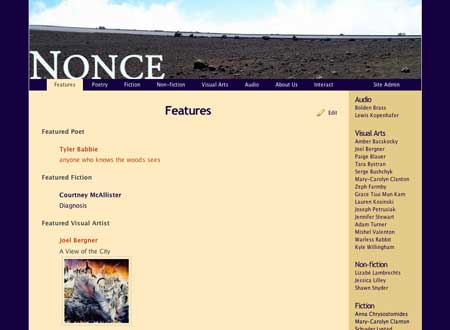
Nonce Journal

Nonce Journal

The Nonce Journal is the handy work of five UMW students -Alissa Bourbonnnais, Alex Cardia, Kanise Carter, Liz Gerber, and Rebecca Parson- from Claudia Emerson’s The Literary Journal class. The project for the entire class was to spend the first half of the semester reading and analyzing the most recent publications from some of the high profile literary journals in North America. Below is the course description:

This special topics course will give students a unique introduction to the world of the contemporary national literary journal. The most recent issues of select journals will serve as initial texts—and students will examine the journals’ shared and divergent purposes, including the role they play in the creation of regional and national literatures. Students will then learn the practical side of journal production, working collaboratively to design and produce an on-line journal of their own.

This class was somewhat experimental in that the students were not only expected to analyze contemporary literature (a feat within itself), but to turn this analysis of the poetics into their own conception of an online literary journal: student-based praxis. There were four groups of students, each group was expected to present on a series of existing journals and then conceptualize their own theme-based journal, solicit submissions, design an interface, and present an over-arching rationale for their creation. Here is their idea of the new literary journal, in their own words:

By the nature of our generational representation of the arts through the medium of the Internet, Nonce aims to take a new angle on the concept of a peer-reviewed journal. After publication, we hope an immediate dialogue will be established by readers and writers alike by posting comments in the actual journal. We are interested in this exchange because the reputation of the works can build before our very eyes, and ultimately, the dialogue about the pieces may represent our generation as fully as the art itself.

In other words, please comment on the work you see!

What’s amazing to me about this creative process is that it was all done over the course of two and a half months with less than a part-time staff of no more than five students, a shoe-string budget, and tons of creative labor. There has been a lot of discussion about the direction of the educational process in relationship to technology and how it might shape the experience of the future, well to those questions I offer up this class, and in particular the Nonce Journal, as a possibility to dwell upon.

What’s more is that while I’d love to take credit for this creation, I really didn’t have that much to do with the process. Professor Emerson framed the experience of what it means to conceptualize a vision for a literary journal, delving into the finer details of a journal’s identity, the selection process, as well as an in-depth look at what it means to be an editor of arts-based publication. The students hunkered down and did all sorts of amazing and imaginative work. All I did was set up a few WordPress installs, show them a some basics, and serve as an ad hoc consultant for any particular issues they might have along the way. This usually entailed making WordPress play nice as a more conventional website -and it just doesn’t get any easier for me than WordPress! I started this project as a Drupal site, but soon realized that I really don’t want to administer their journals, I want them to do everything from nuts to bolts -and guess what- they did!

The Nonce staff, the first of the four groups to present their work, created a literary journal over the course of a semester with submissions from over thirty-five artists from around the globe -this is not your mother’s college literary journal! I can’t help but think that the future of these web-based tools is not only to change the dynamic of any given classroom, but also to frame a series of resources that make the educational process a space not only for thinking and imagining but also for building. The built online environment of Nonce -which moves beyond the strictly Personal Learning Environment- is a collaborative testament to the very process of creativity that not only reflects a fascinating cultural moment for traditional academic and creative publications, but also affords each of these students a way to turn what they have learned by doing into something they can continue to build upon well after they leave Mary Washington. The tools are all web-based- their own domain would cost $8 a year, a hosting service another $6.95 a month, and they don’t need to be in the same physical place to keep the journal going -and, boy, I hope they do keep it going.

Nonce is an example of the Literary Zine of the 21st century -made for next to nothing, not necessarily tied to any one place, framed by its own generational vision of art and culture, with a unique perspective about the changing nature of peer review. Why can’t students start using these tools to imagine, create, and collect the generational vision of this interesting moment we are living in? This journal takes VCU’s Blackbird, the current Grand Poobah of online literary journals, as its inspiration, but unlike Blackbird it has a space for real-time commentary, it is RSS ready, and it has the open source WordPress community of innovation behind it to allow the presentation of the online work to evolve as quickly as the technology does.

But enough already, go check out Nonce for yourself. So far I have only made it through the visual artists and there is so much good stuff to be had -here are a few of my favorites: Joel Bergner’s Mural paintings, Serge Bushchyk’s “Windsurfer,” and Grace Tsui Mun Kam’s “Aerial Painting.”
All I can say is wow!

Posted in WordPress | Tagged , , | 6 Comments