Adapting to the Reclaim Cloud

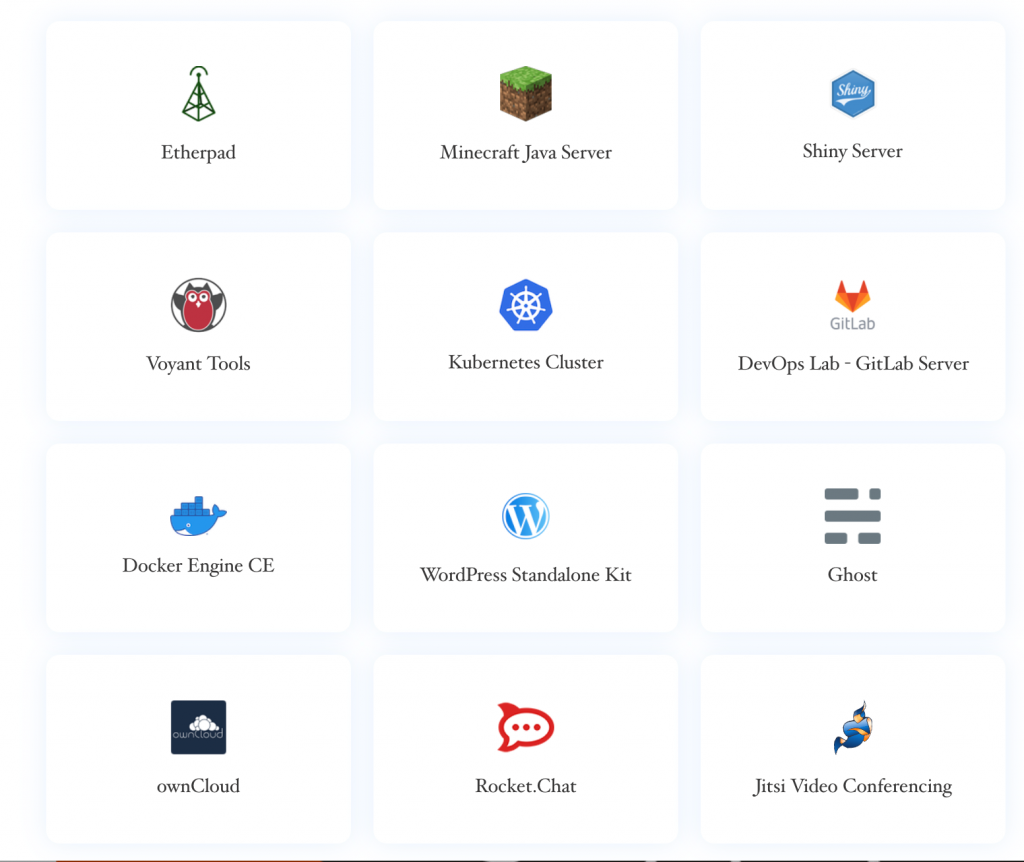
Tim has been on a full-blown roll creating one-click apps for Reclaim Cloud. In just the first few weeks we already have more custom one-click apps in Reclaim Cloud than we created through Installatron for our first few years. It speaks to the power of this new platform for sure, not to mention the seemingly limitless possibilities it provides us to leverage Docker compose files for a whole host of applications will prove a huge boon for the marketplace of apps.

In fact, J.R. Dingwall’s recent post about trying to get the application Adapt Learning authoring tool installed on Reclaim Cloud speaks quite pointedly to the limits and possibilities of this new platform. Let me start with the limits, a lot of us edtechs are not sysadmins, so spinning up your own server, even if in the new fangled Cloud, is not necessarily simple:

Installing the authoring tool requires access to commandline, which I had never used before. Reclaim Cloud makes accesses command line super easy and clear, but like a foreign language, you gotta know what you’re doing. I also discovered that my approach to following instructions is not really the best way. Initially, you need to have four things in place to install adapt authoring: git, node.js, MongoDB, and grunt. That was a big hurdle until I found in the documentation how to check each. So I spun up the environment (selecting node.js, and mongdb) and then spun my wheels trying to figure out how to get git and grunt installed. Doh! Turned out they came with the package.

You can create just about any stack on Reclaim Cloud, but that process assumes certain skills like command line knowledge of Linux environments, how these next generation apps are packaged, not to mention their various relations, etc. I think this could be an environment edtechs become more and more familiar with, but I also understand the hard limits of entry, the need for support, and the time it takes for such specialized learning. SO, on the other side, the limits are real and it is up to us to try and make the tool accessible not only to the sysadmins, but also the folks who want to focus on its use. Here is JR’s second point really resonates with us:

I recall David Wiley’s keynote presentation at OER 18, a talk where he was asked to be provocative. One of the things he mentioned was about the days of compiling his own code, and while open source is very important that it is more important to make tools usable to the widest possible audience (I’m paraphrasing). I think Reclaim has often struck a great balance between providing simple easy to use access to tools and letting them get under the hood. Reclaim Cloud takes it to the next level.

I think this is absolutely spot on. Reclaim Cloud, as we are imagining it, gives the most Mountain Dew addled sysadmin an endless playground of possibility while at the same time providing a space for instructional technologists and designers to play and conceptualize the possibilities of this new environment, while at the same time providing focused community support and help when and where possible to make various technologies heretofore unimaginable just a click away.

Special thanks to JR for taking it to the blog, JR, I really appreciate the time and energy he spent illustrating the challenges and rewards of diving into a whole new paradigm for exploring open source edtech tools.


Posted in Reclaim Cloud | Tagged , | 2 Comments

Hollywood Squares at MEITAL2020

What do washed up edtech like me do now? Well, naturally I play Hollywood Squares in Zoom!

https://www.youtube.com/watch?v=Bjjuq3ftfLw

To be clear, the idea was sound, and Philip Schmidt nailed the backgrounds that allowed us to seamlessly switch between lighted and unlighted squares.

Technically we needed 9 people and would have to be asked questions and by two contestants who were competing against each out in game show tic-tac-toe, but again the idea was sound. I even did a ridiculous promo video that makes zero sense:

This fun group of folks was more than willing to roll with anything. Thanks to the indulgent crew consisting of Allison Littlejohn, Lisa Marie Blaschke, Laia Canals, and Yishay Mor I think we made the session a bit more silly and fun. Although, I realize it might help to talk about the actual session and some of what we discussed. This panel was for Israel’s 18th annual MEITAL conference focusing on Teaching and Learning Technologies. The crew listed above was staging a reunion tour based on our unattended session in Barcelona way back in 2017.* The panel discussed what possible futures for higher ed post-COVID-19 might look like, you can read a full panel description and more details on the conference website. I am not sure there is a recoding of the session, but I will save the space beneath paragraphs below jut in case.

I can’t say I remember what we said exactly, but this Italian transplant couldn’t help thinking through the current crisis in the US. To be fair, I was definitely channeling a bit of Kathleen Fitzpatrick’s blog post “Your Institution Does Not Deserve to Survive” while trying to imagine anything resembling insight into the insanity that is the US context right now. The situation many U.S. institutions of higher learning find themselves in is a perfect storm that finds them damned if they open up campus as usual (which less than a week after the session seems even more insane given the rise in cases of the virus) and damned if they don’t (the financial fall-out could represent an existential endgame for a significant amount of schools). The full brunt of the market logic higher ed has conformed for the last three decades has caught up with it, which is true for just about every sector. The discussions of states and the Federal government cutting financial support for education is nothing new, but now our sector is finally looking into the abyss of what that chronic underfunding and overcharging for services means in a full blown depression. I believe Lisa even mentioned the idea of “tuition insurance” as a real thing now given every institution is face with the real risk of choosing to do business as usual and finding themselves in the midst of a full blown catastrophe on campus. I can’t help but think that Tom Woodward called it over a decade ago when he scripted the Uncanny Edtech bit about an educational insurance salesman that comes back from the future to sell people education insurance given the future is a complete shit show 🙂

So, it was a fun session, I guess, but can’t say things didn’t get pretty bleak pretty quick…

_____________________

*Nobody attending was  a result of the entire city going on strike to protest the Spanish government’s abuse of power.

Posted in presentations | Tagged , | Leave a comment

Long Live UMW Blogs

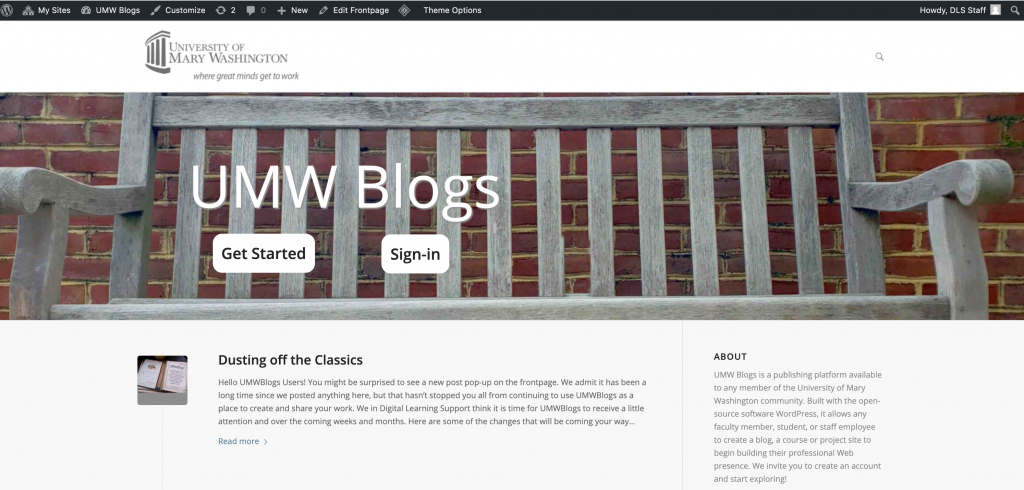
The last few weeks I’ve been working with UMW instructional technologist Shannon Hauser* on some overdue maintenance for the venerable UMW Blogs. Part of that work included a quick coat of paint for the homepage featured above. It has been proudly sporting Martha Burtis‘s design work from 2010 or so, and while that held up well for a decade, it was time for some new digs. I went to the trusty Enfold theme, which we run on most of our Domain of One’s Own schools, which is usually good for a minimalist, responsive theme.

While admittedly biased, I like Shannon’s thinking that it might be a good time for a UMW Blogs revival. It provides both a simpler and more scalable solution for faculty and students that just want WordPress blogs without the over head of a full cPanel instance. Having a more streamlined offering is always nice, and it also gets away from the either/or mentality some folks approach Domains vs. WordPress Multisite from.

Long live UMW Blogs, the open source publishing platform that could!

A couple of notes about the work:

  • all mapped domains are now moved over to UMW Domains, so Tim was able to force https across the entire WordPress Multisite instance
  • database and WordPress core files upgraded to latest version, 5.4.2
  • all plugins and themes updated
  • snazzy new homepage theme, as mentioned

And with that, a piece of UMW’s instructional history got a much needed tune-up and is now running like a top with 10,000+ accounts as an open archive and there’s plenty of room for at least 10,000 more 🙂

______________________

*The levels of both awesome and bizarre that Shannon is an instructional technologist at UMW is probably not lost on a few readers of this lowly blog, she started as a student worker with the group back in 2007 or 2008, so there is some solid history there.

Posted in UMW Blogs, WordPress, wpmu | Leave a comment

Reclaim Cloud’s Free Public Beta Now Open

I’ve been writing a bit about Reclaim Cloud on this blog over the past month in preparation for this: the launching of the open, public beta for Reclaim Hosting’s new cloud hosting service! It’s really exciting to share this news, and I would be lying if I didn’t admit I’m a bit surprised how quickly everything came together from the point we realized it was possible in late April to rolling it out publicly today.

What is it? Reclaim Cloud is a container-based hosting solution that allows folks to create custom technology stacks in everything from PHP to Ruby to node.js to Go —not to mention the possibility to load and run just about any Docker container freely available on the web. What’s more, we have a growing collection of one-click installers for a wide range of applications.

So, in short, it’s everything we have not been able to provide in terms of hosting a wide variety of technologies and tools beyond the LAMP stack. What’s more, the infrastructure allows the scaling of computing and storage resources seamlessly. A watershed moment for Reclaim and an important move to ensure we can help our community make sense of the ongoing shift in the hosting landscape.

How can you get help? Throughout the free, open beta period this month we’ll be handling all support through our community forums where you’ll find useful guides, focused video tutorials (like those featured above), and the ability to request help via forum topics.

Where do I sign-up? You can read more and sign-up for the free beta period on our website at http://reclaim.cloud

So, reclaim your sense of edtech exploration and jump on the next shuttle to Cloud City!

Posted in reclaim, Reclaim Cloud | Tagged , | 5 Comments

Mounting Directories and Copying Files between Containers in Reclaim Cloud

As I was moving both bavatuesdays and ds106 from a WordPress Cluster setup to a more simplified LEMP-based container, I was running into issues with private and public keys making it hard for me to rsync between containers. I posted my issue to a thread on the Cloud section of the Reclaim Hosting community forum (which will open up tomorrow, and will be where we will be handling support for the open beta period of Reclaim Cloud), and learned a very cool trick, namely that you can mount any one of your containers onto another environment and simply copy over any files you might need. For example, I need to copy the 15 GBs of files in bavatuesdays wp-content over to the new install, but with rsync not working the prospect of downloading and re-uploading seems time consuming and ridiculous.

“But,” to quote Tim in the forum thread

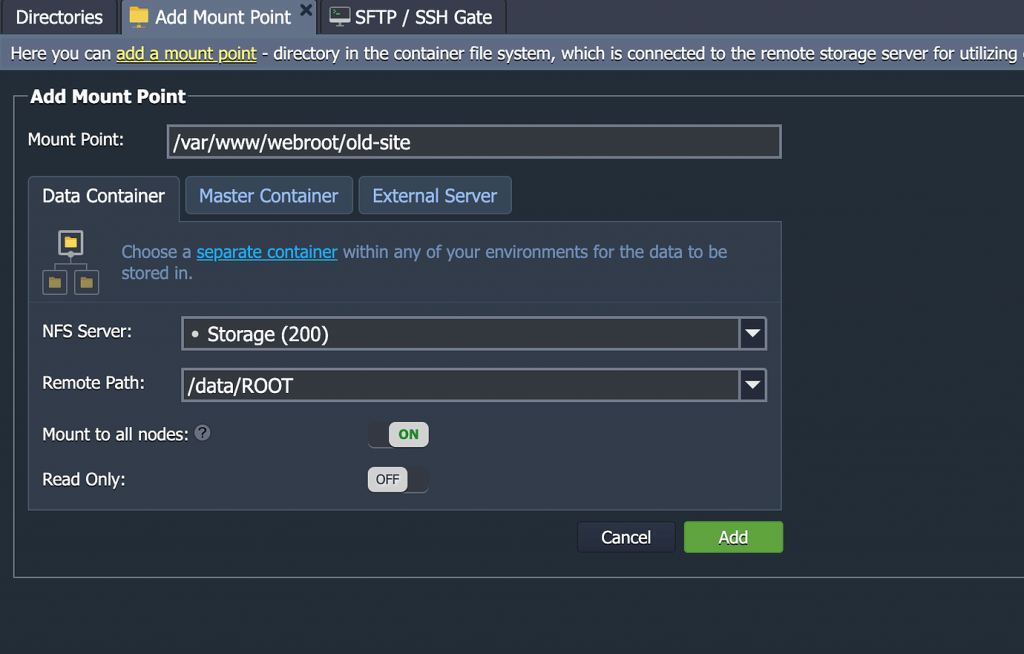
…there may be an easier way, you can just mount your older storage container to the new container like so:

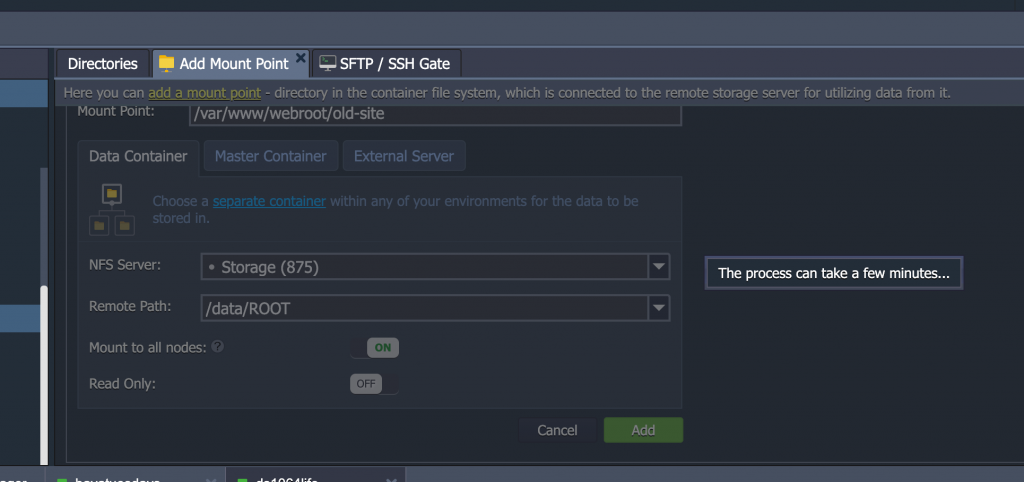
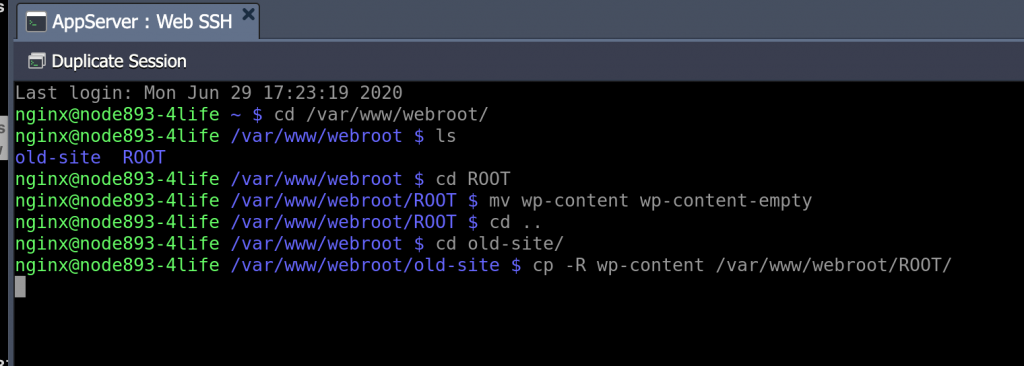
Then you can simply copy files as if both folders are on the same server from /var/www/webroot/old-site to /var/www/webroot/ROOT

And it worked, what’s more we tried it with a database container after I took a dump of the ds106 database, and it was cool to discover you can mount a database container onto an add container to copy files as well.  So, transferring files and data between containers across different application environments is quote simple.

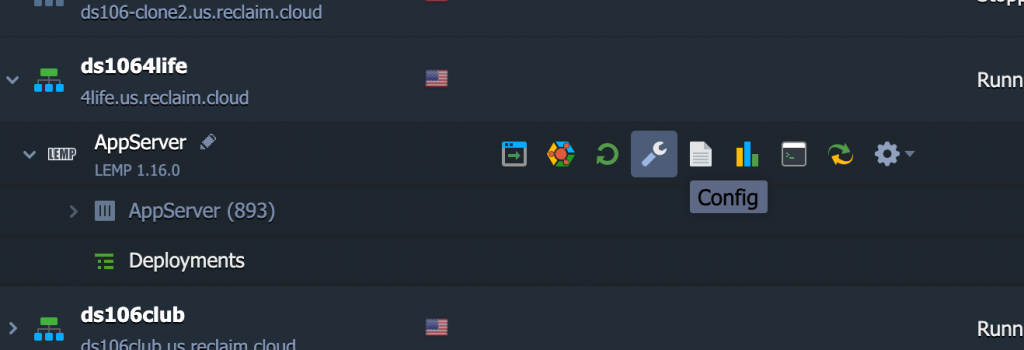
You go to the Config icon in the container you want to mount the other container to:

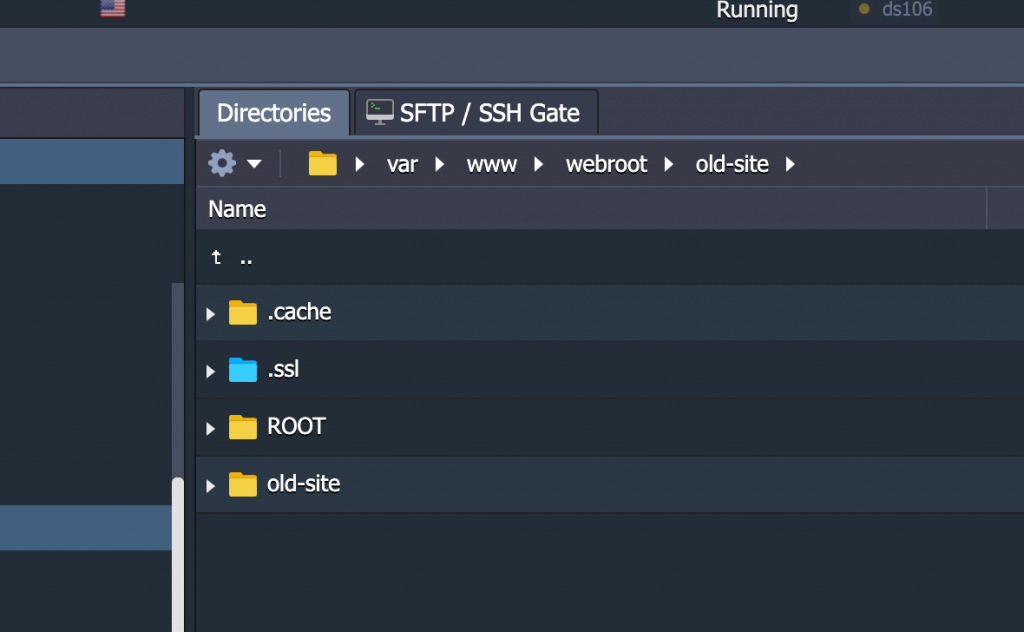
Create a directory in the /webroot folder, in this example old-site:

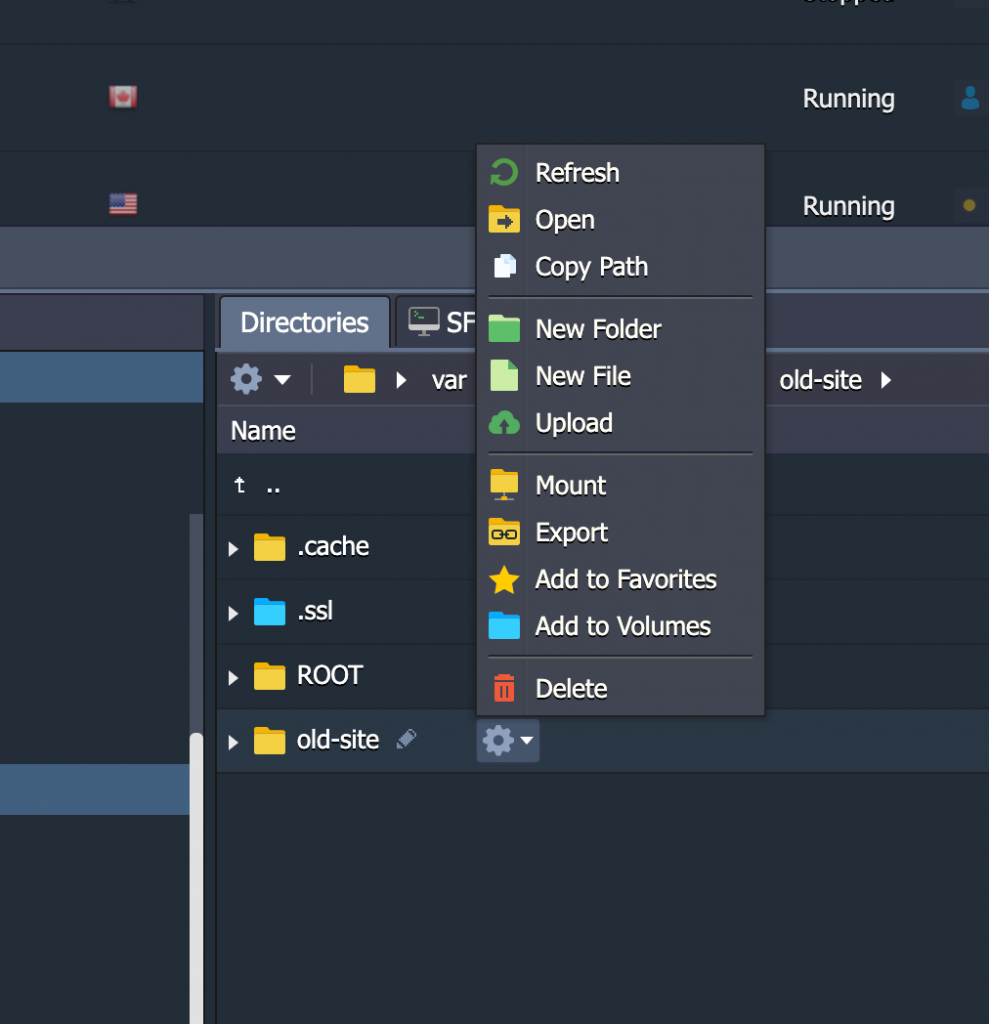
The click the gear icon and click on the Mount optin:

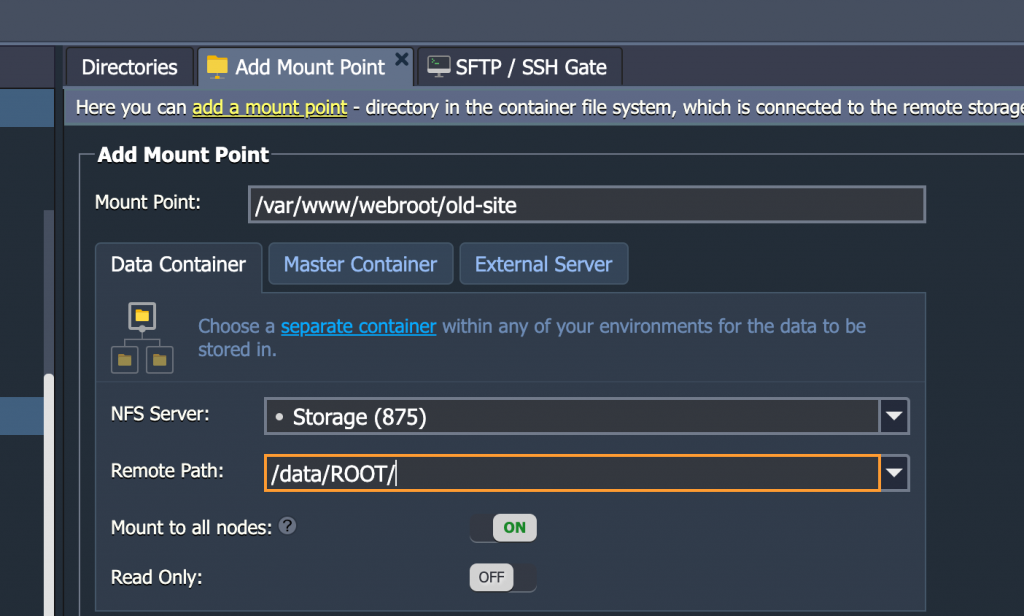
After that you will need to choose the container you want to mount, and include the path to the directory you want to have access to:

It happens quite quickly, the few minutes is an exaggeration…

And once it is mounted you can copy or sync files between the old-site folder and the directory you need to copy your files to (in this example /var/www/webroot/ROOT/) and it the copy seamlessly—without the wait.

Just another reason I am loving Reclaim Cloud.

Posted in Reclaim Cloud | Tagged , | Leave a comment

Holy Clustered Cloudlets, bava!

The last month needed to be a deep dive into the Reclaim Cloud, and I think I have held up my end. I migrated quite a few old sites, namely bavaghost, this blog (a couple of times), ds106 (a couple of times), and ds106.club. I also spun up some new applications, such as Jitsi, Discourse, Azuracast, and Minio. It has been a really rewarding, if at times frustrating, month. I am learning a ton about containers, Docker, and power of virtualized environments. I’ve been able to experiment with different database types and environments for bavatuesdays and ds106 simply by cloning an entire stack and testing the changes, this is illustrated nicely by my last post about switching database types on ds106 and down-sizing this blog to a non-clustered WordPress instance. I followed up on that last night with moving ds106 to a non-clustered WordPress instance as well, and like this blog it’s running cleanly on a fraction of the CPU resources.

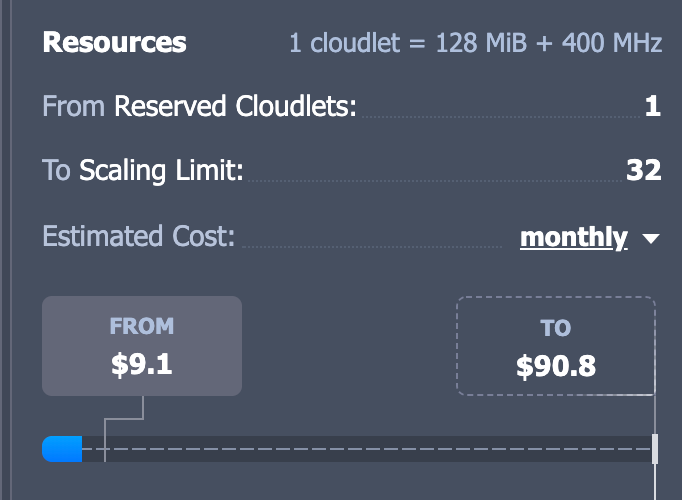
The Reclaim Cloud measures resources in a unit known as a cloudlet, which is a measure of CPU usage or, 128 MB per cloudlet. So 8 cloudlets is 1 GB of CPU, 16 cloudlets 2 GB, etc. Part of my experimentation over the last month was to explore WordPress clusters given this environment would be ideal for heavily trafficked WordPress sites. And while ds106 and bavatuesdays have a bit of traffic, they are not “high traffic” sites so reducing the regular cloudlet usage by roughly 60% translates into significant ongoing savings monthly.

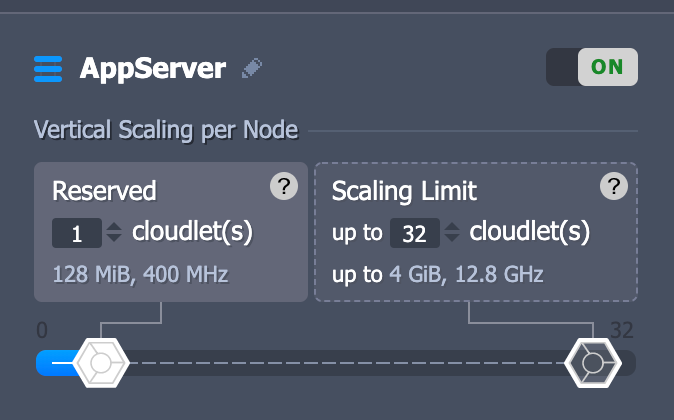
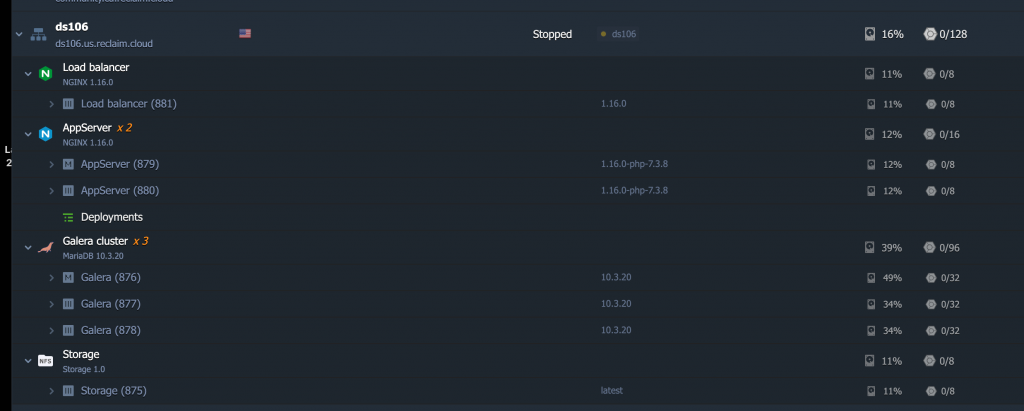
While I can reserve up to 32 cloudlets, or 4 GB of CPU for my WordPress site to scale up at any time, I will only be charged for how much I use, which is on average 10 cloudlets. With the clustered setup I was being charged minimum25 cloudlets given it was powering a load balancer, 2 NGINX apps, 3 MySQL databases, a separate storage container, etc.

With the non-clustered environment base resource usage (cloudlets) is cut significantly because there are far fewer containers.This containerized LEMP environment with the MySQL database, NGINX app, and storage all wrapped into one is far simpler than the cluster, and while it won’t scale as seamlessly as the architecture in the first image, chances are it won’t need to. And even if it does get a spike, the container can scale another 22 cloudlets, or almost 3 GBs of CPU resources, before running into any limits.
So, as June comes to a close I have moved this blog around a bunch over the last 6 months: from cPanel-based shared hosting to Digital Ocean to Kinsta back to Digital Ocean and now to Reclaim Cloud. Digital Ocean was costing about $25 per month for a 4 GB server and Spaces instance, which is quite reasonable. Kinsta would have been $80 a month for container-based WordPress hosting, which was a bit rich for my blood. Running bavatuesdays on the Reclaim Cloud will cost roughly the same as Digital Ocean for a server that can scale up to 4 GB (although in practice it is only using 1-2 GBs of resource at most). And while there is no possible way we can pretend to compete with Digital Ocean on server costs, if we are able to keep pricing within the same ballpark that would be amazing!

Posted in reclaim, Reclaim Cloud | Tagged , , , , , | 1 Comment

Weekend Notes from Reclaim Cloud: Anth101, downsizing bava, and back to MyISAM

I spent some time Saturday and Sunday playing around with the Reclaim Cloud, I am spending more and more time in this environment, and loving it. Couple of  notes here given I am prone to forget.

I moved the impressive Anth101 from a managed server into the cloud this weekend on a scalable WordPress instance. That site runs really lean now, so it is a perfect fit. This was not a clustered WordPress site, and so far it is using 3 cloudlets—which would roughly work out to $9 a month. A world of difference from managed hosting 🙂

After moving Anth101 I got the idea that perhaps this blog could be put on a similar non-clustered WordPress instance. The difference would be roughly 1/3 the number of resources/cloudlets (roughly 8 versus 24 being used in the clustered environment), which would translate into significant monthly savings. So, I gave it a shot put was running into issues with rsyncing between containers, which was a permissions key issue on my end. I documented it in the Reclaim community forums, but one thing I realized as a result is that you can mount file systems from another Network File System (NFS) container in a different environment, which is pretty slick. I tried that (you can see details in forum thread linked above) and was able to easily copy everything from the old wp-content directory over to the new instance after mounting it. So, this blog is running in a new WordPress environment on the Reclaim Cloud, and we’ll see if there is a noticeable difference in load and resources demands.

Finally, I already wrote about switching the database type on this blog and ds106 from MyISAM to InnoDB. There were no perceivable performance issues on this blog, but when I switched types for  ds106 (a WordPress Multisite instance) the database resource usage on that cluster went through the roof. I had time this weekend to try switching the database type back to MyISAM on ds106, and the resource usage dropped. So it was definitely an issue with the database type. The whole reason I did this in the first place was because the Galera Cluster that syncs the multiple databases in that environment only works with the InnoDB type. And if InnoDB is no longer running on ds106, I may have to switch it back to a non-clustered WordPress instance as well. There is a theme here, a clustered setup may be overkill for my modest web life. The real beauty of switching database types, however, was the cloning tool in Reclaim Cloud. I could take an entire snapshot of the ds106 stack, change database types, test that it worked, and then point DNS to watch load. It was super simple, and I could always switch back to the previous environment if need be during testing.

Anyway, it felt good to spend some time in the Clouds this weekend given our public beta starts Wednesday, I am starting to feel more and more comfortable in the environment, and I am ever more impressed with the options and flexibility it provides.

Posted in bavatuesdays, Reclaim Cloud, WordPress | Tagged , , , | 3 Comments

Reclaim Cloud: Closer than We Think!

Tim and I finally took an hour and sat down and chatted about Reclaim Cloud at length. It was episode 17 of Reclaim Today, and I was encouraged when our colleague Meredith said it really helped her see the bigger picture of what Reclaim Cloud is all about. The whole project is still very much a work-in-progress, but if you want a broader, cohesive sense of what we are thinking about with Reclaim Cloud, this might be a worth a listen.

We have found it really useful to take the time and reflect on our projects over the years, and Tim’s epic re-cap of how we got here makes the point that this has been a long time coming. It is also worth mentioning that we spent about equal amounts of time talk about the technical possibilities as well as the organizing metaphor, Cloud City!, we will be using to try and make the Cloud something folks can hopefully begin to wrap their head around in through focused analogies using a retro-futurist Utopianism that has as much to do with David Lynch films as The Jetsons.

The public beta starts next week, July 1st, and will run through the end of July, after that we are going live with Reclaim Cloud. So if you want in on the public beta, sign-up now at Reclaim Cloud and we’ll send you details once the spherical city in the clouds opens its doors 🙂

A fun technical note, we not only broadcasted live to ds106.tv (a server we run through Digital Ocean), but also used an instance of Jitsi running on the Reclaim Cloud as our video platform, which was broadcast to both Reclaim Radio (run on Azuracast also on Reclaim Cloud) as well as ds106radio.

The vertical and the horizontal in every sense of those words!

Posted in Reclaim Cloud, Reclaim Today | Tagged | Leave a comment

Catching Up on my Utopian Tendencies

I never did blog about episode 3 of Utopian Tendencies that took place on May 29th, but luckily Lauren Heywood is on her A-game! She has a great synopsis of our discussion here, wherein we talked about Jeremy Deller‘s lecture/film Everybody in the Place, which is a social history of House music in the UK.

I can’t recommend this film highly enough, it is a fascinating look at not only the cultural exchange of music through social movements, but also the ways in which this unearths a culture’s deeply nationalist, classist, and racist structures. It was eye-opening to be talking about the ways in which the UK Miner’s Strike in 1984-1985 was a moment that informed much of the social and political history of England since, and Deller uses it (as well as House music) as a way to frame the current moment. It’s brilliantly delivered, and I was blown away as an ever-aspiring pedant at this almost flawless bit of produced pedagogy. It was a really fun discussion, and you can listen to it here.

https://www.jeremydeller.org/FolkArchive/FolkArchive.php

One of the fascinating bits of that discussion was when Deller talks about the importance of  Sound Systems (as part of a longer, Jamaican history of musical tradition) in framing the culture of House music in the UK, and part of that racial tension that was also influenced by the gay club scenes in Chicago and Detroit. It speaks to the broader African diaspora of cultural influence that finds itself back in the heart of the crumbling empire, and the heavy-handed response on the part of police and politicians.

In fact, this strain of thought was the context for Lauren mentioning Grime, an entire musical genre I was unfamiliar with—to her surprise and possibly even a tinge of chagrin 🙂 So episode 4 was an intervention to rectify this gaping hole in my knowledge of contemporary UK musical movements. That happened a week ago, and Lauren and I embarked on a tour de force of Grime music (after 20 minutes of catching up and me trying to get my internet connection under control) which was a total blast.

I’ll let Lauren speak to the finer details of Grime, but I really enjoyed the music she played for me, and the context, history, and broader view of the import and impact in recent history of this movement speaks volumes to our moment, as Nigel pointed out during the discussion. It is a doozy at 3 hours, but if you are looking for a Grime tour, this might be the ticket!

One of the bits about the show a week ago is we used Jitsi for chatting, and I loved the Youtube share feature, it made Lauren’s DJing of the Grime music videos quite seamless.

This Friday at 5 PM CET we will be broadcasting episode 5, and this is the first topic I am recommending. I am going to shift gears a bit and look back on some of the Utopian Rhetoric during the Web 2.0 years, namely 2004 – 2010. I sent Lauren a link to What is Web 2.0? and we will be using that as background, but our homework is to find some Utopian rhetoric from that era and look at some of its assumptions, promises, etc. So, that is an open call for anyone who wants to use the comments to share a few choice gems for us to chat about on the radio.


Posted in Utopian Tendencies | Tagged , , , , , | Leave a comment

1995

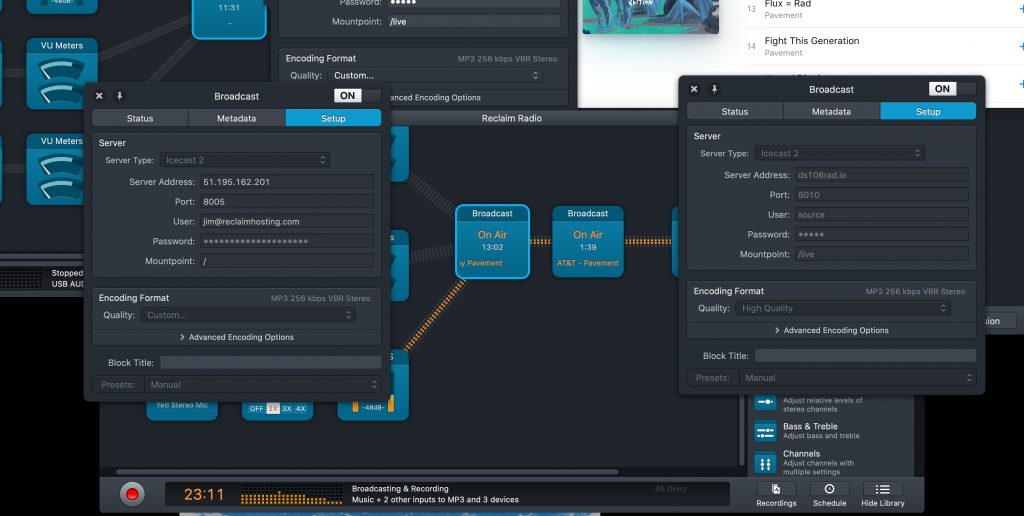
Image of two broadcasters within one Audio Hijack setup x-casting to Reclaim Radio and ds106radio

Two broadcasters within one Audio Hijack setup x-casting to Reclaim Radio and ds106radio

I was playing with cross-casting between Reclaim Radio and ds106radio yesterday, it was as easy as adding a second broadcaster to my current Audio Hijack setup.

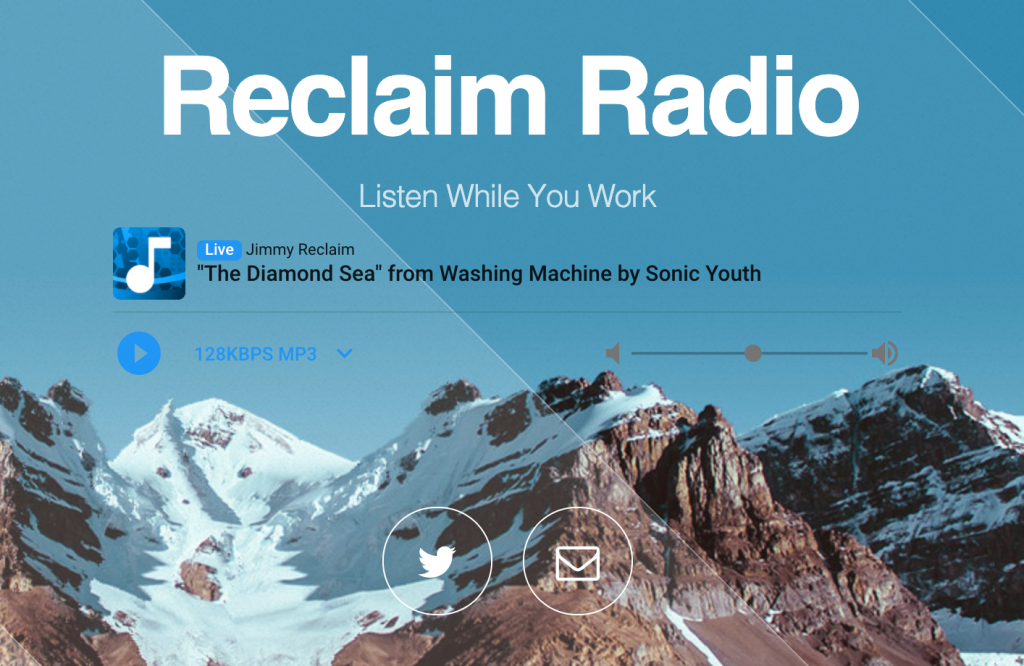
Image of Reclaim Radio splashpage

Reclaim Radio splashpage

I played a string of tunes from 1995.  I am listing them below, and after that is the entire show which runs a little over an hour (twenty minutes of it being the “Diamond Sea” by Sonic Youth):

I also included a ds106radio bumper from Anna Rinko that she created back in 2016.

So, that’s it, drink up, Johnny!


Posted in audio, Brian Jonestown Massacre, ds106radio, Reclaim Radio | Tagged , , | Leave a comment