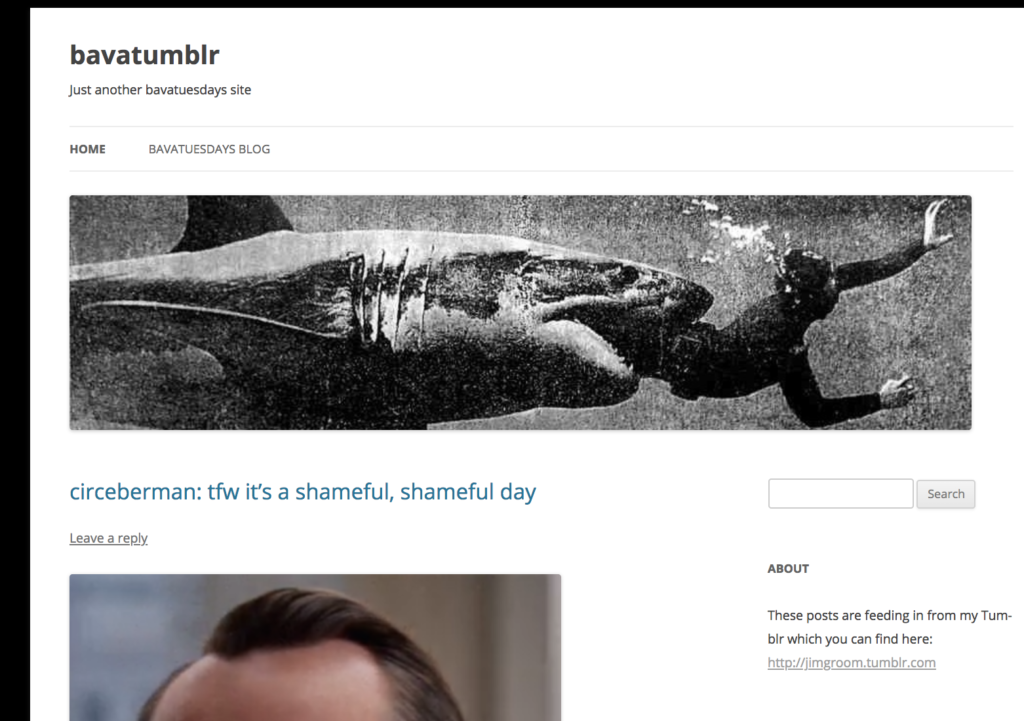
I had a 3 year run on Tumblr. It lasted between July 2012 and August 2015. I loved Tumblr for the GIFs, the film screenshots, and the digital art more generally. I could and did spend hours just scrolling through certain sites, and the attention to old school aesthetics was impeccable by many of the folks I followed there. The IWDRM site had a lot to do with my Tumblr affair, but I remained pretty much a dilettante—just dipping in and out and grabbing other peoples stuff. But when Tumblr was good—it was the best of the graphic web.
But time goes on, and nothing gold can stay. My abandoning of Tumblr was a slow process, and given I never had any strong network ties there is was relatively painless, but I would miss all the images, videos and web art I collected there, so I started an archive site for my Tumblr blog back in 2013, knowing early on the day would come. Well, the day came a while ago, and I am just finalizing things now. I ran Site Sucker on the site that I recently migrated, and have saved both the local links and the Tumblr links for posterity, so almost every post on my Tumblr has two on the archive. I am keeping the WP files and database in the rare case I just to revive it, but for now I can create my own living Tumblr with Reclaim Video 🙂
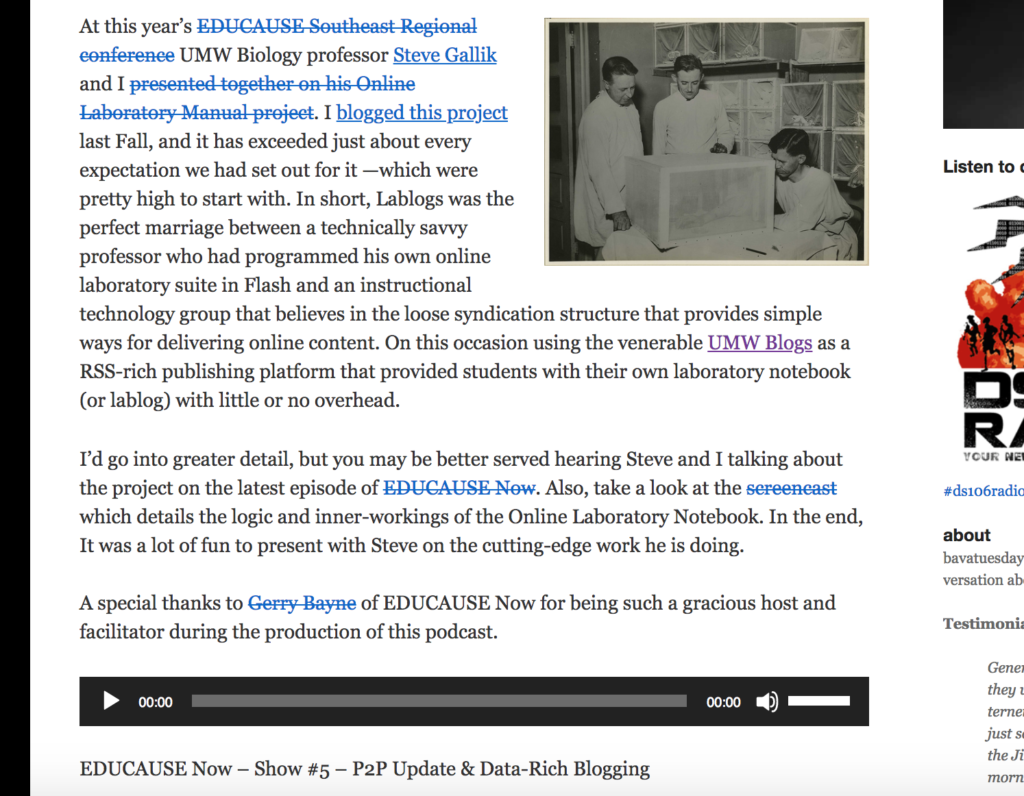
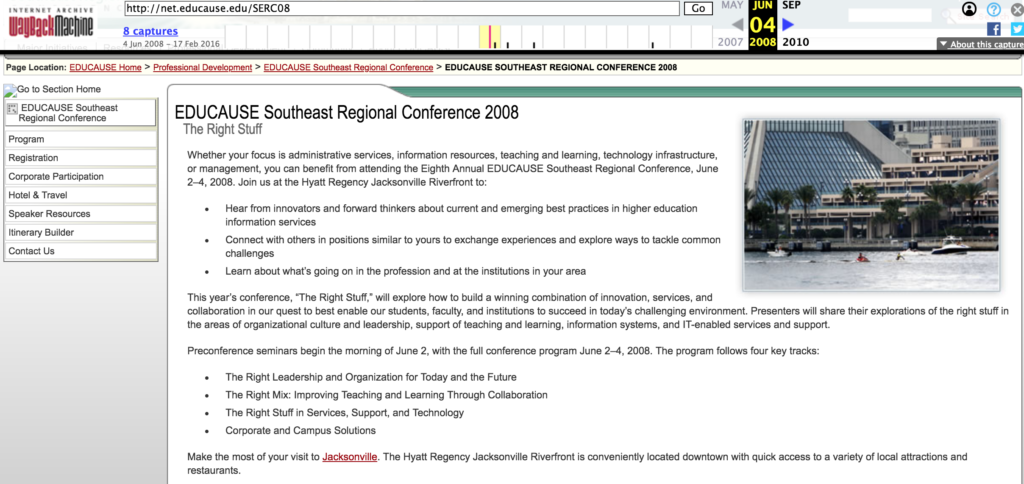
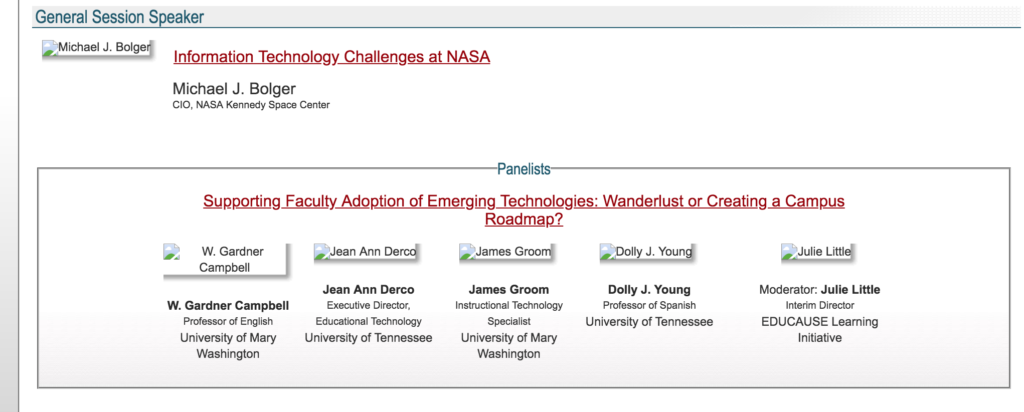
I’ve been going through the paces of trying to keep the bava in relatively good shape, and one of the things I forgot was a few random audio and video files that were outside the standard WPMS blogs.dir upload folder. While cleaning these up I noticed an audio file of an EDUCAUSE Now show from July of 2008. It was about data-rich blogging, and UMW Biology professor Steve Gallik was talking about the way he was using blog syndication to have students do their labs. I had a copy of the audio on my blog, and I found the original post to make sure it was embedding. While doing this I noticed that every EDUCAUSE link in the post was broken. The link to the 2008 Southern Regional conference, the link to Gerry Bayne’s personal page on EDUCAUSE, the link to the EDUCAUSE Now show, the screencast of Steve’s work, everything.
In terms of 2008, EDUCAUSE is not faring much better, I couldn’t find any of those links through a Google search, I was figuring maybe the net.educause.edu was the issue, but I cannot find any of it at www either. I did see the Wayback Machine has some snapshots from 2008 which I reproduced here, but the links to any media don’t seem to work. And while the service the Internet Archive does is invaluable, shouldn’t organizations also do their part? A good example of this is the way the folks at IT Conversations archived all of their amazing discussions through the Internet Archive so they will be maintained and live on as a web resource. Fact is, this was a big part of why the the idea of bringing blogging platforms on campus to prevent them from becoming an after-thought running off the side of your desk, but something the organization would support and, in turn, think-through their longevity as an institutional resource. This is also why the personal cyberinfrastructure was often seen as an alternative to spaces like Facebook in the academic sphere, Not only to encourage the building of a sense of an academic self outside the box store chains, but also to give more control and privacy over this work.While I do think that the personal archive can contribute back— the very act of blogging that EDUCAUSE conference in 2008 kept at least two of those conversations alive on the web—-I also think organizations should be prioritizing the consistency of their web archives.
I often think the fact that bavatuesdays is my individual home online makes all the difference. Do organizational fluctuations and turnover result in such web mismanagement? Maybe, but then UMW’s DTLT has an entirely new team, yet that work has been done because there’s a broader sense of the value of the digital work done as part of the last decade at that institution’s history. That’s crucial, and with both personal and communal sites running on an organization service like UMW Blogs preservation and sense of consistency and history to document the intricacies of transformation of teaching and learning over the last 15 years becoming something more than a maintenance issue, they become an archive.
It can be tempting to discount the work with blogs and wikis over the last 10+ years as just part and parcel of a broader social media orgy or, worse, outdated. Much of it was trying to establish local open source alternatives to these corporate spaces in order to harness the power of these tools while providing a buffer from the trappings of not only the LMS, but also Facebook and Google. Arraigned, indeed 🙂
10 years ago I moved bavatuesdays into what was then a WordPress Multiuser (WPMU) site, a setup which would now be known as a multi-network WordPress Multisite (WPMS) instance. I had the idea back in March of 2008 to take all my different sites, such as jimgroom.net, , planetmiles.net, etc., and move them under one WPMU roof WPMU at wpmued.org. But the kicker was they would not just be mapped domains, but each would be in its own network that could have other sites within it, such as radicalreuse. running on the same WPMU instance. It was fun stuff, and it held up quite well for a decade.
That said, as time went on many of the sites needed to be archived, and eventually many of the plugins running this setup were woefully outdated. Not only was my blog’s error log ridiculously active, but I was running into issues getting my site running cleanly over https. So, in the end, I decided to pull everything apart. I appreciate the convenience of having all my sites running off a single WordPress—it made updates to new versions, plugins and themes dead simple. But, in the end, the multi-network was overkill. Bavatuesdays was the only site that was truly active, and just about everything else was long overdue for some Sitesucker action. So when the setup started getting in the way of some fairly simple and important things like securing the site, I figured it was high time to invest in an overhaul. So, this post documents the beginnings of that with bavatuesdays (I still have a few more networks within that WPMU to clean out).
A clean slate for the bava
As I mentioned and documented a few posts ago when working on the UNLV migration, we had the process for moving individual sites within a WPMS into their own WordPress instances down to a science. I pointed the domain away from the WPMS instance to a new directory called and installed a blank WordPress there. I then dropped all the database tables and imported the SQL export I got from Sequel Pro with the appropriate tables (namely all the tables for the blog with ID 30—which was bavatuesdays—as well as the wp_user and wp_usermeta tables). [Before importing the SQL file I did a quick find and replace of all the tables defined by the blog ID, i.e. wp_30_ , with wp_ .] I also downloaded the entire WPMS site locally so I could quickly upload the files, themes and plugins using rsync. Below is the command line code for that, which was run from the wp-content directory of the downloaded WPMU files on my desktop:
After that, I did a few find and replace commands to clean up the database paths and URLs throughout the blog in the directory where the new WordPress site lives on the server:
And finally, I got rid of all extra users and their metadata from wp_user and wp_usermeta using the following commands in the SQL section of MyPHPAdmin (my main admin account has the ID of 1, which is why this is the only user not deleted):
DELETE FROM `wp_users` WHERE `ID`!=1;
DELETE FROM `wp_usermeta` WHERE `user_id`!=1;
The final thing I had to do is clean up the names in the wp_usermeta table. The privileges row was not giving me proper access and I realized there were a bunch of instances of the wp_X_ (where X = a number) that seemed to be preventing me from accessing all elements of the dashboard, so I cleaned up a bunch of those manually by changing the tables references back to wp_. I have to look into this in more detail as to why, but it did solve my issue.
Like a second marriage to renew vows
And for the first time in over a decade, the bava is running on a single instance of WordPress. I did the same for all the subsites of bavatuesdays, namely festival., tumblr., and radicalreuse.. I don’t think there are any other subsites under the bava worth saving, and I will most likely convert these 3 into stand alone HTML site using Sitesucker given they’re all inactive at this point. I really enjoy doing this kind of thing, it makes me feel good to do some technical upkeep on a space I have put so much time and energy into over the last 13 years, it’s almost like fixing things around an old house (another favorite past time) or mowing the lawn, there is a certain satisfaction in these things for me, and in that way the bava.blog just keeps on giving?
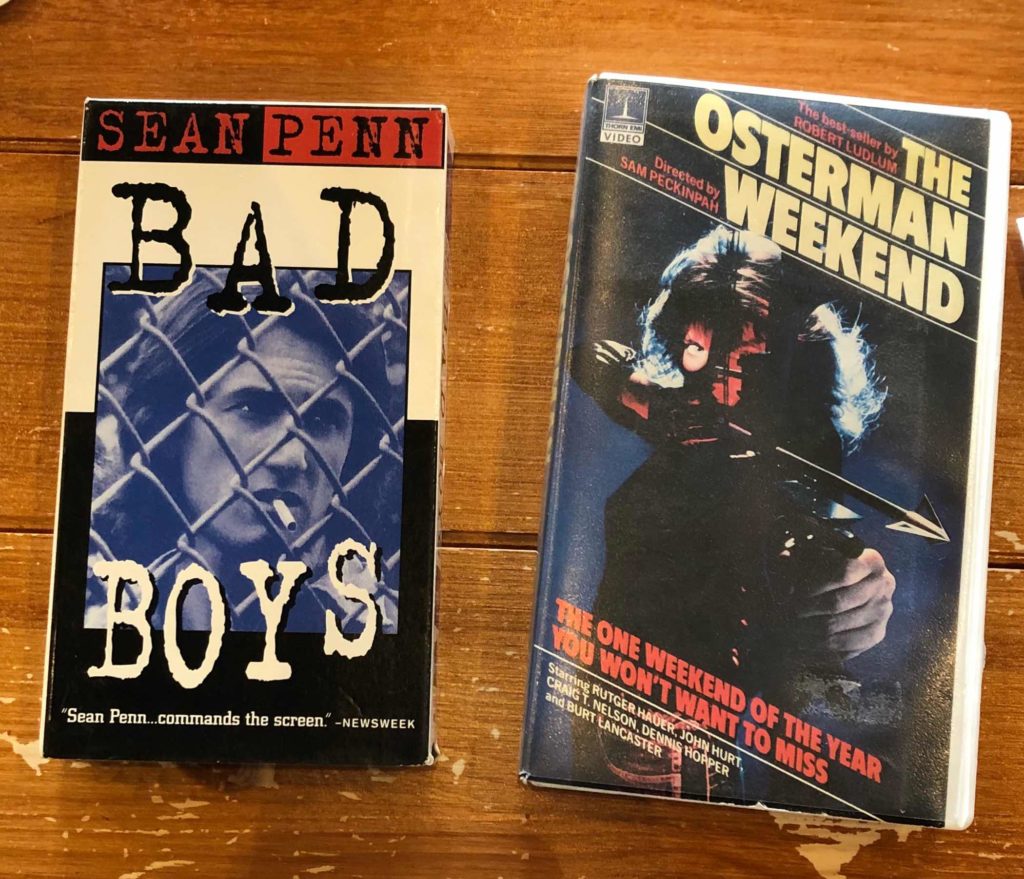
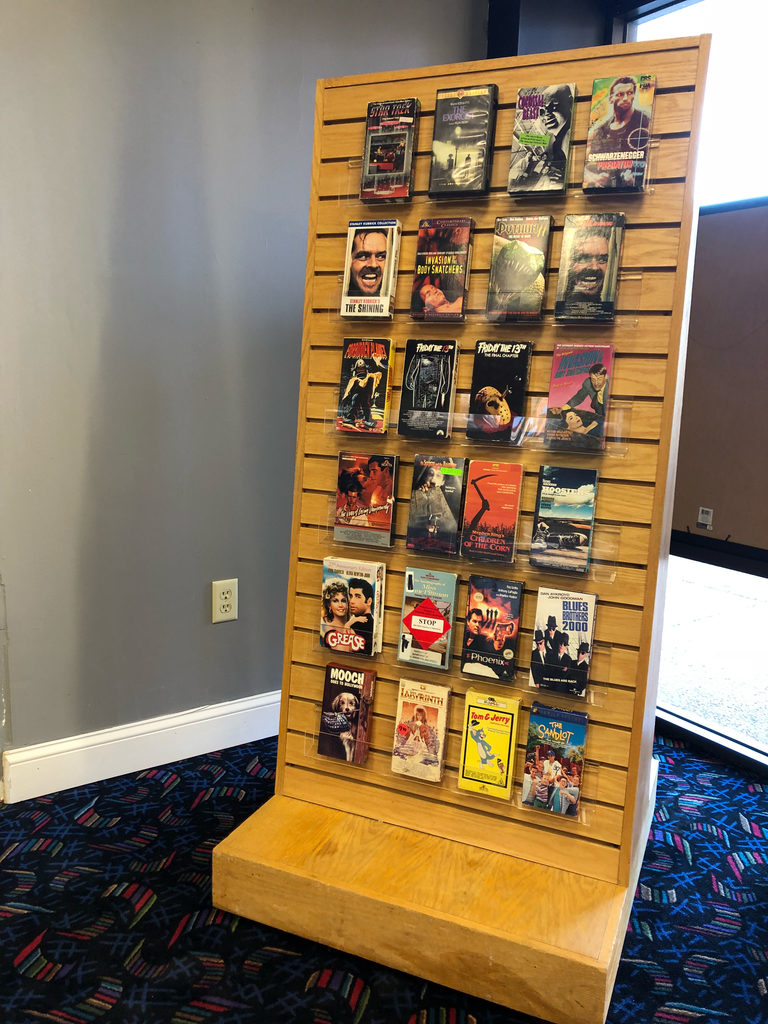
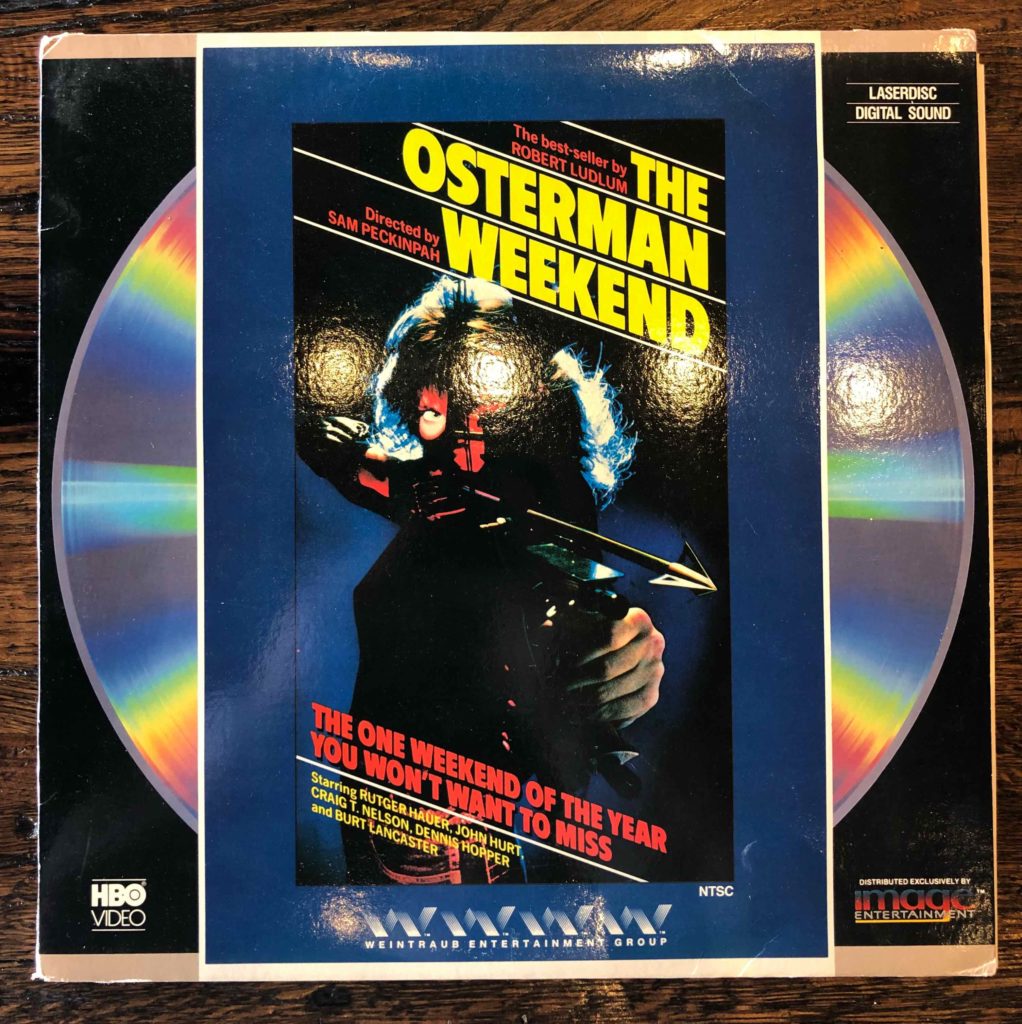
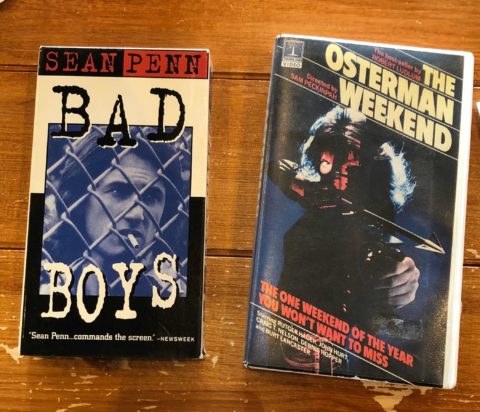
Last week was a whirlwind between a major migration, PressED Conference, and a packed-full Easter weekend. There was no real respite yesterday given we had a shared hosting server down most of the day, so attention was split to say the least. But given today has been the first chance I’ve had to take a real breath since getting back from the US almost two weeks ago, I figured a quick update on Reclaim Video was in order. We are working through the 1983 movies wishlist, and we’re off to a good start with All the Right Moves, Bad Boys, and The Osterman Weekend on VHS
What’s more, we also got the shelves in for the $14 dollar showcase rack we found at Goodwill two weeks ago, so this can be where we show-off all our 1983 movies as they come in—and I just made sure more ARE coming in 🙂
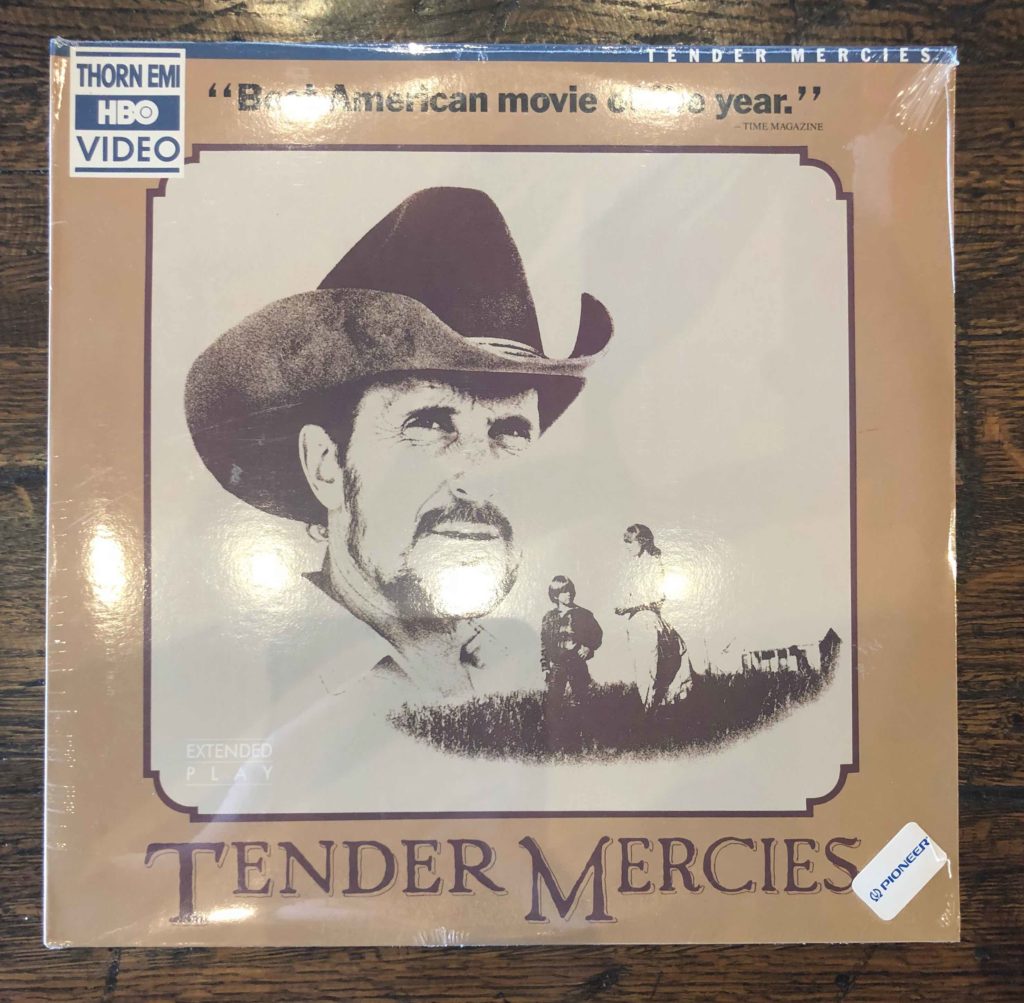
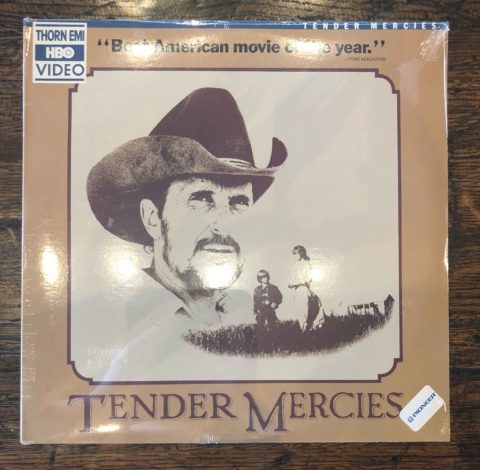
Update: Look what just came in this morning, that’s Peckinpah on VHS and LD -so good!
Still buzzing (and a bit bleary eyed) after #pressedconf18 last night. Can't imagine how @Pgogy & @nlafferty must feel! Really looking forward to catching up with all the sessions I missed yesterday.
I share Lorna’s sentiment this morning, PressEd Twitter Conference was an absolute blast, and by all accounts a refreshing and welcome change to how we do both conferences and Twitter. I won’t lie, I was wondering if and how Pat Lockley and Natalie Lafferty would pull the whole thing off, but the morning after I’m blown away by how right they were and how good it was. It was a 12 hour tour de force of showcasing the use of WordPress in higher ed, and it worked. I was able to get 15 minute blasts of ideas, integrations, and possibilities from folks I’ve know and respected for years as well as from folks I just learned about yesterday. I will go back through some of the sessions and try and blog about a few of them, but for now let me just get my closing a.k.a “Graveyard Shift,” session up on the blog for safe keeping 🙂
A bit about my thinking before that though. I did the talk all day while following the tweet stream. I wanted to prepare something well in advance, but I kept on coming up against two issues: 1) I’ve never done a talk like this, and 2) I wanted to avoid getting too serious or caught in the weeds given this was going to be on Twitter. The last point is relevant because I personally hate long, thoughtful threads on Twitter. They both bore and annoy me. What’s more, Twitter has gone from 0-600000000000 in the more than ten years I have used it, early on it was accused of being the most useless and solipsistic of online activities and now folks consider it a professional and political necessity. The latter two annoy me much more than the former, I liked Twitter much more when it felt communal, irreverent, and quotidian. After the last several years of constantly being barraged with talk of “fake news,” long think-piece inspired threads, and some serious self-righteousness, I’ve lost my interest. I can’t quit it, but I feed the habit less and less.
So, as I was thinking about how to keep my 20 or so tweets true to my favorite Twitter, I knew they would have to be silly, personal, irreverent and full of GIFs. As for content, if I made one simple point, that was more than enough—this is Twitter after all. Anything longer or more in-depth would be fodder for the blog, which may not fare much better 🙂 So, I started with a few jokes, talked about WordPress as a movement, attacked the VLE/LMS—with a dig at the NGDLE, and finished up with my simple point: given the current shitstorm around privacy and data, WordPress might be one easy way to reclaim a bit of both teaching and e-learning spaces, but also your personal presence online—and maybe make the web a bit greener. That’s it.
The bit about privacy and data was based on this post, but I wanted to remain relatively light and just have some fun—not sure it worked, but I was totally fired up by the whole day and the process of creating the 20 tweets was LOL-fest. As I mentioned earlier, I worked on the presentation throughout the conference (I set aside most of the day), and I added the text of my tweets and the accompanying GIFs or images to a Google Doc. I then went through and worked on the language and jokes, and then once I had everything done by about 5 PM my time, I scheduled them all in Tweetdeck to be a minute apart from 11:05 Pm to 11:25 PM Italian time. I have to admit it was the cleanest presentation I ever gave. Text was proof-read, “slides” finished and programmed, and no worries of me going over time. In that regard, the execution of this talk was totally novel and very cool. I did want to do a poll about WordPress and movies, but given you cannot schedule polls in Tweetdeck I abandoned the idea given I did not want to mess things up. All in all, it was the most fun I have had on Twitter since the hey day of ds106, and it reminded me how good that platform can be.
One last thing about the conference, it brought me back to 2007 or 2008 when this blog was almost all WordPress all the time, a moment wherein we felt that we really could break through with WordPress in education. And, one could argue, we did. WordPress is pretty ubiquitous around higher ed, but rather than it being a force for change—it often feels more like “time to make the web donuts.” The conversation around empowering folks to build their own sites and reclaim their domain is often met with the reactionary “It’s too hard,” or treated like just another enterprise technology. For me, that has never been what WordPress was, it was always the power to understand the web and build something for and on it.
Ok, but enough of that, now for the twenty tweets from yesterday’s PressEd talk, enjoy?
But enough antics, this is serious business….a Twitter conference-we need to share some important knowledge like, for example, what I ate for lunch (panzerotti)
An occasion to galvanize a reclamation of the spaces where we teach and learn online from the fluorescent lighted spaces of the VLE/LMS #pressedconf18pic.twitter.com/dtS2nfjhZq
An epic struggle in the annals of #edtech was brewing in 2008, a fight to reclaim a sense of independence over how and where we teach and learn truly on the web. And many were ready to fight for it…. #pressedconf18pic.twitter.com/AEmFPdavuW
But 10 years later, all we seem to be left with are MOOCs, Facebook, and the smell of napalm on Twitter. “Someday this web’s gonna end” #pressedconf18pic.twitter.com/P5rFjWRjj7
WordPress is not a salvo to the web’s (and by extension higher ed’s) current problems around misinformation and psychological propaganda, but it might be understood as a harbor and home base during the storm #pressedconf18pic.twitter.com/BIbia073kO
So, let me offer a simple example of why self-hosted WP could be more relevant than ever for HE given current shitstorm around big data, privacy, and “do no evil” approach to web citizenship #pressedconf18pic.twitter.com/NUw3SxorzV
It’s not only the limiting possibilities of the VLE/LMS, but increased presence of 3rd-party vendors collecting student/faculty info to “personalize” learning-it can only end as bad as Facebook’s current data debacle #pressedconf18pic.twitter.com/L6qBnQC2tQ
If nothing else, WordPress can and should be an open space to reclaim not only your teaching and learning, but your online presence from the machines that everywhere want to collect, profile, and monetize your data #pressedconf18pic.twitter.com/NykZ89xyrx
Years ago @brlamb discussed how HE should represent the green spaces of the web, rather than a space everywhere crowded and controlled by commercial interests. A decade later it couldn’t be more relevant #pressedconf18pic.twitter.com/c330Ig2YPj
For me, WP has been that green space on the web. The small plot of internet I can manage, build on, and share without having to sell my soul to the data consuming services that everywhere encroach on our online lives #pressedconf18https://t.co/UWKIYlahMOpic.twitter.com/60vztpEt2d
In that regard, after more than 13 years of using WP in HE, it remains the very best invocation of the spirit of openness, sharing, and accessibility many of us imagine HE represents as part of its core mission #pressedconf18pic.twitter.com/TDHIyjOiK3
And that’s that, thanks to all the amazing folks who shared their work today, and particularly to @nlafferty and @patlockley for putting this whole thing together. It was really a lot of fun! I mean what did you expect from a Twitter conference? #pressedconf18pic.twitter.com/dfvKRu3MO6
Early this week we had a pretty big migration for a school we work with to move both old school faculty web spaces as well as breaking out individual sites from a WordPress Multsite (WPMS) blog into their own cPanel account. The first bit of this, moving files from the old school DIY sites was pretty straightforward. Tim scripted a sync between the two servers using rsync that moved the files of two hundred accounts cleanly between the two servers.
The second part of the migration, however, was a bit more labor intense. For this piece we needed to move individual WordPress blogs from a WPMS setup into their own cPanel account. Not nothing. So, we tried the plugin Duplicator Pro (with the WPMS addon) but that was not making things any easier at all in the WPMS context. We had to abandon that avenue, and look at what it would look like to do this manually for 100 sites. Tim and I did one together, and wee got the pieces down:
identify blog ID and user (or users) ID for individual site to be moved on WPMS instance
Use SequelPro to download that site IDs tables as well as wp_user and wp_user meta tables from WPMS database
Re-write site site ID in SQL file downloaded from wp_ID_ to wp_
On the cPanel side, we need to make sure the user had an account (something we scripted pretty easily using cPanel’s API)
Create a WordPress site on the account we are migrating
Drop all tables in PHPMyAdmin
Import downloaded SQL file through PHPMyAdmin in cPanel
Delete all users from wp_user and wp_usermeta save the one associated with that site on WPMS
Run commands to update URL across site
Run commands to change the uploads path from WPMS to one-off WP
Those steps effectively export and import database tables and user info from WPMS to the individual cPanel instance and make sure all is good in the database. The last bit was to make sure we had all files, plugins, and themes. To do this we downloaded (using rsync again0 all the WPMS files locally (this sped up the process enormously):
Rsync files from remote WPMS instance locally
rysnc uploaded files for the site we are migrating from blogs.dir/blog_ID/files/ to public_html/wp-content/uploads/
rysnc plugins and themes
fix permissions across entire account once this is all done
As you can see, this is a laundry list and it took some serious time. Doing this Tuesday morning I was averaging about two sites an hour. The method was sound, and things were moving cleanly, but timewise it was insane. Once Tim woke up and jumped in, he streamlined the process immensely by rsyncing WPMS instance locally and coming up with the commands that ensure the site and user IDs in the database are fixed and files synced seamlessly. The time to move a site went from 30 minutes to anywhere between 5-10, which allowed us to migrate the 100 sites in question on schedule. It is a thing of beauty to witness Tim streamline a process like this and make things run like a Swiss watch.
So, the rest of this post will be specific documentation for this process because I will be using the same method Tim perfected for this migration to finally break this blog free from its tyrannical WPMS beginnings into an individual WP site, only to re-subjugate it soon after 🙂
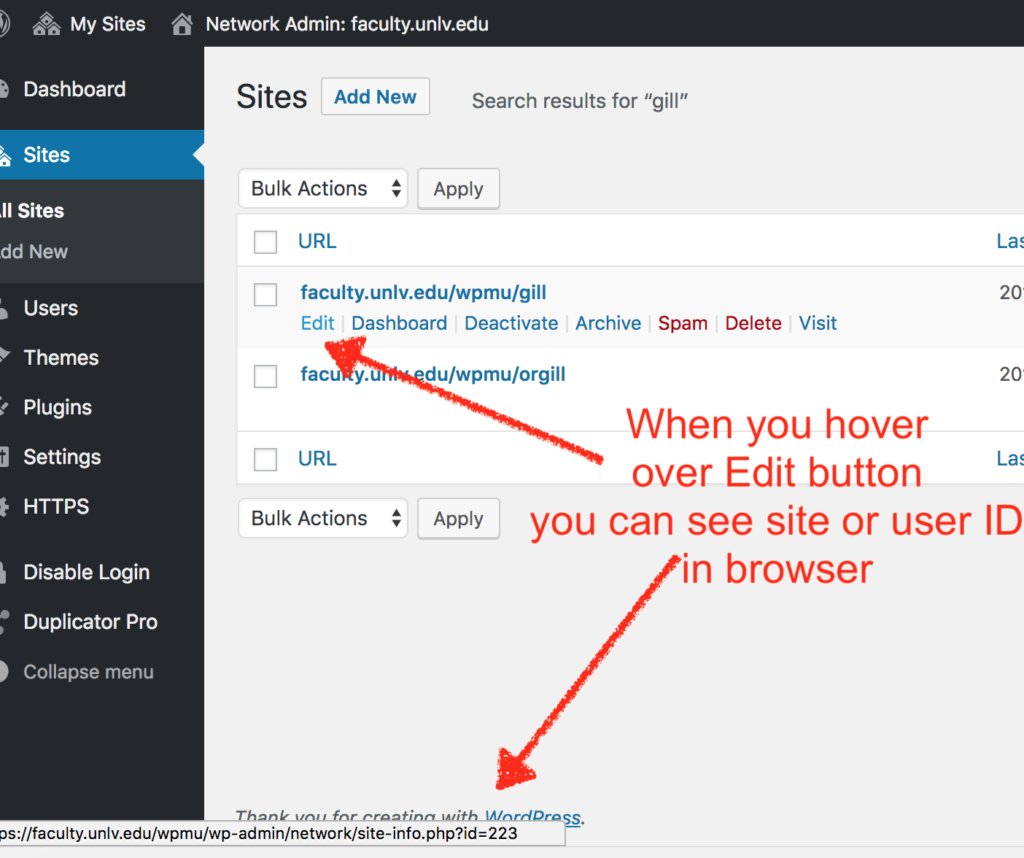
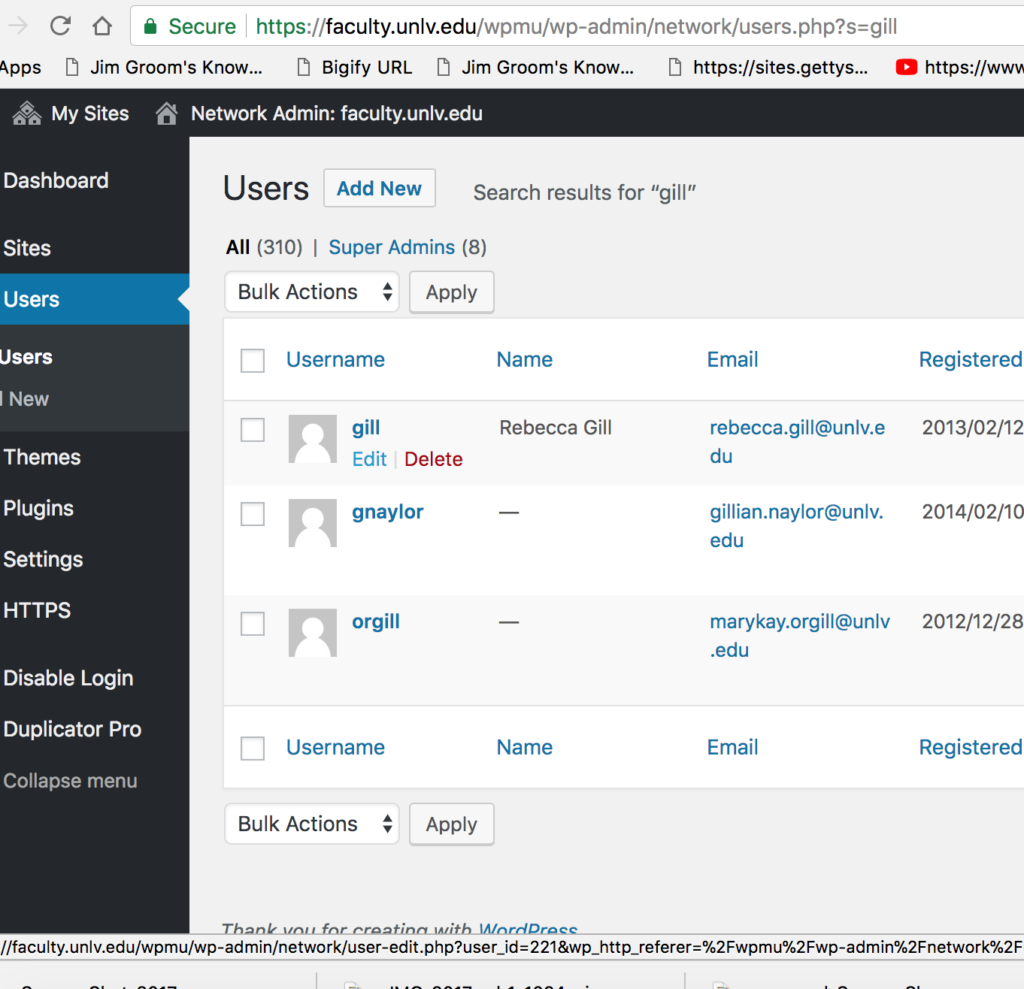
The information you need to get started is the blog_id and user_id for the site you will be migrating from the WPMS setup into a stand-alone site on cPanel. In the the WPMS you can go to the Network Admin and search in Sites and then Users to find the IDs in question. Just hover over the Edit button to see the ID in the browser as illustrated below.
Keep in mind often the site ID and the user ID are different, but they can also be the same. This screwed me up early on, so just a heads up.
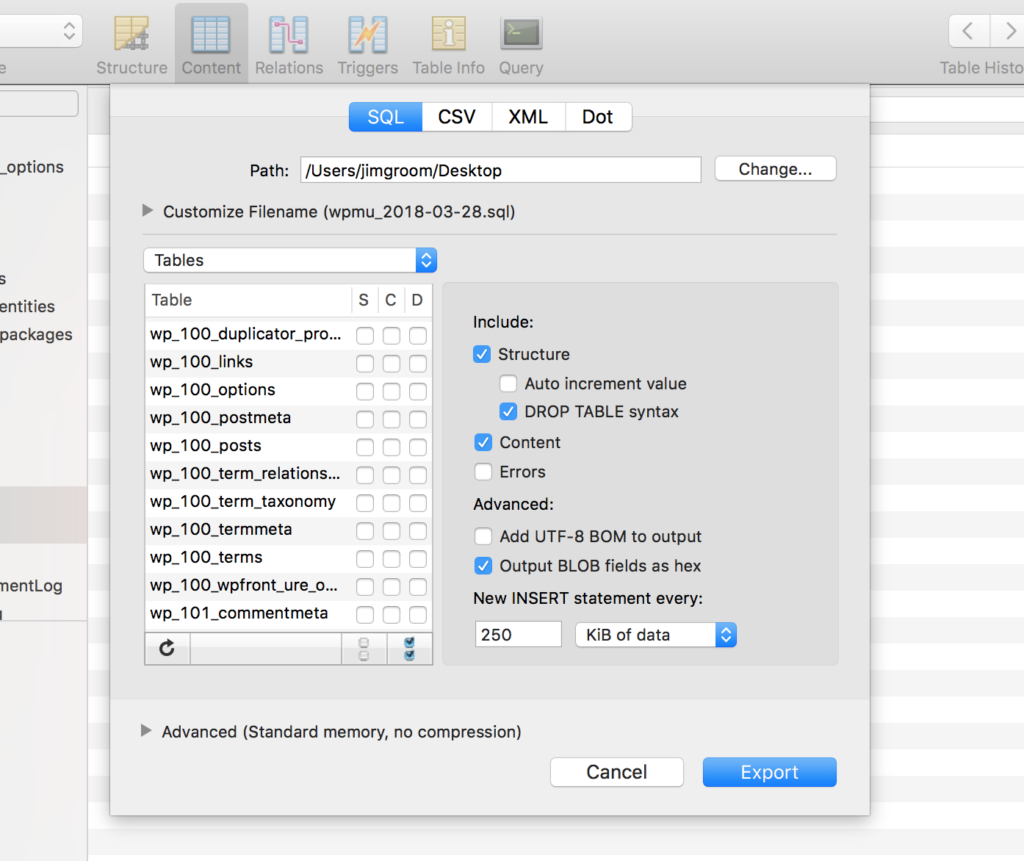
Once that is done you are going to download the appropriate tables from the WPMS instance, along with the wp_user and wp_usermeta tables. I used Sequel Pro for this, and it is quite the tool for this stuff (although you can do it through PHPMyAdmin in cPanel):
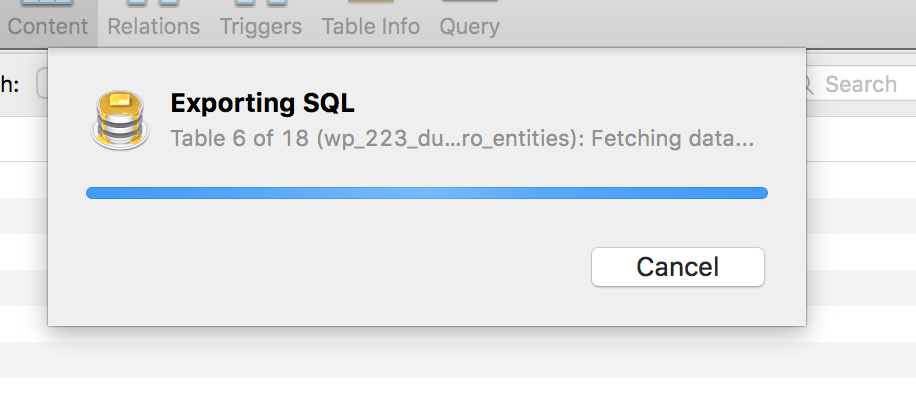
The exporting dialog box is nice cause it shows you what tables are being downloaded.After this, you will have a downloaded SQL that you need to run one find and replace command on before you import it to your WordPress shell on cPanel. Blog tables in WPMS are uniquely identified in the database with an ID, such as wp_223_, but given this will be a stand alone site now you need to change all instances of wp_223_ to wp_.
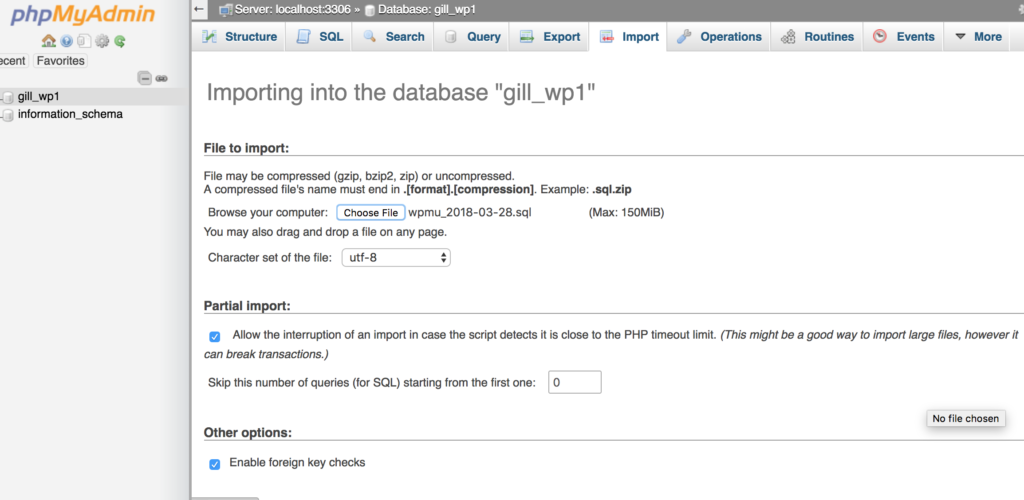
After that, you dump all the database files of the WordPress instance you installed on your cPanel account, and then import this SQL files via PHPMyAdmin:
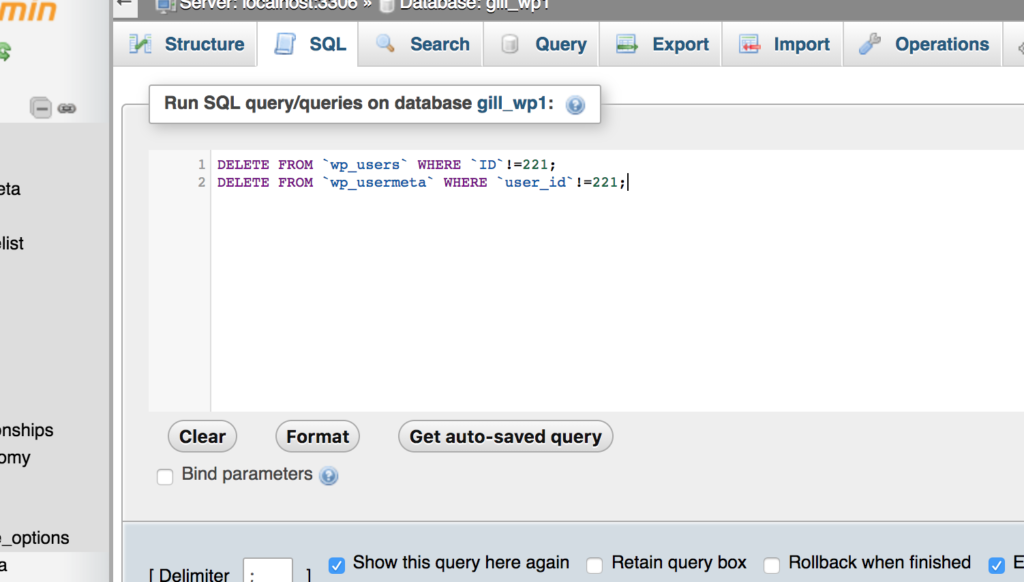
Now, if you remember, we grabbed the entire wp_user and wp_usermeta tables from the WPMS, which could be hundreds (or even thousands) of users. But in this instance we only need one, and Tim shared a slick SQL command that you can run to delete all users but the one you want. The user ID in this instance was 221, so the following code deletes all user info save that for ID 221:
DELETE FROM `wp_users` WHERE `ID`!=221;
DELETE FROM `wp_usermeta` WHERE `user_id`!=221;
Noice the user ID is different from the site ID:
Now, all the data is moved over and the user can login with the original username and password. The only things left are to transfer files, clean up URLs in database, change uploads path, and fix permissions. This is where Tim’s playing with WordPress command line voodoo and file sync shaved 15-20 minutes off the migration process.
So, here are the codes for cleaning up the database and file path for this particular site:
OK, so using WordPress’s command line feature, the above 3 commands re-write all instances of the old URL faculty.unlv.edu/wpmu/gill to gill.faculty.unlv.edu. The second replaces the WPMS file path (blogs.dir/269/files) with uploads, which is the default for a stand alone WP. Finally, the third command replaces any existing instances of the masked path for files in the WPMS (gill.faculty.unlv.edu/files) with the new path (gill.faculty.unlv.edu/wp-content/uploads). That’s it for cleaning up URLs.
Now we have to sync uploaded files, plugins, and themes. This was another huge time saver because rsync is so much faster and cleaner than FTP. So, what we had to do here is download all the WPMS files locally. This is the command I used for that, which was grabbing all files from the wpmu folder:
Notice that the first command is specific to the site ID I’m working with, namely 223. I had to change this for each new site I migrated. The other two commands are syncing all the themes and plugins. These transfers literally take seconds, which changes everything in terms of waiting.
After that, you need to run the fixperms.sh script for the cpanel account, and you are done. I won’t say easy, necessarily, but see how all the pieces work make me think this could be scripted more seamlessly if we were to have schools that wanted to migrate their WPMS instances to a Domain of One’s Own instance. Anyway, this one will be a reference going forward, and further testament to the fact that Tim Owens is the best damn thing that ever happened to the bava!
I woke up to a few tweets about Reclaim Hosting and the #deletefacebook movement. It’s been hard for me to get excited about Facebook either way. I see it as one of the more depressing malls of the web, and I try and stay away as much as possible. And beyond their horrific practices with collecting personal data, I have been equally dismayed over the past several years by their refusal to curtail predatory catfishing when brought to their attention again and again. It seems like expecting anything else from Facebook would be tantamount to expecting that Google’s “Don’t Be Evil” was anything more than a flattering slogan to sell an image.
And while I tend to agree deleting your account is not necessarily a solution and data collection needs to be regulated more stringently as it soon will be in Europe, a part of me can’t help but think what did we expect? Whether hacked or handed over, did we really doubt that sooner or later we would pay dearly for the “free” services we have gorged ourselves on for more than a decade? I guess that makes the current moment of outrage seem a bit disingenuous, or at least somewhat absurd. In the end, to be a good citizen of the web you have to be willing to take some ownership of your online presence, and that means taking the time and spending a bit of money (although not all that much) to build something on an open platform outside the corporate spaces that have become ubiquitous because we’ve often settled for less when it comes to the open web. WordPress is my drug of choice, and 13 years later it remains a robust open source community that powers near a third of all sites on the web. More than that, it makes me feel like I have far more options through this tool then just about anything else I do online, which in turn allows me to define my presence to a much greater degree, not to mention build course sites, research sites, web services, and more.
So, thanks to the tweets from Laura and Howard this morning, I think this is what my talk for PressEd Conference will be about on Thursday. I have been struggling a bit with that talk given many other folks far smarter than me will have much more interesting things to share when it comes to WordPress in education. So, maybe my 20 tweets or so can be about why using WordPress in education is more relevant than ever given the trappings of a free, but not open, web seem to be coming home to roost presently. And while Facebook is certainly the most deserving of targets for public outrage, chances are they’re not alone in their practices by any stretch of the imagination as Doc Searls blogged about the other day:
What will happen when the Times, the New Yorker and other pubs own up to the simple fact that they are just as guilty as Facebook of leaking its readers’ data to other parties, for—in many if not most cases—God knows what purposes besides “interest-based” advertising?
It’s invigorating and life-affirming to witness a broad movement of folks around the USA, led by some badass high schoolers, demand sane gun laws simply to ensure their safety at school. Something currently taken for granted here in Italy. That for me seems like a first order need—thinking of sending my kids to an American primary or secondary school only to wonder if they will make it home alive because politicians are in the NRA’s pocket is unconscionable. It’s a movement that is long overdue, and there are certainly many forces that helped give it the head of steam it has presently. I want to think the same could be true for reclaiming a bit of the open web, and would like to believe that the work a whole cadre of open educators have been pushing on for the last 10-15 years would be one practical approach, this is of particular interest to me given the perils of higher ed going down the data extraction in the name of personalization that is being pushed by the folks at EDUCAUSE under the banner of the Next Generation Digital Learning Environment (NGDLE). If we want to look at one space where the outrage around Facebook that might hit even closer to home in the context of education, it could be what companies will be extracting what data in the name of streamlined, integrated personalization environment that the NGDLE promises. Anyway, I’ll save some of this for my Tweetstorm on Thursday 🙂
Reclaim Video is coming along nicely. It will be officially opening sometime in the next month or so. What that looks like exactly is not entirely clear just yet, and ww would appreciate any and all ideas. We are discussing memberships that allow for unlimited rentals of VHS, Beta, Laserdiscs, as well as the video game consoles. We are toying with getting a telepresence robot so I can help manage the space remotely, bringing in curators to run the shop, as well as an entire web-based interface for interacting with the physical space remotely. I am being vague because this is all still amorphous. But one thing I’m sure of is that we do have t-shirts, stickers, guaranteed memberships, and a custom GIF awaiting anyone willing to send us 4 of the following 95 titles from 1983. If you are game, either use the comments to commit to any 4, or send along the videos you want to contribute to jimgroom_at_gmail.com. The films can be in any of the formats noted—namely VHS, Betamax (Beta) or Laserdisc (LD)—and the the closer to 1983 the version, the better!
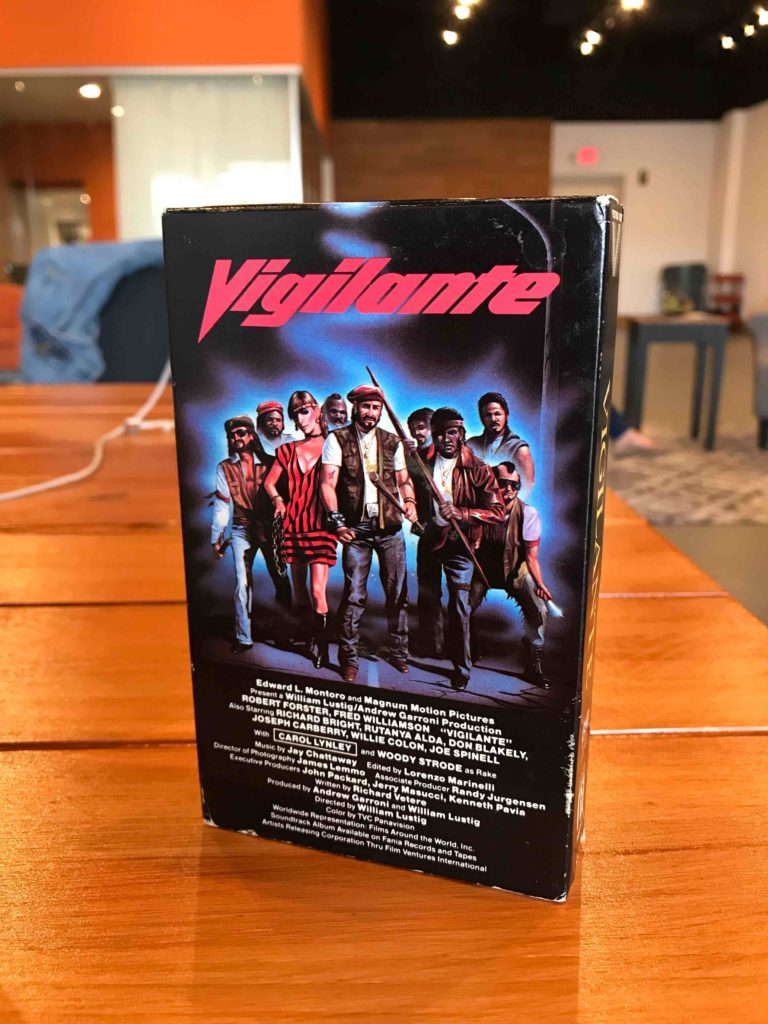
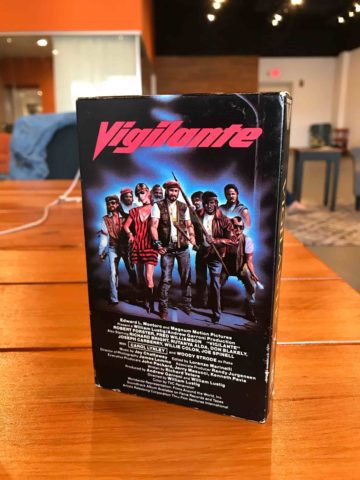
This is the wishlist we will working through at Reclaim over the next month or so as we start building out the collection in earnest. We’ll come out with other lists for other years as things move along, but the idea of focusing on a particular year will help us be a bit more intentional. What’s more, it offers an interesting perspective on the cultural moment—all those Robert Forster vigilante films 🙂 I’ll blog more about 1983 as we start procuring some of these. You might also me asking, why 1983? Isn’t that kind of a random year given VHS invasion can be traced back to the late 70s. Well, it is random, and it is more closely aligned with the video store I started visiting when I was 12 years-old in 1983 (East Coast Video in Oceanside, Long Island). They still rented VCRs, the tape covers were a deep blue, and it was magical to me. That’s the UR-video rental store that fuels much of what Reclaim Video is for me. But many of you have your own East Coast Video of the mind, along with your own favorites—so feel free to ignore this list, send something else all together, and/or, better yet, start your own damn video store 🙂
Update 4/3/2018: I will be crossing out any titles/formats we receive, and this is the first batch so far 🙂
I am sitting at a small round table in Frankfurt Airport staring out at the tarmac which, all things being equal, I’ll soon be taxied across on my way back home to Trento. While I’m still somewhat cognizant-given I’m working between timezones on a sleepless redeye-I’ll try and record how intense the last ten days were—in fact the life of a Reclaimer is always intense! [Let’s get a drink, kid!] This trip was a whirlwind with two primary objectives: 1) help run a workshop for folks at several schools running Domain of One’s Own, and 2) get Reclaim Video as close to finished as possible. I’m thrilled (and somewhat amazed) that I can now happily say “Mission Accomplished!” —and then some. I’m reeling a bit from the intensity, but at the same time working like that makes me feel pretty alive—I can very easily feed off it, but a crash is never far behind 🙂
The Workshop of One’s Own was Thursday and Friday of last week, and I got in late Tuesday. In fact, I even picked up a stray dog at National Airport who proved a trusty companion for the next few days 🙂 We invited Alan to Fredericksburg so he could speak to the Workshop attendees about SPLOTs, and that he did with some hardcore 70s TV commercial references! The Reclaim Hosting crew came together and re-thought the first workshop a bit: we broke it up into an intense dive into how WHM, WHMCS, and WordPress are integrated to create what we know as Domain of One’s Own. Day two we had a discussion about how various folks are approaching the project on their campus, and then jumped into tools like Omeka, Scalar, Grav, and then a longer session on SPLOTs. I think the tool overviews were not as helpful as we thought they would be, so that might be something we abandon next time. I think the workshop was effective, but we still need to have more hands-on workshopping time. So if we run another in the Fall, that will definitely be a goal!
One of the cool things Tim and Lauren put together that worked really well was an Escape Room. It was my first time doing one, and it was fun. I think it broke up the intensity of both days to some degree, and it had a great script and was really thoughtful. The quick version: a student is sucked into their computer and it is going to update in an hour and effectively overwrite the student’s existence. So, you need to find the passcode for his computer to avoid this Tron-inspired digital nightmare. Good stuff.
The workshop wiped me out, but I was still able to get a couple of movies in at the Library of Congress, Packard Campus with Alan and Mo Pelzel, specifically My Left Foot and the original Manchurian Candidate.
https://www.instagram.com/p/BgbSFEkjnfu
I have to say I was less impressed with Manchurian Candidate my second time around, but the brief introduction by one of the curators was a pretty amazing homage to Janet Leigh, which made me far more interested in her part of the film. And while this film could not be more timely (geo-political problems with Russia, China, and North Korea around psychological warfare) the whole thing kinda felt a bit flat. That said, Janet Leigh on the train was not, and ole Blue Eyes was pretty awesome too—but I don’t know, how current it felt (or we may want it too feel) was a drawback for me rather than selling point.
https://www.instagram.com/p/BgbRgoCD9-5
Whereas My Left Foot blew me away, I think Daniel Day Lewis is the very best in the business, and he did not disappoint. The pathos of that story, the sense of people in their lives versus psychological or technical defining and controlling them was a real welcome relief.
Reclaim Video Carpet
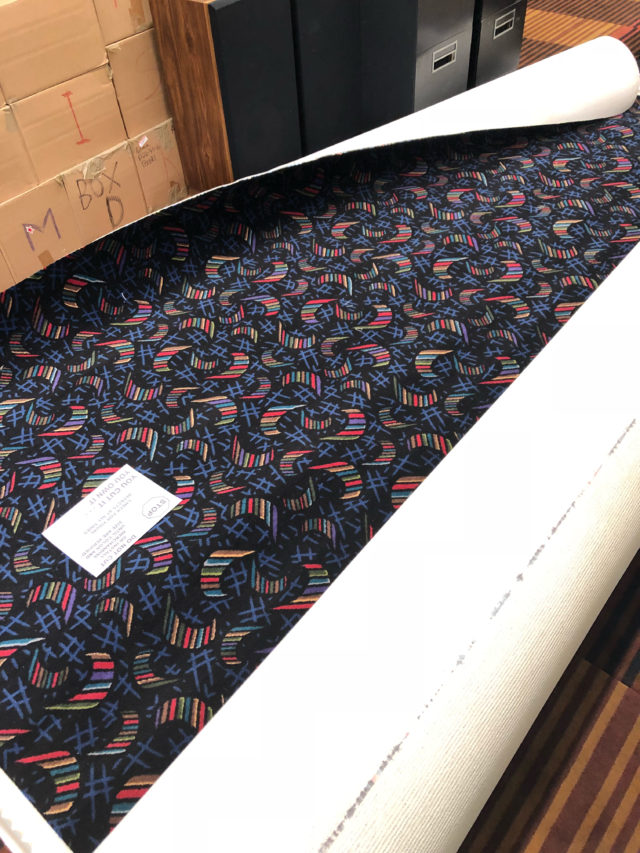
Anyway, after some downtime Sunday morning, I started turning my mind to a bear that had been bothering me since I arrived: laying the groovy new carpet for Fredericksburg’s latest video store. Hmmmm, how to tell this one? Well, I guess tell it straight with a slant. When I was in grad school and living in NYC, which is almost 20 years ago now, I spent a fair amount of my spare time working with my brother laying floors. I learned how to install wood floors, lay tile, and even some carpet. I was better at tile and wood (because those were my brothers specialties), and while I had laid carpet with others—I neither liked it not was as comfortable with it. What’s more, if you have a funky pattern, matching up the seam can be a pain in the ass (more on this soon). So, Sunday I spent time revisiting the carpet laying process and measuring stuff out as well as calling my brother for a quick refresher course. After all of that, I felt fairly confident that we could install the carpet Monday morning, which would give us time to finish the shelves and stock the store on Tuesday. We had a tight deadline because we needed the space at least partially finished to film part of our promo video for #OER18, but that’s classified.
So, Monday morning came around and we started cutting the carpet and preparing the 12′ x 20′ piece for installation. Tim was helping me and everything was going smoothly until we folded the carpet off the wall and glued a 10′ x 20′ section with commercial grade carpet glue (leaving 2′ x 20′ piece unglued to manage the seam). That glue is powerful. After spreading, it was time to roll the carpet back and set it, but after the shift it was 2 feet off the wall. Nightmare. The next 60-90 minutes were the worst I have had in a while. We tried pulling the carpet but it was already setting so we had to go on the glue, which made a complete mess and ruined my boots and Tim’s sneakers. What’s more, the area was too big and the glue too tacky for us to even adjust the piece. We thought we were kissing $1000 worth of carpet (our only real expense for Reclaim Video besides the awesome storefront sign) goodbye. At one point we were discussing how we salvage the carpet (which was starting to get glue on it), and I was regretting ever deciding to lay the carpet myself. Did I already mention it was a nightmare? After an hour of trudging through glue in our shoes, then our socks, and then bare feet, we finally were able to fold the carpet like a paper airplane and adjust it just right against the back wall. It fell in pretty cleanly, and we were saved! REDEMPTION!!!
Crisis avoided, and we could even get the glue off the carpet before it dried. After what turned into a 3 hour ordeal we finished putting it in and were way too shellshocked to even try and tackle cutting the second piece and thinking through the seam. We just thanked our lucky stars for actually saving the carpet and called it a day. The next day we were back at it, and this went smoother, although we miscalculated the seam by an inch or so, which means the pattern is not perfect, but there is no gap and given the carpet is pretty busy you have to be looking for our mistake. My brother would know for sure. But after our initial call for the refresher, I did not tell my brother about any of this, and I am pretty sure he doesn’t read this blog. A bit of saving face. The final product was actually better then I would have ever have dreamed while I was stepping through commercial grade glue trying to keep from completely freaking out:
https://www.instagram.com/p/BgkkOvoDmUA
A savvy carpet pattern eye could find the seam, but for all intents and purposes the carpet is perfect for the space, and it really finished it off. Once the carpet was done on Tuesday, we worked on the baseboard, shelves, as well as moving and stocking the counters Tuesday night and all-day Wednesday during a snow storm:
https://www.instagram.com/p/BgkkD2UDGk3
It was amazing how quickly it transformed into everything we had envisioned and more:
https://www.instagram.com/p/BgmPCpADkdj
https://www.instagram.com/p/BgmR2EWD-dN
And by Thursday morning we were stocking the shelves with VHS and Betamax tapes, not to mention laserdiscs:
https://www.instagram.com/p/BgoShgqno_c
It was as done as it could be based on our current inventory, and I could not be more thrilled with how it came together! It made the perfect backdrop for our video work the rest of the day. The only sad part for me is soon after it was finished and we were done filming it was time for me to head back to Italy. It all went so fast! Although I did not leave before finally putting away the innumerable boxes of books that were littering the back office of Reclaim Video, so it felt good to truly get everything on my list to-do this time done.
And while parting Reclaim Video was sweet sorrow, I did snap a couple of selfies to remember it by 🙂
https://www.instagram.com/p/BgpDsvnF9yp
https://www.instagram.com/p/BgpAOvGF6TX/
A dream come true, indeed! It was an intense 10 days, but the most rewarding kind of work: helping people manage their domains and creating something fun alongside it!
So, what is Grav? It’s a content management system (CMS) or, said another way, it’s an application to make websites. But differs from other CMSs like Drupal or WordPress in its underlying technology. While it’s a PHP app like those two, unlike them it does not have a database. All data is written directly to files rather than stored and retrieve from a database. This is known as a flat-file system and it can help with performance given numerous database calls can slow down sites.
Why and when would you use Grav? I’m not sure I would push a faculty member or student towards Grav if they weren’t somewhat technically-inclined. It’s not that Grav is particularly difficult, every CMS has a learning curve, but rather it gets really interesting when you can integrate it into Github using the Github Sync plugin, which sync everything on your Grav site to a Github repository for others to contribute to, clone, or fork.
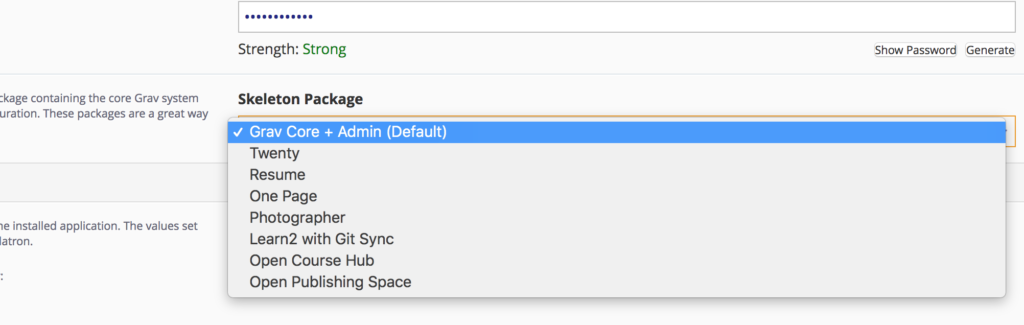
But is it educational? Thanks to the great Paul Hibbitts, absolutely. One of the cool things Paul has been doing is building packages with predefined themes and plugins to create a focused functionality. We have these as part of our shared hosting servers, and they add fun options like a Resume, Photo site, Open Course Hub, etc. In many ways it is quite similar to what Brian Lamb and Alan Levine imagined with their SPLOTs.
In fact, the package are well maintained, in fact Paul just updated a few Installatron packages at Reclaim Hosting, and you can try it out on our demo server at stateu.org.
Thanks to the speedy work of Tim @ReclaimHosting updated Installatron packages for @getgrav Open Course Hub are now ready with Grav 1.4 and Admin Panel 1.7?????? (Open Publishing Space and Learn2 with Git Sync have also been updated) pic.twitter.com/7QtfIm9USU
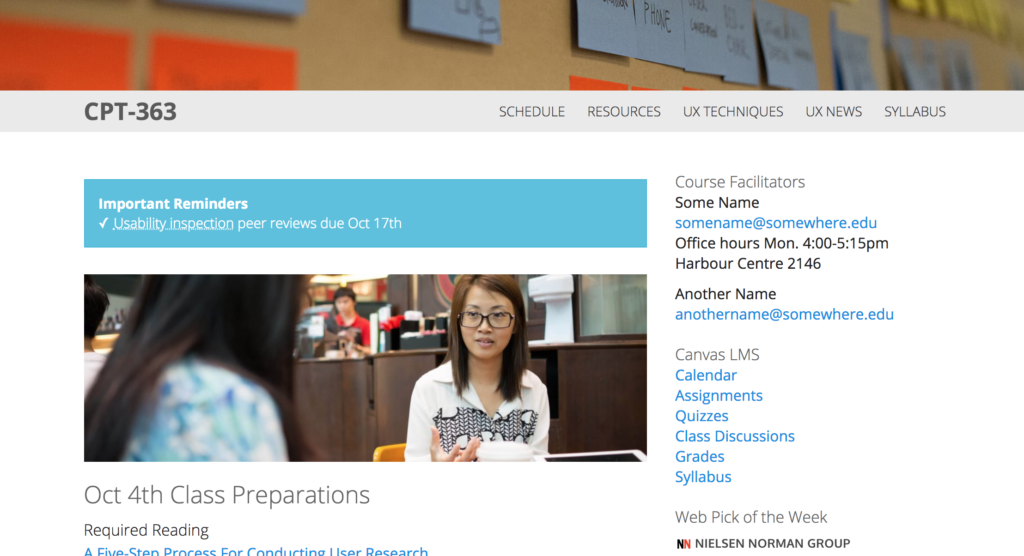
To get more familiar with Grav, I actually installed and played around with the Open Course Hub package to re-make the Workshop website.
The original is a course/blog theme designed by Paul that I used his package to install on Reclaim and then synced with Github (which the wizard makes quite simple if you have an account). I deleted much of the pages in the original and keep the sidebar and page structure—notice the “Edit This Page” link that leads you to Github.
One of the issue I ran into as I was getting acquainted with Grav through the Open Course Hub package is that changing the menu structure or the blog post structure took me a bit to figure out. This is always the case with learning new systems, but when installing these packages you may feel somewhat tied to the pre-existing structure.
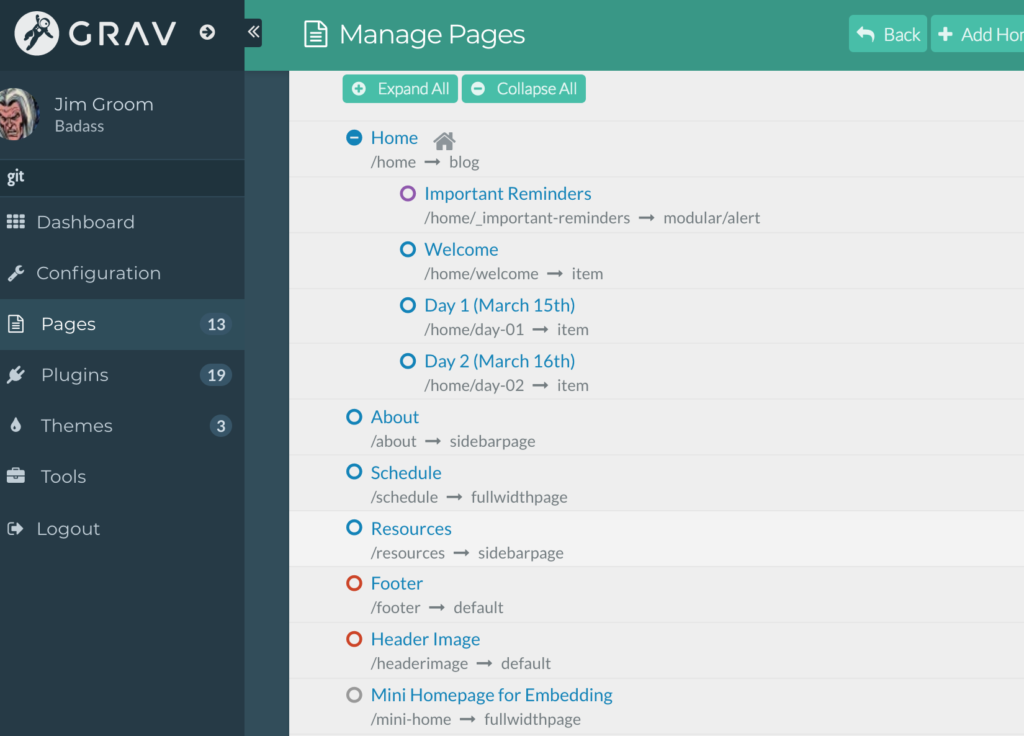
I’ll provide a quick anatomy of the homepage in my Grav to explain what I mean. Here is a look at the Grav pages management area:
Page Management Area of Grav
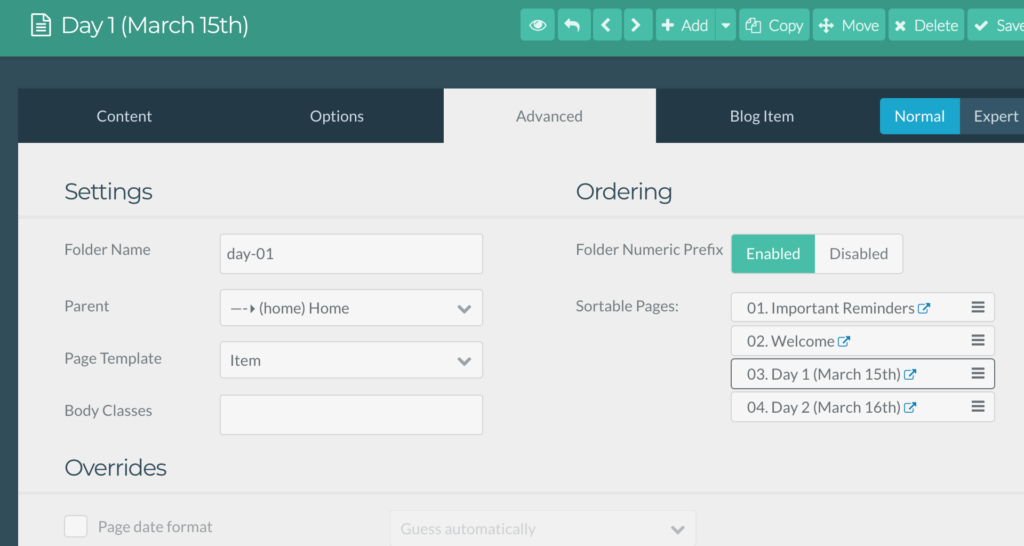
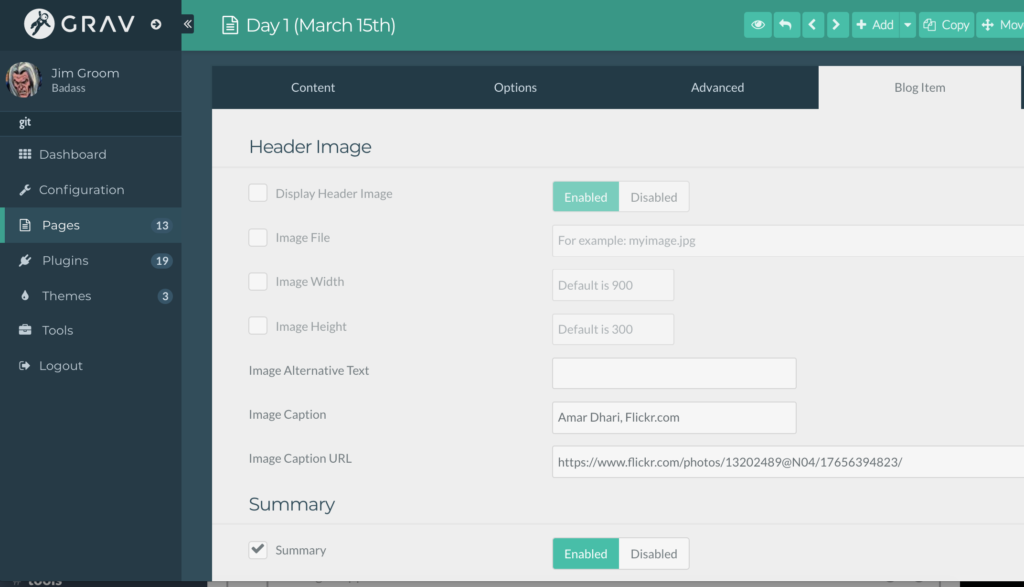
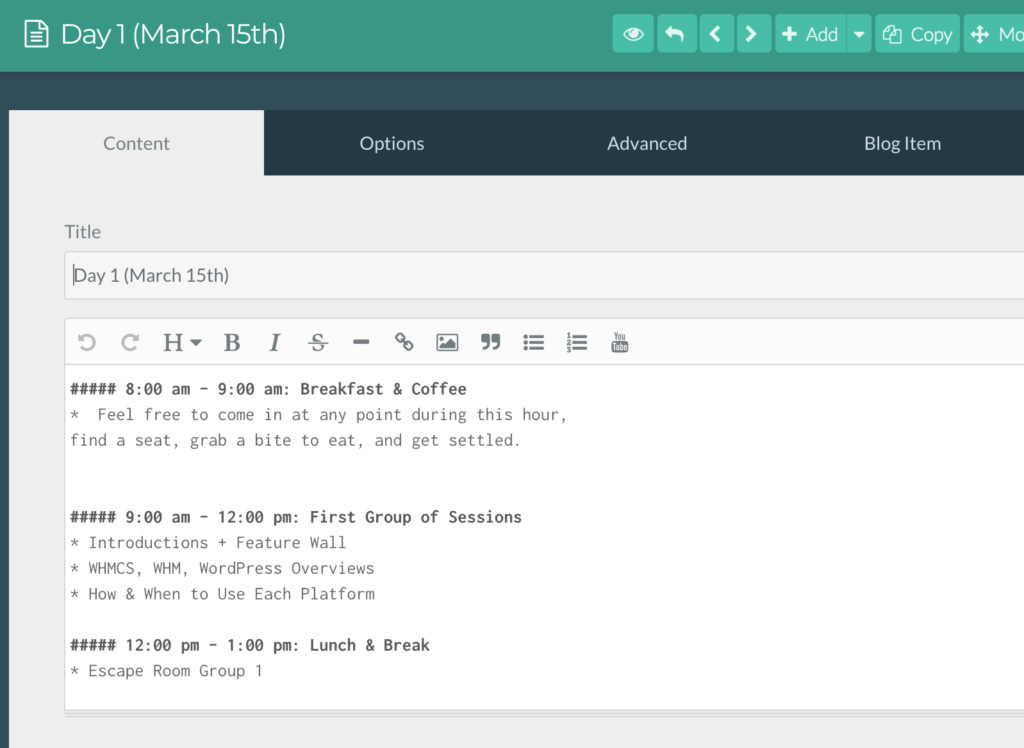
The pages under home are part of the blog. Keep in mind Grav is not necessarily a blogging engine, so the blog functionality is a bit of an addon that you need to build which depends in part on your theme. Paul setup the Open Course Hub that it would have the blog feature enabled by default. The blog posts are known as “items” and you can see the content for the “Day 1 (March 15th)” post below:
Text Editor for Blog Item in Grav
Like Ghost, Grav is built to write using Markdown and you can see in the Content tab that it has a basic visual editor similar to WordPress. The other tabs are where you would control various features of the item.
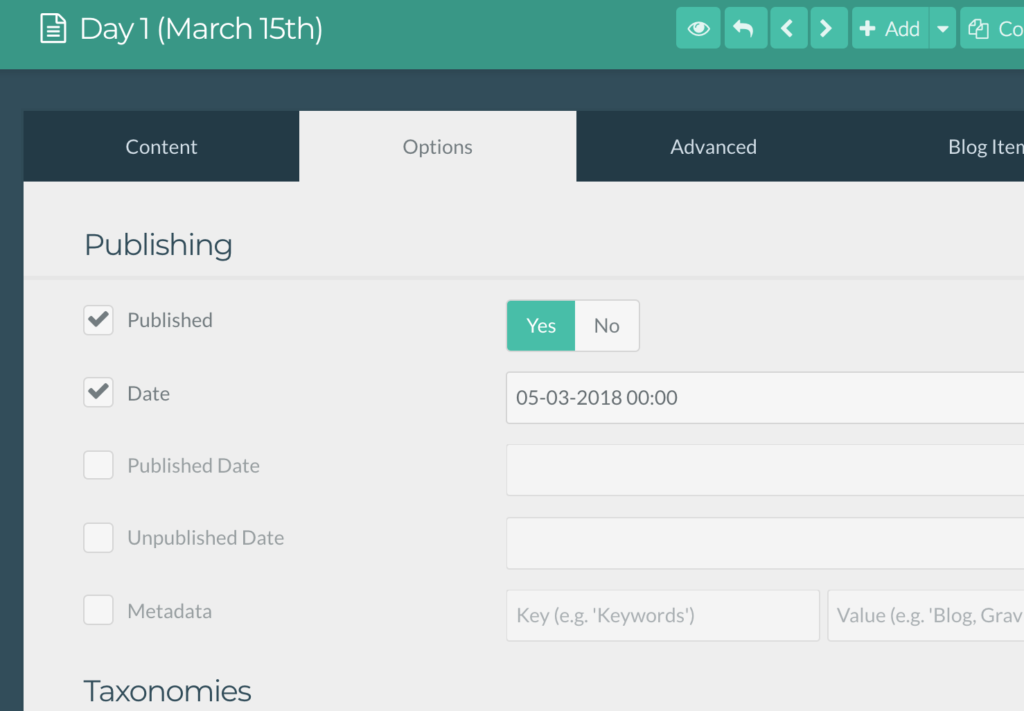
In the Options tab you can update the date of the post, the status (published, draft, etc), add categories, tags, etc.
In Advanced you can control parent page, template, ordering, etc.
In Blog Item you can add featured image, link, summary excerpt, etc.
In retrospect it is simple enough, but after being so trained to think through the WordPress dashboard it’s amazing how much of something as simple as creating a post you take for granted.
So, I’ll be saying as much and more this Friday when I show off Grav to a group of folks to give them a better sense of some of the options afforded through open source applications like Grav and their dedicated community members like Paul that make these applications that much better.
Also, please leave additional talking points, recommendations for examples, and even critiques of what I wrote above in order to help me fine-tune this bit of Workshop of One’s Own.
is an ongoing conversation about media of all kinds ...
Testimonials:
Generations from now, they won't call it the Internet anymore. They'll just say, "I logged on to the Jim Groom this morning.
-Joe McMahon
Everything Jim Groom touches is gold. He's like King Midas, but with the Internet.
-Serena Epstein
My understanding is that an essential requirement of the internet is to do whatever Jim Groom asks of you while you're online.
-James D. Calder
@jimgroom is the Billy Martin of edtech.
-Luke Waltzer
My 3yr old son is VERY intrigued by @jimgroom's avatar. "Is he a superhero?" "Well, yes, son, to many he is."
-Clint Lalonde
Jim Groom is a fiery man.
-Antonella Dalla Torre
“Reverend” Jim “The Bava” Groom, alias “Snake Pliskin” is a charlatan and a fraud, a self-confessed “used car salesman” clawing his way into the glamour of the education technology keynote circuit via the efforts of his oppressed minions at the University of Mary Washington’s DTLT and beyond. The monster behind educational time-sink ds106 and still recovering from his bid for hipster stardom with “Edupunk”, Jim spends his days using his dwindling credibility to sell cheap webhosting to gullible undergraduates and getting banned from YouTube for gross piracy.

 A good example of this is the way the folks at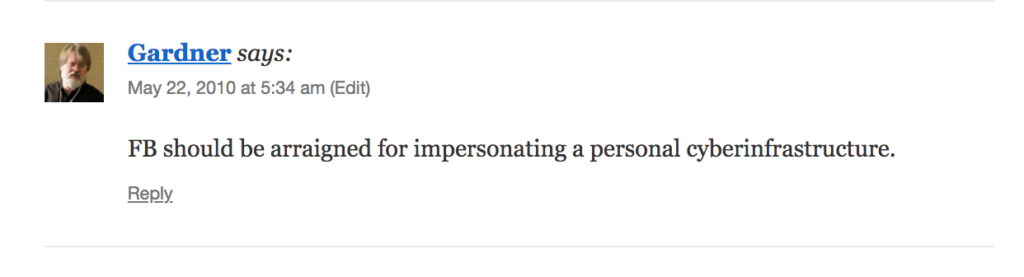
 10 years ago I moved bavatuesdays into what was then a WordPress Multiuser (WPMU) site, a setup which would now be known as a multi-network WordPress Multisite (WPMS) instance. I had




 Once that is done you are going to download the appropriate tables from the WPMS instance, along with the wp_user and wp_usermeta tables. I used Sequel Pro for this, and it is quite the tool for this stuff (although you can do it through PHPMyAdmin in cPanel):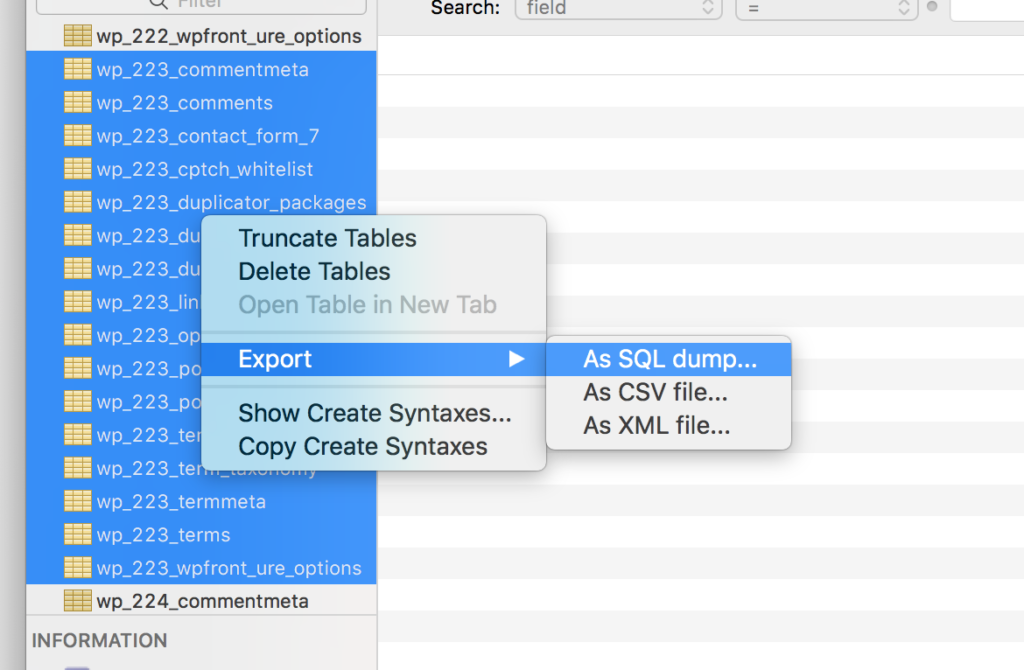
 After this, you will have a downloaded SQL that you need to run one find and replace command on before you import it to your WordPress shell on cPanel. Blog tables in WPMS are uniquely identified in the database with an ID, such as wp_223_, but given this will be a stand alone site now you need to change all instances of wp_223_ to wp_.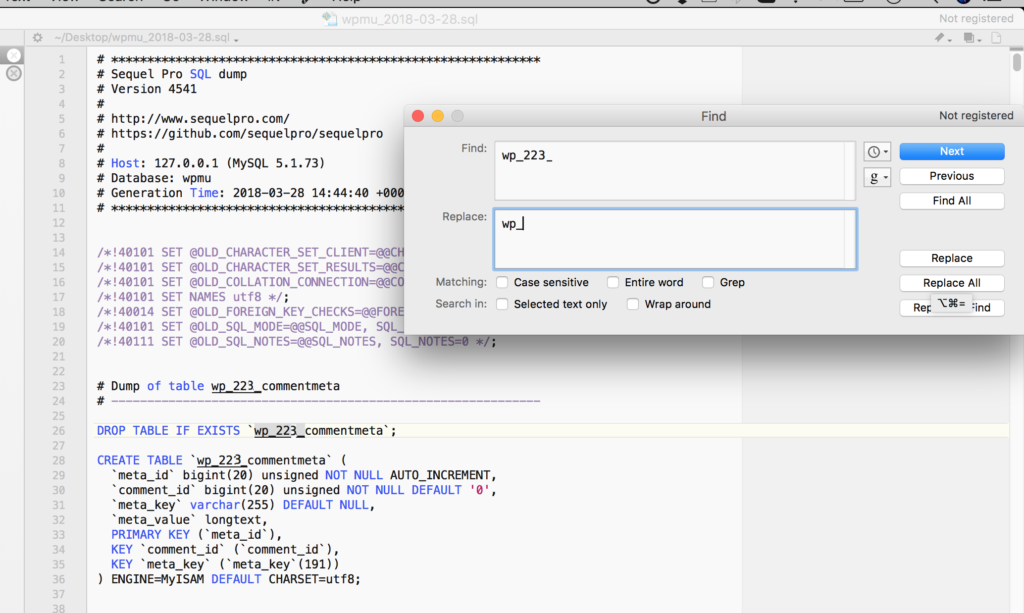





 In Advanced you can control parent page, template, ordering, etc.