A Metaphorical Collapse

Alex Bitterman has an interesting post about the bridge collapse in Minneapolis earlier today and the state of the American infrastructure. He also includes some aerial footage of this disaster. I particularly connected with Alex’s post because I relate so much of the crumbling infrastructure of this nation he describes with its crumbling sense of priorities, principles, and any clear sense of itself (my reading not his).

Are the above images reminiscent of another catastrophic event that happened two years ago this month?

Posted in YouTube | Tagged | 3 Comments

Pimp that bliki!

I responded to a comment by Sue Mayberry -who was asking for more details about creating a bliki (a WordPress MediaWiki mashup)- offering a kind of quick overview of some of the steps with links to the specific posts and details here.

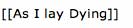
While writing the response to Sue, I began thinking about another possibility with the blog/wiki hybrid that I had bounced around with Patrick and Andy a few weeks ago. Namely, what if you could have a quick tag in the blog editor to link directly to a wiki page within the Bliki environment. For example, I am blogging about William Faulkner’s As I lay Dying within a class bliki and I wrap this text in square brackets like so:
As i lay Dying

This creates a link to a page on the MediaWiki portion of the hybrid that someone in the class can begin to frame out, edit, etc. So, any time someone blogs about this novel or wants to reference a particular wiki article within a blog post or blog page, they can create a direct link though the double square bracket tags.

Simple, pretty cool, so what? Well, OK, let’s take it a bit further. What if there are a series of key concepts in this course that you want the class to think through and integrate into their analysis of a subject. Well, they can be discussing a particular text, concept, issue, etc. and be referencing these key concepts in the blog post that the class as a whole has access to editing via the wiki portion of the hybrid. Wrap that idea in the quicktag and you have a link to a class glossary of terms ideas, concepts etc. that is as dependent on the structure of the blog as it is upon the wiki. In this way, making the wiki and blog integrate becomes that much simpler, and rather than creating a systematic page logic in the wiki, you can simply link out to articles in the wiki from blog posts or pages. This can also work for students that want to write their papers in a wiki – or for faculty that want to utilize the functionality of a wiki for certain elements of the course (a quick sign-up sheet, a collaborative exercise, assignments, a wikified syllabus, a class index, glossary, etc.).

Well, if this at all interests you, then you’re in luck because it’s pretty easy to do. In fact, below the whole thing can be broken down into three quick steps.

1) The plugin code I will be referring to here is available as a text file below, and is a WordPress plugin designed by Andreas Krennmair called Wikipedia Link that I have been using for well over two years now. All it does is use double square brackets around a word or phrase to link to that Wikipedia. The “blikified” version of this plugin simply requires you to copy the code below into a text editor, save it as wikipedia-link.php, and replace the two instances of http://en.wikipedia.org/wiki/index.php in the code below with the path to your wiki. For example, if your wiki is installed in the path folder http://mydomain.net/wiki/ the url you would replace the two instances of http://en.wikipedia.org/wiki/$1 with
http://mydomain.net/wiki/index.php?title=$1
Important note:: if you are using Short URLs for MediaWiki this will be different.

After that, upload it to your plugins folder, activate it, and disco –you will be dancing , yeeeeeeah!

Download the plugin here: wikipedia-link.text

Now, here’s the trick, you can also globally activate this plugin for a WPMu installation and have the same thing happening on an associated MediaWiki installation. Chaos or a quick and dirty MediaWiki farm? You be the judge…

Posted in WordPress | Tagged , , , , | 5 Comments

Killer Shark (1972)


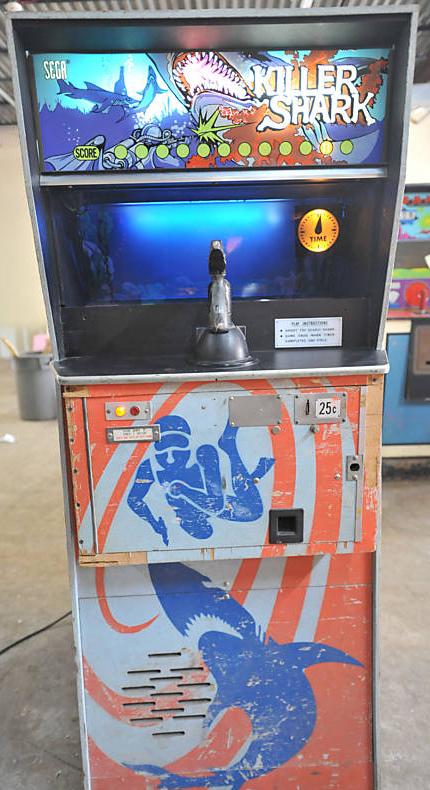
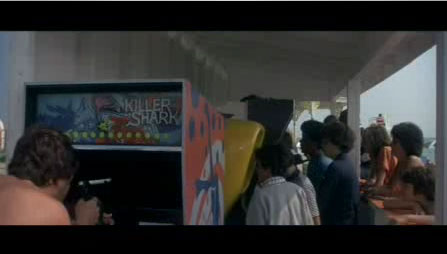
Image of Killer SharkJerry and I got to talking about classic arcade games yesterday (as we are wont to do along with 1980s music) and the 1972 electro-mechanical game Killer Shark came up as a topic of conversation. Killer Shark represents a brief moment before the imperial rise of the video game, yet the cabinet was fully representative of the aesthetic of video games to come.
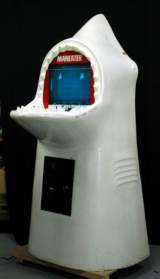
Although, in all fairness, not nearly as inspired as the surreal cabinet design of the first Shark video game Maneater -yet a hundred times the graphics and game play in my opinion. It’s always fun to indulge in a bit of gaming nostalgia, and I decided to take it a little further in order to find some more details and images, and lo and behold I hit pay dirt -so easy with the internets:

Killer Shark, Sega, 1972, shark moves around and the player shoots it with a spear gun. It has a series of slides on a wheel that make the shark move and thrash around when shot. Electronic sound and 8-track player. Same game as Sega’s Sea Devil, but Sea Devil had a manta ray instead of a shark. (Link)

The reference to Sea Devil above is relevant, because that is actually the game I played while growing up at the local arcade (and I literally did grow up there). My first exposure to Shark Attack came during a brief cinematic foreshadowing in Jaws (1975). I went back to the archive in order to give anyone who may not have remembered the fascinating aesthetic of this game -in many ways both haunting and gruesome. The shark moves lightening fast (not unlike the genetically engineered in Deep Blue Sea) through a series of flickering slides and when the harpoon hits, the blood flows freely as the shark writhes in pain. The images are pretty powerful, and thankfully the time machine of the movies preserves it all in beautiful Technicolor!

Posted in fun, video games | Tagged , | 10 Comments

Get your bliki on!

That’s right, the WordPress MediaWiki mashup is gaining some momentum. Just check out the Blogfolio del Dr. Mario Nunez, a self-proclaimed “Blogfesor” at the Recinto Universitario de Mayaguez in beautiful Puerto Rico. I love it!!! The other thing I love is that I got most of the credit when Andy Rush did most of the work 🙂

The bliki has re-surfaced for me as the Fall semester looms larger every day, and Mario and I have been talking a bit about the installation details (is this on a WPMu account Mario?) and perhaps it would be helpful to go through the steps more precisely in a blog post. I’ll try and put together a play-by-play tutorial for anyone interested in experimenting with the Bliki this Fall. Additionally, there is an excellent example of a Bliki that we worked on during the Spring semester that I have yet to blog. Marjorie Och’s Venice Seminar Exhibit was a really convincing experiment with the bliki for me and I’ll be sure to blog the details of this as well so that you can get an idea of the struggles we had when figuring out when to use the blog, when to use the wiki, and how to integrate the two for a more dynamic site/exhibit. And, ideally, you could let me know what your logic is so that we can begin to conceptualize this malleable course space.

Posted in WordPress | Tagged , , , , , | 9 Comments

In Cold Blood

I picked up Truman Capote’s In Cold Blood for the first time this weekend. I am only a hundred pages in thus far, but I can only begin to suggest how artfully he frames the narrative in the first fifty pages. I have yet to see the film starring Robert Blake, and I am kind of glad I held out because after finishing the book I would be very interested to see how they translated this narrative. The book seems almost written for the screen, the way in which it cuts between the narratives of the Clutter family and the murderers harrowing movement towards what is written as if it were the violent destiny for everyone involved in this macabre documentary tale. It is really masterful how the juxtaposition of the family’s daily routine with a more detailed portrait of violence personified by these two murderers creates a tension and compassion that is as masterful a narrative splicing as I have yet to read.

I also was struck by a few of the symbolic harbingers of things to come. One, in particular, struck me more than the other in the first fifty pages of the book -the description of Mr. Clutter admonishing his son Kenyon not to ride his horse too hard:

“Skeeter was a horse.” A beautiful horse. A strawberry stallion he [Kenyon] had raised from a foal. How that Skeeter could take a fence! “You use a horse too hard,” his father had cautioned him, “One day you’ll ride the life out of Skeeter.” And he had; while Skeeter was streaking down a road with his master astride him, his heart failed, and he stumbled and was dead.

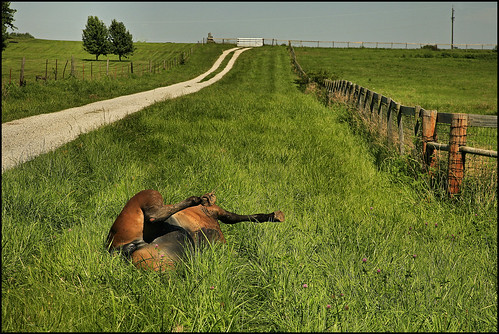
A vivid moment that captures the immediacy of death, and how quickly it can all be turned off. A theme Capote elaborately weaves throughout the first one hundred pages so brilliantly. Yet, I had only ever seen horses as majestic, powerful beasts who move so swiftly and gracefully, and yet are somehow rooted to the earth. Being a city boy, I have never seen a dead horse, and have to admit that I didn’t really have the imaginative power to represent what it might look like. But then, as if by some metaphysical convergence, I came across the following image in FoToEdge’s Flickrstream, whose photographs constantly inspire so much emotion and thought for me, but this one was one in particular was just downright unheimlich.

Image of dead horse.

And the two separate works of art all became that much more beautifully horrific for me.

Posted in film, Uncategorized | Tagged , , , , | 3 Comments

“Alternatives for BlackBoard”

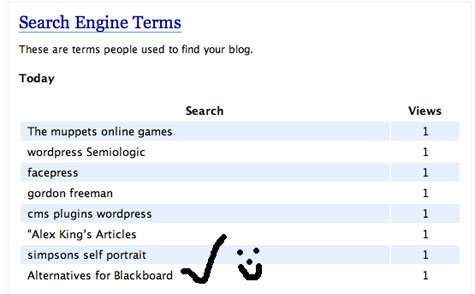
It is always fun to see what search terms send people your way. In my case it’s usually keywords like De-Animator (the flash game), Simpsonizer (the Simpson-ized self-portrait maker), or Felix the Cat -now these are all topics I have talked about on a few occasions, but they don’t necessarily reflect the meat and potatoes of this blog (and what is that exactly?). Today there was a search term that has me wearing a really big smile as I write this.

Alternative to BlackBoard

Yes, that’s right, we do serve up BlackBoard alternatives here at bavatuesdays. Start with this post that frames a general argument against canned course management systems like BlackBoard, while also suggesting Wordpres as an alternative (keep in mind that WordPress Multi-user makes the hacking part somewhat irrelevant). After that, take a look at this post which may suggest some other larger conceptual reasons why a system like WordPress Multi-user might provide a viable alternative. After that you might want to rummage around in the wpmu category. Finally, when you’re finished with your research just do me a favor and let everyone know that there are, indeed, alternatives 🙂

Tagged | 3 Comments

Commentpress, Interactive Libraries, and WPMu

Image of a Ping Pong table in the middle of a library
Image used courtesy of Jessamyn‘s CC Flickr photos.

“And then I realized… like I was shot… like I was shot with a diamond… a diamond bullet right through my forehead.”
Captain Kurtz in Apocalypse Now

I saw Will Richardson’s post that Budd the Teacher had set up a working version of the Commentpress theme. I commented there a bit and generally played around, I had already set up a document themed version of Mary Rowlandson’s captivity narrative (read more here), but while posting a comment on Bud’s installation of the theme an idea hit (possibly unoriginal, but what isn’t!): “Why don’t we locate a number of public domain books that folks are reading in their classes and publish them through a blog on our WordPress Multi-User installation as an extension of the library.” These books may be linked with a class, but the library “publishes them,” so to speak, and offers additional resources on the works which in turn might foster an active community of collaboratively reading, commenting, and discussing a number of books in a distributed fashion.

This is part of a more general move we have been making to work more directly with the library folks here at UMW (which makes perfect sense) and the more I think about it the more this seems like an unparalleled opportunity to forge an even deeper relationship between the library, teaching, learning, and technology. And I can’t help but think that this theme was made for the 21st century library, allowing for a unique experience that a library is best equipped to richly frame. Why not publish novels, poems, manuscripts, historical documents, etc. and invite classes, researchers, the community as a whole to engage them online. Just think about it, by working collaboratively with teachers and professors, the library can help lead students to more detailed resources, databases, articles, etc. about a particular text or topic making the relationship between reading, discussion, writing and research that much more seamless.

Posted in WordPress, wordpress multi-user | Tagged , , , , | 6 Comments

Deep Thought #453: Porting the ELS Blogs WPMu install to a new domain

Image of beach
“Without order nothing can exist – without chaos nothing can evolve.” – Unknown
Picture used courtesy of Ivanomak

I spent most of the last two days (and all of today well into this evening -meaning now) finishing up a transfer of almost 80 blogs from one domain running WordPress Multi-user using subdirectories to a new domain using dynamic subdomains. The details are many and varied, and I would be more than happy to discuss them with anyone who is going through this process (but I don’t have the stamina to document them all here -sorry). In fact, this post isn’t necessarily about the technical details, its more about some preconceptions and my recent push towards centralizing things in my head. Ever since I have been waxing vulgar about using WPMu as a university-wide authoring platform for students, professors, courses, etc. (it’s been going on almost a year now) I am just awaking a bit from my monomaniacal trance. Now don’t get me wrong, I do indeed think WPMu is the cat’s meow when it comes to a distributed space for authoring, feeding, and sharing work, as well as allowing students to take it with them when they go. Fanboy ’til the end!

But I have been stressing for the last week or so, and as a result refusing to do anything else until summer session ended and all the “old blogs” on the ELS Blogs multi-user site are ported over to the new UMW Blogs site. Why? Jerry and Martha astutely asked me this at Wednesday business meeting and I came up with some half-assed answer about needing everything in one place, directory structures (when I start talking tech it is a sure fire sign somethings amiss), and management concerns. What? Management concerns?! “Come on, Jim -get over yourself.” I couldn’t manage my way out of a wet paper bag. So, why the need to port these blogs, spend almost six hours re-configuring sql queries and re-encoding text (things i am terrible at) when so much of what made the ELS Blogs an important and forwarding-looking space was the conversations, pings, and trackbacks so many students shared there. in fact, when I did a full port (I left the original ELS Blog site untouched and it remains up and running) I realized just how many of those connections might be severed by my push for order and everything that is holy. So, in the end, I think Jerry and Martha’s question about why I’m doing this was good one, and I still don’t have a good answer. So, rather than playing WPMu admin god boy -I’m gonna send out a nice little e-mail to everyone with a ELS Blog and say the following:

After struggling with my own sense of ownership, power, and technical Napolean complex. I decided that I am gonna shut down ELS Blogs and kick all you freeloading squatters out because you’re lazy, dirty and you have no proper place in my domain.

Actually, no, I’m not gonna write that, I’m gonna write something more like this:

Hey guys and gals, we have a new Multi-User space for blogs, classes, and independent studies and such. If you want to bring your blog over (for most of the work we do with WordPress will be taking place in the new space from here on out) here’s how. If not, that’s fine, I still love you and ELS Blogs will be trucking along for as long as you need it. Enjoy.

I really don’t want my zeal for all things WordPress to get in the way for what’s best for a virtual learning environement. ELS Blogs is an amazing intellectual ecosystem, why do I have to “develop” it into something it’s not for my own sense of challenge, order, and pseudo-mastery? I don’t know, but all I can say is that the funk is officially gone and the port has been abandoned for the time being because I don’t want to destroy the trackbacked connections that so many students and professors have spent countless hours of building, fostering, and cultivating. OK, this all stands until I get the directive to do otherwise, or I have yet another idea for delaying the inevitable fact the WPMu is a few steps closer to being institutionalized at UMW -why does that scare me so. I think Jerry understands…

Finally, the hubris on my part -did I even ask Gardner, his students, my own, Terry’s, or anyone else about this transition and what it might mean to them? Although, not to toot my own horn or anything, but I did get it to work for what it’s worth, and I even discovered a way via the forums to have a single wpmu account spread across several different domains -next project?! 😉

Posted in WordPress, wordpress multi-user | Tagged , , , | 2 Comments

Mary Rowlandson meets Commentpress

I have set up a WordPress Multi-User test of CommentPress, a theme brought to you by the fine folks at The Future of the Book (in particular Bob Stein, Jessie Wilbur, and Eddie Tejada). This theme is absolutely sick (a good thing, mind you) because it allows you to literally publish a book online using the blogging software WordPress. But more importantly, it builds in some revolutionary nested comment functionality that re-imagines the space wherein you can have threaded conversations alongside the text to brilliantly capture the actual unfolding of a stream of textual ideas in-line. Very impressive stuff, and I highly recommend you try it out yourself.

Rowlandson

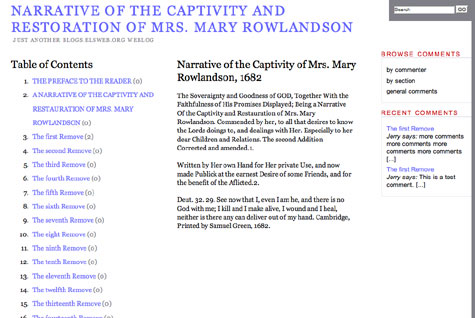
As a test on a WordPress Multi-User site, I published Mary Rowlandson’s Narrative of the Captivity of Mrs. Mary Rowlandson, 1682 here (it woks like a champ). I was able to cut and paste this public domain text quite easily because the Early Americas Digital Archive has their texts encoded in the TEI (Text Encoded Initiative) XML vocabulary. Now Patrick will have a lot more to say about how this may open up some amazing possibilities for further slicing and dicing of a text formatted in such a way.

In short, I can think of a million and one ways this may prove revolutionary for how we read, discuss, and comment upon texts for a class. Think of the possibilities for recording and sharing marginalia; collaboratively annotating a text as a class; threaded discussion about book passages; tracking one’s genesis for paper; offering communal books for different classes and students to works through and comment on in a distributed fashion; and the list goes on and on. The way I would teach an Early American literature class would undoubtedly change forever given the xml formatted texts and this phenomenal theme which opens up so much teaching and learning goodness.

Thanks to the heads up very early on from Brian Lamb (who saw this baby coming months ago), as well as Martha and Matt (of Tattered Coat fame) for the links via del.icio.us and e-mail, you all rule the Web 2.0 school!

Posted in WordPress | Tagged , , , , , , | 7 Comments

Cassavetes’s Husbands: Death, Funerals, and New York

“[Cassavetes] replaces the exhausted artifices of conventional movies with a new set of pseudo-realistic ones, which are mostly instantaneous clichés. As a writer-director, he’s so dedicated to revealing the pain under the laughter he’s a regular Pagliacci.” – Pauline Kael, Husbands

Image of John Cassavetes

I have to give a huge thanks to a YouTuber from Canada, AlexeiPachinko, who made John Cassavetes’s 1970 film Husbands available in its entirety on YouTube over 19 installments. Now it is pretty obvious that this is not the best way to watch any film, no less one by Cassavetes. But for me -a perpetually homesick New Yorker who constantly wants to revisit parts of this film which I first saw in the warm arms of UCLA’s Melnitz theater during the early 90s -this was like the discovery of oxygen. More than any other film, Husbands reflects my own traumatically romantic relationship to New York. Now this was one of the few Cassavetes’s films generally trashed by critics (Kael in particular hated pretty much all of his films) for being too self-indulgent, misogynistic, overly long, and without any real compelling focus. That being the case, however, I can’t help returning to so many scenes and images from this film again and again -especially more recently.


Opening Funeral scene: “Archie, I’m telling you, don’t believe truth!”

The opening of this film, from the credits through the end of the funeral scene (along with the scene on the subway and streets scenes in section two on YouTube), may very well be the most powerfully emulsified visions of New York burnt upon my psyche. Let me start by saying New York is not America, it is New York -the two should never be confounded or conflated. New York (and Long Island in particular) is, at least for me, a space of memories fueled by unmanageable chaos framed by a childlike freedom that is everywhere imbued with death. At my Mother’s house the kitchen table served as the focus for life and death. The table’s lazy susan always had a fresh pot of coffee, a carton or two of Marlboro 100s (with the Gold colored foil mind you), and an assortment of ashtrays -all of which constantly revolved around unending conversations about everything- but most of which constantly turned back to death. I wouldn’t have characterized my mother as an overly morbid person, in fact she was full of life and energy having raised seven children almost single-handedly, but as with most people from Queens, Brooklyn, and Nassau County, tracking, discussing, and living within the specter of death is a communal art of preparing one another for the inevitable.


The Final scene just makes me want to cry, especially when Cassevetes sees his children after an extended weekend debauch in London.

I miss my Mom a lot these days, and the poetic vision of Husbands that draws the beautifully coarse textures of New York during the 1970s frames a landscape in which I was being prepared for death, and in many ways being a husband, a father, and, more importantly, a mortal. This film is not only a curative for my own struggles with endings and saying goodbye, but a constant reminder of Cassavetes own untimely death as a father of two and a husband of one of my first boyhood, mother-loving crushes on Gena Rowlands (solely based on her performance in Gloria). The last five minutes of Husbands embodies how film is simultaneously a sepulcher of the past as much as it is a way of coming to terms with and transcending the confined imaginings of what is now gone. How? I don’t know exactly. I do know, however, that I miss John Cassavetes. How can I miss someone I never knew? Well, I imagine that is caught up with how someone who I never knew and is almost dead twenty years can continue to give me a meaningful memory from my childhood I never had in order to help me deal with loss in the present so that I can prepare myself for the future. I also know that I miss my mother very, very much these days.

Posted in film, films, movies, YouTube | Tagged , , | 7 Comments