WPMu Multi-DB Tutorial

Sooner or later we had to do it on UMW Blogs, and over a week ago we made the jump to a multi-database setup for our WordPress Multi-User environment. We have a subscription to the WPMu Dev Premium service, which gives us access to the Multi-DB script. This code enables you to break one database up into many, allowing your site to scale for a whole lot of blogs… it might also improve performance significantly. Given the fact that UMW Blogs got hit quite hard the first week of classes, I spent the following Sunday working with the ever-brilliant Zach Davis of Cast Iron Coding upgrading our database structure. I enlisted Zach’s support because a) he is much smarter than me about this stuff (and in general), and b) the documentation for making the move from a single to a multi-database environment was rather fragmented and scarce, which made me a bit uncomfortable with experimenting šŸ™‚

So, in short, what follows is my attempt to consolidate documentation for this process in one place. I can’t vouch that everything is 100% accurate or will definitely work on your install, rather I’ll depend on folks out there to correct any oversights, mistakes, or outright lies I perpetrate here. I think of this tutorial as a much needed start to documenting this process step-by-step, something which is unfortunately non-existent currently.

1. First things first, if you want to get the scripts and code that powers this process, you’ll need to get a subscription for the WPMu Dev Premium service. And if you’re running a big WPMu site and don’t have your own group of in-house programmers, this may prove an affordable alternative because as of now I’m not aware of a free alternative. Also, as of the writing of this post the plugin works up to WPMu version 2.6.5.

2. Once you have the script files, go ahead and create your databases.Ā  But before you do, a question will immediately arise— how many databases should you have: 16, 256 or 4096? This really depends on how many blogs you see in your WPMu site’s future, we only went up to 16 dbs (which is actually 18, but more on that soon) because at 2400 blogs over the course of two years our growth will remain both steady and limited over time (we’re a small school). We really don’t expect 50,000 to 100,000 blogs anytime soon–it would take us almost 50 years to get to the lower end of that spectrum, and whileĀ  I love WPMu, I’mĀ  not sure it will be the platform of choice in the year 2059. However, if you foresee 50,000 to 100,000 blogs/users in a shorter period of time—say a year or two—I would opt for 256 databases, and if you plan on growing to much more than that (say 100,000+), I would imagine 4096 databases would be what you want.

3. After you have figured this out for yourself, you can create your databases, my example for this tutorial will be with the 16 databases option, but it should be relevant to any configuration. The first potential issue you may have will be with the actual naming of the databases. And while the documentation suggests you can name your databases along the lines of any convention you want, we found that not to be true. In fact, we tried to just number them consecutively, and this created an error. As of now, you should really stick to the alpha-numeric database number convention when creating new databases that you’ll get here in the DB_SQL tool. If you are like me, you will grab something like the code for the first 16 lines below, I used wpmu_ as my database name prefix.

CREATE DATABASE `wpmu_0` DEFAULT CHARACTER SET utf8 COLLATE utf8_general_ci;
CREATE DATABASE `wpmu_1` DEFAULT CHARACTER SET utf8 COLLATE utf8_general_ci;
CREATE DATABASE `wpmu_2` DEFAULT CHARACTER SET utf8 COLLATE utf8_general_ci;
CREATE DATABASE `wpmu_3` DEFAULT CHARACTER SET utf8 COLLATE utf8_general_ci;
CREATE DATABASE `wpmu_4` DEFAULT CHARACTER SET utf8 COLLATE utf8_general_ci;
CREATE DATABASE `wpmu_5` DEFAULT CHARACTER SET utf8 COLLATE utf8_general_ci;
CREATE DATABASE `wpmu_6` DEFAULT CHARACTER SET utf8 COLLATE utf8_general_ci;
CREATE DATABASE `wpmu_7` DEFAULT CHARACTER SET utf8 COLLATE utf8_general_ci;
CREATE DATABASE `wpmu_8` DEFAULT CHARACTER SET utf8 COLLATE utf8_general_ci;
CREATE DATABASE `wpmu_9` DEFAULT CHARACTER SET utf8 COLLATE utf8_general_ci;
CREATE DATABASE `wpmu_a` DEFAULT CHARACTER SET utf8 COLLATE utf8_general_ci;
CREATE DATABASE `wpmu_b` DEFAULT CHARACTER SET utf8 COLLATE utf8_general_ci;
CREATE DATABASE `wpmu_c` DEFAULT CHARACTER SET utf8 COLLATE utf8_general_ci;
CREATE DATABASE `wpmu_d` DEFAULT CHARACTER SET utf8 COLLATE utf8_general_ci;
CREATE DATABASE `wpmu_e` DEFAULT CHARACTER SET utf8 COLLATE utf8_general_ci;
CREATE DATABASE `wpmu_f` DEFAULT CHARACTER SET utf8 COLLATE utf8_general_ci;
CREATE DATABASE `wpmu_global` DEFAULT CHARACTER SET utf8 COLLATE utf8_general_ci;
CREATE DATABASE `wpmu_vip1` DEFAULT CHARACTER SET utf8 COLLATE utf8_general_ci;

You might notice there are actually 18, not 16, databases here. I added the last two based on the code from the previous 16. The reason for these two extras is important, the Global database has all the tables for global plugins, site meta, etc., the VIP database allows me to put the main blog for UMW Blogs in its own database which should optimize its performance given it is probably the most heavily trafficked blog in the environment. So, there’s the logic behind having, in reality, 18 databases, and now that I think about it, I should have created another VIP blog database for the UMW Blogs tags blog–might have to see if I can do this after the fact–anyone know if this is possible?

Once you got this code, you can create the new databases using phpMyAdmin or use the command line—if you aren’t afraid of it like I am šŸ™‚

Image of phpMyAdmin Multi-DB

After you have created your databases, you need to make sure you have one, über admin user who has permissions for all the databases you just created. This is probably much easier to do in command line, but you’ll have to do this in CPanel if you work like I do, something I wouldn’t recommend for 256 or 4096 dbs —any one wanna share the command line code?

4) OK, once you databases have been created, and the permissions are set, you are going to need to setup the db-config.php file. This is a key part of the process, so be sure to take a little time with this and make sure everything is right. Additionally the dc_ip terminology can get confusing (dc stands for data center, and I believe it is misleading).

This is where you choose how many databases you want to scale to:
// 16,256,4096
define ('DB_SCALING', '16');

This is where you specify the IP address of your server. Don’t be confused by the DC (or data center abbreviation), also keep in mind that unless your WPMu is spread out over several IP addresses, you should only have to specifiy on IP address here–am I right with this?
// Usage: add_dc_ip(IP, DC)
// EX: add_dc_ip('123.123.123.', 'dc1');
add_dc_ip('123.123.123.', 'dc1');

This is where you specify your global tables name, we named ours umwblogs_wpmu_global, this is your own call, and the umwblogs_ is our overarching db prefix.
// Do not include default global tables
// Leave off base prefix (eg: wp_)
//
// Usage: add_global_table(TABLE_NAME)
// EX: add_global_table('something');
add_global_table('umwblogs_wpmu_global');

This is where you specify the details of your server, including db name, IP, HOST, DB Name, User, PW). We didn’t include a second DC IP address nor a Lan_Host, and everything still worked fine–once again, am I being misleading here? Also, the add_server terminology is odd as well, you have already created databases, and I’m not sure they can be understood as servers, but disregard this—it is inexact language that kills us in this field—and I am a large part of the problem šŸ˜‰

// Usage: add_db_server(DS, DC, READ, WRITE, HOST, LAN_HOST, NAME, USER, PASS)
// EX: add_db_server('wpmu_global', 'dc1', 1, 1,'global.mysql.example.com:3509','global.mysql.example.lan:3509', 'global-db', 'globaluser', 'globalpassword');
add_db_server('global', 'dc1', 1, 1,'64.120.23.72','192.168.0.101', 'wpmu_global', 'db_user_name', 'db_user_name_pass');

add_db_server(‘0’, ‘dc1′, 1, 1,’64.120.23.72’, ‘wpmu_0’, ‘db_user_name’, ‘db_user_name_pass’);
add_db_server(‘1’, ‘dc1′, 1, 1,’64.120.23.72’, ‘wpmu_1’, ‘db_user_name’, ‘db_user_name_pass’);
add_db_server(‘2’, ‘dc1′, 1, 1,’64.120.23.72’, ‘wpmu_2’, ‘db_user_name’, ‘db_user_name_pass’);
add_db_server(‘3’, ‘dc1′, 1, 1,’64.120.23.72’, ‘wpmu_3’, ‘db_user_name’, ‘db_user_name_pass’);
add_db_server(‘4’, ‘dc1′, 1, 1,’64.120.23.72’, ‘wpmu_4’, ‘db_user_name’, ‘db_user_name_pass’);
add_db_server(‘5’, ‘dc1′, 1, 1,’64.120.23.72’, ‘wpmu_5’, ‘db_user_name’, ‘db_user_name_pass’);
add_db_server(‘6’, ‘dc1′, 1, 1,’64.120.23.72’, ‘wpmu_6’, ‘db_user_name’, ‘db_user_name_pass’);
add_db_server(‘7’, ‘dc1′, 1, 1,’64.120.23.72’, ‘wpmu_7’, ‘db_user_name’, ‘db_user_name_pass’);
add_db_server(‘8’, ‘dc1′, 1, 1,’64.120.23.72’, ‘wpmu_8’, ‘db_user_name’, ‘db_user_name_pass’);
add_db_server(‘9’, ‘dc1′, 1, 1,’64.120.23.72’, ‘wpmu_9’, ‘db_user_name’, ‘db_user_name_pass’);
add_db_server(‘a’, ‘dc1′, 1, 1,’64.120.23.72’, ‘wpmu_a’, ‘db_user_name’, ‘db_user_name_pass’);
add_db_server(‘b’, ‘dc1′, 1, 1,’64.120.23.72’, ‘wpmu_b’, ‘db_user_name’, ‘db_user_name_pass’);
add_db_server(‘c’, ‘dc1′, 1, 1,’64.120.23.72′,’ ‘wpmu_c’, ‘db_user_name’, ‘db_user_name_pass’);
add_db_server(‘d’, ‘dc1′, 1, 1,’64.120.23.72’, ‘wpmu_d’, ‘db_user_name’, ‘db_user_name_pass’);
add_db_server(‘e’, ‘dc1′, 1, 1,’64.120.23.72’, ‘wpmu_e’, ‘db_user_name’, ‘db_user_name_pass’);
add_db_server(‘f’, ‘dc1′, 1, 1,’64.120.23.72′,’ ‘wpmu_f’, ‘db_user_name’, ‘db_user_name_pass’);

add_db_server(‘wpmu_vip1’, ‘dc1′, 1, 1,’64.120.23.72’, ‘wpmu_vip_1’, ‘db_user_name’, ‘db_user_name_pass’);

[Notice in the above code I got rid of the second IP address and LAN Host.]

Moving on, in the next area you want to be sure to specify the correct blog ID of the blog (or blogs) you want to have their own VIp database.
// Usage: add_vip_blog(BLOG_ID, DS)
// EX: add_vip_blog(1, 'vip1');
add_vip_blog(1, 'vip1');

5. Now that’s it for the db-config.php file, but before I move on–and skip this step if you are not interested in changing code— I just wanted to note that Zach actually re-wrote the PHP code in this file to make it a bit more streamlined, I offer it up here to ask if it makes sense, and might be integrated into the next version of the plugin, it seems cleaner, but I might be missing something. Below is Zach’s code for adding the db_servers and vip blog:

$umwBlogs_host = 'localhost';
$umwBlogs_user = 'db_user_name';
$umwBlogs_pw = 'db_user_name_pass';
$umwBlogs_databases = array(
'global',
'0',
'1',
'2',
'3',
'4',
'5',
'6',
'7',
'8',
'9',
'a',
'b',
'c',
'd',
'e',
'f',
'vip1',
);

// create the rest
foreach($umwBlogs_databases as $umwBlogs_dbKey) {
$dbName = ‘umwblogs_wpmu_’.$umwBlogs_dbKey;
add_db_server($umwBlogs_dbKey, ‘dc1’, 1, 1, $umwBlogs_host, $umwBlogs_host, $dbName, $umwBlogs_user, $umwBlogs_pw);
}
add_vip_blog(1, ‘vip1’);

I’m definitely interested in what you think of this?

6. Now that this is all setup, we need to do one more bit of configuration in the move-blogs.php file:

///DB Settings
$dbname = 'umwblogs_umwblogs'; //This is your current database
$blog_table_prefix = 'wp_'; //Prefix of your wpmu blog tables, most likely this won't need to be changed
$newdb_prefix = 'wpmu'; //This is the prefix of the db's you're moving your tables into - we assume they are all the same, if not, you're in trouble

//We need info to connect to the databases
$dbhost = ‘localhost’;
$dbuname = ‘db_user_name’;
$dbpass = ‘db_user_name_ pass’;

//How many db’s are you moving into (16, 256, or 4096)?
$db_scaling = ’16’;

7. Once you have done this, you are ready to take the plunge and try and move all your blogs to the new database structure. If you do this, and haven’t backed up your existing database four times, you are nuts. Now that I have said that, the next step is to call up the move-blogs.php file (which you shoud have placed in the wp-content/scripts directory) in your browser and see if it finds your databases, and everything has been created correctly, etc.

We didn’t create our databases the first time around because I was under the false impression the db-config file would do this, but from my experience it doesn’t, and here is the error we got.
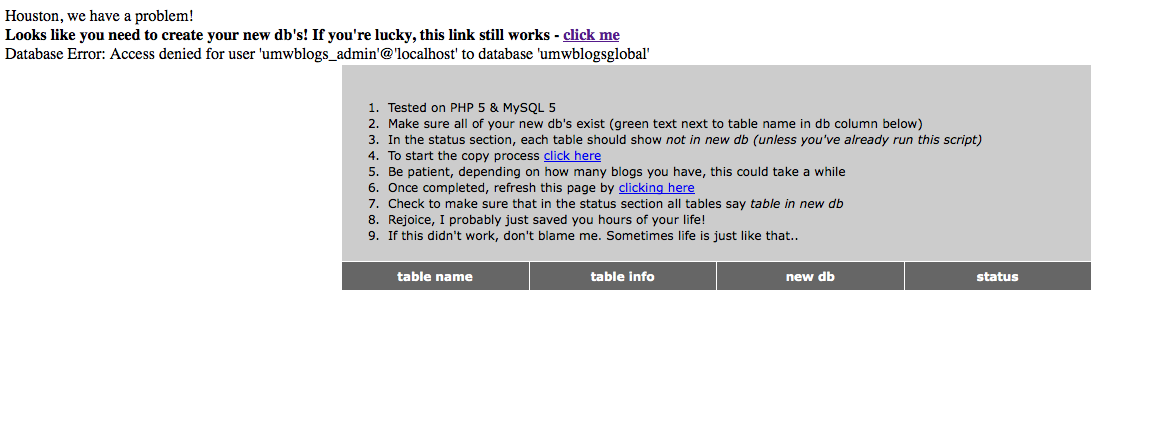
Image of DB error

Once we created them and named them according to the convention outlined above, we were on our way, but there was one more issue worth noting. Before going to the move-blogs.php script, there are actually two typos that could really throw you off on lines 83 and 85 on the move-blogs.php file:

...'move_blogs.php?table=copy'>click hereclicking here

Note that the first and third lines above have the move-blogs.php file with an underscore (move_blogs.php) rather than a dash---that threw us off for a bit before Zach found the typo, so change this before you start the move--it will spare you some potential heart failure. It should look like this:

...'move-blogs.php?table=copy'>click hereclicking here

After that, if the gods are on your side, your entire database will be broken up into all kinds of pieces, and everything will magically work fine. One thing I noticed was that my plugins were all good, but the mapped domains (we had a few) broke after this upgrade, so keep that in mind. Good luck!

OK, I have to go home now, it is a snow day here in Virginia :)
Posted in wordpress multi-user, wpmu | Tagged , , , , , , , , , , , , | 25 Comments

Syndicatin’ Welfare: UMW Blogs’ Syndication Framework on the Cheap

Can you you feel the bass and guitar kick in, and hear the tempo surely rise? I knew that you could!

I know that it’s evil
I know that it’s got to be
I know I ain’t doing much
Doing nothing means a lot to me
Living on a shoe string
A fifty cent millionaire
Open to charity
Syndicatin’ welfare

Enjoy the rest here.

Everything you ever wanted to know about the state of syndication on UMW Blogs for the low, low price of my overdrawn prose. So lay it down and start kicking it up a notch–if you ain’t syndicatin’, you ain’t vindicatin’!

Preliminaries

Here are the plugins and widgets you’ll need for this syndication framework:

  • FeedWordPress Syndication plugin that is at the heart of the re-publishing posts from blog-to-blog. particularly when re-publishing a students posts in a course aggregating blog.
  • Sitewide Tags Pages Plugin This plugin automatically re-publishes all public posts from around your WPMu environment within a single blog. Which, in turn, gives you access to sitewide tag and categories feeds in one place, as well as a sitewide search of public posts. Note: only works with dynamic subdomains last I checked.
  • cets_EmbedRSS This plugin simply allows you to publish RSS feeds within a page or post without hacking the theme template (which until recently was a necessary evil).
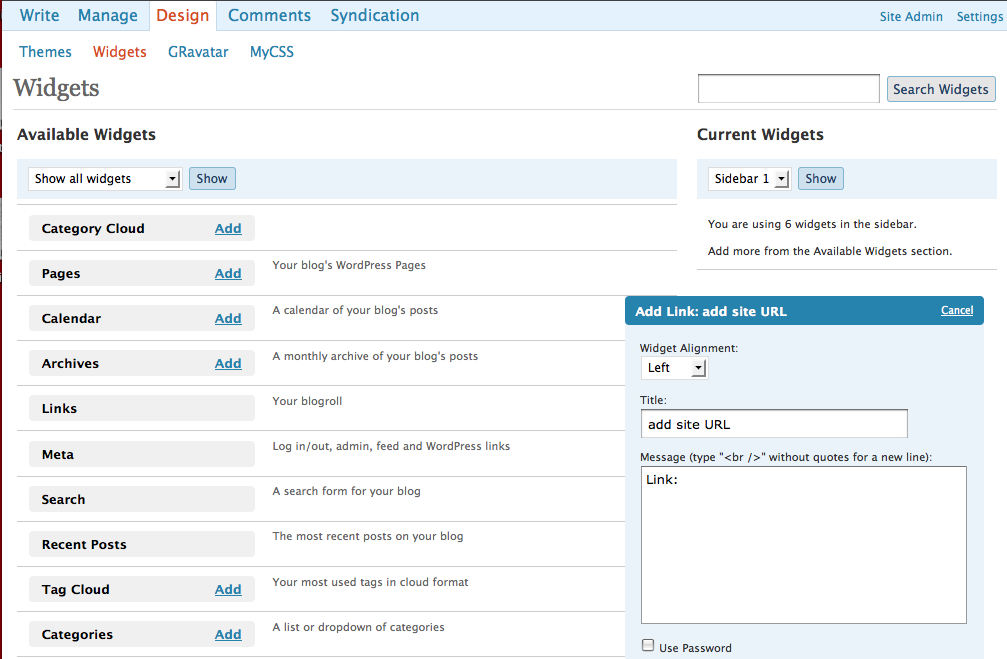
  • Add Link widget This widget actually allows people to add a link to their own blog in the sidebar of another site, which automatically inserts their URL into the FeedWordPress plugin. So, effectively putting this on a course blog allows students to drop off their own feeds in the sidebar

I. Crux of the Syndication Hub: http://tags.umwblogs.org

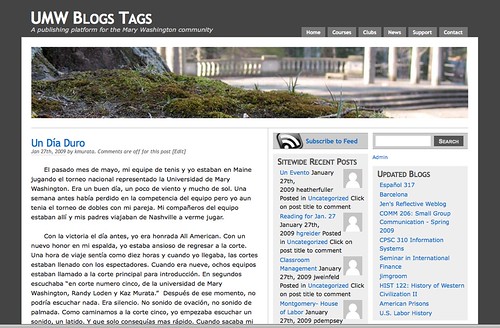
UMW Blogs Tags blog

UMW Blogs Tags blog

In many ways the Sitewide Tags Pages plugin is the glue that allows WPMu to act as a lightweight, yet powerful, syndication framework. Before this plugin came along both tags and category feeds were only available on a blog-by-blog basis, preventing the possibility of syndicating posts that shared tags or categories across numerous blogs. With this plugin all public posts are automatically re-published from across the site into one blog.Ā  Which results in an impressive step forward by allowing faculty and/or students to agree upon a unique tag or category for any given class, which in turn lets everyone in that course subscribe to one feed to see all the related posts. For example, if your class was on Prison Literature and everyone agreed that the course tag for related post should be prisonlit, then the following feed would aggregate all public posts with this tag from across the WPMu installation:

http://tags.umwblogs.org/tag/prisonlit/feed

If instead of a tag, the course agreed upon category such as prison lit,it would look like this:

http://tags.umwblogs.org/category/prison-lit/feed

Now, it is in conjunction with the Sitewide Tags Pages plugin that FeedWordPress plugin can become quite powerful. Once you have an agreed upon tag (or category), you can activate the FeedWordPress plugin and add the feed for a specific tag like prisonlit (http://tags.umwblogs.org/tag/prisonlit/feed) to an aggregating course blog. After that, every post published on the students blogs with that tag will be automatically re-published on this course aggregating blog. Additionally, all of the actual post title (a.k.a. permalinks) will link back to the students orginal post on their own blog.Ā  For example, in Susan Fernsebner’s A Cultural History of Late 20th Century China course blog every students’ post is being fed in through FeedWordPress by way of a unique, sitewide tag the class decided upon. Also, the title of each post links back to the actual student’s blog. With such a setup the class members and professor can simply subscribe to the course RSS feed and have all the posts for that class delivered to their RSS reader through a single feed, and each of the titles within the reader will link back to the student’s post on their own blog, rather than the course blog.

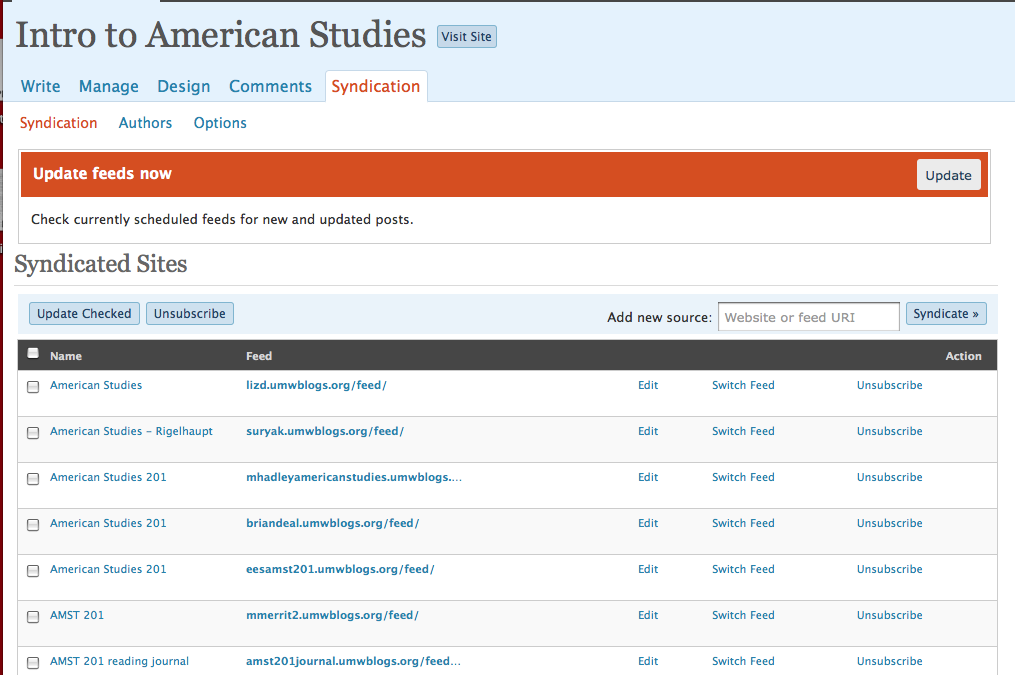
FeedWordPress Interface

What we have here is a lightweight, powerful mechanism for collecting posts from around the environment in one place and filtering them by tags and/or categories by means of the Sitewide Tags Pages plugin, while the FeedWordPress plugin allows for easy re-publishing of a filtered tag or category within a unique course space which results in a series of aggregated of posts relevant to the course.

II. Bring Your Own Blog

Now, what if you aren’t blogging on UMW Blogs, what if your a Blogger baby or a WordPress.com commie or a Drupal droid? What if you are a roll your own kinda gal? Does this mean you are out of luck? Of course not, this is UMW Blogs after all, we don’t discriminate, we just filter. And that is the kicker for me, so if you activate FeedWordPress on the actual sitewide tags blog—or on any specific course blog—you can simply add an external feed coming from another service (right now I have tested FeedWordPress with Blogger, WordPress, WP.com, TypePad, and Drupal—all work cleanly) and the posts will syndicate into the course blogs cleanly with the relevant tags or categories. And if you activate and palce the Add Link widget in the sidebar of a course blog or the tags blog, students could simply drop off the URL of their own blog on some other site or service, and it would integrate smoothly. How about that?Ā  Is this eduglu?

Wants some examples of this?Ā  I have a couple.

Zach Whalen is hosting his courses on a Drupal installation he both designed and manages, it has some impressive features and the students all have their own spaces on a Drupal course site like this one. To bring the posts from this course into the UWM Blogs fold, all we need to do is add the feed for the Drupal course into the FeedWordPress plugin on the UMW Blogs Tag Site. That way, all the posts my the students on professor Whalen’s site will be visible and searchable on UMW Blogs.

Another example is a student for professor Sue Fernsebner’s Toys as History Seminar who came in with his own blog on WordPress.com. All prof. Fernsebner needs to do is add this feed to the Tags Blog using the Add Link Widget, and the post from WordPress.com would be automatically be re-published in UMW Blogs with the appropriate tag or category. Which leads me to the final section of this post…

III. There is more than one way to feed a course blog

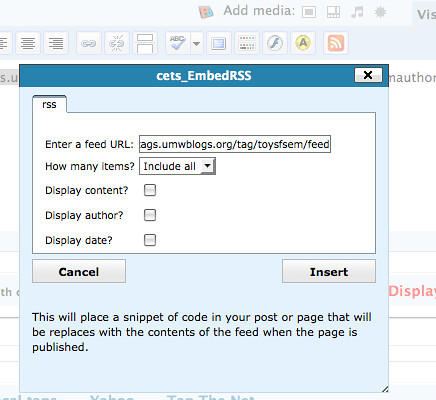
Professor Fernsebner’s Toys as History Seminar is an example of the fact that there are a number of ways to handle aggregating posts by students in a course blog.Ā  She is not using FeedWordPress for this seminar, and while all the students are still tagging their posts with a unique tag, they ar being fed into a separate page on her course blog using the cets_EmbedRSS plugin. So, if all the students are tagging their posts toysfsem, for example, she would simply activate the cets_EmbedRSS plugin, create a new page, and click on the RSS icon in the visual text editor.

cets_EmbedRSS

From there she adds the following feed: http://tags.umwblogs.org/tag/toysfsem/feed And all the posts tagged with toysfsem will be aggregated into this page, including the student blogging from WordPress.com whose feed was added to the UMW Blogs Tag site.

Additionally, you can simply activate the feedWordPress plugin and Add Link widget and have student drop off their feeds for where they are blogging.

Add Link widget

Add Link widget

This can be useful for quickly collecting all the distributed blogs for each of the students, as well as providing a quick way to allow the aggregation to happen without too much time and effort spent on wrangling URLs. This method is being used by professor Rigglehaupt in a number of his course blogs, and as long as the students are aware they should only include the base URL for their entire blog if is dedicated only to this course, if it is being used for several courses they need to specify a unique tag orĀ  category feed for this course only and add the entire URL, something like this:

http://myblog.umwblogs.org/tag/amst350/feed

or

http://myblog.umwblogs.org/category/amst350/feed

And, what you have here is a self-service model for syndication, wherein the students become responsible for the feeds they add, and for actually thinking about the implications of writing for several courses from one space, as well as framing the site to work within these parameters. The thinking about the actual process of syndication, organization, and managing one’s own space is actual a key feature to this entire model. I don’t think it should be shied away from at all, but rather embraced.

IV. There can be no feeding without eating

As you might have gathered if you made it this far (you self-loathing hippie, you!), I’ve been trying to work through as many angles as possible with this stuff. This post is fodder for a bunch of documentation I will be building for faculty at UMW for creating syndication based courses on UMW Blogs. We have a surprising number of over 30 courses using some kind of syndication setup this semester, and it is high time we documented the hell out of it. I’ll also note here that BDP RSS, the plugin that started me down the aggregation/syndication path, has been retired on UMW Blogs.Ā The combination of cets_EmbedRSS and the Sitewide Tags Pages plugin made this plugin somewhat redundant, but to its great credit it hasn’t been updated for over a year but still works fine in the latest versions of WordPress and WordPress Mu.

Finally, let me make a shameless plea for the plugin developers, particularly Donncha O Caoimh’s Sitewide Tags Pages Plugin and Charles Johnson’s FeedWordPress plugin—which are the two key ingredients to this syndication framework at the moment. They could both use your support, I know Charles Johnson appreciates donations (and he has been on an insane tear developing this plugin as of late, it’s just about perfect–at least until the next upgrade), and I imagine Donncha wouldn’t mind a tip or even an extra hand developing out the plugin, looking for bugs, fixes, and generally giving back as much as one gets within the WPMu community. I keep thinking that the power of such a framework and third-party solutions can’t remain “free” for too long if we aren’t building on each others work and pitching in as we can. Such a solution remains cheap ’cause we give back, and welfare means not being a glutton, for our ability to feed depends on others need to eat šŸ˜‰

Posted in WordPress, wordpress multi-user, wpmu | Tagged , , , , , , , , , , , , , , , , , , , | 13 Comments

WPMu Privacy Options and Sitewide Feeds-a question…

I’m in the process of writing up the syndication hub we got up and running on UMW Blogs, and I think it is as close as we’ve come to the mythical Eduglu. In getting my thoughts together to give a detailed overview of our setup a question has come up that I was wondering if anyone might have an idea or two about.

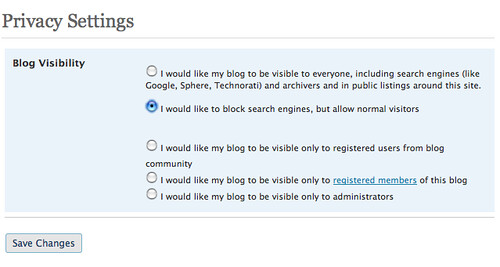
Image of More Privacy Options plugin interface

Here’s the deal, we are using DSader’s More Privacy Options plugin so that people can have more granular control over who sees their blog posts. One thing I have noticed is that when users choose to keep their blog open, but want to hide it from search engines, their posts no longer aggregate into the tags blog powered by Donncha’s Sitwewide Tags Pages plugin. This is creating a few difficulties when syndicating sitewide tags and categories for everyone on the site.

So, in short, is there a way to have the posts that are not indexed by Google still be re-published in this tags blogs? I figure it isn’t creating an issue in regards to privacy, because the tags blog can’t be searched by Google either, so folks who choose that setting will still have the same level of anonymity. Any ideas for me to test out?

Posted in wordpress multi-user, wpmu | Tagged , , , , , , , , , , | 6 Comments

Of Punks, Pimps and C.H.U.D.s: Gentrification in NYC as told by 1980s film

Disclaimer: This is a “media-enhanced” version of a paper I wrote in graduate school for an American Studies course back in 2002. And while I recognize it is both rough and theoretically meager at certain points, I’m still fascinated with the overall premise of the argument, namely that through movies one can actually trace the changing face of a city like New York over the course of a decade. I was prompted to publish this paper in particular because of a recent conversation I had with Brad Efford about Nighthawks in the comments of this post. Additionally, I am increasingly persuaded that the blog is the ultimate form for framing a visual/media-based discussion around films, and embedding clips that are discussed just make the experience that much cooler in my mind. My writing is admittedly far more formal and restrained than it usually is on the bava, a format I am glad to be free of. Yet, at the same time, I think the paper structure forced me to spend more time building and unpacking a more complex framework of thought for imagining the “Urban Jungle” films of the 1980s. Anyway, this is a long, long post which I imagine few, if any, will read, but I believe it is very much inline with the genesis and ongoing logic of my thoughts on bavatuesdays, so why not make it part of the archive–I am my own publishing house after all šŸ˜‰

A younger Homer Simpon on the run from pimps and CHUDs

A younger Homer Simpson on the run from pimps and CHUDs

Oh Homer, of course you’ll have a bad impression of New York if you only focus on the pimps and the C.H.U.D.s.

Marge Simpson, from “The City of New York vs. Homer Simpson

Marge Simpson, with her acute and poignant insight, may have already put her finger on the main point of this paper, making my own ideas somewhat obsolete – but in an attempt to live life in spite of The Simpsons, I will proceed. Focusing on ā€œthe pimps and the CHUDsā€ is exactly what this paper will do in an attempt to suggest the means through which movies during the 1980s “prophesize” the growing momentum of urban transformation (or gentrification) in New York City that we all can bear witness to today. In fact, the recent gentrification of NYC is assumed in this paper. What remains open for question is whether or not we can read the relatively recent “revival” of neighborhoods like Lower East Side, Times Square, Hell’s Kitchen, Bedford-Stuyvesant, Park Slope, and the South Bronx (to name just a few) through a selection of movies that were made during the 1980s. Moreover, if this relationship can be established, than how do we interpret these films’ assorted reflections of the social, economic, and political transformations of the gentrification (a.k.a. ā€œrecycling,ā€ ā€œrenaissance,ā€ ā€œrenewal,ā€ and ā€œrevitalization,ā€) of the inner city? This last question is a much more difficult one, for which I will employ theories of Popular Culture and Marxism to read the methodology of American Studies as well as the contemporary cultural form of urban movies during the 1980s.

Continue reading

Posted in movies | Tagged , , , , , , , , , , , , , , , , , , , , , , , , , | 12 Comments

Nighthawks (1981)

t03374sqdlyI love movies that feature New York City during the late 70s and early 80s, they capture a space on celluloid that I want to constantly remind myself existed once upon a time. And after watching The Hitcher a little while back, Rutger Hauer reminded me of the classic Nighthawks which is an excellent example of a NYC film during this period. And while it’s a post-Rocky Stallone vehicle (he is beautifully 70s in this film), I don’t remember it so much for him—although on re-watching it he has a gem or two in there which seem like preparation for his role as John Rambo. The real push to return to this film came from one of my favorite character actors, the great Joe Spinell of Maniac fame. When I drill down even further, I actually re-watched this film for just one scene. A short, seemingly throwaway moment wherein Stallone is emphatically bitch slapped by Lt. Munafo (Spinell), possibly the most beautiful in the history of Spinell’s rich career:
Understand this, sucker!!!” It doesn’t get any better than that, especially when it’s aimed at Stallone. Although, let’s face it, I’m a child of the 80s and I’d be lying if I didn’t acknowledge that I have a fond affection for Sly—and anyone who says otherwise during this period is lyig through their teeth. Let’s face it, Stallone is an over-actor’s actor who, like Charles Heston, is earnest in his inability, unlike the dreadfully saccharine William Shatner. An excellent example of which can be found in Nighthawks, the following clip is from the memorable subway chase scene and it would seem that Stallone is preparing for his classic monologue at the end of First Blood the very next year. Wait until the very end of this short clip for the pay off:

Subway Chase

Last, but definitely not least, the opening of Nighthawks offers up a couple of treats. Not only does it feature the lithe keyboards of Keith Emerson, whose impact on 80s music and culture more generally is just starting to sink in, but also frames one of my favorite visions of New York City during the 1970s and 80s, a crime ridden wasteland in which being mugged by switchblade-carrying Puerto Ricans was a foregone conclusion. And this opening scene actually marries a couple of aesthetics from NYC films of this period, it frames the classic thugs mugging helpless victim in abandoned streets, Ć  la Death Wish (1974), but ends with a cop foot chase and subway platform battle that reminds me a lot of The French Connection (1971). Seems like movies in the 90s and 00s forgot the importance of a compelling opening scene, which are far more common among even mediocre films during the 70s and 80s.

Posted in movies | Tagged , , , , , , , , , , , , , | 7 Comments

New South Blogs

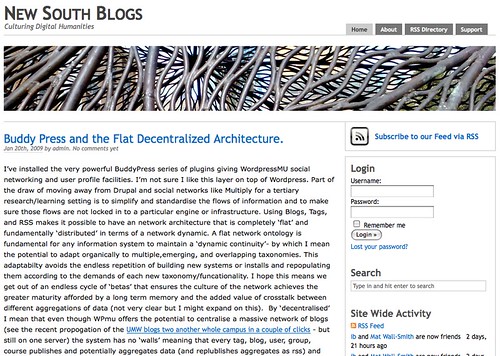
Image of New South Blogs

I just got a trackback from New South Blogs which is burgeoning publishing platform for the University of New South Wales, and it’s pretty cool to see the work many of us are doing in this regard impact and inspire folks all over the world. It is a brand new installation, but already Mat Wall-Smith (the cat behind this project) has me thinking about the implications of BuddyPress specifically, but the conceptual importance of a flat and loose platform like WordPress Multi-User more generally. In this post he says the following:

The WPmu approach is refreshing in part because it understands that tomorrow there will be new systems and new ways of working with data and that a mature and resilient network culture will probably need to be able to transcend (find a continuity) beyond the instantiation of particular system, technology, pedagogy, course, or organiser.

While I love BuddyPress for its opening of the social networking potential we found useful in Multiply and Drupal to an open system I wonder if it contravenes the dual tenants of flat and descentralised – I’m not sure I want an opensource facebook – I’d rather an open and dynamic social(ity)….

I couldn’t agree with what he says here more, and the importance in such an experiment is not WPMu per se, but the way in which this application mimics (or begins to reflect or represent) the increasingly distributed, autonomous, and networked logic of the web. It’s de-centered design does transcend the technology and begins to more and more represent how we are simultaneously imagining and shaping the web. It’s cool to read someone thinking through this at such an abstracted, conceptual level.

And what’s more, I like his questions in regards to the value of BuddyPress. Do we really want, or need, an open source Facebook? I’m not so sure, I immediately get excited that it provides a directory of blogs and members with little or no hacking, I also love the fact that we can create groups on the fly that can quickly become forums in bbpress. That said, I’m not sure the social networking elements are essential. In fact, I wonder if they might begin to suggest UMW Blogs as a kind of creepy tree house that is trying to be everything? Perhaps, I wonder if we might be best off emphasizing the directory functions and just see what happens with the social networking tools. If people find ways to use them effectively and they become valuable, great. If they don’t, it really doesn’t matter all that much because the core of WPMu remains untouched, and it didn’t cost us anything šŸ™‚

Nonetheless, I appreciate Mat’s making me think through this one a bit more, and here’s to New South Blogs, which appears to be an exciting addition to the world of educational publishing platforms.

Posted in Uncategorized | Tagged , , , , , , , , , , , , , | Leave a comment

When Garfield dies, people read!

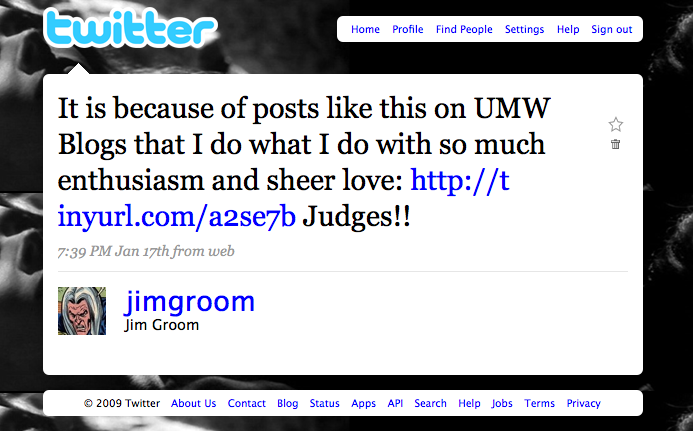
Here is a wild example of how writing out in the open can lead to crazy things, like, for example, being read by a whole lot of people. This past weekend I read this post about an existential Garfield strip that ran back in October of 1989. It was written by a student (the great Judges!) in professor Zach Whalen’s Graphic Novels class here at Mary Washington, and I was nothing short of blown away by how precise and intelligent the analysis of the comic strip was. So, being excited about the post I tweeted it so that others might share in the joy.

picture-3

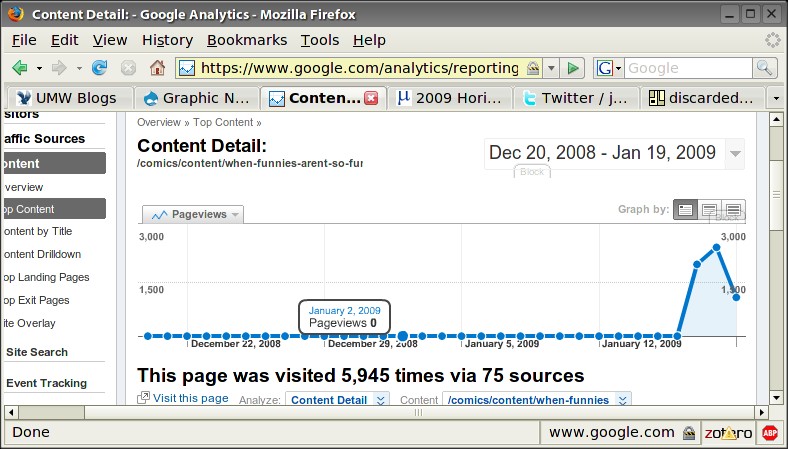
I imagined a few people might read the post and begin to realize how powerful the ability to share this stuff out is, and how cool it is to be able to feature great work from UMW through these publishing tools. I didn’t think too much about it after wards, but when talking to Zach at ELI just a few days later he noted that the post had almost 6,000 hits in less than two day. What! Seems like someone must have picked up my tweet, or Zach’s response tweet, and submitted it to Reddit.com, and some other user-generated news sites, and soon enough this post became widely read by thousands of people. Let me say that again, this student’s work became widely read by thousands of people!

access-stats-brad

Let there be no mistake about it, what we are doing with UMW Blogs (professor Whalen’s course is actually run in his own Drupal install we are feeding into UMW Blogs, we have eduglu! but more on this anon) is echoing far and wide through the internet. Our students are being read, and their ideas are being heard, and when they write they do it for an audience far bigger than their classmates.

Posted in Uncategorized | Tagged , , , , , , , , , | 5 Comments

Not Your Grandpa’s Blog

Yesterday I had a blast co-presenting with Alan Levine and Cole Camplese on re-thinking the blog as a creative engine that kind of pushes the way we conceptualize the idea of the blog.

Here is a link to the presentation site, and here’s my presentation page within that site. And finally, here’s Inigo Montoya wondering whether the term blog means what everyone thinks it means.

Posted in Uncategorized | Tagged | 3 Comments

Computer Love

Feeling very affectionate towards my computer this morning, I decided to find a machine readable song that it could groove on, and where else would I turn but Kraftwerk, in particular the album Computer World. So this one is for you computer, for all the hard work you do for me, I “Computer Love” you!

And if there is any doubt, this video of an outrageously cool live performance of “Elektro Cardiogram” proves that Kraftwerk put the “tech” in techno.

Now tell me these crazy Germans don’t rule! Moreover, not only did they define techno, the have one of the most influential tracks in the birth of rap and hip hop. Wow!

Posted in fun, music | Tagged , , , , , , , | 10 Comments

Credentials, please.

Yesterday, Laura Blankenhip hosted a really fun podcast that I was fortunate enough to be a part of, along with Randy Thornton and Barbara Ganley. The discussion starts out talking about questions surrounding credentialing in higher ed, but soon becomes a free-range conversation about all kinds of topics, featuring everything from the over-credentialing of faculty to the taylorization of education to the Works Progress Administration (WPA). What was most enjoyable about the conversation, at least for me, was how it captured some candid thinking out loud about educational alternatives which nicely framed the uncertainty of our moment when it comes to the future of educational institutions more generally. If you want to have an enjoyable podcasting expereience, let Laura know a topic you might be interested in talking about, and I’m sure you wont regret the time you spend thinking with her.

Go here to listen to our conversation.

Posted in Uncategorized | Tagged , , , , | 4 Comments