Jeff McClurken and I have been working on a project for his History of American Technology and Culture course that I am pretty excited about. I’m digging this one in particular because it highlights some of the unique possibilities of building an exhibit of student research in WordPress Multi-User. But before I get started, I should note that this course has a long tradition of experimentation and that this incarnation is just the latest iteration in a long line of online presentations. Jerry Slezak and Jeff have explored everything from Netscape Composer back in the day to MediaWiki last year. But we all knew that when I got my hands on this mother it would be WPMu time, right? Right. So let’s proceed.
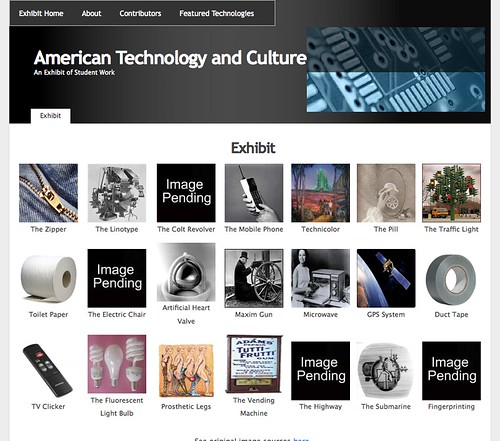
Here’s the deal, there are 21 students in this class, each of which will be thoroughly investigating a technology of their choice. The range of which is fascinating, this year’s group moves from the zipper to toilet paper to the mobile phone to global positioning systems (with a wide range in between). I love the array of technologies from various moments in American culture, it makes for a rich and complex understanding of the very idea of what a technology is and how it relates to our culture at any given moment. McClurken rocks! A number of years back everyone in the course would make their own Netscape Composer sites—many of which were quite good. One of the issues with this approach—beyond the fact that Netscape Composer is now outdated—was that a wide range of different layouts and presentations often made it difficult to present and navigate the research as the larger product of a course. Although, it does preserve and present the individual’s research project quite nicely.
More recently MediaWiki was used, and I think their were some improvements there, but for me MediaWiki is increasingly becoming a bear between spam, a lack of a user-friendly text editor, and a brand new formatting language—however basic. In fact, I am more and more convinced MediaWiki is a technology of extremes–it is really only useful for huge projects with hundreds or thousands of participants, or just one. The middle ground is often far more work and maintenance than need be, and do feel free to fight me on this—I’m feeling ornery and could use a good throw down. What’s more, while getting one’s own work out of MediaWiki isn’t difficult, it’s having your own MediaWiki to post it in that may prove impossible (and here’s where a project like this in Wikipedia may be interesting–if not difficult). That said, it’s easy enough to reformat a series of MediaWiki pages for a blog or straight HTML, but there is some additional work involved and we just added several more steps.
Given my sense of the limitations of these two options, and thanks to Jeff’s willingness to experiment, I suggested we actually build the exhibit of student research in UMW Blogs with a customized theme. The logic is as follows; once each student selects the technology they will be researching, they create their own blog with the technology name in the subdomain. For example, a student researching the Birth Control Pill would create a blog along the lines of this URL: http://thepill.umwblogs.org/. After that, we make available a lightly hacked theme that every student in the class will use to provide a consistency of templates across the 21 students’ research sites. As for the content, Jeff provided the class with specific guidelines outlining the aspects of the technology they need to research, and by formalizing these elements as pages within their own sites we came up with some rather simple steps for creating their site using this class-wide template (you can see them here) .
In other words, the 21 different students create their own blogs wherein they publish their research according to a specific format, they choose a common theme (which is lightly hacked) that creates and over-arching means of navigating the work of the entire class. The homepage is simply a blog Jeff created which contains the iconic images that link to each of the student’s research, along with information about the contributors and an about page. What’s nice about this is that each of the blogs are independently administered and created by the students, so they can export their work as they see fit, or even import it into another blog or portfolio space and organize and theme it as they want.
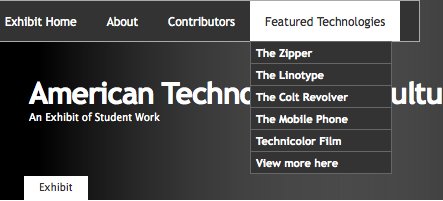
What’s so cool about this in my mind is that it takes so little effort, I used slightly hacked K2 theme to give the sense of consistency amongst 22 different blogs, and the ability to move easily amongst the distributed research is powerful because the illusion of some kind of visual whole is preserved—while the fact that it’s an individual’s own research that they control remains intact. The students’ research and the exhibit site are still works in progress at this point, but it should be done within the next couple of weeks, and I’ll probably be blogging it again. But, in the mean time, if anyone is interested in reading about the simple theme hacks I used to accomplish this, take the jump with the link below.
Continue reading →

 My Ubuweb feed just brought forth another little treasure, this time Kathy Acker reading excerpts from her book My Mother: Demonology (1994) which is set to music and titled Redoing Childhood. This album was released by Kill Rock Stars after her death in 2000. It’s a haunting series of track, perfect for my mindset these days, and “President Bush” is particularly twisted. You can red more about the conception of this project here (which provides an interesting look at Acker, who after reading Blood and Guts in High School (1984) I began to idolize). Hal Wilner, the producer of the album, notes that Acker
 Check out the